


Transform Your Ideas Into Beautiful Digital Flipbooks—Step by Step
🗺️ Your Flipbook Creation Journey
Welcome to your comprehensive guide for creating stunning AI-powered flipbooks. This user experience journey walks you through every phase—from initial concept to sharing your finished digital book with the world.
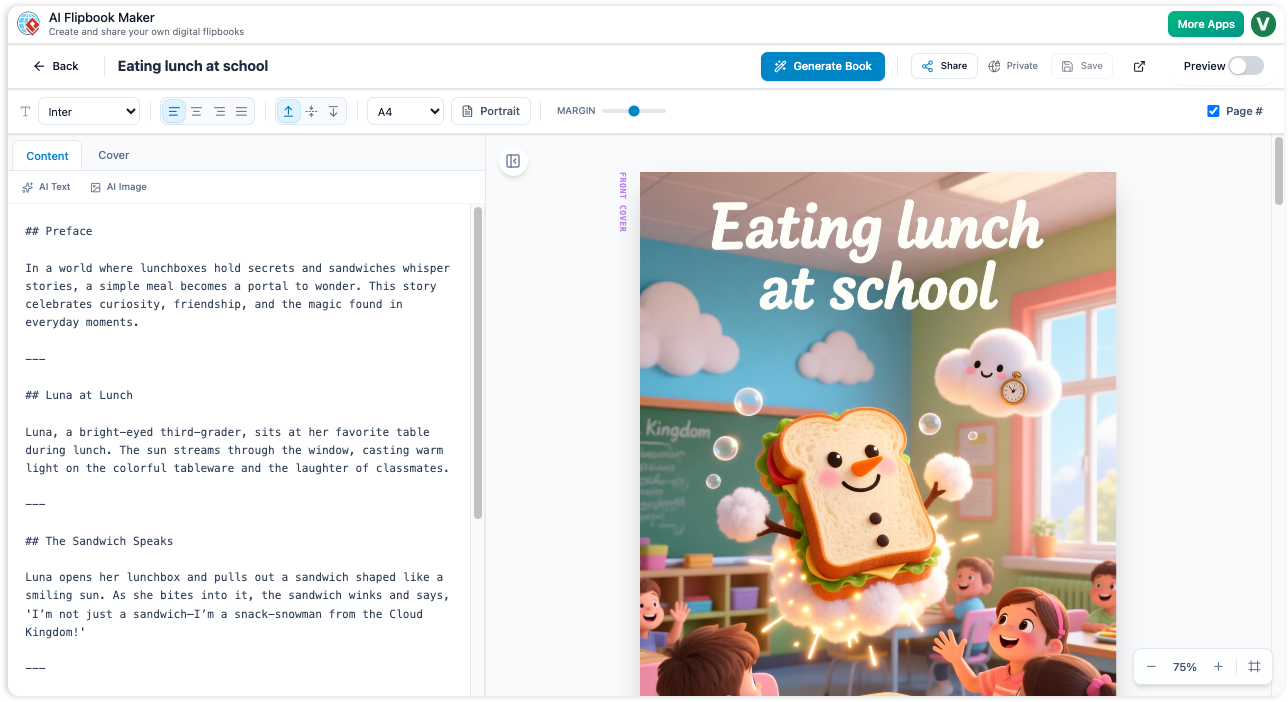
🌟 Phase 1: Discovery & Inspiration
Before You Begin
You have an idea, a message, or knowledge to share—but turning it into a polished digital book can feel overwhelming. The AI Flipbook Maker eliminates that friction by automating content creation, design, and organization.
What You’ll Achieve:
-
Create professional-quality flipbooks in minutes, not days
-
No writing, design, or coding skills required
-
Organize and showcase your work on customizable virtual bookshelves
-
Share instantly via link across any device
💡 Pro Tip: Start with a clear topic and audience in mind. The more specific your input, the more tailored your AI-generated content will be.
🚀 Phase 2: Getting Started – Define Your Book
Step 1: Set Your Foundation
Navigate to the AI Flipbook Maker and begin by defining your book’s core parameters:
-
Enter Your Topic: What is your book about? (e.g., “Sustainable Gardening for Beginners”)
-
Select Target Audience: Who are you writing for? (e.g., hobbyists, professionals, students)
-
Choose Tone & Style: Formal, conversational, playful, authoritative?
-
Set Page Count: How long should your flipbook be?
✅ The AI instantly processes your inputs and prepares a structured outline.
✍️ Phase 3: AI-Powered Content Creation
Step 2: Generate Your Book Outline
Watch as the AI crafts a logical, engaging structure for your flipbook:
-
Chapter titles and section headers
-
Key talking points under each section
-
Flow optimized for your selected audience and tone
You remain in control: Review, edit, or regenerate any part of the outline before proceeding.
Step 3: Bring Pages to Life with AI Visuals
Once your outline is approved, the AI generates:
-
A stunning, custom book cover designed to attract readers
-
Unique, relevant images for every page, matched to your content
-
Consistent visual style throughout your flipbook
🎨 No design experience? No problem. The AI handles typography, layout, and image selection automatically.
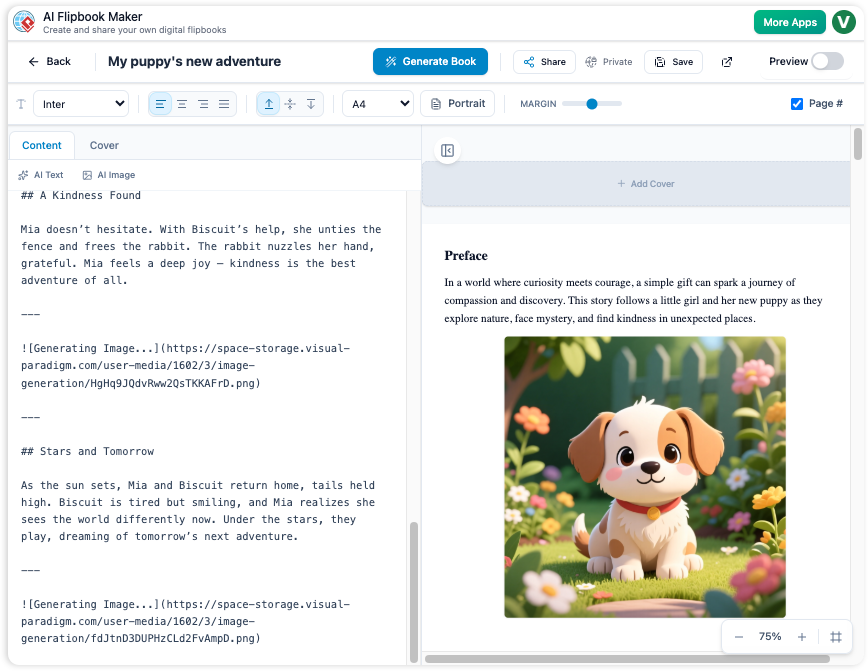
🎨 Phase 4: Customize & Refine
Personalize Your Flipbook
While AI does the heavy lifting, you can fine-tune every element:
-
Edit text content directly on any page
-
Swap AI-generated images with your own uploads
-
Adjust colors, fonts, and layout to match your brand
-
Preview the realistic page-turning effect in real-time
Organize on Your AI Bookshelf
Create a beautiful virtual space to showcase your work:
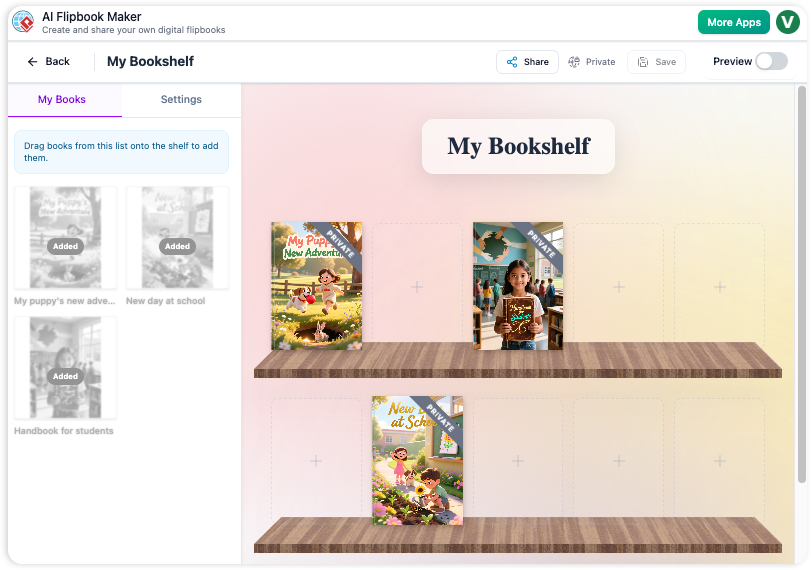
Bookshelf Features:
-
📚 Create multiple themed bookshelves (e.g., “Marketing Guides,” “Personal Projects”)
-
🎨 Choose from various shelf styles and backgrounds
-
🖱️ Drag-and-drop to reorder books or categorize by status (Draft, Published, Archived)
-
🏷️ Add tags and descriptions for easy discovery
🌐 Phase 5: Share & Engage
Publish with One Click
When your flipbook is ready:
-
Click “Publish” to generate a unique, shareable URL
-
Choose privacy settings: Public, Unlisted, or Password-Protected
-
Copy your link or embed code for websites and social media
Why Sharing Is Seamless:
-
🔗 Easy Sharing: One link works everywhere—email, LinkedIn, Twitter, your portfolio
-
📱 Cross-Platform Compatibility: Looks perfect on desktop, tablet, and mobile
-
🔄 Interactive Experience: Readers enjoy realistic page flips, zoom, and full-screen mode
-
📊 Engagement Ready: Ideal for lead magnets, educational content, product catalogs, and creative portfolios
🔄 Phase 6: Iterate & Grow
Update & Repurpose
Your flipbook isn’t static. Return anytime to:
-
Edit content or refresh images
-
Generate new editions with updated AI content
-
Duplicate successful books to create series or variations
Build Your Digital Library
As you create more flipbooks, your customizable bookshelf becomes a powerful showcase of your expertise, creativity, or brand storytelling—all organized and ready to impress.
✅ Key Benefits Recap
| Feature | User Benefit |
|---|---|
| AI-Generated Outlines | Save hours of planning; start with a pro structure |
| AI Image & Cover Creation | Stunning visuals without hiring a designer |
| Customizable Bookshelves | Professional organization that reflects your brand |
| One-Click Sharing | Instant distribution across all channels |
| No-Code Editing | Full creative control with zero technical barriers |
| Responsive Flip Experience | Engage readers on any device with immersive interaction |
🛠️ Technical Excellence Under the Hood
The AI Flipbook Maker leverages modern web technologies to ensure:
-
Fast loading and smooth animations
-
SEO-friendly, accessible flipbook pages
-
Secure hosting and reliable link performance
-
Automatic updates and feature enhancements
🎯 Ideal Use Cases
-
🎓 Educators: Create interactive textbooks or lesson supplements
-
💼 Marketers: Develop product catalogs, case studies, or lead magnets
-
✍️ Writers & Creators: Prototype books, share portfolios, or publish short stories
-
🏢 Businesses: Onboarding guides, training manuals, or client proposals
-
🎨 Designers: Showcase visual projects in an engaging, flipbook format
📚 Reference List
- Visual Paradigm Flipbook Maker – Create Interactive Digital Flipbooks: This online tool allows users to convert static documents into engaging flipbooks featuring realistic page-flipping effects.
- AI Flipbook Generator: Create & Publish Digital Books Instantly: This tool enables creators to write, design, and publish professional digital flipbooks and storybooks directly from a simple text prompt.
- Lumina AI Slideshow Maker: Create Stunning Presentations with AI: Users can leverage artificial intelligence to generate high-quality slides from simple text input, saving time while enhancing visual creativity.
- AI Animated Presentation Studio: Create Dynamic, Animated Slides with Ease: An AI-powered web studio that combines traditional slide editing with generative AI to automate the writing and design of animated presentations.
- Self-Hosted Flipbook Slideshow: Transform Documents into Interactive Presentations: A technical guide for converting PDFs into interactive flipbook slideshows with full control over hosting and customization.
- Markdown Presentation Maker: Turn Code into Beautiful Slides: This tool transforms Markdown files into polished, animated presentations with syntax highlighting, ideal for technical and developer-focused content.
- Lumina AI: Generate AI-Powered Video Slideshows Instantly: A release update describing a tool that creates dynamic video presentations from text, perfect for rapid marketing content creation and storytelling.
- Flipbook Maker: A Game-Changer for Interactive Content: This article explores how flipbook technology transforms static brochures and reports into immersive digital experiences.
- Creating Animation Flipbooks with AniFuzion & Fliplify: A tutorial focused on combining animation software with flipbook makers to produce visually rich, moving digital publications.
- Why Visual Paradigm Online’s Flipbook Maker Stands Out: An analysis of the unique features that make this flipbook maker suitable for professional KPI presentations and interactive reports.