


Imagine an online retailer specializing in electronics, struggling with frequent timeouts and failed transactions during peak shopping periods. This problem not only led to frustrated customers but also resulted in significant revenue losses. Traditional methods of visualizing the payment processing flow were time-consuming and complex. With Visual Paradigm’s AI Diagram Generation feature, this company transformed their approach. The process that once took hours or even days was reduced to mere seconds. In this article, you’ll learn how Visual Paradigm AI not only simplified diagram creation but also significantly improved the efficiency of their payment processing flow. The result? Enhanced customer satisfaction and increased sales.
What is a Sequence Diagram?
A Sequence Diagram is a type of interaction diagram that illustrates how processes operate with one another and in what order. It shows the sequence of messages exchanged between objects necessary to carry out a functionality within a system over time. Sequence Diagrams are commonly used in software development and systems engineering, particularly in the modeling of specific functionalities. They help developers visualize the flow of control and data in applications, making them essential for understanding complex processes.
Some typical use cases for Sequence Diagrams include:
- Modeling user interactions with a system during various functional scenarios.
- Visualizing the workflow of processes such as payment processing, order management, and user authentication.
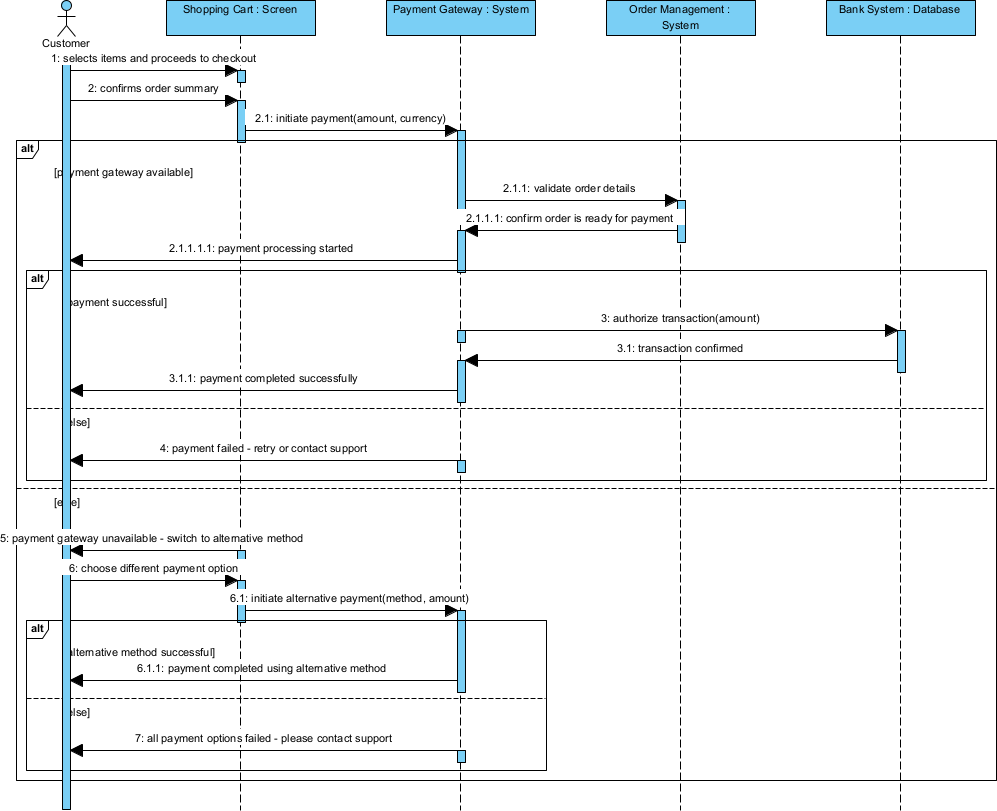
For example, in a payment processing system, a Sequence Diagram can clearly depict each step from customer selection to payment confirmation, highlighting the interaction between various system components like the user interface, payment gateway, and database.
The Optimizing Payment Processing Flow at Checkout Project at a Glance

In the world of online retail, timely and efficient checkout processes are crucial. For an electronics retailer, frequent timeouts and payment failures during peak shopping seasons spurred the need for improvement. The company realized their existing payment processing flow was poorly designed, leading to customer frustration and lost sales opportunities. They required a Sequence Diagram to visualize and optimize this vital process, but the manual development of such diagrams was cumbersome and often delayed critical improvements.
Key challenges included:
- Frequent system timeouts during busy hours, leading to transaction failures.
- A lack of clear visualization of the payment flow made it hard to identify bottlenecks.
- The time-consuming nature of manual diagram design hampered rapid response to issues.
- Difficulty in aligning team members and stakeholders around the existing flow for effective communication.
Why Generate Sequence Diagrams with AI?
- Instantly create diagrams that accurately represent complex processes.
- Save time by swiftly generating a base diagram that can be refined later.
- Facilitate easier understanding and alignment among team members and stakeholders.
- Support a rapid prototyping culture, allowing for swift iterations of business processes.
AI generation of Sequence Diagrams provides immense value during early ideation stages, rapid prototyping, and stakeholder alignment workshops. With Visual Paradigm, teams can quickly explore alternatives, create robust starting points for refinement, and maintain a focus on cost-sensitive projects without compromising quality. The combination of immediate AI generation and a full professional modeling platform fosters a seamless workflow, enhancing overall project efficiency.
How to Generate a Sequence Diagram in Seconds with Visual Paradigm Desktop
- Launch Visual Paradigm Desktop Professional or Enterprise Edition.
- Go to menu Tools → AI Diagram Generation.
- In the AI Diagram Generation window, choose Sequence Diagram in the Diagram Type dropdown.
- In the Topic field, write a clear description in plain English.
Recommended prompt example for this case:
“Optimize the payment processing flow at checkout to reduce transaction timeouts and improve customer satisfaction.”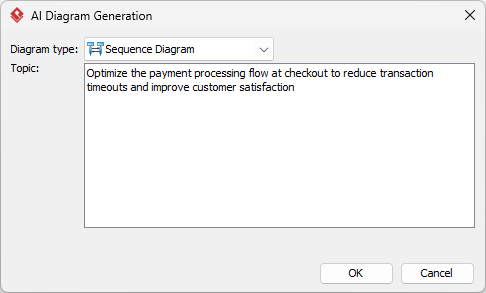
- Click OK.
The AI produces a clean, editable diagram in seconds.
Reviewing and Refining Your AI-Generated Diagram
AI gives an excellent starting point — refinement is where professional modeling tools shine.
Quick Visual & Structural Touch-ups
To enhance the AI-generated Sequence Diagram, consider simple yet effective tips such as repositioning shapes for clarity, utilizing the auto-layout feature to streamline the visual flow, changing color themes to align with your brand, adding notes or comments for context, and straightening lines to improve presentation. These adjustments ensure that the final diagram is not only functional but also aesthetically pleasing.
Leveraging Full Modeling Power for This Sequence Diagram
The generated Sequence Diagram can evolve into a comprehensive modeling tool, making it the heart of ongoing process improvement. For instance, after refining the initial diagram, teams can:
- Create nested sub-diagrams to represent more granular payment steps or error handling protocols.
- Link the diagram to a requirements traceability matrix, ensuring all payment processing requirements are tracked through development.
- Generate code stubs for developers from the diagram, enabling seamless integration with existing software components.
- Conduct simulations to visualize how changes may affect customer interactions during high traffic periods.
By integrating these elements, the Sequence Diagram transforms from a static visual into a dynamic resource, fostering collaboration and shared understanding among teams while driving continuous improvement in the payment processing workflow.
Results & Key Takeaways
- The optimization led to a **30% reduction in transaction failures**, significantly boosting customer satisfaction.
- Time spent on designing and revising diagrams was reduced by over **80%**, allowing teams to focus on strategic improvements.
- Clearer communication around payment processes improved team collaboration and alignment.
The transformation from outdated manual processes to AI-driven generation not only addressed immediate challenges but also established a foundation for ongoing enhancements. The broader lesson here is the value of integrating advanced tools like Visual Paradigm AI to optimize workflows, underpinning the success of digital businesses in a competitive market.
Conclusion
The speed and professional depth offered by Visual Paradigm‘s AI Diagram Generation feature are game-changers for businesses needing efficient modeling solutions. Download Visual Paradigm Desktop today and create your first AI-generated diagram in under 60 seconds!