
Enterprise architecture demands precision. As organizations scale, their digital landscapes become intricate webs of processes, systems, and infrastructure. ArchiMate 3 provides the standard for modeling these structures, but standard usage often falls short when addressing intricate dependencies. This guide explores advanced techniques for building robust, scalable models that withstand organizational change. We focus on structural integrity, dynamic relationships, and the strategic alignment of motivation elements.
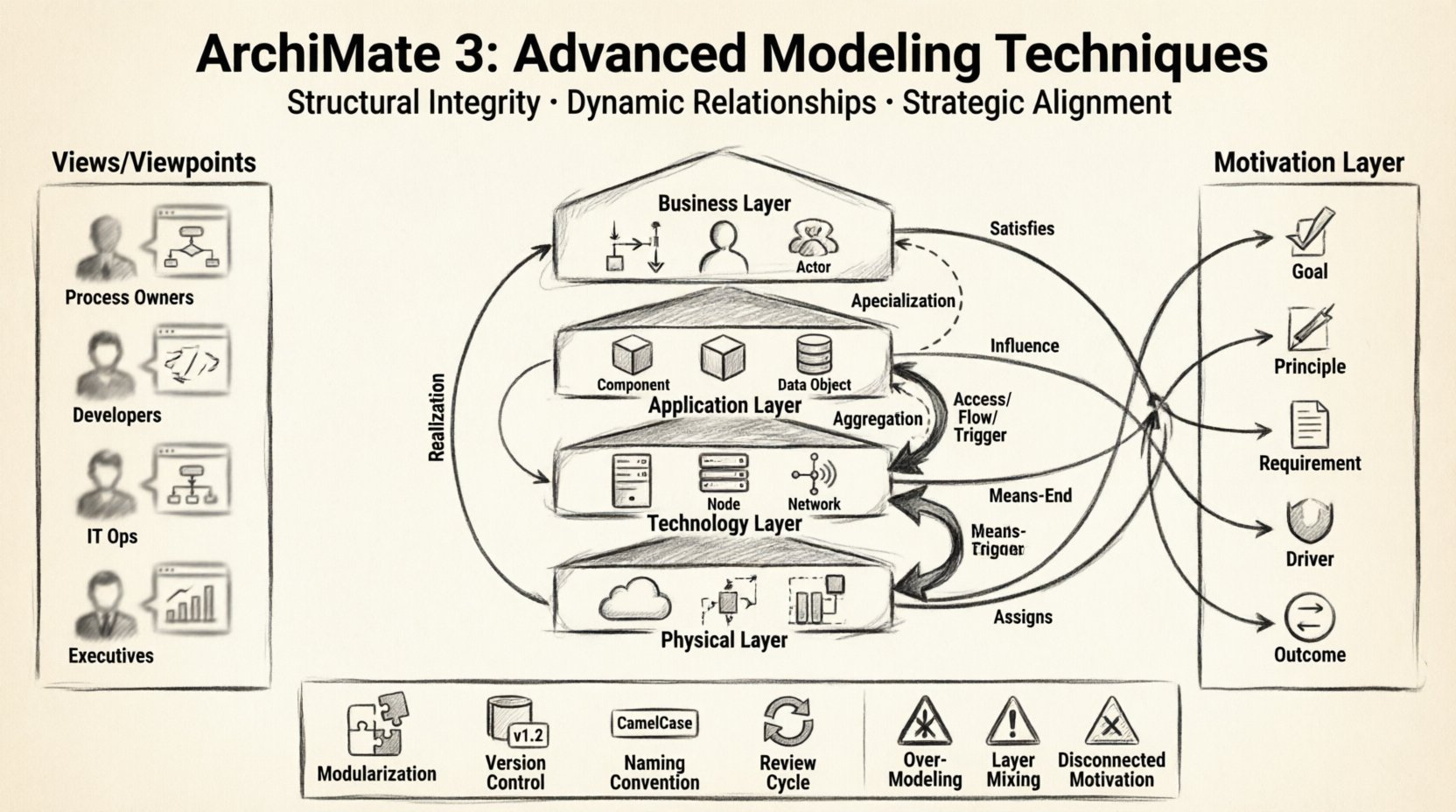
Understanding the Core Architecture Layers 📊
ArchiMate 3 organizes architecture into four primary layers. Mastery of these layers is foundational, but advanced modeling requires understanding the nuances within each.
- Business Layer: Defines the business services, processes, roles, and actors. It focuses on what the organization does.
- Application Layer: Specifies the software components, data objects, and services that support business processes. It focuses on how the business is enabled.
- Technology Layer: Represents the hardware, networks, and physical infrastructure. It focuses on the technical environment.
- Physical Layer (Infrastructure): Often grouped with Technology, this details the actual deployment of software onto hardware nodes.
When constructing complex models, it is vital not to conflate these layers. For instance, a business process should not directly trigger a database query without an application service in between. Maintaining layer separation ensures clarity in impact analysis.
Layer Mapping Table
| Layer | Primary Elements | Key Focus |
|---|---|---|
| Business | Process, Role, Actor, Service | Value Delivery |
| Application | Application Function, Application Component, Data Object | Functionality Support |
| Technology | Node, Device, System Software, Communication Network | Execution Environment |
Advanced Relationship Dynamics 🔗
Relationships define how elements interact. In complex models, the choice of relationship type dictates the semantics of the architecture. Advanced modeling goes beyond basic connections to include structural and behavioral nuances.
Structural Relationships
Structural relationships describe how elements are composed or specialized.
- Specialization: Used when an element is a specific type of another (e.g., a Specific Role is a specialization of General Role). This allows for inheritance of attributes.
- Aggregation: Indicates a whole-part relationship where parts can exist independently of the whole. Use this for composite structures.
- Association: A generic relationship between elements that does not imply flow or realization. It is often used for static connections.
Dynamic Relationships
Dynamic relationships describe the flow of control, data, or usage.
- Access: An element uses the functionality of another. Common in Application-to-Technology mappings.
- Flow: Indicates the movement of data or material between elements. Essential for process modeling.
- Trigger: Indicates that an element initiates a change in another. This is critical for event-driven architectures.
- Realization: A fundamental concept where an element provides the implementation for another. For example, an Application Function realizes a Business Process.
Tip: Avoid overusing Realization. Reserve it for clear implementation links. Using Access or Flow where appropriate prevents semantic ambiguity.
Motivation Elements: The Strategic Layer 🎯
One of the most powerful features of ArchiMate 3 is the Motivation Layer. This layer connects the “why” to the “what.” Advanced modeling leverages this to show alignment between strategy and execution.
- Goal: A target state that an actor wishes to achieve. Goals drive requirements.
- Principle: A rule or guideline that guides the behavior of the enterprise. Principles constrain the model.
- Requirement: A condition or capability that must be met. Requirements are often derived from Goals.
- Driver: A factor that influences the achievement of a Goal. Drivers can be internal or external.
- Outcome: The result of a Goal being achieved. Outcomes provide value.
In complex models, motivation elements should not be isolated. They must be linked to the core layers to demonstrate impact.
Motivation Mapping Strategy
Connect motivation elements to the layers they affect using specific relationships:
- Satisfies: Links a Requirement to a Goal (or vice versa).
- Influence: Links a Principle to an element. Use this to show constraints.
- Means-End: Links an Outcome to a Goal.
- Assigns: Links a Driver to a Goal or Requirement.
By mapping these relationships, you create a traceability chain from high-level strategy down to specific technical components.
Managing Complexity with Views and Viewpoints 👁️
A single model cannot effectively communicate architecture to all stakeholders. Complexity is managed through Views and Viewpoints.
- Viewpoint: Defines the concerns of a specific stakeholder group. It specifies the conventions, languages, and rules for the view.
- View: The actual representation of the architecture tailored to a specific viewpoint. It is a subset of the model.
Advanced techniques involve creating multiple views from the same underlying model. This ensures consistency while allowing focus.
Common Viewpoint Types
| Viewpoint | Target Audience | Focus Area |
|---|---|---|
| Business Process | Process Owners | Workflows and Roles |
| Application Integration | Developers | Data Flow and Interfaces |
| Infrastructure | IT Operations | Networks and Nodes |
| Strategic | Executives | Goals and Drivers |
Handling Groups and Containers 📦
When models grow large, navigation becomes difficult. ArchiMate 3 introduces Groups and Containers to organize elements without altering their semantics.
- Group: A logical grouping of elements. It does not imply a structural relationship like aggregation. It is used for partitioning the view.
- Container: A grouping element that represents a physical or logical entity capable of containing other elements. It is often used to denote boundaries.
Use Groups to separate concerns within a single view. Use Containers when you need to show that elements are physically or logically hosted within a specific boundary.
Consistency and Naming Conventions 📝
Complex models suffer from inconsistency. Establishing strict naming conventions is a prerequisite for maintainability.
- Standardize Prefixes: Use prefixes for element types (e.g.,
APP-for Application Functions,PROC-for Processes). - Version Control: Include version numbers in element names if the model tracks evolution over time.
- Description Fields: Do not put all information in the name. Use the description field for detailed context.
- Unique Identifiers: Ensure every element has a unique ID within the model to prevent duplication.
Common Pitfalls in Advanced Modeling ⚠️
Even experienced architects encounter errors. Being aware of common pitfalls helps maintain model health.
- Over-Modeling: Creating relationships for every possible interaction. Focus on the relevant flows for the current scope.
- Mixing Layers: Connecting Business Elements directly to Technology Elements without Application mediation. This obscures the dependency chain.
- Ignoring Constraints: Failing to model constraints explicitly. This leads to solutions that violate technical or business rules.
- Static Relationships: Using static relationships where dynamic flows are required. Ensure the relationship type matches the behavior.
- Disconnected Motivation: Leaving strategy elements unconnected to the core layers. This breaks the traceability chain.
Best Practices for Scalability 🚀
As the model grows, performance and usability become critical.
- Modularization: Split the model into multiple files or packages based on domain or capability. Link them using standard references.
- Versioning: Maintain a history of model versions. Tag releases when significant changes occur.
- Documentation: Maintain a separate documentation file for model decisions and architectural rationales.
- Review Cycles: Schedule regular reviews to prune obsolete elements and validate relationships.
- Tooling Agnosticism: Ensure the model adheres to the standard syntax so it can be imported into different environments if necessary.
Summary of Key Points 🧩
Building advanced ArchiMate 3 models requires discipline and a deep understanding of the framework’s semantics. By strictly adhering to layer boundaries, selecting precise relationship types, and leveraging the Motivation Layer, architects can create models that are both accurate and useful. Managing complexity through views and viewpoints ensures that the architecture remains accessible to all stakeholders. Consistency in naming and structure prevents technical debt in the model itself.
Remember that the goal is clarity, not completeness. A model that is too detailed becomes a reference manual that no one reads. A model that is too abstract fails to guide implementation. Striking this balance is the core of enterprise architecture practice.
Focus on the relationships that drive decision-making. Use the standard to communicate, not to constrain creativity. With these techniques, complex models become powerful assets for organizational transformation.