


🌟 Introduction: Why BPMN 2.0 Matters
Business Process Model and Notation (BPMN) 2.0 is the global standard for visualizing, analyzing, and documenting business processes. It enables businesses, analysts, developers, and stakeholders to communicate process flows clearly and consistently—no matter their technical background.

With the rise of digital transformation, BPMN 2.0 has become essential for process improvement, automation, compliance, and integration with enterprise systems.
In this beginner’s guide, we’ll walk you through the fundamentals of BPMN 2.0 and show you how to use Visual Paradigm, a powerful all-in-one platform, to model, simulate, and manage business processes effectively.
🔹 Part 1: Understanding BPMN 2.0 Basics
✅ What is BPMN 2.0?
BPMN 2.0 (Business Process Model and Notation version 2.0) is an ISO-standardized graphical language for modeling business processes. It’s designed to be intuitive for both business users and IT professionals.
It’s used to:
-
Map out workflows (e.g., customer onboarding, order fulfillment).
-
Identify bottlenecks and inefficiencies.
-
Automate processes using BPM engines (like Camunda or Activiti).
-
Communicate process logic across departments.
🔧 Core Elements of BPMN 2.0
BPMN uses a visual notation made up of key elements. Let’s break them down:
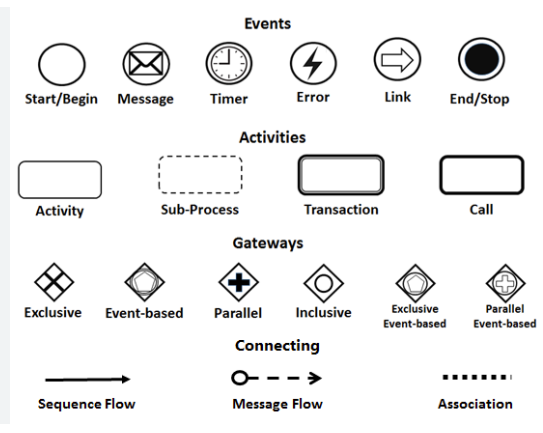
| Element | Description | Visual Example |
|---|---|---|
| Start Event | Marks the beginning of a process. | ⚡ (Circle with a dot inside) |
| End Event | Marks the end of a process. | ⚡ (Circle with a thick border) |
| Task | A single work item or action (e.g., “Approve Loan”). | Rectangle with rounded corners |
| Activity | A group of tasks (can be a sub-process). | Same as Task, but may contain nested elements |
| Sequence Flow | Arrows showing the order of execution. | Solid arrow |
| Gateway | Controls decision points or branching logic. | Diamond shape |
| Message Flow | Shows communication between participants (e.g., systems or roles). | Dashed arrow |
| Pool & Lane | Represents participants (e.g., departments or systems) and their responsibilities. | Rectangular container divided into lanes |
💡 Tip: Think of a BPMN diagram like a flowchart—but with standardized symbols and semantics.
🔄 Common BPMN Patterns
-
Sequence Flow – Linear execution (Task A → Task B).
-
Exclusive Gateway (XOR) – One path chosen based on a condition.
-
Parallel Gateway (AND) – Multiple paths executed simultaneously.
-
Inclusive Gateway (OR) – One or more paths can be taken.
-
Event-Driven Gateway – Triggers based on events (e.g., timer, message).
-
Sub-Process – A task that contains its own internal process (can be collapsed).
🔹 Part 2: Getting Started with Visual Paradigm
Visual Paradigm is a comprehensive all-in-one platform for business process modeling, software design, and system analysis. It supports BPMN 2.0, UML, ERD, and more—making it ideal for both beginners and professionals.
✅ Why Use Visual Paradigm?
-
User-friendly interface – Drag-and-drop BPMN elements.
-
BPMN 2.0 compliant – Full support for standards.
-
Collaboration features – Share, comment, and version control.
-
Simulation & Validation – Test your process before implementation.
-
Export & Integration – Export to PDF, PNG, or integrate with workflow engines.
-
Modeling across domains – Combine BPMN with UML, C4, and more.
🛠 Step-by-Step: Create Your First BPMN Diagram in Visual Paradigm
Step 1: Launch Visual Paradigm
-
Open Visual Paradigm (available for Windows, macOS, Linux).
-
Go to File > New > BPMN Diagram.
Step 2: Set Up Your Diagram
-
Name your diagram (e.g., “Customer Order Processing”).
-
Choose BPMN 2.0 as the standard.
Step 3: Add a Start Event
-
Drag Start Event from the palette onto the canvas.
-
Double-click to edit the name (e.g., “New Order Received”).
Step 4: Add Tasks
-
Drag Task elements onto the canvas.
-
Add tasks like:
-
“Validate Order”
-
“Check Inventory”
-
“Process Payment”
-
“Ship Product”
-
Step 5: Connect with Sequence Flows
-
Use the Sequence Flow tool (arrow icon) to connect events and tasks in order.
Step 6: Add a Gateway (Decision Point)
-
Drag an Exclusive Gateway (diamond) after “Check Inventory”.
-
Connect two outgoing flows:
-
“In Stock” → “Ship Product”
-
“Out of Stock” → “Notify Customer”
-
Step 7: Add an End Event
-
Drag an End Event to the final step.
-
Connect it via sequence flow.
Step 8: Add a Pool & Lane (Optional for Multi-Party Processes)
-
Use Pool to represent a participant (e.g., “Sales Department”).
-
Add Lanes inside the pool (e.g., “Sales”, “Warehouse”, “Finance”).
-
Assign tasks to appropriate lanes to show responsibility.
Step 9: Validate & Simulate
-
Click Validate to check for errors (e.g., unconnected flows).
-
Use Simulation to run the process and test different scenarios (e.g., “What if inventory is low?”).
Step 10: Export & Share
-
Export as PDF, PNG, or HTML.
-
Share via link or export to Confluence, SharePoint, or Jira.
🔹 Part 3: Best Practices for BPMN Modeling
-
Keep It Simple – Avoid overly complex diagrams. Use sub-processes to break down large flows.
-
Use Meaningful Names – Tasks and events should clearly describe what happens.
-
Follow Standard Notation – Use only BPMN 2.0-compliant symbols.
-
Define Clear Start/End Events – Every process must have a clear beginning and end.
-
Document Assumptions & Exceptions – Use annotations or notes for context.
-
Involve Stakeholders – Get feedback from business users and IT teams during design.
🔹 Part 4: Real-World Use Cases
| Industry | Use Case |
|---|---|
| Banking | Loan approval workflow with validation, credit check, and manager approval. |
| E-commerce | Order fulfillment process with inventory check, payment, and shipping. |
| Healthcare | Patient admission process with triage, registration, and doctor assignment. |
| Manufacturing | Production planning and quality inspection workflow. |
Visual Paradigm helps model these processes with precision and supports future automation via BPMN engine integration.
🔹 Conclusion: Start Modeling with Confidence
BPMN 2.0 is the gold standard for business process modeling. With Visual Paradigm, you get a powerful, intuitive, and all-in-one solution to:
-
Design clear, standardized process diagrams.
-
Simulate and validate workflows.
-
Collaborate across teams.
-
Prepare processes for automation.
Whether you’re a business analyst, process engineer, or developer, mastering BPMN 2.0 with Visual Paradigm will empower you to visualize, optimize, and transform your organization’s operations.
📚 Resources to Learn More
- Business Process Design with Powerful BPMN Software – Visual Paradigm: An in-depth overview of Visual Paradigm’s intuitive BPMN 2.0 modeler, highlighting its role in creating professional Business Process Diagrams quickly, with features like process drill-down, simulation, animation, and integration with other modeling standards.
- Online BPMN Diagram Tool – Visual Paradigm: A guide to Visual Paradigm’s online BPMN tool for drawing business process diagrams in the cloud, emphasizing ease of use, professional templates, drag-and-drop functionality, and support for BPMN workflows accessible to anyone.
- Introduction to BPMN Part I – Visual Paradigm: A foundational tutorial introducing BPMN concepts and providing step-by-step guidance on creating and drawing BPMN diagrams using Visual Paradigm’s modeling features.
- How to Draw BPMN Diagram? – Visual Paradigm: A practical step-by-step BPMN tutorial demonstrating how to create business process diagrams in Visual Paradigm, covering essential elements and an easy-to-use interface for beginners and experts.
- How to Create BPMN Diagram? – Visual Paradigm: An instructional resource explaining BPMN basics and the process of building workflow diagrams with Visual Paradigm’s dedicated BPMN software for process and workflow design.
- BPMN Notation Overview – Visual Paradigm: A comprehensive guide to BPMN symbols, notations, and diagram examples, showcasing how Visual Paradigm’s award-winning tool supports full BPMN modeling and visualization.
- What is BPMN? – Visual Paradigm: An explanatory overview of BPMN as a standard notation for business workflows, detailing its history, benefits, and how Visual Paradigm enables effective process modeling and analysis.
🎯 Your Next Step:
Download Visual Paradigm Free Edition today and create your first BPMN 2.0 diagram in under 10 minutes!
✅ Pro Tip: Start with a simple process like “Customer Support Ticket Handling” to build confidence.