
1. What BPMN is
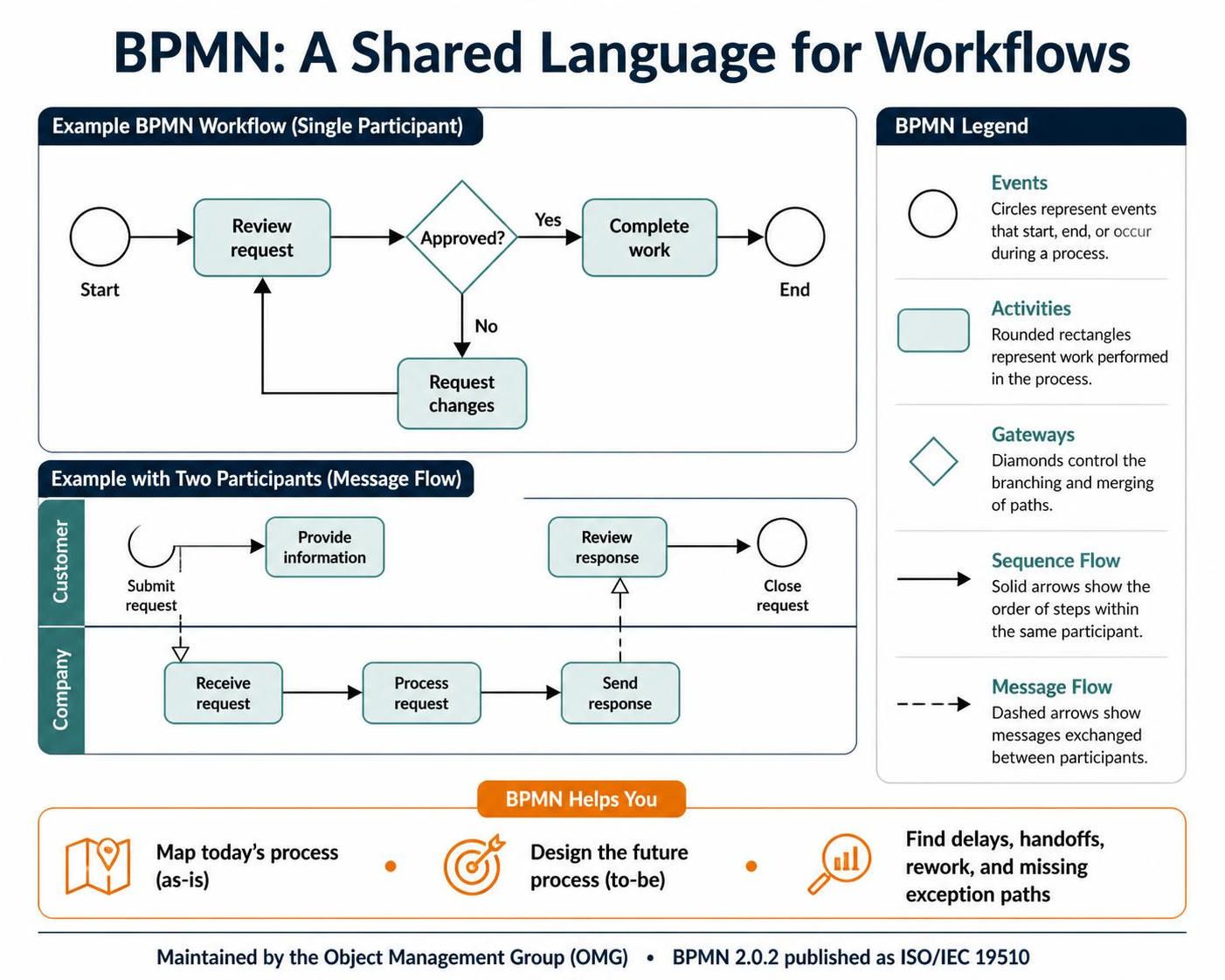
Business Process Model and Notation (BPMN) is a standardized visual language for describing how work moves through a process. It helps business stakeholders, analysts, and technical teams discuss the same workflow using consistent symbols. BPMN is maintained by the Object Management Group; BPMN 2.0.2 is published as ISO/IEC 19510.
A BPMN diagram is more than a flowchart: its symbols have defined meanings, and its connection rules distinguish process flow from messages between participants. A useful model can document the current process (“as-is”), clarify a proposed process (“to-be”), and help teams spot delays, handoffs, rework, or missing exception paths.
2. Core BPMN concepts
BPMN’s main building blocks are flow objects, connecting objects, swimlanes, data, and artifacts.
| Element | What it represents | Typical notation and use |
|---|---|---|
| Event | Something that happens during the process | Circle. Start, intermediate, and end events indicate when a process begins, something occurs, or a path finishes. |
| Activity | Work performed | Rounded rectangle. A task is a single unit of work; a subprocess groups a more detailed flow. |
| Gateway | Routing or synchronization logic | Diamond. Used to make a decision, start parallel paths, or merge paths. |
| Sequence flow | The order of work within a process | Solid arrow. Connects flow elements within the same pool. |
| Message flow | Communication between participants | Dashed arrow. Shows a message crossing between pools; it does not represent the order of steps inside a pool. |
| Pool and lane | Who participates or is responsible | A pool represents a participant or process; lanes divide responsibilities within a pool. |
| Data object / data store | Information used or produced | Shows documents, records, or information that persists beyond a single activity. |
| Annotation / group | Extra explanatory context | Adds a note or visually groups elements without changing process flow. |
Events
An event’s outline and marker convey its role and trigger:
-
Start event: begins a process path.
-
Intermediate event: occurs during the process—for example, a message received or a timer expiring.
-
End event: ends a path. Different end-event types can indicate different outcomes, such as a normal completion or an error.
-
Boundary event: attached to an activity or subprocess to show an event that can interrupt or affect it, such as a timeout.
Use a message event when the process responds to communication, and a timer event when timing is part of the process rule, such as a deadline.
Activities
Name activities with a clear verb + object, such as “Check inventory,” “Approve payment,” or “Send confirmation.” Use:
-
Task for a single step.
-
Subprocess when a step has enough detail to model separately.
-
Call activity when reusing a globally defined process, if your modeling approach supports it.
Common task markers can specify the type of work, such as user-performed, manual, or automated work. Add such detail only when it helps readers or implementation.
Gateways
Choose a gateway based on the process logic—not just the shape you want to draw:
-
Exclusive (XOR): take one of the outgoing paths. Example: “In stock?” → Yes or No.
-
Parallel (AND): start all outgoing paths; a matching join can wait for all required paths.
-
Inclusive (OR): take one or more outgoing paths, depending on conditions.
-
Event-based: the next path is determined by which event happens first, such as a payment response or a timeout.
Label outgoing decision flows with conditions, such as Yes / No or Approved / Declined. When a gateway splits a flow, make the merge logic clear. An exclusive merge brings alternative paths back together; a parallel join synchronizes paths that were started in parallel.
Connecting objects and pools
A sequence flow shows process order and normally stays inside one pool. A message flow shows communication between separate pools—for example, a customer sending an order to a company. Do not use a message flow to show the next internal task, or a sequence flow to depict communication between separate participants.
Pools can represent independent participants, such as a customer, a company, and a payment provider. Lanes within a pool show roles or departments. Keep responsibility boundaries meaningful: a lane should clarify who does the work, not simply decorate the diagram.
3. A practical modeling workflow
-
Set the scope. State the process’s trigger, outcome, and boundaries. For example: “From receiving an order to confirming shipment.”
-
Identify participants and roles. Decide which participants need separate pools and which responsibilities belong in lanes.
-
Write the happy path. List the ordinary steps in order before adding gateways and exception paths.
-
Add events and decisions. Show meaningful triggers, outcomes, business rules, and alternate paths.
-
Add handoffs and data. Mark communications between participants and information needed or produced where it improves understanding.
-
Check completeness. Trace each path from a start to an end. Confirm that gateways have understandable conditions, and that exception paths do not disappear ambiguously.
-
Review with process users. Validate the model with the people who perform or receive the work. Revise it when it differs from actual practice.
-
Keep the diagram readable. Use consistent naming, minimize crossing lines, and move detailed sub-processes into separate diagrams when needed.
Start with a model that answers the business question. Adding every BPMN symbol or implementation detail at once often makes a diagram harder to review.
4. Example: online order fulfillment
Scope: From customer order submission through confirmation of shipment. This example focuses on the company’s process and uses a separate customer pool to show the incoming order and outgoing confirmation.
Process narrative
-
The customer submits an order.
-
The company receives the order and checks inventory.
-
If an item is unavailable, the company notifies the customer and ends that order path.
-
If the item is available, the company processes payment.
-
If payment is declined, the company notifies the customer and ends that path.
-
If payment is approved, the warehouse picks and packs the order.
-
The company hands the parcel to the carrier and sends a shipment confirmation.
Text diagram
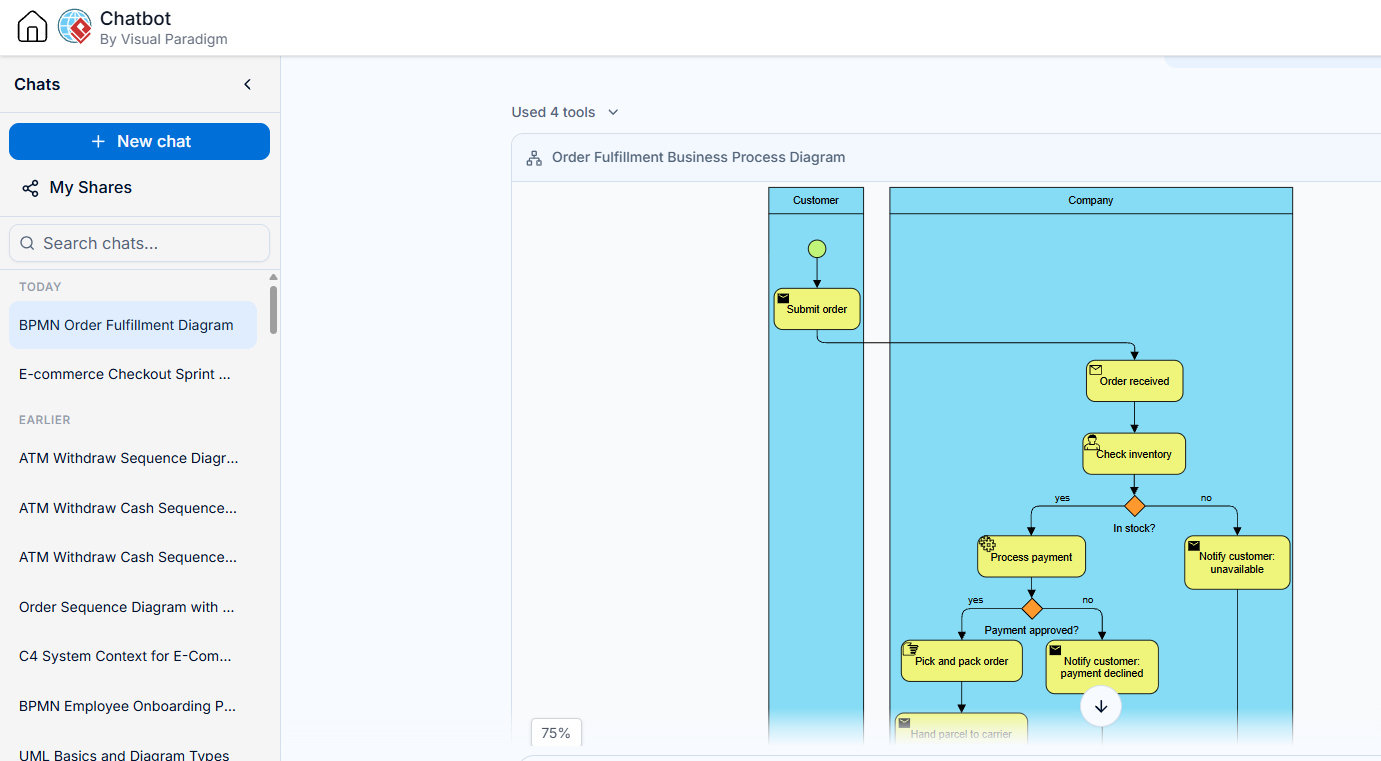
Customer pool:
(Start) → Submit order ──message──▶

Company pool:
(Message start: order received)
  → Check inventory
  → XOR: In stock?
      No  → Notify customer: unavailable → (End)
      Yes → Process payment
             → XOR: Payment approved?
                 No  → Notify customer: payment declined → (End)
                 Yes → Pick and pack order
                         → Hand parcel to carrier
                         → Send shipment confirmation ──message──▶ Customer
                         → (End)
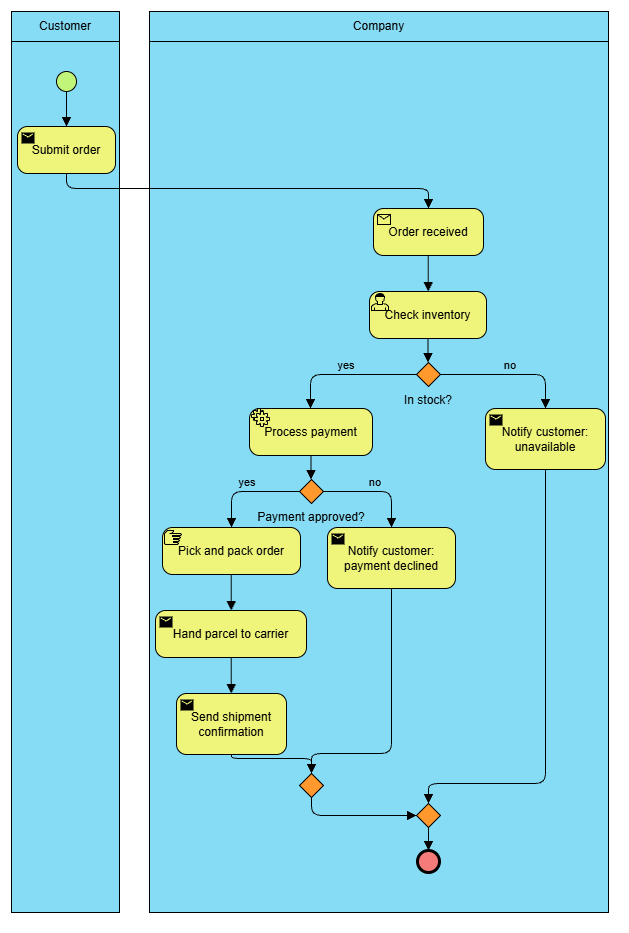
BPMN Custom PlantUML Code (Only Supported by VPasCode Editor)
@startuml
title Order Fulfillment Business Process Diagram
<style>
    element { MaximumWidth 160 }
    start   { Backgroundcolor #00695C }
    stop    { Backgroundcolor #C2185B }
    activity{ Backgroundcolor #81D4FA; MaximumWidth 150 }
    diamond { Backgroundcolor #FFB74D; MaximumWidth 80 }
    arrow   { LineColor #424242; Fontcolor #000000 }
    swimlane{ Fontcolor #000000; FontSize 14 }
</style>

|#F0F8FF|Customer|
start
:<<SendTask>>
Submit order;

|#E8F5E9|Company|
:<<ReceiveTask>>
Order received;
:<<UserTask>>
Check inventory;
if (In stock?) then (yes)
  :<<ServiceTask>>
  Process payment;
  if (Payment approved?) then (yes)
    :<<ManualTask>>
    Pick and pack order;
    :<<SendTask>>
    Hand parcel to carrier;
    :<<SendTask>>
    Send shipment confirmation;
  else (no)
    :<<SendTask>>
    Notify customer: payment declined;
  endif
else (no)
  :<<SendTask>>
  Notify customer: unavailable;
endif
stop
@endumlUse sequence flows for the company’s internal steps and message flows between the Customer and Company pools. Label each XOR gateway’s outgoing flows with its conditions. In Visual Paradigm, the “In stock?” and “Payment approved?” questions can be placed as gateway labels, while the outgoing arrows carry “Yes” and “No.”
Possible extensions: Add a timer boundary event to payment processing if the business has a payment deadline; add an exception path for a carrier handoff failure; or model picking and packing as a subprocess if it needs its own detailed workflow.
5. Building the model in Visual Paradigm
Visual Paradigm provides a BPMN 2.0 modeling tool and supports subprocess drill-down, so a high-level process can link to a more detailed process diagram. Its BPMN features also include documenting working procedures and modeling as-is and to-be processes.
A practical build sequence:
-
Create a BPMN Business Process Diagram in Visual Paradigm.
-
Add a Customer pool and a Company pool; divide the Company pool into lanes such as Customer Service, Warehouse, and Shipping if those responsibilities matter.
-
Place the start event and activities, then add the inventory and payment gateways.
-
Draw sequence flows within the Company pool; use message flows for exchanges with the Customer.
-
Label tasks and conditional paths in plain language. Add data objects, such as an Order or Payment Result, only where they help readers understand the process.
-
Arrange the diagram so the main flow reads consistently—often left to right—and minimize crossing connectors.
-
Review the diagram with stakeholders. If a step’s detail obscures the main path, consider placing that detail in a subprocess diagram.
-
Save and share the model in the format and workspace appropriate to your team.
Visual Paradigm advertises BPMN diagram modeling, process drill-down, working-procedure documentation, and as-is/to-be modeling. Availability of particular capabilities may depend on the edition.
6. Common modeling mistakes
-
Using the wrong connector: sequence flow is internal process order; message flow is communication across participants.
-
Using a gateway without clear logic: label the decision and its outgoing conditions.
-
Treating every action as a separate pool: use lanes for responsibilities within one participant; separate pools for distinct participants.
-
Leaving paths unclear: show what happens for declines, timeouts, missing information, and other relevant exceptions.
-
Overloading one diagram: use subprocesses to separate detailed work from the overview.
-
Modeling the ideal instead of reality: document the current process accurately before proposing improvements.
-
Adding detail without purpose: include data, events, and task markers when they answer a modeling or review question.
7. Quick review checklist
-
Does the diagram have a clear start and end for each relevant path?
-
Can a reader identify who performs each activity?
-
Are decisions and outgoing conditions explicit?
-
Are sequence flows and message flows used appropriately?
-
Are exceptions and alternate outcomes represented?
-
Is the diagram legible at its intended viewing size?
-
Have the people who perform the process confirmed that it is accurate?