From Zero to Hero: Learn BPMN 2.0 in 30 Minutes

In today’s fast-paced digital world, business process management is more critical than ever. Whether you’re a business analyst, project manager, developer, or just someone curious about how organizations streamline operations, understanding BPMN 2.0 (Business Process Model and Notation) is a game-changer.

This article will take you from absolute beginner to confident BPMN 2.0 practitioner in just 30 minutes. No jargon overload. No fluff. Just clear, actionable knowledge.


🕒 What You’ll Learn in 30 Minutes

  • What BPMN 2.0 is and why it matters

  • The core elements of BPMN 2.0

  • How to read and create your first process diagram

  • Best practices and common pitfalls

  • Real-world applications

Let’s get started.


🎯 1. What is BPMN 2.0? (The Big Picture)

BPMN 2.0 is a standardized visual language for modeling business processes. It’s like a universal blueprint for how work flows through an organization — from start to finish.

Think of it as “the Rosetta Stone of process modeling”. It allows business analysts, developers, managers, and stakeholders to speak the same language, regardless of technical background.

✅ Why BPMN 2.0?

  • Clarity: Visuals are easier to understand than text-heavy flowcharts.

  • Standardization: No more guessing what symbols mean — BPMN is globally recognized.

  • Integration: Works with workflow engines, automation tools (like Camunda, Activiti, or Bizagi), and enterprise systems.

  • Collaboration: Bridges the gap between business and IT.

💡 Fun Fact: BPMN 2.0 was developed by the Object Management Group (OMG) and released in 2011. It’s now the de facto standard for business process modeling.


🧩 2. Core Elements of BPMN 2.0 (The LEGO Blocks of Process Design)

Every BPMN diagram is built from a few key building blocks. Let’s break them down.

🟦 1. Events – What Happens?

Events are circles that mark something that happens in the process.

There are three main types:

  • Start Event (green circle): The process begins here.

  • End Event (red circle): The process ends here.

  • Intermediate Event (yellow circle): Something happens in the middle (e.g., a timer, message, error).

🎯 Tip: Use icons inside the circle to show type:

  • ⚠️ (Error) – Error event

  • ⏱️ (Timer) – Time-based trigger

  • 📬 (Message) – External message received

🟨 2. Activities – What Gets Done?

Activities are rectangles representing tasks or subprocesses.

  • Task: A single unit of work (e.g., “Approve Loan Application”).

  • Subprocess: A group of tasks (e.g., “Customer Onboarding” with 5 steps inside).

🎯 Pro Tip: Use collapsed subprocesses (with a plus sign) when you don’t need to show internal details. Use expanded ones when you want to drill down.

🟩 3. Gateways – The Decision Points

Gateways are diamonds that control the flow of the process.

Common types:

  • Exclusive Gateway (XOR): One path out (e.g., “Is credit score > 700? Yes → Approve, No → Reject”).

  • Inclusive Gateway (OR): One or more paths can be taken (e.g., “Select payment method: Credit Card, PayPal, or Bank Transfer”).

  • Parallel Gateway (AND): All outgoing paths are taken simultaneously (e.g., “Send email, update CRM, and notify manager”).

🎯 Remember: Gateways determine flow, not actions.

🟧 4. Sequence Flows – The Arrows That Connect It All

Sequence flows are solid lines with arrows that show the order of execution.

✅ Use straight lines or curved lines — it doesn’t matter as long as the flow is clear.

🟪 5. Pools & Lanes – Who Does What?

Pools and lanes represent organizational roles or departments.

  • Pool: A container for a participant (e.g., “Customer”, “Bank”, “HR Department”).

  • Lane: A subdivision within a pool (e.g., “Loan Officer”, “IT Support”).

🎯 Use Pools & Lanes when you need to show cross-functional processes.


🖼️ 3. Build Your First BPMN Diagram (In 10 Minutes)

Let’s model a simple loan approval process.

🎯 Process: Customer Loan Application

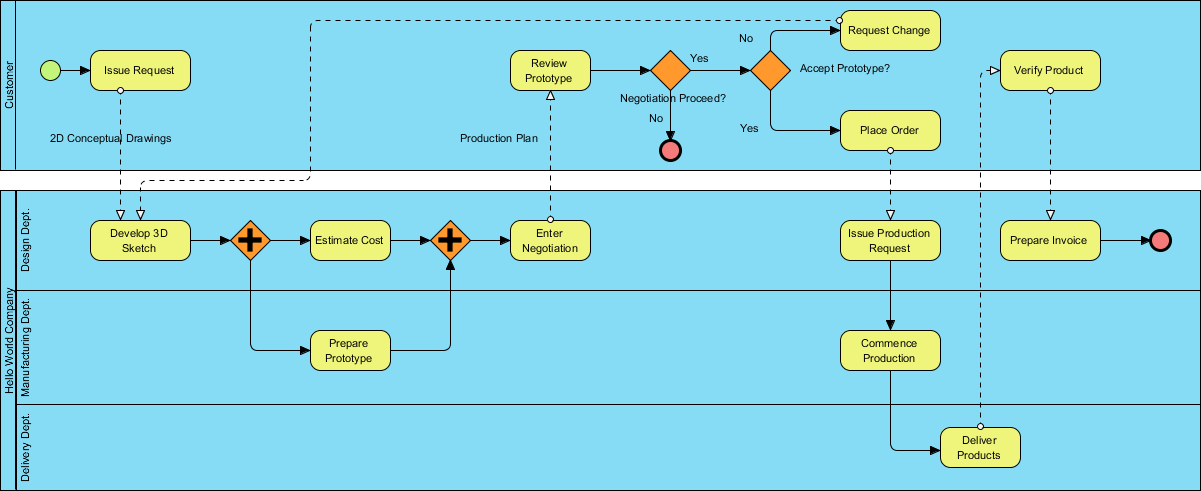
This BPMN (Business Process Model and Notation) diagram illustrates a collaborative workflow between a Customer and a company called Hello World Company. The process covers everything from the initial request to final product delivery and invoicing.

The diagram is divided into two main Pools (Customer and Hello World Company), with the company pool further divided into Lanes (Design, Manufacturing, and Delivery departments).


Phase 1: Initiation and Design

The process begins in the Customer pool and moves quickly into technical development.

  • Issue Request: The customer starts the process by providing “2D Conceptual Drawings.”

  • Develop 3D Sketch: The Design Dept. receives these drawings and creates a 3D model.

  • Parallel Processing: The diagram uses Parallel Gateways (the diamonds with the plus sign) to show that the company performs two tasks simultaneously:

  1. Estimate Cost (Design Dept.)

  2. Prepare Prototype (Manufacturing Dept.)

Phase 2: Negotiation and Approval

Once the internal work is ready, the focus shifts back to the customer for evaluation.

  • Review Prototype: The company provides a “Production Plan,” and the customer reviews the work.

  • Decision Point 1 (Negotiation Proceed?): If “No,” the process ends immediately. If “Yes,” it moves to the next check.

  • Decision Point 2 (Accept Prototype?):

  • No: The customer triggers a Request Change, which loops back to the Design Dept. to update the 3D sketch.

  • Yes: The customer proceeds to Place Order.

Phase 3: Production and Fulfillment

After the order is placed, the internal “Hello World Company” machine kicks into high gear across three departments.

  • Issue Production Request: The Design Dept. sends the formal request to Manufacturing.

  • Commence Production: The Manufacturing Dept. builds the final product.

  • Deliver Products: Once built, the Delivery Dept. takes over to ship the items to the customer.

Phase 4: Closing the Loop

The final steps ensure the customer is satisfied and the company is paid.

  • Verify Product: The customer receives and checks the delivery.

  • Prepare Invoice: Simultaneously (or immediately following verification), the Design Dept. prepares the invoice.

  • End: The process concludes once the invoice is issued and the product is verified.
    From Zero to Hero: Learn BPMN 2.0 in 30 Minutes


Key BPMN Elements Used

Element Symbol in Image Meaning
Start Event Green Circle Where the process begins.
End Event Red Circle (bold) Where the process terminates.
Parallel Gateway Orange Diamond with “+” Tasks happening at the same time.
Exclusive Gateway Orange Diamond A decision point (Yes/No).
Message Flow Dashed Arrows Communication passing between the Customer and the Company.
Sequence Flow Solid Arrows The order of operations within a single pool.

🛠️ 4. Resource to Practice BPMN 2.0

  • Business Process Design with Powerful BPMN Software – Visual Paradigm: An in-depth overview of Visual Paradigm’s intuitive BPMN 2.0 modeler, highlighting its role in creating professional Business Process Diagrams quickly, with features like process drill-down, simulation, animation, and integration with other modeling standards.
  • Online BPMN Diagram Tool – Visual Paradigm: A guide to Visual Paradigm’s online BPMN tool for drawing business process diagrams in the cloud, emphasizing ease of use, professional templates, drag-and-drop functionality, and support for BPMN workflows accessible to anyone.
  • Introduction to BPMN Part I – Visual Paradigm: A foundational tutorial introducing BPMN concepts and providing step-by-step guidance on creating and drawing BPMN diagrams using Visual Paradigm’s modeling features.
  • How to Draw BPMN Diagram? – Visual Paradigm: A practical step-by-step BPMN tutorial demonstrating how to create business process diagrams in Visual Paradigm, covering essential elements and an easy-to-use interface for beginners and experts.
  • How to Create BPMN Diagram? – Visual Paradigm: An instructional resource explaining BPMN basics and the process of building workflow diagrams with Visual Paradigm’s dedicated BPMN software for process and workflow design.
  • BPMN Notation Overview – Visual Paradigm: A comprehensive guide to BPMN symbols, notations, and diagram examples, showcasing how Visual Paradigm’s award-winning tool supports full BPMN modeling and visualization.
  • What is BPMN? – Visual Paradigm: An explanatory overview of BPMN as a standard notation for business workflows, detailing its history, benefits, and how Visual Paradigm enables effective process modeling and analysis.


🚫 5. Common Mistakes to Avoid

Even experienced modelers slip up. Avoid these:

  1. Overcomplicating the Diagram
    → Keep it simple. Use subprocesses to hide complexity.

  2. Using the Wrong Gateway Type
    → Use Exclusive for “only one path”, Parallel for “all paths”, Inclusive for “any or all”.

  3. No Start or End Events
    → Every process must have a Start and End.

  4. Ignoring Pools & Lanes
    → If multiple departments are involved, use them to clarify responsibility.

  5. Using BPMN for Non-Process Work
    → BPMN is for processes, not data models or system architecture.


🌍 6. Real-World Use Cases of BPMN 2.0

BPMN isn’t just theory. It’s used everywhere:

  • Banking: Loan approvals, fraud detection workflows

  • Healthcare: Patient admission, treatment plans

  • E-commerce: Order fulfillment, returns processing

  • HR: Employee onboarding, leave requests

  • Manufacturing: Production scheduling, quality checks

🎯 Case Study: A bank used BPMN to model their loan approval process. They reduced approval time by 40% by identifying bottlenecks and automating tasks.


✅ 7. Quick Recap: Your 30-Minute BPMN 2.0 Mastery Checklist

Task Done?
Understand what BPMN 2.0 is
Know the 5 core elements (Events, Activities, Gateways, Flows, Pools/Lanes)
Create a simple process diagram (e.g., loan approval)
Use a free tool (e.g., Draw.io) to practice
Avoid common mistakes
Think about real-world applications

✅ You’re now a BPMN 2.0 pro!


🎓 Next Steps: Level Up Your Skills

Now that you’ve mastered the basics, here’s where to go next:

  1. Learn Advanced BPMN Concepts:

    • Message Flows (between pools)

    • Data Objects & Associations

    • Error & Compensation Events

    • Event-Driven Processes

  2. Integrate with Automation Tools:

    • Use Camunda or Activiti to run your BPMN diagrams.

    • Automate tasks like sending emails, updating databases, or triggering APIs.

  3. Get Certified:

    • BPMN 2.0 Certification (by OMG or BPM Institute)

    • Camunda Certification (great for developers)

  4. Join the Community:

    • Reddit: r/BPMN

    • LinkedIn Groups: BPMN & Process Management

    • Conferences: BPM Conference, Camunda Community Days


🏁 Final Thought: From Zero to Hero

You started this article knowing nothing about BPMN 2.0.
Now, you can readcreate, and communicate complex business processes using a universal language.

That’s not just knowledge — it’s power.

🌟 Remember: The best processes aren’t just efficient — they’re understood. And BPMN 2.0 is your tool to make that happen.


📌 Download Your Free BPMN 2.0 Cheat Sheet (PDF)

👉 Click here to download a printable summary of all symbols, flow rules, and best practices (Note: In a real article, this would be a link)


🙌 You Did It!

From zero to hero in 30 minutes.
Now go model your first process — and change how your team works.

The future of business process management is visual. And you’re now part of it.

🚀 Go build something great.

Markdown
Posted on Categories BPMN

BPMN Best Practices: How to Create Clean, Readable Process Diagrams

Creating clean, readable BPMN (Business Process Model and Notation) diagrams is essential for effective communication across stakeholders—business analysts, developers, project managers, and end users. Poorly designed diagrams can lead to confusion, misinterpretation, and project delays. Here are BPMN best practices to help you create professional, intuitive, and maintainable process diagrams:


✅ 1. Start with a Clear Purpose

Before drawing, define:

  • Who is the audience? (e.g., business users, IT teams)

  • What is the goal? (e.g., documentation, system design, compliance)

  • What level of detail is needed? (high-level overview vs. detailed execution)

👉 Tip: Use process scope and level of abstraction to guide your diagram’s complexity.


✅ 2. Use the Right Level of Abstraction

  • Swimlanes (Pools & Lanes): Use them to show responsibility (who does what).

    • Pools represent separate organizations or major departments.

    • Lanes within a pool represent roles, teams, or systems.

  • Avoid overusing swimlanes—too many can clutter the diagram.

👉 Best Practice: Only include swimlanes that add value (e.g., different departments or systems involved).


✅ 3. Follow a Logical Flow

  • Use top-to-bottom or left-to-right flow for natural reading.

  • Avoid crossing flows and zigzagging paths.

  • Use gateways (XOR, AND, OR) appropriately to model decision points and parallel paths.

👉 Avoid: Complex, tangled paths. If a process has too many branches, consider breaking it into sub-processes.


✅ 4. Use Sub-Processes for Complexity

  • Encapsulate repetitive or complex logic into sub-processes.

  • Use collapsed sub-processes for high-level views.

  • Use expanded sub-processes when you need to show internal details.

👉 Best Practice: Name sub-processes descriptively (e.g., “Validate Customer Application”).


✅ 5. Keep Gateway Logic Simple

  • Use XOR (exclusive) for mutually exclusive choices.

  • Use AND (inclusive) only when all paths must be taken.

  • Use OR (inclusive) cautiously—ensure it’s clear when multiple paths may occur.

  • Avoid complex combinations of gateways without clear logic.

👉 Tip: If you’re using multiple gateways, consider adding annotations to clarify behavior.


✅ 6. Use Standard BPMN Symbols Correctly

Symbol Correct Use
Start Event Only one per process (unless using message events).
End Event One per process (unless multiple end states).
Task Single unit of work. Avoid grouping multiple tasks.
Sequence Flow Arrows showing execution order (not data flow).
Message Flow Dashed line between pools (for communication).

👉 Avoid: Mixing sequence flow and message flow incorrectly.


✅ 7. Name Elements Clearly and Consistently

  • Use action-oriented names (e.g., “Approve Loan Request”, not “Task 1”).

  • Avoid vague terms like “Process” or “Step”.

  • Use consistent capitalization and grammar (e.g., all verbs in present tense).

👉 Example: ✅ “Send Confirmation Email” ❌ “Send Email”


✅ 8. Limit the Number of Elements per Diagram

  • Aim for 1–3 swimlanes and 10–20 main elements (tasks, gateways, events).

  • If the process is longer, split into multiple diagrams (e.g., “Onboarding – Step 1”, “Onboarding – Step 2”).

👉 Best Practice: Use “Process” and “Sub-Process” to break down large processes.


✅ 9. Use Annotations Sparingly and Strategically

  • Use annotations to explain complex logic, business rules, or exceptions.

  • Avoid cluttering the diagram with text—keep it visual.

👉 Example: An annotation can clarify: “If credit score < 600, route to manual review.”


✅ 10. Apply Visual Hierarchy and Consistency

  • Use consistent colors, fonts, and line thickness.

  • Use icons or visual cues (e.g., color coding for error paths).

  • Align elements neatly—use grid snapping in your BPMN tool.

👉 Tip: Use a style guide for your team (e.g., all tasks are blue, gateways are yellow).


✅ 11. Validate with Stakeholders

  • Share the diagram with business users and developers.

  • Ask: “Can you understand the flow without explanation?”

  • Iterate based on feedback.

👉 Best Practice: Use BPMN tools with collaboration features (e.g., Camunda Modeler, Bizagi, Signavio).


✅ 12. Document Assumptions and Exceptions

  • Use exception flows (e.g., error events, compensation) to show failure paths.

  • Document assumptions in notes or a separate section.

👉 Example: “If the customer is not found in CRM, send to fraud review.”


🛠️ Tools That Support Best Practices

  • Business Process Design with Powerful BPMN Software – Visual Paradigm: An in-depth overview of Visual Paradigm’s intuitive BPMN 2.0 modeler, highlighting its role in creating professional Business Process Diagrams quickly, with features like process drill-down, simulation, animation, and integration with other modeling standards.
  • Online BPMN Diagram Tool – Visual Paradigm: A guide to Visual Paradigm’s online BPMN tool for drawing business process diagrams in the cloud, emphasizing ease of use, professional templates, drag-and-drop functionality, and support for BPMN workflows accessible to anyone.
  • Introduction to BPMN Part I – Visual Paradigm: A foundational tutorial introducing BPMN concepts and providing step-by-step guidance on creating and drawing BPMN diagrams using Visual Paradigm’s modeling features.
  • How to Draw BPMN Diagram? – Visual Paradigm: A practical step-by-step BPMN tutorial demonstrating how to create business process diagrams in Visual Paradigm, covering essential elements and an easy-to-use interface for beginners and experts.
  • How to Create BPMN Diagram? – Visual Paradigm: An instructional resource explaining BPMN basics and the process of building workflow diagrams with Visual Paradigm’s dedicated BPMN software for process and workflow design.
  • BPMN Notation Overview – Visual Paradigm: A comprehensive guide to BPMN symbols, notations, and diagram examples, showcasing how Visual Paradigm’s award-winning tool supports full BPMN modeling and visualization.
  • What is BPMN? – Visual Paradigm: An explanatory overview of BPMN as a standard notation for business workflows, detailing its history, benefits, and how Visual Paradigm enables effective process modeling and analysis.

✅ Summary: Checklist for Clean BPMN Diagrams

✅ Item Done?
Clear process purpose and scope
Logical top-to-bottom/left-to-right flow
Appropriate use of swimlanes
Sub-processes for complex logic
Standard BPMN symbols used correctly
Clear, consistent naming
Limited number of elements per diagram
Annotations used to clarify, not clutter
Visual consistency (colors, fonts, alignment)
Reviewed with stakeholders

Final Thought

**A good BPMN diagram is a conversation starter—not a puzzle.**When stakeholders can understand your process at a glance, you’ve succeeded.

By following these best practices, you’ll create BPMN diagrams that are not only accurate but also actionable, maintainable, and collaborative—a true asset in process improvement and digital transformation.

Posted on Categories BPMN

Comprehensive Guide to Business Process Model and Notation (BPMN) with Visual Paradigm

Business Process Model and Notation (BPMN) is the globally recognized standard for modeling business processes. It provides a visual language that enables organizations to design, analyze, document, and optimize workflows across departments, systems, and even across organizational boundaries. This comprehensive guide walks you through the core elements of BPMN, their meanings, and how to effectively use them—especially with Visual Paradigm, a powerful and intuitive BPMN 2.0 modeling tool.


1. Introduction to BPMN

BPMN is designed to be both business-friendly and technically precise. It bridges the gap between business stakeholders and IT professionals by offering a common visual language for describing business processes. Developed by the Object Management Group (OMG), BPMN 2.0 is the current standard, supporting rich semantics for process modeling, including events, activities, gateways, and connecting objects.

Comprehensive Guide to Business Process Model and Notation (BPMN) with Visual Paradigm

With tools like Visual Paradigm, creating professional BPMN diagrams has become faster, more collaborative, and more insightful—offering features such as process drill-down, simulation, animation, and integration with other modeling standards.


2. Core BPMN Elements

BPMN diagrams are built from four fundamental categories of elements:

  1. Events

  2. Activities

  3. Gateways

  4. Connecting Objects


These elements work together to define the whatwhenhow, and flow of a business process.


2.1 Events: Triggers and Outcomes

Events are represented by circles and signify something that happens during a process—either initiating, interrupting, or concluding it.

Types of Events:

Symbol Event Type Description
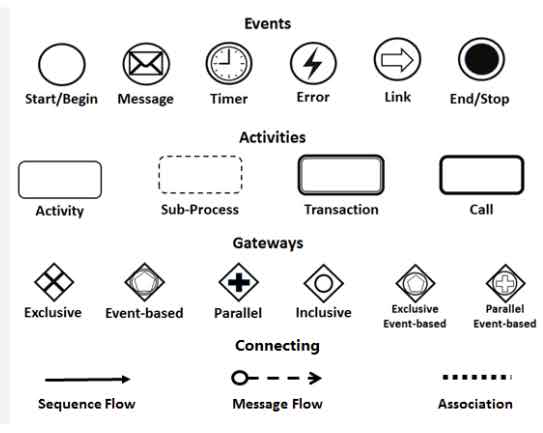
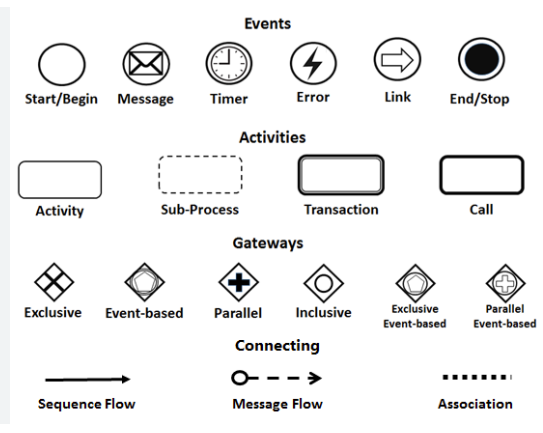
🟢 Empty Circle Start/Begin Event Marks the beginning of a process. Can be triggered by a message, timer, or other external input.
📧 Circle with Envelope Message Event Indicates a message is sent or received between participants (e.g., customer order received).
⏰ Circle with Clock Timer Event Triggers a process at a specific time or after a delay (e.g., “Send reminder after 3 days”).
⚡ Circle with Lightning Bolt Error Event Indicates an error has occurred during execution. Used for exception handling.
🔗 Circle with Rightward Arrow Link Event Connects different parts of a diagram (e.g., in large diagrams split across pages).
🔴 Filled Circle End/Stop Event Marks the conclusion of a process. Can be normal (success) or error-based.

✅ Tip: Use Intermediate Events (placed between activities) to capture time-based triggers, message exchanges, or error conditions without stopping the flow.


2.2 Activities: Units of Work

Activities represent the work performed in a process and are shown as rounded rectangles. They define what needs to be done.

Types of Activities:

Symbol Activity Type Description
🟦 Rounded Rectangle Activity (Task) A single, atomic unit of work (e.g., “Approve Invoice”).
🟦 Dashed Border Sub-Process A compound activity that can be expanded into a detailed sub-diagram (e.g., “Process Loan Application” → detailed steps).
🟦 Double Border Transaction A group of activities that must all succeed or fail together (e.g., financial transfer with rollback capability).
🟦 Thick Border Call Activity Refers to a globally defined, reusable process or sub-process (e.g., “Authenticate User” from a shared library).

✅ Best Practice: Use Sub-Processes to break down complex workflows for clarity. Use Call Activities to promote reuse and maintain consistency across multiple diagrams.


2.3 Gateways: Decision Points and Flow Control

Gateways are diamond-shaped symbols that control the flow of execution by determining branching, merging, or splitting paths.

Types of Gateways:

Symbol Gateway Type Description
🔴 Diamond with ‘X’ Exclusive (XOR) Only one outgoing path is taken based on a condition (e.g., “Is approval required?” → Yes/No).
🔵 Diamond with Circle Inside Event-Based The path taken depends on which event occurs first (e.g., “Wait for Payment or Refund”).
🟢 Diamond with ‘+’ Parallel (AND) All outgoing paths are executed simultaneously (e.g., “Send email and update database”).
🟡 Diamond with ‘O’ Inclusive (OR) One or more paths can be taken (e.g., “Send notification to manager, team, or client”).

⚠️ Note: Gateways must be connected with sequence flows and are critical for modeling decision logic, concurrency, and complex routing.


2.4 Connecting Objects: Defining Relationships

Connecting objects define how elements in the diagram relate to each other. They ensure the process flows logically from start to end.

Types of Connecting Objects:

Symbol Connection Type Description
➡️ Solid Arrow Sequence Flow Shows the order of execution between flow elements (events, activities, gateways).
➤ Dashed Line (Open Circle → Arrow) Message Flow Represents communication between different participants (e.g., two pools in a collaboration diagram).
⋮ Dotted Line Association Links artifacts (e.g., data objects, annotations) to flow elements. Does not affect execution order.

✅ Pro Tip: Use Message Flows to model interactions between separate organizational units or systems (e.g., Customer → Sales Team → ERP System). Use Associations to add notes or attach documents to tasks.


3. Creating BPMN Diagrams with Visual Paradigm

Visual Paradigm is a leading BPMN 2.0 modeling tool that simplifies the creation of professional business process diagrams. Its intuitive interface and powerful features make it ideal for both beginners and advanced users.

Key Features of Visual Paradigm:

  • Drag-and-Drop Interface: Easily add events, activities, gateways, and connecting objects.

  • Professional Templates: Start with pre-built BPMN templates for common processes (e.g., Order Fulfillment, Employee Onboarding).

  • Process Drill-Down: Expand Sub-Processes into detailed diagrams for deeper analysis.

  • Simulation & Animation: Run simulations to test process logic and visualize execution paths.

  • Integration with Other Standards: Supports UML, ERD, and other modeling languages for enterprise-wide consistency.

  • Cloud Collaboration: Work in real time with team members using the online BPMN diagram tool.


4. Step-by-Step Guide to Drawing a BPMN Diagram

  1. Define the Process Scope: Identify the start and end points (e.g., “Customer Order Process”).

  2. Add a Start Event: Use a Start Event (empty circle) to mark the beginning.

  3. Add Activities: Insert Rounded Rectangles for each task (e.g., “Receive Order,” “Check Inventory”).

  4. Insert Gateways: Use Exclusive Gateways to model decisions (e.g., “Is stock available?”).

  5. Connect with Sequence Flows: Draw solid arrows to define execution order.

  6. Add End Event: Use a Filled Circle to close the process.

  7. Enhance with Artifacts: Use Associations to link notes, data objects, or documents.

  8. Simulate & Validate: Use Visual Paradigm’s simulation feature to test different scenarios.

📌 Example: A simple Order Processing Workflow:

  • Start → Receive Order → Check Inventory → (If Yes) → Ship Order → End

  • (If No) → Notify Supplier → Wait for Stock → Continue


5. Benefits of Using BPMN and Visual Paradigm

Benefit Explanation
Clarity & Communication BPMN diagrams are easy to understand for both business and technical teams.
Process Optimization Visualizing workflows helps identify bottlenecks and redundancies.
Standardization BPMN ensures consistency across departments and organizations.
Automation Readiness BPMN models can be directly used to generate code or configure workflow engines.
Collaboration & Documentation Visual Paradigm supports version control, sharing, and documentation export.

6. Learning Resources: Getting Started with BPMN in Visual Paradigm

To master BPMN modeling with Visual Paradigm, explore these official resources:


7. Conclusion

BPMN is more than just a diagramming tool—it’s a strategic asset for business process improvement. With the right tool like Visual Paradigm, organizations can model, analyze, simulate, and optimize their workflows with precision and collaboration.

Whether you’re a business analyst, process manager, or IT developer, mastering BPMN and leveraging powerful tools like Visual Paradigm will empower you to design efficient, transparent, and scalable business processes.

🔗 Start Your BPMN Journey Today:
Explore the full suite of Visual Paradigm’s BPMN features at https://www.visual-paradigm.com

Posted on Categories BPMN

BPMN 2.0 Explained: A Beginner’s Guide to Business Process Modeling Using Visual Paradigm All-in-One Platform

🌟 Introduction: Why BPMN 2.0 Matters

Business Process Model and Notation (BPMN) 2.0 is the global standard for visualizing, analyzing, and documenting business processes. It enables businesses, analysts, developers, and stakeholders to communicate process flows clearly and consistently—no matter their technical background.

Comprehensive Guide to Business Process Model and Notation (BPMN) with Visual Paradigm

With the rise of digital transformation, BPMN 2.0 has become essential for process improvement, automation, compliance, and integration with enterprise systems.

In this beginner’s guide, we’ll walk you through the fundamentals of BPMN 2.0 and show you how to use Visual Paradigm, a powerful all-in-one platform, to model, simulate, and manage business processes effectively.


🔹 Part 1: Understanding BPMN 2.0 Basics

✅ What is BPMN 2.0?

BPMN 2.0 (Business Process Model and Notation version 2.0) is an ISO-standardized graphical language for modeling business processes. It’s designed to be intuitive for both business users and IT professionals.

It’s used to:

  • Map out workflows (e.g., customer onboarding, order fulfillment).

  • Identify bottlenecks and inefficiencies.

  • Automate processes using BPM engines (like Camunda or Activiti).

  • Communicate process logic across departments.


🔧 Core Elements of BPMN 2.0

BPMN uses a visual notation made up of key elements. Let’s break them down:

Comprehensive Guide to BPMN and Using Visual Paradigm's BPMN Tool - ArchiMetric

Element Description Visual Example
Start Event Marks the beginning of a process. ⚡ (Circle with a dot inside)
End Event Marks the end of a process. ⚡ (Circle with a thick border)
Task A single work item or action (e.g., “Approve Loan”). Rectangle with rounded corners
Activity A group of tasks (can be a sub-process). Same as Task, but may contain nested elements
Sequence Flow Arrows showing the order of execution. Solid arrow
Gateway Controls decision points or branching logic. Diamond shape
Message Flow Shows communication between participants (e.g., systems or roles). Dashed arrow
Pool & Lane Represents participants (e.g., departments or systems) and their responsibilities. Rectangular container divided into lanes

💡 Tip: Think of a BPMN diagram like a flowchart—but with standardized symbols and semantics.


🔄 Common BPMN Patterns

  1. Sequence Flow – Linear execution (Task A → Task B).

  2. Exclusive Gateway (XOR) – One path chosen based on a condition.

  3. Parallel Gateway (AND) – Multiple paths executed simultaneously.

  4. Inclusive Gateway (OR) – One or more paths can be taken.

  5. Event-Driven Gateway – Triggers based on events (e.g., timer, message).

  6. Sub-Process – A task that contains its own internal process (can be collapsed).


🔹 Part 2: Getting Started with Visual Paradigm

Visual Paradigm is a comprehensive all-in-one platform for business process modeling, software design, and system analysis. It supports BPMN 2.0, UML, ERD, and more—making it ideal for both beginners and professionals.

✅ Why Use Visual Paradigm?

  • User-friendly interface – Drag-and-drop BPMN elements.

  • BPMN 2.0 compliant – Full support for standards.

  • Collaboration features – Share, comment, and version control.

  • Simulation & Validation – Test your process before implementation.

  • Export & Integration – Export to PDF, PNG, or integrate with workflow engines.

  • Modeling across domains – Combine BPMN with UML, C4, and more.


🛠 Step-by-Step: Create Your First BPMN Diagram in Visual Paradigm

Step 1: Launch Visual Paradigm

  • Open Visual Paradigm (available for Windows, macOS, Linux).

  • Go to File > New > BPMN Diagram.

Step 2: Set Up Your Diagram

  • Name your diagram (e.g., “Customer Order Processing”).

  • Choose BPMN 2.0 as the standard.

Step 3: Add a Start Event

  • Drag Start Event from the palette onto the canvas.

  • Double-click to edit the name (e.g., “New Order Received”).

Step 4: Add Tasks

  • Drag Task elements onto the canvas.

  • Add tasks like:

    • “Validate Order”

    • “Check Inventory”

    • “Process Payment”

    • “Ship Product”

Step 5: Connect with Sequence Flows

  • Use the Sequence Flow tool (arrow icon) to connect events and tasks in order.

Step 6: Add a Gateway (Decision Point)

  • Drag an Exclusive Gateway (diamond) after “Check Inventory”.

  • Connect two outgoing flows:

    • “In Stock” → “Ship Product”

    • “Out of Stock” → “Notify Customer”

Step 7: Add an End Event

  • Drag an End Event to the final step.

  • Connect it via sequence flow.

Step 8: Add a Pool & Lane (Optional for Multi-Party Processes)

  • Use Pool to represent a participant (e.g., “Sales Department”).

  • Add Lanes inside the pool (e.g., “Sales”, “Warehouse”, “Finance”).

  • Assign tasks to appropriate lanes to show responsibility.

Step 9: Validate & Simulate

  • Click Validate to check for errors (e.g., unconnected flows).

  • Use Simulation to run the process and test different scenarios (e.g., “What if inventory is low?”).

Step 10: Export & Share

  • Export as PDF, PNG, or HTML.

  • Share via link or export to Confluence, SharePoint, or Jira.


🔹 Part 3: Best Practices for BPMN Modeling

  1. Keep It Simple – Avoid overly complex diagrams. Use sub-processes to break down large flows.

  2. Use Meaningful Names – Tasks and events should clearly describe what happens.

  3. Follow Standard Notation – Use only BPMN 2.0-compliant symbols.

  4. Define Clear Start/End Events – Every process must have a clear beginning and end.

  5. Document Assumptions & Exceptions – Use annotations or notes for context.

  6. Involve Stakeholders – Get feedback from business users and IT teams during design.


🔹 Part 4: Real-World Use Cases

Industry Use Case
Banking Loan approval workflow with validation, credit check, and manager approval.
E-commerce Order fulfillment process with inventory check, payment, and shipping.
Healthcare Patient admission process with triage, registration, and doctor assignment.
Manufacturing Production planning and quality inspection workflow.

Visual Paradigm helps model these processes with precision and supports future automation via BPMN engine integration.


🔹 Conclusion: Start Modeling with Confidence

BPMN 2.0 is the gold standard for business process modeling. With Visual Paradigm, you get a powerful, intuitive, and all-in-one solution to:

  • Design clear, standardized process diagrams.

  • Simulate and validate workflows.

  • Collaborate across teams.

  • Prepare processes for automation.

Whether you’re a business analyst, process engineer, or developer, mastering BPMN 2.0 with Visual Paradigm will empower you to visualize, optimize, and transform your organization’s operations.


📚 Resources to Learn More

  • Business Process Design with Powerful BPMN Software – Visual Paradigm: An in-depth overview of Visual Paradigm’s intuitive BPMN 2.0 modeler, highlighting its role in creating professional Business Process Diagrams quickly, with features like process drill-down, simulation, animation, and integration with other modeling standards.
  • Online BPMN Diagram Tool – Visual Paradigm: A guide to Visual Paradigm’s online BPMN tool for drawing business process diagrams in the cloud, emphasizing ease of use, professional templates, drag-and-drop functionality, and support for BPMN workflows accessible to anyone.
  • Introduction to BPMN Part I – Visual Paradigm: A foundational tutorial introducing BPMN concepts and providing step-by-step guidance on creating and drawing BPMN diagrams using Visual Paradigm’s modeling features.
  • How to Draw BPMN Diagram? – Visual Paradigm: A practical step-by-step BPMN tutorial demonstrating how to create business process diagrams in Visual Paradigm, covering essential elements and an easy-to-use interface for beginners and experts.
  • How to Create BPMN Diagram? – Visual Paradigm: An instructional resource explaining BPMN basics and the process of building workflow diagrams with Visual Paradigm’s dedicated BPMN software for process and workflow design.
  • BPMN Notation Overview – Visual Paradigm: A comprehensive guide to BPMN symbols, notations, and diagram examples, showcasing how Visual Paradigm’s award-winning tool supports full BPMN modeling and visualization.
  • What is BPMN? – Visual Paradigm: An explanatory overview of BPMN as a standard notation for business workflows, detailing its history, benefits, and how Visual Paradigm enables effective process modeling and analysis.

🎯 Your Next Step:
Download Visual Paradigm Free Edition today and create your first BPMN 2.0 diagram in under 10 minutes!

✅ Pro Tip: Start with a simple process like “Customer Support Ticket Handling” to build confidence.

Posted on Categories BPMN