Dominate Your Market with Visual Paradigm’s AI Porter’s Five Forces Analyzer

Dominate your market with Visual Paradigm’s AI Porter’s Five Forces Analyzer. Generate fast, professional industry reports with actionable strategic insights.

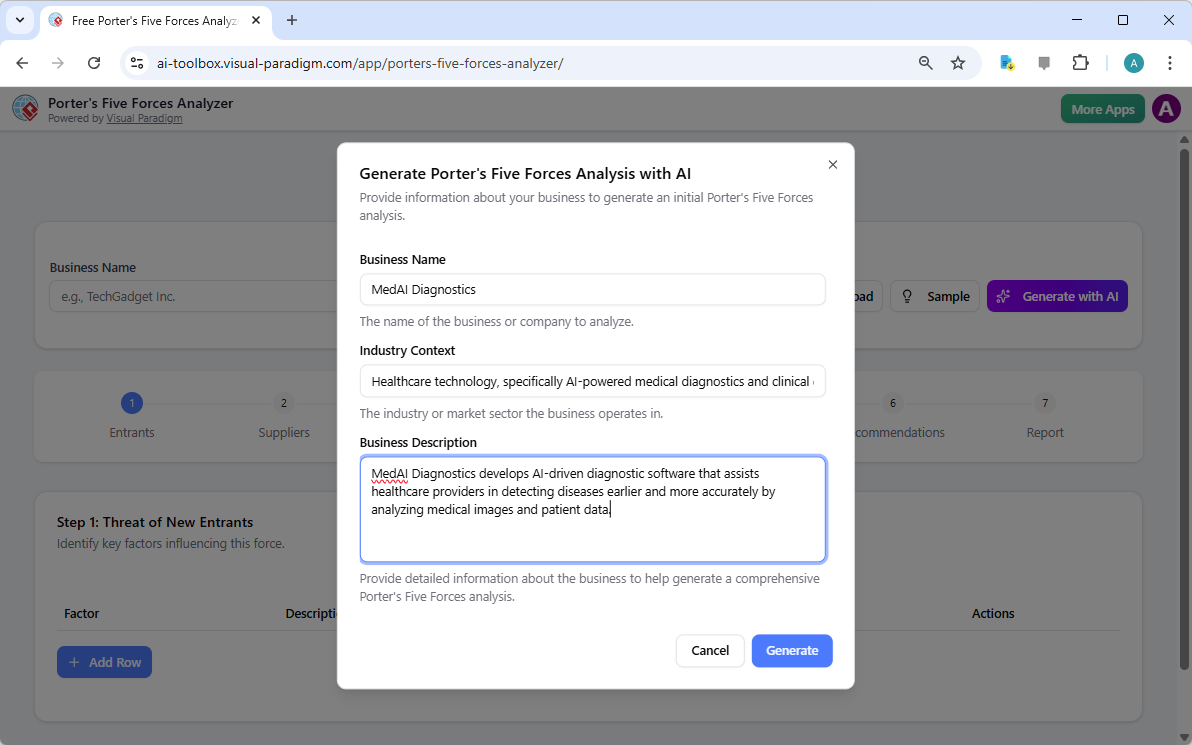
Unlock the secrets of your industry and outmaneuver the competition with the AI-powered Porter’s Five Forces Analyzer from Visual Paradigm! In today’s fast-paced business environment, understanding the structural forces that shape your profitability isn’t just an advantage—it’s a necessity for survival. Whether you are a startup founder or a seasoned strategist, this professional industry analysis tool provides the clarity you need to make winning decisions. The landing screen invites you into a seamless experience where you simply describe your business to ignite a high-level strategic engine that works for you!

As seen in the initial setup, users can input specific details like business name and industry context—such as a cutting-edge medical diagnostics firm—to receive a tailored analysis. This intelligent interface acts as your personal consultant, bridging the gap between raw data and actionable intelligence.

Visual Paradigm’s AI-Powered Porter's Five Forces Analysis Tool landing screen, where users begin by entering a brief busines

Why Every Business Needs an AI-Powered Strategic Edge

Conducting a manual industry study can take days of grueling research. However, with Visual Paradigm’s easy-to-use strategic planning software, you can generate a comprehensive draft in seconds! This tool doesn’t just list facts; it interprets the competitive intensity of your specific market niche, allowing you to focus on high-level validation rather than tedious data entry. It is the ultimate best industry analysis tool for those who value both speed and precision.

Quick Summary of Key Benefits

  • Lightning-Fast Analysis: Generate a full Five Forces report in minutes using advanced AI assistance.

  • Structured 7-Step Logic: Follow a proven, professional workflow that leaves no stone unturned.

  • Total Privacy: Save your sensitive strategic data locally as .json files—no cloud storage required!

  • Actionable Intelligence: Move beyond theory with specific strategic recommendations tailored to your business.

  • Professional Output: Produce high-quality reports perfect for stakeholder presentations and board meetings.

Step 1: Confronting the Threat of New Entrants

The first step in any robust analysis is evaluating how easy it is for new players to enter your territory. Using the AI-powered Porter’s Five Forces Analyzer, you can identify critical barriers to entry such as regulatory requirements, capital costs, and the need for specialized domain expertise. In the example of an AI medical firm, the tool highlights how FDA clearances and deep medical knowledge act as powerful shields for established players.

By rating these factors as Low, Medium, or High, you gain an immediate visual representation of your market’s defensibility. This online strategic tool ensures that you are never blindsided by a new competitor appearing overnight!

The screenshot of Step 1 of Visual Paradigm AI-Powered Porter's Five Forces Analysis Tool. - Professional online diagram make

Step 2: Evaluating the Bargaining Power of Suppliers

Are your suppliers squeezing your margins? Step 2 of the workflow focuses on the Bargaining Power of Suppliers. This section helps you identify if your business is overly dependent on a few key providers, such as specialized AI talent or unique data providers. Identifying these bottlenecks early allows you to develop diversification strategies before they become critical issues.

The interactive dynamic tables allow you to add custom rows and refine AI-generated suggestions, ensuring the analysis reflects the “on-the-ground” reality of your supply chain. It’s strategic management made simple and effective!

The screenshot of Step 2 of the Visual Paradigm  AI-Powered Porter's Five Forces Analysis Tool. - Professional online diagram

Step 3: Mastering the Bargaining Power of Buyers

Your customers are your lifeblood, but their power to drive down prices can be a major threat. In Step 3, the best AI-powered Porter’s Five Forces Analyzer examines the Bargaining Power of Buyers. For a medical tech company, this might involve analyzing the negotiating leverage of large healthcare institutions or the low switching costs that might reduce brand loyalty.

Understanding these dynamics is crucial for your pricing strategy. By recognizing when buyer power is high, you can shift your focus toward differentiation and value-added services that make your product indispensable.

The screenshot of Step 3 of the Visual Paradigm  AI-Powered Porter's Five Forces Analysis Tool. - Professional online diagram

Step 4: Identifying the Threat of Substitute Products

Competition doesn’t always come from direct rivals; sometimes, it comes from entirely different ways of solving the same problem. Step 4 guides you through identifying the Threat of Substitutes. Whether it’s traditional human expertise competing against AI or a completely new technology, this tool ensures you are looking at the big picture.

Rating the intensity of these substitutes helps you prioritize which threats need the most attention in your marketing and R&D efforts. With this professional-grade analysis software, you’ll always stay one step ahead of market shifts!

The screenshot of Step 4 of the Visual Paradigm  AI-Powered Porter's Five Forces Analysis Tool. - Professional online diagram

Step 5: Navigating Rivalry Among Existing Competitors

The final force in the framework is the Rivalry Among Existing Competitors. This is often where the most intense pressure is felt, characterized by price wars, aggressive advertising, and rapid innovation. The tool prompts you to assess the number of competitors and the rate of industry growth to determine the overall heat of the market.

In a crowded field like AI healthcare, understanding the “innovation race” is vital. This step helps you visualize the competitive landscape so you can find “Blue Ocean” opportunities where rivalry is less intense.

The screenshot of Step 5 of the Visual Paradigm  AI-Powered Porter's Five Forces Analysis Tool. - Professional online diagram

Step 6: Developing Winning Strategic Recommendations

An analysis is only as good as the actions it inspires! Step 6 of the AI-powered Porter’s Five Forces Analyzer is where the magic happens. Based on the data gathered in the previous steps, the AI suggests powerful strategic recommendations. These might include pursuing specific certifications, forming strategic partnerships, or creating tiered pricing models to capture more market share.

This is where you transform insights into a roadmap for success. You can edit these recommendations to align perfectly with your company’s unique vision and resource capabilities.

The screenshot of Step 6 of the Visual Paradigm  AI-Powered Porter's Five Forces Analysis Tool - Professional online diagram

Step 7: Generating Your Professional Final Report

The culmination of your hard work is a consolidated final report. Step 7 gathers every factor, impact rating, and recommendation into a professional, easy-to-read format. This is the document that wins over investors and aligns your team. It includes an executive summary and a detailed breakdown of each force, providing a complete 360-degree view of your industry’s attractiveness.

You can print this report directly or save it as a PDF, making it incredibly easy to share with stakeholders or include in your formal business plan. It’s the ultimate deliverable for any serious business professional!

The screenshot of Step 7 of the Visual Paradigm  AI-Powered Porter's Five Forces Analysis Tool, displaying the automatically

Master Your Strategy Today!

There has never been a better time to take control of your competitive destiny. Visual Paradigm’s AI-powered Porter’s Five Forces Analyzer is designed to empower you with the insights needed to thrive in any industry. From identifying hidden threats to capitalizing on untapped opportunities, this tool is your gateway to strategic excellence. Don’t leave your success to chance—base your decisions on the gold standard of industry analysis!

Ready to see where your business stands in the competitive landscape? Use this easy-to-use strategic planning tool to transform your industry knowledge into a defensible competitive advantage right now!

Experience the power of AI-driven strategy:

Try the Porter’s Five Forces Analyzer Now!

Learn more about our innovative strategic tools.

Related Links

Comprehensive Tutorial: Convert a PDF to a Wonderful Flipbook in a Few Clicks Using Visual Paradigm Online

Introduction

In today’s digital age, presenting content in an engaging and interactive manner is crucial for capturing and retaining audience attention. One effective way to achieve this is by converting traditional PDF documents into dynamic flipbooks. Visual Paradigm Online offers a powerful and user-friendly solution for this transformation with its Fliplify tool. This comprehensive tutorial will guide you through the process of converting a PDF to a wonderful flipbook in just a few clicks, highlighting the key features and benefits of using Visual Paradigm Online. Whether you are creating educational materials, business presentations, or personal projects, this guide will help you leverage the full potential of flipbooks to make your content stand out.

Can I turn my PDF into a Flipbook? - Visual Paradigm Blog

Converting a PDF to an engaging flipbook can significantly enhance the presentation and interactivity of your content. Visual Paradigm Online offers a seamless and user-friendly way to achieve this with its powerful Fliplify tool. This tutorial will guide you through the process of converting a PDF to a flipbook in just a few clicks, highlighting the key features and benefits of using Visual Paradigm Online.

Transform Your PDFs into Engaging Flipbooks with Our Powerful Tools - Visual Paradigm Blog

Step 1: Getting Started with Visual Paradigm Online

  1. Sign Up and Log In:

    • Visit the Visual Paradigm Online website and sign up for an account if you don’t already have one.
    • Log in to access the suite of tools, including Fliplify for creating flipbooks.
  2. Navigate to Fliplify:

    • Once logged in, navigate to the Fliplify section from the dashboard. This is where you will convert your PDF into a flipbook.

Step 2: Uploading Your PDF

  1. Upload the PDF:

    • Click on the “Create Flipbook” button and select the option to upload a PDF.
    • Choose the PDF file from your computer or cloud storage that you want to convert into a flipbook.
  2. Processing the PDF:

    • Visual Paradigm Online will automatically process the uploaded PDF and convert it into a flipbook format. This process typically takes just a few moments, depending on the size of the PDF.

Step 3: Customizing Your Flipbook

  1. Choose a Template:

    • Browse through the available flipbook templates and select one that best suits your content. Templates provide a foundation for your design, allowing for easy customization 26.

Flipping into the Future: The Magic of Flipbooks with Animation Capability  - Visual Paradigm Blog

  1. Customize the Layout:

    • Use the intuitive interface to customize the layout of your flipbook. Adjust the page layout, add interactive elements like annotations, highlights, and comments to enhance engagement 24.
  2. Add Interactive Elements:

    • Incorporate interactive elements such as links, videos, and audio clips to make your flipbook more engaging. These elements can be easily added using the drag-and-drop interface 25.
  3. Integrate Animations (Optional):

    • If you want to enhance your flipbook with animations, you can use Visual Paradigm’s AniFuzion tool to create or import 2D and 3D animations. These animations can be seamlessly integrated into your flipbook to add visual appeal 20.

Step 4: Adding Text-to-Speech (TTS) and AI Human Voices

  1. Enable TTS:

    • Incorporate Text-to-Speech (TTS) to narrate your flipbook. This feature enhances the interactive experience, making the content more engaging and accessible 20.
  2. Customize AI Human Voices:

    • Customize the AI human voices to match the tone and style of your flipbook. Adjust the voice settings to ensure a natural and professional narration.

Step 5: Previewing and Publishing Your Flipbook

  1. Preview the Flipbook:

    • Preview your flipbook to ensure it meets your expectations. Check the layout, interactive elements, and animations to make sure everything is in place.
  2. Publish the Flipbook:

    • Once satisfied, click on the “Publish” button to make your flipbook live. You can share the flipbook with your audience by providing a link or embedding it on your website 24.

Step 6: Organizing Your Flipbooks

  1. Create a Virtual Bookshelf:

    • Navigate to the virtual bookshelf feature in Visual Paradigm Online.
    • Create a new bookshelf and customize its appearance to match your branding or personal style.
  2. Add Flipbooks to the Bookshelf:

    • Add your published flipbooks to the virtual bookshelf. Organize them by category, topic, or any other criteria that make sense for your content.
    • Customize the thumbnails and descriptions of each flipbook to make them visually appealing and informative.
  3. Share Your Virtual Bookshelf:

    • Share your virtual bookshelf with your audience by providing a link or embedding it on your website.
    • Promote your bookshelf through social media, email newsletters, and other marketing channels to reach a wider audience.

Flipping Book Animation Software - Visual Paradigm Blog

Conclusion

Converting a PDF to a wonderful flipbook using Visual Paradigm Online is a straightforward and engaging way to present your content. With features like customizable templates, interactive elements, animations, text-to-speech (TTS), and AI human voices, you can create captivating flipbooks that stand out. Whether for educational content, business presentations, or personal projects, Visual Paradigm’s tools offer a comprehensive suite of features to bring your ideas to life and captivate your audience. By following this tutorial, you can transform your static PDFs into dynamic and interactive flipbooks, enhancing the presentation and engagement of your content with ease.

Comprehensive Guide to Creating Flipbooks and Organizing Them into a Beautiful Virtual Bookshelf

Introduction

Creating flipbooks with Visual Paradigm Online is a seamless and engaging way to present your content. Whether you’re designing educational materials, business presentations, or personal projects, Visual Paradigm’s tools offer a comprehensive suite of features to bring your ideas to life. This guide will walk you through the process of creating flipbooks, incorporating 2D and 3D animations, text-to-speech (TTS), and AI human voices, and organizing them into a beautiful virtual bookshelf.

Fliplify:Visual Paradigm Online的翻页书设计大师| 學習EA, Agile & UML 和使用Visual Paradigm 技能- 點部落

Step 1: Getting Started with Visual Paradigm Online

  1. Sign Up and Log In:

    • Visit the Visual Paradigm Online website and sign up for an account if you don’t already have one.
    • Log in to access the suite of tools, including Fliplify for creating flipbooks and AniFuzion for adding animations.
  2. Explore the Dashboard:

    • Familiarize yourself with the dashboard, which provides access to various tools and features.
    • Navigate to the Fliplify section to start creating your flipbook.

Make Your Flipbook Stand Out with AniFuzion - Fliplify

Step 2: Creating a Flipbook with Fliplify

  1. Choose a Template or Start from Scratch:

    • Browse through the available flipbook templates or choose to start from scratch. Templates provide a foundation for your design, while starting from scratch allows for more customization 26.
  2. Design Your Flipbook:

    • Use the intuitive interface to design your flipbook. Add pages, customize the layout, and incorporate interactive elements such as annotations, highlights, and comments 24.
    • Utilize the advanced design tools to ensure a polished and professional presentation.
  3. Integrate 2D and 3D Animations:

    • Use AniFuzion to create or import 2D and 3D animations. These animations can be seamlessly integrated into your flipbook to enhance engagement and visual appeal 20.
    • Ensure that the animations flow seamlessly with the rest of the content, using the interactive features of Fliplify to enhance comprehension 25.

Visual Paradigm Online: Revolutionizing Digital Content Creation - Cybermedian

  1. Add Text-to-Speech (TTS) and AI Human Voices:

    • Incorporate TTS and AI human voices to narrate your flipbook. This feature enhances the interactive experience, making the content more engaging and accessible 20.
    • Customize the voice settings to match the tone and style of your flipbook.

Bring Your Characters to Life with Enhanced TTS Support - Visual Paradigm  News

  1. Preview and Publish:

    • Preview your flipbook to ensure it meets your expectations. Make any necessary adjustments to the design and content.
    • Once satisfied, publish the flipbook and share it with your audience 24.

Step 3: Organizing Flipbooks into a Virtual Bookshelf

  1. Create a Virtual Bookshelf:

    • Navigate to the virtual bookshelf feature in Visual Paradigm Online.
    • Create a new bookshelf and customize its appearance to match your branding or personal style.
  2. Add Flipbooks to the Bookshelf:

    • Add your published flipbooks to the virtual bookshelf. Organize them by category, topic, or any other criteria that make sense for your content.
    • Customize the thumbnails and descriptions of each flipbook to make them visually appealing and informative.
  3. Customize the Bookshelf Layout:

    • Arrange the flipbooks on the bookshelf in a visually appealing manner. Use the layout tools to adjust the positioning and spacing of the flipbooks.
    • Add interactive elements, such as links to related content or additional resources, to enhance the user experience.
  4. Share Your Virtual Bookshelf:

    • Share your virtual bookshelf with your audience by providing a link or embedding it on your website.
    • Promote your bookshelf through social media, email newsletters, and other marketing channels to reach a wider audience.

Step 4: Enhancing Engagement with Interactive Features

  1. Interactive Annotations:

    • Add annotations, highlights, and comments to your flipbooks to enhance engagement and comprehension. These interactive elements make the content more dynamic and personalized 25.
  2. Quizzes and Polls:

    • Incorporate quizzes and polls within your flipbooks to engage your audience and gather feedback. This feature is particularly useful for educational content and business presentations.
  3. Multimedia Integration:

    • Integrate multimedia elements, such as videos, images, and audio clips, to enhance the visual appeal and engagement of your flipbooks.
    • Ensure that the multimedia elements are seamlessly integrated with the rest of the content, using the interactive features of Fliplify to enhance comprehension 25.

How to Add Voice to Characters by Text-to-Speech with Perfect Lip Sync-  AniFuzion


Conclusion

Creating flipbooks with Visual Paradigm Online and organizing them into a beautiful virtual bookshelf is a powerful way to present your content engagingly and interactively. With features like 2D and 3D animations, TTS, and AI human voices, you can enhance the visual appeal and engagement of your flipbooks. Whether for educational content, business presentations, or personal projects, Visual Paradigm’s tools offer a comprehensive suite of features to bring your ideas to life and captivate your audience.

Comprehensive Tutorial for Creating Wonderful Animation Flipbooks with Visual Paradigm’s AniFuzion and Fliplify

Introduction

Creating an animation flipbook combines the engaging nature of animations with the interactive experience of flipbooks. Visual Paradigm’s AniFuzion and Fliplify tools offer a seamless way to achieve this, allowing users to create captivating content that stands out. This tutorial will guide you through the process of creating an animation flipbook, highlighting why these tools are an excellent choice and how they can make your content more attractive and engaging.

Why Choose Visual Paradigm’s AniFuzion and Fliplify?

Elevate Your Animations with Sound in AniFuzion - AniFuzion

  1. User-Friendly Interface:

    • Both AniFuzion and Fliplify provide intuitive interfaces that make it easy for users, regardless of their technical expertise, to create professional-quality animations and flipbooks 2024.
  2. Comprehensive Toolkit:

    • These tools offer a wide range of features, including 2D and 3D animation, customizable templates, and interactive elements, ensuring that users have everything they need to create engaging content 2126.
  3. Seamless Integration:

    • AniFuzion and Fliplify integrate seamlessly with each other and with other features of Visual Paradigm Online, creating a comprehensive suite for all your creative needs 2126.
  4. High-Quality Output:

    • The tools ensure that the final output is of high quality, with polished and professional-looking animations and flipbooks that captivate audiences 2024.
  5. Customer Support:

    • Visual Paradigm provides excellent customer support, assisting users with any issues or questions they may have while using the tools 27.

How Animated Flipbooks Make Content Attractive and Engaging

Flipping Book Animation Software - Visual Paradigm Blog

  1. Visual Appeal:

    • Animated flipbooks combine the visual appeal of animations with the interactive experience of flipbooks, making the content more engaging and visually appealing 20.
  2. Interactive Experience:

    • The interactive nature of flipbooks allows users to engage with the content in a more dynamic way, enhancing comprehension and retention 25.
  3. Storytelling:

    • Animated flipbooks enable users to tell stories in a more compelling way, using animations to bring characters and scenes to life 21.
  4. Versatility:

    • Animated flipbooks can be used for a wide range of purposes, from educational content and business presentations to marketing materials and personal projects 2426.

Tutorial: Creating an Animation Flipbook with AniFuzion and Fliplify

Visual Paradigm Flipbook Maker: Elevate Your Digital Presence with Dynamic and Engaging Flipbooks - Visual Paradigm Blog

Step 1: Create Animations with AniFuzion
  1. Sign Up and Log In:

    • Sign up for a Visual Paradigm Online account and log in to access AniFuzion.
  2. Choose a Template or Start from Scratch:

    • Browse through the available templates or choose to start from scratch. Templates provide a foundation for your animation, while starting from scratch allows for more customization 21.
  3. Design Your Animation:

    • Use the intuitive interface to design your animation. Add characters, scenes, and props, and customize their appearance and actions. Utilize the 2D and 3D animation features to bring your vision to life 20.
  4. Add Interactive Elements:

    • Incorporate interactive elements, such as annotations, highlights, and comments, to enhance engagement and comprehension 25.
  5. Preview and Export:

    • Preview your animation to ensure it meets your expectations. Once satisfied, export the animation in the desired format 20.
Step 2: Create a Flipbook with Fliplify
  1. Upload Your Animation:

    • Log in to Visual Paradigm Online and access Fliplify. Upload your exported animation to use as content for your flipbook 24.
  2. Choose a Template or Start from Scratch:

    • Browse through the available flipbook templates or choose to start from scratch. Templates provide a foundation for your flipbook, while starting from scratch allows for more customization 26.
  3. Design Your Flipbook:

    • Use the intuitive interface to design your flipbook. Add pages, customize the layout, and incorporate interactive elements, such as annotations and highlights 24.
  4. Integrate Your Animation:

    • Integrate your animation into the flipbook, ensuring that it flows seamlessly with the rest of the content. Utilize the interactive features of Fliplify to enhance the engagement and comprehension of the animation 25.
  5. Preview and Publish:

    • Preview your flipbook to ensure it meets your expectations. Once satisfied, publish the flipbook and share it with your audience 24.

Conclusion

Creating an animation flipbook with Visual Paradigm’s AniFuzion and Fliplify is a powerful way to make your content more attractive and engaging. With their user-friendly interfaces, comprehensive toolkits, seamless integration, and high-quality output, these tools provide everything needed to create captivating animation flipbooks. Whether for educational content, business presentations, marketing materials, or personal projects, AniFuzion and Fliplify offer a seamless and productive experience, making them an ideal choice for all your creative needs.

Comprehensive Tutorial for Creating Stunning Flipbooks with Fliplify of Visual Paradigm Online

Introduction

Fliplify, part of Visual Paradigm Online, is a powerful tool designed to help users create captivating digital flipbooks and slideshows. Whether you are starting from scratch or uploading existing content, Fliplify offers a seamless and user-friendly experience. This tutorial will guide you through the process of creating stunning flipbooks, highlighting the key features, application areas, and reasons why Fliplify stands out.

Why Choose Fliplify?

  1. User-Friendly Interface:

    • Fliplify provides an intuitive and user-friendly interface that makes it easy for users to create professional-looking flipbooks without the need for extensive technical knowledge 24.
  2. Versatile Content Creation:

    • Users can craft flipbooks from various sources, including PDFs, PowerPoints, and more. This versatility allows for a wide range of content to be transformed into engaging flipbooks 24.
  3. Customization Options:

    • Fliplify empowers users to customize every aspect of their flipbooks, from layout and design to interactive elements. This ensures a polished and professional presentation tailored to specific needs 24.
  4. Interactive Elements:

    • The tool allows for the addition of interactive elements, such as annotations, highlights, and comments, enhancing the engagement and comprehension of the content 25.
  5. Seamless Integration:

    • Fliplify seamlessly integrates with other features of Visual Paradigm Online, creating a comprehensive suite for all your creative needs. This integration ensures a smooth and productive experience 26.

Application Areas

  1. Business Presentations:

    • Create engaging and interactive business presentations that captivate audiences and effectively communicate key messages.
  2. Educational Content:

    • Develop educational materials that are visually appealing and interactive, enhancing the learning experience for students.
  3. Marketing Materials:

    • Design digital brochures, product catalogs, and other marketing materials that stand out and engage potential customers.
  4. Personal Projects:

    • Use Fliplify for personal projects, such as creating photo albums, travel journals, or any other content that benefits from an interactive and visually appealing format.

Why Fliplify Stands Out

  1. Comprehensive Toolkit:

    • Fliplify offers a robust set of tools for creating, editing, and publishing flipbooks. From basic design elements to advanced customization options, Fliplify provides everything needed to create stunning flipbooks 26.
  2. Easy to Use:

    • The platform is designed to be easy to use, with a straightforward interface that allows users to focus on their creative projects without the hassle of complex software installations 24.
  3. High-Quality Output:

    • Fliplify ensures that the published flipbooks are of high quality, with professional-looking designs and interactive elements that enhance the user experience 24.
  4. Customer Support:

    • Visual Paradigm Online provides excellent customer support, assisting users with any issues or questions they may have while using the Flipbook feature 27.

Feature List

  1. Customizable Templates:

    • Choose from a variety of customizable templates to start your flipbook project. These templates provide a foundation for your design, allowing for easy customization to fit your specific needs 26.
  2. Interactive Annotations:

    • Add annotations, highlights, and comments to your flipbooks to enhance engagement and comprehension. These interactive elements make the content more dynamic and personalized 25.
  3. Multiple File Format Support:

    • Convert various file types into flipbooks, including PDFs, PowerPoints, eBooks, and spreadsheets. This versatility allows for a wide range of content to be transformed into engaging flipbooks 27.
  4. Advanced Design Tools:

    • Utilize advanced design tools to customize the layout, design, and interactive elements of your flipbooks. These tools ensure a polished and professional presentation 26.
  5. Seamless Integration with Visual Paradigm Online:

    • Fliplify integrates seamlessly with other features of Visual Paradigm Online, creating a comprehensive suite for all your creative needs. This integration ensures a smooth and productive experience 26.

Conclusion

Fliplify of Visual Paradigm Online stands out as a powerful and user-friendly tool for creating stunning flipbooks. With its intuitive interface, versatile content creation options, and advanced design tools, Fliplify provides everything needed to create engaging and interactive flipbooks. Whether for business presentations, educational content, marketing materials, or personal projects, Fliplify offers a seamless and productive experience, making it an ideal choice for all your flipbook needs.