
Designing the backbone of an application is rarely just about typing out table definitions. It is an architectural decision that ripples through every layer of the software stack. A robust Entity Relationship Diagram (ERD) acts as the blueprint for data integrity, performance, and scalability. When senior engineers approach database schema design, they do not merely connect boxes with lines. They consider the lifecycle of the data, the constraints of the underlying storage engine, and the needs of the application logic that will eventually consume this information.
This guide dives deep into the structural and philosophical standards used in production environments. We will explore naming conventions, normalization strategies, relationship modeling, and the often-overlooked aspects of data governance. The goal is not to provide a quick fix but to establish a framework for sustainable data modeling.
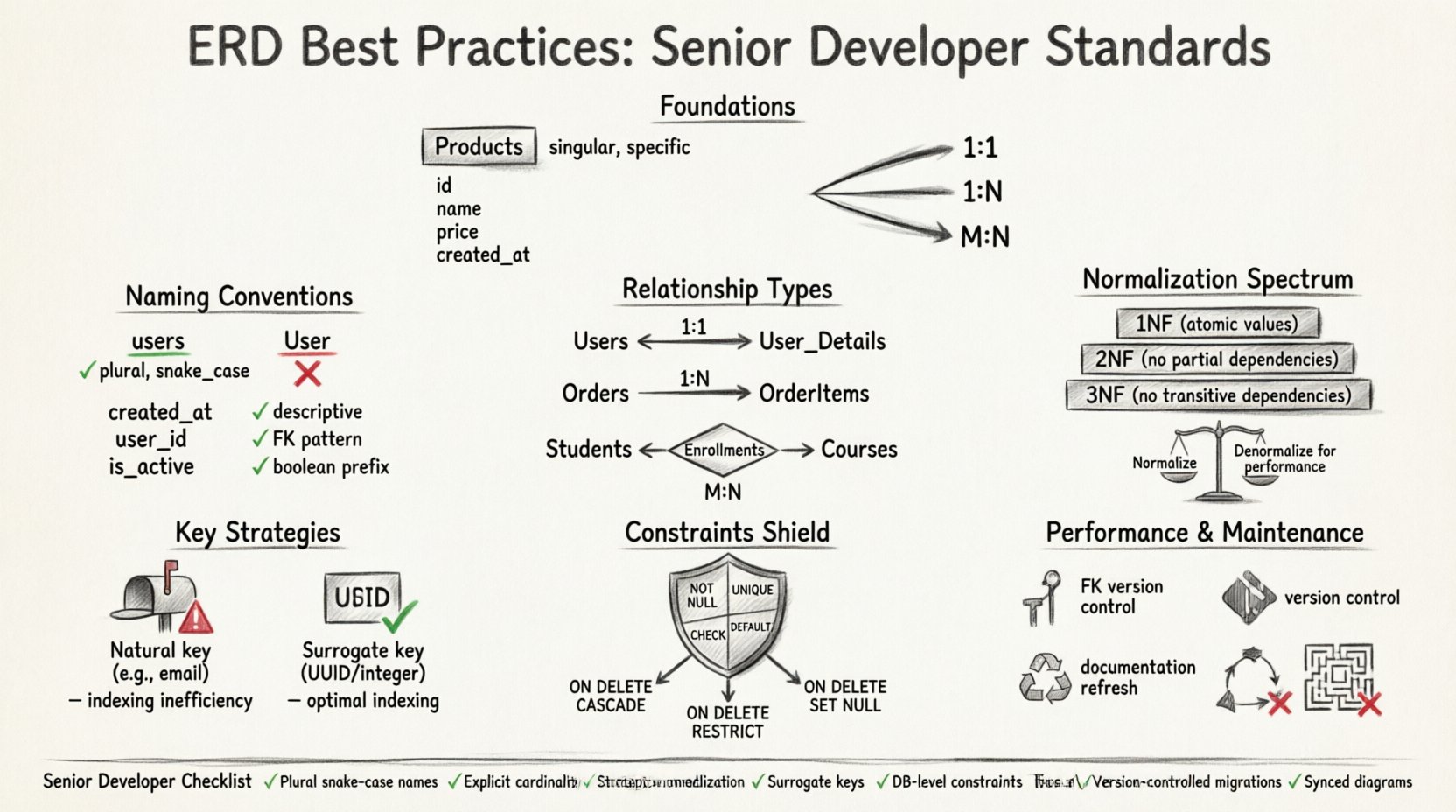
📐 Foundations of Solid Data Modeling
Before drawing a single line, one must understand the core components that make up a relational model. The Entity Relationship Diagram is the visual representation of these components. In professional settings, clarity is paramount. Ambiguity in a diagram leads to ambiguity in the code, and ambiguity in the code leads to bugs in production.
- Entities: These represent real-world objects or concepts. In a database, they translate to tables. An entity should be singular and specific. Avoid generic names like
Itemsin favor ofProductsorInventory. - Attributes: These are the properties of an entity. They become columns within the table. Attributes should be atomic, meaning they hold a single value, not a list or a complex object.
- Relationships: These define how entities interact. A relationship links a row in one table to a row in another. Understanding cardinality is critical here.
Senior developers emphasize that the diagram must be self-documenting. If a developer looks at the ERD and needs to ask a question about the business logic, the design has failed. Every table and column should have a clear purpose that can be inferred from its name and context.
🏷️ Naming Conventions and Standards
Naming is the most visible aspect of a schema, yet it is often treated as an afterthought. Consistent naming reduces cognitive load for developers reading the schema. It also aids in automated code generation tools and ORM frameworks.
Table Names
- Pluralization: Use plural nouns for tables.
Usersis preferred overUser. This aligns with the concept that a table contains a collection of records. - Underscores: Adopt
snake_casefor table names. This improves readability compared to camelCase, especially in environments where case sensitivity might vary between operating systems. - Scope: Avoid prefixes unless necessary for domain separation. While some teams use prefixes like
tbl_ordb_, modern tools often handle this automatically. Keep names clean.
Column Names
- Descriptive: A column name should explain the data it holds without needing external documentation.
created_atis better thantsortime. - Foreign Keys: Name foreign key columns to match the referenced table. If referencing the
Userstable, the column should beuser_id. This makes the join condition obvious. - Booleans: Use prefixes like
is_,has_, orcan_to indicate a boolean state. Examples includeis_active,has_subscription, orcan_edit.
Consistency across the entire project is more important than the specific choice of convention. Once a standard is agreed upon, it must be enforced through linting tools or peer reviews.
🔗 Mastering Relationships and Cardinality
The strength of a relational database lies in its relationships. Mismanaging these relationships is a common source of data duplication and integrity errors. Senior developers categorize relationships based on cardinality: how many instances of one entity relate to another.
| Relationship Type | Description | Implementation |
|---|---|---|
| One-to-One (1:1) | One record in Table A relates to exactly one record in Table B. | Place a unique foreign key in one of the tables. |
| One-to-Many (1:N) | One record in Table A relates to many records in Table B. | Place a foreign key in Table B referencing Table A. |
| Many-to-Many (M:N) | Records in Table A can relate to many in Table B and vice versa. | Create a junction table with two foreign keys. |
One-to-One Relationships
These are less common than other types but appear in specific scenarios, such as separating sensitive data or splitting large data sets for performance. For example, a Users table might hold public profile data, while a User_Details table holds private information like social security numbers. The link is enforced by a unique constraint on the foreign key column.
One-to-Many Relationships
This is the workhorse of relational design. An Order table relates to an OrderItems table. One order can have many items. The foreign key resides in the OrderItems table pointing to the Orders table. This structure allows for efficient querying without repeating the entire order header for every item.
Many-to-Many Relationships
A direct link between two tables is impossible in standard relational systems. A junction table, often called an associative entity, is required. For example, linking Students and Courses. A student can take many courses, and a course can have many students. The junction table Enrollments contains student_id and course_id. This table can also store additional data, such as the date of enrollment or a grade.
When modeling these relationships, consider the optionality. Is it mandatory for a user to have a profile? If yes, the relationship is mandatory. If a user can exist without a profile, the foreign key can be null. Explicitly defining this in the diagram prevents logic errors in the application layer.
🧱 Normalization and Data Integrity
Normalization is the process of organizing data to reduce redundancy and improve integrity. While often taught as a rigid set of rules, senior developers treat it as a spectrum. The goal is to balance data purity with query performance.
First Normal Form (1NF)
- Ensure atomicity: Each column contains only one value.
- Ensure distinct columns: No repeating groups or arrays within a single cell.
- Ensure unique rows: Every row must be uniquely identifiable.
Second Normal Form (2NF)
- Meet 1NF requirements.
- Remove partial dependencies. All non-key attributes must depend on the whole primary key, not just part of it. This is crucial when dealing with composite keys.
Third Normal Form (3NF)
- Meet 2NF requirements.
- Remove transitive dependencies. Non-key attributes should not depend on other non-key attributes. For example, if a table has
EmployeeID,ManagerID, andManagerName, the manager name depends on the manager ID, not the employee ID. Move manager details to a separate table.
When to Denormalize:
Strict adherence to 3NF is not always the answer. In read-heavy applications, joining multiple tables can become a performance bottleneck. Senior engineers might denormalize specific data points to reduce join complexity. For instance, caching the Username in an Orders table might be acceptable if user names rarely change and reading speed is critical. However, this introduces update anomalies. If a username changes, every order record must be updated. This trade-off must be documented and understood.
🔑 Key Selection Strategies
The Primary Key (PK) is the unique identifier for a row. The choice of key impacts how the database engine indexes data and how relationships are formed.
Natural Keys
A natural key relies on existing business data, such as a Social Security Number or an Email Address. The advantage is that the key represents real-world meaning. The disadvantage is that natural keys can change, and they are often too long for efficient indexing. Using a unique identifier like an email as a foreign key can bloat other tables significantly.
Surrogate Keys
A surrogate key is an artificial identifier, typically an auto-incrementing integer or a UUID. It has no business meaning. This is the preferred approach for most modern systems. It remains stable even if the underlying data changes. It is compact, making index lookups faster. It also simplifies relationships because foreign keys are smaller and more consistent.
- Integer Surrogates: Efficient for indexing and storage. Ideal for high-volume transactional systems.
- UUIDs: Useful for distributed systems where uniqueness must be guaranteed across multiple nodes without coordination. They avoid gaps in ID sequences but are larger and less index-friendly than integers.
🛡️ Constraints and Data Integrity
A database is only as good as the rules that guard it. Constraints ensure that the data remains accurate and consistent, regardless of how the application interacts with it.
- NOT NULL: Enforce that required fields are always populated. This prevents the database from storing incomplete records that could break application logic.
- UNIQUE: Prevent duplicate entries in columns that must be distinct, such as email addresses or product SKUs.
- CHECK: Allow for custom logic. For example, ensuring a discount percentage is between 0 and 100.
- DEFAULT: Provide sensible fallback values. If a user does not specify a timezone, default to UTC.
Referential Integrity constraints are vital for maintaining relationships. ON DELETE rules dictate what happens when a parent record is removed. Options include:
- CASCADE: Delete the child records automatically. Use with caution, as it can lead to accidental data loss.
- RESTRICT: Prevent deletion if child records exist. This forces the application to handle the logic explicitly.
- SET NULL: Set the foreign key to null if the parent is deleted. This works only if the column allows nulls.
⚡ Performance and Indexing Considerations
Designing for performance starts at the schema level. While queries are optimized later, a poor schema can make optimization impossible.
Indexing Strategy
- Primary Keys: Automatically indexed.
- Foreign Keys: Should be indexed to speed up join operations and constraint checks.
- Query Columns: Columns frequently used in
WHERE,ORDER BY, orGROUP BYclauses should be indexed.
However, indexes are not free. They consume disk space and slow down write operations. Every insert, update, or delete must update the index. Senior developers avoid over-indexing. They analyze actual query patterns before adding indexes.
Data Types
Choosing the correct data type affects storage and speed. Using a generic string type for dates or numbers wastes space and slows down comparisons. Use TIMESTAMP for date and time. Use DECIMAL for currency to avoid floating-point errors. Use BOOLEAN for true/false states rather than integers or strings.
🔄 Evolution and Maintenance
Software requirements change. A schema that works today might be obsolete in a year. A static diagram is a liability. The ERD must evolve alongside the application.
Version Control for Schemas
Schema changes should be treated like code. Store migration scripts in a version control system. This allows teams to track what changed, who changed it, and when. It also enables rollbacks if a migration causes issues. Never manually alter a production database without a script.
Documentation Hygiene
- Comments: Use comments in the database to explain complex logic or business rules that cannot be enforced by constraints.
- Diagram Updates: If the code changes, the diagram must change. An outdated diagram leads to confusion and wasted time during onboarding or debugging.
- Change Logs: Maintain a log of significant structural changes. This helps in understanding why a specific design decision was made years later.
🚫 Common Pitfalls to Avoid
Even experienced teams make mistakes. Recognizing common patterns of failure helps in prevention.
- Circular Dependencies: Table A depends on B, and B depends on A. This creates a deadlock during creation or deletion. Break the cycle by allowing nulls temporarily or using a third table.
- Over-normalization: Creating too many tables for trivial relationships leads to complex queries that are hard to maintain. Sometimes, a single table is sufficient.
- Ambiguous Foreign Keys: A column named
idin multiple tables without context can cause confusion. Always usetable_idnaming. - Ignoring Soft Deletes: Deleting data permanently is often irreversible. Design for soft deletes by adding an
is_deletedflag and an index on it.
📝 Summary of Senior-Level Considerations
Building a high-quality data model requires a blend of theoretical knowledge and practical experience. It is not enough to know what a foreign key is; you must understand how it impacts query planning and transaction locking. The following checklist summarizes the critical actions for a robust design.
- ✅ Use plural, snake_case naming conventions consistently.
- ✅ Define relationships explicitly with correct cardinality.
- ✅ Apply normalization principles but allow for strategic denormalization.
- ✅ Prefer surrogate keys for internal identification.
- ✅ Enforce constraints at the database level, not just in the application.
- ✅ Index foreign keys and frequently queried columns.
- ✅ Version control all schema changes.
- ✅ Keep diagrams synchronized with the actual database state.
By adhering to these practices, developers create systems that are resilient, understandable, and capable of growing with the business. The effort invested in the initial design phase pays dividends in reduced technical debt and smoother operations down the line. Data is the most valuable asset of any application; treating its structure with discipline is the mark of a senior professional.