
Designing a robust database schema is one of the most critical tasks in software development. An Entity Relationship Diagram (ERD) serves as the blueprint for your data architecture. If the foundation is flawed, the application built upon it will struggle with performance, data integrity, and scalability. Before handing off a database model to developers or deployment teams, a rigorous review process is essential. This guide outlines ten essential steps to validate your ERD, ensuring your data structure is ready for production.
A well-structured ERD minimizes redundancy, enforces constraints, and clarifies relationships between data entities. Skipping validation steps often leads to costly refactoring later in the development lifecycle. This checklist covers naming conventions, normalization, constraints, and documentation standards. Follow these steps to ensure your model is reliable and maintainable.
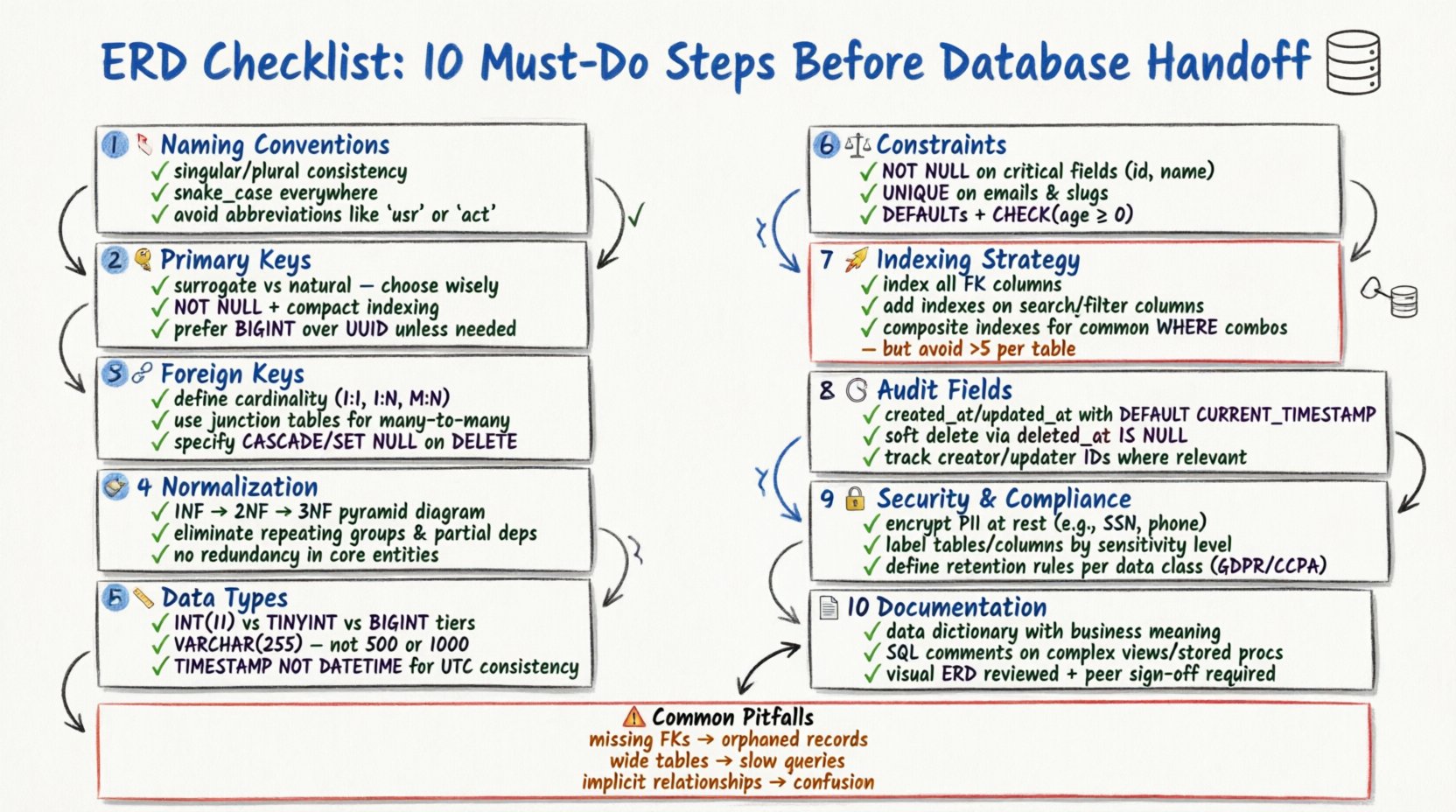
1. Verify Entity Naming Conventions 🏷️
Consistency in naming is the first line of defense against confusion. Every table (entity) and column (attribute) must follow a standardized naming convention. Inconsistent names lead to ambiguity during SQL query writing and maintenance.
- Use Singular or Plural Consistently: Choose one style for table names (e.g.,
UservsUsers) and apply it throughout the schema. Singular names are generally preferred for conceptual modeling, while plural names are often used for physical implementation. - Avoid Reserved Keywords: Ensure no entity or column name conflicts with database-specific reserved words (e.g.,
Order,Group,Index). Using reserved words often requires escaping characters, which reduces code readability. - Use Underscores for Separators: Adopt a snake_case convention for columns and tables (e.g.,
user_profile) to maintain readability across different database engines. - Exclude Abbreviations: Avoid abbreviations unless they are universally understood.
cust_idis better thancid. Clarity should always take precedence over brevity.
2. Define Primary Key Strategy 🔑
Every table must have a unique identifier to distinguish records. The choice of primary key impacts performance, indexing, and data relationships.
- Surrogate vs. Natural Keys: Decide whether to use a surrogate key (an artificial ID like an auto-incrementing integer or UUID) or a natural key (data that already exists, like an email address). Surrogate keys are often preferred for stability, as natural keys may change over time.
- Indexing Implications: Primary keys are automatically indexed. Ensure the chosen key type is compact. Large keys (like long strings) can bloat indexes and slow down join operations.
- Uniqueness Constraints: Explicitly mark the primary key column as
NOT NULL. A primary key cannot contain null values under any circumstances. - Composite Keys: If a table requires a composite primary key (multiple columns), ensure every relationship referencing this table can handle multiple columns. This can complicate foreign key constraints.
3. Map Foreign Key Relationships 🔗
Relationships define how entities interact. Incorrect relationship mapping leads to data orphaning and referential integrity issues.
- Cardinality: Clearly define if a relationship is One-to-One, One-to-Many, or Many-to-Many. One-to-Many is the most common pattern in relational databases.
- Many-to-Many Resolution: A Many-to-Many relationship requires a junction table (link table). Ensure this table includes the foreign keys from both parent entities and, if necessary, its own attributes.
- Referential Actions: Specify how the database should handle updates or deletions. Common options include
CASCADE(delete child records),SET NULL, orRESTRICT(prevent deletion). Choose based on business logic requirements. - Self-Referencing: If a table references itself (e.g., an employee table with a manager column), clearly label this relationship to avoid confusion during schema review.
4. Apply Data Normalization Rules 🧹
Normalization reduces data redundancy and improves integrity. While modern systems sometimes denormalize for performance, understanding the forms is crucial.
| Normal Form | Requirement | Benefit |
|---|---|---|
| 1NF (First Normal Form) | Atomic values, no repeating groups | Ensures each cell contains a single value |
| 2NF (Second Normal Form) | No partial dependencies | Ensures non-key columns depend on the whole key |
| 3NF (Third Normal Form) | No transitive dependencies | Ensures non-key columns depend only on the key |
- Avoid Redundancy: If a piece of information is stored in multiple tables, it should be stored in one place to prevent update anomalies.
- Balance with Performance: Strict normalization can lead to complex joins. Document any intentional denormalization decisions made for query optimization purposes.
- Check Data Dependencies: Ensure that columns are logically dependent on the primary key and not on other non-key columns.
5. Select Appropriate Data Types 📏
Choosing the wrong data type wastes storage space and can lead to calculation errors.
- Integer Precision: Use
TINYINTfor small numbers (0-255) andBIGINTfor large identifiers. Do not useINTfor everything ifSMALLINTsuffices. - String Lengths: Avoid using generic
TEXTorVARCHAR(MAX)unless necessary. Define specific lengths (e.g.,VARCHAR(50)for a state code) to enforce data limits and improve indexing efficiency. - Date and Time: Use
TIMESTAMPorDATETIMEdepending on timezone requirements. Ensure the format is consistent (ISO 8601 is a standard). Avoid storing dates as strings. - Boolean Values: Use a native boolean type if available. If not, use
TINYINT(1)orCHAR(1). Avoid storing booleans as strings (“yes”/”no”).
6. Enforce Constraints and Defaults ⚖️
Constraints protect data quality at the database level. Relying solely on application-level validation is risky.
- Not Null: Mark critical columns as
NOT NULL. This prevents missing data from corrupting reports or logic. - Unique Constraints: Apply unique constraints to columns like email addresses or usernames to prevent duplicate entries.
- Default Values: Set sensible defaults for status columns (e.g.,
status = 'active') or timestamps to avoid manual entry errors. - Check Constraints: Use check constraints to validate business rules (e.g.,
age > 18orprice > 0). This ensures data adheres to logical rules regardless of the source.
7. Plan Indexing Strategy 🚀
Indexes speed up data retrieval but slow down write operations. A balanced approach is necessary.
- Foreign Key Indexes: Always index foreign key columns. This is critical for the performance of join operations between tables.
- Search Columns: Identify columns frequently used in
WHERE,ORDER BY, orGROUP BYclauses. Add indexes to these columns. - Composite Indexes: If queries filter on multiple columns, create a composite index. The order of columns in the index matters and should match the query patterns.
- Avoid Over-Indexing: Too many indexes increase disk usage and slow down
INSERT,UPDATE, andDELETEoperations. Review the necessity of every index.
8. Include Audit Fields 🕒
Traceability is vital for debugging and compliance. Every table handling business logic should track changes.
- Created At: Add a
created_atcolumn to record when a record was first inserted. - Updated At: Add an
updated_atcolumn to record the last modification time. - Soft Deletes: Instead of hard deletion, consider adding a
deleted_atcolumn. This allows data to be restored if needed and preserves referential integrity. - Who Changed: For critical audit trails, include a
created_byandupdated_bycolumn to store the user ID responsible for the action.
9. Address Security and Compliance 🔒
Data security must be baked into the schema, not added as an afterthought.
- PII Handling: Identify Personally Identifiable Information (PII) such as SSNs, credit card numbers, or health records. These should be encrypted or tokenized.
- Data Classification: Label sensitive columns in the schema documentation so developers know which fields require extra security measures.
- Access Control: While specific permissions are often set at the application or database user level, the schema should reflect data sensitivity (e.g., separate tables for public vs. private data).
- Retention Policies: Ensure the schema supports data retention requirements. Some jurisdictions require data deletion after a certain period.
10. Document and Validate the Schema 📄
A schema without documentation is a liability. Documentation ensures future maintainability.
- Data Dictionary: Maintain a document describing every table, column, and relationship. Include business definitions for each field.
- Comments: Use SQL comments within the DDL (Data Definition Language) scripts to explain complex logic or specific business rules.
- Visual Review: Generate the ERD visually to check for circular references, orphaned tables, or missing relationships.
- Peer Review: Have another architect or senior developer review the model. A fresh pair of eyes often catches logical errors missed during initial design.
Common Modeling Errors and Fixes 🛠️
Reviewing the checklist is not enough. You must also be aware of common pitfalls.
| Error | Consequence | Fix |
|---|---|---|
| Missing Foreign Keys | Orphaned records, data inconsistency | Add explicit foreign key constraints |
| Wide Tables | Hard to read, slow queries | Split into related tables (Normalization) |
| Implicit Relationships | Confusion during development | Draw explicit lines in ERD, add FK columns |
| Nullability Issues | Logic errors in application | Set NOT NULL where data is required |
| Hardcoded IDs | Migration difficulties | Use foreign keys instead of hardcoded IDs |
Final Thoughts on Schema Design 🎯
Building a database model is a balance between strict integrity and practical performance. Following this checklist ensures that your data structure supports business needs without compromising on quality. Take the time to review each step before committing the schema to version control. A few hours spent validating the ERD can save weeks of debugging and refactoring later.
Remember that a database model is a living document. As business requirements change, the schema must evolve. Regular audits against this checklist will keep your data architecture healthy and aligned with your goals. Prioritize clarity, consistency, and integrity in every decision you make.
By adhering to these ten steps, you establish a solid foundation for your application. Your team will appreciate the clarity, and your production environment will benefit from reduced errors and better performance. Make the checklist a standard part of your development workflow.