


In today’s fast-paced digital world, business process management is more critical than ever. Whether you’re a business analyst, project manager, developer, or just someone curious about how organizations streamline operations, understanding BPMN 2.0 (Business Process Model and Notation) is a game-changer.
This article will take you from absolute beginner to confident BPMN 2.0 practitioner in just 30 minutes. No jargon overload. No fluff. Just clear, actionable knowledge.
🕒 What You’ll Learn in 30 Minutes
-
What BPMN 2.0 is and why it matters
-
The core elements of BPMN 2.0
-
How to read and create your first process diagram
-
Best practices and common pitfalls
-
Real-world applications
Let’s get started.
🎯 1. What is BPMN 2.0? (The Big Picture)
BPMN 2.0 is a standardized visual language for modeling business processes. It’s like a universal blueprint for how work flows through an organization — from start to finish.
Think of it as “the Rosetta Stone of process modeling”. It allows business analysts, developers, managers, and stakeholders to speak the same language, regardless of technical background.
✅ Why BPMN 2.0?
-
Clarity: Visuals are easier to understand than text-heavy flowcharts.
-
Standardization: No more guessing what symbols mean — BPMN is globally recognized.
-
Integration: Works with workflow engines, automation tools (like Camunda, Activiti, or Bizagi), and enterprise systems.
-
Collaboration: Bridges the gap between business and IT.
💡 Fun Fact: BPMN 2.0 was developed by the Object Management Group (OMG) and released in 2011. It’s now the de facto standard for business process modeling.
🧩 2. Core Elements of BPMN 2.0 (The LEGO Blocks of Process Design)
Every BPMN diagram is built from a few key building blocks. Let’s break them down.
🟦 1. Events – What Happens?
Events are circles that mark something that happens in the process.
There are three main types:
-
Start Event (green circle): The process begins here.
-
End Event (red circle): The process ends here.
-
Intermediate Event (yellow circle): Something happens in the middle (e.g., a timer, message, error).
🎯 Tip: Use icons inside the circle to show type:
⚠️ (Error) – Error event
⏱️ (Timer) – Time-based trigger
📬 (Message) – External message received
🟨 2. Activities – What Gets Done?
Activities are rectangles representing tasks or subprocesses.
-
Task: A single unit of work (e.g., “Approve Loan Application”).
-
Subprocess: A group of tasks (e.g., “Customer Onboarding” with 5 steps inside).
🎯 Pro Tip: Use collapsed subprocesses (with a plus sign) when you don’t need to show internal details. Use expanded ones when you want to drill down.
🟩 3. Gateways – The Decision Points
Gateways are diamonds that control the flow of the process.
Common types:
-
Exclusive Gateway (XOR): One path out (e.g., “Is credit score > 700? Yes → Approve, No → Reject”).
-
Inclusive Gateway (OR): One or more paths can be taken (e.g., “Select payment method: Credit Card, PayPal, or Bank Transfer”).
-
Parallel Gateway (AND): All outgoing paths are taken simultaneously (e.g., “Send email, update CRM, and notify manager”).
🎯 Remember: Gateways determine flow, not actions.
🟧 4. Sequence Flows – The Arrows That Connect It All
Sequence flows are solid lines with arrows that show the order of execution.
✅ Use straight lines or curved lines — it doesn’t matter as long as the flow is clear.
🟪 5. Pools & Lanes – Who Does What?
Pools and lanes represent organizational roles or departments.
-
Pool: A container for a participant (e.g., “Customer”, “Bank”, “HR Department”).
-
Lane: A subdivision within a pool (e.g., “Loan Officer”, “IT Support”).
🎯 Use Pools & Lanes when you need to show cross-functional processes.
🖼️ 3. Build Your First BPMN Diagram (In 10 Minutes)
Let’s model a simple loan approval process.
🎯 Process: Customer Loan Application
This BPMN (Business Process Model and Notation) diagram illustrates a collaborative workflow between a Customer and a company called Hello World Company. The process covers everything from the initial request to final product delivery and invoicing.
The diagram is divided into two main Pools (Customer and Hello World Company), with the company pool further divided into Lanes (Design, Manufacturing, and Delivery departments).
Phase 1: Initiation and Design
The process begins in the Customer pool and moves quickly into technical development.
-
Issue Request: The customer starts the process by providing “2D Conceptual Drawings.”
-
Develop 3D Sketch: The Design Dept. receives these drawings and creates a 3D model.
-
Parallel Processing: The diagram uses Parallel Gateways (the diamonds with the plus sign) to show that the company performs two tasks simultaneously:
-
Estimate Cost (Design Dept.)
-
Prepare Prototype (Manufacturing Dept.)
Phase 2: Negotiation and Approval
Once the internal work is ready, the focus shifts back to the customer for evaluation.
-
Review Prototype: The company provides a “Production Plan,” and the customer reviews the work.
-
Decision Point 1 (Negotiation Proceed?): If “No,” the process ends immediately. If “Yes,” it moves to the next check.
-
Decision Point 2 (Accept Prototype?):
-
No: The customer triggers a Request Change, which loops back to the Design Dept. to update the 3D sketch.
-
Yes: The customer proceeds to Place Order.
Phase 3: Production and Fulfillment
After the order is placed, the internal “Hello World Company” machine kicks into high gear across three departments.
-
Issue Production Request: The Design Dept. sends the formal request to Manufacturing.
-
Commence Production: The Manufacturing Dept. builds the final product.
-
Deliver Products: Once built, the Delivery Dept. takes over to ship the items to the customer.
Phase 4: Closing the Loop
The final steps ensure the customer is satisfied and the company is paid.
-
Verify Product: The customer receives and checks the delivery.
-
Prepare Invoice: Simultaneously (or immediately following verification), the Design Dept. prepares the invoice.
-
End: The process concludes once the invoice is issued and the product is verified.
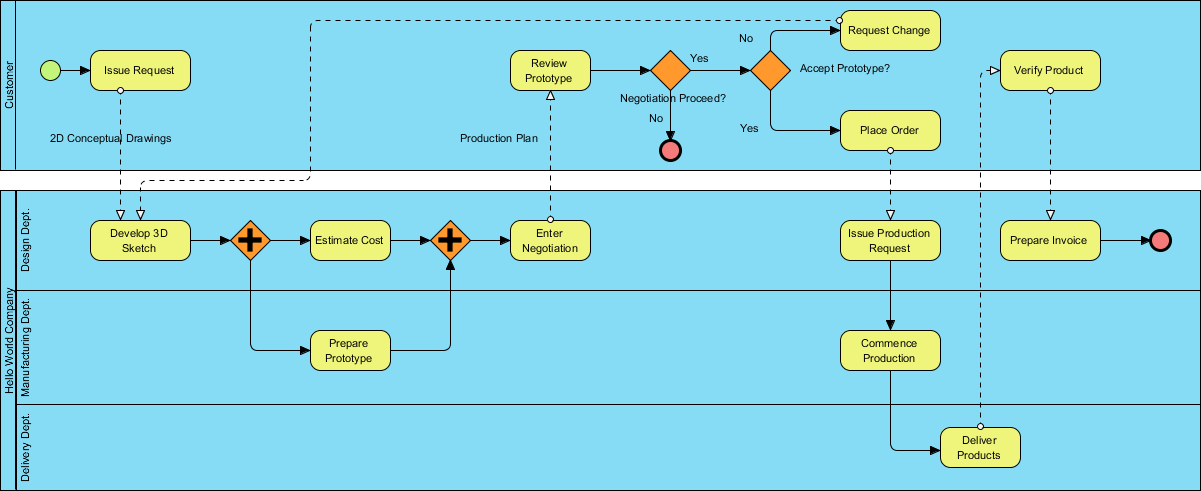
Key BPMN Elements Used
| Element | Symbol in Image | Meaning |
|---|---|---|
| Start Event | Green Circle | Where the process begins. |
| End Event | Red Circle (bold) | Where the process terminates. |
| Parallel Gateway | Orange Diamond with “+” | Tasks happening at the same time. |
| Exclusive Gateway | Orange Diamond | A decision point (Yes/No). |
| Message Flow | Dashed Arrows | Communication passing between the Customer and the Company. |
| Sequence Flow | Solid Arrows | The order of operations within a single pool. |
🛠️ 4. Resource to Practice BPMN 2.0
- Business Process Design with Powerful BPMN Software – Visual Paradigm: An in-depth overview of Visual Paradigm’s intuitive BPMN 2.0 modeler, highlighting its role in creating professional Business Process Diagrams quickly, with features like process drill-down, simulation, animation, and integration with other modeling standards.
- Online BPMN Diagram Tool – Visual Paradigm: A guide to Visual Paradigm’s online BPMN tool for drawing business process diagrams in the cloud, emphasizing ease of use, professional templates, drag-and-drop functionality, and support for BPMN workflows accessible to anyone.
- Introduction to BPMN Part I – Visual Paradigm: A foundational tutorial introducing BPMN concepts and providing step-by-step guidance on creating and drawing BPMN diagrams using Visual Paradigm’s modeling features.
- How to Draw BPMN Diagram? – Visual Paradigm: A practical step-by-step BPMN tutorial demonstrating how to create business process diagrams in Visual Paradigm, covering essential elements and an easy-to-use interface for beginners and experts.
- How to Create BPMN Diagram? – Visual Paradigm: An instructional resource explaining BPMN basics and the process of building workflow diagrams with Visual Paradigm’s dedicated BPMN software for process and workflow design.
- BPMN Notation Overview – Visual Paradigm: A comprehensive guide to BPMN symbols, notations, and diagram examples, showcasing how Visual Paradigm’s award-winning tool supports full BPMN modeling and visualization.
- What is BPMN? – Visual Paradigm: An explanatory overview of BPMN as a standard notation for business workflows, detailing its history, benefits, and how Visual Paradigm enables effective process modeling and analysis.
🚫 5. Common Mistakes to Avoid
Even experienced modelers slip up. Avoid these:
-
Overcomplicating the Diagram
→ Keep it simple. Use subprocesses to hide complexity. -
Using the Wrong Gateway Type
→ Use Exclusive for “only one path”, Parallel for “all paths”, Inclusive for “any or all”. -
No Start or End Events
→ Every process must have a Start and End. -
Ignoring Pools & Lanes
→ If multiple departments are involved, use them to clarify responsibility. -
Using BPMN for Non-Process Work
→ BPMN is for processes, not data models or system architecture.
🌍 6. Real-World Use Cases of BPMN 2.0
BPMN isn’t just theory. It’s used everywhere:
-
Banking: Loan approvals, fraud detection workflows
-
Healthcare: Patient admission, treatment plans
-
E-commerce: Order fulfillment, returns processing
-
HR: Employee onboarding, leave requests
-
Manufacturing: Production scheduling, quality checks
🎯 Case Study: A bank used BPMN to model their loan approval process. They reduced approval time by 40% by identifying bottlenecks and automating tasks.
✅ 7. Quick Recap: Your 30-Minute BPMN 2.0 Mastery Checklist
| Task | Done? |
|---|---|
| Understand what BPMN 2.0 is | ☐ |
| Know the 5 core elements (Events, Activities, Gateways, Flows, Pools/Lanes) | ☐ |
| Create a simple process diagram (e.g., loan approval) | ☐ |
| Use a free tool (e.g., Draw.io) to practice | ☐ |
| Avoid common mistakes | ☐ |
| Think about real-world applications | ☐ |
✅ You’re now a BPMN 2.0 pro!
🎓 Next Steps: Level Up Your Skills
Now that you’ve mastered the basics, here’s where to go next:
-
Learn Advanced BPMN Concepts:
-
Message Flows (between pools)
-
Data Objects & Associations
-
Error & Compensation Events
-
Event-Driven Processes
-
-
Integrate with Automation Tools:
-
Use Camunda or Activiti to run your BPMN diagrams.
-
Automate tasks like sending emails, updating databases, or triggering APIs.
-
-
Get Certified:
-
BPMN 2.0 Certification (by OMG or BPM Institute)
-
Camunda Certification (great for developers)
-
-
Join the Community:
-
Reddit: r/BPMN
-
LinkedIn Groups: BPMN & Process Management
-
Conferences: BPM Conference, Camunda Community Days
-
🏁 Final Thought: From Zero to Hero
You started this article knowing nothing about BPMN 2.0.
Now, you can read, create, and communicate complex business processes using a universal language.
That’s not just knowledge — it’s power.
🌟 Remember: The best processes aren’t just efficient — they’re understood. And BPMN 2.0 is your tool to make that happen.
📌 Download Your Free BPMN 2.0 Cheat Sheet (PDF)
👉 Click here to download a printable summary of all symbols, flow rules, and best practices (Note: In a real article, this would be a link)
🙌 You Did It!
From zero to hero in 30 minutes.
Now go model your first process — and change how your team works.
The future of business process management is visual. And you’re now part of it.
🚀 Go build something great.