Modeling a Social Media Platform Database: AI-Powered ERD Generation in Visual Paradigm

Learn how to use Visual Paradigm’s AI to instantly generate professional ER diagrams for a social media platform database from simple text prompts.

Let’s be honest: starting a database design from a blank canvas can be a daunting task. Whether you are an experienced software architect or a student learning data modeling, manually drawing entities, defining attributes, and routing relationship lines takes significant effort. This is where AI Entity Relationship Diagram (ERD) generation changes the game. By simply describing your project ideas—like a “Social Media Platform”—you can use Visual Paradigm Desktop to instantly transform natural language into a professional, standards-compliant data model.

This feature isn’t just about speeding up the process; it’s about bridging the gap between a business requirement and a technical schema. In this deep dive, we’ll look at how you can go from a simple text prompt to a fully structured database diagram containing users, posts, and comments in just seconds using this intelligent database design tool.

Quick summary: Key takeaways

  • Text-to-Model Efficiency: Convert plain English descriptions into complex ER diagrams instantly.
  • Intelligent Detection: The AI automatically identifies entities, attributes, primary keys, and relationships.
  • Standard Notation: Generates diagrams that follow industry-standard ER conventions (Crow’s Foot, etc.).
  • Fully Editable: The result is a native Visual Paradigm diagram, ready for further refinement and SQL generation.

Step 1: Defining the Scope with Natural Language

The process begins with a simple concept. You don’t need to know SQL syntax or drag-and-drop dozens of boxes manually. Instead, you access the AI Diagram Generation feature within the tool. As shown in the workflow below, you simply select “Entity Relationship Diagram” as your target output. The power lies in the prompt.

In our example, we wanted to visualize the backend of a social network. We entered the prompt: “Visualize an ERD describing the database structure of a social media platform”. This plain text is all the AI needs to understand the domain requirements, inferring that a social platform typically needs users, content, interactions, and notifications.

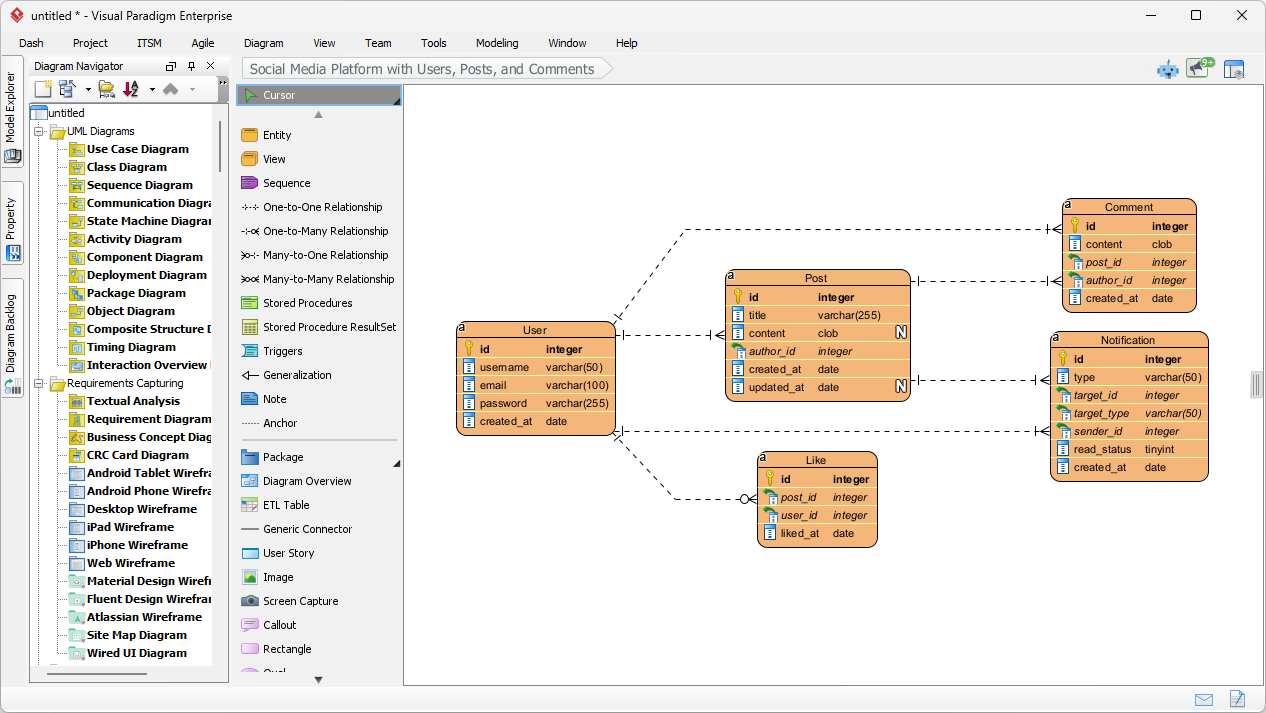
This is a screenshot of Visual Paradigm (aka. Visual Paradigm Desktop). It is now showing the use of AI diagram generation to

Step 2: Analyzing the AI-Generated Data Model

Once you hit “OK,” the AI analyzes your text to identify the core entities (tables) and their associations. It doesn’t just drop random boxes on the canvas; it applies intelligent relationship and cardinality detection to structure the data logic. Within moments, you are presented with a complete diagram that looks like it took hours to design manually.

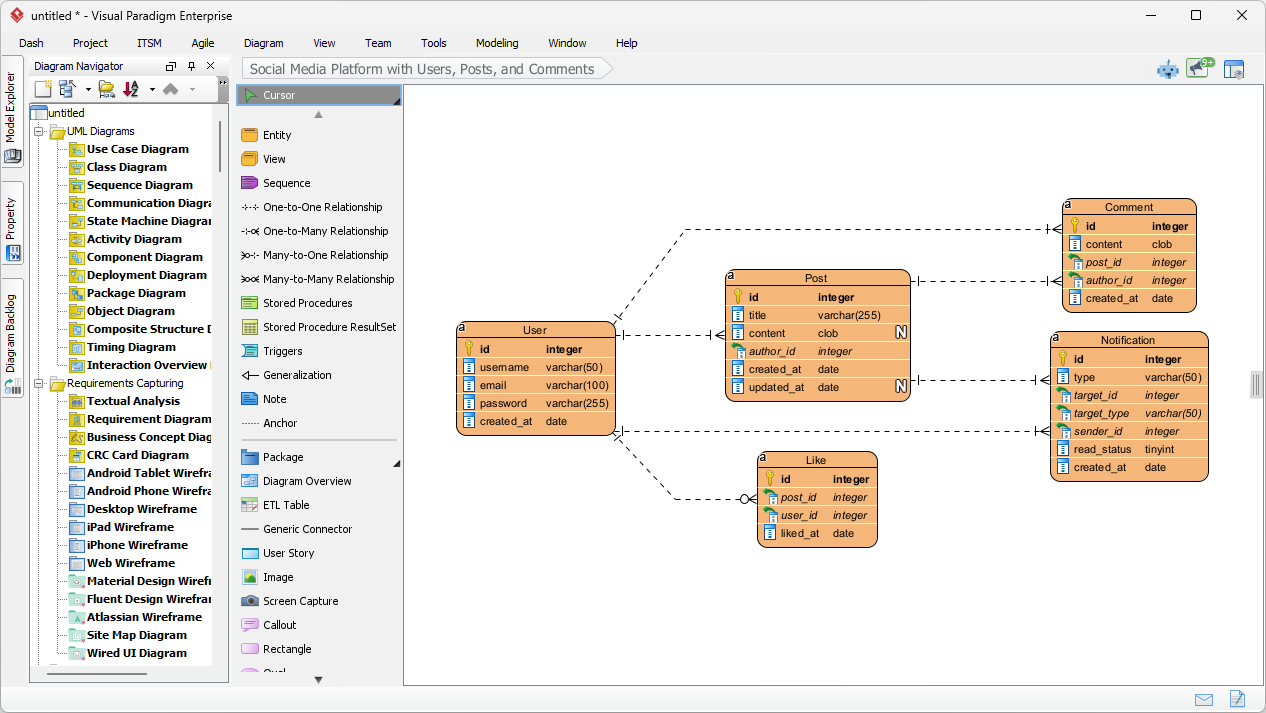
Looking at the result below, you can see the AI correctly generated a schema perfectly suited for a social media app. It created a User entity with standard attributes like username, email, and password. It logically connected the User to a Post entity (one-to-many relationship), recognizing that one user creates many posts. It even fleshed out the details by adding Comment, Like, and Notification entities, complete with foreign keys (e.g., post_id, author_id) and appropriate data types like varchar, clob, and integer.

This is the screenshot of Visual Paradigm Desktop. It shows a Entity Relationship Diagram generated by AI, based on the descr

Why This AI Feature is a Must-Have for Modelers

The beauty of using an AI-powered database modeling tool is that it handles the heavy lifting of layout and organization. As seen in the generated diagram, the entities are arranged to minimize crossing lines, making the data structure easy to read and validate.

Automatic Attribute and Key Assignment

Notice how the AI automatically assigned Primary Keys (PK) to every entity, represented by the key icon. It also made smart guesses on data types—assigning clob (Character Large Object) for the “content” of a post because it knows posts can be long, while keeping “username” as a standard varchar(50). This saves you the tedium of manually setting properties for every single column during the conceptual phase.

From Static Image to Functional Project

Unlike simple image generators, the output here is a fully editable native diagram. If you decide later that a “Post” should also have a “Category,” you can simply add that attribute using the diagram editor. This seamless transition to implementation means you can use this diagram as a foundation to generate DDL scripts for MySQL, PostgreSQL, or Oracle, effectively moving from a rough idea to a physical database schema in one workflow.

How to Create Your Own AI ERD

Ready to try this easy-to-use ERD creator? Here is the simple workflow to replicate the results shown above:

  1. Launch Visual Paradigm: Open a new or existing project.
  2. Open AI Tool: Navigate to Tools > AI Diagram Generation.
  3. Select Diagram Type: Choose “Entity Relationship Diagram” from the dropdown menu.
  4. Enter Description: Type a clear description of your system (e.g., “A library system with books, members, and loans”).
  5. Generate: Click OK and watch your diagram appear.
  6. Refine: Use the editor to tweak relationships or add specific constraints if needed.

Conclusion

Visual Paradigm’s AI Entity Relationship Diagram Generation transforms the way we approach data modeling. By turning a simple sentence about a “social media platform” into a comprehensive, technically accurate ERD, it removes the barriers to entry for database design. Whether you are prototyping a new application or documenting an existing system, this tool provides a robust, professional starting point instantly.

Stop drawing boxes one by one. Experience the speed of AI-assisted modeling today.

Download Visual Paradigm Desktop and try AI Diagram Generation now


Related Links

Visual Paradigm provides a comprehensive suite of ERD (Entity-Relationship Diagram) tools that facilitate the design of scalable database schemas through both traditional visual editors and AI-driven automation. These tools support various notations, such as Chen notation, and enable the seamless transition from conceptual modeling to physical database implementation and reverse engineering.

  1. Visual Paradigm ERD Tool – Create Entity-Relationship Diagrams Online: A web-based tool that enables the intuitive drag-and-drop design of professional database schemas.
  2. Database Design with ERD Tools – Visual Paradigm Guide: A resource for architects focused on building scalable and robust databases using data modeling best practices.
  3. DBModeler AI: Intelligent Database Modeling Tool: An AI-driven application designed for automated database modeling, schema generation, and live SQL testing.
  4. Free ERD Tool – Design Databases Online with Visual Paradigm: Offers a no-installation, browser-based solution for creating professional entity-relationship diagrams at no cost.
  5. Chen Notation ERD Editor – Advanced Entity-Relationship Modeling: A specialized editor providing full support for entities, attributes, relationships, and cardinality using precise Chen notation.
  6. Visual Paradigm ERD Tool for Database Design – Complete Solution: A comprehensive tool for developers and architects to model, visualize, and generate databases with high efficiency.
  7. New Diagram Types Added to AI Diagram Generator: DFD & ERD: This release highlights the ability to generate ERDs instantly from natural language prompts using AI.
  8. Streamlining Entity-Relationship Modeling with Visual Paradigm: An article detailing how to simplify the modeling process from the initial concept to final database deployment.
  9. Introduction to Data Modeling: ERD, Code Generation & Reverse Engineering: An introductory guide covering the essential lifecycle of diagramming and reverse engineering databases.
  10. What is an Entity-Relationship Diagram (ERD)? – Visual Paradigm Guide: An explanatory guide covering the core components and significance of ERDs within the broader context of database design.

A comprehensive guide to Entity-Relationship Diagram (ERD) modeling

ERDs remain one of the most important tools for designing relational databases, communicating data requirements, and avoiding costly redesigns later.

1. What is an ERD and Why Do We Use It?

An Entity-Relationship Diagram (ERD) is a visual model that shows:

  • The things we want to store (entities)
  • The properties of those things (attributes)
  • How those things are connected (relationships)
  • How many of each thing can be connected (cardinality / multiplicity)

Main purposes in 2025–2026:

  • Communicate structure between developers, analysts, product managers, and domain experts
  • Serve as single source of truth before writing DDL (CREATE TABLE …)
  • Catch logical mistakes early (redundancy, missing constraints, wrong cardinalities)
  • Support microservices / domain-driven design boundary identification
  • Generate documentation automatically in many modern tools

2. Core Notations Used Today

Three main families are still actively used:

Notation Popularity (2025) Readability Best For Symbols for cardinality
Crow’s Foot Highest Very high Most teams, tools (Lucidchart, dbdiagram, Draw.io, QuickDBD, etc.) Crow’s feet, bars, circles, dashes
Chen Medium Medium Academia, some conceptual modeling Numbers (1, N), diamonds heavy
IDEF1X Low Medium Some government / legacy systems Specific box-in-box notation

Crow’s Foot is the de-facto industrial standard in 2025–2026 → we will use it in this guide.

3. Basic Building Blocks (Crow’s Foot)

Concept Symbol Description Example
Strong Entity Rectangle Exists independently, has its own primary key Customer, Order, Product
Weak Entity Double rectangle Existence depends on owner entity; partial key + owner’s key = full key OrderLine (depends on Order)
Attribute Oval (connected to entity) Property of an entity name, price, email
Primary Key Underlined attribute Uniquely identifies entity instance customer_id, isbn
Multivalued Attr Double oval Can have multiple values (usually becomes separate table) phone_numbers, tags
Derived Attr Dashed oval Can be calculated from other attributes age (from birth_date)
Composite Attr Oval containing other ovals Attribute made of several sub-attributes full_address → street, city, zip

4. Relationships & Cardinality (The Heart of ERD)

Relationship = diamond (sometimes just a line in modern minimalist style)

Cardinality answers two questions for each side of the relationship:

  • Minimum number of related instances? (0 or 1)
  • Maximum number of related instances? (1 or many = N)
Symbol (Crow’s Foot) Minimum Maximum Meaning (from this side) Common name Example sentence
Circle (○) 0 Optional Zero A customer may have placed zero orders
Short bar ( ) 1 Mandatory One (exactly)
Crow’s foot (> ) 0 N Zero or many Optional many A customer can place many orders
Bar + crow’s foot (> ) 1 N One or many Mandatory many
Double bar ( ) 1 1 Exactly one

Common patterns (written left → right):

  • 1:1 || — || Person ↔ Passport (current)
  • 1:0..1 || — ○| Department ↔ Manager (some depts have no manager)
  • 1:N || — >| Author → Book
  • 1:0..N || — ○> Customer → Order
  • M:N >| — >| Student ↔ Course (many-to-many)

5. Participation Constraints

  • Total participation = double line from entity to relationship (every instance must participate)
  • Partial participation = single line (some instances may not participate)

Examples:

  • Every Order must have at least one OrderLine → total participation (double line) + 1..N
  • Not every Customer has placed an Order → partial + 0..N

6. Weak Entities & Identifying Relationships

Weak entity:

  • Cannot exist without its owner (strong entity)
  • Its primary key = owner’s PK + partial key (discriminator)

Symbol:

  • Double rectangle
  • Identifying relationship = double diamond or bold line
  • Usually 1:N identifying relationship (owner → many weak entities)

Classic example:

Order contains OrderLine
(double rect + bold line)
PK: order_id PK: (order_id, line_number)

7. Step-by-Step ERD Modeling Process (Practical 2025–2026 Workflow)

  1. Understand the domain deeply Talk to stakeholders → collect nouns & verbs

  2. List candidate entities (nouns) → Filter real-world objects that need to be stored independently

  3. List attributes for each entity → Mark primary keys (underlined) → Identify candidate keys / natural keys → Spot multivalued, composite, derived attributes

  4. Find relationships (verbs) → Ask: “Which entities are directly associated?” → Avoid transitive relationships (they usually hide missing entities)

  5. Determine cardinality & participation for each direction → Write 4–6 sentences using the template: “Each A can/must be associated with zero/one/many B.” “Each B can/must be associated with zero/one/many A.”

  6. Handle M:N relationships Almost always resolve them into junction table (weak or strong entity) Add attributes if the relationship itself has properties (e.g. enrollment_date, grade)

  7. Identify weak entities Ask: “Can this entity exist without the other?”

  8. Add supertype/subtype (if needed — inheritance) Use circle with d (disjoint) / o (overlapping)

  9. Review for common smells

    • Fan trap / chasm trap
    • Too many M:N without attributes → missing entity?
    • Redundant relationships
    • Missing mandatory participation
    • Entities with only foreign keys → probably weak entity
  10. Validate with stakeholders using concrete examples

8. Modern Best Practices & Tips (2025–2026)

  • Prefer minimalist style (no diamonds — just labeled lines)
  • Use verb phrases on relationship lines (places, contains, taught_by)
  • Color-code domains / bounded contexts in large models
  • Keep logical ERD separate from physical (data types, indexes come later)
  • Version control the .drawio / .dbml / .erd file
  • Use tools that can generate SQL / Prisma / TypeORM schema (dbdiagram.io, erdgo, QuickDBD, Diagrams.net + plugins)
  • For very large systems → modular ERDs per bounded context

Quick Reference – Most Common Patterns

  • Customer 1 —— 0..* Order
  • Order 1 —— 1..* OrderLine
  • Product * —— * Category → resolve to junction + attributes
  • Employee 1 —— 0..1 Department (manager)
  • Department 1 —— 0..* Employee (members)
  • Person 1 —— 0..1 Car (current_car)

Recommended AI ERD Tool

Visual Paradigm offers a comprehensive ecosystem for ERD visual modeling, combining desktop-grade engineering power with cloud-based agility, AI acceleration, and team collaboration features. This makes it suitable for individual modelers, agile teams, enterprise architects, and database professionals working on everything from quick prototypes to complex legacy system re-engineering.

The ecosystem primarily consists of two main platforms that complement each other:

  • Visual Paradigm Desktop (downloadable application for Windows, macOS, Linux) — focused on deep, professional database engineering.
  • Visual Paradigm Online (browser-based, no installation required) — optimized for fast, collaborative, AI-assisted diagramming.

Both support core ERD notations (including Crow’s Foot and Chen), conceptual/logical/physical levels, and full traceability between model layers.

Key Ways the Ecosystem Helps in the ERD Visual Modeling Process

  1. Intuitive & Fast Diagram Creation
    • Drag-and-drop interface with resource-centric modeling (no constant toolbar switching).
    • Automatic foreign key column generation when creating relationships.
    • Support for all standard ERD elements: strong/weak entities, identifying/non-identifying relationships, multivalued/derived/composite attributes, stored procedures, triggers, views, unique constraints, etc.
    • Sub-diagrams help break large enterprise schemas into logical views.
  2. Full Lifecycle Support: Conceptual → Logical → Physical
    • One-click derivation: generate logical ERD from conceptual, physical from logical (with automatic traceability and navigation via Model Transitor).
    • Maintain consistency across abstraction levels — changes in one level can propagate intelligently.
  3. AI-Powered Acceleration (especially strong in VP Online)
    • DB Modeler AI and AI Diagram Generator — describe your data requirements in plain English (e.g., “We have customers who place orders containing products from multiple categories”), and the AI instantly generates a normalized, professional ERD complete with entities, relationships, and keys.
    • Supports Chen notation for ERD in the AI generator.
    • Ideal for rapid prototyping or when starting from vague business requirements.
  4. Database Engineering & Synchronization
    • Forward engineering — generate complete, error-free DDL scripts (or directly create/update databases) for major DBMS: MySQL, PostgreSQL, Oracle, SQL Server, SQLite, Amazon Redshift, etc.
    • Reverse engineering — import existing databases and instantly reconstruct visual ERDs (extremely helpful for legacy systems or documentation recovery).
    • Patch / diff tool — compare model vs. live database, generate delta scripts to apply changes safely without data loss.
    • Enter sample data directly in ERD entities → export to database for quick seeding.
  5. Team Collaboration & Versioning
    • Real-time concurrent editing (multiple users on the same ERD simultaneously).
    • Built-in conflict detection and smart resolution.
    • Full revision history, commit/update, revert changes.
    • Commenting directly on diagram elements for feedback.
    • Publish & share — generate web links, embed diagrams, export to PDF/image/HTML for stakeholders who don’t have licenses.
    • Centralized cloud repository (VPository) keeps everyone aligned across dev/test/prod environments.
  6. Integration Across the Broader Modeling Ecosystem
    • Link ERD entities to other diagrams: reference a data entity in DFDs, UML class diagrams, wireframes, BPMN processes, etc.
    • Generate ORM code (Hibernate, etc.) from ERD → bridge visual model to application layer.
    • Visual Diff — compare different versions or model vs. database schema.
    • Export professional data dictionary / specifications for documentation & handover.

Quick Comparison: When to Use Which Part of the Ecosystem

Need / Scenario Recommended Platform Key Strengths in ERD Context
Deep reverse engineering, patching prod DB, ORM generation Desktop Full engineering suite, offline work, advanced synchronization
Quick sketches, AI-assisted design from text, zero setup Online AI generation, browser access, lightweight
Real-time team modeling sessions Online (or Desktop + Teamwork Server) Simultaneous editing, commenting, conflict resolution
Enterprise-scale schemas with sub-models Desktop Better performance for very large models
Stakeholder reviews & sharing Both (publish feature) Web links, embeds, PDF exports
Free / non-commercial use Community Edition (Desktop) or Free VP Online account Full ERD editing, limited advanced engineering

In summary, Visual Paradigm’s ecosystem removes friction at every stage of ERD modeling — from initial brainstorming (AI + quick drag-drop), through collaborative refinement and validation, to final implementation and maintenance (round-trip engineering). It is particularly strong when your workflow involves both visual communication and actual database delivery.

ERD Articles