AIと手動による図面作成:どちらがあなたのワークフローに合っているか?

長年にわたり、図面を作成するには、図形を手動でドラッグし、接続線を整列させ、コンポーネントにラベルを付ける必要がありました。正確ではありましたが、時間がかかりました。
今では、Visual Paradigm OnlineのAIチャットボットのようなAI駆動型ツールが、図面の作成方法を変革しました。テキストのプロンプトを数秒で完全なUML、BPMN、またはフローチャート図に変換します。

しかし、どちらの方法があなたのワークフローに適しているでしょうか?AIと手動による図面作成の長所と短所を検討し、両方を組み合わせることで最適な結果が得られることを紹介します。

手動による図面作成:より多くの努力を払う代わりに完全な制御

手動による図面作成は長年、専門家にとって標準的なアプローチです。完全な創造的自由を提供します——すべての要素、レイアウト、接続は、意図した通りに丁寧に作成されます。

利点:

  • 完全なデザイン制御:レイアウト、命名、視覚的詳細をすべて自分で決定できます。
  • より良い概念的理解:図形を手動で描くことで、システムの論理構造に対する理解が深まります。
  • 高いカスタマイズ性:プレゼンテーションの洗練や特定の視覚的基準の達成に最適です。

課題:

  • 時間のかかる作業:複雑な図面は完成まで数時間かかることがあります。
  • 繰り返しの調整:小さな変更でも、大幅な再配置が必要になることがあります。
  • 高い習得難易度:初心者はモデリング表記やベストプラクティスに苦労することが多いです。

経験豊富なモデラーにとって、正確性が求められる場面で手動による図面作成は依然として価値がありますが、より多くの時間と労力が求められます。

AIによる図面作成:スケールにおけるスピードとシンプルさ

Visual Paradigm OnlineのAIチャットボットのようなAI駆動型図面作成ツールは、自然言語を使って図面を自動生成します。
必要なものを簡単に説明するだけです——たとえば:

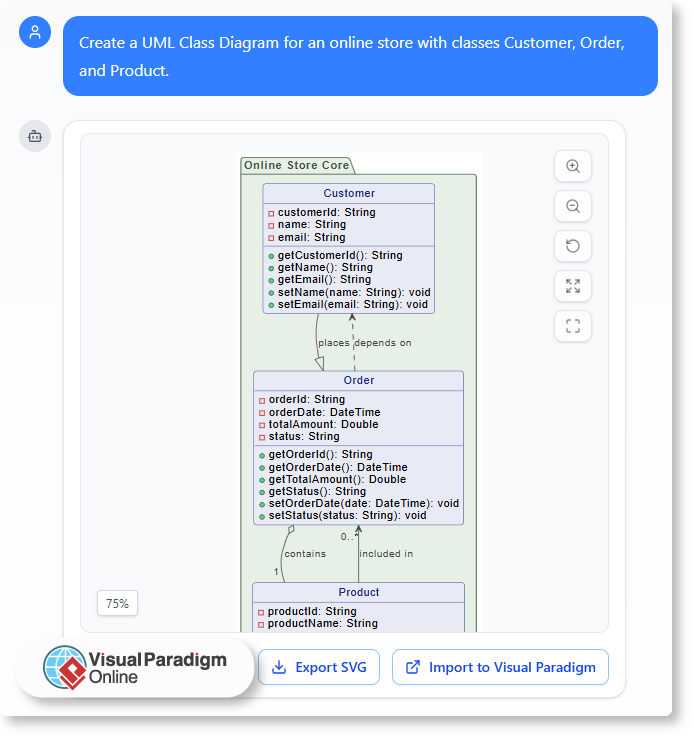
「オンラインストア用のUMLクラス図を作成してください。クラスにはCustomer、Order、Productを含む。」

数秒のうちに、ツールは構造化された編集可能な図面を生成します。
UML Class Diagram for an online store with classes Customer, Order, and Product.

利点:

  • 即時結果:瞬時に完全な図面を生成できます。
  • モデリングの専門知識は不要:AIが構文と構造を自動で処理します。
  • ブレインストーミングに最適:初期段階のアイデアを迅速に可視化したり、複数のバージョンを比較したりできます。

課題:

  • レイアウトへの制御が少ない:AIは正確性に注力しており、プレゼンテーションの美しさにはあまり配慮しません。
  • 創造的な微調整が限られている:一部のカスタマイズは依然として手動での編集が必要です。
  • プロンプトの明確さに依存する:要請の説明の質によって結果が異なります。

AIによる図面作成はスピード、アクセス性、自動化において優れています——特に迅速な反復やコンセプトの検証に役立ちます。

バランスを見つける:なぜ両方が必要なのか

一方のアプローチを選ぶのではなく、現代のワークフローはAI支援による手動編集によって最大の利点を得ます。
Visual Paradigm OnlineのAIチャットボットは、両方の世界を一つの環境に統合しています:

AI生成から始めましょう — テキストから即座にベース図を生成します。

  • AIに調整や説明を依頼する — たとえば「継承関係を追加」や「この相互作用を説明」など。
  • 手動編集に切り替えましょう — エディタ内で直接要素を精緻化、再配置、スタイル調整します。

このハイブリッドアプローチは時間を節約しつつ完全な制御を維持し、ブレインストーミングから最終ドキュメント作成まで生産性を保ちます。

実際の活用事例

  • ソフトウェア設計者:AIでUML図を下書きし、手動で微調整して正確なシステムドキュメントを作成。
  • ビジネスアナリスト:会議用にBPMNやフローチャートを生成し、重要なステップを明確化するために微調整。
  • 学生および教育者:リアルタイムの例とフィードバックを使って、UMLやプロセスモデリングをより迅速に学習。

各用途はAIの効率性を活かしつつ手動の正確性を失わず、プロフェッショナルおよび教育現場の両方に理想的なバランスを提供。

Visual Paradigm Onlineによる両方の長所を兼ね備えた環境

Visual Paradigm Onlineは、AI支援による作成と手動での微調整をシームレスにサポートする統合型モデリングワークスペースを提供します。
次のようなことができます:

  1. 自然言語のプロンプトから図を生成。
  2. AIベースの説明や改善をリクエスト。
  3. 視覚エディタ内ですべての要素を手動で編集。
  4. クラウドに即座に作業を保存・共有。

自動化と人間の創造性を統合することで、ワークフローを高速かつ柔軟に保ちつつ、品質や明確性を損なわず。

結論

AIと手動による図作成はそれぞれ独自の強みを持っています。手動設計は正確さと制御を提供し、AIはスピードと簡便さを提供。
Visual Paradigm OnlineのAIチャットボットは両者を統合し、迅速に開始し、簡単に微調整し、より短時間でプロフェッショナルな成果を提供可能に。
システム設計、プロセスマッピング、UML学習のいずれにおいても、このバランスにより図がワークフローに本当に適合します。
AIによる図の生成を日々の業務プロセスに統合する

現代のプロジェクトは明確さ、スピード、協働を求めるが、アイデアを視覚化する作業は予想以上に時間がかかることが多い。プロセスの記録、概念の説明、新しいシステムの計画など、図を作成する作業は貴重な時間を消費する。このような状況において、Visual Paradigm Online AIチャットボットのようなAIツールが、業務プロセスを根本から再定義する。

自然言語を理解し、編集可能な図を生成することで、チャットボットはあなたが作業を行う方法を変革する——コンセプトから完成までを一貫してサポートする。

一日を賢く始める方法

白紙のキャンバスから始めるのではなく、会話から始めることができる。自分のアイデアやワークフローを平易な言葉で説明し、AIに最初のバージョンを作成してもらう。

たとえば:

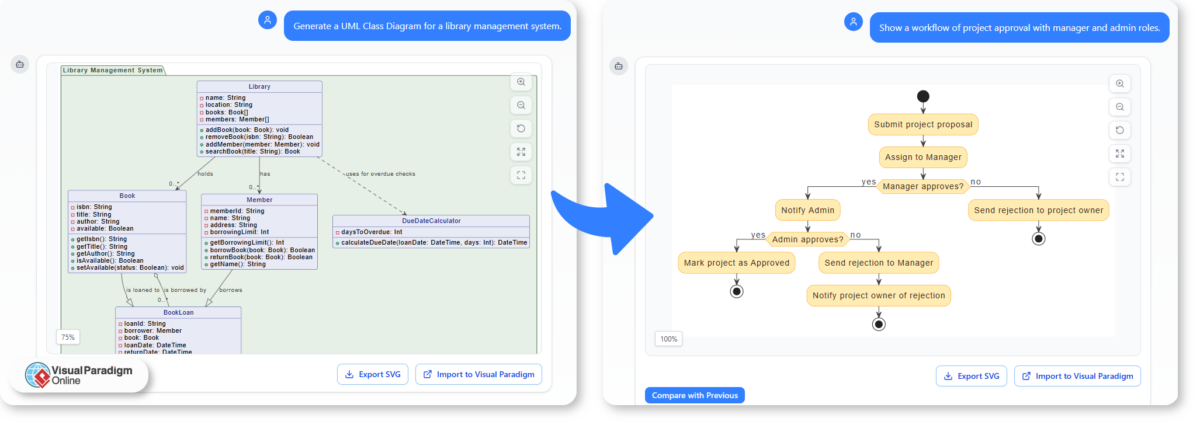
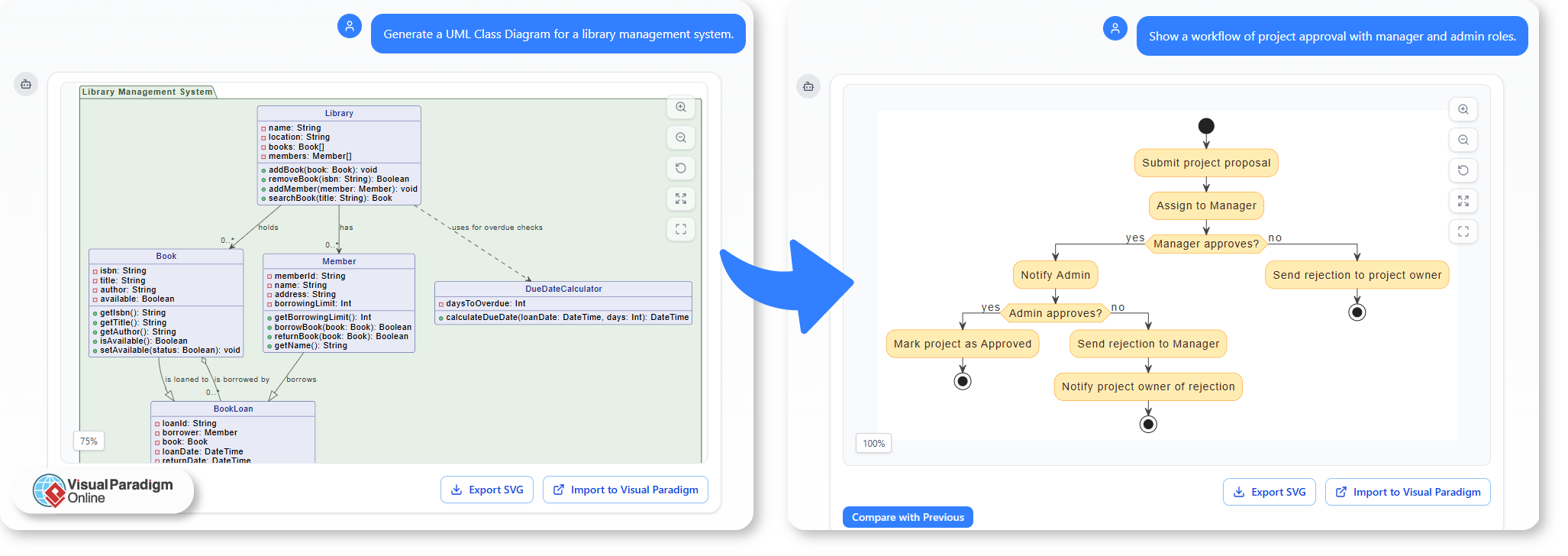
  • 「図書管理システムのUMLクラス図を生成してください。」
  • 「マネージャーと管理者の役割を含むプロジェクト承認のワークフローを表示してください。」

これらのプロンプトは、すぐに構造化された図を生成し、Visual Paradigm Onlineの図編集ツールで微調整が可能になる。

A Smarter Way to Start Your Day with AI Chatbot

AIをドキュメント作成に活用する

ドキュメント作成はしばしば複雑なシステムやプロセスを説明することを含む。AIによる図の生成は、文章による記述を視覚化することで、理解を深める。

以下のような用途に活用できます:

  • 書いたメモやレポートから直接、システム設計を図示する。
  • 手動で再描画せずに、ドキュメントの更新用に迅速な図を生成する。
  • AI生成のテンプレートを使用して、図の統一性を維持する。

これにより、技術的またはビジネス上のドキュメントの維持がより迅速かつ一貫性を持って行える。

教育と学習を支援する

教育者やトレーナーもAI生成の図を授業に取り入れることができる。抽象的なアイデアを数秒で視覚的な例に変換することで、AIは学習をよりインタラクティブで効果的なものにする。

たとえば:

  • 教師は、システムの説明を入力するだけで、UMLシーケンス図の仕組みを簡単に説明できる。
  • 学生は、単一のプロンプトを変更することで、結果として得られる図にどのような影響があるかを探索できる——実験を通じて構造を学ぶ。
  • トレーニング資料は、講義内容に合わせて自動生成された視覚的要素で豊かにできる。

この実践的なアプローチは、理論的学習と実際の応用をつなぐ。

設計計画のスピードアップ

システムやワークフローを計画する際、AIは最終決定前にアイデアを迅速に視覚化する手段をチームに提供する。図のフォーマットに気を配ることなく、自由にブレインストーミングし、さまざまな構造をテストし、迅速に反復できる。

一般的なシナリオには以下がある:

  • プロジェクト計画:チームの責任分担や承認プロセスを可視化する。
  • ソフトウェア設計:議論用にシステムの構造や関係性をドラフトする。
  • プロセス改善:迅速なAIドラフトを用いてワークフローをマッピングすることで、非効率な点を特定します。

ベース構造が整うと、VP Onlineで共同で微調整が可能です。

AIを日常の一部にする

AIをワークフローに統合することは、創造性を置き換えることではなく、障壁を取り除くことである。構造の自動生成により、AIは論理、流れ、コミュニケーションに集中できるようにします。

日々の業務において、それは以下の意味です:

  • 手作業で図を描く時間の短縮。
  • 自身の言語から直接作成された明確な図表。
  • 文書作成、授業資料、設計計画の迅速な対応。

より効率的な働き方

Visual Paradigm OnlineAIチャットボット図の作成を日々のルーティンの一部に——迅速で、柔軟で、知能的。教員、アナリスト、デザイナーのいずれであっても、簡単な会話で日常のアイデアをプロフェッショナルなビジュアルに変換できます。

ソフトウェア設計における自然言語の重要性

シンプルな英語がチームを結びつける方法——そしてAIがそれを構造化された図に変換する方法

ソフトウェア設計は長年、専門的な記号、図表、技術文書に依存してきた。しかし、それらが存在する前に、アイデアは通常、単純な会話から始まる。「ユーザーはログインし、自分のダッシュボードを表示する。」課題は、日常的な記述を形式的なモデルに翻訳する際に、混乱や不整合を生じがちなことだ。

自然言語——効果的に使えば——そのギャップを埋め、多様なチーム間での円滑な協働と迅速な理解を可能にする。そして今、AIの助けを借りて、シンプルな英語を即座に形式的で視覚的な表現に変換できる。

ソフトウェア設計における言語の壁

デザイナー、開発者、ビジネス関係者は、しばしば異なる「言語」で話す。

  • 開発者はクラス、コンポーネント、APIの観点で考える。
  • アナリストは要件やユースケースを記述する。
  • クライアントは目標やユーザー体験をシンプルな言葉で説明する。

共通の言語がなければ、コミュニケーションは断片化する。技術的な正確さは重要だが、システムの動作を理解する必要がある非技術者を遠ざけることもあり得る。自然言語はその橋渡しを提供する——誰もが理解できる、中立的な媒体であり、構造に深く関わる前に全員が一致した状態を保てる。

シンプルな記述から明確な設計へ

システムを自然言語で説明することで、明確さが促進される。チームメンバーが何かの仕組みを説明しなければならないとき、言葉で、しばしば欠落している手順、明確でない所有権、または隠れた依存関係に気づく。

たとえば、プロセスを次のように説明する場合:

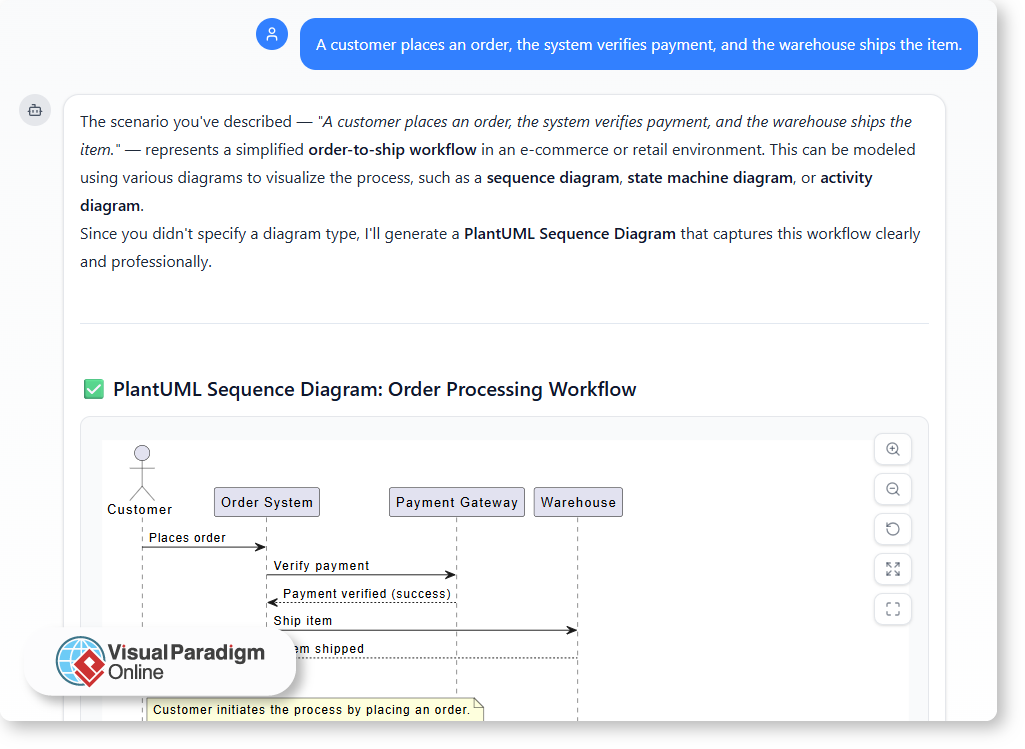
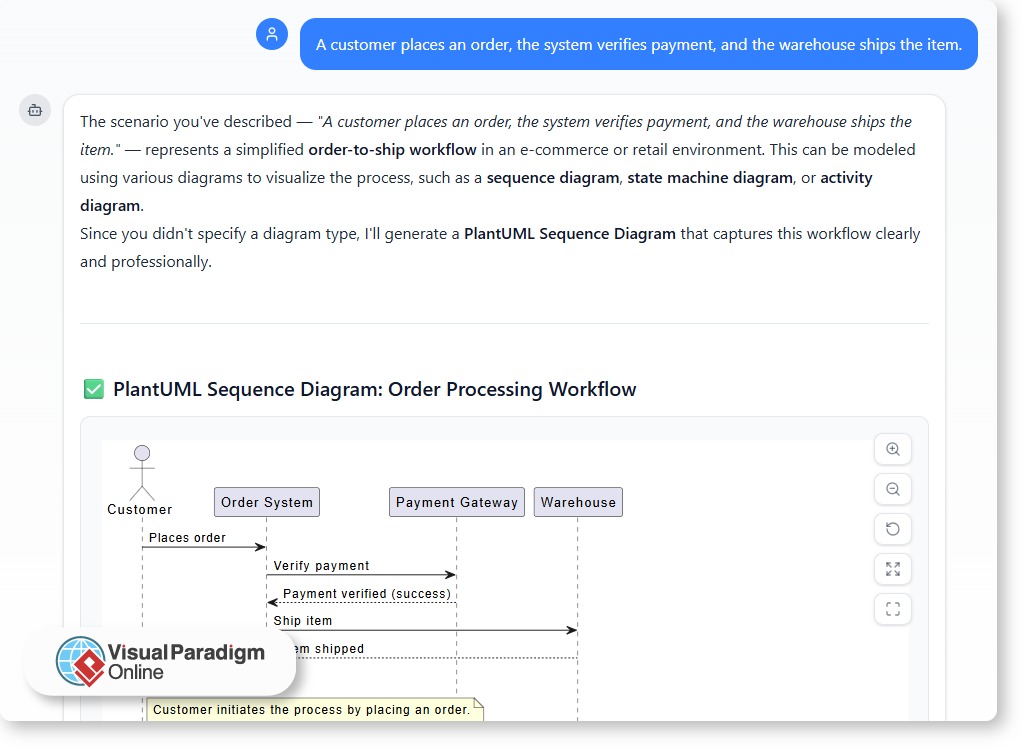
「顧客が注文を出し、システムが支払いを確認し、倉庫が商品を発送する。」

すでに流れ、役割、行動の順序を示唆している。しかし、それを形式的な図——たとえばユースケースやシーケンスモデル——に変換するには、解釈が必要となる。ここにAI駆動のツールが登場する。

AIが自然言語をどのように解釈するか

現代のAIモデリングアシスタント、たとえばVisual Paradigm Onlineでは、自然言語処理を用いてシンプルな記述を分析し、対応する図を生成する。単に自分の言葉でプロセスを説明するだけで、AIは主要なアクター、関係性、相互作用を特定する。

たとえば:

  • 「ユーザーがログインする」→ アクターとユースケースを作成する。
  • 「システムが確認メールを送信する」→ インタラクションを追加する。
  • 「マネージャーがレポートを確認する」→ 他の役割とプロセスフローを導入する。

数秒で、テキストが標準表記に従った視覚的モデルに変換される様子が見える。技術的な構造を可視化しつつ、初期の記述に貢献した全員が理解できる形にしている。

共有された理解を通じた協働の向上

自然言語を出発点とすると、チームはより自然にコミュニケーションを取り、誤解を減らすことができます。AIは人間の意図と形式的な構造の間の翻訳者として機能することで、これを支援します。

その結果は明確です:

  • 明確さ:複雑な仕様書を読む必要なく、誰もがシステムを理解できます。
  • 一貫性:AIは関係性や要素が論理的に結びついていることを保証します。
  • スピード:アイデアから可視化までのプロセスはほぼ瞬時です。
  • 包括性:技術レベルの異なるステークホルダーも、意味のある形で参加できます。

AIモデリングアシスタントと協働するもう一つの利点は、全チャット履歴を共有できる各プロンプトと応答は、モデルが初期のアイデアから洗練された図へと進化した過程を記録しています。この共有された記録により、チームメイトが過去の議論を確認し、設計の根拠を理解し、文脈を失わず協働を継続しやすくなります。

技術専門家だけが使うツールではなく、図作成は誰もが参加でき、一致した理解を保てる透明で共有されたプロセスになります。

現代の設計における会話の力

ソフトウェア設計はますます会話的になっています。テンプレートを埋めるか、手作業で図を描くのではなく、チームは自然にアイデアを説明し、AIに構造化を支援してもらうことができます。この会話型のアプローチにより、摩擦が減り、協働が促進され、チームがより迅速に合意に達するようになります。

次のようなプラットフォームではVisual ParadigmのAIチャットボットそのコンセプトが現実のものになります。聞き、理解し、モデル化する——あなたの文章を構造的で標準準拠のビジュアルに変換します。

言葉から図へ、アイデアからシステムへ

自然言語は形式的なモデリングの代替ではありません——それは基盤です。明確な言葉でアイデアを表現し、AIに視覚的表現への翻訳を任せることで、チームは理解と正確性の両方を獲得できます。

ソフトウェア設計の本質は、コミュニケーションプロセスです。AIツールの支援により、平易な英語が、人々とシステムをつなぐためにこれまで以上に強力になっています。

Why Natural Language Matters in Software Design

How plain English brings teams closer — and how AI turns it into structured diagrams

Software design has long relied on specialized notations, diagrams, and technical documentation. But before any of that exists, ideas usually start as simple conversations: “The user logs in and views their dashboard.” The challenge is that translating those everyday descriptions into formal models often introduces confusion or inconsistency.

Natural language — when used effectively — helps bridge that gap, enabling smoother collaboration and faster understanding across diverse teams. And now, with the help of AI, plain English can be instantly transformed into formal, visual representations.

The Language Barrier in Software Design

Designers, developers, and business stakeholders often speak in different “languages.”

  • Developers think in terms of classes, components, and APIs.
  • Analysts write requirements and use cases.
  • Clients describe goals and user experiences in plain terms.

Without a shared language, communication becomes fragmented. Technical precision is important, but it can also alienate non-technical members who need to understand system behavior. Natural language provides that bridge — an accessible, neutral medium that keeps everyone aligned before diving into structure.

From Plain Description to Clear Design

Using natural language to describe systems encourages clarity. When team members must explain how something works in words, they often uncover missing steps, unclear ownership, or hidden dependencies.

For instance, describing a process as:

“A customer places an order, the system verifies payment, and the warehouse ships the item.”

Already suggests a flow, roles, and order of actions. But turning that into a formal diagram — such as a use case or sequence model — requires interpretation. That is where AI-driven tools step in.

Why Natural Language Matters in Software Design

How AI Interprets Natural Language

Modern AI modeling assistants, such as the one in Visual Paradigm Online, use natural language processing to analyze plain descriptions and generate corresponding diagrams. You simply describe the process in your own words, and the AI identifies key actors, relationships, and interactions.

For example:

  • “User logs in” → creates an actor and use case.
  • “System sends confirmation email” → adds an interaction.
  • “Manager reviews report” → introduces another role and process flow.

In seconds, you can see your text transformed into a visual model that follows standard notation. It makes technical structure visible, yet accessible to everyone who contributed to the initial description.

Improving Collaboration Through Shared Understanding

When natural language serves as the starting point, teams communicate more naturally and make fewer assumptions. AI supports this by acting as a translator between human intent and formal structure.

The results are clear:

  • Clarity: Everyone understands the system without needing to read complex specifications.
  • Consistency: The AI ensures relationships and elements are logically connected.
  • Speed: The process from idea to visualization is almost instant.
  • Inclusivity: Stakeholders with different technical levels can still participate meaningfully.

Another advantage of working with an AI modeling assistant is that the entire chat history can be shared. Each prompt and response documents how the model evolved — from initial ideas to refined diagrams. This shared record makes it easier for teammates to review past discussions, understand design rationale, and continue collaboration without losing context.

Instead of being a tool reserved for technical experts, diagram creation becomes a transparent, shared process where everyone can contribute and stay aligned.

The Power of Conversation in Modern Design

Software design is becoming more conversational. Instead of filling templates or manually creating diagrams, teams can now describe ideas naturally and let AI assist in structuring them. This conversational approach reduces friction, encourages collaboration, and helps teams reach consensus faster.

In platforms like Visual Paradigm’s AI Chatbot, that concept comes to life. It listens, understands, and models — turning your sentences into structured, standards-compliant visuals.

From Words to Diagrams, and Ideas to Systems

Natural language is not a replacement for formal modeling — it is the foundation. By expressing ideas clearly in words and allowing AI to handle translation into visual form, teams gain both understanding and precision.

Software design is, at its core, a communication process. And with the support of AI-powered tools, plain English has never been more powerful in bringing people and systems together.

Integrating AI Diagram Generation into Your Daily Workflow

Modern projects demand clarity, speed, and collaboration — but turning ideas into visuals often takes longer than expected. Whether you are documenting a process, explaining a concept, or planning a new system, creating diagrams can consume valuable time. This is where AI-powered tools like the Visual Paradigm Online AI Chatbot redefine the workflow.

By understanding natural language and generating ready-to-edit diagrams, the chatbot transforms how you work — from concept to completion.

A Smarter Way to Start Your Day

Instead of beginning with a blank canvas, you can start with a conversation. Describe your idea or workflow in plain language, and let AI create the first version for you.

For example:

  • “Generate a UML Class Diagram for a library management system.”
  • “Show a workflow of project approval with manager and admin roles.”

These prompts instantly produce structured diagrams that you can refine in the Visual Paradigm Online Diagram Editor.

Integrating AI Diagram Generation into Your Daily Workflow

Bringing AI into Documentation

Documentation often involves explaining complex systems or processes. AI diagram generation simplifies this by turning written descriptions into visuals that enhance understanding.

You can use it to:

  • Illustrate system design directly from your written notes or reports.
  • Generate quick visuals for documentation updates without redrawing manually.
  • Maintain consistency across diagrams by using AI-generated templates.

This makes maintaining technical or business documentation faster and more consistent.

Supporting Teaching and Learning

Educators and trainers can also integrate AI-generated diagrams into their lessons. By turning abstract ideas into visual examples within seconds, AI helps make learning more interactive and effective.

For instance:

  • Teachers can demonstrate how a UML sequence works by simply typing a system description.
  • Students can explore how changing a single prompt affects the resulting diagram — learning structure through experimentation.
  • Training materials can be enriched with automatically generated visuals that match the lesson content.

This hands-on approach bridges theoretical learning and practical application.

Accelerating Design Planning

When planning systems or workflows, AI gives teams a faster way to visualize ideas before finalizing them. You can brainstorm freely, test different structures, and iterate quickly without worrying about diagram formatting.

Common scenarios include:

  • Project planning: Visualize team responsibilities and approval processes.
  • Software design: Draft system structures and relationships for discussion.
  • Process improvement: Identify inefficiencies by mapping workflows through quick AI drafts.

Once the base structure is ready, it can be fine-tuned collaboratively in VP Online.

Making AI Part of Your Routine

Integrating AI into your workflow is not about replacing creativity — it is about removing barriers. By automating structure creation, AI lets you focus on logic, flow, and communication.

In your daily work, that means:

  • Fewer hours spent drawing manually.
  • Clearer diagrams created directly from your own language.
  • Faster turnaround for documentation, lessons, and design plans.

A More Efficient Way to Work

The Visual Paradigm Online AI Chatbot makes diagramming an integrated part of your daily routine — quick, flexible, and intelligent. Whether you are a teacher, analyst, or designer, you can turn everyday ideas into professional visuals with a simple conversation.

AI vs. Manual Diagramming: Which Fits Your Workflow?

For years, creating diagrams meant manually dragging shapes, aligning connectors, and labeling components. It was precise but time-consuming.
Now, AI-powered tools like the Visual Paradigm Online AI Chatbot have transformed how diagrams are made — turning text prompts into complete UML, BPMN, or flow diagrams in seconds.

But which method fits your workflow better: AI or manual diagramming? Let us explore the pros and cons of each, and how combining both delivers optimal results.

Manual Diagramming: Total Control with More Effort

Manual diagramming has long been the standard approach for professionals. It gives full creative freedom — every element, layout, and connection is crafted exactly as intended.

Advantages:

  • Full design control: You decide the layout, naming, and visual details.
  • Better conceptual understanding: Drawing shapes manually deepens comprehension of system logic.
  • High customization: Ideal for refining presentations and meeting specific visual standards.

Challenges:

  • Time-consuming: Complex diagrams can take hours to perfect.
  • Repetitive adjustments: Minor changes may require extensive rearrangement.
  • Steep learning curve: Beginners often struggle with modeling notation and best practices.

Manual diagramming remains valuable for experienced modelers who need accuracy, but it demands more time and effort.

AI Diagramming: Speed and Simplicity at Scale

AI-driven diagramming tools like Visual Paradigm Online’s AI Chatbot use natural language to create diagrams automatically.
You simply describe what you need — for example:

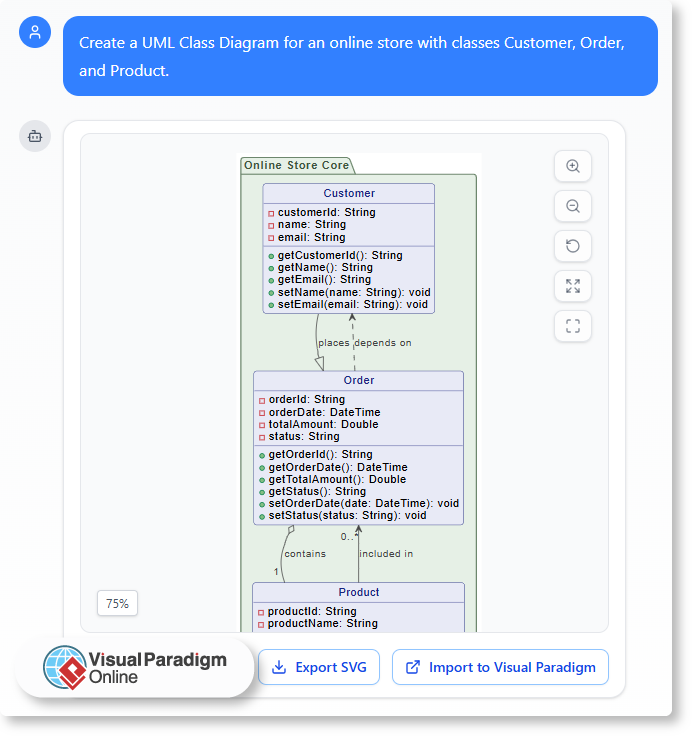
“Create a UML Class Diagram for an online store with classes Customer, Order, and Product.”

Within seconds, the tool generates a structured, ready-to-edit diagram.

AI vs. Manual Diagramming: Which Fits Your Workflow?

Advantages:

  • Instant results: Generate complete diagrams in moments.
  • No modeling expertise required: AI handles syntax and structure automatically.
  • Great for brainstorming: Quickly visualize early-stage ideas or compare multiple versions.

Challenges:

  • Less control over layout: AI focuses on accuracy, not presentation aesthetics.
  • Limited creative fine-tuning: Some customization still requires manual editing.
  • Dependent on prompt clarity: Results vary with how well the request is described.

AI diagramming excels in speed, accessibility, and automation — especially useful for quick iterations or concept validation.

Finding the Balance: Why You Need Both

Rather than choosing one approach, modern workflows benefit most from AI-assisted manual editing.
The Visual Paradigm Online AI Chatbot integrates both worlds in a single environment:

Start with AI generation — instantly create your base diagram from text.

  • Ask AI for adjustments or explanations — such as “Add an inheritance relationship” or “Explain this interaction.”
  • Switch to manual editing — refine, reposition, and style elements directly in the editor.

This hybrid approach saves time while preserving full control, allowing you to stay productive from brainstorming to final documentation.

Real-World Use Cases

  • Software Designers: Use AI to draft UML diagrams, then fine-tune manually for precise system documentation.
  • Business Analysts: Generate BPMN or flowcharts for meetings, then refine key steps for clarity.
  • Students & Educators: Learn UML or process modeling faster with real-time examples and feedback.

Each use case benefits from AI efficiency without losing manual precision — a balance ideal for professional and educational environments alike.

The Best of Both Worlds with Visual Paradigm Online

Visual Paradigm Online provides an integrated modeling workspace that supports AI-assisted creation and manual refinement seamlessly.
You can:

  1. Generate diagrams from natural-language prompts.
  2. Request AI-based explanations or improvements.
  3. Edit every element manually in the visual editor.
  4. Save and share your work in the cloud instantly.

By merging automation and human creativity, it ensures your workflow is both fast and flexible — without sacrificing quality or clarity.

Conclusion

AI and manual diagramming each have unique strengths. Manual design offers precision and control; AI provides speed and simplicity.
The Visual Paradigm Online AI Chatbot combines both, allowing you to start fast, refine easily, and deliver professional results in less time.
Whether you are designing systems, mapping processes, or learning UML, this balance ensures your diagrams truly fit your workflow.