


Overview
OpenDocs is a web-based, AI-powered knowledge management platform and “Visual Knowledge Engine” developed by Visual Paradigm. It seamlessly integrates rich text documentation with interactive diagramming in a single, collaborative workspace. Designed for modern engineering, project, and knowledge teams, OpenDocs acts as a “living library”—a dynamic, evolving repository of organizational knowledge that combines the power of structured writing with visual thinking.
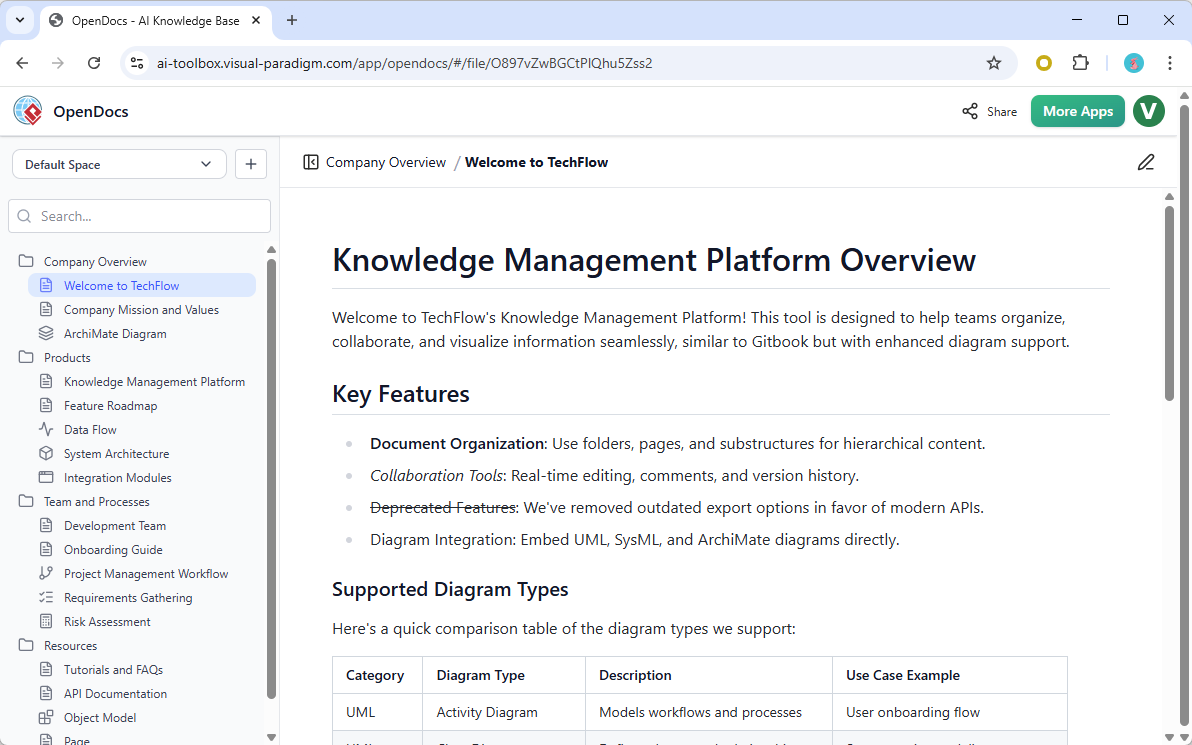
By merging documentation and modeling into one unified environment, OpenDocs eliminates the friction between text and diagrams, enabling teams to create, organize, share, and evolve their knowledge with unprecedented efficiency.
✅ Note: AI-generated content may contain inaccuracies. Always verify outputs before finalizing or sharing.
Core Purpose of OpenDocs
The primary mission of OpenDocs is to break down silos between documentation and modeling—two traditionally separate domains in technical and business workflows. Instead of toggling between tools like Confluence, Draw.io, or Word, teams can now work in a single, intelligent workspace.
Key Objectives:
-
Unify text and diagrams: Create and edit both Markdown/WYSIWYG content and visual models (UML, ERD, Mind Maps, etc.) in the same document.
-
Reduce tool-switching fatigue: Eliminate context switching by providing all necessary features within one interface.
-
Accelerate knowledge creation: Use AI to generate content and diagrams from plain language.
-
Enable real-time collaboration: Work together on documents and models with teammates across time zones.
-
Build a living knowledge base: Maintain up-to-date, version-controlled, and searchable documentation.
Key Features & Capabilities
✅ All-in-One Knowledge Hub
OpenDocs combines:
-
Rich text editing (Markdown & WYSIWYG modes)
-
Integrated diagram editor (supports UML, ERD, Flowcharts, Mind Maps, VSM, and more)
-
Inline diagramming: Insert and edit diagrams directly within text—no need to export or switch contexts.
📌 Example: Write a section on “User Authentication Flow,” then insert a UML sequence diagram directly below—edit it in real time without leaving the document.
✅ AI-Driven Content Creation
Leverage generative AI to:
-
Convert natural language into structured documents.
-
Generate diagrams from descriptions (e.g., “Create a flowchart for user login process”).
-
Auto-summarize long documents or meeting notes.
-
Suggest improvements to existing content using AI feedback.
💡 Use Case: Type “Design a mind map of project deliverables for Q3” → Instantly generate a visual mind map with AI-organized branches.
✅ Structured Knowledge Management
Organize information hierarchically using:
-
Nested folders and subfolders
-
Tag-based categorization
-
Searchable content indexing
-
Version history for every document
This structure supports scalable knowledge bases, making it easy to navigate complex projects or enterprise-wide documentation.
✅ Visual Thinking & Inline Diagramming
OpenDocs promotes visual thinking—a cognitive approach where ideas are better understood through diagrams.
Supports:
-
UML Diagrams: Class, Sequence, Use Case, Activity, Component, etc.
-
ERD (Entity-Relationship Diagrams): Ideal for database design and schema documentation.
-
Mind Maps: For brainstorming, planning, and knowledge structuring.
-
Flowcharts & Process Maps: Visualize business logic, workflows, and system processes.
-
Value Stream Mapping (VSM): For Lean and Agile teams.
All diagrams are editable inline, meaning you can tweak them without leaving the document.
✅ Effortless Collaboration & Sharing
Teams can collaborate in real time with:
-
Live co-editing of documents and diagrams
-
Real-time comments and mentions
-
Secure, shareable links (read-only or editable)
-
Permission controls for different user roles
🔐 Security Note: All documents are stored securely in the cloud with enterprise-grade encryption and access controls.
✅ Cloud-Based Accessibility
OpenDocs is:
-
Fully web-based – accessible from any modern browser (Chrome, Firefox, Safari, Edge)
-
No installation required – no desktop software or downloads
-
Cross-platform – works on Windows, macOS, Linux, tablets, and mobile devices
-
Always up to date – automatic updates ensure you’re using the latest features
Target Users & Use Cases
OpenDocs is designed for a wide range of professionals who need to create, manage, and visualize knowledge effectively.
| User Group | How They Use OpenDocs |
|---|---|
| Development Teams | Document APIs, system architectures, technical specs, and code design patterns with embedded diagrams. |
| Project Managers | Centralize project plans, roadmaps, status reports, and stakeholder communications. |
| System Analysts & Architects | Model business processes (TOGAF), data flows, and system components using UML and ERD. |
| HR Departments | Build organized employee handbooks, onboarding guides, and policy documentation. |
| Educators & Students | Create study guides, lecture notes, research summaries, and visual learning aids. |
🎯 Bonus: Ideal for Agile teams to maintain product backlogs, sprint plans, and user story maps in one place.
Subscription & Availability
OpenDocs is included with the following Visual Paradigm subscriptions:
-
Visual Paradigm Online (Combo Edition)
-
Visual Paradigm (Professional Edition)
🔗 Note: It is not available as a standalone product. You must have a valid subscription to access OpenDocs.
For pricing and plans, visit: https://www.visual-paradigm.com/shop/vp.jsp
Best Practices for Using OpenDocs
-
Start with a Clear Structure: Use folders and subfolders to mirror your project or organizational hierarchy.
-
Use AI Wisely: Generate drafts with AI, but always review and refine them for accuracy and context.
-
Combine Text and Diagrams: Never leave diagrams isolated—always explain them with concise text.
-
Tag Documents: Use tags (e.g.,
#architecture,#API,#onboarding) for easier searching and filtering. -
Enable Version Control: Regularly save changes and use the history feature to track updates.
-
Share Securely: Use read-only links for external stakeholders; grant edit access only to trusted team members.
Why OpenDocs Stands Out
| Feature | Why It Matters |
|---|---|
| AI + Diagrams in One Place | Reduces cognitive load and speeds up documentation cycles |
| No Tool Switching | Increases productivity and focus |
| Real-Time Collaboration | Enables distributed teams to work together seamlessly |
| Living Knowledge Base | Evolves with your project, reducing outdated documentation |
| Visual-First Approach | Aligns with how humans naturally think and communicate |
Conclusion
OpenDocs redefines how teams manage knowledge in the digital age. By merging AI-driven content creation, visual thinking, and collaborative documentation, it transforms static wikis into dynamic, living knowledge ecosystems.
Whether you’re a developer documenting a microservice, a project manager tracking milestones, or a student organizing research, OpenDocs empowers you to think visually, write clearly, and collaborate effectively—all in one intelligent platform.
References
Comprehensive Guide to OpenDocs: February–March 2026 Update – The AI-Powered Visual Knowledge Engine: A detailed overview of OpenDocs’ features, AI capabilities, and use cases, with insights into the platform’s evolution through early 2026.
OpenDocs by Visual Paradigm: Revolutionizing Knowledge Management with AI and Visual Thinking: An in-depth article highlighting OpenDocs’ role in breaking down documentation silos and enabling visual collaboration across teams.
OpenDocs – AI-Powered Knowledge Platform | Visual Paradigm Updates: Official release notes detailing new features, improvements, and integrations introduced in OpenDocs.
OpenDocs by Visual Paradigm: Revolutionizing Knowledge Management with AI and Visual Thinking: A follow-up piece exploring how OpenDocs supports agile methodologies, system architecture, and team collaboration.
OpenDocs – Visual Paradigm Official Features Page: The official product page outlining core features, supported diagram types, collaboration tools, and subscription details.
Comprehensive Guide to OpenDocs: February–March 2026 Update – The AI-Powered Visual Knowledge Engine: Additional insights into AI functionality, real-world applications, and integration with other Visual Paradigm tools.
OpenDocs – Visual Paradigm Official Features Page: A second reference to the official feature documentation, reinforcing accuracy and completeness of product capabilities.
Comprehensive Guide to OpenDocs: February–March 2026 Update – The AI-Powered Visual Knowledge Engine: Repeated for emphasis, this source provides consistent updates on platform enhancements and user adoption trends.
📌 Final Reminder: While OpenDocs leverages powerful AI to accelerate knowledge creation, always validate AI-generated content for accuracy, context, and completeness—especially in technical or legal documentation.
📘 Ready to get started?
Visit https://ai.visual-paradigm.com/tool/opendocs to explore OpenDocs and begin building your visual knowledge base today.