


Introduction to Modern Strategic Planning
In the complex landscape of modern business, the ability to formulate, visualize, and communicate strategy is paramount. Whether you are a startup founder sketching a disruption or a corporate planner analyzing market risks, the frameworks you use matter. Enter Model Canvas, a versatile, Visual Paradigm AI-powered model canvas studio designed to transform how we approach strategic documentation. Unlike static templates or disjointed whiteboard apps, Model Canvas integrates a sophisticated multi-layered AI assistant directly into the workflow, promising to turn a single idea into a comprehensive business plan in seconds.
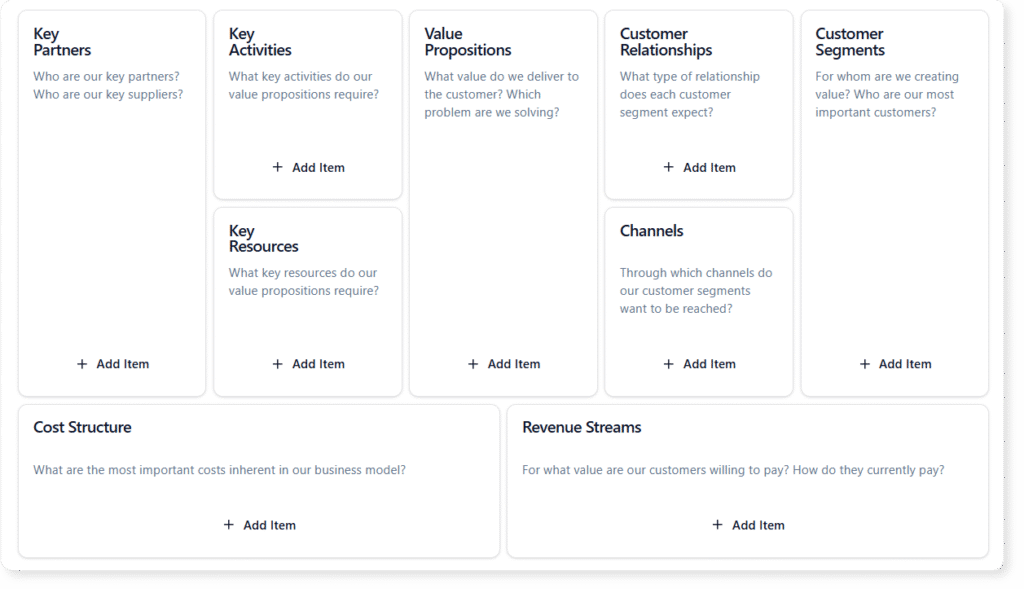
What is Model Canvas Tool?
At its core, Visual Paradigm Model Canvas Tool is a comprehensive suite of strategic templates. It acts as a digital studio where users can create, analyze, and manage a wide variety of business canvases. While it anchors on the popular Business Model Canvas, its library extends to Lean Canvas, SWOT Analysis, PESTLE, and dozens of other frameworks used by product managers and agile coaches.
The tool distinguishes itself through its “hybrid” approach to content creation. Users can brainstorm manually—using the interface like a structured digital whiteboard—or they can leverage the built-in AI to handle the heavy lifting. This flexibility makes it suitable for both educational purposes, where students learn the frameworks, and professional environments, where speed and depth are critical.
The Engine: Three Tiers of AI Assistance
The standout feature of Model Canvas is its integration of Artificial Intelligence, which functions not just as a text generator, but as a strategic partner. The application breaks down AI assistance into three distinct tiers, catering to different stages of the planning process.
Tier 1: Full Canvas Generation
This feature is designed for the “Zero to One” phase. Users provide a high-level topic or a simple business idea—for example, “A subscription box service for rare, indoor plants.” The AI then generates a completely filled-in canvas. It populates every section with relevant sticky notes, effectively creating a detailed first draft in seconds. This functionality eliminates the intimidation of a blank page and provides immediate material for refinement.
Tier 2: Context-Aware Suggestions
Strategic planning often hits roadblocks. You might have a clear Value Proposition but struggle to define Key Partnerships. With Tier 2 assistance, users can request targeted suggestions for specific sections. The AI analyzes the context of the entire canvas to ensure consistency and offers a list of new ideas specifically for that block. It feels akin to asking a smart colleague, “What am I missing here?”
Tier 3: In-Depth Strategic Analysis
Perhaps the most valuable feature for high-level decision-making is the specialized “AI Analysis” tab. Once a canvas is populated, the AI can perform deep-dive operations, transforming static data into dynamic insights. Capabilities include:
- Elevator Pitch Generation: Summarizing the entire business model into a compelling narrative.
- SWOT Extraction: Identifying strengths and weaknesses implicit in the model.
- Risk Assessment: Highlighting potential points of failure.
- Marketing Strategy: Suggesting go-to-market approaches based on customer segments.
User Experience and Core Features
Beyond the AI, the application is built with a focus on usability and professional management.
Multi-Canvas Switcher
The application avoids the “one-size-fits-all” trap by including a Multi-Canvas Switcher. This library allows users to toggle between different frameworks depending on the task at hand. A product manager might start with a Product Canvas for development and switch to a Lean Canvas for market validation, all within the same ecosystem.
Dual Viewing Modes
To support both holistic thinking and deep focus, Model Canvas offers two primary viewing modes. Canvas View displays the entire grid, allowing users to see connections and the “big picture.” Conversely, Focus Mode isolates a single section, removing distractions. This is particularly useful during brainstorming sessions where the goal is to exhaustively list items for a specific category, such as “Customer Segments.”
Project Management and Sharing
Model Canvas creates a bridge between cloud convenience and local control. Projects can be saved to the cloud for access across devices or exported as local files for privacy. Sharing is handled through read-only links, allowing stakeholders, investors, or advisors to view the strategy without the risk of accidental edits. This makes it an excellent tool for sending a polished “viability check” to a potential investor.
Target Audience
The versatility of Model Canvas makes it an asset for a broad spectrum of professionals:
- Entrepreneurs: For rapid prototyping of startups and pivoting business models.
- Product Managers: For mapping customer journeys and competitive analysis.
- Agile Coaches: For facilitating team alignment via frameworks like the Team Canvas.
- Business Students: As an educational sandbox to learn strategic frameworks.
Limitations and Considerations
While Model Canvas is a robust tool, potential users should be aware of certain constraints to ensure it fits their workflow:
- Single-User Focus: The tool is designed for individual use. It does not currently support real-time collaborative editing (like Google Docs), meaning teams cannot work on the same canvas simultaneously.
- Internet Dependency: An active internet connection is required to access all AI features and cloud storage capabilities.
- Fixed Layouts: The canvas templates are pre-defined. Users cannot create custom canvas layouts or modify the structure of existing templates.
Conclusion
Model Canvas represents a significant step forward in digital strategic planning. By combining a vast library of proven business frameworks with a multi-layered AI assistant, it solves the two biggest problems in strategy: getting started and going deep. Whether you are generating a pitch for a new venture or conducting a SWOT analysis for an established corporation, Model Canvas provides the structure and intelligence to make the process faster, sharper, and more professional.
Related posts:
 Simplifying Software Architecture: A Deep Dive into the AI-Assisted UML Class Diagram Generator
Mastering Sprint Preparation: A Comprehensive Review of the Agile Backlog Refiner
Upgrading to AI-Powered Modeling in Visual Paradigm: A Comprehensive Guide
A Comprehensive Guide to UML Activity Diagrams: From Manual Modeling to AI-Driven Natural Language Generation
Simplifying Software Architecture: A Deep Dive into the AI-Assisted UML Class Diagram Generator
Mastering Sprint Preparation: A Comprehensive Review of the Agile Backlog Refiner
Upgrading to AI-Powered Modeling in Visual Paradigm: A Comprehensive Guide
A Comprehensive Guide to UML Activity Diagrams: From Manual Modeling to AI-Driven Natural Language Generation