


Navigating the Visual Paradigm AI Ecosystem
Choosing the right product within the Visual Paradigm AI ecosystem is a strategic decision that depends heavily on a user’s specific workflow requirements. The spectrum of tools ranges from rapid, conversational prototyping to deep, enterprise-grade engineering. To select the optimal tool, users must consider three primary factors: the technical depth required for the task, the specific domain of the project (such as database design versus high-level system architecture), and the preferred working environment (cloud-based flexibility versus desktop power).

This guide breaks down the distinct roles of the Visual Paradigm AI suite to help you match the right tool to your engineering needs.
1. The Engineer’s Workbench: Visual Paradigm Desktop
For professionals requiring “deep engineering” and rigorous control over complex systems, Visual Paradigm proposes the Desktop application. This tool is the heavyweight champion of the ecosystem, designed for environments where precision and legacy integration are paramount.

Best For
The Desktop client is the ideal choice for enterprise architects and software developers who need offline capabilities, code engineering, and extensive forward/reverse engineering of legacy systems. It bridges the gap between conceptual modeling and implementation.
AI Feature Integration
Far from being a legacy tool, the desktop version has evolved to embed a powerful AI Diagram Generator. This feature allows users to instantly create 11 specialized diagram types. Supported diagrams include:
- Data Flow Diagrams (DFD)
- Chen Notation ERDs
- SysML Internal Block Diagrams
Hybrid Access
Visual Paradigm Desktop offers a hybrid experience. Users with a Professional or Enterprise license and an active maintenance plan can access cloud-based AI tools, such as the DB Modeler AI and AI Chatbot, directly within the desktop interface, ensuring that heavy engineering does not come at the cost of modern AI conveniences.
2. The Conversational Co-Pilot: AI Chatbot
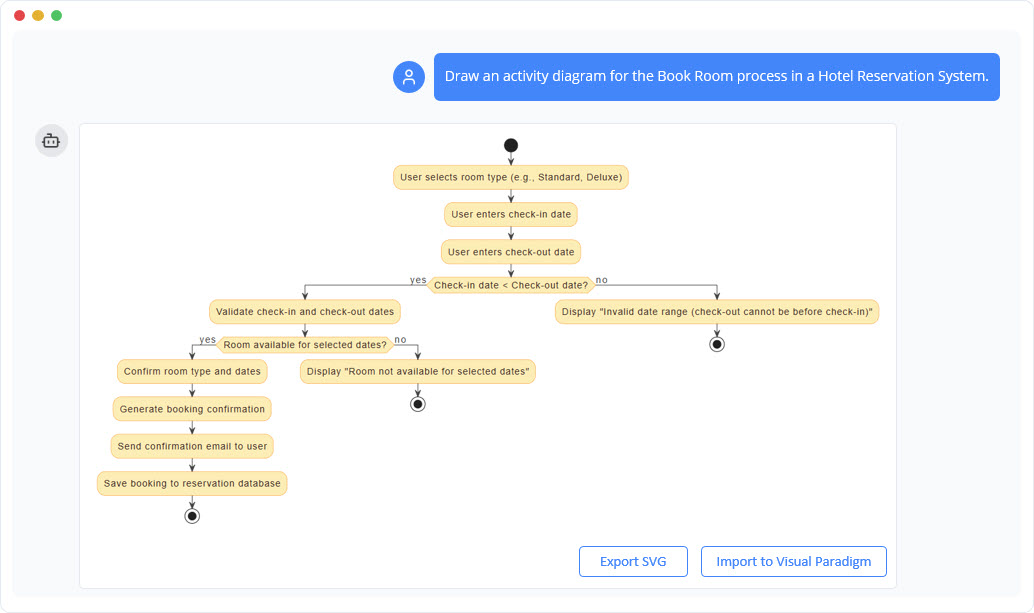
The AI Chatbot serves as the ideal starting point for users facing “blank canvas” syndrome. It is designed to move a user from a raw idea to a visual model with unprecedented speed, acting as a collaborative partner.
Best For
This tool is recommended for the rapid prototyping of a “vast universe” of diagrams. It excels in generating general software and business models, including:
Key Capabilities: Interactive Refinement
The Chatbot’s defining strength lies in interactive refinement. Unlike static generators, it allows users to “talk” to their diagrams. Through natural language commands, users can add elements, rename classes, or refactor relationships without ever touching a manual drawing tool.
Analytical Insights
Beyond visual generation, the Chatbot is proposed for users who need to analyze their models. It can answer technical questions regarding the diagram (e.g., “What are the main use cases?”) and generate professional documentation on demand, making it a powerful tool for clarity and communication.
3. The End-to-End Specialist: DB Modeler AI
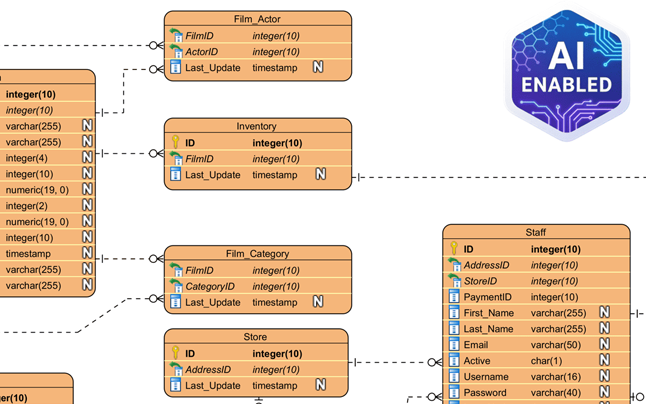
For users specifically interested in database development, Visual Paradigm proposes the DB Modeler AI. This is a specialized web application designed to strictly bridge the gap between requirements gathering and production-ready SQL code.
Best For
This tool is tailored for developers, students, and architects starting a new database project who require a technically sound, optimized schema from the ground up.
The 7-Step Workflow
DB Modeler AI is the only choice for users requiring Intelligent Normalization. It guides the user through a structured workflow that progresses from 1NF to 3NF, providing educational rationales for every structural decision made by the AI.
Validation and Testing
A critical feature of the DB Modeler is the ability to test designs immediately. It includes an Interactive SQL Playground seeded with realistic, AI-generated sample data, allowing developers to query and validate their schema before deploying it.
4. Specialized Web Studios
When a user’s interest is limited to a specific niche, Visual Paradigm proposes specialized “Studios” that focus on single-purpose efficiency.
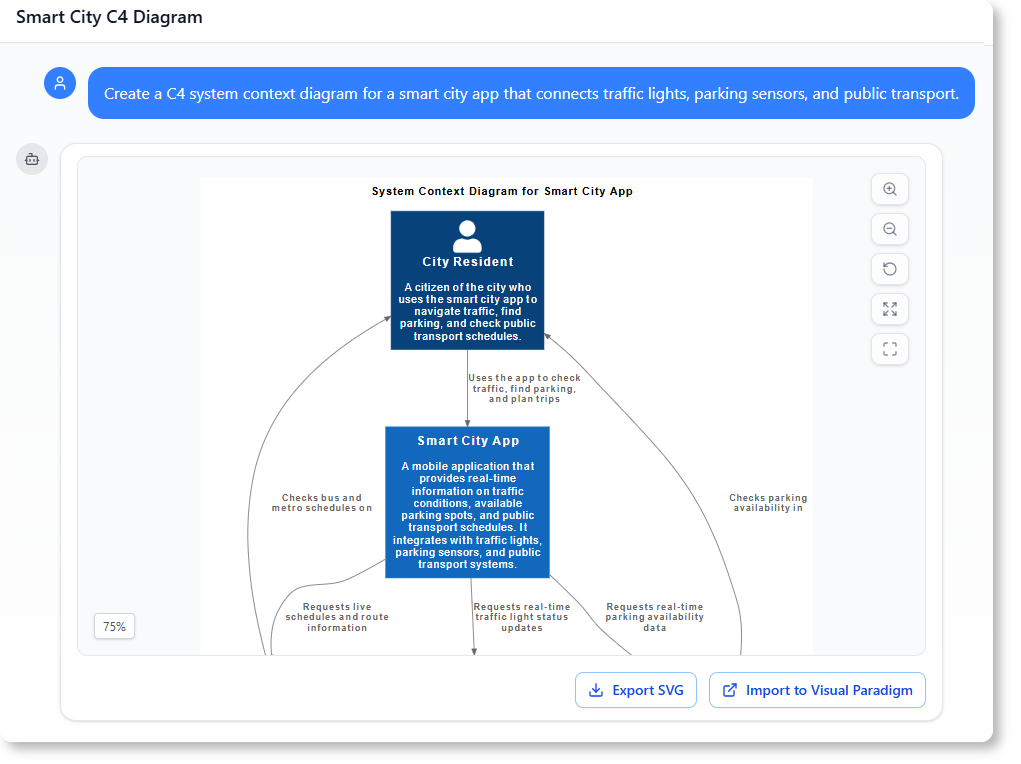
- AI C4 Studio: Recommended for software architects who need to generate Context, Container, and Component views specifically using PlantUML syntax.
- Use Case to Activity Diagram Generator: Proposed for analysts who need to transform narrative textual requirements into functional UML activity workflows.
- AI-Powered Markmap Studio: Targeted at users who need to instantly turn scattered thoughts into structured mind maps during brainstorming sessions.
Comparative Selection Guide
To summarize the ecosystem, the following table matches common use cases with the recommended Visual Paradigm product:
| Use Case | Recommended Product |
|---|---|
| New Database Project | DB Modeler AI |
| Quick UML/Business Prototyping | AI Chatbot |
| Enterprise Architecture / Offline Work | VP Desktop (w/ AI integration) |
| Architecture Documentation (C4) | AI C4 Studio |
| Requirements to Workflow | Use Case to Activity Diagram Generator |
Conceptualizing the Difference: A Construction Analogy
Choosing between these tools is comparable to selecting the right assistance for a construction project. Understanding the nature of your “building” helps determine which tool is required:
- The AI Chatbot is the Expert Consultant: Imagine a consultant standing next to you. You sketch ideas on a napkin together, and when you ask them to “move that wall,” they do it instantly. It is collaborative, fast, and flexible.
- The DB Modeler AI is the High-End Engineering Simulator: This tool ensures the infrastructure—the plumbing and electrical work (data structure)—meets every building code (normalization) before you break ground. It focuses on structural integrity and compliance.
- The VP Desktop AI is the Automated Factory: This is where the heavy machinery lives. It is used to actually build the final structure, manage massive complexity, and sync the design with real-world materials through reverse and forward engineering.
-
AI-Powered Visual Modeling and Design Solutions by Visual Paradigm: Explore cutting-edge AI-driven tools for visual modeling, diagramming, and software design, enabling faster, smarter development workflows.
-
Visual Paradigm – All-in-One Visual Development Platform: A comprehensive platform for visual modeling, software design, business process modeling, and AI-powered development tools.
-
AI Chatbot Feature – Intelligent Assistance for Visual Paradigm Users: Leverage AI-powered chatbot functionality to get instant guidance, automate tasks, and enhance productivity within Visual Paradigm.
-
Visual Paradigm Chat – AI-Powered Interactive Design Assistant: An interactive AI chat interface that helps users generate diagrams, write code, and solve design challenges in real time.
-
AI Textual Analysis – Transform Text into Visual Models Automatically: Use AI to analyze text documents and automatically generate diagrams such as UML, BPMN, and ERD for faster modeling and documentation.
-
Visual Paradigm AI Chatbot Enhances Multi-Language Support …: 7 hours ago · Discover the latest updates to Visual Paradigm ‘s AI -Powered visual modeling software, including multi-language UI and improved chat content localization. Experience seamless AI diagram generation in languages like Spanish, French, Chinese, and more with our AI chatbot for UML and other diagrams.
-
AI -Powered BI Analytics by Visual Paradigm – ArchiMetric: Get started in under a minute at ai . visual – paradigm .com/tool/ ai -powered-bi-analytics. No installation, no signup required for most features.
-
Discover the Power of Visual Paradigm ’s AI -Powered… – Visualize AI: While tools like Google’s AI Image Translator (via Google Lens and Google Translate) offer convenience, Visual Paradigm ’s AI -Powered Image Translator takes the lead with…
-
AI Chatbot for Diagramming: How It Works with Visual Paradigm: The Visual Paradigm AI chatbot is an AI -powered modeling assistant that turns natural language into diagrams. It doesn’t require users to learn specific modeling standards or syntax.
-
AI Brainstorming Features – Visual Paradigm: Discover how Visual Paradigm’s AI-powered brainstorming tools enhance idea generation with intelligent suggestions and collaborative workflows.
-
AI Brainstorming Tool – Visual Paradigm AI: Use the AI Brainstorming tool from Visual Paradigm to rapidly generate and organize ideas with AI-driven insights and smart templates.
-
AI-Powered Use Case Diagram Refinement Tool – Smart Diagram Enhancement: Leverage AI to automatically refine and optimize your use case diagrams for clarity, consistency, and completeness.
-
Convert Use Case to Activity Diagram – AI-Powered Transformation: Automatically convert use case diagrams into detailed activity diagrams using AI to visualize system workflows.
-
AI-Assisted UML Class Diagram Generator – Visual Paradigm: An interactive, step-by-step tool to help users create UML class diagrams with AI-powered suggestions, validation, PlantUML export, and design analysis.
-
Mastering UML Activity Diagrams with AI | Visual Paradigm Blog: A blog post exploring how AI-powered features in Visual Paradigm enhance the creation and optimization of UML activity diagrams for developers and analysts.
-
Revolutionize Your Slides: Meet Visual Paradigm’s AI Markdown Presentation Maker!: 9 Dec 2025 · Introducing Visual Paradigm’s AI Markdown Presentation Maker – the game-changing tool that turns your raw ideas into stunning, animated …
-
Lumina AI: Generate AI-Powered Video Slideshows Instantly: Create dynamic video presentations from text using AI, perfect for storytelling, marketing, and rapid content creation.
-
Lumina AI Slideshow Maker: Create Stunning Presentations with AI: Use artificial intelligence to generate professional-quality slides from simple text input, saving time and enhancing creativity.
-
Illumy AI Slideshow Maker: Instant AI-Powered Presentation Creation: Generate visually rich, professional slides in seconds using AI, ideal for marketers, educators, and business professionals.
-
AI Animated Presentation Studio: Create Dynamic, Animated Slides with Ease: Design engaging, animated presentations with AI assistance, combining storytelling with motion and visual effects.
-
How to Structure Your Jira Backlog Instantly with Agilien AI: Learn how Agilien AI automates Jira backlog structuring by analyzing user stories and generating well-organized sprints and epics.
-
Agilien AI-Powered Jira Backlog Planner – Visual Paradigm: Automate and enhance your Jira backlog planning with Agilien AI, which intelligently structures user stories and epics for efficient sprint planning.
-
How to Create Stunning Animated Presentations with Visual Paradigm’s AI Markdown Presentation Maker: A step-by-step guide on leveraging AI-powered Markdown tools within Visual Paradigm to design visually engaging and dynamic presentations effortlessly.
-
Introducing AI Animated Presentation Studio – A New Era in Visual Storytelling: Visual Paradigm launches its AI Animated Presentation Studio, enabling users to generate dynamic, AI-enhanced presentations with minimal effort.