


Overview
The Visual Paradigm AI Chatbot is an AI-driven visual modeling assistant developed by Visual Paradigm, a leading provider of UML, enterprise architecture, and diagramming solutions. Designed specifically for visual modeling workflows, this intelligent tool excels at generating, refining, explaining, and analyzing diagrams—particularly UML diagrams (e.g., Sequence, Class, Use Case, Activity, State Machine, Component, Deployment), as well as other industry-standard models such as ArchiMate, SysML, C4 Model, Mind Maps, SWOT/PESTLE frameworks, and more.
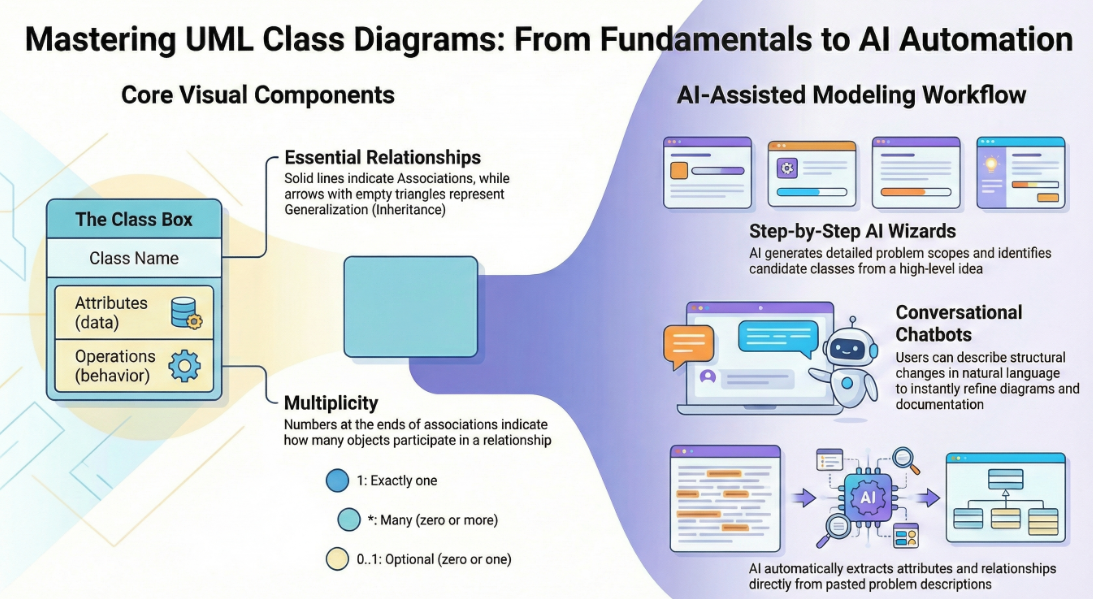
Unlike general-purpose AI assistants (e.g., ChatGPT), the Visual Paradigm AI Chatbot is purpose-built for diagram-centric design and documentation, with deep expertise in:
-
UML notation and semantics
-
Interaction fragments (
alt,opt,loop,ref) -
Lifelines, message flows, activation bars
-
Conditional logic and error handling
It transforms natural language descriptions into clean, accurate, and professionally rendered diagrams in seconds, supporting iterative refinement through conversational feedback.
✅ Key Features
| Feature | Description |
|---|---|
| Instant Diagram Generation | Describe a business process or system interaction in plain English → receive a fully rendered UML diagram within seconds. |
| Conversational Refinement | Iteratively improve diagrams via follow-up prompts: add branches, rename participants, adjust logic, or restructure layout—no need to restart. |
| Explain & Understand | Ask “Explain this diagram” → receive a clear, step-by-step breakdown of flows, messages, decision points, and control logic. |
| Multi-Diagram Support | Fully supports: Sequence, Class, Use Case, Activity, State, Communication, Object, Package, Deployment, Component, and more. |
| Smart Error & Flow Handling | Automatically applies alt, opt, loop, and ref fragments to represent success paths, exceptions, retries, and validations. |
| Seamless Integration with Visual Paradigm | Export or import diagrams directly into Visual Paradigm Online or Desktop for advanced editing, collaboration, versioning, and documentation. |
| PlantUML Source View | Toggle to view or edit the underlying PlantUML code—ideal for developers, version control, and automation. |
| Multi-Language Support | Accepts prompts and generates diagrams in multiple languages (English, Chinese, Spanish, French, German, Japanese, Korean, etc.). |
🛠️ Step-by-Step Guide: How to Use the Visual Paradigm AI Chatbot
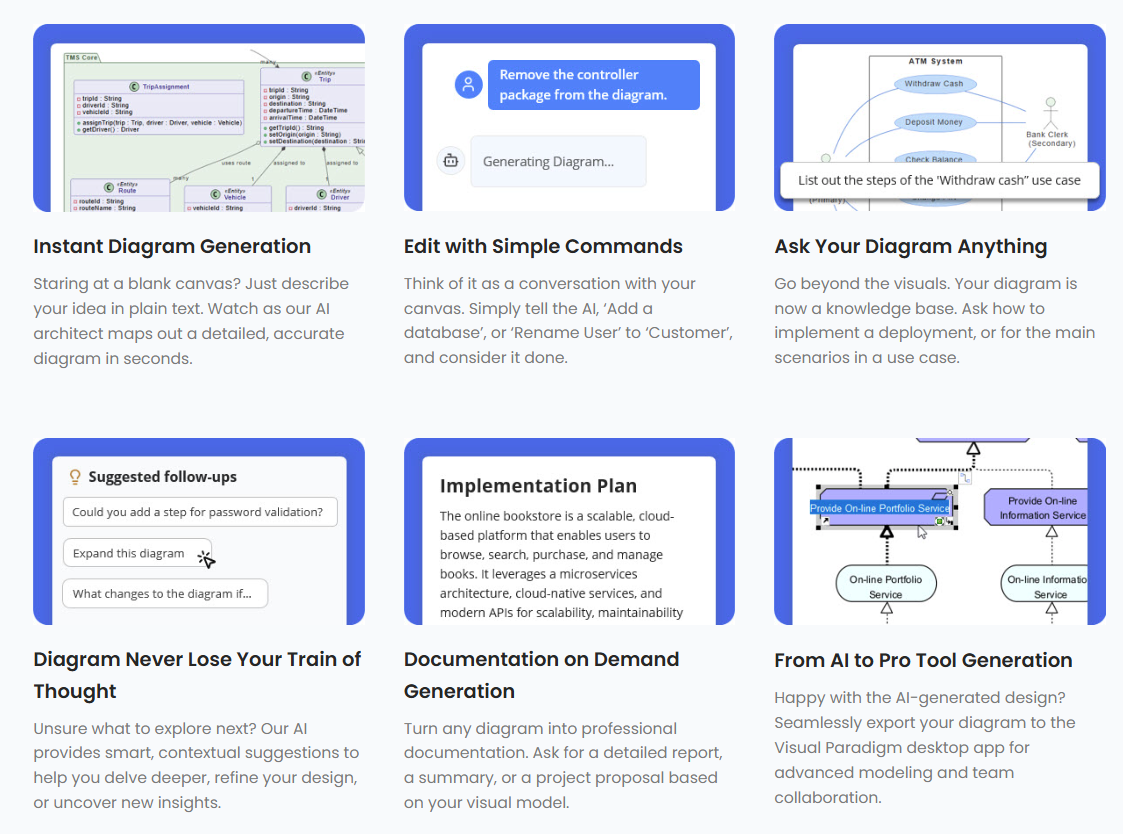
1. Access the Chatbot
-
Web Version (Free): Visit https://chat.visual-paradigm.com/ – no installation required.
-
Integrated Access: Launch from Visual Paradigm Online/Desktop → Tools → AI Chatbot (available with active license/project).
-
Alternative Entry: https://ai-toolbox.visual-paradigm.com/app/chatbot/
✅ No login needed for basic use. Sign-in enables saving chats and exporting to your workspace.
2. Start a New or Continue an Existing Chat
-
Click + New Chat to begin fresh.
-
Or continue from an existing conversation for ongoing modeling tasks.
The interface includes:
-
Chat history (for context retention)
-
Diagram preview (rendered in real-time)
-
Tabs: Diagram | PlantUML Source
-
Zoom controls and export options
3. Generate a Diagram (Core Prompt)
Enter a clear, descriptive natural language prompt. Examples that work best:
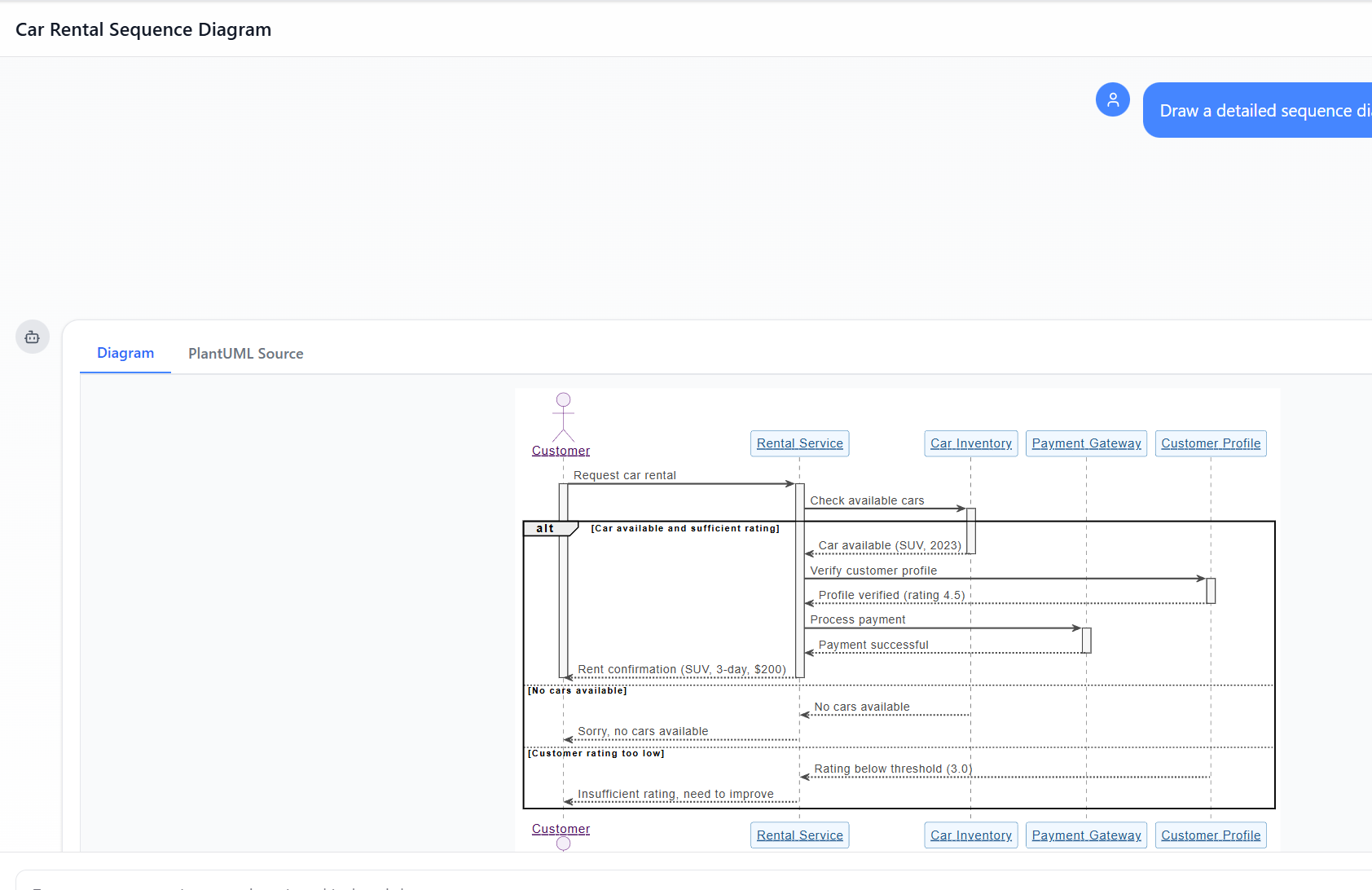
📌 “Draw a detailed sequence diagram for a car rental process involving Customer, Rental Service, Car Inventory, Payment Gateway, and Customer Profile.”
📌 “Generate a UML sequence diagram for online flight booking: user selects flight → checks seat availability → proceeds to payment → confirms or fails.”
📌 “Create a sequence diagram: user places order → shopping cart validates items → order service checks inventory → payment gateway processes charge → confirmation sent.”
💡 Tip: Be specific about participants, message order, conditions, and outcomes.
👉 Result: The AI generates a fully formatted diagram in 5–15 seconds, complete with:
-
Proper lifelines
-
Solid lines for synchronous messages
-
Dotted lines for return messages
-
Activation bars for active processing
-
alt,opt, andloopfragments for branching logic
🔍 Example Output: Your car rental diagram includes conditional branches for:
Success (car available + rating ≥ 3.0)
No cars available
Low rating (< 3.0)
All handled usingaltfragments — demonstrating intelligent error and flow management.
4. Refine Iteratively (Conversational Power)
Use follow-up prompts to evolve your diagram:
| Prompt | Effect |
|---|---|
| “Add an alternative path when payment is declined.” | AI adds a new alt branch with error message and retry option. |
| “Include model year and color in the car confirmation message.” | Updates message text dynamically. |
| “Change the rating threshold from 3.0 to 4.0.” | Adjusts condition in alt fragment. |
| “Add a loop for up to 3 attempts to select a car.” | Introduces loop fragment around selection process. |
| “Explain the ‘Customer rating too low’ branch.” | Returns a detailed explanation of the logic and impact. |
✅ No re-generation needed—changes are applied instantly in context.
5. Analyze & Explain Diagrams
Use these prompts to deepen understanding:
-
"Explain this sequence diagram step by step." -
"What does the 'alt' fragment represent here?" -
"Summarize the success path from start to confirmation." -
"Identify all error conditions and how they’re handled."
This feature is especially valuable for:
-
Students learning UML
-
Teams reviewing system interactions
-
Documentation and onboarding
6. Export & Integrate into Projects
Once satisfied, export or integrate your diagram:
| Option | Use Case |
|---|---|
| Export as PNG/SVG/PDF | For reports, presentations, or sharing. |
| View PlantUML Source | Copy code for version control, embedding in Markdown/docs, or reuse in other tools. |
| Import to Visual Paradigm | Fully edit in the desktop or online IDE—add constraints, stereotypes, links to other diagrams, or generate code. |
🔄 Pro Tip: Use the exported PlantUML code in CI/CD pipelines, documentation generators (e.g., MkDocs, Docusaurus), or collaborative wikis.
🌟 User Experience: Why Teams Love It
“It’s like having a senior architect in the chat.” – Software Architect, Global Tech Firm
✅ Real-World Benefits
| Benefit | Impact |
|---|---|
| Speed & Productivity | What once took 20–60 minutes of manual diagramming now takes 1–5 minutes of conversation. Ideal for prototyping, sprint planning, and design sprints. |
| Beginner-Friendly | No need to memorize UML syntax—just describe the process naturally. The AI enforces correct notation automatically. |
| Low-Friction Iteration | Refine logic, add conditions, or adjust flow in real time—no context loss. |
| Accurate Complex Logic | Handles real-world scenarios: inventory checks, payment failures, rating validations, retry loops—with proper alt/loop usage. |
| Learning Accelerator | Explaining diagrams back to users helps solidify understanding of UML concepts. |
| Error Resilience | AI anticipates common pitfalls (e.g., missing error paths) and includes them proactively. |
⚠️ Note: While highly accurate, extremely complex or highly customized layouts may still benefit from final manual adjustments in Visual Paradigm Desktop/Online.
📌 Best Practices for Optimal Results
-
Be Specific: Include participants, actions, conditions, and expected outcomes.
-
Use Clear Language: Avoid vague terms like “something happens” → say “the system validates the user’s credentials.”
-
Break Down Complex Scenarios: Start with the main flow, then add branches (e.g., success, failure, retry).
-
Leverage Follow-Ups: Don’t hesitate to iterate—each prompt refines the model.
-
Use PlantUML Mode for Code Integration: When working in documentation or automation, switch to PlantUML Source to extract clean code.
🏁 Conclusion: The Future of Visual Modeling is Conversational
The Visual Paradigm AI Chatbot redefines how professionals approach visual modeling. By turning natural language into precise, structured diagrams—complete with intelligent flow control, error handling, and real-time refinement—it bridges the gap between business requirements, technical design, and development execution.
Whether you’re a developer, system architect, business analyst, or student, this tool empowers you to:
-
Design faster
-
Communicate clearer
-
Learn better
-
Collaborate smarter
🎯 Final Thought: Visual modeling is no longer a barrier—it’s a conversation.
🔧 Need Help? Try This Prompt!
“Generate a UML sequence diagram for a user login process: user enters email/password → system validates credentials → if valid, redirect to dashboard; if invalid, show error message and allow retry up to 3 times.”
👉 Paste this into the chatbot and see how quickly you get a polished, production-ready diagram.
📬 Have a Scenario in Mind? Let’s Build It Together
If you’d like help crafting the perfect prompt for your use case—whether it’s for banking systems, e-commerce workflows, IoT device interaction, or enterprise architecture modeling—just share your idea, and I’ll help you write the optimal input for the Visual Paradigm AI Chatbot.
📞 Explore Now: https://chat.visual-paradigm.com
📚 Learn More: https://www.visual-paradigm.com
💬 Join the Community: Thousands of users worldwide use the AI Chatbot daily for faster, smarter modeling.
Visual Paradigm AI Chatbot – Where Ideas Become Diagrams, Instantly. 🚀
- AI Chatbot Feature – Intelligent Assistance for Visual Paradigm Users: This article introduces the core chatbot functionality designed to provide instant guidance and automate tasks to enhance user productivity.
- Visual Paradigm Chat – AI-Powered Interactive Design Assistant: An overview of an interactive AI interface that assists users in generating diagrams, writing code, and solving design challenges in real time.
- AI Chatbot for Diagramming: How It Works with Visual Paradigm: This resource explains how the chatbot acts as a modeling assistant that turns natural language into diagrams, removing the need for users to learn specific modeling standards or syntax.
- Visual Paradigm AI Chatbot Enhances Multi-Language Support: A release update detailing the addition of multi-language UI and improved chat content localization, allowing for AI diagram generation in languages such as Spanish, French, and Chinese.
- Case Study: Enhancing System Modeling Efficiency with Visual Paradigm’s AI-Powered Chatbot: A detailed study demonstrating how the chatbot improves productivity and accuracy in system modeling through conversational diagram creation.
- Visual Paradigm AI Chatbot: The World’s First Purpose-Built AI Assistant for Visual Modeling: This article highlights the launch of a groundbreaking AI assistant tailored specifically for visual modeling with intelligent guidance.
- How to Turn Requirements into Diagrams with an AI Chatbot: This guide explores how project requirements can be evolved from simple text into full system designs through the conversational interface.
- How AI Chatbot Can Help You Learn UML Faster: An educational post describing how users can practice UML interactively and receive instant feedback to improve their skills using the AI assistant.
- AI in Architecture Modeling: Keeping Complex Systems Aligned: This article discusses how the chatbot interprets instructions in context to maintain naming consistency and connection logic during complex system revisions.
- The Future of Collaborative Modeling: AI as Your Team’s Co-Designer: A discussion on how the chatbot empowers teams to create standards-compliant diagrams and share structured insights in a collaborative way.
Related posts:
 Mastering Visual Paradigm’s AI-Powered Textual Analysis: A Comprehensive Guide to Rapid UML Modeling (2025–2026)
 How to Learn UML with Visual Paradigm’s AI Chatbot: A Practical Guide
 Data Flow Diagrams Made Simple: A Modern Guide with AI
From Chat to Documentation: A Hands-On Review of Visual Paradigm’s AI Chatbot to OpenDocs Integration
Data Flow Diagrams Made Simple: A Modern Guide with AI
From Chat to Documentation: A Hands-On Review of Visual Paradigm’s AI Chatbot to OpenDocs Integration