


Let’s be honest: starting a database design from a blank canvas can be a daunting task. Whether you are an experienced software architect or a student learning data modeling, manually drawing entities, defining attributes, and routing relationship lines takes significant effort. This is where AI Entity Relationship Diagram (ERD) generation changes the game. By simply describing your project ideas—like a “Social Media Platform”—you can use Visual Paradigm Desktop to instantly transform natural language into a professional, standards-compliant data model.
This feature isn’t just about speeding up the process; it’s about bridging the gap between a business requirement and a technical schema. In this deep dive, we’ll look at how you can go from a simple text prompt to a fully structured database diagram containing users, posts, and comments in just seconds using this intelligent database design tool.
Quick summary: Key takeaways
- Text-to-Model Efficiency: Convert plain English descriptions into complex ER diagrams instantly.
- Intelligent Detection: The AI automatically identifies entities, attributes, primary keys, and relationships.
- Standard Notation: Generates diagrams that follow industry-standard ER conventions (Crow’s Foot, etc.).
- Fully Editable: The result is a native Visual Paradigm diagram, ready for further refinement and SQL generation.
Step 1: Defining the Scope with Natural Language
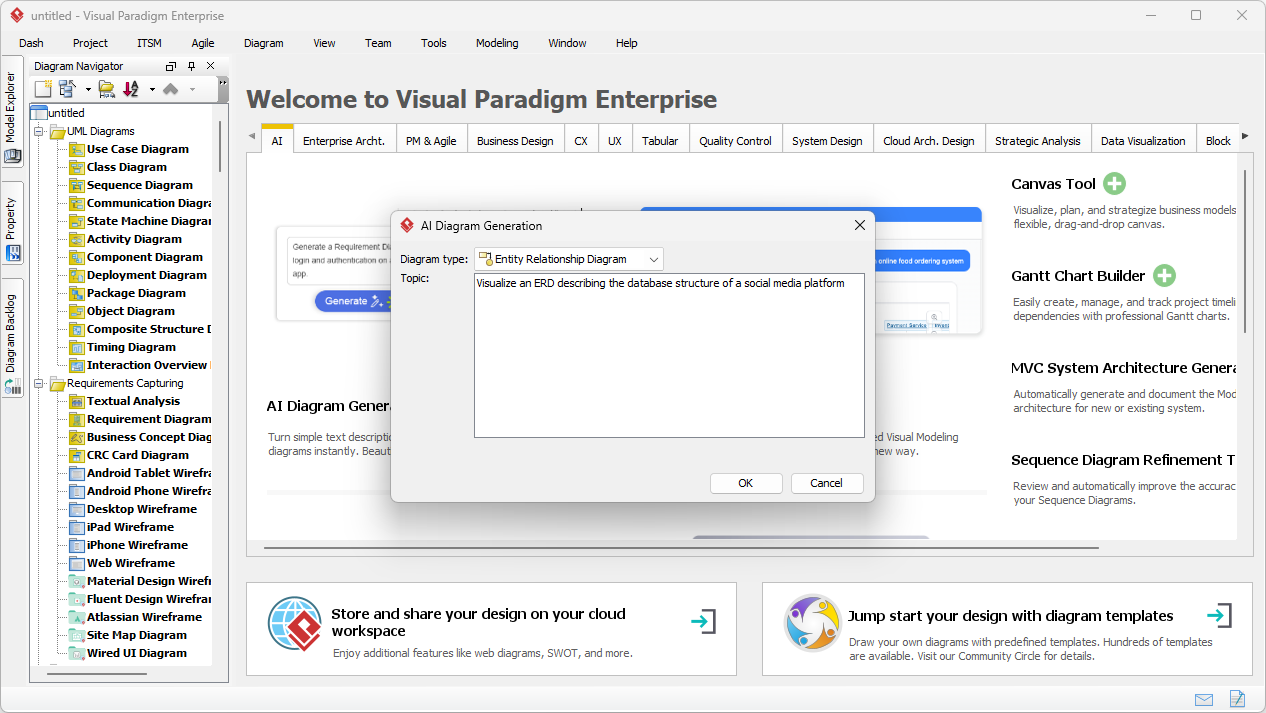
The process begins with a simple concept. You don’t need to know SQL syntax or drag-and-drop dozens of boxes manually. Instead, you access the AI Diagram Generation feature within the tool. As shown in the workflow below, you simply select “Entity Relationship Diagram” as your target output. The power lies in the prompt.
In our example, we wanted to visualize the backend of a social network. We entered the prompt: “Visualize an ERD describing the database structure of a social media platform”. This plain text is all the AI needs to understand the domain requirements, inferring that a social platform typically needs users, content, interactions, and notifications.
Step 2: Analyzing the AI-Generated Data Model
Once you hit “OK,” the AI analyzes your text to identify the core entities (tables) and their associations. It doesn’t just drop random boxes on the canvas; it applies intelligent relationship and cardinality detection to structure the data logic. Within moments, you are presented with a complete diagram that looks like it took hours to design manually.
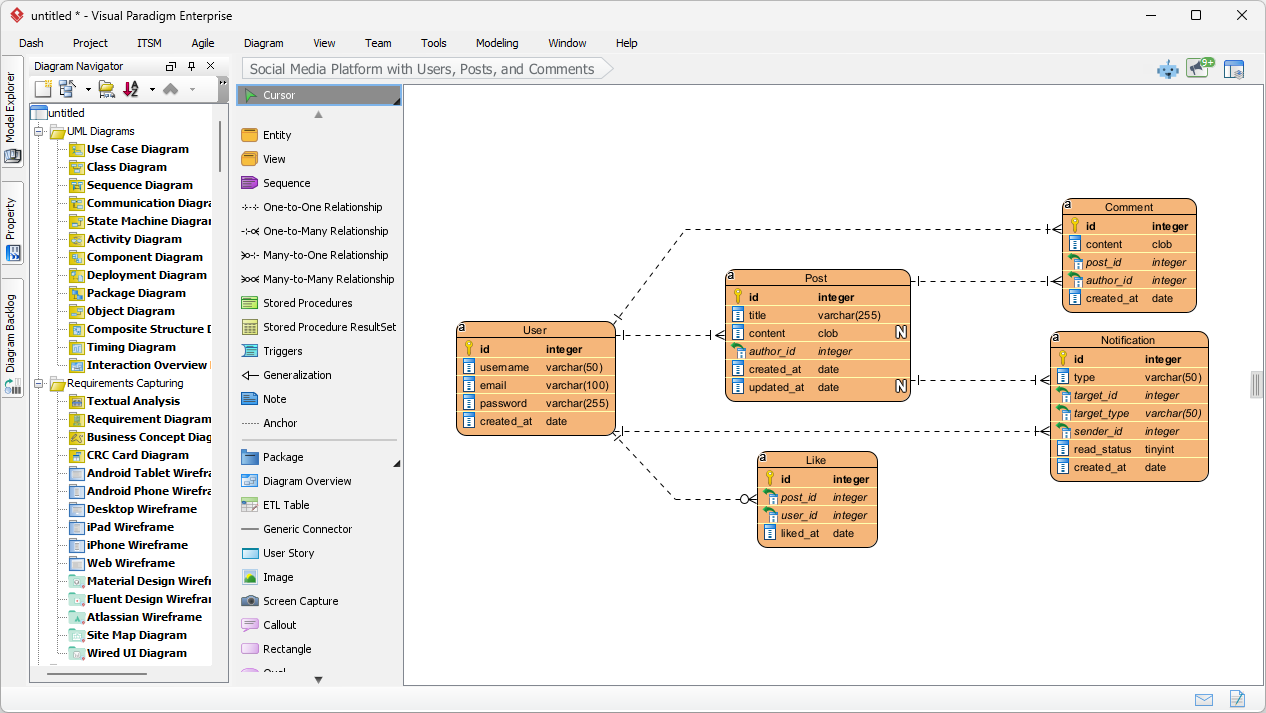
Looking at the result below, you can see the AI correctly generated a schema perfectly suited for a social media app. It created a User entity with standard attributes like username, email, and password. It logically connected the User to a Post entity (one-to-many relationship), recognizing that one user creates many posts. It even fleshed out the details by adding Comment, Like, and Notification entities, complete with foreign keys (e.g., post_id, author_id) and appropriate data types like varchar, clob, and integer.
Why This AI Feature is a Must-Have for Modelers
The beauty of using an AI-powered database modeling tool is that it handles the heavy lifting of layout and organization. As seen in the generated diagram, the entities are arranged to minimize crossing lines, making the data structure easy to read and validate.
Automatic Attribute and Key Assignment
Notice how the AI automatically assigned Primary Keys (PK) to every entity, represented by the key icon. It also made smart guesses on data types—assigning clob (Character Large Object) for the “content” of a post because it knows posts can be long, while keeping “username” as a standard varchar(50). This saves you the tedium of manually setting properties for every single column during the conceptual phase.
From Static Image to Functional Project
Unlike simple image generators, the output here is a fully editable native diagram. If you decide later that a “Post” should also have a “Category,” you can simply add that attribute using the diagram editor. This seamless transition to implementation means you can use this diagram as a foundation to generate DDL scripts for MySQL, PostgreSQL, or Oracle, effectively moving from a rough idea to a physical database schema in one workflow.
How to Create Your Own AI ERD
Ready to try this easy-to-use ERD creator? Here is the simple workflow to replicate the results shown above:
- Launch Visual Paradigm: Open a new or existing project.
- Open AI Tool: Navigate to Tools > AI Diagram Generation.
- Select Diagram Type: Choose “Entity Relationship Diagram” from the dropdown menu.
- Enter Description: Type a clear description of your system (e.g., “A library system with books, members, and loans”).
- Generate: Click OK and watch your diagram appear.
- Refine: Use the editor to tweak relationships or add specific constraints if needed.
Conclusion
Visual Paradigm’s AI Entity Relationship Diagram Generation transforms the way we approach data modeling. By turning a simple sentence about a “social media platform” into a comprehensive, technically accurate ERD, it removes the barriers to entry for database design. Whether you are prototyping a new application or documenting an existing system, this tool provides a robust, professional starting point instantly.
Stop drawing boxes one by one. Experience the speed of AI-assisted modeling today.
Download Visual Paradigm Desktop and try AI Diagram Generation now
Related Links
Visual Paradigm provides a comprehensive suite of ERD (Entity-Relationship Diagram) tools that facilitate the design of scalable database schemas through both traditional visual editors and AI-driven automation. These tools support various notations, such as Chen notation, and enable the seamless transition from conceptual modeling to physical database implementation and reverse engineering.
- Visual Paradigm ERD Tool – Create Entity-Relationship Diagrams Online: A web-based tool that enables the intuitive drag-and-drop design of professional database schemas.
- Database Design with ERD Tools – Visual Paradigm Guide: A resource for architects focused on building scalable and robust databases using data modeling best practices.
- DBModeler AI: Intelligent Database Modeling Tool: An AI-driven application designed for automated database modeling, schema generation, and live SQL testing.
- Free ERD Tool – Design Databases Online with Visual Paradigm: Offers a no-installation, browser-based solution for creating professional entity-relationship diagrams at no cost.
- Chen Notation ERD Editor – Advanced Entity-Relationship Modeling: A specialized editor providing full support for entities, attributes, relationships, and cardinality using precise Chen notation.
- Visual Paradigm ERD Tool for Database Design – Complete Solution: A comprehensive tool for developers and architects to model, visualize, and generate databases with high efficiency.
- New Diagram Types Added to AI Diagram Generator: DFD & ERD: This release highlights the ability to generate ERDs instantly from natural language prompts using AI.
- Streamlining Entity-Relationship Modeling with Visual Paradigm: An article detailing how to simplify the modeling process from the initial concept to final database deployment.
- Introduction to Data Modeling: ERD, Code Generation & Reverse Engineering: An introductory guide covering the essential lifecycle of diagramming and reverse engineering databases.
- What is an Entity-Relationship Diagram (ERD)? – Visual Paradigm Guide: An explanatory guide covering the core components and significance of ERDs within the broader context of database design.