AI 与手动绘图:哪种更适合您的工作流程?

多年来,绘制图表意味着手动拖动形状、对齐连接线并标注组件。虽然精确,但耗时耗力。
如今,像 Visual Paradigm Online 的 AI 聊天机器人这样的 AI 驱动工具已经改变了图表的制作方式——只需几秒钟,就能将文本提示转化为完整的 UML、BPMN 或流程图。

但哪种方法更适合您的工作流程:AI 还是手动绘图?让我们来探讨两者的优缺点,以及如何结合两者以获得最佳效果。

手动绘图:完全掌控,但需付出更多努力

多年来,手动绘图一直是专业人士的标准方法。它提供了完全的创作自由——每个元素、布局和连接都按预期精心打造。

优点:

  • 完全的设计控制权:您决定布局、命名和视觉细节。
  • 更深入的概念理解:手动绘制形状有助于加深对系统逻辑的理解。
  • 高度可定制:非常适合优化演示文稿并满足特定的视觉标准。

挑战:

  • 耗时:复杂的图表可能需要数小时才能完善。
  • 重复调整:微小的更改可能需要大量重新布局。
  • 学习曲线陡峭:初学者常常难以掌握建模符号和最佳实践。

对于需要精确性的资深建模人员来说,手动绘图仍然具有价值,但它需要投入更多的时间和精力。

AI 绘图:规模化下的速度与简便

像 Visual Paradigm Online 的 AI 聊天机器人这样的 AI 驱动绘图工具,利用自然语言自动生成图表。
您只需描述所需内容——例如:

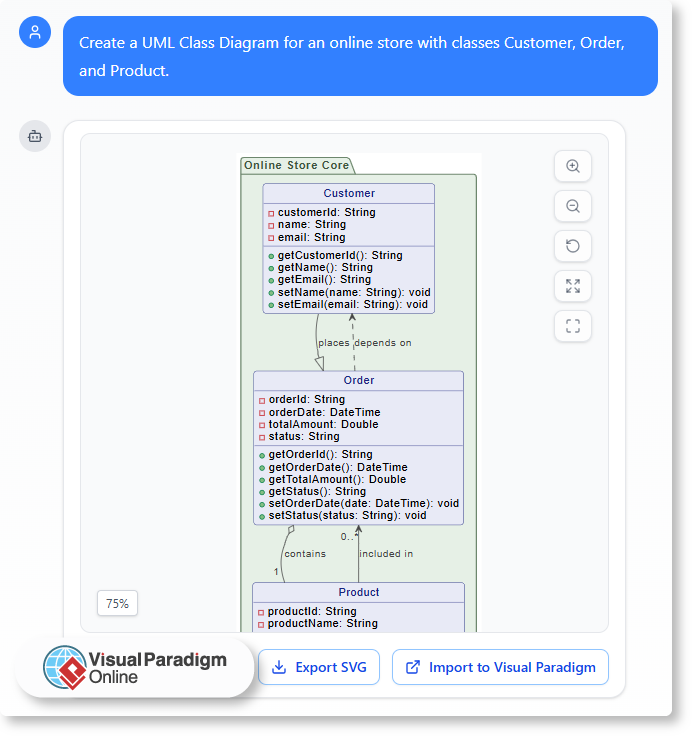
“为一个在线商店创建一个 UML 类图,包含 Customer、Order 和 Product 类。”

几秒钟内,该工具即可生成一个结构清晰、可编辑的图表。
UML Class Diagram for an online store with classes Customer, Order, and Product.

优点:

  • 即时结果:瞬间生成完整的图表。
  • 无需建模专业知识:AI 自动处理语法和结构。
  • 非常适合头脑风暴:快速可视化早期构思或对比多个版本。

挑战:

  • 对布局的控制较少:AI 关注准确性,而非展示美感。
  • 创意微调有限:部分自定义仍需手动编辑。
  • 依赖于提示的清晰度:结果因请求描述的清晰程度而异。

AI 绘图在速度、易用性和自动化方面表现出色——尤其适用于快速迭代或概念验证。

寻找平衡:为什么您需要两者兼备

与其选择一种方法,现代工作流程最受益于人工智能辅助的手动编辑。
Visual Paradigm Online 的人工智能聊天机器人将两者融合在一个环境中:

从人工智能生成开始——通过文本立即创建你的基础图表。

  • 向人工智能请求调整或解释——例如“添加继承关系”或“解释这个交互”。
  • 切换到手动编辑——在编辑器中直接优化、重新定位和美化元素。

这种混合方法在节省时间的同时保持完全控制,让你从头脑风暴到最终文档都能保持高效。

实际应用场景

  • 软件设计师:使用人工智能绘制 UML 图表,然后手动微调以获得精确的系统文档。
  • 业务分析师:为会议生成 BPMN 或流程图,然后优化关键步骤以提高清晰度。
  • 学生与教育工作者:通过实时示例和反馈,更快地学习 UML 或流程建模。

每个应用场景都能受益于人工智能的效率,同时不牺牲手动精度——这种平衡对专业和教育环境都极为理想。

Visual Paradigm Online 实现了两全其美的效果

Visual Paradigm Online 提供一个集成的建模工作区,可无缝支持人工智能辅助创建和手动优化。
你可以:

  1. 通过自然语言提示生成图表。
  2. 请求基于人工智能的解释或改进。
  3. 在可视化编辑器中手动编辑每个元素。
  4. 立即在云端保存并分享你的工作。

通过融合自动化与人类创造力,它确保你的工作流程既快速又灵活——同时不牺牲质量或清晰度。

结论

人工智能和手动绘图各有独特优势。手动设计提供精确性和控制力;人工智能则提供速度与简便性。
Visual Paradigm Online 的人工智能聊天机器人融合了两者,让你能够快速启动,轻松优化,并在更短时间内交付专业成果。
无论你是在设计系统、绘制流程,还是学习 UML,这种平衡都能确保你的图表真正契合你的工作流程。
将AI绘图功能融入您的日常工作中

现代项目需要清晰、高效和协作——但将想法转化为视觉图形往往比预期花费更长时间。无论您是在记录流程、解释概念,还是规划新系统,创建图表都会消耗宝贵的时间。这正是像 Visual Paradigm Online AI 聊天机器人这样的AI工具重新定义工作流程的地方。

通过理解自然语言并生成可编辑的图表,聊天机器人彻底改变了您的工作方式——从构思到完成。

开启一天的更智能方式

与其从一张白纸开始,不如从一次对话开始。用通俗易懂的语言描述您的想法或工作流程,让AI为您生成第一个版本。

例如:

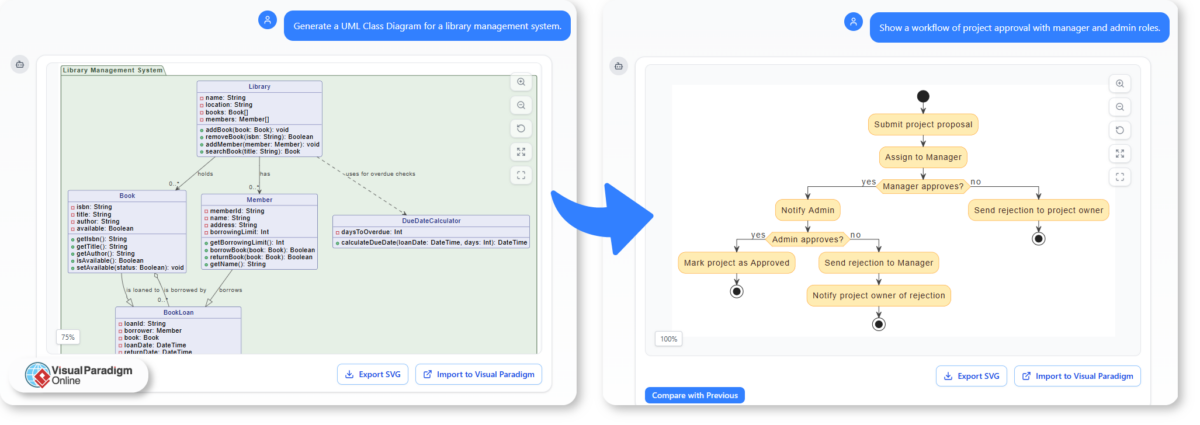
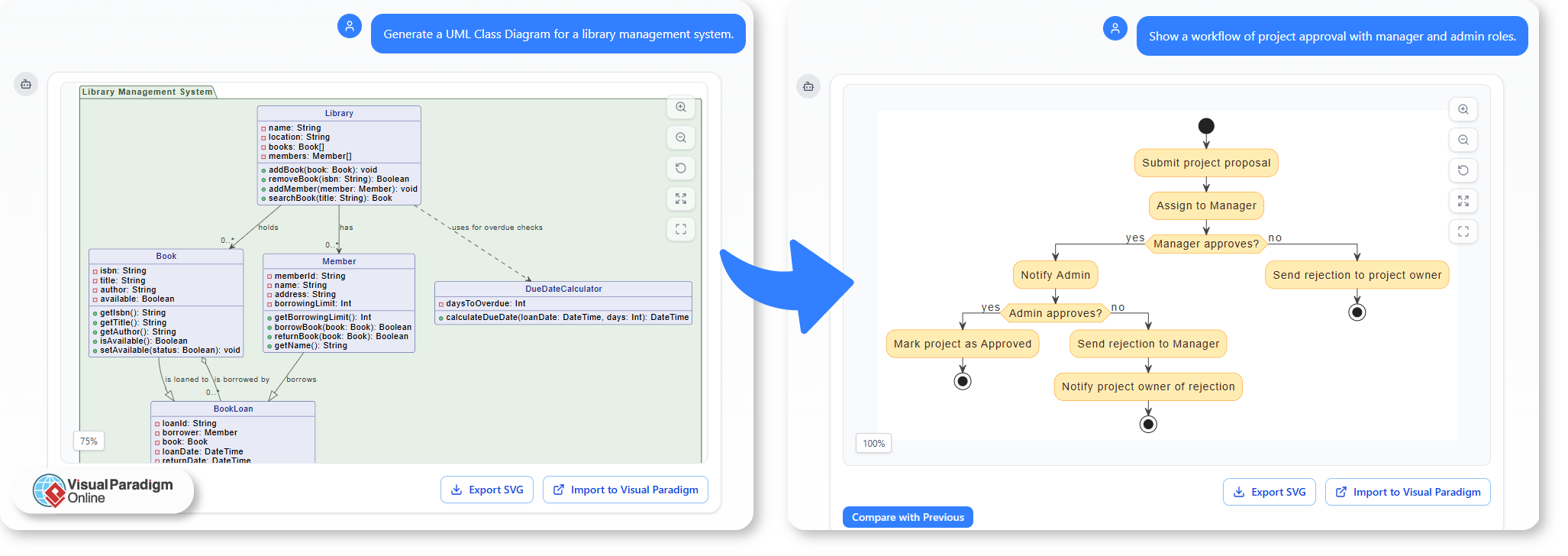
  • “为图书馆管理系统生成一个UML类图。”
  • “展示一个包含经理和管理员角色的项目审批流程。”

这些提示能立即生成结构化的图表,您可以在 Visual Paradigm Online 图表编辑器中进一步优化。

A Smarter Way to Start Your Day with AI Chatbot

将AI引入文档编制

文档编制通常涉及解释复杂的系统或流程。AI绘图功能通过将文字描述转化为有助于理解的视觉图形,简化了这一过程。

您可以使用它来:

  • 直接从您的文字笔记或报告中展示系统设计。
  • 无需手动重绘,即可快速生成文档更新所需的视觉图形。
  • 通过使用AI生成的模板,保持图表之间的统一性。

这使得维护技术或业务文档更加迅速且一致。

支持教学与学习

教育工作者和培训师也可以将AI生成的图表融入课程中。通过在几秒钟内将抽象概念转化为视觉示例,AI有助于使学习更加互动和高效。

例如:

  • 教师只需输入系统描述,就能演示UML时序图的工作原理。
  • 学生可以探索更改单一提示如何影响最终图表——通过实验学习结构。
  • 培训材料可以通过自动生成功能与课程内容匹配的视觉元素来丰富。

这种实践性方法架起了理论学习与实际应用之间的桥梁。

加速设计规划

在规划系统或工作流程时,AI为团队提供了在最终确定前快速可视化想法的更快方式。您可以自由头脑风暴,测试不同结构,并快速迭代,而无需担心图表格式问题。

常见场景包括:

  • 项目规划:可视化团队职责和审批流程。
  • 软件设计:草拟系统结构和关系以供讨论。
  • 流程改进:通过快速的AI草图来绘制工作流程,识别低效之处。

一旦基础结构准备就绪,便可在 Visual Paradigm Online 中协同进行优化调整。

让AI融入你的日常

将AI融入你的工作流程,并非取代创造力——而是消除障碍。通过自动化结构创建,AI让你能够专注于逻辑、流程与沟通。

在日常工作中,这意味着:

  • 减少手动绘图的时间。
  • 直接通过你自己的语言生成更清晰的图表。
  • 文档、课程和设计计划的交付速度更快。

更高效的工作方式

Visual Paradigm OnlineAI聊天机器人让绘图成为你日常工作的有机组成部分——快速、灵活且智能。无论你是教师、分析师还是设计师,只需一次简单的对话,就能将日常想法转化为专业视觉成果。

为什么自然语言在软件设计中至关重要

如何通过简单的英语让团队更紧密——以及人工智能如何将其转化为结构化图表

软件设计长期以来依赖于专业的符号、图表和技术文档。但在这些内容出现之前,想法通常始于简单的对话:“用户登录并查看他们的仪表板。”挑战在于,将这些日常描述转化为正式模型时,常常会引入混淆或不一致。

当有效使用自然语言时,它有助于弥合这一差距,促进跨团队更顺畅的合作和更快的理解。如今,在人工智能的帮助下,简单的英语可以立即转化为正式的可视化表示。

软件设计中的语言障碍

设计师、开发人员和业务利益相关者通常使用不同的“语言”。

  • 开发人员从类、组件和API的角度思考。
  • 分析师编写需求和用例。
  • 客户用通俗易懂的语言描述目标和用户体验。

如果没有共同的语言,沟通就会变得支离破碎。技术上的精确性固然重要,但它也可能让需要理解系统行为的非技术人员感到疏远。自然语言提供了这座桥梁——一种易于理解、中立的媒介,确保所有人在深入结构之前保持一致。

从简单描述到清晰设计

使用自然语言描述系统有助于提高清晰度。当团队成员必须用语言解释某事物如何运作时用文字,他们常常会发现缺失的步骤、不明确的所有权或隐藏的依赖关系。

例如,将一个过程描述为:

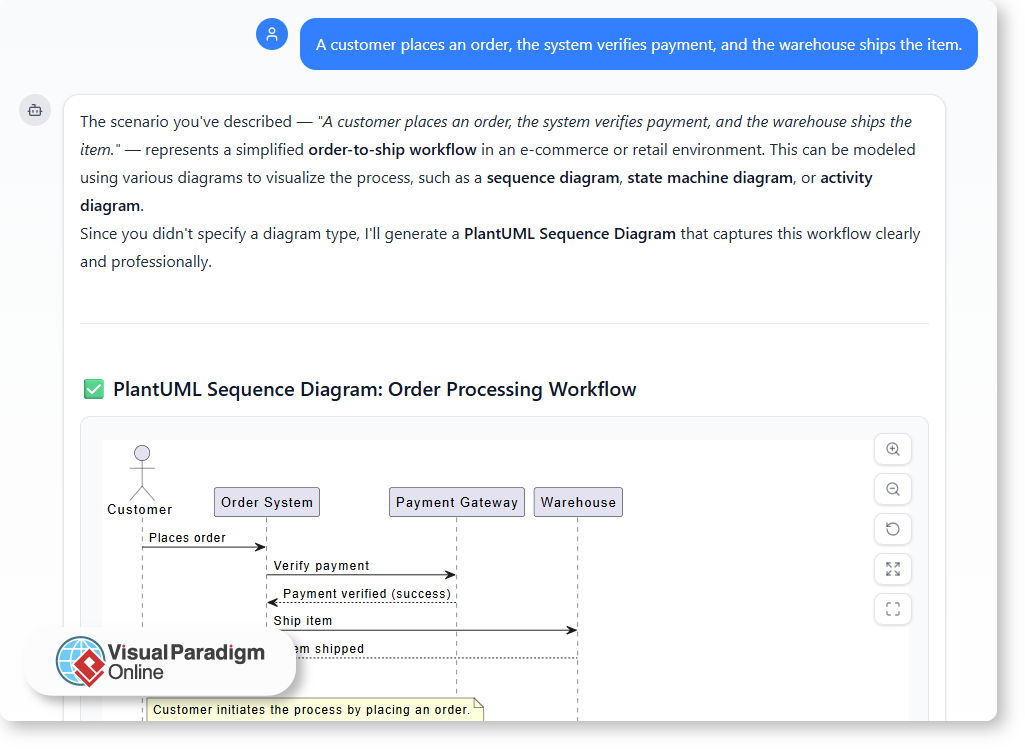
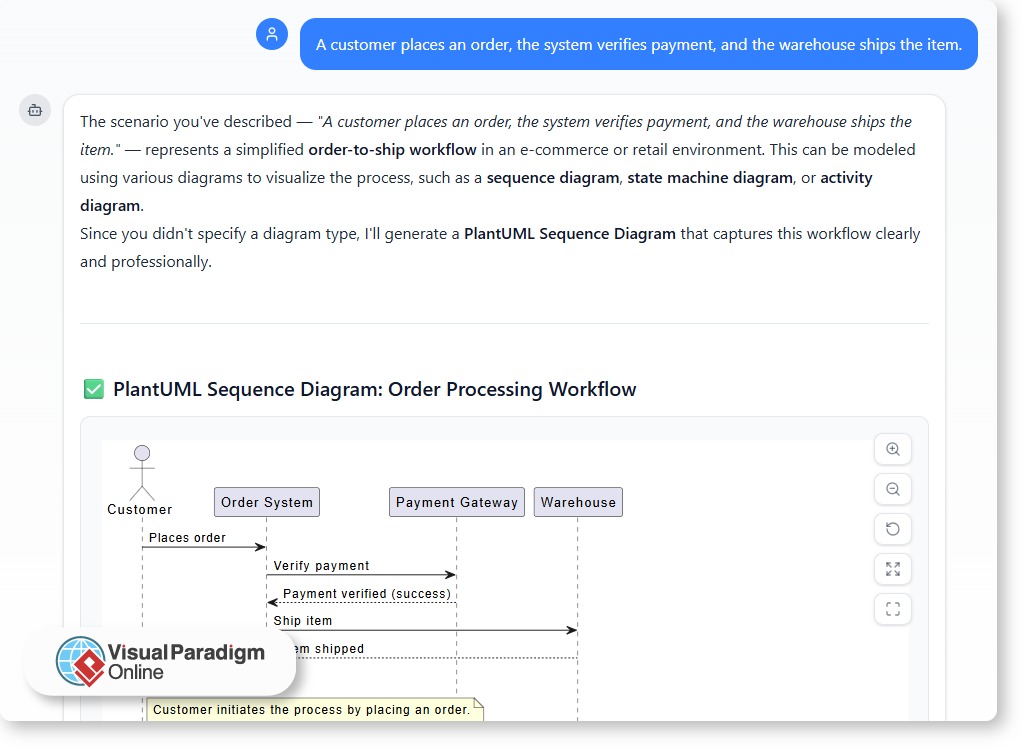
“客户下单,系统验证付款,仓库发货。”

这已经暗示了流程、角色和动作的顺序。但将其转化为正式图表——例如用例或序列模型——需要解释。这正是人工智能驱动工具发挥作用的地方。

人工智能如何解析自然语言

现代人工智能建模助手,例如Visual Paradigm Online,利用自然语言处理分析简单描述并生成相应的图表。你只需用自己的语言描述流程,人工智能就能识别出关键参与者、关系和交互。

例如:

  • “用户登录” → 创建一个参与者和用例。
  • “系统发送确认邮件” → 添加一项交互。
  • “经理审核报告” → 引入另一个角色和流程。

几秒钟内,你就能看到你的文字被转化为遵循标准符号的可视化模型。它使技术结构变得清晰可见,同时对所有参与初始描述的人都易于理解。

通过共同理解提升协作

当自然语言作为起点时,团队沟通更加自然,减少不必要的假设。人工智能通过充当人类意图与正式结构之间的翻译者来支持这一过程。

结果显而易见:

  • 清晰性:每个人都能理解系统,而无需阅读复杂的规范。
  • 一致性:人工智能确保关系和元素之间逻辑连贯。
  • 速度:从想法到可视化的过程几乎瞬间完成。
  • 包容性:不同技术水平的利益相关者仍能有意义地参与。

与人工智能建模助手合作的另一个优势是,整个聊天记录都可以共享每个提示和回复都记录了模型的演进过程——从最初的构想到最终的精炼图表。这一共享记录使团队成员更容易回顾过往讨论,理解设计逻辑,并在不丢失上下文的情况下继续协作。

图示创建不再只是技术专家的专属工具,而成为一个透明且共享的过程,每个人都能参与并保持一致。

现代设计中对话的力量

软件设计正变得越来越具有对话性。团队不再需要填写模板或手动绘制图表,而是可以自然地描述想法,并让人工智能协助进行结构化。这种对话式方法减少了摩擦,促进了协作,帮助团队更快达成共识。

在诸如Visual Paradigm的人工智能聊天机器人这一理念在这些平台上得以实现。它倾听、理解并建模——将你的语句转化为结构化且符合标准的视觉图表。

从文字到图表,从想法到系统

自然语言并非正式建模的替代品——而是其基础。通过用清晰的语言表达想法,并让人工智能负责将其转化为视觉形式,团队既能获得理解,又能实现精确性。

软件设计本质上是一种沟通过程。借助人工智能工具的支持,普通英语在连接人与系统方面从未如此强大。

Why Natural Language Matters in Software Design

How plain English brings teams closer — and how AI turns it into structured diagrams

Software design has long relied on specialized notations, diagrams, and technical documentation. But before any of that exists, ideas usually start as simple conversations: “The user logs in and views their dashboard.” The challenge is that translating those everyday descriptions into formal models often introduces confusion or inconsistency.

Natural language — when used effectively — helps bridge that gap, enabling smoother collaboration and faster understanding across diverse teams. And now, with the help of AI, plain English can be instantly transformed into formal, visual representations.

The Language Barrier in Software Design

Designers, developers, and business stakeholders often speak in different “languages.”

  • Developers think in terms of classes, components, and APIs.
  • Analysts write requirements and use cases.
  • Clients describe goals and user experiences in plain terms.

Without a shared language, communication becomes fragmented. Technical precision is important, but it can also alienate non-technical members who need to understand system behavior. Natural language provides that bridge — an accessible, neutral medium that keeps everyone aligned before diving into structure.

From Plain Description to Clear Design

Using natural language to describe systems encourages clarity. When team members must explain how something works in words, they often uncover missing steps, unclear ownership, or hidden dependencies.

For instance, describing a process as:

“A customer places an order, the system verifies payment, and the warehouse ships the item.”

Already suggests a flow, roles, and order of actions. But turning that into a formal diagram — such as a use case or sequence model — requires interpretation. That is where AI-driven tools step in.

Why Natural Language Matters in Software Design

How AI Interprets Natural Language

Modern AI modeling assistants, such as the one in Visual Paradigm Online, use natural language processing to analyze plain descriptions and generate corresponding diagrams. You simply describe the process in your own words, and the AI identifies key actors, relationships, and interactions.

For example:

  • “User logs in” → creates an actor and use case.
  • “System sends confirmation email” → adds an interaction.
  • “Manager reviews report” → introduces another role and process flow.

In seconds, you can see your text transformed into a visual model that follows standard notation. It makes technical structure visible, yet accessible to everyone who contributed to the initial description.

Improving Collaboration Through Shared Understanding

When natural language serves as the starting point, teams communicate more naturally and make fewer assumptions. AI supports this by acting as a translator between human intent and formal structure.

The results are clear:

  • Clarity: Everyone understands the system without needing to read complex specifications.
  • Consistency: The AI ensures relationships and elements are logically connected.
  • Speed: The process from idea to visualization is almost instant.
  • Inclusivity: Stakeholders with different technical levels can still participate meaningfully.

Another advantage of working with an AI modeling assistant is that the entire chat history can be shared. Each prompt and response documents how the model evolved — from initial ideas to refined diagrams. This shared record makes it easier for teammates to review past discussions, understand design rationale, and continue collaboration without losing context.

Instead of being a tool reserved for technical experts, diagram creation becomes a transparent, shared process where everyone can contribute and stay aligned.

The Power of Conversation in Modern Design

Software design is becoming more conversational. Instead of filling templates or manually creating diagrams, teams can now describe ideas naturally and let AI assist in structuring them. This conversational approach reduces friction, encourages collaboration, and helps teams reach consensus faster.

In platforms like Visual Paradigm’s AI Chatbot, that concept comes to life. It listens, understands, and models — turning your sentences into structured, standards-compliant visuals.

From Words to Diagrams, and Ideas to Systems

Natural language is not a replacement for formal modeling — it is the foundation. By expressing ideas clearly in words and allowing AI to handle translation into visual form, teams gain both understanding and precision.

Software design is, at its core, a communication process. And with the support of AI-powered tools, plain English has never been more powerful in bringing people and systems together.

Integrating AI Diagram Generation into Your Daily Workflow

Modern projects demand clarity, speed, and collaboration — but turning ideas into visuals often takes longer than expected. Whether you are documenting a process, explaining a concept, or planning a new system, creating diagrams can consume valuable time. This is where AI-powered tools like the Visual Paradigm Online AI Chatbot redefine the workflow.

By understanding natural language and generating ready-to-edit diagrams, the chatbot transforms how you work — from concept to completion.

A Smarter Way to Start Your Day

Instead of beginning with a blank canvas, you can start with a conversation. Describe your idea or workflow in plain language, and let AI create the first version for you.

For example:

  • “Generate a UML Class Diagram for a library management system.”
  • “Show a workflow of project approval with manager and admin roles.”

These prompts instantly produce structured diagrams that you can refine in the Visual Paradigm Online Diagram Editor.

Integrating AI Diagram Generation into Your Daily Workflow

Bringing AI into Documentation

Documentation often involves explaining complex systems or processes. AI diagram generation simplifies this by turning written descriptions into visuals that enhance understanding.

You can use it to:

  • Illustrate system design directly from your written notes or reports.
  • Generate quick visuals for documentation updates without redrawing manually.
  • Maintain consistency across diagrams by using AI-generated templates.

This makes maintaining technical or business documentation faster and more consistent.

Supporting Teaching and Learning

Educators and trainers can also integrate AI-generated diagrams into their lessons. By turning abstract ideas into visual examples within seconds, AI helps make learning more interactive and effective.

For instance:

  • Teachers can demonstrate how a UML sequence works by simply typing a system description.
  • Students can explore how changing a single prompt affects the resulting diagram — learning structure through experimentation.
  • Training materials can be enriched with automatically generated visuals that match the lesson content.

This hands-on approach bridges theoretical learning and practical application.

Accelerating Design Planning

When planning systems or workflows, AI gives teams a faster way to visualize ideas before finalizing them. You can brainstorm freely, test different structures, and iterate quickly without worrying about diagram formatting.

Common scenarios include:

  • Project planning: Visualize team responsibilities and approval processes.
  • Software design: Draft system structures and relationships for discussion.
  • Process improvement: Identify inefficiencies by mapping workflows through quick AI drafts.

Once the base structure is ready, it can be fine-tuned collaboratively in VP Online.

Making AI Part of Your Routine

Integrating AI into your workflow is not about replacing creativity — it is about removing barriers. By automating structure creation, AI lets you focus on logic, flow, and communication.

In your daily work, that means:

  • Fewer hours spent drawing manually.
  • Clearer diagrams created directly from your own language.
  • Faster turnaround for documentation, lessons, and design plans.

A More Efficient Way to Work

The Visual Paradigm Online AI Chatbot makes diagramming an integrated part of your daily routine — quick, flexible, and intelligent. Whether you are a teacher, analyst, or designer, you can turn everyday ideas into professional visuals with a simple conversation.

AI vs. Manual Diagramming: Which Fits Your Workflow?

For years, creating diagrams meant manually dragging shapes, aligning connectors, and labeling components. It was precise but time-consuming.
Now, AI-powered tools like the Visual Paradigm Online AI Chatbot have transformed how diagrams are made — turning text prompts into complete UML, BPMN, or flow diagrams in seconds.

But which method fits your workflow better: AI or manual diagramming? Let us explore the pros and cons of each, and how combining both delivers optimal results.

Manual Diagramming: Total Control with More Effort

Manual diagramming has long been the standard approach for professionals. It gives full creative freedom — every element, layout, and connection is crafted exactly as intended.

Advantages:

  • Full design control: You decide the layout, naming, and visual details.
  • Better conceptual understanding: Drawing shapes manually deepens comprehension of system logic.
  • High customization: Ideal for refining presentations and meeting specific visual standards.

Challenges:

  • Time-consuming: Complex diagrams can take hours to perfect.
  • Repetitive adjustments: Minor changes may require extensive rearrangement.
  • Steep learning curve: Beginners often struggle with modeling notation and best practices.

Manual diagramming remains valuable for experienced modelers who need accuracy, but it demands more time and effort.

AI Diagramming: Speed and Simplicity at Scale

AI-driven diagramming tools like Visual Paradigm Online’s AI Chatbot use natural language to create diagrams automatically.
You simply describe what you need — for example:

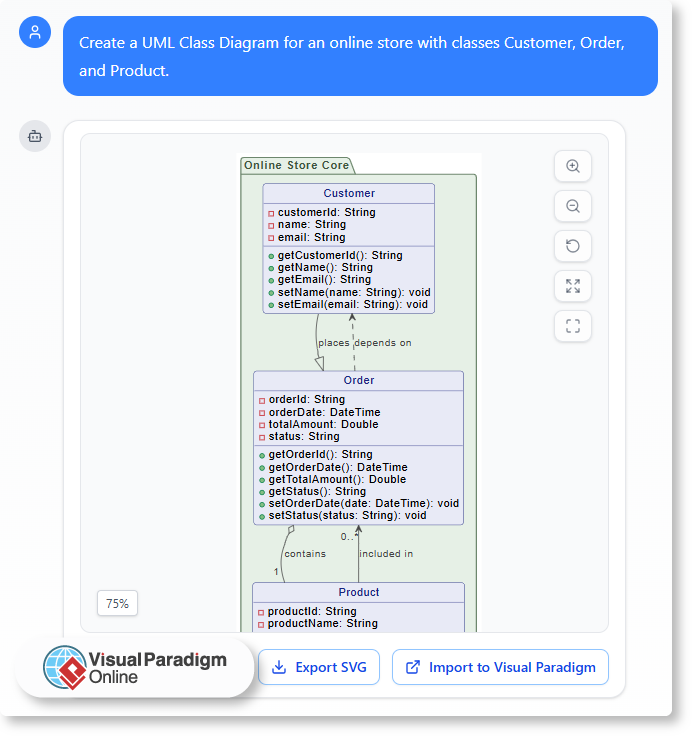
“Create a UML Class Diagram for an online store with classes Customer, Order, and Product.”

Within seconds, the tool generates a structured, ready-to-edit diagram.

AI vs. Manual Diagramming: Which Fits Your Workflow?

Advantages:

  • Instant results: Generate complete diagrams in moments.
  • No modeling expertise required: AI handles syntax and structure automatically.
  • Great for brainstorming: Quickly visualize early-stage ideas or compare multiple versions.

Challenges:

  • Less control over layout: AI focuses on accuracy, not presentation aesthetics.
  • Limited creative fine-tuning: Some customization still requires manual editing.
  • Dependent on prompt clarity: Results vary with how well the request is described.

AI diagramming excels in speed, accessibility, and automation — especially useful for quick iterations or concept validation.

Finding the Balance: Why You Need Both

Rather than choosing one approach, modern workflows benefit most from AI-assisted manual editing.
The Visual Paradigm Online AI Chatbot integrates both worlds in a single environment:

Start with AI generation — instantly create your base diagram from text.

  • Ask AI for adjustments or explanations — such as “Add an inheritance relationship” or “Explain this interaction.”
  • Switch to manual editing — refine, reposition, and style elements directly in the editor.

This hybrid approach saves time while preserving full control, allowing you to stay productive from brainstorming to final documentation.

Real-World Use Cases

  • Software Designers: Use AI to draft UML diagrams, then fine-tune manually for precise system documentation.
  • Business Analysts: Generate BPMN or flowcharts for meetings, then refine key steps for clarity.
  • Students & Educators: Learn UML or process modeling faster with real-time examples and feedback.

Each use case benefits from AI efficiency without losing manual precision — a balance ideal for professional and educational environments alike.

The Best of Both Worlds with Visual Paradigm Online

Visual Paradigm Online provides an integrated modeling workspace that supports AI-assisted creation and manual refinement seamlessly.
You can:

  1. Generate diagrams from natural-language prompts.
  2. Request AI-based explanations or improvements.
  3. Edit every element manually in the visual editor.
  4. Save and share your work in the cloud instantly.

By merging automation and human creativity, it ensures your workflow is both fast and flexible — without sacrificing quality or clarity.

Conclusion

AI and manual diagramming each have unique strengths. Manual design offers precision and control; AI provides speed and simplicity.
The Visual Paradigm Online AI Chatbot combines both, allowing you to start fast, refine easily, and deliver professional results in less time.
Whether you are designing systems, mapping processes, or learning UML, this balance ensures your diagrams truly fit your workflow.