支持TOGAF ADM的ArchiMate综合教程

ArchiMate简介

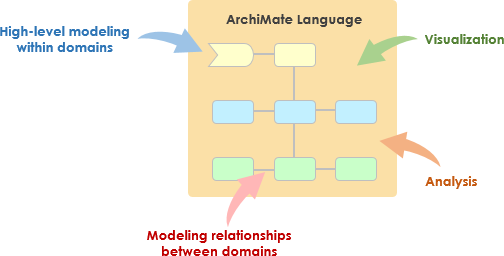
ArchiMate是一种开放且独立的企业架构建模语言,支持对业务领域内及跨业务领域的架构进行描述、分析和可视化。它旨在为向利益相关者清晰且无歧义地传达复杂架构提供一种方式。当与TOGAF架构开发方法(ADM)结合使用时,ArchiMate尤其有用,能够提供一种标准化的方式来建模和沟通企业架构。
What is ArchiMate?

ArchiMate的核心概念

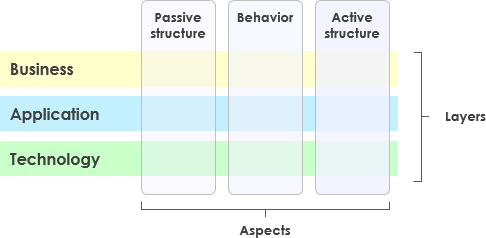
ArchiMate Core Framework

1. ArchiMate的层级

ArchiMate将企业架构划分为三个主要层级:

  • 业务层:关注支持组织目标的业务流程、服务和功能。
  • 应用层:处理支持业务层的应用服务、组件及其交互。
  • 技术层:涵盖技术基础设施,包括支持应用层的硬件、软件和网络组件。

2. 核心元素

ArchiMate定义了若干用于建模架构的核心元素:

  • 主动结构元素:表示执行行为的实体,如业务参与者、应用组件和设备。
  • 行为元素:表示架构内的流程、功能、服务和交互。
  • 被动结构元素:表示由行为元素使用或产生的信息或数据,如业务对象和数据对象。

3. 关系

ArchiMate定义了多种关系类型以连接各个元素:

  • 结构关系:例如组合、聚合和特化。
  • 依赖关系:例如关联、实现和被使用。
  • 动态关系: 例如触发和流程。

4. 视角

ArchiMate 提供了多个视角,用于从不同角度可视化架构:

  • 业务流程视角: 展示业务流程及其交互。
  • 应用协作视角: 展示应用程序如何协作以支持业务流程。
  • 技术实现视角: 展示技术组件如何实现应用组件。

ArchiMate 与 TOGAF ADM

TOGAF 架构开发方法(ADM)

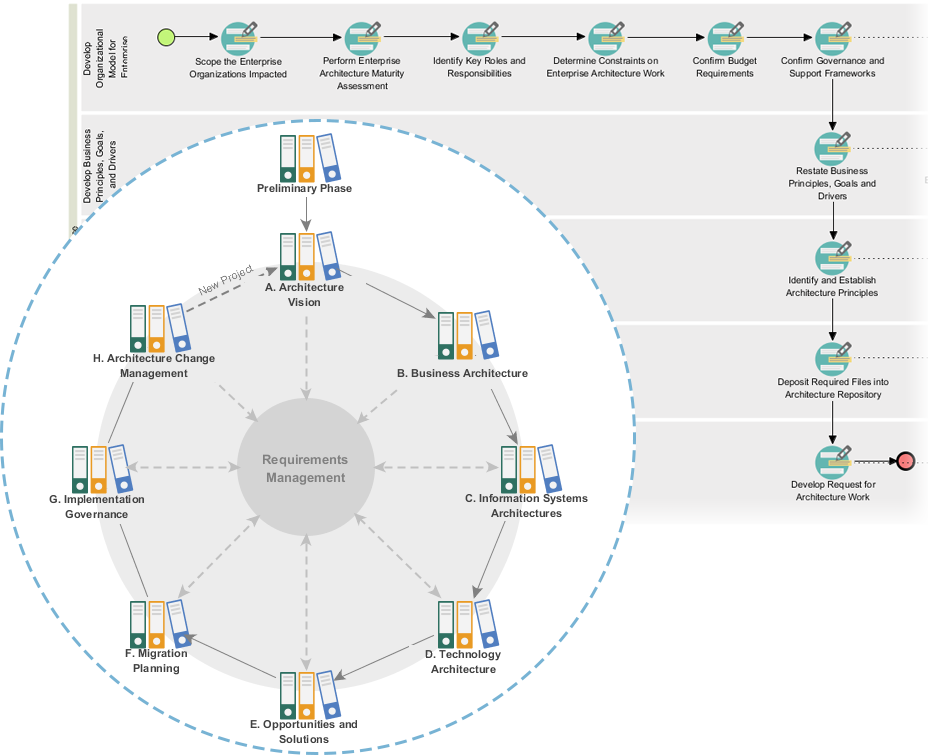
TOGAF ADM 是一种全面的开发企业架构的方法论。它由多个阶段组成,每个阶段专注于架构开发过程中的特定方面。ArchiMate 通过提供一种标准化的方式来建模和可视化每个阶段的架构,从而支持 TOGAF ADM。
Powerful TOGAF ADM Toolset

TOGAF ADM 的阶段

  1. 初步阶段: 确立架构原则、框架和治理。
  2. 架构愿景: 定义范围、利益相关者、关注点和业务目标。
  3. 业务架构: 开发业务架构,包括业务流程和服务。
  4. 信息系统架构: 开发数据架构和应用架构。
  5. 技术架构: 开发技术架构。
  6. 机遇与解决方案: 识别并优先考虑架构项目。
  7. 迁移规划: 制定迁移和实施计划。
  8. 实施治理: 为架构的实施提供治理和支持。

ArchiMate模型示例

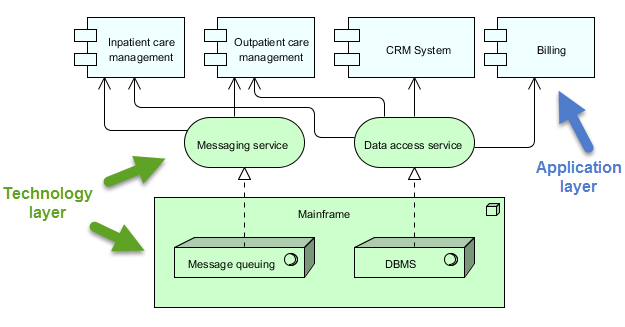
此图展示了医疗管理系统的一种分层架构,分为两个主要层级:应用层以及技术层以下是各组件及其交互的详细说明:
archimate diagram example

应用层(蓝色)

该层由各种直接与用户或其他系统交互以管理医疗服务的应用程序和系统组成。该层的关键组件包括:

  1. 住院护理管理:

    • 管理与住院患者相关的服务和流程。
  2. 门诊护理管理:

    • 管理前往医院接受治疗但未住院的患者的服务和流程。
  3. CRM系统(客户关系管理):

    • 管理与患者的互动,包括沟通、随访以及患者关系管理。
  4. 账单管理:

    • 处理财务相关事务,包括生成账单、处理付款以及管理财务记录。

技术层(绿色)

该层提供支持应用层应用程序的底层基础设施和服务。该层的关键组件包括:

  1. 消息服务:

    • 促进医疗管理系统内不同应用程序和系统之间的通信。
    • 确保消息可靠且按正确顺序传递。
  2. 数据访问服务:

    • 提供一种集中访问和管理整个系统数据的方式。
    • 确保数据能够高效且安全地被检索和存储。
  3. 主机:

    • 中央计算系统,用于托管核心服务和数据。
    • 包括两个主要组件:
      • 消息队列:管理消息的排队和处理,以确保可靠通信。
      • 数据库管理系统(DBMS):存储并管理各个应用程序使用的数据。

交互

  • 住院护理管理门诊护理管理客户关系管理系统,以及计费消息服务数据访问服务以执行各自的功能。
  • 消息服务数据访问服务依赖于主机提供核心服务,如消息队列和数据库管理。
  • 主机确保消息被正确处理,数据得到高效管理,从而支持整个系统运行。

该图描绘了一种通过将应用层功能与底层技术基础设施分离来管理医疗服务的结构化方法。这种分离使得系统设计更具模块性和可维护性,其中一层的更改对另一层的影响最小。消息服务数据访问服务充当中介,促进应用组件与主机系统之间的通信和数据管理。

推荐的ArchiMate企业架构工具

Visual Paradigm被广泛认为是企业架构(EA)项目中用于ArchiMate建模的最佳工具之一。以下是它被强烈推荐的一些原因:
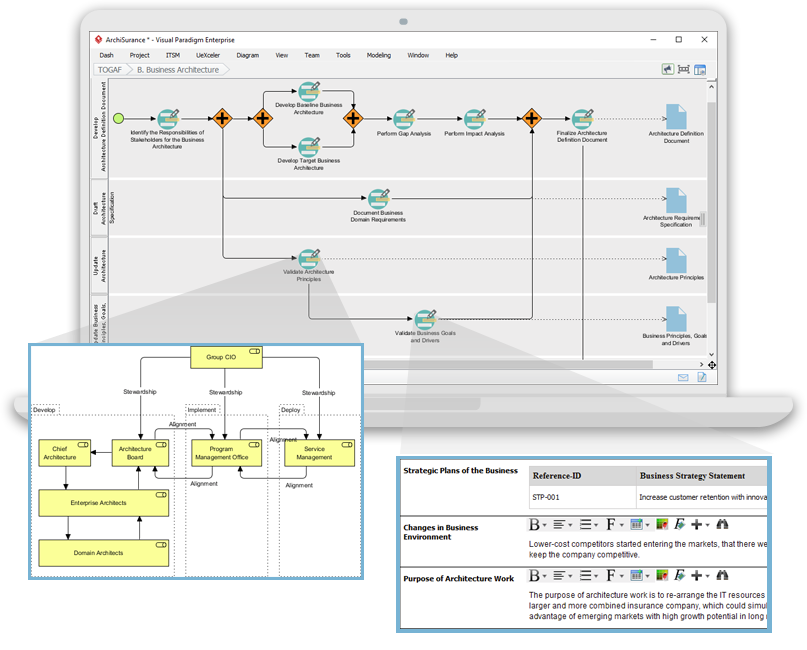
Navigating TOGAF: Your Guide to the ADM Process - Visual Paradigm Guides

1. 全面的ArchiMate支持

  • 完整的ArchiMate标准:Visual Paradigm支持最新的ArchiMate标准,包括ArchiMate 3.1,确保您可以使用所有官方的ArchiMate元素和关系进行建模。
  • 丰富的元素库:它提供了一个庞大的ArchiMate符号库,便于创建详细且准确的模型。

2. 用户友好的界面

  • 直观的设计:该工具提供易于导航的用户友好界面,即使是初次接触ArchiMate建模的用户也能轻松使用。
  • 拖放功能:拖放功能可实现快速高效的模型创建。

3. 高级建模功能

  • 分层视图:支持创建分层视图(如业务层、应用层、技术层),以提供企业架构的整体视图。
  • 跨层关系:可轻松定义并可视化架构中不同层级之间的关系。

4. 协作与共享

  • 团队协作:Visual Paradigm支持协作工作,允许多个用户同时在同一项目上工作。
  • 版本控制:集成的版本控制有助于管理变更并跟踪模型的演变过程。

5. 集成能力

  • 工具集成:可无缝集成其他工具和平台,如 JIRA、Confluence 和各种数据库,从而提升整体企业架构实践。
  • 导入/导出:支持以多种格式导入和导出模型,包括 ArchiMate 交换文件格式,确保与其他工具的兼容性。

6. 文档与报告

  • 自动生成文档:从您的 ArchiMate 模型自动生成全面的文档,节省时间并确保一致性。
  • 自定义报告:允许创建针对特定利益相关者需求的自定义报告。

7. 培训与支持

  • 丰富的资源:提供大量教程、指南和示例,帮助用户入门并掌握 ArchiMate 建模。
  • 客户支持:提供强大的客户支持,协助解决可能出现的任何问题或疑问。

8. 可扩展性

  • 可扩展的解决方案:适用于中小型和大型企业架构项目,是各类规模组织的多功能工具。

9. 合规性与标准

  • 行业标准:符合行业标准和最佳实践,确保您的企业架构模型合规且保持最新。

结论

ArchiMate 提供了一种强大且标准化的方式来建模企业架构,支持 TOGAF ADM 方法论。通过理解 ArchiMate 中的关键概念、层级、元素和关系,您可以有效地建模并将其复杂架构向利益相关者清晰传达。所提供的示例展示了如何使用 ArchiMate 来建模业务流程、应用协作和技术实现,支持 TOGAF ADM 的各个阶段。

ArchiMate 工具资源

  1. 免费在线 ArchiMate 图表工具

    • 描述: 使用支持 ArchiMate 3 可视化建模语言的免费工具在线创建 ArchiMate 图表。包含示例和模板,帮助您快速上手。
    • 网址免费在线 ArchiMate 图表工具 1
  2. 主页 – 免费 ArchiMate 资源

    • 描述: 提供一种可视化语言来建模和捕捉企业架构,提供一种可视化不同领域内部及之间关系的方法。
    • 网址主页 – 免费 ArchiMate 资源 2
  3. Visual Paradigm – UML、敏捷、PMBOK、TOGAF、BPMN 等更多

  4. 第 7 章. ArchiMate – Visual Paradigm 社区圈

  5. 什么是 ArchiMate?

    • 描述: 逐步学习指南,涵盖如何使用ArchiMate进行企业架构建模。
    • 网址什么是ArchiMate? 5
  6. ArchiMate工具

    • 描述: 学习如何使用Visual Paradigm,这是一款专为敏捷软件团队设计的设计和管理工具。
    • 网址ArchiMate工具 6
  7. 最佳ArchiMate软件

    • 描述: 经认证的ArchiMate工具,用于高效的企业架构设计与建模。可快速绘制符合开放组官方规范的ArchiMate图表。
    • 网址最佳ArchiMate软件 7
  8. 如何格式化ArchiMate元素?

  9. ArchiMate视角指南 – 资源映射视角

  10. ArchiMate 图表教程

    • 描述:本教程帮助您了解 ArchiMate 图表、如何创建它们以及何时使用它们。包含示例和技巧。
    • 网址ArchiMate 图表教程 10

这些资源应能为使用 Visual Paradigm 的 ArchiMate 工具进行企业架构建模提供全面的起点。
Visual Paradigm TOGAF引导流程全面指南

简介

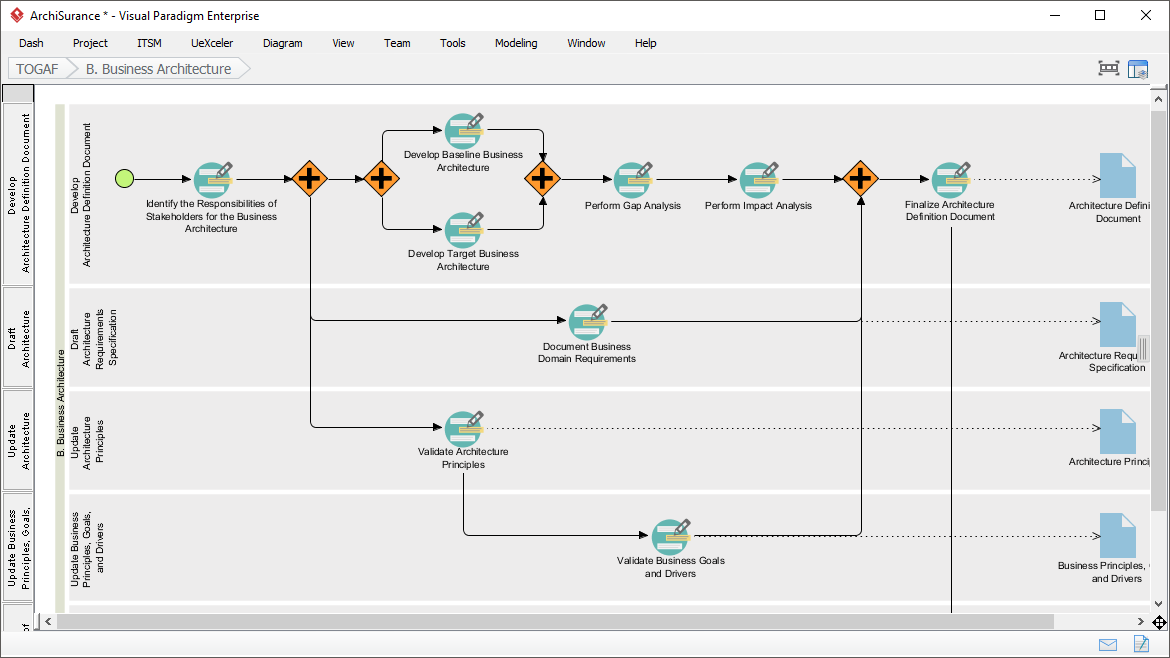
Visual Paradigm 的 TOGAF 引导流程是一款强大的工具,旨在简化 TOGAF 架构开发方法(ADM)的采用。它提供逐步指导、操作说明和真实案例,以支持企业架构的开发。本全面指南将探讨 Visual Paradigm TOGAF 引导流程的关键特性、优势和应用领域,突出其在企业架构领域中的独特之处。

Transform Your Business with Visual Paradigm and TOGAF - Visual Paradigm Guides

主要特性

  1. 逐步指导:

    • 引导流程为 TOGAF ADM 的每个阶段提供详细且逐步的指导,确保用户能够轻松应对企业架构开发的复杂性。1112.
  2. 与 ArchiMate 的集成:

    • Visual Paradigm 支持 ArchiMate 与 TOGAF ADM 的集成,为企业的架构项目提供强大的组合。ArchiMate 3 拥有灵活的符号系统,使架构师能够有效地表达复杂模型。1314.
  3. 自动化任务管理:

    • 该工具通过自动化任务管理和通知功能提升整个流程,使用户能够逐步且协作地开发架构交付成果。15.
  4. 可视化流程图:

    • 该软件具备可视化流程图,帮助用户轻松地贯穿整个企业架构流程。它提供了一整套规划、设计和开发工具,以完成 ADM 活动。14.
  5. 全面的工具包:

    • Visual Paradigm 提供一系列专为 ADM 活动设计的工具,包括用于建模企业架构中业务、IT 和物理层面的 ArchiMate 图表。这些工具提供了架构的全面视图,使 TOGAF 的理解和实施更加容易。14.

优势

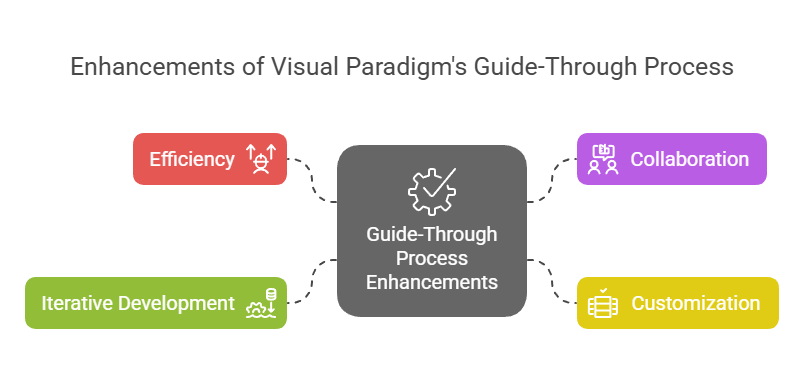
Enhancements of Visual Paradigm's Guide-Through Process: Visual Paradigm

  1. 效率:

    • 引导流程通过提供清晰的指导和自动化任务,显著提升了效率,使用户能够专注于战略决策,而非程序性细节11.
  2. 协作:

    • 该工具促进了项目所有者、业务分析师、企业架构师和IT专业人员等不同利益相关者之间的协作。这种协作方式确保各方在整个架构开发过程中保持参与并充分了解情况15.
  3. 定制化:

    • Visual Paradigm的工具支持定制化,使组织能够根据自身特定需求和目标调整ADM流程。这种灵活性确保架构开发过程与组织的独特需求相一致11.
  4. 迭代开发:

    • TOGAF ADM的迭代特性得到了Visual Paradigm引导流程的全面支持。这使得实践者能够根据不断变化的信息需求和利益相关者的反馈来调整和优化工作,确保架构满足组织不断变化的需求16.

应用领域

  1. 企业架构开发:

    • 主要应用领域是企业架构开发,引导流程帮助组织设计、规划、实施和管理其企业架构。它提供了一种结构化的方法,以有效实现业务目标与IT战略的对齐17.
  2. 数字化转型:

    • 该工具对于数字化转型举措至关重要,组织通过实施新技术和流程来提升客户体验和运营效率18.
  3. 战略规划:

    • Visual Paradigm的引导式流程通过提供一个全面的框架,支持战略规划,包括制定架构愿景、界定范围、识别利益相关者以及制定沟通计划。这确保了架构开发过程与业务目标和战略驱动因素保持一致19.
  4. 敏捷方法:

    • 该工具整合了敏捷方法和UML,为企业发展企业架构提供了全面的解决方案。这种整合确保了架构开发过程既灵活又高效,支持组织内部的敏捷实践14.

结论

Visual Paradigm的TOGAF引导式流程在支持TOGAF ADM方面表现出色,是一款全面且高效的工具。其逐步指导、与ArchiMate的集成、自动化任务管理以及协作功能,使其成为企业架构开发的宝贵资源。通过利用该工具,组织可以提升效率、协作性、定制化和迭代开发能力,最终实现企业架构目标,推动业务价值和转型

Comprehensive Guide to Visual Paradigm’s TOGAF Guide-Through Process

Introduction

Visual Paradigm’s TOGAF Guide-Through Process is a powerful tool designed to streamline the adoption of the TOGAF Architecture Development Method (ADM). It provides step-by-step guidance, instructions, and real-life examples to support enterprise architecture development. This comprehensive guide will explore the key features, benefits, and application areas of Visual Paradigm’s TOGAF Guide-Through Process, highlighting why it stands out in the field of enterprise architecture.

Transform Your Business with Visual Paradigm and TOGAF - Visual Paradigm Guides

Key Features

  1. Step-by-Step Guidance:

    • The Guide-Through Process offers detailed, step-by-step instructions for each phase of the TOGAF ADM, ensuring that users can navigate the complexities of enterprise architecture development with ease 1112.
  2. Integration with ArchiMate:

    • Visual Paradigm supports the integration of ArchiMate with TOGAF ADM, providing a powerful combination for enterprise architecture initiatives. ArchiMate 3, with its versatile notation system, allows architects to express complex models effectively 1314.
  3. Automated Task Management:

    • The tool enhances the entire process with automated task management and notifications, enabling users to develop architecture deliverables incrementally and collaboratively 15.
  4. Visual Process Maps:

    • The software features visual process maps that help users navigate through the entire enterprise architecture process easily. It provides a full set of planning, design, and development tools to complete ADM activities 14.
  5. Comprehensive Toolkit:

    • Visual Paradigm offers a range of tools tailored for ADM activities, including ArchiMate diagrams for modeling business, IT, and physical aspects of enterprise architecture. These tools provide a comprehensive view of the architecture, making it easier to understand and implement TOGAF 14.

Benefits

Enhancements of Visual Paradigm's Guide-Through Process: Visual Paradigm

  1. Efficiency:

    • The Guide-Through Process significantly enhances efficiency by providing clear instructions and automating tasks, allowing users to focus on strategic decisions rather than procedural details 11.
  2. Collaboration:

    • The tool facilitates collaboration among different stakeholders, including project owners, business analysts, enterprise architects, and IT professionals. This collaborative approach ensures that all parties are engaged and informed throughout the architecture development process 15.
  3. Customization:

    • Visual Paradigm’s tool allows for customization, enabling organizations to tailor the ADM process to their specific needs and goals. This flexibility ensures that the architecture development process aligns with the organization’s unique requirements 11.
  4. Iterative Development:

    • The iterative nature of the TOGAF ADM is fully supported by Visual Paradigm’s Guide-Through Process. This allows practitioners to adapt and refine their work based on evolving information needs and stakeholder feedback, ensuring that the architecture meets the changing needs of the organization 16.

Application Areas

  1. Enterprise Architecture Development:

    • The primary application area is enterprise architecture development, where the Guide-Through Process helps organizations design, plan, implement, and govern their enterprise architecture. It provides a structured approach to align business goals with IT strategies effectively 17.
  2. Digital Transformation:

    • The tool is crucial for digital transformation initiatives, where organizations seek to enhance customer experience and operational efficiency through the implementation of new technologies and processes 18.
  3. Strategic Planning:

    • Visual Paradigm’s Guide-Through Process supports strategic planning by providing a comprehensive framework for developing architecture visions, defining scope, identifying stakeholders, and creating communications plans. This ensures that the architecture development process is aligned with business goals and strategic drivers 19.
  4. Agile Methodologies:

    • The tool integrates agile methodologies and UML, providing a comprehensive solution for enterprise architecture development. This integration ensures that the architecture development process is both flexible and efficient, supporting agile practices within the organization 14.

Conclusion

Visual Paradigm’s TOGAF Guide-Through Process stands out as a comprehensive and effective tool for supporting the TOGAF ADM. Its step-by-step guidance, integration with ArchiMate, automated task management, and collaborative features make it an invaluable resource for enterprise architecture development. By leveraging this tool, organizations can enhance efficiency, collaboration, customization, and iterative development, ultimately achieving their enterprise architecture goals and driving business value and transformation.

Comprehensive Tutorial for ArchiMate Supporting TOGAF ADM

Introduction to ArchiMate

ArchiMate is an open and independent enterprise architecture modeling language that supports the description, analysis, and visualization of architecture within and across business domains. It is designed to provide a clear and unambiguous way to communicate complex architectures to stakeholders. ArchiMate is particularly useful when used in conjunction with the TOGAF Architecture Development Method (ADM), providing a standardized way to model and communicate enterprise architectures.

What is ArchiMate?

Key Concepts of ArchiMate

ArchiMate Core Framework

1. Layers of ArchiMate

ArchiMate divides the enterprise architecture into three main layers:

  • Business Layer: Focuses on the business processes, services, and functions that support the organization’s goals.
  • Application Layer: Deals with the application services, components, and their interactions that support the business layer.
  • Technology Layer: Covers the technology infrastructure, including hardware, software, and network components that support the application layer.

2. Core Elements

ArchiMate defines several core elements that are used to model the architecture:

  • Active Structure Elements: Represent the entities that perform behavior, such as business actors, application components, and devices.
  • Behavior Elements: Represent the processes, functions, services, and interactions within the architecture.
  • Passive Structure Elements: Represent the information or data used or produced by behavior elements, such as business objects and data objects.

3. Relationships

ArchiMate defines several types of relationships to connect the elements:

  • Structural Relationships: Such as composition, aggregation, and specialization.
  • Dependency Relationships: Such as association, realization, and used-by.
  • Dynamic Relationships: Such as triggering and flow.

4. Viewpoints

ArchiMate provides several viewpoints to visualize the architecture from different perspectives:

  • Business Process Viewpoint: Shows the business processes and their interactions.
  • Application Cooperation Viewpoint: Shows how applications cooperate to support business processes.
  • Technology Realization Viewpoint: Shows how technology components realize application components.

ArchiMate and TOGAF ADM

TOGAF Architecture Development Method (ADM)

TOGAF ADM is a comprehensive methodology for developing enterprise architectures. It consists of several phases, each focusing on a specific aspect of the architecture development process. ArchiMate supports TOGAF ADM by providing a standardized way to model and visualize the architecture at each phase.

Powerful TOGAF ADM Toolset

Phases of TOGAF ADM

  1. Preliminary Phase: Establishes the architecture principles, framework, and governance.
  2. Architecture Vision: Defines the scope, stakeholders, concerns, and business objectives.
  3. Business Architecture: Develops the business architecture, including business processes and services.
  4. Information Systems Architectures: Develops the data and application architectures.
  5. Technology Architecture: Develops the technology architecture.
  6. Opportunities and Solutions: Identifies and prioritizes architecture projects.
  7. Migration Planning: Develops the migration and implementation plan.
  8. Implementation Governance: Provides governance and support for the implementation of the architecture.

Examples of ArchiMate Models

This diagram illustrates a layered architecture for a healthcare management system, divided into two main layers: the Application Layer and the Technology Layer. Here’s a detailed explanation of each component and their interactions:

archimate diagram example

Application Layer (Blue)

This layer consists of the various applications and systems that directly interact with users or other systems to manage healthcare services. The key components in this layer are:

  1. Inpatient Care Management:

    • Manages services and processes related to patients who are admitted to the hospital.
  2. Outpatient Care Management:

    • Manages services and processes for patients who visit the hospital for treatment but are not admitted.
  3. CRM System (Customer Relationship Management):

    • Manages interactions with patients, including communication, follow-ups, and patient relationship management.
  4. Billing:

    • Handles the financial aspects, including generating bills, processing payments, and managing financial records.

Technology Layer (Green)

This layer provides the underlying infrastructure and services that support the applications in the Application Layer. The key components in this layer are:

  1. Messaging Service:

    • Facilitates communication between different applications and systems within the healthcare management system.
    • Ensures that messages are delivered reliably and in the correct order.
  2. Data Access Service:

    • Provides a centralized way to access and manage data across the system.
    • Ensures that data is retrieved and stored efficiently and securely.
  3. Mainframe:

    • The central computing system that hosts core services and data.
    • Includes two main components:
      • Message Queuing: Manages the queuing and processing of messages to ensure reliable communication.
      • DBMS (Database Management System): Stores and manages the data used by the various applications.

Interactions

  • Inpatient Care ManagementOutpatient Care ManagementCRM System, and Billing interact with the Messaging Service and Data Access Service to perform their respective functions.
  • The Messaging Service and Data Access Service rely on the Mainframe for core services like message queuing and database management.
  • The Mainframe ensures that messages are processed correctly and data is managed efficiently, supporting the entire system’s operations.

The diagram depicts a structured approach to managing healthcare services by separating the application-level functions from the underlying technology infrastructure. This separation allows for more modular and maintainable system design, where changes in one layer have minimal impact on the other. The Messaging Service and Data Access Service act as intermediaries, facilitating communication and data management between the application components and the mainframe.

Recommended ArchiMate EA Tool

Visual Paradigm is widely recognized as one of the best tools for ArchiMate modeling in Enterprise Architecture (EA) projects. Here are some reasons why it is highly recommended:

Navigating TOGAF: Your Guide to the ADM Process - Visual Paradigm Guides

1. Comprehensive ArchiMate Support

  • Full ArchiMate Standard: Visual Paradigm supports the latest ArchiMate standards, including ArchiMate 3.1, ensuring that you can model using all the official ArchiMate elements and relationships.
  • Rich Library of Elements: It provides a extensive library of ArchiMate symbols, making it easy to create detailed and accurate models.

2. User-Friendly Interface

  • Intuitive Design: The tool offers a user-friendly interface that is easy to navigate, even for users who are new to ArchiMate modeling.
  • Drag-and-Drop: The drag-and-drop functionality allows for quick and efficient model creation.

3. Advanced Modeling Features

  • Layered Views: Supports the creation of layered views (e.g., Business, Application, Technology) to provide a holistic view of the enterprise architecture.
  • Cross-Layer Relationships: Easily define and visualize relationships across different layers of the architecture.

4. Collaboration and Sharing

  • Team Collaboration: Visual Paradigm supports collaborative work, allowing multiple users to work on the same project simultaneously.
  • Version Control: Integrated version control helps manage changes and track the evolution of your models.

5. Integration Capabilities

  • Tool Integration: Seamlessly integrates with other tools and platforms, such as JIRA, Confluence, and various databases, enhancing the overall EA practice.
  • Import/Export: Supports importing and exporting models in various formats, including ArchiMate Exchange File Format, ensuring compatibility with other tools.

6. Documentation and Reporting

  • Automated Documentation: Generates comprehensive documentation from your ArchiMate models, saving time and ensuring consistency.
  • Custom Reports: Allows for the creation of custom reports tailored to specific stakeholder needs.

7. Training and Support

  • Extensive Resources: Offers a wealth of tutorials, guides, and examples to help users get started and master ArchiMate modeling.
  • Customer Support: Provides robust customer support to assist with any issues or questions that may arise.

8. Scalability

  • Scalable Solutions: Suitable for both small and large-scale EA projects, making it a versatile tool for organizations of all sizes.

9. Compliance and Standards

  • Industry Standards: Aligns with industry standards and best practices, ensuring that your EA models are compliant and up-to-date.

Conclusion

ArchiMate provides a powerful and standardized way to model enterprise architectures, supporting the TOGAF ADM methodology. By understanding the key concepts, layers, elements, and relationships in ArchiMate, you can effectively model and communicate complex architectures to stakeholders. The examples provided illustrate how ArchiMate can be used to model business processes, application cooperation, and technology realization, supporting the various phases of the TOGAF ADM.

ArchiMate Tool Resource

  1. Free Online ArchiMate Diagram Tool

    • Description: Create ArchiMate diagrams online with a free tool that supports ArchiMate 3 visual modeling language. Includes examples and templates to help you get started.
    • URLFree Online ArchiMate Diagram Tool 1
  2. Main Page – ArchiMate Resources for FREE

    • Description: Offers a visual language to model and capture enterprise architecture, providing a means to visualize relationships within and between different domains.
    • URLMain Page – ArchiMate Resources for FREE 2
  3. Visual Paradigm – UML, Agile, PMBOK, TOGAF, BPMN and More!

  4. Chapter 7. ArchiMate – Visual Paradigm Community Circle

  5. What is ArchiMate?

    • Description: Step-by-step learning guide for ArchiMate, including how to use it for enterprise architecture modeling.
    • URLWhat is ArchiMate? 5
  6. ArchiMate tools

    • Description: Learn how to use Visual Paradigm, a design and management tool designed for agile software teams.
    • URLArchiMate tools 6
  7. Best ArchiMate Software

    • Description: Certified ArchiMate tool for effective EA design and modeling. Quickly draw ArchiMate diagrams that conform to The Open Group official specification.
    • URLBest ArchiMate Software 7
  8. How to Format ArchiMate Elements?

  9. ArchiMate Viewpoint Guide – Resource Map Viewpoint

  10. ArchiMate Diagram Tutorial

    • Description: Tutorial that helps you learn about ArchiMate diagrams, how to create them, and when to use them. Includes examples and tips.
    • URLArchiMate Diagram Tutorial 10

These resources should provide a comprehensive starting point for using Visual Paradigm’s ArchiMate tool for enterprise architecture modeling.