


The integration of Artificial Intelligence (AI) into software development is not just a technological evolution—it’s a paradigm shift. From automating repetitive tasks to enabling smarter design decisions, AI is redefining how software is conceived, built, tested, and maintained. This comprehensive guide explores how AI is reshaping the traditional software development lifecycle (SDLC), the benefits and challenges involved, and what the future holds.
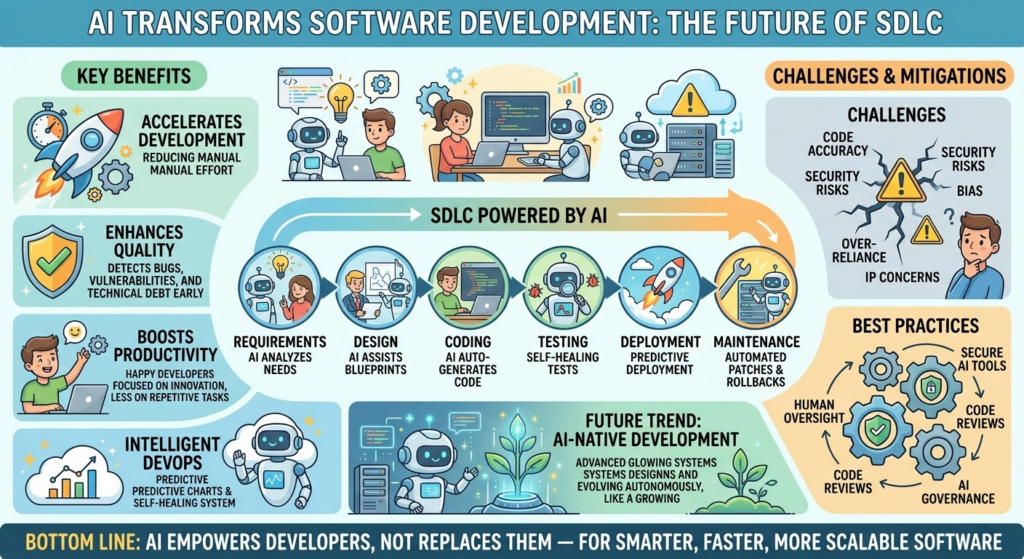
1. Traditional Software Development Lifecycle (SDLC): A Brief Overview
Before diving into AI’s impact, it’s essential to understand the conventional SDLC model, which typically includes the following phases:
-
Requirements Gathering
-
Design
-
Implementation (Coding)
-
Testing
-
Deployment
-
Maintenance
Each phase involves human expertise, collaboration, and iterative feedback. While effective, this process can be time-consuming, error-prone, and resource-intensive.
2. How AI is Transforming Each Phase of the SDLC
1. Requirements Gathering & Analysis
Traditional Approach: Business analysts and developers spend significant time gathering, analyzing, and refining requirements through interviews, documentation, and stakeholder meetings.
AI-Driven Transformation:
-
Natural Language Processing (NLP): AI tools analyze stakeholder emails, meeting transcripts, and user feedback to automatically extract and prioritize requirements.
-
Sentiment Analysis: AI identifies user pain points and expectations from social media, support tickets, or surveys.
-
Automated Requirement Generation: AI models (e.g., GPT-based systems) generate draft requirements from high-level user stories or product vision documents.
✅ Example: An AI tool like Jira + AI plugins can suggest user stories from a product roadmap or detect ambiguous requirements in documentation.
2. System Design & Architecture
Traditional Approach: Architects design system blueprints using diagrams, specifications, and best practices based on experience.
AI-Driven Transformation:
-
AI-Powered Architecture Suggestions: AI analyzes past successful projects and recommends scalable, secure, and maintainable architectures.
-
Code-to-Design Generation: AI tools generate UML diagrams, ER models, or component diagrams from existing codebases.
-
Constraint-Based Design: AI ensures designs comply with security, performance, and compliance standards (e.g., GDPR, HIPAA).
✅ Example: Amazon CodeWhisperer or GitHub Copilot can suggest architectural patterns based on code context and project goals.
3. Implementation (Coding) – The Most Transformed Phase
Traditional Approach: Developers write code line by line, following best practices and using IDEs with basic autocomplete.
AI-Driven Transformation:
-
AI-Powered Code Completion: Tools like GitHub Copilot, Amazon CodeWhisperer, and Tabnine suggest entire lines or functions based on context.
-
Code Generation from Natural Language: Developers describe functionality in plain English, and AI generates working code (e.g., “Create a function to validate email format”).
-
Code Refactoring & Optimization: AI identifies inefficient or redundant code and suggests improvements.
-
Bug Prediction: AI models predict where bugs are likely to occur based on code patterns and historical data.
✅ Example: A developer types “Sort this list in descending order” → AI generates the correct sorting function with error handling.
⚠️ Note: While AI accelerates coding, it requires human oversight to ensure correctness, security, and maintainability.
4. Testing & Quality Assurance
Traditional Approach: Manual and automated testing are conducted in parallel, often with significant time investment and false positives.
AI-Driven Transformation:
-
Test Case Generation: AI automatically generates test cases from requirements or code, including edge cases.
-
Self-Healing Tests: AI identifies flaky tests and updates them automatically when UI or logic changes.
-
Predictive Testing: AI predicts which modules are most likely to fail and prioritizes testing efforts.
-
Visual & UI Testing: AI analyzes screenshots to detect UI inconsistencies or regressions (e.g., Applitools).
-
Automated Bug Detection: AI scans code and test results to identify potential bugs or security vulnerabilities.
✅ Example: Testim.io uses AI to create and maintain automated UI tests without writing code.
5. Deployment & DevOps
Traditional Approach: CI/CD pipelines are configured manually, with periodic deployments and monitoring.
AI-Driven Transformation:
-
Intelligent CI/CD Pipelines: AI analyzes historical deployment data to optimize build times, detect risky changes, and recommend deployment strategies.
-
Automated Rollbacks: AI detects anomalies in production (e.g., increased error rates) and triggers rollbacks automatically.
-
Predictive Deployment Scheduling: AI schedules deployments during low-traffic periods to minimize impact.
-
Anomaly Detection in Production: AI monitors logs, metrics, and traces to detect performance degradation or security threats in real time.
✅ Example: Google’s SRE (Site Reliability Engineering) uses AI to predict system failures and recommend proactive actions.
6. Maintenance & Evolution
Traditional Approach: Developers fix bugs, update features, and refactor code in response to user feedback or changing needs.
AI-Driven Transformation:
-
Automated Bug Triage: AI categorizes and prioritizes bug reports based on severity, frequency, and impact.
-
Code Debt Identification: AI flags outdated, unmaintained, or overly complex code sections.
-
Predictive Maintenance: AI forecasts when components might fail or need updates.
-
Legacy Code Modernization: AI helps refactor or migrate old codebases to modern frameworks.
✅ Example: Snyk and SonarQube use AI to detect vulnerabilities and technical debt in codebases.
3. Key AI Technologies Powering the Transformation
| Technology | Application in SDLC |
|---|---|
| Large Language Models (LLMs) | Code generation, documentation, requirement analysis |
| Computer Vision | UI testing, visual regression detection |
| Machine Learning (ML) | Predictive analytics, anomaly detection, test optimization |
| Natural Language Processing (NLP) | Requirement extraction, chatbot support, code documentation |
| Reinforcement Learning | Optimizing CI/CD workflows, deployment strategies |
4. Benefits of AI in Software Development
-
Increased Productivity: Developers spend less time on boilerplate and more on high-value tasks.
-
Faster Time-to-Market: Automation accelerates all phases of SDLC.
-
Higher Code Quality: AI detects bugs, vulnerabilities, and anti-patterns early.
-
Improved Collaboration: AI tools act as intelligent teammates, reducing cognitive load.
-
Lower Costs: Reduced manual effort and fewer production failures.
-
Scalability: AI enables teams to manage larger, more complex systems efficiently.
5. Challenges & Risks of AI in Development
Despite its promise, AI adoption in software development comes with challenges:
| Challenge | Explanation |
|---|---|
| Code Quality & Accuracy | AI may generate incorrect or insecure code (e.g., hallucinations). |
| Over-Reliance & Skill Erosion | Developers may lose coding fundamentals if they depend too much on AI. |
| Security & Privacy Risks | AI tools may expose sensitive code to third parties or leak data. |
| Bias in AI Outputs | AI models trained on biased data may produce biased code or suggestions. |
| Intellectual Property (IP) Issues | Who owns code generated by AI? Legal gray areas exist. |
| Tooling Fragmentation | Too many AI tools with inconsistent interfaces and quality. |
6. Best Practices for Integrating AI into Development
To harness AI effectively while mitigating risks:
-
Use AI as an Assistant, Not a Replacement
– AI should augment developers, not replace them. -
Implement Strict Code Review Processes
– All AI-generated code must be reviewed by humans. -
Secure AI Tooling
– Use on-premise or private AI models when handling sensitive code. -
Train AI Models on High-Quality Data
– Avoid garbage-in, garbage-out scenarios. -
Monitor AI Outputs Continuously
– Track hallucinations, security issues, and performance drift. -
Invest in Developer Education
– Train teams to use AI tools effectively and ethically. -
Establish AI Governance Policies
– Define rules for AI use, data handling, and IP ownership.
7. The Future: AI-Native Development
The next frontier is AI-native software development, where:
-
Entire applications are co-designed and co-built with AI agents.
-
Developers act as “AI conductors,” guiding AI systems to create complex systems.
-
AI agents autonomously manage tasks like deployment, monitoring, and even feature ideation.
-
Self-evolving software systems that adapt to user behavior and environments.
🔹 Example: AI agents could monitor user behavior, detect a need for a new feature, design it, write the code, test it, and deploy it—all with minimal human input.
8. Conclusion: A New Era of Software Development
AI is not replacing software developers—it’s redefining their role. The traditional SDLC is evolving into a collaborative, intelligent, and adaptive process, where AI handles repetitive, predictable tasks, and humans focus on creativity, strategy, and ethical decision-making.
While challenges remain, the benefits are undeniable: faster delivery, higher quality, and more innovation. Organizations that embrace AI thoughtfully and responsibly will gain a significant competitive edge.
The future of software development isn’t just automated—it’s intelligent, collaborative, and human-centered.
Further Reading & Tools to Explore
-
GitHub Copilot – AI pair programmer
-
Amazon CodeWhisperer – AI coding assistant
-
Tabnine – AI code completion
-
Snyk – AI-powered security scanning
-
Applitools – Visual AI testing
-
Testim.io – AI-driven test automation
-
Google’s DeepMind & AlphaCode – AI for competitive programming
Final Thought:
AI isn’t the end of the developer—it’s the beginning of a new kind of developer: one who thinks more strategically, writes smarter code, and builds systems that learn and grow over time.
Embrace AI. Guide it. Innovate with it. 🚀