


Introduction
Amazon Web Services (AWS) is the world’s leading cloud computing platform, offering over 200 fully featured services from data centers globally. In cloud-native development and DevOps, Architecture Diagrams are critical artifacts used to visualize how these services interact to deliver business value.
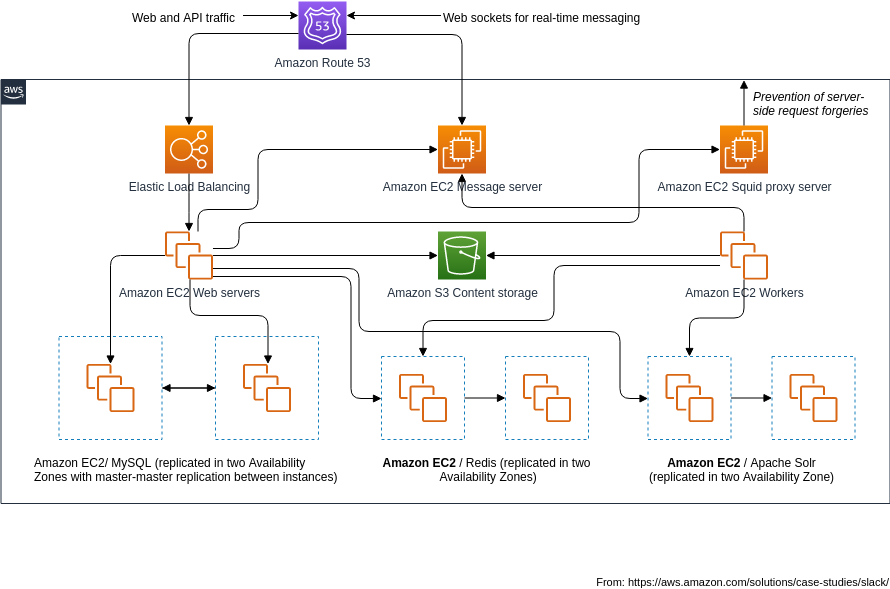
They are rarely about a single server; they represent the end-to-end flow of data, traffic, and processing, mapping out a solution that scales securely and resiliently.
1. The Anatomy of a Cloud Architecture Diagram
Before diving into specific services, it is essential to understand the standard layers of any high-level cloud architecture diagram.
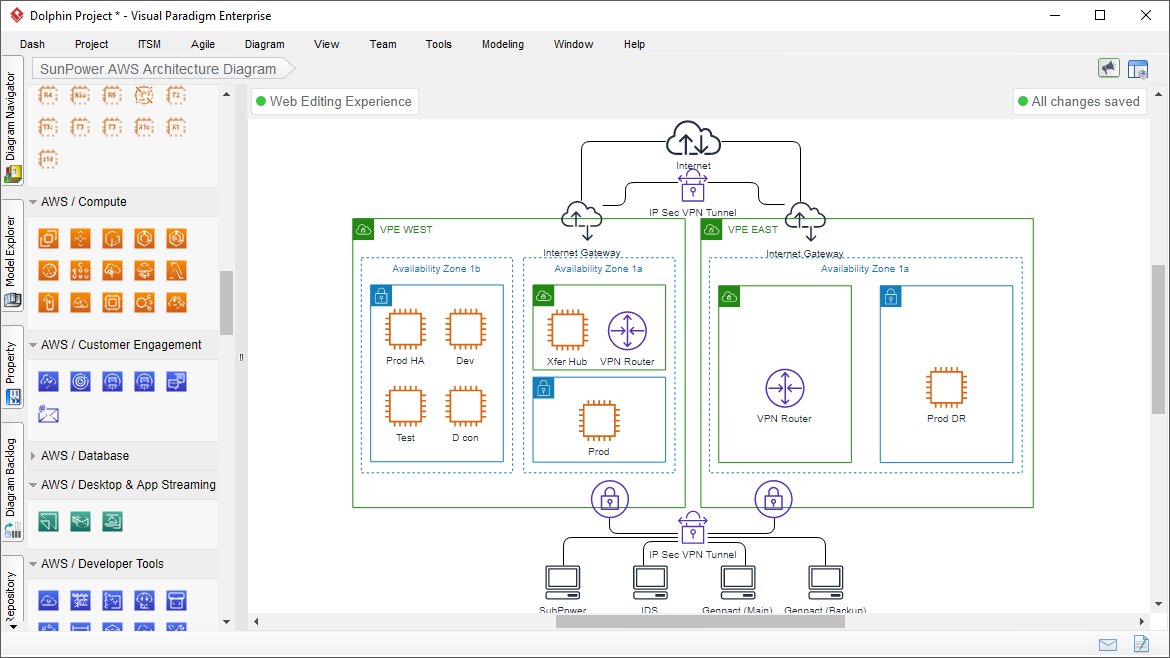
The Five Core Layers
-
User Layer: The frontend application (Single Page Application, Web Gateway, API).
-
Network Layer: Firewalls, Load Balancers (ELB), Routers, CDNs, DNS.
-
Compute Layer: EC2 instances, ECS/EKS, Lambda, EventBridge.
-
Data & Storage Layer: DynamoDB, RDS, S3, ElastiCache.
-
Support & Monitoring Layer: CloudWatch, CloudTrail, GuardDuty.
Common Patterns Represented
-
IaaS (Infrastructure as a Service): Provisioning resizable servers (EC2).
-
PaaS (Platform as a Service): Managed databases and containers (RDS, EKS).
-
SaaS (Software as a Service): Managed serverless apps (Lambda @ Edge).
-
FaaS (Function as a Service – Serverless): Event-driven functions (AWS Lambda).
2. Core Components & Services
A. Compute & Networking
-
Virtual Private Cloud (VPC): The building block of the cloud. It is a logical isolation of physical resources, similar to a private network in your data center.
-
Internet Gateway (IGW): Allows communication between VNets in the same AWS Region and the internet.
-
Elastic Load Balancer (ELB): Distributes incoming application traffic across multiple instances to ensure high availability and fault tolerance (Application Load Balancer for HTTP/HTTPS).
-
Router: Controls traffic within VPC.
-
Internet Assessment Service (IAS): Enables customers to assess your network and improve security using centralized policies.
B. Databases
-
Athena: Serverless data analytics on data in Amazon S3 to generate SQL queries on your stored data.
-
Amazon Redshift (BI): DB designed to run complex analytical queries in parallel over billions of rows.
-
Amazon RDS (Relational): Managed relational databases (MySQL, PostgreSQL).
-
ElastiCache: Hierarchical member server with sub-categories:
-
Memory-based: Boosts performance and lowers latency of in-memory caching.
-
Disk-based: Faster throughput and storage capacity for metadata-like data or IO-intensive key-value stores.
-
Managed Memory: Best for simple caching or temporary structured data when you want to get started with Amazon ElastiCache.
-
Managed Disk: Best for systems that need lower latencies or more durability for IO-intensive or metadata stores.
-
C. Storage
-
Amazon S3: Provided with service-level performance for reducing data loss and downtime.
-
FTP: Simple FTP protocol that supports receiving files (push).
-
EBS (Elastic Block Store): Simple and easy-to-use block-level storage volumes designed for use with Elastic Block Store instances.
-
ECS (Elastic Container Service): Comprehensive managed service for running containers and containers.
-
EFS (Elastic File System): Same architecture as NFS, but runs across multiple Availability Zones (AZs) and Supports file-level volume growth.
-
McRas: Simple and easy-to-use store that is accessible across multiple Availability Zones.
D. Container & Orchestration
-
Amazon ECR (Elastic Container Registry): Simple and easy-to-use container registry that is considered the standard for managing AWS ECR.
-
Amazon ECR (Enhanced Container Registry): Advanced container registry with built-in support for multi-region synchronization.
-
Amazon ECS (Elastic Container Service): Comprehensive managed service for running containers and containers.
-
Amazon EKS (Elastic Kubernetes Service): Supports both Docker and native containers.
-
ECS: Simple and easy-to-use cluster that supports both Docker and native containers.
E. Monitoring & Logging
-
Amazon CloudWatch: Monitoring and alerting service based on metrics, logs, events, and custom operators.
-
Amazon Logs: Centralized log management service that provides a simplified log management interface for managing application logs.
3. Best Practices for Designing AWS Diagrams
When creating architecture diagrams, adhere to the following principles:
1. Follow the Golden Ratio
The recommended aspect ratio for diagrams (width-to-height) is 20:7.5.
-
Why? This ratio provides enough space for details (icons, labels, connections) without cluttering the diagram.
-
Example: A diagram image with an aspect ratio of 20:7.5 should fit perfectly within a standard A4 or Letter sheet without excessive cropping or white space.
2. Utilize the Cloud Computing Stack
Organize your diagram into the standard cloud service layers:
-
Presentation/Client Layer: Where users interact.
-
Web Application/Script/Code Layer: Logic processing.
-
Data Layer: Databases and storage.
-
Deployment Layer: How the application is hosted.
-
Support/Monitoring Layer: Observability and management.
3. Prioritize Security & High Availability
-
Encryption: Locate where data is encrypted at rest (S3, RDS) and in transit (TLS/SSL).
-
Redundancy: Use services like Multi-AZ (Availability Zones) to prevent single points of failure.
-
Access Control: Clearly show IAM Roles, Users, and Policies.
4. Document the Flow
Even if based on standard AWS architecture diagrams, ensure you annotate the flow of data (e.g., “User Request → Load Balancer → EC2 → DB”).
5. Future-Proofing
Design with modularity in mind. If you plan to switch from ECS to EKS or EFS to Findestream, ensure your diagram supports conceptual expansion without major structural changes.
4. Tooling
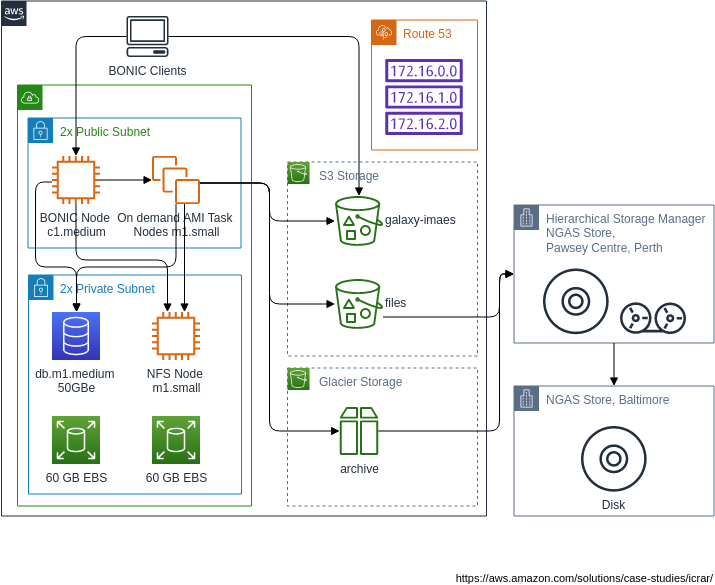
Visual Paradigm supports AWS network architecture through two primary paradigms: a traditional drag-and-drop manual editor and a modern AI-powered studio that generates diagrams from text descriptions.
Traditional Diagramming Paradigm
This approach focuses on manual control and precise modeling using standard cloud design tools.
-
Comprehensive Icon Library: Access a full set of the latest official AWS icons (e.g., EC2, S3, VPC) to ensure diagrams meet industry standards.
-
Drag-and-Drop Interface: An intuitive editor allowing you to manually place, connect, and align symbols to represent complex network topologies.
-
Hybrid Modeling: Support for connecting AWS shapes with traditional UML shapes (nodes, components, artifacts) within deployment diagrams for better technical representation.
-
Templates & Examples: A library of ready-to-use templates for common architectures like SAP HANA or MongoDB on AWS to accelerate the design process.
-
Collaboration & Export: Tools for real-time team collaboration and exporting finished diagrams to formats like PNG, SVG, and PDF.
AI-Powered Paradigm
The AI Cloud Architecture Studio shifts the focus from manual drawing to intelligent generation and refinement.
-
Natural Language Generation: Describe your project requirements in plain English, and the AI automatically generates a complete AWS network diagram.
-
Design Philosophy Selection: Choose from preset goals such as Low Cost/MVP, High Availability, or Enterprise Grade to guide the AI in selecting appropriate AWS services.
-
Interactive Refinement: Use an AI chatbot to request modifications (e.g., adding a load balancer or changing a database type), which are applied instantly to the visual model.
-
Automated Documentation: Generate comprehensive architecture reports in Markdown format based on the generated diagram for easier project handovers.
Side-by-Side Comparison: Review original and updated versions of a diagram side-by-side to track AI-suggested changes before accepting them.
5. Conclusion
AWS Architecture Diagrams are more than just technical illustrations; they are strategic blueprints that guide the construction of robust, secure, and scalable cloud solutions. By understanding the core services, adhering to the 20:7.5 golden ratio, and prioritizing security layers, DevOps teams can create diagrams that effectively communicate complex infrastructure to stakeholders, engineers, and auditors.
Whether you are designing an IaaS environment with EC2 and RDS or a PaaS setup with Lambda and DynamoDB, the goal remains the same: visual clarity, operational reliability, and future scalability.
Reference List
Based on the provided URL list, here is the formatted reference guide:
- AWS Architecture Diagram Tool: AWS-Ready Diagrams & Components: Introduces specialized components and templates designed for building accurate AWS architecture diagrams directly within the Visual Paradigm platform.
- Comprehensive TOGAF ADM Tutorial: A Step-by-Step Guide: Provides a detailed walkthrough of the Architecture Development Method, guiding users through establishing frameworks and managing architecture lifecycles.
- AWS Architecture Diagram Tool: Features & Usage: Details the specific features of the cloud diagramming tool, including pre-built AWS shapes and cloud-specific configuration options.
- Production Version of AWS Architecture Diagram Tool: Highlights the professional capabilities of the tool for enterprise-grade architectural modeling and documentation.
- Solutions Overview: Free AWS Architecture Diagram Tool: Offers an overview of the available solutions and provides access to the tool for creating cloud architecture diagrams efficiently.
- French Language Solution: Free AWS Architecture Diagram Tool: Provides French-language resources and access to the cloud diagramming solutions, catering to international users.
- Updates Release: AI Cloud Architecture Studio Launch: Announces the latest release of the AI-driven studio capable of generating and refining cloud architecture designs automatically.
- Revolutionizing Cloud Design: A Deep Dive by Cybermedian: An external analysis discussing how Visual Paradigm’s new AI studio is transforming the speed and accuracy of cloud design processes.
- YouTube Video: AI Cloud Architecture Studio Overview: A video tutorial demonstrating the launch and core functionalities of the AI Cloud Architecture Studio.
- YouTube Video: AI Cloud Architecture Studio: Generating and Refining: A detailed video explanation of how the AI tool assists in generating diagrams, refining designs, and exporting reports.
- YouTube Video: Discover How AI Cloud Architecture Studio Works: A supplementary video guide exploring the capabilities of the AI studio in cloud architecture generation and documentation.
- Guide: Cloud Services Architecture & AWS: Provides an educational overview of cloud services architecture, specifically focusing on AWS implementation strategies and design principles.