


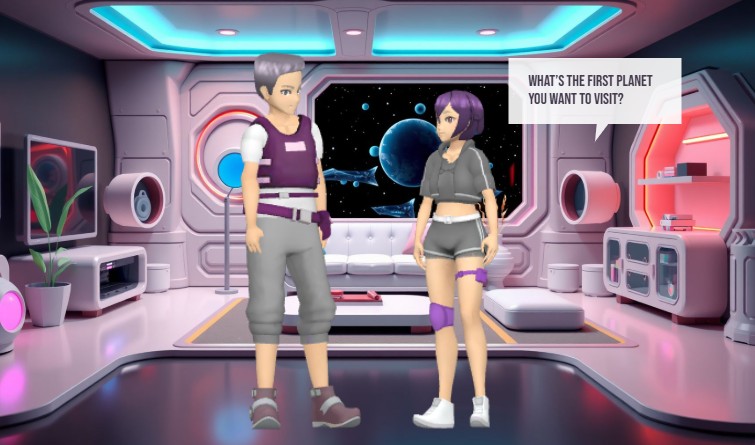
Visual Paradigm’s Animation Maker, known as AniFuzion, enables users to create professional-grade 2D and 3D animations without design expertise. This online tool streamlines the process of producing engaging videos, interactive flipbooks, and animated content through a drag-and-drop interface, AI-powered text-to-speech, and automatic lip-sync. The image showcases a dynamic 3D scene set in a futuristic space station, featuring two characters in conversation. This example demonstrates how AniFuzion can be used to build immersive narratives with customizable characters, detailed environments, and real-time audio integration. The software’s capabilities allow users to generate polished animations quickly, making it a powerful solution for educators, marketers, and content creators.
Users can leverage AniFuzion to produce content that captures attention and enhances communication. The tool supports a wide range of applications, from educational explainer videos to marketing campaigns. Its intuitive design reduces the complexity of animation, allowing users to focus on storytelling rather than technical execution. The integration of AI features, such as text-to-speech and automatic lip-sync, ensures that dialogue flows naturally, adding realism to character interactions. This makes AniFuzion ideal for creating content that is both visually appealing and functionally effective.
Key Features of AniFuzion
AniFuzion offers a suite of features designed to simplify the animation creation process. The drag-and-drop interface allows users to easily arrange characters, props, and effects on a canvas, making it accessible for beginners. The extensive 3D character library includes thousands of customizable figures, enabling users to create unique avatars that fit their narrative needs. Pre-built actions and motion libraries provide over 2,000 dynamic movements, allowing users to animate characters with minimal effort.
AI-driven tools further enhance the animation experience. The AI text-to-speech feature converts scripts into high-quality audio with various accents and emotional tones. Automatic lip-sync ensures that character mouth movements align perfectly with spoken dialogue, creating a more immersive experience. Users can also apply shape effects and animation presets to text and objects, adding visual interest with minimal effort.
Ready-to-use scenes, props, and templates allow users to build environments rapidly, reducing the time spent on world-building. The software supports multiple export options, including MP4 videos and interactive flipbooks, making it easy to share content across various platforms. These features collectively enable users to create professional-quality animations efficiently.
How to Use AniFuzion: Core Workflows
Creating animations with AniFuzion involves a straightforward process. Users begin by signing up for a Visual Paradigm Online account and navigating to the Animation Maker. From there, they can start a new project and select a template or create a blank canvas. The first step is to add a character from the library and customize its appearance using the properties panel. Users can adjust colors, textures, and body parts to match their vision.
Next, users can apply pre-built actions to the character, such as walking or waving, to create movement. The timeline allows users to set the duration and sequence of these actions. Audio can be added using the AI text-to-speech tool, which generates voiceovers with automatic lip-sync. This ensures that dialogue is synchronized with character movements, enhancing realism.
Users can further enrich their animations by adding backgrounds, props, and text with animation presets. These elements can be arranged on the canvas and animated with simple clicks. Once the animation is complete, users can preview it to ensure everything flows smoothly. Finally, the animation can be exported as an MP4 file or shared as an interactive flipbook.
Advanced Techniques and Tips
For users looking to push the boundaries of their animations, AniFuzion offers advanced techniques. Rigging allows users to adjust a character’s skeleton for more realistic movements. Motion retargeting enables the transfer of motions between characters, ensuring consistency across different figures. Users can also create custom actions using keyframing, allowing for unique animations tailored to their narrative.
When building complex scenes, users should consider the performance of their animations. Simplifying the scene by reducing the number of effects or props can improve playback speed. Ensuring that the browser is up to date and closing other tabs can also enhance performance. Users can test their animations on different devices to ensure compatibility and smooth playback.
Another tip is to use the built-in audio library to add background music or sound effects. These elements can enhance the mood and atmosphere of the animation, making it more engaging. Users can upload their own audio files or select from the library, adjusting volume and timing to sync with visual elements.
Quick Summary
-
AniFuzion is an online animation tool that enables users to create 2D and 3D animations without design expertise.
-
Features include a drag-and-drop interface, an extensive 3D character library, and AI-powered text-to-speech and lip-sync.
-
Users can create professional-quality animations quickly, making it ideal for educators, marketers, and content creators.
-
Core workflows involve adding characters, applying actions, adding audio, and exporting the final product.
-
Advanced techniques include rigging, motion retargeting, and custom actions for more realistic animations.
Visual Paradigm’s Animation Maker, AniFuzion, empowers users to create engaging and professional animations with ease. The tool’s intuitive interface and powerful features make it accessible for beginners while offering advanced capabilities for experienced users. By leveraging AI-driven tools and a vast library of assets, users can produce high-quality content quickly and efficiently. Whether creating educational videos, marketing campaigns, or interactive stories, AniFuzion provides the tools needed to bring ideas to life. Try AniFuzion today and discover how it can transform your creative process.
Explore the possibilities of AniFuzion and start creating your own animations now. Visit Visual Paradigm’s Animation Maker to learn more and begin your journey.
Related Links
-
How to Create PowerPoint Like Animation Slides on the… – AniFuzion: Creating animated PowerPoint presentations has never been easier, thanks to tools like Visual Paradigm Online’s AniFuzion. This online 2D animation maker allows you to bring your…
-
Bring Your Ideas to Life with Visual Paradigm Anifuzion 3D Video Maker: Anifuzion is a web-based 3D animation tool that enables users to create immersive 3D videos and animations without requiring advanced technical skills.
-
AniFuzion: The Online Ultimate Animation Maker – Content Posts: Visual Paradigm Online’s AniFuzion stands out as a leading animation video tool due to its comprehensive feature set, which caters to a wide range of users, from beginners to experienced animators.
-
Introducing Visual Paradigm’s AniFuzion: The Ultimate Animated Video Maker – Cybermedian: Part of the Visual Paradigm Online Platform, AniFuzion offers a unique blend of 2D and 3D animation techniques , making it an all-in-one solution for creating dynamic and engaging content1.
-
AniFuzion: Online Animation Maker: Visual Paradigm Online. Start creating stunning 2D and 3D animations. Explore customizable character families and intuitive tools to bring … Character Families · Storytelling Video Maker · Restaurant Owners · Tutorials
-
Comprehensive Guide to Creating Animated Content for Flipbooks with Visual Paradigm Online’s Flipbook Maker: This guide details the process of generating animated flipbook content using the flipbook maker feature in Visual Paradigm Online.
-
3D Video Maker – Visual Paradigm: Create eye-catching 3D videos that stand out for visual storytelling, presentations, or creative projects, Without needing of advanced software, you can customize scenes with 3D characters, 3D props, motions in a dynamic and engaging way.
-
Online 3D video maker – Visual Paradigm: Create stunning 3D videos effortlessly with Visual Paradigm ‘s intuitive and powerful animation tools.
-
2D Animation Maker – Create Expressive 2D Character – Visual Paradigm: Bring stories to life with vibrant 2D animations using VP Online. This tool offers easy-to-use features for animating 2D characters, scenes, and effects, …
-
2D Animation Maker – Create Animated Videos Online: An easy-to-use online tool for creating 2D animations without coding, perfect for educators, marketers, and content creators.