


In modern agile environments, the rapid pace of development often leads to information scattered across disparate tools, creating “documentation silos” where requirements sit in wikis while designs exist only in standalone diagramming applications. Visual Paradigm OpenDocs emerges as the solution to this fragmentation, acting as an AI-powered knowledge hub that bridges the gap between text-based documentation and visual modeling. By keeping requirements, designs, and sprint artifacts in one living repository, teams can eliminate redundancy and maintain a single source of truth throughout the CI/CD pipeline.
Why Agile Teams Choose OpenDocs
Based on common feedback from distributed teams, the platform specifically addresses several agile-specific pain points by integrating organizational process and structure (OPS) with user behavior and document processes (UBDP).
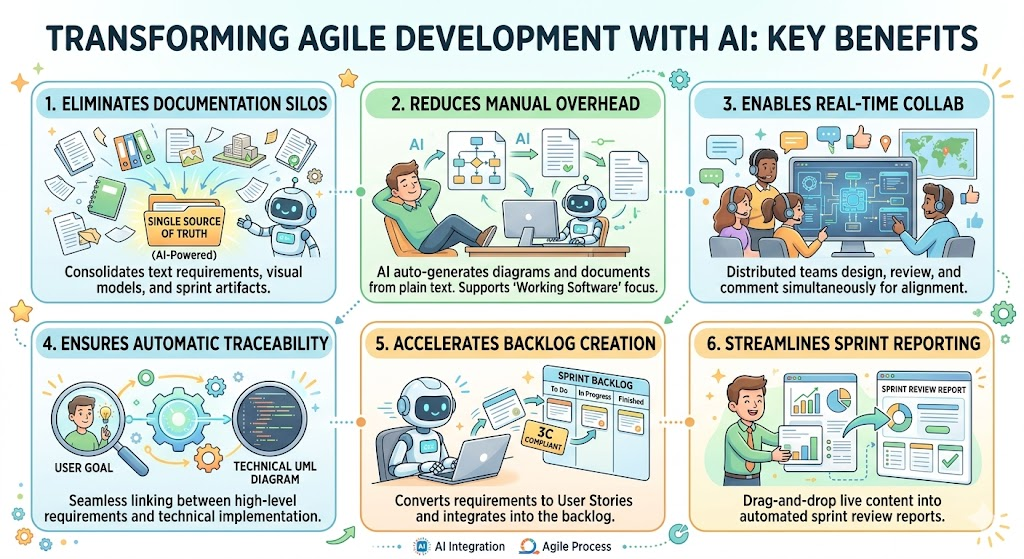
1. Centralized Single Source of Truth
Agile teams often juggle between Jira for backlog management, Confluence or Wikis for notes, and tools like Draw.io or Lucidchart for diagrams. OpenDocs consolidates these into a [structured tree hierarchy].
-
Benefit: Developers, Product Owners (POs), and testers can access everything—from rough User Stories to detailed UML diagrams—in one location, reducing context switching and ensuring alignment.
2. Reduced Documentation Overhead
The agile mantra “working software over comprehensive documentation” is supported by AI automation within OpenDocs.
-
Benefit: Instead of manually drawing boxes and arrows, teams use AI to generate drafts of both text documents and diagrams from plain text prompts. This saves hours of manual effort, allowing more time for actual development.
3. Real-Time Collaborative Modeling
For distributed teams, real-time synchronization is critical during rapid sprint cycles.
-
Benefit: Visual Paradigm’s collaboration tools allow multiple team members to design, review, and comment on diagrams simultaneously. This ensures that design decisions are aligned before code is written, preventing rework later in the sprint.
4. Automatic Traceability
One of the most powerful features of OpenDocs is the ability to link high-level business goals directly to technical implementations.
-
Benefit: Teams can trace a high-level user goal in a document directly to its technical realization (e.g., a Sequence diagram or Class diagram). This ensures that development effort remains strictly focused on delivering user value and maintains visibility into impact analysis.
Practical Example: The “Customer Refund” Feature
To illustrate the capabilities of OpenDocs, consider an agile team developing a new “Customer Refund” module. The workflow typically unfolds as follows:
Phase 1: Requirement Gathering & Ideation
The Product Owner utilizes the OpenDocs AI Assistant to generate a draft “Refund Policy” document based on stakeholder feedback. This establishes the business intent immediately within the workspace.
Phase 2: Visualizing the Flow
Within the same page where the policy was written, the lead developer instantiates a visual model using the AI Diagram Generator.
-
Action: The developer types a prompt: “Show the steps for validating a refund, processing the payment, and notifying the customer.”
-
Result: The system instantly generates a UML Activity Diagram that mirrors the language of the requirement, clarifying the workflow before a single line of code is written.
Phase 3: Backlog Integration
Once the stories are clear, the team leverages Agilien, the AI-native agile tool integrated into the ecosystem.
-
Action: Requirements are converted into [3C-compliant User Stories] (Card, Convention, Confirmation).
-
Result: These stories are pushed directly into the Sprint Backlog, ensuring that the documentation, model, and backlog remain synchronized.
The Agile Documentation Workflow in OpenDocs
A typical sprint cycle in Visual Paradigm follows a structured five-phase workflow that blends discovery, modeling, collaboration, execution, and reporting.
1. Discovery & Ideation
-
Activity: Create a dedicated OpenDocs page to brainstorm the new feature.
-
Tools: Utilize Mind Maps or User Story Maps to define the “backbone” of the user journey. This phase focuses on understanding the “Why” and “Who” before diving into technical details.
2. AI-Powered Modeling
-
Activity: Convert textual requirements into precise technical diagrams to clarify architecture.
-
Tools: Generate UML Use Case diagrams or Sequence diagrams using the AI Description Generator. This step clarifies the technical constraints and data flow before coding begins.
3. Collaborative Review
-
Activity: Team members engage in peer review, identifying potential design conflicts or logical gaps early.
-
Tools: Use PostMania (the review tool) to leave comments and feedback directly on specific diagram elements. This steers the conversation away from “what” to “how” and catches edge cases during the design phase.
4. Execution & Tracking
-
Activity: As the sprint progresses, the living documentation must reflect the team’s progress.
-
Tools: Update the [Scrum Process Canvas] or a dynamic Kanban board. Crucially, these artifacts are automatically linked back to the original documentation pages, maintaining a historical context for every task completed.
5. Automated Reporting
-
Activity: Prepare professional reports for stakeholders and review meetings.
-
Tools: Use the Document Composer to drag and drop live diagrams and corresponding text blocks into a formatted report. This ensures that the Sprint Review presentation is dynamic, visually engaging, and accurately reflects the current state of the codebase.
Key Features & Integration Highlights
-
Agilen Integration: Seamlessly converts text into 3C (Card, Conversation, Confirmation) user stories, adhering to modern agile methodology.
-
AI Automation: Dedicated AI modules for generating user story maps, use cases, and activity diagrams from natural language prompts.
-
Seamless Collaboration: PostMania allows for intuitive review workflows where comments are attached directly to diagram nodes.
-
Traceability Matrix: Automatically maintains links between business requirements, system designs, and implementation code.
References
- Opening the AI Knowledge Platform in OpenDocs: Explains how OpenDocs eliminates documentation silos by unifying text and visual modeling in a single hierarchical repository.
- Comprehensive Guide to Agile User Story Mapping with Visual Paradigm: Details the process of using Mind Maps and User Story Maps during the discovery phase of an agile sprint.
- Why Your Agile Team Needs Visual Collaboration: Discusses the benefits of keeping requirements, designs, and sprint artifacts in one place to improve alignment.
- Comprehensive Guide Designing a Use Case Driven Agile Process in Visual Paradigm with AI: Provides a deep dive into using AI to generate Use Case diagrams and align technical architecture with agile workflows.
- Visual Paradigm Homepage: The official source for the latest features, tutorials, and product overview.
- Team Collaboration Toolset: Highlights features like PostMania that enable real-time feedback and comment manipulation on diagrams.
- Agile UML Diagram Tool: Focuses on how UML modeling is integrated into agile cycles to facilitate rapid design迭代.
- Agile Tool Solution: Describes the Agilen feature which converts requirements into 3C-compliant user stories automatically.
- AI-Powered Use Case Description Generator: Demonstrates capabilities for transforming plain text descriptions into structured UML Use Case diagrams.
- Team Collaboration Toolset (Revisited): Reinforces the capabilities of real-time collaboration and design reviews in distributed teams.
- Scrum Process Canvas: Guides users on how to track sprint progress using dynamic Kanban boards linked to documentation.
- Use Case Driven Agile Process (Revisited): Reconfirms the workflow of moving from text requirements to visual models for agile development.