


Introduction to Visual Paradigm’s AI Ecosystem
In the rapidly evolving landscape of system design and database management, the integration of Artificial Intelligence has become a pivotal factor for efficiency.
Within the Visual Paradigm ecosystem, two tools stand out: the DB Modeler AI and the AI Chatbot. While both leverage generative capabilities to assist developers and architects, they are distinct yet interconnected instruments designed for specific phases of the design lifecycle.
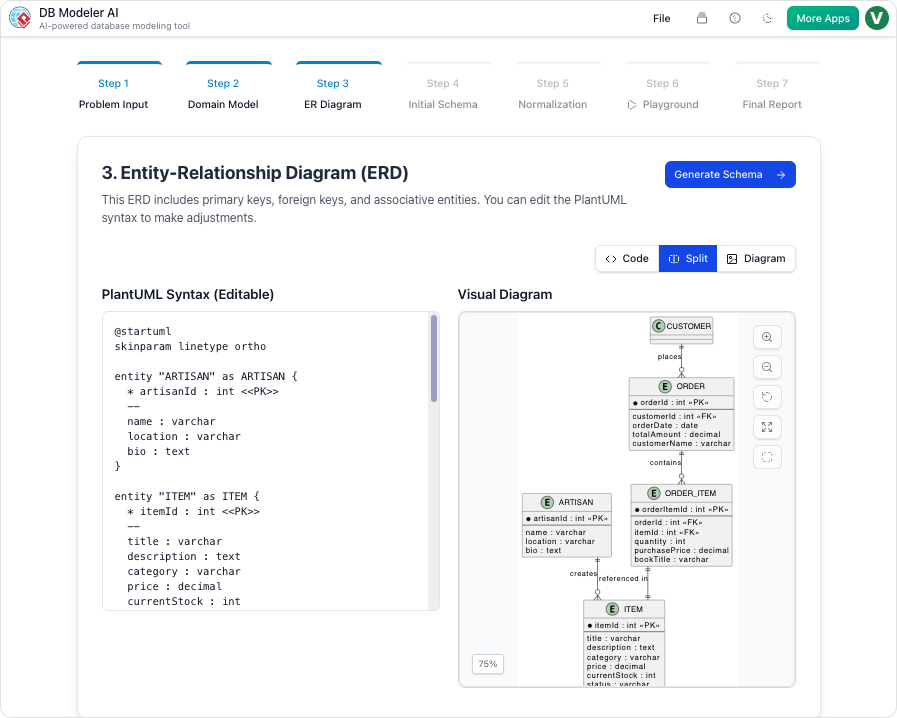
Understanding the nuance between these tools is critical for teams looking to optimize their workflow. While they share a foundation in AI, they differ significantly in their primary goals, structural workflows, and technical depth. This guide explores those differences to help you select the right tool for your project needs.
Primary Differences at a Glance
Before diving into the technical specifications, it is helpful to visualize the core distinctions between the two platforms. The following table outlines how each tool approaches goals, structure, and testing.
| Feature | DB Modeler AI | AI Chatbot |
|---|---|---|
| Primary Goal | Creating fully normalized, production-ready SQL schemas. | Rapid diagram generation and conversational refinement. |
| Structure | A rigid, guided 7-step technical workflow. | An open-ended natural language conversation. |
| Normalization | Automated progression from 1NF to 3NF with educational rationales. | Focuses on visual structure rather than technical optimization. |
| Testing | Features an interactive SQL playground with AI-generated sample data. | Primarily for visual modeling and analysis; no live testing environment. |
| Versatility | Specialized strictly for database design and implementation. | Supports a vast universe of diagrams, including UML, SysML, ArchiMate, and business matrices. |
DB Modeler AI: The End-to-End Specialist
The DB Modeler AI functions as a specialized web application designed to bridge the gap between abstract business requirements and executable database code. It is engineered for precision and architectural maturity.
The 7-Step Guided Journey
Unlike general-purpose tools, the DB Modeler AI enforces a structured approach. Its most notable feature is a 7-step guided journey that safeguards the integrity of the database design. This workflow ensures that users do not skip critical design phases, leading to a more robust final product.
Stepwise Normalization
One of the most complex tasks in database design is normalization—the process of organizing data to reduce redundancy and improve data integrity. DB Modeler AI automates this often error-prone task. It systematically optimizes a schema from First Normal Form (1NF) up to Third Normal Form (3NF). Uniquely, it provides educational rationales for its decisions, allowing users to understand why a table was split or a relationship modified.
Live Validation and Production Output
The tool goes beyond drawing. It features a Live Validation environment where users can launch an in-browser database. This allows for the immediate execution of DDL (Data Definition Language) and DML (Data Manipulation Language) queries against AI-seeded sample data. Once the design is validated, the system generates specific PostgreSQL-compatible SQL DDL statements, derived directly from the refined Entity-Relationship (ER) diagrams, making the output ready for deployment.
AI Chatbot: The Conversational Co-Pilot
In contrast to the rigid structure of the DB Modeler, the AI Chatbot acts as a broader, cloud-based assistant intended for general visual modeling. It is the tool of choice for rapid prototyping and broad system conceptualization.
Interactive Refinement
The AI Chatbot shines in its ability to interpret natural language commands for visual manipulation. Users can “talk” to their diagrams to facilitate changes that would traditionally require manual dragging and dropping. For example, a user might issue a command like “Rename Customer to Buyer” or “Add a relationship between Order and Inventory,” and the chatbot executes these visual refactors instantly.
Analytical Insights and Best Practices
Beyond generation, the AI Chatbot serves as an analytical engine. Users can query the chatbot regarding the model itself, asking questions such as “What are the main use cases in this diagram?” or requesting design best practices relevant to the current diagram type. This feature turns the tool into a consultant that reviews work in real-time.
Seamless Integration
The AI Chatbot is designed to fit into a wider ecosystem. It is available in the cloud and integrates directly into the Visual Paradigm Desktop environment. This interoperability allows users to generate diagrams via conversation and then import them into the desktop client for granular, manual modeling.
Integration and Use Case Recommendations
While distinct, these tools are often integrated in practice. For instance, the AI Chatbot is frequently utilized within the DB Modeler AI workflow to help users refine specific diagrammatic elements or answer architectural questions during the design process.
When to Use DB Modeler AI
- Start here when initiating a new database project.
- Use this tool when the requirement is a technically sound, normalized schema.
- Choose this for projects requiring immediate SQL generation and data testing capabilities.
When to Use the AI Chatbot
- Start here to quickly prototype system views.
- Use this tool for non-database diagrams, such as UML, SysML, or ArchiMate.
- Choose this for refining existing models through simple natural language commands without strict structural enforcement.
Analogy for Understanding
To summarize the relationship between these two powerful tools, consider a construction analogy:
The DB Modeler AI is comparable to sophisticated architectural software used by structural engineers. It calculates stress loads, blueprints every pipe, and ensures the building meets legal codes and stands upright physically. It is rigid, precise, and output-oriented.
The AI Chatbot is like an expert consultant standing next to you at the drafting table. You can ask them to “move that wall” or “draw a quick sketch of the lobby,” and they do it instantly based on your description. However, while they provide excellent visual guidance and advice, they are not necessarily running the deep structural engineering simulations required for the final blueprint.
-
Comprehensive Guide to Visual Paradigm AI Table Generator: From Natural Language to Executable Code: This guide walks users through transforming natural language descriptions into fully functional database tables and executable code using Visual Paradigm AI’s advanced table generation engine.
-
Kata AI Marketing Platform ERD – Sample Database Design: A real-world example of an ERD for an AI-powered marketing platform, demonstrating how to model users, campaigns, analytics, and content relationships.
-
The Comprehensive Guide to DBModeler AI… – Cybermedian: Visual Paradigm ’s DBModeler AI represents a significant leap forward in database design. By combining expert guidance, visual diagramming, and live SQL testing , it allows users to…
-
AI-Powered Database Modeling with DBModeler AI: Discover how DBModeler AI enables intelligent database schema design and automated modeling in Visual Paradigm.
-
Free ERD Tool – Design Databases Online with Visual Paradigm: Access a free, no-cost ERD tool online for creating professional entity-relationship diagrams without installation or subscription.
-
How to Draw Entities in Visual Paradigm ERD: Step-by-step user guide on creating and customizing entities in Visual Paradigm’s ERD tool for accurate database modeling.
-
How to Model a Relational Database with ERD – Visual Paradigm Tutorial: Practical tutorial showing how to use ERDs to model relational databases from concept to implementation.
-
Generating Database from ERD in Visual Paradigm: Detailed guide on automatically generating a database schema from an ERD using Visual Paradigm’s reverse engineering capabilities.
-
Generate Class Diagram from ERD – Visual Paradigm Tutorial: Learn how to convert an ERD into a class diagram to support object-oriented design and development workflows.
-
Visual Paradigm ERD Tool for Database Design – Complete Solution: A full-featured ERD tool designed for database architects and developers to model, visualize, and generate databases efficiently.
-
Free UML Design Tool – Visual Paradigm: Free UML modeler designed for software design and database design with UML (Unified Modeling Language), ERD. Run on Windows, Linux, Mac OS X.
-
Visual Paradigm – Advanced Database Design and Modeling Tool: A comprehensive database modeling tool offering ERD creation, schema generation, and integration with development workflows.
-
Visual Paradigm Online – Access Diagrams and Tools: Direct access to Visual Paradigm’s full suite of diagramming tools, including UML, ERD, flowcharts, and more, all in the cloud.