


In the fast-paced world of software development, the gap between a high-level project goal and a development-ready backlog is often where teams struggle the most. Backlog refinement—formerly known as grooming—is essential, yet it can be time-consuming and chaotic without the right structure. The Agile Backlog Refiner aims to solve this problem by combining a structured 7-step wizard with intelligent AI automation. In this review, we explore how this tool facilitates the translation of business requirements into actionable epics, user stories, and sprint plans.
What is the Agile Backlog Refiner?
The Agile Backlog Refiner is a specialized web application designed to guide Product Owners, Scrum Masters, and development teams through the entire lifecycle of backlog refinement. Unlike generic project management boards that assume you already have your tasks defined, this tool focuses on the creation and definition phase. It functions as an intelligent assistant that helps transform a single project goal into a comprehensive report containing prioritized user stories, risk assessments, and a draft sprint plan.
The tool operates on two main modalities: a manual mode for granular control and an AI-assisted mode that generates a complete refinement plan from a simple description. The output is a consolidated report that serves as a single source of truth for stakeholders and developers alike.
Key Features and Capabilities
1. AI-Powered Backlog Generation
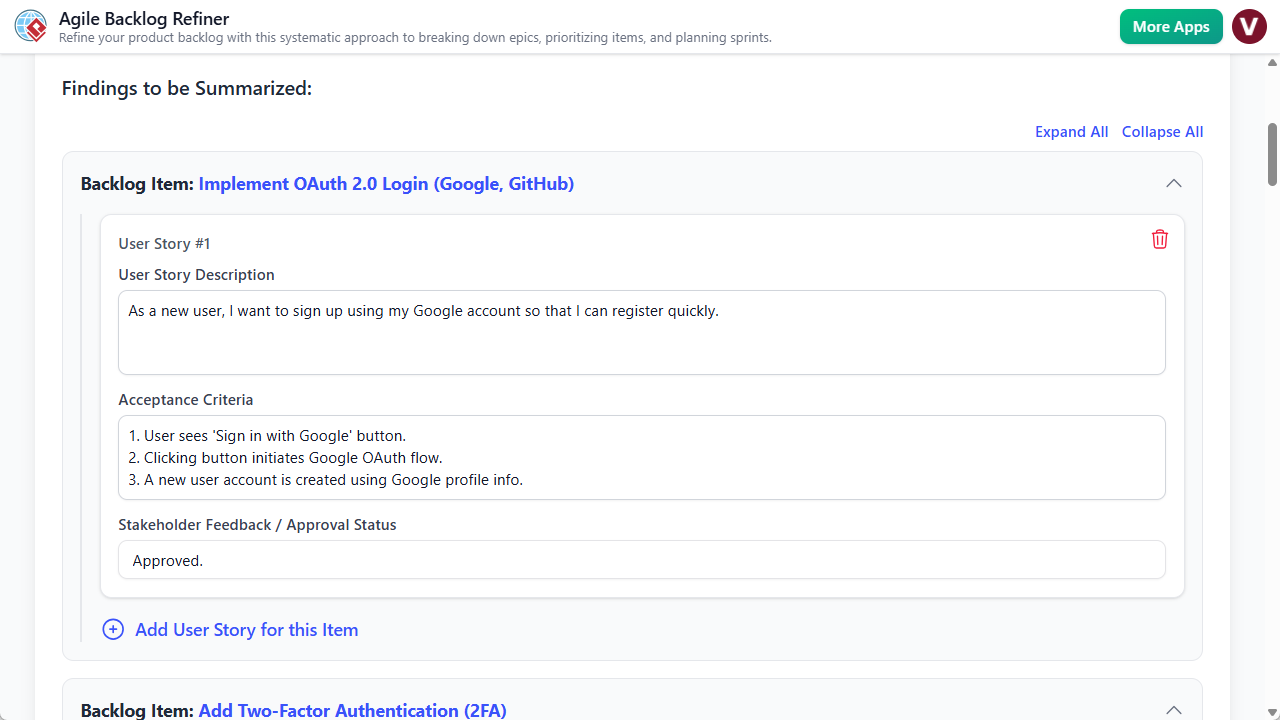
The standout feature of this tool is its ability to utilize Artificial Intelligence to perform the heavy lifting of backlog creation. By simply entering a high-level project description (e.g., “Create a user profile page with order history”), the AI engine populates data across the entire workflow. It drafts epics, decomposes them into specific user stories, writes acceptance criteria, and even suggests priorities. This feature massively accelerates preparation time, allowing Product Owners to start with a solid draft rather than a blank page.
2. The 7-Step Guided Wizard
To ensure no critical aspect of agile planning is overlooked, the application enforces a best-practice workflow consisting of seven distinct steps:
- Preparation: Setting the stage and goals.
- Decompose Epics: Breaking down large bodies of work.
- Prioritize PBIs: Using methods like MoSCoW to rank items.
- Refine Stories: Adding detail and acceptance criteria.
- Risk Assessment: Identifying potential pitfalls early.
- Finalize & Plan: Drafting the sprint structure.
- Final Report: Generating the output document.
A visual stepper at the top of the interface tracks progress, turning green as steps are completed. This gamified element provides a sense of accomplishment and ensures methodical progress.
3. Structured Form-Based Input
The user interface is designed around clear, structured forms. Whether you are manually entering data or editing AI suggestions, the tool provides specific fields for Epics, User Stories, and Risk definitions. This structure acts as a digital worksheet, prompting the user for the right information at the right time, which directly improves the quality and consistency of the backlog.
4. Flexible Data Management
Recognizing the diverse security needs of agile teams, the tool offers dual saving mechanisms. Users can save projects to the cloud for accessibility across different locations or export the entire project state as a local .json file. The latter is particularly useful for teams with strict data privacy requirements or for those who wish to version-control their planning sessions manually.
Target Audience and Use Cases
The Agile Backlog Refiner is tailored for specific roles within the software development lifecycle:
- Product Owners & Managers: It serves as a preparation deck for backlog refinement sessions, ensuring they enter meetings with a clear, prioritized list of work.
- Scrum Masters: The tool acts as a facilitation aid, keeping the team focused and ensuring that often-skipped steps, like risk assessment, are covered.
- Development Teams: Developers benefit from the clarity of well-written user stories and defined acceptance criteria, which reduces ambiguity during execution.
Practical Workflow Scenarios
AI-Assisted Sprint Planning
For teams needing to quickly spin up a backlog for a new feature, the AI workflow is ideal. The team can agree on a one-paragraph description, input it into the “Generate with AI” prompt, and receive a fully structured plan. The session then shifts from writing to reviewing, where the team tweaks priorities and estimates based on their specific context.
Manual Deep-Dive Refinement
For complex features requiring granular human oversight, users can bypass the AI. Starting with a blank project, a Product Owner can manually input an Epic in Step 2, decompose it into Product Backlog Items (PBIs) in Step 3, and meticulously define acceptance criteria in Step 4. This mode is excellent for maintaining strict control over technical requirements.
Limitations and Considerations
While the Agile Backlog Refiner is a powerful planning aid, potential users should be aware of certain limitations to manage expectations:
- No Direct Integration: The tool creates a refined plan, but it does not automatically sync with Jira, Trello, or Azure DevOps. Users must manually transfer the final stories into their primary issue tracker.
- Single-User Focus: The application is designed for a facilitator (e.g., the Product Owner) to drive the session. It does not support real-time collaborative editing where multiple team members type simultaneously.
- AI Memory: The AI treats every generation request as a new session; it does not retain memory of previous projects or long-term organizational context.
Conclusion
The Agile Backlog Refiner helps bridge the gap between abstract ideas and concrete development tasks. By enforcing a structured 7-step process and leveraging AI to eliminate the “blank page syndrome,” it allows teams to run more productive meetings and produce higher-quality documentation. While the lack of direct integration with issue trackers adds a manual step to the workflow, the value gained in clarity, risk assessment, and efficient planning makes it a worthy addition to the Agile toolkit.
Related posts:
 Simplifying Software Architecture: A Deep Dive into the AI-Assisted UML Class Diagram Generator
Model Canvas Review: Revolutionizing Strategic Planning with AI
Upgrading to AI-Powered Modeling in Visual Paradigm: A Comprehensive Guide
A Comprehensive Guide to UML Activity Diagrams: From Manual Modeling to AI-Driven Natural Language Generation
Simplifying Software Architecture: A Deep Dive into the AI-Assisted UML Class Diagram Generator
Model Canvas Review: Revolutionizing Strategic Planning with AI
Upgrading to AI-Powered Modeling in Visual Paradigm: A Comprehensive Guide
A Comprehensive Guide to UML Activity Diagrams: From Manual Modeling to AI-Driven Natural Language Generation