Comprehensive Tutorial for ArchiMate Supporting TOGAF ADM

Introduction to ArchiMate

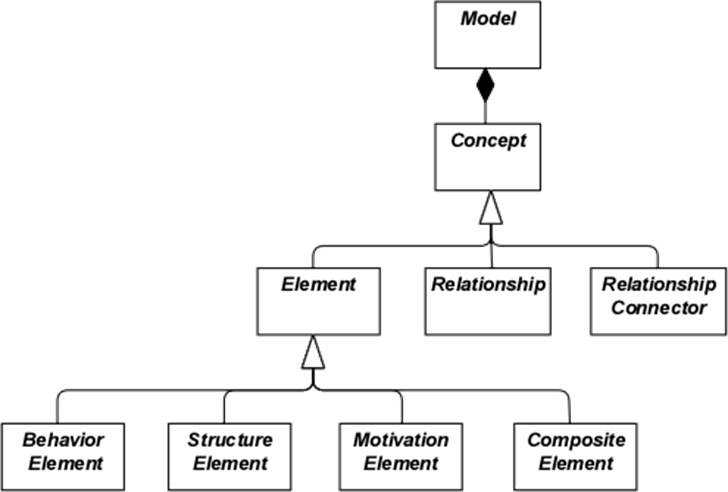
ArchiMate is an open and independent enterprise architecture modeling language that supports the description, analysis, and visualization of architecture within and across business domains. It is designed to provide a clear and unambiguous way to communicate complex architectures to stakeholders. ArchiMate is particularly useful when used in conjunction with the TOGAF Architecture Development Method (ADM), providing a standardized way to model and communicate enterprise architectures.

What is ArchiMate?

Key Concepts of ArchiMate

ArchiMate Core Framework

1. Layers of ArchiMate

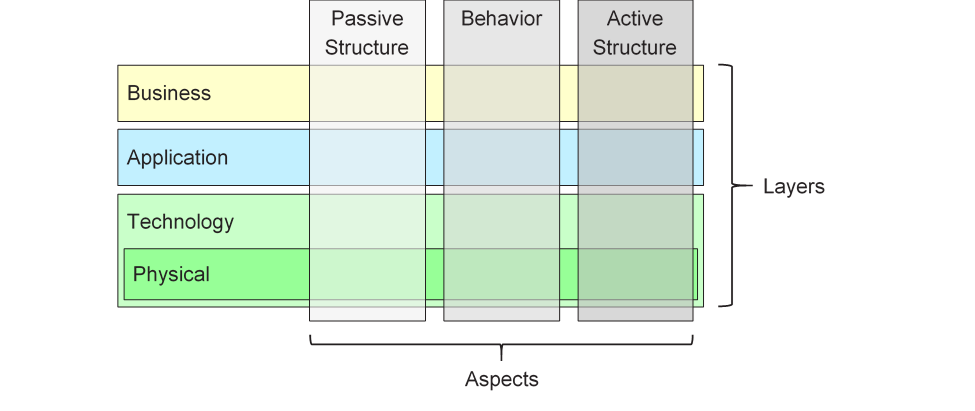
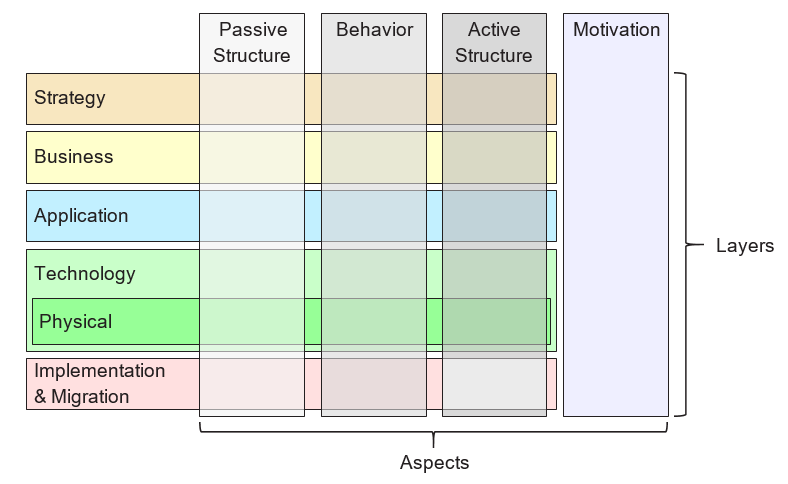
ArchiMate divides the enterprise architecture into three main layers:

  • Business Layer: Focuses on the business processes, services, and functions that support the organization’s goals.
  • Application Layer: Deals with the application services, components, and their interactions that support the business layer.
  • Technology Layer: Covers the technology infrastructure, including hardware, software, and network components that support the application layer.

2. Core Elements

ArchiMate defines several core elements that are used to model the architecture:

  • Active Structure Elements: Represent the entities that perform behavior, such as business actors, application components, and devices.
  • Behavior Elements: Represent the processes, functions, services, and interactions within the architecture.
  • Passive Structure Elements: Represent the information or data used or produced by behavior elements, such as business objects and data objects.

3. Relationships

ArchiMate defines several types of relationships to connect the elements:

  • Structural Relationships: Such as composition, aggregation, and specialization.
  • Dependency Relationships: Such as association, realization, and used-by.
  • Dynamic Relationships: Such as triggering and flow.

4. Viewpoints

ArchiMate provides several viewpoints to visualize the architecture from different perspectives:

  • Business Process Viewpoint: Shows the business processes and their interactions.
  • Application Cooperation Viewpoint: Shows how applications cooperate to support business processes.
  • Technology Realization Viewpoint: Shows how technology components realize application components.

ArchiMate and TOGAF ADM

TOGAF Architecture Development Method (ADM)

TOGAF ADM is a comprehensive methodology for developing enterprise architectures. It consists of several phases, each focusing on a specific aspect of the architecture development process. ArchiMate supports TOGAF ADM by providing a standardized way to model and visualize the architecture at each phase.

Powerful TOGAF ADM Toolset

Phases of TOGAF ADM

  1. Preliminary Phase: Establishes the architecture principles, framework, and governance.
  2. Architecture Vision: Defines the scope, stakeholders, concerns, and business objectives.
  3. Business Architecture: Develops the business architecture, including business processes and services.
  4. Information Systems Architectures: Develops the data and application architectures.
  5. Technology Architecture: Develops the technology architecture.
  6. Opportunities and Solutions: Identifies and prioritizes architecture projects.
  7. Migration Planning: Develops the migration and implementation plan.
  8. Implementation Governance: Provides governance and support for the implementation of the architecture.

Examples of ArchiMate Models

This diagram illustrates a layered architecture for a healthcare management system, divided into two main layers: the Application Layer and the Technology Layer. Here’s a detailed explanation of each component and their interactions:

archimate diagram example

Application Layer (Blue)

This layer consists of the various applications and systems that directly interact with users or other systems to manage healthcare services. The key components in this layer are:

  1. Inpatient Care Management:

    • Manages services and processes related to patients who are admitted to the hospital.
  2. Outpatient Care Management:

    • Manages services and processes for patients who visit the hospital for treatment but are not admitted.
  3. CRM System (Customer Relationship Management):

    • Manages interactions with patients, including communication, follow-ups, and patient relationship management.
  4. Billing:

    • Handles the financial aspects, including generating bills, processing payments, and managing financial records.

Technology Layer (Green)

This layer provides the underlying infrastructure and services that support the applications in the Application Layer. The key components in this layer are:

  1. Messaging Service:

    • Facilitates communication between different applications and systems within the healthcare management system.
    • Ensures that messages are delivered reliably and in the correct order.
  2. Data Access Service:

    • Provides a centralized way to access and manage data across the system.
    • Ensures that data is retrieved and stored efficiently and securely.
  3. Mainframe:

    • The central computing system that hosts core services and data.
    • Includes two main components:
      • Message Queuing: Manages the queuing and processing of messages to ensure reliable communication.
      • DBMS (Database Management System): Stores and manages the data used by the various applications.

Interactions

  • Inpatient Care ManagementOutpatient Care ManagementCRM System, and Billing interact with the Messaging Service and Data Access Service to perform their respective functions.
  • The Messaging Service and Data Access Service rely on the Mainframe for core services like message queuing and database management.
  • The Mainframe ensures that messages are processed correctly and data is managed efficiently, supporting the entire system’s operations.

The diagram depicts a structured approach to managing healthcare services by separating the application-level functions from the underlying technology infrastructure. This separation allows for more modular and maintainable system design, where changes in one layer have minimal impact on the other. The Messaging Service and Data Access Service act as intermediaries, facilitating communication and data management between the application components and the mainframe.

Recommended ArchiMate EA Tool

Visual Paradigm is widely recognized as one of the best tools for ArchiMate modeling in Enterprise Architecture (EA) projects. Here are some reasons why it is highly recommended:

Navigating TOGAF: Your Guide to the ADM Process - Visual Paradigm Guides

1. Comprehensive ArchiMate Support

  • Full ArchiMate Standard: Visual Paradigm supports the latest ArchiMate standards, including ArchiMate 3.1, ensuring that you can model using all the official ArchiMate elements and relationships.
  • Rich Library of Elements: It provides a extensive library of ArchiMate symbols, making it easy to create detailed and accurate models.

2. User-Friendly Interface

  • Intuitive Design: The tool offers a user-friendly interface that is easy to navigate, even for users who are new to ArchiMate modeling.
  • Drag-and-Drop: The drag-and-drop functionality allows for quick and efficient model creation.

3. Advanced Modeling Features

  • Layered Views: Supports the creation of layered views (e.g., Business, Application, Technology) to provide a holistic view of the enterprise architecture.
  • Cross-Layer Relationships: Easily define and visualize relationships across different layers of the architecture.

4. Collaboration and Sharing

  • Team Collaboration: Visual Paradigm supports collaborative work, allowing multiple users to work on the same project simultaneously.
  • Version Control: Integrated version control helps manage changes and track the evolution of your models.

5. Integration Capabilities

  • Tool Integration: Seamlessly integrates with other tools and platforms, such as JIRA, Confluence, and various databases, enhancing the overall EA practice.
  • Import/Export: Supports importing and exporting models in various formats, including ArchiMate Exchange File Format, ensuring compatibility with other tools.

6. Documentation and Reporting

  • Automated Documentation: Generates comprehensive documentation from your ArchiMate models, saving time and ensuring consistency.
  • Custom Reports: Allows for the creation of custom reports tailored to specific stakeholder needs.

7. Training and Support

  • Extensive Resources: Offers a wealth of tutorials, guides, and examples to help users get started and master ArchiMate modeling.
  • Customer Support: Provides robust customer support to assist with any issues or questions that may arise.

8. Scalability

  • Scalable Solutions: Suitable for both small and large-scale EA projects, making it a versatile tool for organizations of all sizes.

9. Compliance and Standards

  • Industry Standards: Aligns with industry standards and best practices, ensuring that your EA models are compliant and up-to-date.

Conclusion

ArchiMate provides a powerful and standardized way to model enterprise architectures, supporting the TOGAF ADM methodology. By understanding the key concepts, layers, elements, and relationships in ArchiMate, you can effectively model and communicate complex architectures to stakeholders. The examples provided illustrate how ArchiMate can be used to model business processes, application cooperation, and technology realization, supporting the various phases of the TOGAF ADM.

ArchiMate Tool Resource

  1. Free Online ArchiMate Diagram Tool

    • Description: Create ArchiMate diagrams online with a free tool that supports ArchiMate 3 visual modeling language. Includes examples and templates to help you get started.
    • URLFree Online ArchiMate Diagram Tool 1
  2. Main Page – ArchiMate Resources for FREE

    • Description: Offers a visual language to model and capture enterprise architecture, providing a means to visualize relationships within and between different domains.
    • URLMain Page – ArchiMate Resources for FREE 2
  3. Visual Paradigm – UML, Agile, PMBOK, TOGAF, BPMN and More!

  4. Chapter 7. ArchiMate – Visual Paradigm Community Circle

  5. What is ArchiMate?

    • Description: Step-by-step learning guide for ArchiMate, including how to use it for enterprise architecture modeling.
    • URLWhat is ArchiMate? 5
  6. ArchiMate tools

    • Description: Learn how to use Visual Paradigm, a design and management tool designed for agile software teams.
    • URLArchiMate tools 6
  7. Best ArchiMate Software

    • Description: Certified ArchiMate tool for effective EA design and modeling. Quickly draw ArchiMate diagrams that conform to The Open Group official specification.
    • URLBest ArchiMate Software 7
  8. How to Format ArchiMate Elements?

  9. ArchiMate Viewpoint Guide – Resource Map Viewpoint

  10. ArchiMate Diagram Tutorial

    • Description: Tutorial that helps you learn about ArchiMate diagrams, how to create them, and when to use them. Includes examples and tips.
    • URLArchiMate Diagram Tutorial 10

These resources should provide a comprehensive starting point for using Visual Paradigm’s ArchiMate tool for enterprise architecture modeling.

Tutorial: UML vs BPMN – Key Concepts and Examples

Introduction

Unified Modeling Language (UML) and Business Process Model and Notation (BPMN) are two popular modeling languages used in software development and business process management. While both serve to visualize and document processes, they cater to different aspects of system design and have distinct purposes. This tutorial will compare UML and BPMN, highlighting their key concepts, differences, and providing examples to illustrate their use cases.

Free Online UML Tool - Visual Paradigm

Key Concepts

Unified Modeling Language (UML)

UML is a standardized modeling language used primarily in software engineering to specify, visualize, construct, and document the artifacts of software systems. It provides a set of diagrams to represent the structure and behavior of a system.

Key Diagrams in UML

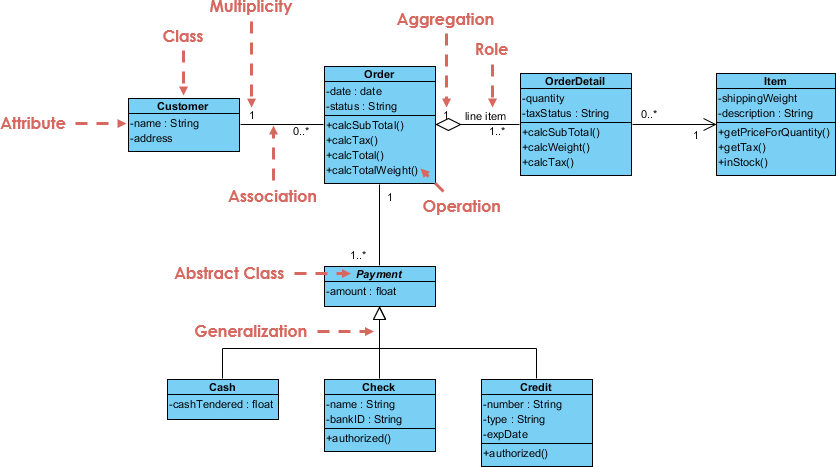
  1. Class Diagram

    • Represents the static structure of a system by showing the system’s classes, attributes, methods, and the relationships among classes.
    • Example: A class diagram for a library management system showing classes like BookMember, and Loan.
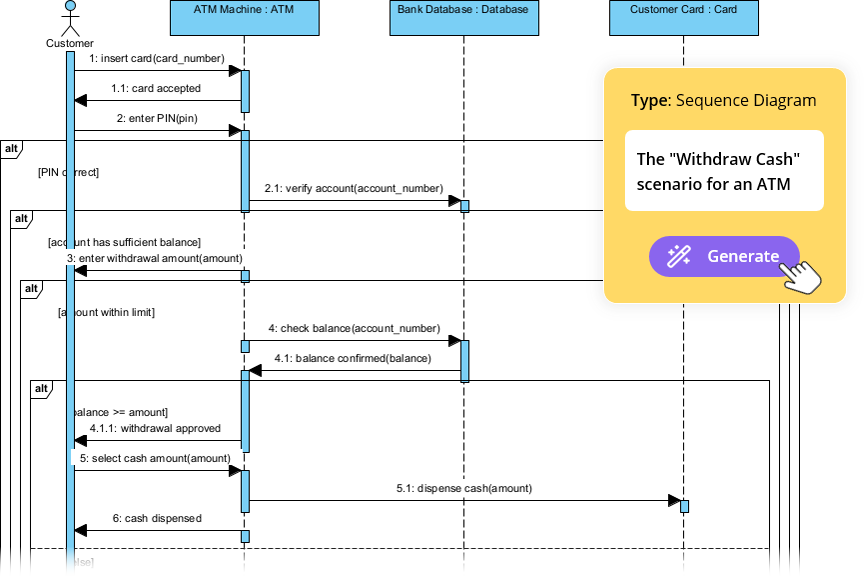
  2. Sequence Diagram

    • Shows how objects interact in a particular scenario of a use case, focusing on the sequence of messages exchanged.
    • Example: A sequence diagram for the Checkout use case in an online shopping system.
  3. Use Case Diagram

    • Captures the functional requirements of a system by showing the interactions between users (actors) and the system.
    • Example: A use case diagram for an online shopping system showing use cases like Browse ProductsAdd to Cart, and Checkout.
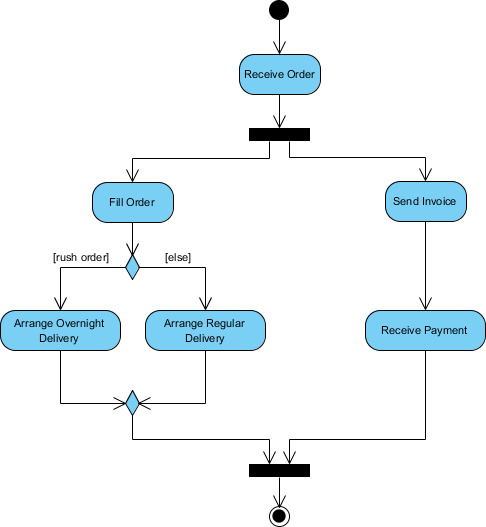
  4. Activity Diagram

    • Models the workflow of a system by showing the sequence of activities and the flow of control.
    • Example: An activity diagram for the Order Processing workflow in an online shopping system.

Business Process Model and Notation (BPMN)

BPMN is a graphical representation for specifying business processes in a workflow. It is designed to be understandable by all business stakeholders, from business analysts to technical developers.

How to Create BPMN Diagram? Visual Paradigm

Key Elements in BPMN

  1. Events

    • Represent something that happens during a process, such as a start event, end event, or intermediate event.
    • Example: A start event triggered by a customer placing an order.
  2. Activities

    • Represent the work performed within a process. Activities can be tasks or sub-processes.
    • Example: A task to Process Payment in an order fulfillment process.
  3. Gateways

    • Control the flow of a process, determining the branching, forking, merging, and joining of paths.
    • Example: A gateway that decides whether to Ship Order or Cancel Order based on payment status.
  4. Flow Objects

    • Include events, activities, and gateways, connected by sequence flows to define the order of execution.
    • Example: A sequence flow from Process Payment to Ship Order.

UML vs BPMN: Key Differences

  1. Purpose

    • UML: Primarily used for software design and development, focusing on the structure and behavior of software systems.
    • BPMN: Used for business process management, focusing on the workflow and interactions within business processes.
  2. Audience

    • UML: Targeted at software developers, architects, and engineers.
    • BPMN: Targeted at business analysts, process owners, and stakeholders involved in business operations.
  3. Scope

    • UML: Covers a wide range of diagrams for different aspects of software systems, including structure, behavior, and interactions.
    • BPMN: Focuses specifically on business processes, providing a detailed representation of workflows and interactions.
  4. Complexity

    • UML: Can be complex due to the variety of diagrams and notations, requiring a deeper understanding of software engineering concepts.
    • BPMN: Generally simpler and more intuitive, designed to be understood by non-technical stakeholders.

Examples

Example 1: Online Shopping System

UML Use Case Diagram

  • Actors: Customer, Admin
  • Use Cases: Browse Products, Add to Cart, Checkout, Manage Inventory
  • Description: Shows the interactions between customers and the online shopping system, highlighting the main functionalities.

BPMN Process Diagram

  • Events: Start (Customer places order), End (Order shipped)
  • Activities: Process Payment, Prepare Order, Ship Order
  • Gateways: Decision gateway to check payment status
  • Description: Illustrates the workflow of order processing, from payment to shipping, with clear decision points.

Example 2: Library Management System

UML Class Diagram

  • Classes: Book, Member, Loan
  • Relationships: Member borrows Book, Loan associates Member and Book
  • Description: Represents the static structure of the library management system, showing the relationships between key entities.

BPMN Process Diagram

  • Events: Start (Member requests book), End (Book returned)
  • Activities: Check Availability, Issue Book, Send Reminder
  • Gateways: Decision gateway to check book availability
  • Description: Shows the workflow of borrowing a book, from request to return, with decision points for availability checks.

The Key Differences between UML and BPMN

Here is a comparative table highlighting the key differences between UML and BPMN:

Feature UML (Unified Modeling Language) BPMN (Business Process Model and Notation)
Purpose Primarily used for software design and development, focusing on the structure and behavior of software systems. Used for business process management, focusing on the workflow and interactions within business processes.
Audience Targeted at software developers, architects, and engineers. Targeted at business analysts, process owners, and stakeholders involved in business operations.
Scope Covers a wide range of diagrams for different aspects of software systems, including structure, behavior, and interactions. Focuses specifically on business processes, providing a detailed representation of workflows and interactions.
Complexity Can be complex due to the variety of diagrams and notations, requiring a deeper understanding of software engineering concepts. Generally simpler and more intuitive, designed to be understood by non-technical stakeholders.
Key Diagrams/Elements – Class Diagram
– Sequence Diagram
– Use Case Diagram
– Activity Diagram
– State Machine Diagram
– Component Diagram
– Events (Start, End, Intermediate)
– Activities (Tasks, Sub-processes)
– Gateways (Decision, Parallel, Event-based)
– Flow Objects (Sequence Flow, Message Flow)
Example Use Cases – Software architecture design
– System behavior modeling
– Requirements analysis
– Object-oriented design
– Business process mapping
– Workflow automation
– Process improvement
– Business-IT alignment
Integration Often integrated with software development tools and IDEs. Often integrated with business process management suites and enterprise architecture tools.
Standardization Standardized by the Object Management Group (OMG). Standardized by the Object Management Group (OMG).
Flexibility Highly flexible with various diagrams to model different aspects of a system. More focused on business processes but can be extended with additional notations for specific needs.
Visualization Provides a comprehensive view of the system’s architecture and behavior. Provides a clear and intuitive view of business processes and workflows.

This table summarizes the key differences between UML and BPMN, helping you understand their respective strengths and use cases in software development and business process management.

Recommended UML and BPMN Tool

Visual Paradigm is highly recommended for using both UML and BPMN due to its comprehensive features and seamless integration of both modeling languages. Here are some key reasons why Visual Paradigm stands out:

  1. Comprehensive Modeling Support: Visual Paradigm supports a wide range of modeling standards, including UML, BPMN, ERD, DFD, and more. This makes it a versatile tool for various types of software development and business process management projects 910.

  2. Integrated Environment: The tool provides an all-in-one suite that integrates UML and BPMN modeling with agile development tools, project management diagrams, and code engineering capabilities. This integration helps in managing projects effortlessly and ensures a smooth transition from design to implementation 911.

  3. Ease of Use: Visual Paradigm offers an intuitive and easy-to-use interface, making it accessible for both beginners and experienced users. The tool includes features like auto-stretched pools, smart connector-correction, and expandable sub-processes, which simplify the modeling process 11.

  4. Code Engineering: The tool bridges the gap between UML design models and source code by supporting code generation and reverse engineering. This feature is beneficial for developers as it helps in maintaining consistency between the design and implementation 10.

  5. Collaborative Features: Visual Paradigm supports real-time and asynchronous team collaboration, allowing multiple team members to work on the same project simultaneously. This feature is crucial for agile teams that require constant communication and collaboration 9.

  6. High-Quality Documentation: The tool enables the generation of high-quality process documents and reports, which are essential for documentation and stakeholder communication. This feature helps in maintaining clear and concise records of the project’s progress and design decisions 10.

  7. Industry Recognition: Visual Paradigm is trusted by leading enterprises and has won major IT awards. Its industry-unique TOGAF ADM lifecycle tool and other enterprise architecture tools make it a reliable choice for professional use 9.

  8. Affordability: Visual Paradigm offers a highly affordable visual modeling toolset that supports UML, BPMN, and other essential diagrams. This makes it accessible for small teams, personal users, and students without compromising on features 10.

  9. Tutorials and Support: Visual Paradigm provides a range of free tutorials and resources to help users get started with UML and BPMN modeling. These resources include step-by-step guides, videos, and documentation, ensuring that users can effectively use the tool for their projects 1213.

In conclusion, Visual Paradigm’s comprehensive feature set, ease of use, collaborative capabilities, and industry recognition make it an ideal choice for teams looking to integrate UML and BPMN modeling into their software development and business process management projects.

Conclusion

UML and BPMN serve different purposes in the realm of system design and process management. UML is ideal for software development, providing a comprehensive set of diagrams to model the structure and behavior of software systems. BPMN, on the other hand, is tailored for business process management, offering a clear and intuitive way to visualize workflows and interactions within business processes. Understanding the key concepts and differences between UML and BPMN will help you choose the right tool for your specific needs and ensure effective communication and documentation in your projects.

Comprehensive Guide to Unified Modeling Language (UML)

Introduction to UML

Unified Modeling Language (UML) is a standardized modeling language consisting of an integrated set of diagrams designed to help you visualize the design of a system. UML is widely used in software engineering to specify, visualize, construct, and document the artifacts of software systems. It provides a standard way to visualize a system’s architectural blueprints, including elements such as actors, processes, activities, logical groupings, annotations, and so on.

Free UML Tool

Key Concepts

1. Model

A model in UML is a simplified representation of a system or a part of a system. It helps in understanding and communicating the design and structure of the system.

2. Diagrams

UML diagrams are graphical representations of a system’s architecture. They are categorized into two main types: structural diagrams and behavioral diagrams.

3. Elements

UML elements are the basic building blocks used to create models. They include classes, objects, interfaces, components, nodes, use cases, actors, and more.

4. Relationships

Relationships in UML define how elements are connected to each other. Common relationships include associations, generalizations, dependencies, and realizations.

5. Notations

UML uses a standard set of notations to represent different elements and relationships. These notations help in creating consistent and understandable diagrams.

Diagram Types

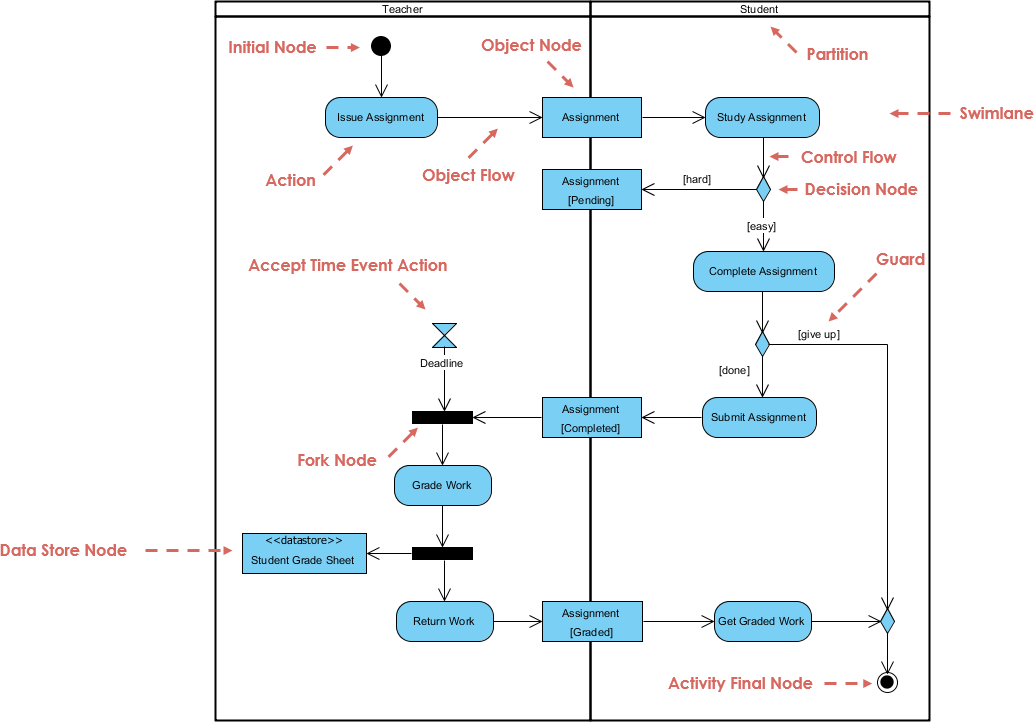
UML consists of 14 types of diagrams, which are divided into two main categories: structural diagrams and behavioral diagrams.

Overview of the 14 UML Diagram Types

Structural Diagrams

  1. Class Diagram

    • Represents the static structure of a system by showing the system’s classes, attributes, methods, and the relationships among classes.
    • Example: A class diagram for a library management system showing classes like BookMember, and Loan.
  2. Object Diagram

    • Shows a snapshot of the detailed state of a system at a particular point in time.
    • Example: An object diagram representing instances of Book and Member classes in a library system.
  3. Component Diagram

    • Illustrates the organization and dependencies among a set of components.
    • Example: A component diagram for a web application showing components like UIBusiness Logic, and Database.
  4. Deployment Diagram

    • Shows the physical deployment of artifacts on nodes.
    • Example: A deployment diagram for a web application showing servers, databases, and their interactions.
  5. Package Diagram

    • Organizes elements of a model into groups, providing a way to structure and manage complex systems.
    • Example: A package diagram for a software project showing packages like UIServices, and Data Access.
  6. Profile Diagram

    • Customizes UML models with standard extension mechanisms.
    • Example: A profile diagram extending UML for a specific domain like healthcare or finance.

Behavioral Diagrams

  1. Use Case Diagram

    • Captures the functional requirements of a system by showing the interactions between users (actors) and the system.
    • Example: A use case diagram for an online shopping system showing use cases like Browse ProductsAdd to Cart, and Checkout.
  2. Sequence Diagram

    • Shows how objects interact in a particular scenario of a use case, focusing on the sequence of messages exchanged.
    • Example: A sequence diagram for the Checkout use case in an online shopping system.
  3. Communication Diagram

    • Emphasizes the structural relationships between objects and the messages they exchange.
    • Example: A communication diagram for the Checkout use case showing the interactions between CustomerOrder, and Payment objects.
  4. State Machine Diagram

    • Represents the states of an object and the transitions between states due to events.
    • Example: A state machine diagram for a Order object in an online shopping system.
  5. Activity Diagram

    • Models the workflow of a system by showing the sequence of activities and the flow of control.
    • Example: An activity diagram for the Order Processing workflow in an online shopping system.
  6. Interaction Overview Diagram

    • Provides a high-level overview of the interactions between different parts of a system.
    • Example: An interaction overview diagram for the Order Processing workflow showing the interactions between CustomerOrder, and Payment components.
  7. Timing Diagram

    • Shows the interactions between objects in a single axis representing time.
    • Example: A timing diagram for the Order Processing workflow showing the timing of interactions between CustomerOrder, and Payment objects.

Applications Areas

UML is widely used in various domains and industries, including:

UML Applications Areas - Visual Paradigm

  1. Software Engineering

    • Software design and architecture
    • Requirements analysis and specification
    • System modeling and documentation
  2. Business Process Modeling

    • Workflow analysis and optimization
    • Business process reengineering
  3. Systems Engineering

    • Hardware and software co-design
    • Embedded systems development
  4. Enterprise Architecture

    • Enterprise-wide system integration
    • IT strategy and planning
  5. Academic Research

    • Formal methods and verification
    • Software engineering education

Examples

Example 1: Library Management System

  • Class Diagram

    • Classes: BookMemberLoan
    • Relationships: Member borrows BookLoan associates Member and Book
  • Use Case Diagram

    • Actors: LibrarianMember
    • Use Cases: Borrow BookReturn BookSearch Catalog
  • Sequence Diagram

    • Scenario: Borrow Book
    • Objects: MemberLibrarianBookLoan
    • Messages: Member requests to borrow BookLibrarian checks availability, Loan is created

Example 2: Online Shopping System

  • Class Diagram

    • Classes: CustomerProductOrderPayment
    • Relationships: Customer places OrderOrder contains ProductPayment processes Order
  • Use Case Diagram

    • Actors: CustomerAdmin
    • Use Cases: Browse ProductsAdd to CartCheckoutManage Inventory
  • Activity Diagram

    • Workflow: Order Processing
    • Activities: Customer places orderOrder is validatedPayment is processedOrder is shipped

Conclusion

UML is a powerful and versatile modeling language that helps in visualizing, specifying, constructing, and documenting the artifacts of software systems. Its wide range of diagrams and standardized notations make it an essential tool for software engineers, business analysts, and system architects. By understanding the key concepts, diagram types, and application areas of UML, you can effectively use it to design and communicate complex systems.

Visual Paradigm is highly recommended as the best UML tool for IT software development teams due to its comprehensive suite of features and seamless integration with agile methodologies. Here are some key reasons why Visual Paradigm stands out:

  1. Comprehensive Modeling Support: Visual Paradigm supports a wide range of modeling standards, including UML, SysML, BPMN, ERD, DFD, and ArchiMate. This makes it a versatile tool for various types of software development projects 123.

  2. Agile Integration: Visual Paradigm is designed to aid agile software development processes. It integrates UML modeling with agile practices such as Scrum and Kanban, allowing teams to create UML diagrams as needed to support communication and documentation without compromising agility 45.

  3. Collaborative Features: The tool supports real-time and asynchronous team collaboration, enabling multiple team members to work on the same project simultaneously. This feature is crucial for agile teams that require constant communication and collaboration 15.

  4. Code Engineering Capabilities: Visual Paradigm offers code generation and reverse engineering capabilities, which can significantly speed up the development process. It supports various technologies such as ORM and REST, making it easier to transition from design to implementation 16.

  5. User-Friendly Interface: The tool provides an intuitive and easy-to-use interface, which helps in creating and managing complex diagrams efficiently. It also includes features like wireframing, storyboarding, and prototyping, which are essential for UX design 15.

  6. Integration with IDEs: Visual Paradigm integrates seamlessly with leading Integrated Development Environments (IDEs), ensuring a smooth transition from analysis to design and implementation. This integration reduces efforts across all stages of the software development lifecycle 7.

  7. Reporting and Documentation: The tool allows for the generation of professional reports in various formats such as PDF, Word, and HTML. This feature is beneficial for documentation and stakeholder communication 8.

  8. Industry Recognition: Visual Paradigm is trusted by millions of users, including government units, blue-chip companies, and educational institutions. It has won major IT awards, further validating its reliability and effectiveness in the industry 5.

In conclusion, Visual Paradigm’s robust feature set, agile integration, collaborative capabilities, and industry recognition make it an ideal choice for IT software development teams looking to enhance their UML modeling and software development processes.