自动化数据库规范化:使用 Visual Paradigm AI 数据库模型设计器的逐步指南

人工智能驱动的规范化简介

数据库规范化是组织数据的关键过程,以确保数据完整性并消除冗余。虽然传统上是一项复杂且容易出错的任务,但现代工具已发展到能够自动化这一“繁重工作”。Visual Paradigm AI 数据库模型设计器充当智能桥梁,将抽象概念转化为技术优化、可投入生产的实现方案。
Desktop AI Assistant

要理解这一工具的价值,可以类比汽车制造过程。如果类图是最初的草图,而实体关系图(ERD)是机械蓝图,那么规范化就是调整发动机的过程,以确保没有松动的螺栓或不必要的重量。AI 数据库模型设计器充当‘自动化工厂’,以实现最大效率来执行这一调整。本教程将引导您通过使用 AI 数据库模型设计器有效规范化您的数据库模式。

Doc Composer

步骤 1:访问引导式工作流程

AI 数据库模型设计器采用一种专门的七步引导式工作流程。规范化在第 5 步占据核心位置。在到达此阶段之前,该工具允许您输入高层次的概念类。随后,它利用智能算法为优化准备结构,使用户能够无需手动操作即可从概念过渡到表格。

步骤 2:逐步推进规范化形式

一旦进入规范化阶段,AI 将迭代优化数据库模式通过三个主要的架构成熟阶段。这一逐步推进的过程确保您的数据库符合行业可靠性标准。

实现第一范式(1NF)

第一级优化关注数据的原子性。AI 分析您的模式以确保:

  • 每个表格单元格包含单一的原子值。
  • 表中的每个记录都是唯一的。

迈向第二范式(2NF)

在 1NF 结构的基础上,AI 进行进一步分析,以建立键与属性之间的强关系。在此步骤中,该工具确保所有非键属性都完全功能化并依赖于主键,从而有效消除部分依赖。

最终达到第三范式(3NF)

为了达到专业优化的标准水平,AI 将模式推进到 3NF。这包括确保所有属性都依赖于在主键上。通过这样做,该工具消除了传递依赖,而传递依赖是数据异常的常见来源。

步骤3:审查自动化错误检测

在整个规范化过程中,AI数据库建模器采用智能算法来检测常常困扰设计不良系统的架构缺陷。它特别关注可能导致以下问题的异常:

  • 更新错误
  • 插入错误
  • 删除错误

通过自动化检测,该工具消除了手动排查潜在完整性问题的负担,确保为您的应用程序提供坚实的基础。

步骤4:理解架构变更

AI数据库建模器的一个显著特点是其透明性。与仅在后台重新组织表的传统工具不同,该工具充当教育资源。

在1NF、2NF和3NF步骤中所做的每一项更改,AI都会提供教育性的理由和解释。这些见解帮助用户理解为减少冗余所需的具体架构调整,作为掌握数据库设计最佳实践的宝贵学习工具。数据库设计.

步骤5:通过交互式沙盒进行验证

在AI将模式优化至3NF后,工作流程进入步骤6,您可以在实际部署之前验证设计。该工具提供了一个独特的交互式沙盒用于最终验证。

功能 描述
实时测试 用户可以根据所选的规范化级别(初始、1NF、2NF或3NF)启动一个浏览器内的数据库实例。
真实数据填充 该环境填充了真实、由AI生成的示例数据,包括INSERT语句和DML脚本.

此环境允许您立即测试查询并验证针对规范化结构的性能。通过与预置数据交互,您可以确认该模式能够正确且高效地处理信息,确保在汽车上路之前,“引擎”已调校至完美状态。

使用用例驱动开发的UML序列图全面指南:是什么、为什么、怎么做,以及人工智能如何让这一切变得简单

在现代软件开发中,用例驱动设计是有效系统建模的基石。它专注于捕捉用户目标系统行为通过现实世界中的场景。这种方法的核心是UML序列图——一种强大的可视化工具,通过展示对象如何随时间交互.

Online Sequence Diagram Tool

本全面指南专为初学者和团队设计,以帮助他们理解:

  • 序列图是什么以及它们为何重要

  • 如何使用用例驱动的方法

  • 关键概念和实际案例

  • 如何Visual Paradigm的AI序列图生成器加速整个过程——使建模更快、更智能、更具协作性。


🎯 什么是用例驱动的方法?

一种用例驱动的方法用户目标为中心。每个用例描述了用户(参与者)与系统之间为实现有意义结果而进行的特定交互。

示例:
“作为一名客户,我希望登录我的账户,以便查看我的订单历史。”

用例不仅仅是文档——它们是功能的蓝图,以及序列图是可视化这些用例实时展开方式的理想方式。


🧩 为什么在用例驱动开发中使用序列图?

序列图特别适合支持用例建模,因为它们:

✅ 展示交互的动态流程的交互
✅ 突出显示消息的时序和顺序的消息
✅ 明确对象之间的责任对象之间
✅ 暴露边缘情况(例如,无效输入、超时)
✅ 在设计和测试过程中支持用例验证用例的设计和测试期间
✅ 改善开发人员、测试人员和利益相关者之间的沟通开发人员、测试人员和利益相关者之间

🔍 没有序列图,用例可能仍然抽象。有了它们,它们就变成了可执行的蓝图.


📌 UML序列图的关键概念(适合初学者)

在深入用例之前,让我们先掌握核心构建模块:

Sequence Diagram Example

元素 描述 视觉
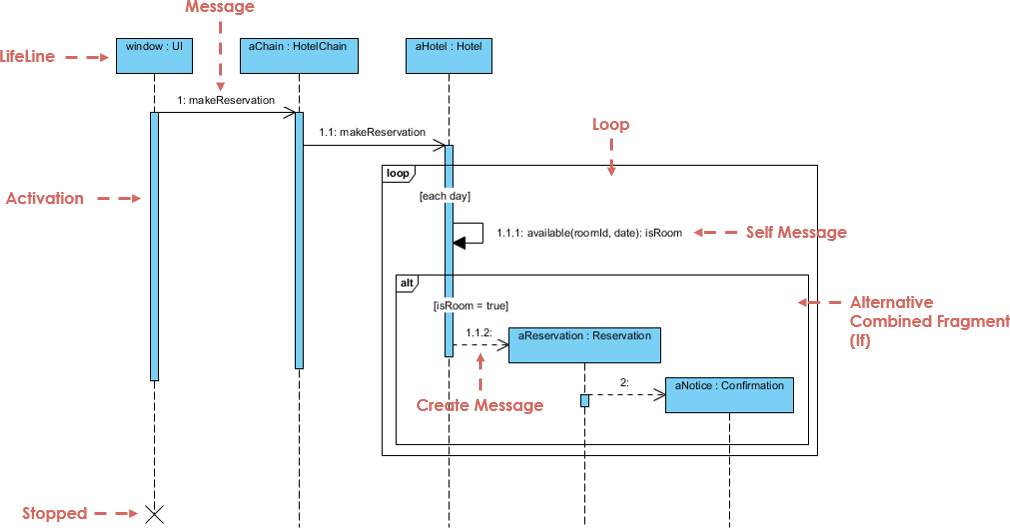
生命线 垂直的虚线,表示对象或参与者。显示其随时间的存在。 ───────────────
消息 生命线之间的水平箭头。表示通信。
  • 同步 实心箭头,箭头头为实心。调用者等待响应。
  • 异步 实心箭头,箭头头为空心。无需等待。
  • 返回 虚线箭头(响应)。
  • 自消息 箭头返回到同一生命线(内部处理)。
激活条 生命线上的细长矩形,表示对象处于活动状态的时间。 ▯▯▯
组合片段 表示控制逻辑的方框:
  • alt 替代(if/else) alt: 成功 / 失败
  • 可选 可选(可能发生,也可能不发生) 可选:打印收据
  • 循环 重复(例如:while 循环) 循环:重试 3 次
  • 并行 并行执行 并行:检查付款和库存
创建/删除 创建生命线末端的消息或“X” 创建:用户X

💡 提示:始终从 开始一个用例,然后 将其映射到顺序图.


🔄 如何从用例创建顺序图(逐步指南)

让我们通过一个实际案例,使用 用例驱动的方法.

Free AI Sequence Diagram Refinement Tool - Visual Paradigm AI


📌 示例:用例 – “用户登录系统”

用例文本:

作为一名用户,我希望使用我的用户名和密码登录我的账户,以便访问我的个人资料。

步骤 1:识别参与者和对象

  • 参与者用户

  • 对象登录视图登录控制器数据库

步骤 2:定义主流程

  1. 用户 → 登录视图: 输入用户名/密码

  2. 登录视图 → 登录控制器: 发送凭据

  3. 登录控制器 → 数据库: 检查用户是否存在

  4. 数据库 → 登录控制器: 返回结果

  5. 登录控制器 → 登录视图: 发送成功/失败

  6. 登录视图 → 用户: 显示消息

步骤 3:使用组合片段添加控制逻辑

使用一个 alt 片段 来显示:

  • 成功路径: “登录成功”

  • 失败路径: “无效凭据”

✅ 这捕捉了用例中的 决策点 在用例中。

步骤 4:添加激活条

  • 向 登录控制器 和 数据库 以显示处理时间。

步骤 5:最终图表

现在你已拥有一个完整的, 与用例对齐的序列图 反映了真实的系统行为。

🔗 看看实际效果: AI 驱动的 UML 序列图


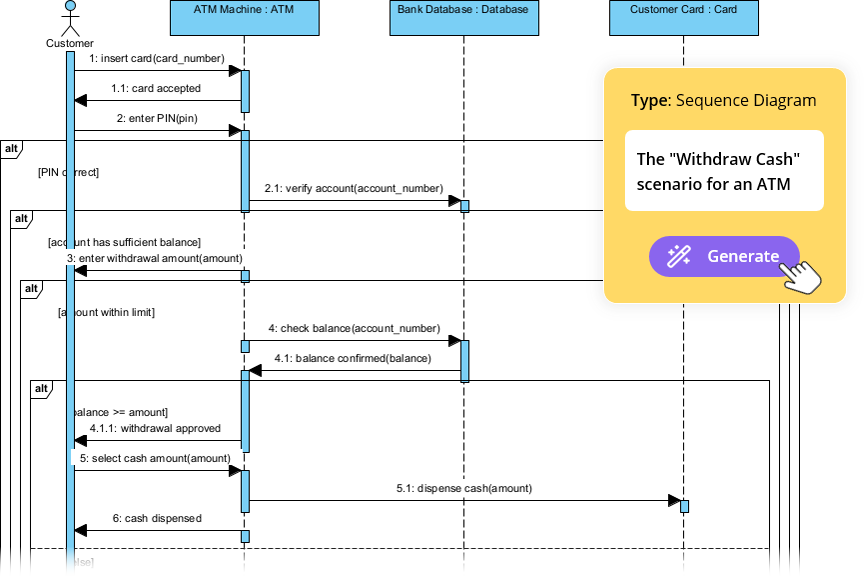
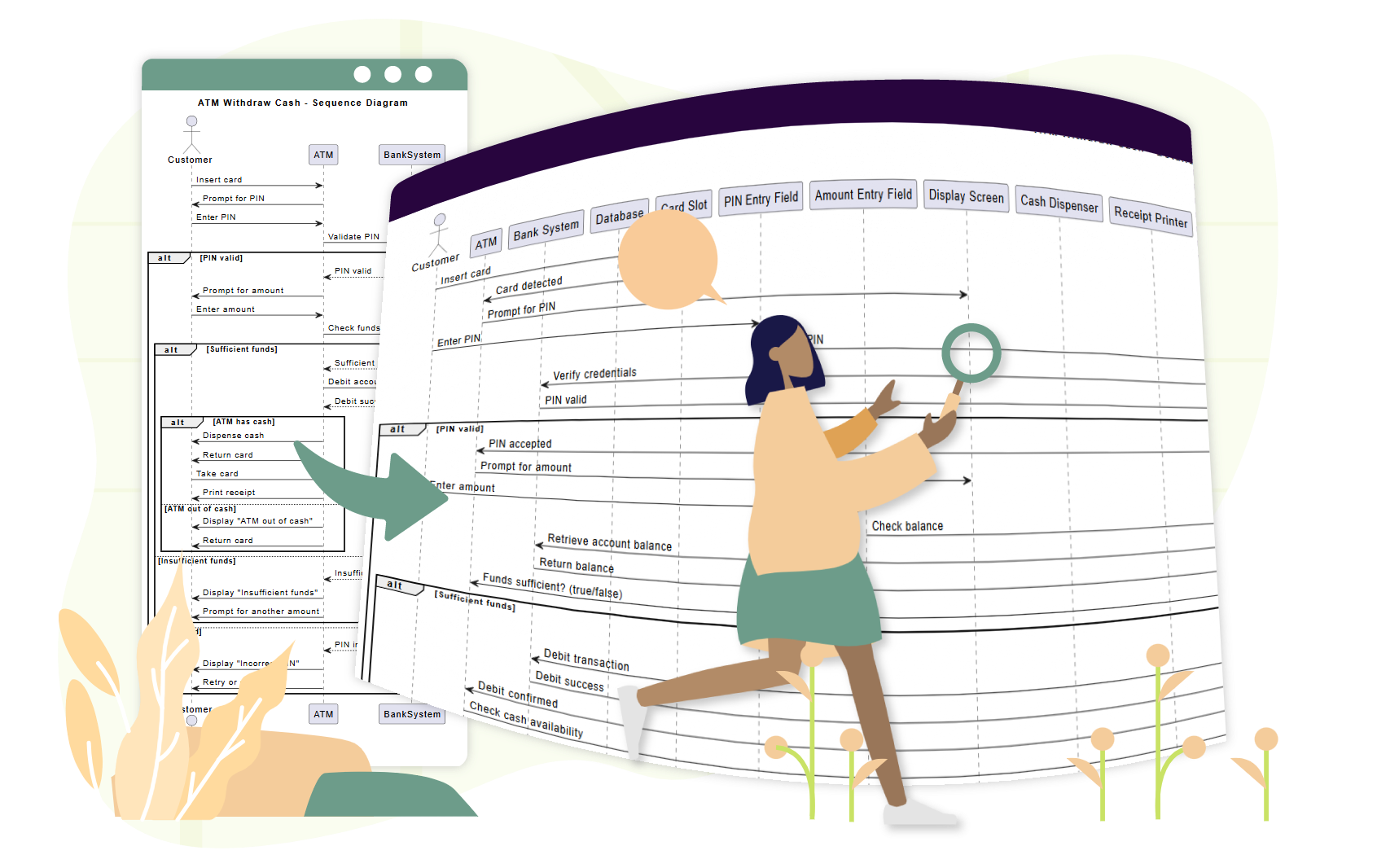
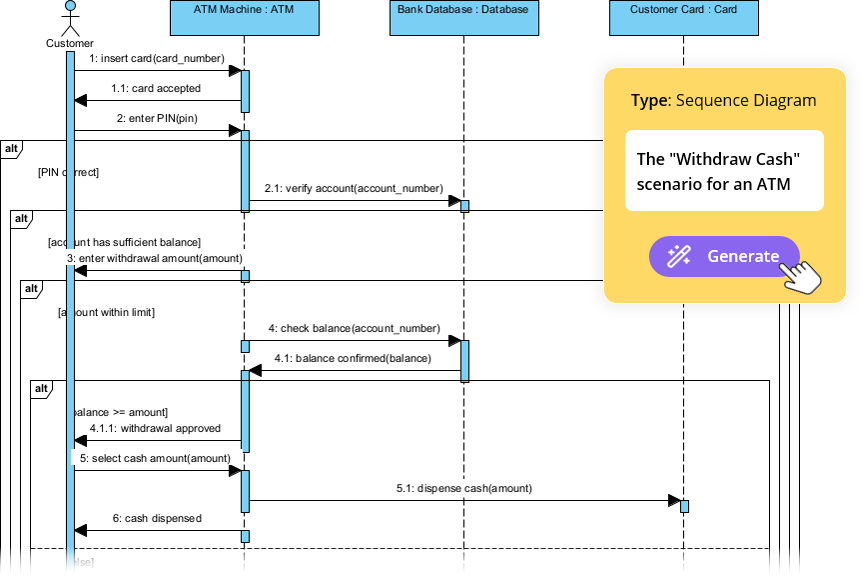
📌 示例 2:用例 – “客户从 ATM 提取现金”

用例文本:

作为客户,我希望可以从 ATM 提取现金,以便获取我的资金。如果余额不足,我希望收到通知。

步骤 1:识别参与者

  • 参与者客户

  • 对象ATM读卡器银行服务器出钞器

步骤 2:主流程

  1. 客户 → ATM: 插入卡片

  2. ATM → 读卡器: 读取卡片

  3. ATM → 客户: 提示输入密码

  4. 客户 → 自动取款机: 输入密码

  5. 自动取款机 → 银行服务器: 验证密码

  6. 银行服务器 → 自动取款机: 确认有效

  7. 自动取款机 → 客户: 提示输入金额

  8. 客户 → 自动取款机: 输入金额

  9. 自动取款机 → 银行服务器: 查询余额

  10. 银行服务器 → 自动取款机: 返回余额

  11. 自动取款机 → 取款机: 发放现金

  12. 自动取款机 → 客户: 显示收据选项

步骤 3:添加片段

  • 循环: 用于输入错误密码后的重试

  • 可选: 用于打印收据

  • 替代: 用于“余额不足”与“成功”之间的选择

🔗 查看 AI 如何处理此问题:使用 AI 顺序图工具简化复杂工作流程


📌 示例 3:用例 – “客户完成电子商务结账”

用例文本:

作为客户,我希望将商品添加到购物车,进入结账流程并完成支付,以便收到我的订单。

步骤 1:参与者

  • 客户购物车支付网关库存系统订单确认

步骤 2:并行流程

  1. 客户 → 购物车: 添加商品 →循环用于多个商品

  2. 购物车 → 客户: 显示总额

  3. 客户 → 支付网关: 启动支付

  4. 客户 → 库存系统: 请求库存检查

  5. 支付网关 → 银行: 处理支付 →库存检查

  6. 库存系统 → 支付网关: 确认可用性

  7. 支付网关 → 购物车: 确认订单

  8. 购物车 → 订单确认: 发送确认信息

✅ 使用 par 片段 以显示并发处理。

🔗 查看完整教程: 掌握使用 AI 聊天机器人绘制时序图:电子商务案例研究


🤖 如何使用 Visual Paradigm 的 AI 时序图生成器帮助团队

传统的建模工具要求用户手动拖动生命线、绘制消息并放置片段——耗时且容易出错。

AI Diagram Generation Guide: Instantly Create System Models with Visual Paradigm's AI - Visual Paradigm Guides

Visual Paradigm 的 AI 驱动的工具 消除了这些瓶颈,尤其适用于采用 用例驱动方法.

✨ 1. AI 聊天机器人:几秒钟内根据用例文本生成图表

无需手动绘制, 用通俗英语描述您的用例:

📝 提示:
“为用户使用用户名/密码登录生成一个时序图,包括错误处理以及连续三次失败后的重试。”

AI:

  • 识别参与者和对象

  • 将用例流程映射到生命线和消息

  • 应用 altloop,以及 opt 片段自动

  • 在 内输出清晰专业的图表10秒内

🔗 试试看: AI驱动的UML序列图


✨ 2. AI序列图优化工具:将草图转化为专业模型

即使您从一个粗糙的草图开始,该 AI序列图优化工具 会对其进行优化:

  • 添加 激活条 在需要的地方

  • 建议 正确的片段使用 (altlooppar)

  • 强制执行 设计模式 (例如:MVC:视图 → 控制器 → 模型)

  • 检测缺失的错误路径和边缘情况

  • 提高可读性和一致性

🔗 学习如何:全面教程:使用AI序列图优化工具


✨ 3. 从用例描述到图表:零手动转换

不再需要手动将用例文本转换为图表。

AI自动将文本用例转换为准确的序列图,减少:

  • 手动工作量

  • 误解

  • 不一致

🔗 看看实际效果:基于用例描述的AI驱动序列图优化


✨ 4. 通过对话式AI进行迭代优化

想改进你的图表吗?只需与AI聊天:

  • “在三次登录失败后添加‘忘记密码’选项。”

  • “将‘用户’改为‘客户’。”

  • “将错误信息显示为红色。”

每个提示都会实时更新图表——无需重绘,无需烦恼。

🔗 探索界面:AI序列图优化工具界面


✨ 5. 团队协作变得简单

  • 非技术利益相关者(产品经理、客户)可通过自然语言参与。

  • 开发人员可以在冲刺期间快速优化图表。

  • 测试人员可以使用图表来编写测试用例。

  • 设计师可以在编码前验证流程。

✅ 适合敏捷团队使用用户故事和用例。


🚀 为什么团队喜爱 Visual Paradigm 的用例建模 AI

优势 影响
⏱️ 速度 几秒钟内生成图表,而不是数小时
🧠 低技能门槛 开始无需 UML 专业知识
🔄 迭代设计 通过聊天实时优化图表
🛠️ 减少错误 AI 可以发现缺失的流程和无效的片段
📦 导出与分享 导出为 PNG、SVG、PDF 格式,或嵌入 Confluence/Notion
🤝 协作 每个人都可以参与,即使非技术人员也可以

📚 初学者与团队的顶级资源

资源 网址
AI驱动的UML序列图 https://blog.visual-paradigm.com/generate-uml-sequence-diagrams-instantly-with-ai/
AI驱动的序列图优化工具 https://www.visual-paradigm.com/features/ai-sequence-diagram-refinement-tool/
全面教程:使用AI序列图优化工具 https://www.archimetric.com/comprehensive-tutorial-using-the-ai-sequence-diagram-refinement-tool/
从用例描述中进行AI驱动的序列图优化 https://www.cybermedian.com/refining-sequence-diagrams-from-use-case-descriptions-using-visual-paradigms-ai-sequence-diagram-refinement-tool/
通过AI序列图工具简化复杂工作流程 https://www.cybermedian.com/🚀-simplify-complex-workflows-with-visual-paradigm-ai-sequence-diagram-tool/
AI序列图优化工具界面 https://ai.visual-paradigm.com/tool/sequence-diagram-refinement-tool/
新手教程:几分钟内创建专业序列图 https://www.anifuzion.com/beginners-tutorial-create-your-first-professional-sequence-diagram-in-minutes-using-visual-paradigm-ai-chatbot/
从简单到复杂:AI驱动的建模演进 https://guides.visual-paradigm.com/from-simple-to-sophisticated-what-is-the-ai-powered-sequence-diagram-refinement-tool/
借助AI聊天机器人掌握序列图:电子商务案例研究 https://www.archimetric.com/mastering-sequence-diagrams-with-visual-paradigm-ai-chatbot-a-beginners-tutorial-with-a-real-world-e-commerce-case-study/
AI序列图示例:视频流播放启动 https://chat.visual-paradigm.com/ai-diagram-example/ai-sequence-diagram-video-streaming-playback/

✅ 使用用例驱动设计的团队最终建议

  1. 从清晰的用例开始 – 首先明确用户目标。

  2. 使用序列图来验证 编码前的流程。

  3. 尽早让利益相关者参与 – 使用图表获取反馈。

  4. 利用AI减少手动工作 – 让工具承担繁重任务。

  5. 保持图表更新 – 随需求演变进行修订。


🎁 免费开始

您无需付费许可即可体验AI驱动建模的强大功能。


📌 结论

用例驱动的方法是用户中心软件设计的基础。UML 顺序图让这些用例生动呈现——展示谁在何时做什么.

借助Visual Paradigm 的 AI 顺序图生成器,团队可以:

  • 从自然语言生成图表

  • 实时优化图表

  • 确保一致性和准确性

  • 跨角色协作

🚀 几秒钟内从用例到图表——无需 UML 专业知识。

👉 从今天开始使用免费社区版,并改变您团队的建模工作流程。


🌟 系统设计的未来不仅是可视化,更是智能化的。
让人工智能成为您的建模伙伴。

变革流程优化:人工智能价值流映射全面指南

现代流程映射入门

价值流映射(VSM)长期以来被视为精益方法论的基石。它为组织提供了关于流程效率、物料流动和信息交换的关键视觉洞察。然而,传统上创建和分析这些图表的方式一直是一项手动且耗时的工作,涉及白板、便利贴和静态绘图软件。这种手动流程常常构成进入门槛,阻碍团队快速迭代工作流程的改进。

随着人工智能驱动工具的引入,流程优化的格局正在发生变化。特别是,人工智能价值流映射编辑器代表了重大进步。这项技术使从业者只需用自然语言描述流程,即可生成完整且数据丰富的价值流图。通过从手动绘制转向智能自动化,企业可以在几分钟内而非数小时内,将原始想法转化为可操作的洞察。

什么是人工智能驱动的价值流映射?

人工智能价值流映射(VSM)编辑器不仅仅是一个绘图工具;它是一个复杂而智能的平台,旨在可视化、分析和优化工作流程。其核心利用自然语言处理(NLP)技术,将流程的简单文本描述转化为完整且可编辑的图表。这一能力使精益工具的使用更加普及,使不同技术水平的用户都能创建专业级别的图表。

除了可视化功能外,这些工具还集成了绘图引擎,支持精细化调整。用户可通过直观的拖放界面调整流程步骤、编辑数据点并重新排列流程。AI分析员的集成进一步提升了工具能力,充当虚拟顾问,分析VSM数据以生成有洞察力的报告,发现瓶颈,并自动提出战略改进建议。

人工智能VSM编辑器的核心功能

要真正革新流程优化,现代VSM工具将自动化与深度分析能力相结合。以下是定义这一技术的关键功能:

1. 文本转图表生成

人工智能VSM工具最直接的好处是能够从普通英语生成图表。用户描述其工作流程——包括操作顺序、库存点和信息流——VSM生成器即可立即创建详细图表。这消除了“空白画布”的心理障碍,提供了一个可立即着手工作的结构。

2. 自动化时间线与指标计算

手动计算精益指标容易出现人为错误。人工智能驱动的编辑器可完全实现自动化。当用户修改图表时,工具会实时自动计算关键指标,包括:

  • 总交付周期:从开始到结束完成一个流程所需的总时间。
  • 增值时间(VAT):用于实际为客户创造价值的活动所花费的时间部分。
  • 流程效率百分比:一个派生指标,用于反映工作流程的优化程度。

3. 人工智能驱动的分析与报告

或许最具变革性的功能是内置的AI顾问。用户可请求对其当前状态图进行分析。AI将审查数据结构、时间线和流程,生成专业报告。该报告突出关键发现,识别绩效指标,并提供战略建议,以消除浪费并提升吞吐量。

4. 高保真导出选项

要使VSM有效,必须具备可传播性。该工具支持将完成的图表导出为高分辨率PNG图像。这确保了研究成果可轻松融入管理报告、利益相关者演示或团队讨论中,且不会损失视觉质量。

目标用户与应用场景

人工智能驱动的流程映射具有高度灵活性,适用于各类致力于组织效率提升的专业人士。下表列出了最受益的群体及其受益方式:

角色 主要优势
运营经理 识别并消除生产线中的浪费(Muda),以降低成本并提高效率。
流程改进顾问 快速为客户创建并分析价值流图(VSM),在项目中更快地交付价值。
软件开发团队 将精益原则应用于DevOps和敏捷工作流程,以优化CI/CD流水线。
业务分析师 绘制复杂的客户旅程和内部业务流程,以提升用户体验。

从可视化到可操作的洞察

的最终目标是价值流映射并非地图本身,而是其所带来的优化。通过利用人工智能,组织可以停止花费时间绘图,转而专注于分析。这些工具提供的自动化洞察使团队能够专注于高层次的战略,而非低层次的格式设置。

无论目标是缩短制造工厂的周期时间,还是优化客户服务工单系统,AI价值流映射提供了做出数据驱动决策所需的清晰度。它弥合了当前状态与未来状态之间的差距,确保流程改进持续、准确且高效。

超越草图:为什么休闲型AI在专业视觉建模中失败(以及Visual Paradigm如何解决这一问题)

人工智能在软件架构中的时代

在快速演变的软件工程在快速演变的软件工程和企业架构领域,将抽象需求转化为精确且可操作的设计是一项关键技能。通用型大型语言模型(LLMs),如ChatGPT和Claude,已经彻底改变了我们进行头脑风暴和生成文本的方式。然而,在专业视觉建模方面,这些工具往往表现不佳。它们生成的内容最好被描述为“草图”——粗糙的近似,缺乏工程蓝图应有的严谨性。


本全面指南探讨了休闲型AI绘图与专业需求之间的显著差距,以及Visual Paradigm(VP)AI生态系统通过提供符合标准、具有持久性和迭代性的绘图能力,弥合了这一差距。

1. “草图艺术家”问题:休闲型AI大语言模型的局限性

休闲型AI工具主要将绘图视为文本生成的延伸。当被要求创建图表时,它们通常会输出Mermaid或PlantUML等格式的代码。MermaidPlantUML虽然在快速可视化方面令人印象深刻,但这种方法缺乏专业工程环境中所需的深度。

缺乏原生渲染或编辑引擎

大语言模型生成基于文本的语法(例如Mermaid流程图代码),但不提供高质量矢量图形(SVG)的内置查看器或编辑器。用户被迫将代码粘贴到外部渲染器中,立即失去交互性。如果需要修改,用户必须请求重新生成完整代码,通常会导致布局完全改变。

语义不准确与标准违规

通用模型经常误解UML或ArchiMate等严格的建模标准。常见错误包括:

  • 混淆聚合(共享所有权)与组合(独占所有权)。
  • 绘制无效的继承箭头或关系方向。
  • 在技术上应为单向关联的情况下创建双向关联。

尽管结果在视觉上可能令人满意,但它们作为工程成果却失败了,因为它们不符合系统架构所遵循的语义规则。

缺乏持久状态

或许最令人沮丧的限制是缺乏对视觉结构的记忆。每个提示都会从头开始重新生成图表。例如,要求大语言模型“在此序列图中添加错误处理”通常会破坏现有布局,断开连接线,或完全忘记先前的元素。没有持久状态来追踪模型的演变过程。

2. 依赖随意AI制图的真实世界风险

使用通用大语言模型进行严肃的架构工作会引入风险,这些风险可能损害项目质量和进度。

设计与实现之间的鸿沟

模糊或语义错误的视觉图会导致代码不一致。开发团队会花费宝贵的时间开会,试图澄清缺乏精确性的图表背后的意图。一个技术上错误但看起来漂亮的图,比根本没有图更糟糕。

语法依赖

讽刺的是,使用像ChatGPT这样的“AI辅助”工具制作图表,通常要求用户学习专门的语法(Mermaid/PlantUML)来手动修复错误。这形成了一个专业门槛,抵消了使用AI带来的效率提升。

工作流程孤立

由大语言模型生成的图表是静态图像或代码片段。它们与版本控制、协作平台以及下游任务(如代码生成或数据库模式创建)脱节。它们处于孤立状态,无法随着项目的发展而演进。

3. 视觉模型AI如何实现专业级建模

视觉模型已将制图转变为一种对话式、标准驱动且集成化流程。与基于文本的大语言模型不同,VP AI理解以下底层元模型UML 2.5,ArchiMate3, C4, BPMN,以及SysML,从而生成符合标准且可编辑的模型。

通过“图表微调”技术实现持久化结构

视觉模型将图表保持为活的对象而非可丢弃的脚本。用户可以通过自然语言指令更新图表的特定部分,而无需触发完全重新生成。

例如,用户可以下达指令:“在登录后添加两步验证步骤”“将客户参与者重命名为用户。”系统会立即调整布局、连接器和语义,同时保持模型其余部分的完整性。这消除了在普通工具中常见的断开链接和布局混乱问题。

符合标准的智能

基于正式符号训练,Visual Paradigm AI 主动执行规则,确保:

  • 关联中的多重性正确。
  • 正确使用构造型。
  • 有效的 ArchiMate 视角(例如,能力图、技术使用情况)。

这生成了技术上可靠的蓝图,开发者和架构师均可信赖。

4. 需求到设计的桥梁:高级AI工作流

Visual Paradigm 不仅提供简单的生成,还通过结构化应用,引导用户从抽象想法走向具体设计。

AI驱动的文本分析

此功能分析非结构化文本(如需求文档或用户故事),提取候选类、属性、操作和关系。它可根据分析结果自动生成初始类图。
AI Diagram Generator | Visual Paradigm

示例场景: 输入如下描述:“一个电子商务平台允许客户浏览商品、加入购物车、通过支付网关结账,并跟踪订单。”AI 识别出类(客户、产品、购物车、订单、支付网关)、属性(价格、数量)和关联(客户下单)。

10步AI向导

对于复杂的图表,如UML 类模型,Visual Paradigm 提供了引导式向导。该工具引导用户按逻辑步骤进行:定义目的 → 确定范围 → 类 → 属性 → 关系 → 操作 → 审查 → 生成。这种人机协同的方法在每一步验证设计,防止基于提示生成中常见的“一次性”错误。

5. 对比:普通大语言模型 vs. Visual Paradigm AI

功能 普通大语言模型(ChatGPT、Claude) Visual Paradigm AI
输出格式 基于文本的代码(Mermaid、PlantUML) 可编辑的原生模型与矢量图形
状态与持久化 无(从头重新生成) 持久化(支持增量更新)
标准合规 低(会生成错误的语法/规则) 高(强制执行UML/BPMN/ArchiMate规则)
可编辑性 需要手动代码修改 对话式界面与拖拽操作
集成 独立片段 全生命周期(代码生成、数据库模式、团队协作)

结论:从手工雕琢到智能工程

传统绘图往往感觉像是雕刻大理石——缓慢、易出错且不可逆。普通的AI大模型虽然提升了草图速度,但仍受限于无法生成一致、持久且工程化的视觉效果。

Visual Paradigm AI它就像软件架构的高精度3D打印机,允许用户输入自然语言规格,获得符合标准且可编辑的结构。它支持对话式迭代,并通过代码生成和数据库集成直接推动实现。

AI Diagram Generation Guide: Instantly Create System Models with Visual  Paradigm's AI - Visual Paradigm Guides

对于厌倦了反复修复损坏的Mermaid片段的软件架构师、企业团队和开发人员来说,Visual Paradigm代表了下一代进化:尊重标准、保留意图并加速交付的智能建模。

Beyond the Sketch: Why Casual AI Fails at Professional Visual Modeling (and How Visual Paradigm Fixes It)

The Era of AI in Software Architecture

In the rapidly evolving landscape of software engineering and enterprise architecture, the ability to transform abstract requirements into precise, actionable designs is a critical skill. General-purpose Large Language Models (LLMs) like ChatGPT and Claude have revolutionized how we brainstorm and generate text. However, when it comes to professional visual modeling, these tools often fall short. They produce what can best be described as “sketches”—rough approximations that lack the rigor of engineered blueprints.


This comprehensive guide explores the significant gap between casual AI diagramming and professional needs, and how the Visual Paradigm (VP) AI ecosystem bridges this divide by delivering standards-aware, persistent, and iterative diagramming capabilities.

1. The “Sketch Artist” Problem: Limitations of Casual AI LLMs

Casual AI tools treat diagramming primarily as an extension of text generation. When prompted to create a diagram, they typically output code in formats like Mermaid or PlantUML. While impressive for quick visualizations, this approach lacks the depth required for professional engineering contexts.

No Native Rendering or Editing Engine

LLMs generate text-based syntax (e.g., Mermaid flowchart code) but offer no built-in viewer or editor for high-quality vector graphics (SVG). Users are forced to paste code into external renderers, instantly losing interactivity. If a change is needed, the user must request a full regeneration of the code, often resulting in a completely different layout.

Semantic Inaccuracies and Standard Violations

Generic models frequently misinterpret strict modeling standards like UML or ArchiMate. Common errors include:

  • Confusing aggregation (shared ownership) with composition (exclusive ownership).
  • Drawing invalid inheritance arrows or relationship directions.
  • Creating bidirectional associations where unidirectional ones are technically correct.

While the results may look aesthetically pleasing, they fail as engineering artifacts because they do not adhere to the semantic rules that govern system architecture.

Lack of Persistent State

Perhaps the most frustrating limitation is the lack of memory regarding visual structure. Each prompt regenerates the diagram from scratch. For example, asking an LLM to “add error handling to this sequence diagram” often breaks the existing layout, disconnects connectors, or forgets prior elements entirely. There is no persistent state to track the evolution of the model.

2. Real-World Risks of Relying on Casual AI Diagramming

Using general LLMs for serious architectural work introduces risks that can undermine project quality and timeline.

The Design-Implementation Gap

Vague or semantically incorrect visuals lead to misaligned code. Development teams waste valuable time in meetings trying to clarify the intent behind a diagram that lacks precision. A “pretty picture” that is technically wrong is worse than no diagram at all.

Syntax Dependency

Ironically, using “AI-assisted” tools like ChatGPT for diagrams often requires the user to learn specialized syntax (Mermaid/PlantUML) to manually fix errors. This creates an expertise barrier that negates the efficiency gains of using AI.

Workflow Isolation

Diagrams generated by LLMs are static images or code snippets. They are disconnected from version control, collaboration platforms, and downstream tasks like code generation or database schema creation. They exist in a silo, unable to evolve with the project.

3. How Visual Paradigm AI Delivers Professional-Grade Modeling

Visual Paradigm has transformed diagramming into a conversational, standards-driven, and integrated process. Unlike text-based LLMs, VP AI understands the underlying meta-models of UML 2.5,ArchiMate3, C4, BPMN, and SysML, producing compliant and editable models.

Persistent Structure with “Diagram Touch-Up” Technology

Visual Paradigm maintains diagrams as living objects rather than disposable scripts. Users can issue natural language commands to update specific parts of a diagram without triggering a full regeneration.

For example, a user can command: “Add a two-factor authentication step after login” or “Rename the Customer actor to User.” The system instantly adjusts the layout, connectors, and semantics while preserving the integrity of the rest of the model. This eliminates the broken links and layout chaos common in casual tools.

Standards-Compliant Intelligence

Trained on formal notations, VP AI actively enforces rules, ensuring:

  • Correct multiplicity in associations.
  • Proper use of stereotypes.
  • Valid ArchiMate viewpoints (e.g., Capability Maps, Technology Usage).

This results in technically sound blueprints that can be trusted by developers and architects alike.

4. Bridging Requirements to Design: Advanced AI Workflows

Visual Paradigm goes beyond simple generation by providing structured applications that guide users from abstract ideas to concrete designs.

AI-Powered Textual Analysis

This feature analyzes unstructured text—such as requirements documents or user stories—to extract candidate classes, attributes, operations, and relationships. It can generate an initial class diagram automatically based on the analysis.
AI Diagram Generator | Visual Paradigm

Example Scenario: Input a description like “An e-commerce platform allows customers to browse products, add to cart, checkout with payment gateway, and track orders.” The AI identifies classes (Customer, Product, Cart, Order, PaymentGateway), attributes (price, quantity), and associations (Customer places Order).

The 10-Step AI Wizard

For complex diagrams like UML Class models, VP offers a guided wizard. This tool leads users through a logical progression: Define Purpose → Scope → Classes → Attributes → Relationships → Operations → Review → Generate. This human-in-the-loop approach validates the design at every step, preventing the “one-shot” errors common in prompt-based generation.

5. Comparison: Casual LLMs vs. Visual Paradigm AI

Feature Casual LLMs (ChatGPT, Claude) Visual Paradigm AI
Output Format Text-based code (Mermaid, PlantUML) Editable Native Models & Vector Graphics
State & Persistence None (Regenerates from scratch) Persistent (Supports incremental updates)
Standards Compliance Low (Hallucinates syntax/rules) High (Enforces UML/BPMN/ArchiMate rules)
Editability Requires manual code edits Conversational UI & Drag-and-Drop
Integration Isolated Snippets Full Lifecycle (Code Gen, DB Schema, Teamwork)

Conclusion: From Manual Chiseling to Intelligent Engineering

Traditional diagramming often feels like chiseling marble—slow, error-prone, and irreversible. Casual AI LLMs improved the speed of sketching but remain limited by their inability to produce consistent, persistent, and engineered visuals.

Visual Paradigm AI acts like a high-precision 3D printer for software architecture. It allows users to input plain English specifications and receive standards-compliant, editable structures. It supports conversational iteration and drives implementation directly through code generation and database integration.

AI Diagram Generation Guide: Instantly Create System Models with Visual  Paradigm's AI - Visual Paradigm Guides

For software architects, enterprise teams, and developers tired of regenerating broken Mermaid snippets, Visual Paradigm represents the next evolution: intelligent modeling that respects standards, preserves intent, and accelerates delivery.

Transforming Process Optimization: A Comprehensive Guide to AI Value Stream Mapping

Introduction to Modern Process Mapping

Value Stream Mapping(VSM) has long been recognized as a cornerstone of Lean methodology. It provides organizations with essential visual insights into process efficiency, material flows, and information exchanges. However, the traditional approach to creating and analyzing these maps has historically been a manual, labor-intensive effort involving whiteboards, sticky notes, and static drawing software. This manual process often creates a barrier to entry, preventing teams from rapidly iterating on their workflow improvements.

The landscape of process optimization is shifting with the introduction of AI-powered tools. Specifically, the emergence of theAI Value Stream Mapping Editorrepresents a significant leap forward. This technology allows practitioners to generate complete, data-rich Value Stream Maps simply by describing a process in natural language. By transitioning from manual drafting to intelligent automation, businesses can move from raw ideas to actionable insights in minutes rather than hours.

What is AI-Powered Value Stream Mapping?

The AI Value Stream Mapping (VSM) Editor is not merely a drawing tool; it is a sophisticated, intelligent platform designed to visualize, analyze, and optimize workflows. At its core, it utilizes natural language processing (NLP) to transform simple text descriptions of processes into full-fledged, editable diagrams. This capability democratizes access to Lean tools, allowing users with varying levels of technical expertise to create professional-grade maps.

Beyond visualization, these tools incorporate diagramming engines that allow for granular refinement. Users can adjust process steps, edit data points, and rearrange flows using intuitive drag-and-drop interfaces. The integration of an AI analyst further elevates the tool, acting as a virtual consultant that examines VSM data to generate insightful reports, uncover bottlenecks, and suggest strategic improvements automatically.

Key Features of the AI VSM Editor

To truly revolutionize process optimization, modern VSM tools combine automation with deep analytical capabilities. Below are the critical features that define this technology:

1. Text-to-Diagram Generation

The most immediate benefit of AI VSM tools is the ability to generate a map from plain English. Users describe their workflow—detailing the sequence of operations, inventory points, and information flows—and the VSM generator instantly creates a detailed diagram. This eliminates the “blank canvas” paralysis and provides an immediate structure to work with.

2. Automated Timeline and Metric Calculation

Manual calculation of Lean metrics is prone to human error. AI-driven editors automate this entirely. As users modify the map, the tool automatically calculates critical metrics in real-time, including:

  • Total Lead Time: The total time it takes for a process to be completed from start to finish.
  • Value-Added Time (VAT): The portion of time spent on activities that actually add value to the customer.
  • Process Efficiency Percentage: A derived metric indicating how streamlined the workflow is.

3. AI-Powered Analysis and Reporting

Perhaps the most transformative feature is the built-in AI consultant. Users can request an analysis of their current state map. The AI reviews the data structure, timelines, and flow to generate a professional report. This report highlights key findings, identifies performance metrics, and offers strategic recommendations to eliminate waste and improve throughput.

4. High-Fidelity Export Options

For a VSM to be effective, it must be communicable. The tool facilitates the export of finished maps as high-resolution PNG images. This ensures that findings can be easily integrated into management reports, stakeholder presentations, or team discussions without loss of visual quality.

Target Audience and Use Cases

AI-powered process mapping is versatile, catering to a wide array of professionals involved in organizational efficiency. The table below outlines who benefits most and how:

Role Primary Benefit
Operations Managers Identify and eliminate waste (Muda) in production lines to reduce costs and improve speed.
Process Improvement Consultants Rapidly create and analyze VSMs for clients, delivering value faster during engagements.
Software Development Teams Apply Lean principles to DevOps and Agile workflows to streamline CI/CD pipelines.
Business Analysts Map complex customer journeys and internal business processes to enhance user experience.

From Visualization to Actionable Insight

The ultimate goal of Value Stream Mapping is not the map itself, but the optimization it enables. By leveraging AI, organizations can stop spending time drawing and start spending time analyzing. The automated insights provided by these tools allow teams to focus on high-level strategy rather than low-level formatting.

Whether the goal is to reduce cycle time in a manufacturing plant or streamline a customer service ticket system, AI Value Stream Mapping provides the clarity required to make data-driven decisions. It bridges the gap between the current state and the future state, ensuring that process improvement is continuous, accurate, and efficient.

Automating Database Normalization: A Step-by-Step Guide Using Visual Paradigm AI DB Modeler

Introduction to AI-Driven Normalization

Database normalization is the critical process of organizing data to ensure integrity and eliminate redundancy. While traditionally a complex and error-prone task, modern tools have evolved to automate this “heavy lifting.” The Visual Paradigm AI DB Modeler acts as an intelligent bridge, transforming abstract concepts into technically optimized, production-ready implementations.
Desktop AI Assistant

To understand the value of this tool, consider the analogy of manufacturing a car. If a Class Diagram is the initial sketch and an Entity Relationship Diagram (ERD) is the mechanical blueprint, then normalization is the process of tuning the engine to ensure there are no loose bolts or unnecessary weight. The AI DB Modeler serves as the “automated factory” that executes this tuning for maximum efficiency. This tutorial guides you through the process of using the AI DB Modeler to normalize your database schema effectively.

Doc Composer

Step 1: Accessing the Guided Workflow

The AI DB Modeler operates using a specialized 7-step guided workflow. Normalization takes center stage at Step 5. Before reaching this stage, the tool allows you to input high-level conceptual classes. From there, it uses intelligent algorithms to prepare the structure for optimization, allowing users to move from concepts to tables without manual effort.

Step 2: Progressing Through Normal Forms

Once you reach the normalization phase, the AI iteratively optimizes the database schema through three primary stages of architectural maturity. This stepwise progression ensures that your database meets industry standards for reliability.

Achieving First Normal Form (1NF)

The first level of optimization focuses on the atomic nature of your data. The AI analyzes your schema to ensure that:

  • Each table cell contains a single, atomic value.
  • Every record within the table is unique.

Advancing to Second Normal Form (2NF)

Building upon the structure of 1NF, the AI performs further analysis to establish strong relationships between keys and attributes. In this step, the tool ensures that all non-key attributes are fully functional and dependent on the primary key, effectively removing partial dependencies.

Finalizing with Third Normal Form (3NF)

To reach the standard level of professional optimization, the AI advances the schema to 3NF. This involves ensuring that all attributes are dependent only on the primary key. By doing so, the tool removes transitive dependencies, which are a common source of data anomalies.

Step 3: Reviewing Automated Error Detection

Throughout the normalization process, the AI DB Modeler employs intelligent algorithms to detect design flaws that often plague poorly designed systems. It specifically looks for anomalies that could lead to:

  • Update errors
  • Insertion errors
  • Deletion errors

By automating this detection, the tool eliminates the manual burden of hunting for potential integrity issues, ensuring a robust foundation for your applications.

Step 4: Understanding the Architectural Changes

One of the distinct features of the AI DB Modeler is its transparency. Unlike traditional tools that simply reorganize tables in the background, this tool functions as an educational resource.

For every change made during the 1NF, 2NF, and 3NF steps, the AI provides educational rationales and explanations. These insights help users understand the specific architectural shifts required to reduce redundancy, serving as a valuable learning tool for mastering best practices in database design.

Step 5: Validating via the Interactive Playground

After the AI has optimized the schema to 3NF, the workflow moves to Step 6, where you can verify the design before actual deployment. The tool offers a unique interactive playground for final validation.

Feature Description
Live Testing Users can launch an in-browser database instance based on their chosen normalization level (Initial, 1NF, 2NF, or 3NF).
Realistic Data Seeding The environment is populated with realistic, AI-generated sample data, including INSERT statements and DML scripts.

This environment allows you to test queries and verify performance against the normalized structure immediately. By interacting with seeded data, you can confirm that the schema handles information correctly and efficiently, ensuring the “engine” is tuned perfectly before the car hits the road.

Comprehensive Guide to ERD Levels: Conceptual, Logical, and Physical Models

The Importance of Architectural Maturity in Database Design

Entity Relationship Diagrams (ERDs) serves as the backbone of effective system architecture. They are not static illustrations but are developed at three distinct stages of architectural maturity. Each stage serves a unique purpose within the database design lifecycle, catering to specific audiences ranging from stakeholders to database administrators. While all three levels involve entities, attributes, and relationships, the depth of detail and the technical specificity vary significantly between them.

To truly understand the progression of these models, it is helpful to use a construction analogy. Think of building a house: a Conceptual ERD is the architect’s initial sketch showing the general location of rooms like the kitchen and living room. The Logical ERD is the detailed floor plan specifying dimensions and furniture placement, though it does not yet dictate the materials. Finally, the Physical ERD acts as the engineering blueprint, specifying the exact plumbing, electrical wiring, and the specific brand of concrete for the foundation.

Engineering Interface

1. Conceptual ERD: The Business View

The Conceptual ERD represents the highest level of abstraction. It provides a strategic view of the business objects and their relationships, devoid of technical clutter.

Purpose and Focus

This model is primarily utilized for requirements gathering and visualizing the overall system architecture. Its main goal is to facilitate communication between technical teams and non-technical stakeholders. It focuses on defining what entities exist—such as “Student,” “Product,” or “Order”—rather than how these entities will be implemented in a database table.

Level of Detail

Conceptual models typically lack technical constraints. For example, many-to-many relationships are often depicted simply as relationships without the complexity of cardinality or join tables. Uniquely, this level may utilize generalization, such as defining “Triangle” as a sub-type of “Shape,” a concept that is abstracted away in later physical implementations.

2. Logical ERD: The Detailed View

Moving down the maturity scale, the Logical ERD serves as an enriched version of the conceptual model, bridging the gap between abstract business needs and concrete technical implementation.

Purpose and Focus

The logical model transforms high-level requirements into operational and transactional entities. While it defines explicit columns for each entity, it remains strictly independent of a specific Database Management System (DBMS). It does not matter at this stage whether the final database will be in Oracle, MySQL, or SQL Server.

Level of Detail

Unlike the conceptual model, the logical ERD includes attributes for every entity. However, it stops short of specifying technical minutiae like data types (e.g., integer vs. float) or specific field lengths.

3. Physical ERD: The Technical Blueprint

The Physical ERD represents the final, actionable technical design of a relational database. It is the schema that will be deployed.

Purpose and Focus

This model serves as the blueprint for creating the database schema within a specific DBMS. It elaborates on the logical model by assigning specific data types, lengths, and constraints (such as varchar(255), int, or nullable).

Level of Detail

The physical ERD is highly detailed. It defines precise Primary Keys (PK) and Foreign Keys (FK) to strictly enforce relationships. Furthermore, it must account for the specific naming conventions, reserved words, and limitations of the target DBMS.

Comparative Analysis of ERD Models

To summarize the distinctions between these architectural levels, the following table outlines the features typically supported across the different models:

Feature Conceptual Logical Physical
Entity Names Yes Yes Yes
Relationships Yes Yes Yes
Columns/Attributes Optional/No Yes Yes
Data Types No Optional Yes
Primary Keys No Yes Yes
Foreign Keys No Yes Yes

Streamlining Design with Visual Paradigm and AI

Creating these models manually and ensuring they remain consistent can be labor-intensive. Modern tools like Visual Paradigm leverage automation and Artificial Intelligence to streamline the transition between these levels of maturity.

ERD modeler

Model Transformation and Traceability

Visual Paradigm features a Model Transitor, a tool designed to derive a logical model directly from a conceptual one, and subsequently, a physical model from the logical one. This process maintains automatic traceability, ensuring that changes in the business view are accurately reflected in the technical blueprint.

AI-Powered Generation

Advanced features include AI capabilities that can instantly produce professional ERDs from textual descriptions. The AI automatically infers entities and foreign key constraints, significantly reducing manual setup time.

Desktop AI Assistant

Bi-directional Synchronization

Crucially, the platform supports bi-directional transformation. This ensures that the visual design and the physical implementation stay in sync, preventing the common issue of documentation drifting away from the actual codebase.

Mastering Database Validation with the Interactive SQL Playground

Understanding the Interactive SQL Playground

The Interactive SQL Playground (often called the Live SQL Playground) acts as a critical validation and testing environment within the modern database design lifecycle. It bridges the gap between a conceptual visual model and a fully functional, production-ready database. By allowing users to experiment with their schema in real-time, it ensures that design choices are robust before any code is deployed.

DBModeler AI showing domain class diagram

Think of the Interactive SQL Playground as a virtual flight simulator for pilots. Instead of taking a brand-new, untested airplane (your database schema) directly into the sky (production), you test it in a safe, simulated environment. You can add simulated passengers (AI-generated sample data) and try out various maneuvers (SQL queries) to see how the plane handles the weight and stress before you ever leave the ground.

Key Concepts

To fully utilize the playground, it is essential to understand the foundational concepts that drive its functionality:

  • Schema Validation: The process of verifying the structural integrity and robustness of a database design. This involves ensuring that tables, columns, and relationships function as intended under realistic conditions.
  • DDL (Data Definition Language): SQL commands used to define the database structure, such as CREATE TABLE or ALTER TABLE. The playground uses these to build your schema instantly.
  • DML (Data Manipulation Language): SQL commands used for managing data within the schema, such as SELECT, INSERT, UPDATE, and DELETE. These are used in the playground to test data retrieval and modification.
  • Architectural Debt: The implied cost of future reworking required when a database is designed poorly in the beginning. Identifying flaws in the playground significantly reduces this debt.
  • Normalization Stages (1NF, 2NF, 3NF): The process of organizing data to reduce redundancy. The playground allows you to test different versions of your schema to observe performance implications.

Guidelines: Step-by-Step Validation Tutorial

The Interactive SQL Playground is designed to be Step 6 of a comprehensive 7-step DB Modeler AI workflow, serving as the final quality check. Follow these steps to validate your database effectively.

Step 1: Access the Zero-Setup Environment

Unlike traditional database management systems that require complex local installations, the playground is accessible entirely in-browser. Simply navigate to the playground interface immediately after generating your schema. Because there is no software installation required, you can begin testing instantly.

Step 2: Select Your Schema Version

Before running queries, decide which version of your database schema you wish to test. The playground allows you to launch instances based on different normalization stages:

  • Initial Design: Test your raw, unoptimized concepts.
  • Optimized Versions: Select between 1NF, 2NF, or 3NF versions to compare how strict normalization affects query complexity and performance.

Step 3: Seed with AI-Powered Data

A comprehensive test requires data. Use the built-in AI-Powered Data Simulation to populate your empty tables.

  1. Locate the “Add Records” or “Generate Data” feature within the playground interface.
  2. Specify a batch size (e.g., “Add 10 records”).
  3. Execute the command. The AI will automatically generate realistic, AI-generated sample data relevant to your specific tables (e.g., creating customer names for a “Customers” table rather than random strings).

Step 4: Execute DDL and DML Queries

With a populated database, you can now verify the schema’s behavior.

  • Run Structural Tests: Check if your data types are correct and if the table structures accommodate the data as expected.
  • Run Logic Tests: Execute complex SELECT statements with JOIN clauses to ensure relationships between tables are correctly established.
  • Verify Constraints: Attempt to insert data that violates Primary Key or Foreign Key constraints. The system should reject these entries, confirming that your data integrity rules are active.

Tips and Tricks for Efficient Testing

Maximize the value of your testing sessions with these practical tips:

  • Iterate Rapidly: Take advantage of the “Instant Feedback” loop. If a query feels clunky or a relationship is missing, return to the visual diagram, adjust the model, and reload the playground. This typically takes only minutes and prevents hard-to-fix errors later.
  • Stress Test with Volume: Don’t just add one or two rows. Use the batch generation feature to add significant amounts of data. This helps reveal performance bottlenecks that aren’t visible with a small dataset.
  • Compare Normalization Performance: Run the exact same query against the 2NF and 3NF versions of your schema. This comparison can highlight the trade-off between data redundancy (storage) and query complexity (speed), helping you make an informed architectural decision.
  • Validate Business Logic: Use the playground to simulate specific business scenarios. For example, if your application requires finding all orders placed by a specific user in the last month, write that specific SQL query in the playground to ensure the schema supports it efficiently.

Mastering Database Normalization with Visual Paradigm AI DB Modeler

Database normalization is a critical process in system design, ensuring that data is organized efficiently to reduce redundancy and improve integrity. Traditionally, moving a schema from a raw concept to the Third Normal Form (3NF) required significant manual effort and deep theoretical knowledge. However, the Visual Paradigm AI DB Modeler has revolutionized this approach by integrating normalization into an automated workflow. This guide explores how to leverage this tool to achieve an optimized database structure seamlessly.

ERD modeler

Key Concepts

To effectively use the AI DB Modeler, it is essential to understand the foundational definitions that drive the tool’s logic. The AI focuses on three primary stages of architectural maturity.

Engineering Interface

1. First Normal Form (1NF)

The foundational stage of normalization. 1NF ensures that the table structure is flat and atomic. In this state, each table cell contains a single value rather than a list or set of data. Furthermore, it mandates that every record within the table is unique, eliminating duplicate rows at the most basic level.

2. Second Normal Form (2NF)

Building upon the strict rules of 1NF, the Second Normal Form addresses the relationship between columns. It requires that all non-key attributes are fully functional and dependent on the primary key. This stage eliminates partial dependencies, which often occur in tables with composite primary keys where a column relies on only part of the key.

3. Third Normal Form (3NF)

This is the standard target for most production-grade relational databases. 3NF ensures that all attributes are only dependent on the primary key. It specifically targets and removes transitive dependencies (where Column A relies on Column B, and Column B relies on the Primary Key). Achieving 3NF results in a high degree of architectural maturity, minimizing data redundancy and preventing update anomalies.

Guidelines: The Automated Normalization Workflow

Visual Paradigm AI DB Modeler incorporates normalization specifically within Step 5 of its automated 7-step workflow. Follow these guidelines to navigate the process and maximize the utility of the AI’s suggestions.

Step 1: Initiate the AI Workflow

Begin by inputting your initial project requirements or raw schema ideas into the AI DB Modeler. The tool will guide you through the initial phases of entity discovery and relationship mapping. Proceed through the early steps until you reach the optimization phase.

Step 2: Analyze the 1NF Transformation

When the workflow reaches Step 5, the AI effectively takes over the role of a database architect. It first analyzes your entities to ensure they meet 1NF standards. Watch for the AI to decompose complex fields into atomic values. For example, if you had a single field for “Address,” the AI might suggest breaking it down into Street, City, and Zip Code to ensure atomicity.

Step 3: Review 2NF and 3NF Refinements

The tool iteratively applies rules to progress from 1NF to 3NF. During this phase, you will observe the AI restructuring tables to handle dependencies correctly:

  • It will identify non-key attributes that do not depend on the full primary key and move them to separate tables (2NF).
  • It will detect attributes that depend on other non-key attributes and isolate them to eliminate transitive dependencies (3NF).

Step 4: Consult the Educational Rationales

One of the most powerful features of the Visual Paradigm AI DB Modeler is its transparency. As it modifies your schema, it provides educational rationales. Do not skip this text. The AI explains the reasoning behind every structural change, detailing how the specific optimization eliminates data redundancy or ensures data integrity. Reading these rationales is crucial for verifying that the AI understands the business context of your data.

Step 5: Validate in the SQL Playground

Once the AI claims the schema has reached 3NF, do not immediately export the SQL. Utilize the built-in interactive SQL playground. The tool seeds the new schema with realistic sample data.

Run test queries to verify performance and logic. This step allows you to confirm that the normalization process hasn’t made data retrieval overly complex for your specific use case before you commit to deployment.

Tips and Tricks

Maximize your efficiency with these best practices when using the AI DB Modeler.

Desktop AI Assistant

  • Verify Context Over Syntax: While the AI is excellent at applying normalization rules, it may not know your specific business domain quirks. Always cross-reference the “Educational Rationales” with your business logic. If the AI splits a table in a way that hurts your application’s read performance, you may need to denormalize slightly.
  • Use the Sample Data: The sample data generated in the SQL playground is not just for show. Use it to check for edge cases, such as how null values are handled in your newly normalized foreign keys.
  • Iterate on Prompts: If the initial schema generation in Steps 1-4 is too vague, the normalization in Step 5 will be less effective. Be descriptive in your initial prompts to ensure the AI starts with a robust conceptual model.