超越草图:为什么休闲型AI大语言模型在视觉建模中失败,以及视觉模型如何弥合这一差距

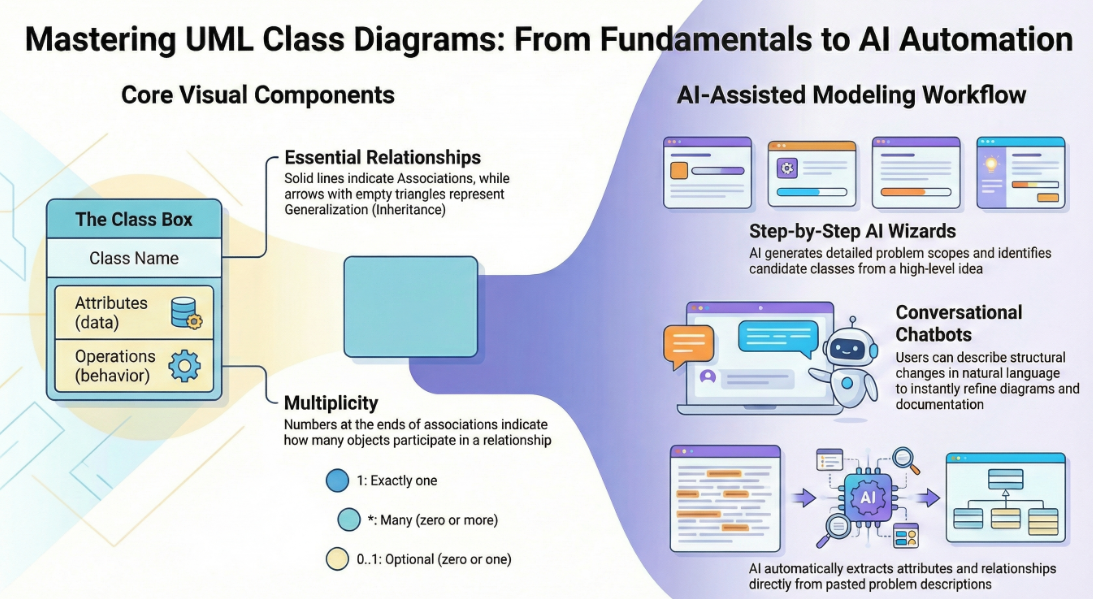
在当今快速发展的软件工程和企业架构领域,将抽象需求转化为精确且可操作的设计仍然具有挑战性。通用型大语言模型(LLMs)在头脑风暴和文本生成方面表现出色,但在专业视觉建模方面却表现不佳。它们生成的只是‘草图’,而非工程化的蓝图。视觉模型的AI驱动生态系统通过提供符合标准、持久且可迭代的绘图功能,改变了这一现状,从而加速从构想到实现的架构工作流程。

1. “草图艺术家”问题:休闲型AI大语言模型的局限性

休闲型AI工具(例如ChatGPT、Claude)将绘图视为文本生成的延伸。它们以诸如MermaidPlantUML等格式输出代码,但在专业使用中缺乏深度。

主要局限性包括:

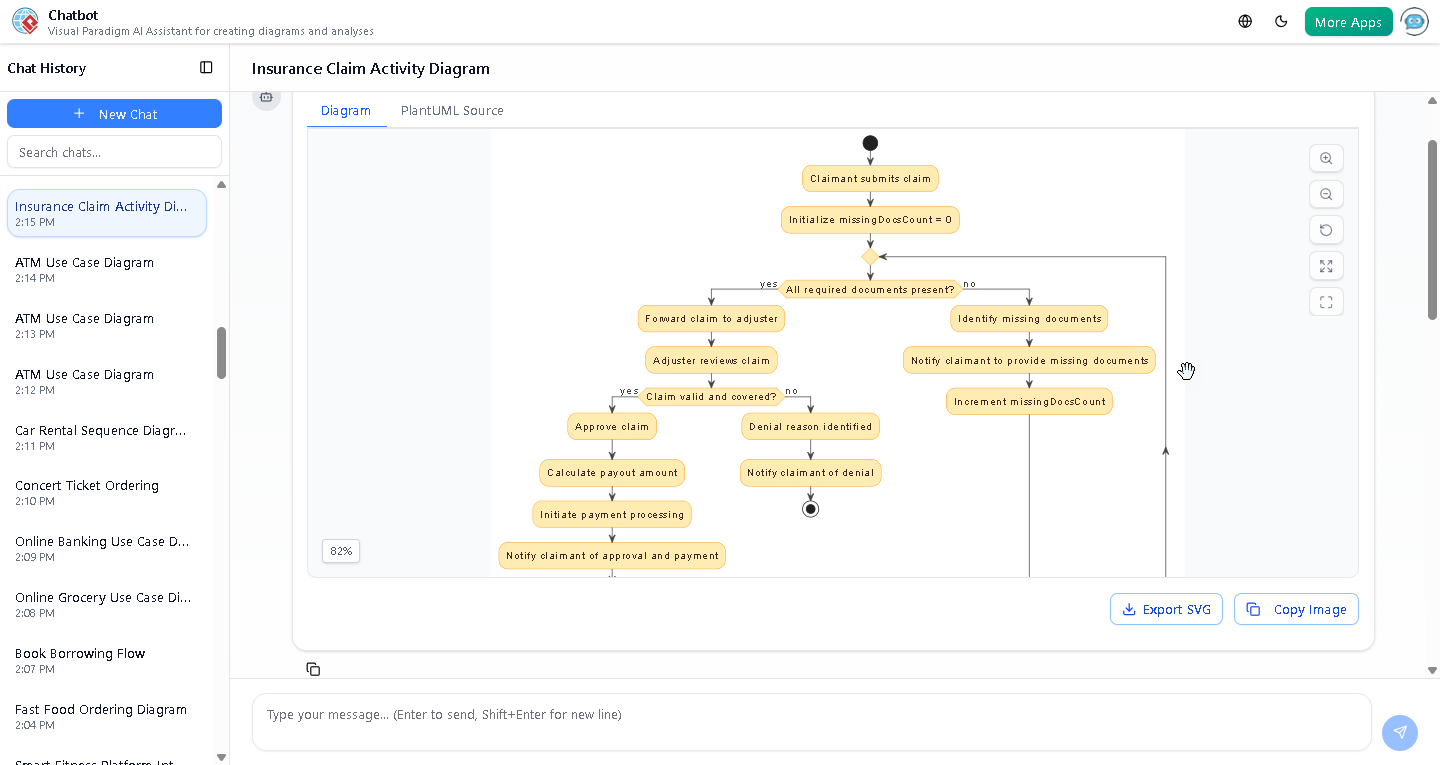
  • 缺乏原生渲染或编辑引擎大语言模型生成基于文本的语法(例如Mermaid流程图代码),但没有内置的查看器或编辑器用于高质量的矢量图形(SVG)。用户需将代码粘贴到外部渲染器中,导致交互性丧失。任何修改都需要完全重新生成。
  • 语义错误与标准违规通用模型会误解UML/ArchiMate概念。例如,它们将聚合(共享所有权)与组合(独占所有权)混淆,或绘制无效的继承箭头。结果看起来美观,但在工程上却无效——例如,类图可能显示双向关联,而实际上应为单向关联。
  • 缺乏持久状态与增量更新每次提示都会从头重新生成图表。要求‘在此序列图中添加错误处理’常常导致布局破坏、连接器丢失或遗忘先前元素。系统对视觉结构没有记忆。

示例:向ChatGPT请求生成‘包含账户、交易和双因素认证的在线银行系统UML类图’,会得到Mermaid代码。添加‘包含欺诈检测模块’后,整个图表将被重新生成——可能导致类的重新排列、关联丢失或引入语法错误。

这些问题导致生成的是‘好看的图片’,而非可维护的模型。

2. 依赖休闲型AI绘图带来的现实问题

使用通用大语言模型会引入风险,从而损害项目质量:

  • 设计与实现之间的鸿沟模糊或错误的视觉表达会导致代码不一致。团队不得不花费大量时间开会澄清意图,因为图表缺乏精确性。
  • 语法依赖与专业门槛编辑Mermaid/PlantUML需要学习专用语法——这对‘AI辅助’工具而言颇具讽刺意味。非专业人士难以进行手动修正。
  • 工作流程孤立图表是静态图像或代码片段,与版本控制、协作或下游任务(如代码生成、数据库模式)脱节。
  • “一次性”提示失败复杂系统需要迭代。用户只有在首次输出后才会发现遗漏(例如缺少负载均衡器、缓存层或异常流程),但重新生成会丢弃已有进展。

示例:在系统设计面试或早期架构讨论中,开发人员使用 ChatGPT 通过 Mermaid 生成 C4 模型图。初始输出常遗漏关键边界或关系。迭代式提示会产生不一致的版本,令团队沮丧并延误决策。

3. 视觉范式 AI 如何实现专业级建模

视觉范式将绘图转变为一种对话式、标准驱动且集成化流程。其 AI 理解 UML 2.5、ArchiMate 3、C4、BPMN、SysML 等多种标准,生成符合规范且可编辑的模型。

A. 基于“图表微调”技术的持久化结构

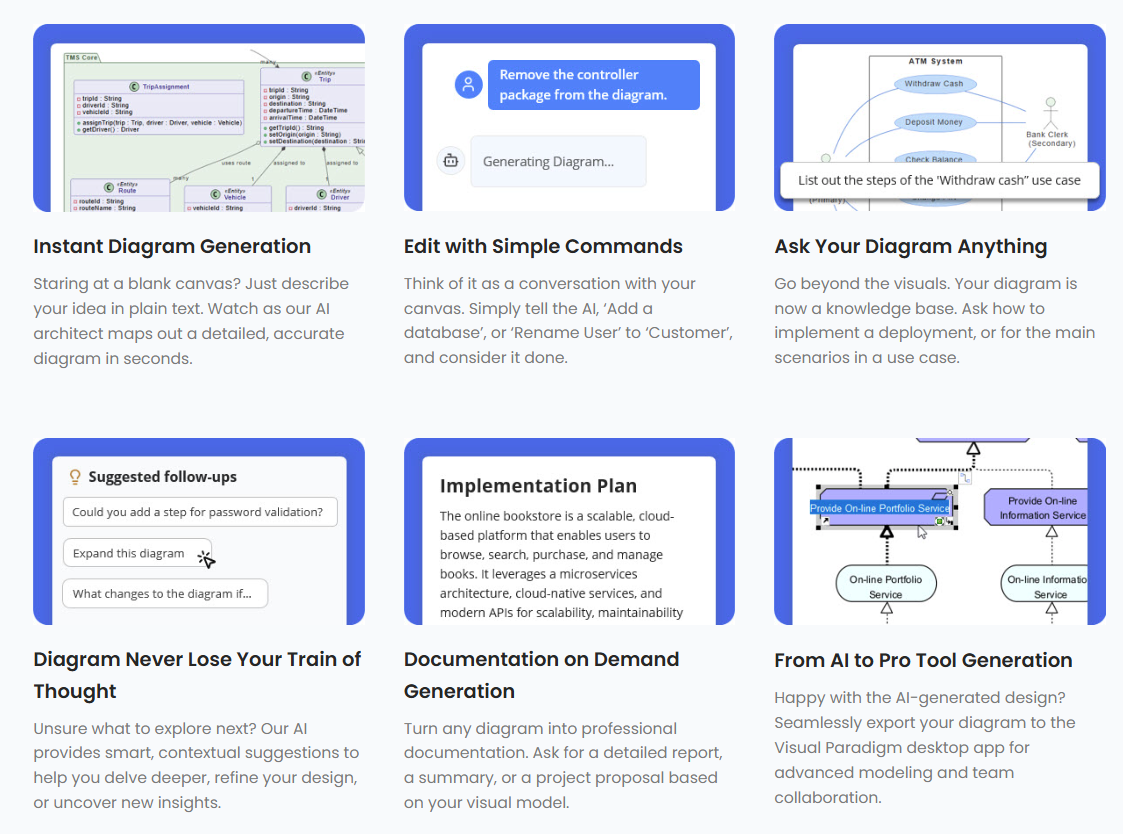
VP 将图表保持为活的对象。用户通过自然语言指令更新特定部分,无需重新生成。

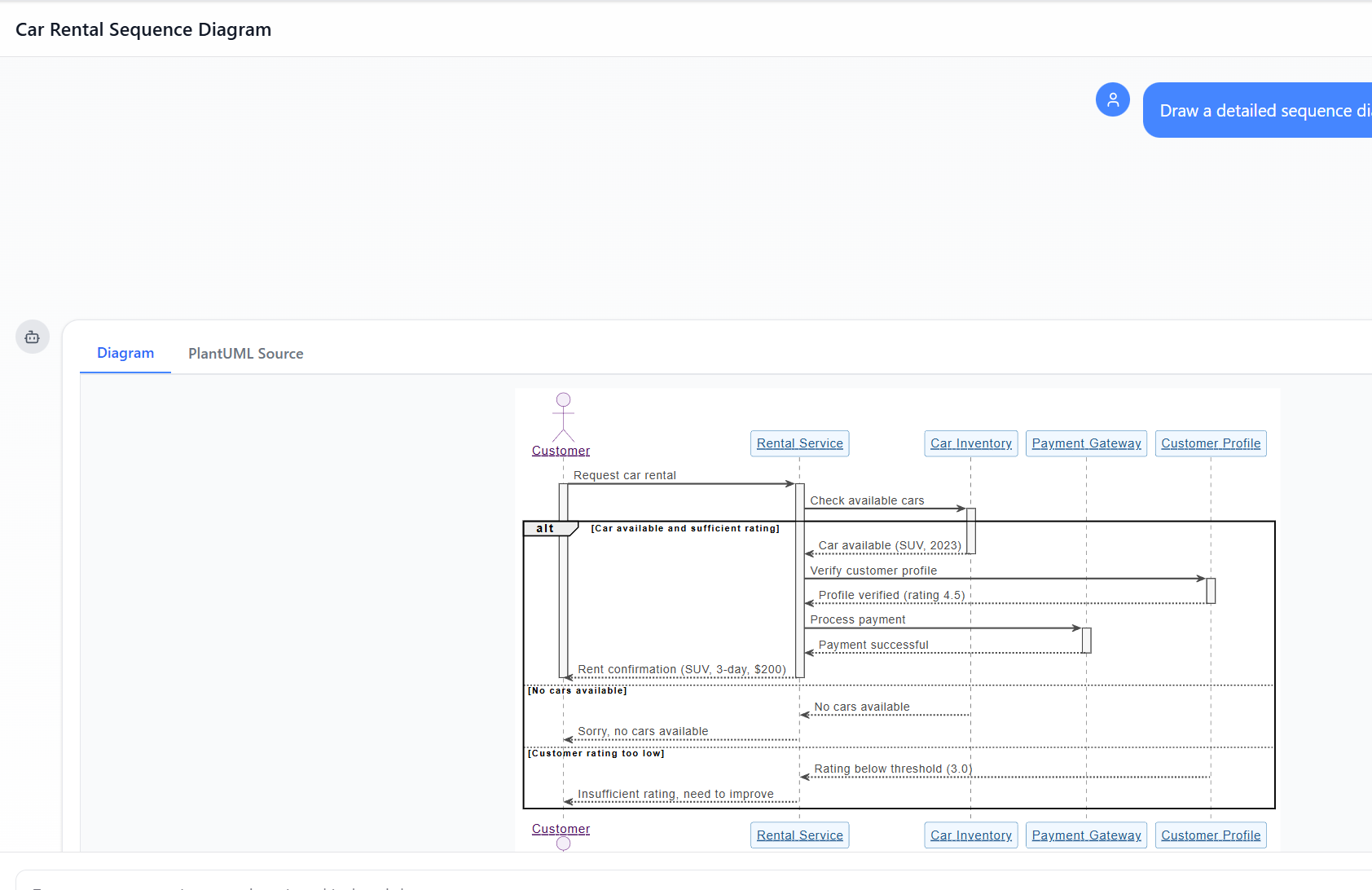
  • 对话式编辑:“登录后添加双因素认证步骤”或“将客户参与者重命名为用户”可即时调整布局、连接线和语义,同时保持完整性。

这消除了普通工具中常见的链接断裂和布局混乱问题。

B. 符合标准的智能

基于正式符号训练,VP AI 强制执行规则:

  • 关联中的正确多重性
  • 正确使用构造型
  • 有效的 ArchiMate 视角(例如,能力图、技术使用)

图表是技术上可靠的“蓝图”,而非近似产物。

C. 系统化的分步分析与指导

VP 提供结构化应用,实现需求到设计的衔接:

  • AI 驱动的文本分析 — 分析非结构化文本(例如需求文档、用户故事),提取候选类、属性、操作和关系,并自动生成初始类图。

    示例:输入描述:“一个电子商务平台允许客户浏览商品、加入购物车、通过支付网关结账,并跟踪订单。” AI 识别出类(客户、商品、购物车、订单、支付网关)、属性(如价格、数量)以及关联关系(客户下单)。

  • 10 步 AI 向导(适用于 UML 类图及其他类似场景)—— 逻辑引导用户:定义目的 → 确定范围 → 确定类 → 属性 → 关系 → 操作 → 审查 → 生成。人机协同验证可防止一次性错误。

D. AI 作为架构顾问

超越生成,VP AI 可对设计进行评审:

  • 检测单点故障
  • 识别逻辑漏洞
  • 建议模式(例如:MVC、仓储、观察者)

它充当专家评审角色。

E. 无缝集成到专业工作流程中

模型并非孤立的图像:

  • 可在 Visual Paradigm 桌面版/在线版中完全编辑
  • 支持版本控制与协作
  • 支持代码工程(例如:生成 Java/Hibernate ORM、数据库模式)
  • 跨工具导出/导入

这实现了从设计到代码的闭环。

示例:通过提示生成“技术层”的 ArchiMate 视角:”创建包含 AWS 组件的基于云的微服务架构的 ArchiMate 图。” AI 生成符合规范的图表。使用“图表润色”功能添加安全控制。导出至桌面以供团队评审和代码生成。

结论:从手工雕琢到 AI 驱动的 3D 打印

传统制图感觉就像雕刻大理石——缓慢、易出错且不可逆。普通的 AI 大语言模型虽提升了速度,但仍只是“草图画家”,生成不一致且无法持久的视觉效果。

Visual Paradigm AI 就像一台高精度 3D 打印机:输入自然语言规格,即可获得符合标准且可编辑的结构,通过对话式迭代,直接驱动实施。通过在一个 AI 增强的平台上统一业务、企业与技术建模,它消除了空白画布的焦虑,确保利益相关者共享一个精确且可操作的基准。

对于厌倦了反复重写损坏的 Mermaid 代码片段的软件架构师、企业团队和开发人员而言,Visual Paradigm 代表着下一代演进:尊重标准、保留意图并加速交付的智能建模。

发布于 分类 AI

超越草图:为什么休闲型AI大模型在视觉建模中失败,以及视觉模型如何弥合这一差距

在现代软件工程领域,从抽象概念到具体系统设计的转变常常感觉像是在解决一个“没有地图的迷宫”。尽管通用大型语言模型(LLMs)已经彻底改变了初始内容创作,但在应用于专业视觉建模时,它们明显不足。本文探讨了休闲型AI绘图生成中缺失的要素,以及视觉模型(VP)AI生态系统将这些挑战转化为架构成功高速引擎

1. “草图艺术家”问题:休闲型AI大模型缺失了什么

通用大模型在绘图方面的根本局限源于文本生成标准化的视觉建模之间的差异。这些资料将通用大模型描述为“草图艺术家”,他们缺乏“建筑规范”“CAD系统”专业工程所必需的

  • 缺乏渲染引擎:通用大模型主要设计用于处理和生成文本。虽然它们可以生成“绘图代码”(如Mermaid或PlantUML),但缺乏内置的渲染引擎将这些代码转换为高质量、可编辑的矢量图形(如SVG)
  • 语义与标准违规:通用AI模型常常生成“美观的草图”,这些草图违反了技术规范的正式建模。它们经常误解复杂的术语,例如“聚合”、“组合”“多态性”导致生成的是装饰性图形,而非功能性工程成果
  • 缺乏状态管理:随意的大型语言模型缺乏持久的视觉结构。如果用户要求基于文本的人工智能修改单一细节,模型通常需要重新生成整个图表,导致连接器断裂、布局错位或先前细节的完全丢失。

2. 随意AI绘图中遇到的问题

依赖随意的AI生成会引入多种风险,可能损害项目完整性:

  • “设计-实现差距”:如果没有严谨的视觉蓝图,逻辑仍然“零散”且“模糊”,常常导致代码混乱,会议结束时也未能达成共识。
  • 语法知识壁垒:如果AI生成原始代码,用户必须具备深厚的技术专长在该特定语法(例如PlantUML)方面的深厚技术专长,才能进行手动修改,这违背了“简易”AI工具的初衷。
  • 与工作流程脱节:通用大型语言模型生成的文本片段与实际工程流程脱节,需要手动复制粘贴,且无法提供版本控制,也无法与其他模型类型集成。
  • “一次性提示”失败:单一提示很少能完全满足用户对详细系统的需求。初始想法往往“零散”,用户常常在看到初稿后才意识到遗漏了关键细节——例如负载均衡器或错误处理状态。

3. 视觉范式AI如何实现专业完整性

视觉范式AI通过将建模从“费力的绘图任务”转变为直观、对话式且自动化的流程.

A. “图表微调”与持久结构

与通用工具不同,VP AI将图表作为持久对象。通过专有的“图表微调”技术,用户可以发出对话式指令,如“添加两步验证步骤”或“重命名此参与者”,AI会立即更新视觉结构,同时保持布局完整性.

B. 标准化智能

Visual Paradigm AI 是经过独特训练,基于既定的建模标准,包括 UML 2.5、ArchiMate 3 和 C4。它理解语义规则与结构文字背后的语义规则与结构,确保关系和命名规范具备技术上的有效性,可直接用于构建

C. 专业化分步分析

为了弥合需求与设计之间的差距,该生态系统提供系统化应用:

  • AI 驱动的文本分析: 自动提取候选领域类、属性和关系 来自非结构化的问题描述绘制任何一条线之前
  • 10 步 AI 向导: 引导用户完成逻辑流程——从定义目标到识别操作——确保“人机协同”验证以防止“一次性”AI生成中常见的错误

D. 作为顾问的架构评审

超越简单的生成,AI充当系统化设计助手。它可以分析现有设计,识别单点故障、逻辑漏洞,或建议行业标准模式,如MVC(模型-视图-控制器)以提升系统质量

E. 无缝生态系统集成

AI 生成的模型是功能化成果,而非孤立的图像。它们可以导入到Visual Paradigm 桌面版或在线版 套件,支持高级编辑、版本控制以及代码工程(包括数据库生成和 Hibernate ORM 集成),确保视觉设计直接驱动软件实现。

结论:从手工雕刻到3D打印

传统建模就像手工雕刻大理石雕像,每一次雕刻都是一次高风险的手动操作。相比之下,Visual Paradigm AI 就像使用高端3D打印机:你用通俗易懂的英语提供规格,系统就能精确构建出技术上可靠的结构,让你专注于战略设计决策。通过将战略、业务建模和技术设计统一到一个AI增强的平台上,Visual Paradigm 消除了“空白画布”问题,确保所有利益相关者基于相同的概念基础.

发布于 分类 AI

从问题到报告:人工智能如何引导您的用例之旅

Discover how AI guides your use case journey from problem to report with Visual Paradigm’s intelligent development assistant.

想象一下,你是一名项目经理,负责推出一个新的在线课程平台。首要挑战是清晰地阐述问题,然后将其转化为一个功能系统。这时,用例驱动开发助手,这是来自Visual Paradigm的AI驱动工具,它会介入其中。它不仅帮助你撰写文档,还引导你完成一个完整且结构化的流程,将模糊的想法转化为详细且可执行的项目计划。这一过程如此直观,仿佛有一位经验丰富的业务分析师和技术架构师与你并肩工作。本文深入探讨了这一强大工具的核心功能,通过一个在线课程平台的真实案例,展示它如何简化整个用例生命周期。

快速概览:用例驱动开发助手的核心要点

  • 从清晰的问题陈述开始,以明确项目的核心目标。

  • 使用人工智能自动生成候选用例和参与者列表。

  • 通过人工智能生成的用例图和活动图.

  • 使用结构化的MoSCoW方法对功能进行优先级排序,以聚焦高价值工作。

  • 生成详细的用例描述和可执行的Gherkin测试场景。

  • 创建全面的报告,以传达项目范围和计划。

  • 通过中央仪表板跟踪进度,并保持单一真实信息源。

步骤1:借助人工智能定义问题

每个成功的项目都始于对所要解决的问题的清晰理解。使用用例驱动开发助手的旅程始于“问题陈述”标签页。在这里,你输入项目名称和简短描述。人工智能随后利用这些信息生成一份全面的问题陈述。如图1所示,该工具已将项目名称“在线课程平台”和简短描述“一个供讲师创建和销售课程、学生注册学习的市场”转化为详尽的叙述。该叙述指出了核心痛点:学生难以找到相关课程,而讲师则面临难以触达广泛受众以及变现专业知识的挑战。这一由人工智能生成的问题陈述成为项目的基石,确保团队成员从一开始就拥有统一的理解。

This is a screenshot of Visual Paradigm's AI Powered Use Case Driven Development Assistant. we are now in step 1. It shows th

步骤2:借助人工智能识别用例

问题明确后,下一步是识别系统必须提供的关键功能。助手的“候选用例”标签页,如图2所示,该过程实现了自动化。在分析问题陈述后,人工智能会提出一组用例,每个用例都与一个参与者(如讲师、学生或管理员)相关联。对于我们的在线课程平台,人工智能提出了诸如“创建新课程”、“上传课程内容”、“浏览和搜索课程”以及“注册课程”等用例。这一列表提供了坚实的基础,节省了原本需要在头脑风暴会议中耗费的大量时间和精力。你可以进一步优化这些建议,添加新用例,或删除无关项,从而形成一份全面的系统功能列表。

This is a screenshot of Visual Paradigm's AI Powered Use Case Driven Development Assistant. We are now in step 2. It shows a

步骤3:通过用例图可视化系统

在确定用例后,至关重要的是可视化它们与系统参与者的交互方式。在“用例图”标签页中,如图3所示,该工具将用例和参与者列表自动转化为清晰的图形化表示。该图展示了参与者(讲师、学生、管理员)与系统功能(如创建新课程等)之间的关系。人工智能驱动的生成确保了图表的准确性与专业排版。这一可视化工具在沟通中极为宝贵,使利益相关者、开发人员和设计师无需阅读冗长的文本文档,即可快速理解系统的范围和功能。

This is a screenshot of Visual Paradigm's AI Powered Use Case Driven Development Assistant. We are now in step 3. It shows a

步骤4:优先排序功能以实现最大影响

并非所有用例都同等重要。项目的成功往往取决于首先聚焦于最关键的功能。如图4,提供了一个强大的框架。它允许你为每个用例分配用户价值和业务价值(在0-10的量表上),然后应用MoSCoW优先级方法(必须有、应该有、可以有、不会有的)。在我们的示例中,AI已帮助识别出“创建新课程”和“上传课程内容”是“必须有”的功能,因为它们对平台的核心功能至关重要。这种结构化的优先级划分确保开发团队专注于为用户和业务提供最高价值,避免在低优先级功能上浪费精力。

This is a screenshot of Visual Paradigm's AI Powered Use Case Driven Development Assistant. We are now in step 4. It shows th

步骤5:详细说明用例并生成活动图

在建立高层视图后,下一步是深入每个用例的细节。如图所示,“用例详情”选项卡图5,允许你为选定的用例创建一个全面的模板。AI可以生成详细的描述,包括前置条件、主流程和替代流程。对于“创建新课程”用例,AI提供了一个结构化模板,列出了必要的步骤。为进一步增强理解,助手可以为同一用例生成“活动图”,如图所示图6。该图直观地展示了逐步的工作流程,从讲师登录到课程保存的整个操作序列。这种详细程度对开发人员和质量保证团队都至关重要。

This is a screenshot of Visual Paradigm's AI Powered Use Case Driven Development Assistant. We are now in step 5. It shows thThis is a screenshot of Visual Paradigm's AI Powered Use Case Driven Development Assistant. We are still in step 5. It shows

步骤6:生成测试场景和序列图

对于开发团队而言,下一步的关键步骤是创建可测试的场景。如图所示,“场景”选项卡图7,允许你直接从用例描述中生成可执行的Gherkin场景。这些场景以自然语言格式(给定-当-则)编写,非常适合自动化测试。AI可以生成主场景和替代场景,例如标题无效的情况。为进一步阐明系统的内部运作,助手可以生成“序列图”,如图所示图8。该图展示了讲师、网页仪表板、后端API、数据库和通知服务之间的交互,清晰地呈现了系统的架构和数据流。

This is a screenshot of Visual Paradigm's AI Powered Use Case Driven Development Assistant. We are in step 6. It shows the AIThis is a screenshot of Visual Paradigm's AI Powered Use Case Driven Development Assistant. We are still in step 6. It shows

步骤7:创建全面的项目报告

在整个开发过程中,向各类利益相关者沟通项目状态和计划至关重要。如图所示,“生成报告”选项卡图9,使这一过程变得简单。你可以生成多种报告,例如“项目概览”、“实施计划”、“质量保证测试计划”或“开发人员任务列表”。这些报告由AI辅助生成,确保内容一致且全面。例如,“项目概览”报告总结了整个项目,包括执行摘要、关键功能以及优先级划分的理由。这一单一信息源确保所有人员保持一致并充分知情。

This is a screenshot of Visual Paradigm's AI Powered Use Case Driven Development Assistant. We are in step 7. It shows a repo

步骤8:通过仪表板跟踪进度

最后,整个过程在“仪表板”中达到顶点,如图所示图10。这个中心枢纽提供了项目状态的高层概览。它显示了项目完成百分比、用例总数以及“必须有”项目的数量。项目清单让你可以跟踪进度,每个完成的步骤都会标记为“已完成”。对项目健康状况的实时可视化对项目经理和团队负责人至关重要,有助于他们识别瓶颈并确保项目按计划推进。

This is a screenshot of Visual Paradigm's AI Powered Use Case Driven Development Assistant. We are in step 8. It shows the da

用例驱动的开发助手不仅仅是一个工具;它是一套全面的工作流程,为软件开发过程带来清晰性和效率。通过在每个阶段利用人工智能——从问题定义到报告生成——它帮助团队更快、更准确地从需求过渡到实现。结果是一个结构清晰、文档完善的项目,与业务目标和用户需求高度一致。如果你希望优化用例开发流程,这款人工智能驱动的工具是一个强大的解决方案。

准备好了解用例驱动的开发助手如何改变你的下一个项目吗?立即试用.

相关链接

用例建模是一种基础的软件工程技术,用于捕获功能需求通过可视化外部参与者和系统内部功能之间的交互。现代平台现在结合了基于人工智能的自动化来优化图表,生成全面的用例描述,并将模型转换为测试用例或活动图以保持设计的一致性和可追溯性。先进的工具如事件流编辑器场景分析器使开发团队能够验证并记录结构化的事件序列,以提高整个系统的清晰度。

  1. 什么是用例图?——UML建模完整指南:深入概述涵盖关键组件、目的和最佳实践用于需求建模。

  2. 逐步用例图教程——从入门到精通:实用资源,指导用户掌握从基础到高级的技术以创建有效的用例图。

  3. 关于用例建模你需要知道的一切:全面探讨用例建模的原则与应用在系统设计中的应用。

  4. Visual Paradigm – 用例描述功能: 详细说明用于精确记录用户交互以及结构化的系统行为。

  5. 掌握使用 Visual Paradigm 的 AI 驱动用例图: 介绍如何利用 AI 创建智能且动态的图表用于现代软件系统。

  6. 使用 Visual Paradigm 事件流编辑器的指南: 逐步说明如何记录结构化的事件序列在用例场景中。

  7. 通过用例场景分析器解析场景: 介绍如何使用分析器来检查和优化交互流程以提高系统清晰度。

  8. 将用例转换为活动图——AI 驱动的转换: 介绍自动化转换将用例转换为详细系统工作流。

  9. 使用 AI 从用例图生成场景和测试用例: 探讨 AI 工具如何自动化创建以需求为导向的测试流程.

  10. 用例图图库——模板与示例: 精心挑选的真实世界示例用于激发灵感、学习和快速原型设计。

建模社交媒体平台数据库:在Visual Paradigm中实现AI驱动的ERD生成

Learn how to use Visual Paradigm’s AI to instantly generate professional ER diagrams for a social media platform database from simple text prompts.

让我们坦率地说:从一张白纸开始设计数据库可能会令人望而生畏。无论你是经验丰富的软件架构师,还是学习数据建模的学生,手动绘制实体、定义属性并连接关系线都需要付出大量精力。这就是AI实体关系图(ERD)生成改变了游戏规则。只需描述你的项目构想——比如一个“社交媒体平台”——你就可以使用Visual Paradigm桌面版将自然语言瞬间转化为专业且符合标准的数据模型。

这一功能不仅仅是为了加快流程;它更是为了弥合业务需求与技术模式之间的差距。在这次深入探讨中,我们将展示如何仅用几秒钟,通过这个智能数据库设计工具.

快速概览:核心要点

  • 文本转模型效率:将简单的英文描述瞬间转换为复杂的ER图。
  • 智能识别:AI自动识别实体、属性、主键和关系。
  • 标准符号:生成符合行业标准ER规范(如乌鸦脚法等)的图表。
  • 完全可编辑:结果是一个原生的Visual Paradigm图表,可进一步优化并生成SQL。

步骤1:通过自然语言定义范围

该过程始于一个简单的概念。你无需了解SQL语法,也不必手动拖拽数十个方框。相反,你可以使用工具中的AI图表生成功能。如下面的工作流程所示,你只需将目标输出选择为“实体关系图”。关键在于提示语。

在我们的示例中,我们希望可视化一个社交网络的后端。我们输入了提示语:“可视化一个描述社交媒体平台数据库结构的ER图”。这一段普通文本就是AI理解领域需求所需的全部信息,它推断出社交平台通常需要用户、内容、互动和通知功能。

This is a screenshot of Visual Paradigm (aka. Visual Paradigm Desktop). It is now showing the use of AI diagram generation to

步骤2:分析AI生成的数据模型

当你点击“确定”后,AI会分析你的文本,识别出核心实体(表)及其关联关系。它不会随意在画布上放置方框;而是应用智能关系与基数检测来构建数据逻辑。片刻之间,你就能看到一个完整的图表,看起来像是花了数小时手动设计而成。

查看下方的结果,你可以看到AI正确生成了一个完全适用于社交媒体应用的模式。它创建了用户具有标准属性的实体,例如用户名, 电子邮件,以及密码。它在逻辑上将用户与一个帖子实体(一对多关系),认识到一个用户会创建多个帖子。它甚至通过添加评论, 点赞,以及通知实体,包含外键(例如帖子ID, 作者ID)以及适当的数据类型,如varchar, clob,以及整数.

This is the screenshot of Visual Paradigm Desktop. It shows a Entity Relationship Diagram generated by AI, based on the descr

为什么这一AI功能是建模者不可或缺的

使用AI驱动的数据库建模工具在于它能够处理布局和组织的繁重工作。如生成的图表所示,实体被安排以尽量减少线条交叉,使数据结构易于阅读和验证。

自动属性和键分配

请注意,AI已自动为每个实体分配主键(PK),以钥匙图标表示。它还对数据类型做出了智能猜测——为帖子的“内容”分配了clob(字符大对象),因为AI知道帖子内容可能很长,同时将“用户名”保持为标准varchar(50)。这避免了你在概念阶段手动为每一列设置属性的繁琐工作。

从静态图像到功能项目

与简单的图像生成器不同,这里的输出是一个完全可编辑的原生图表。如果你之后决定帖子也应包含“类别”,只需使用图表编辑器添加该属性即可。这种无缝过渡到实现的过程意味着你可以将此图表作为基础,生成适用于MySQL、PostgreSQL或Oracle的DDL脚本,从而在一个工作流中从初步构想快速转变为实际的数据库模式。

如何创建您自己的AI ERD

准备好尝试这个易于使用的ERD创建工具吗?以下是复制上述结果的简单工作流程:

  1. 启动Visual Paradigm: 打开一个新项目或现有项目。
  2. 打开AI工具: 导航至 工具 > AI图表生成.
  3. 选择图表类型: 从下拉菜单中选择“实体关系图”。
  4. 输入描述: 输入您系统的清晰描述(例如:“一个包含书籍、成员和借阅的图书馆系统”)。
  5. 生成: 单击确定,观看您的图表生成。
  6. 优化: 使用编辑器调整关系或根据需要添加特定约束。

结论

Visual Paradigm的AI实体关系图生成功能改变了我们进行数据建模的方式。通过将关于“社交媒体平台”的一句话转化为全面且技术准确的ERD,它消除了数据库设计的入门门槛。无论您是在原型设计新应用,还是在记录现有系统,该工具都能立即提供一个强大且专业的起点。

停止一个一个地绘制框。立即体验AI辅助建模的速度。

下载 Visual Paradigm 桌面版,立即尝试AI图表生成


相关链接

Visual Paradigm 提供一套全面的ERD(实体关系图)工具通过传统的可视化编辑器和AI驱动的自动化。这些工具支持多种符号表示法,例如陈氏表示法,并实现从概念建模到物理数据库实现以及逆向工程。

  1. Visual Paradigm ERD 工具 – 在线创建实体关系图:一个基于网络的工具,可实现直观的拖拽式设计专业数据库架构设计。
  2. 使用 ERD 工具进行数据库设计 – Visual Paradigm 指南:专为关注构建可扩展且稳健的数据库的架构师提供的资源,采用数据建模最佳实践。
  3. DBModeler AI:智能数据库建模工具:一款由AI驱动的应用程序,专为自动化数据库建模、模式生成和实时SQL测试。
  4. 免费 ERD 工具 – 使用 Visual Paradigm 在线设计数据库:提供无需安装、基于浏览器的解决方案,用于创建专业实体关系图且完全免费。
  5. 陈氏表示法 ERD 编辑器 – 高级实体关系建模:一款专业编辑器,全面支持实体、属性、关系和基数 使用精确的陈氏表示法。
  6. Visual Paradigm 数据库设计ERD工具——完整解决方案:一个全面的工具,供开发人员和架构师使用,以建模、可视化和生成数据库,实现高效操作。
  7. AI 图表生成器新增图表类型:DFD 和 ERD:此版本突出了自动生成ERD 的能力,只需自然语言提示即可立即生成 使用人工智能。
  8. 通过 Visual Paradigm 简化实体-关系建模:一篇文章详细介绍了如何从初始概念到最终数据库部署的建模过程简化方法.
  9. 数据建模入门:ERD、代码生成与逆向工程:一本入门指南,涵盖图表绘制与逆向工程的完整生命周期绘图与逆向工程数据库。
  10. 什么是实体-关系图(ERD)?——Visual Paradigm 指南:一份解释性指南,涵盖核心组件及其重要性在数据库设计更广泛背景下的ERD。

From Problem to Report: How AI Guides Your Use Case Journey

Discover how AI guides your use case journey from problem to report with Visual Paradigm’s intelligent development assistant.

Imagine you’re a project manager tasked with launching a new online course platform. The first challenge is to articulate the problem clearly and then translate it into a functional system. This is where the Use Case Driven Development Assistant, an AI-powered tool from Visual Paradigm, steps in. It doesn’t just help you write documents; it guides you through a complete, structured workflow to transform a vague idea into a detailed, actionable project plan. The process is so intuitive, it feels like having a seasoned business analyst and a technical architect working side-by-side with you. This deep dive explores the core features of this powerful tool, using a real-world example of an online course platform to show how it streamlines the entire use case lifecycle.

Quick Summary: Key Takeaways from the Use Case Driven Development Assistant

  • Start with a clear problem statement to define the project’s core objective.

  • Use AI to automatically generate a list of candidate use cases and actors.

  • Visualize system functionality with AI-generated Use Case and Activity Diagrams.

  • Prioritize features using a structured MoSCoW method to focus on high-value work.

  • Generate detailed use case descriptions and executable Gherkin test scenarios.

  • Create comprehensive reports to communicate project scope and plans.

  • Track progress and maintain a single source of truth with a central dashboard.

Step 1: Defining the Problem with AI

Every successful project begins with a clear understanding of the problem it aims to solve. The journey with the Use Case Driven Development Assistant starts in the “Problem Statement” tab. Here, you input a project name and a short description. The AI then leverages this information to generate a comprehensive problem statement. As seen in Image 1, the tool has taken the project name “Online Course Platform” and the short description “A marketplace for instructors to create and sell courses, and for students to enroll and learn” to produce a detailed narrative. This narrative identifies the core pain points: students struggle to find relevant courses, while instructors face challenges in reaching a broad audience and monetizing their expertise. This AI-generated problem statement serves as the project’s foundation, ensuring everyone on the team shares a unified understanding from the very beginning.

This is a screenshot of Visual Paradigm's AI Powered Use Case Driven Development Assistant. we are now in step 1. It shows th

Step 2: Identifying Use Cases with AI Assistance

Once the problem is defined, the next logical step is to identify the key functionalities the system must provide. The assistant’s “Candidate Use Cases” tab, shown in Image 2, automates this process. After analyzing the problem statement, the AI suggests a list of use cases, each associated with an actor (like Instructor, Student, or Admin). For our online course platform, the AI proposes use cases such as “Create a New Course,” “Upload Course Content,” “Browse and Search Courses,” and “Enroll in a Course.” This list provides a solid starting point, saving significant time and effort that would otherwise be spent on brainstorming sessions. You can then refine these suggestions, add new ones, or delete irrelevant ones to create a comprehensive list of system functionalities.

This is a screenshot of Visual Paradigm's AI Powered Use Case Driven Development Assistant. We are now in step 2. It shows a

Step 3: Visualizing the System with a Use Case Diagram

After identifying the use cases, it’s crucial to visualize how they interact with the system’s actors. The “Use Case Diagram” tab, illustrated in Image 3, takes the list of use cases and actors and automatically generates a clear, graphical representation. This diagram shows the relationships between the actors (Instructor, Student, Admin) and the system’s functions (Create a New Course, etc.). The AI-powered generation ensures that the diagram is accurate and professionally formatted. This visual aid is invaluable for communication, allowing stakeholders, developers, and designers to quickly grasp the system’s scope and functionality without wading through text-heavy documents.

This is a screenshot of Visual Paradigm's AI Powered Use Case Driven Development Assistant. We are now in step 3. It shows a

Step 4: Prioritizing Features for Maximum Impact

Not all use cases are created equal. A project’s success often hinges on focusing on the most critical features first. The “Prioritize Use Cases” tab, as shown in Image 4, provides a powerful framework for this. It allows you to assign a user value and business value (on a scale of 0-10) to each use case and then apply the MoSCoW prioritization method (Must Have, Should Have, Could Have, Won’t Have). In our example, the AI has helped identify that “Create a New Course” and “Upload Course Content” are “Must Have” features, as they are essential for the platform’s core function. This structured prioritization ensures that the development team focuses on delivering the highest value to users and the business, avoiding wasted effort on low-priority features.

This is a screenshot of Visual Paradigm's AI Powered Use Case Driven Development Assistant. We are now in step 4. It shows th

Step 5: Detailing Use Cases and Generating Activity Diagrams

With the high-level view established, the next step is to dive into the details of each use case. The “Use Case Details” tab, shown in Image 5, allows you to create a comprehensive template for a selected use case. The AI can generate a detailed description, including pre-conditions, main flow, and alternative flows. For the “Create a New Course” use case, the AI provides a structured template that outlines the necessary steps. To further enhance understanding, the assistant can generate an “Activity Diagram” for the same use case, as seen in Image 6. This diagram visually maps out the step-by-step workflow, showing the sequence of actions from the instructor logging in to the course being saved. This level of detail is essential for both developers and QA teams.

This is a screenshot of Visual Paradigm's AI Powered Use Case Driven Development Assistant. We are now in step 5. It shows thThis is a screenshot of Visual Paradigm's AI Powered Use Case Driven Development Assistant. We are still in step 5. It shows

Step 6: Generating Test Scenarios and Sequence Diagrams

For a development team, the next critical step is to create testable scenarios. The “Scenarios” tab, shown in Image 7, allows you to generate executable Gherkin scenarios directly from your use case descriptions. These scenarios, written in a plain-language format (Given-When-Then), are perfect for automated testing. The AI can generate a main scenario and alternative scenarios, such as one for an invalid title. To further clarify the system’s internal workings, the assistant can generate a “Sequence Diagram,” as seen in Image 8. This diagram shows the interaction between the instructor, the web dashboard, the backend API, the database, and the notification service, providing a clear picture of the system’s architecture and data flow.

This is a screenshot of Visual Paradigm's AI Powered Use Case Driven Development Assistant. We are in step 6. It shows the AIThis is a screenshot of Visual Paradigm's AI Powered Use Case Driven Development Assistant. We are still in step 6. It shows

Step 7: Creating Comprehensive Project Reports

Throughout the development process, it’s essential to communicate the project’s status and plans to various stakeholders. The “Generate Report” tab, as shown in Image 9, makes this easy. You can generate a variety of reports, such as a “Project Overview,” “Implementation Plan,” “QA Test Plan,” or a “Developer Task List.” These reports are generated with AI assistance, ensuring they are consistent and comprehensive. For example, the “Project Overview” report summarizes the entire project, including the executive summary, key features, and the rationale behind the prioritization. This single source of truth ensures everyone is aligned and informed.

This is a screenshot of Visual Paradigm's AI Powered Use Case Driven Development Assistant. We are in step 7. It shows a repo

Step 8: Tracking Progress with the Dashboard

Finally, the journey culminates in the “Dashboard,” as seen in Image 10. This central hub provides a high-level overview of the project’s status. It shows the project completion percentage, the total number of use cases, and the number of “Must Have” items. The project checklist allows you to track your progress, with each completed step marked as “Done.” This real-time visibility into the project’s health is invaluable for project managers and team leads, enabling them to identify bottlenecks and ensure the project stays on track.

This is a screenshot of Visual Paradigm's AI Powered Use Case Driven Development Assistant. We are in step 8. It shows the da

The Use Case Driven Development Assistant is more than just a tool; it’s a comprehensive workflow that brings clarity and efficiency to the software development process. By leveraging AI at every stage—from defining the problem to generating reports—it helps teams move from requirements to implementation faster and with greater accuracy. The result is a well-structured, well-documented project that is aligned with business goals and user needs. If you’re looking to streamline your use case development process, this AI-powered tool is a powerful solution.

Ready to see how the Use Case Driven Development Assistant can transform your next project? Try it now.

Related Links

Use case modeling is a fundamental software engineering technique used to capture functional requirements by visualizing the interactions between external actors and a system’s internal functions. Modern platforms now incorporate AI-powered automation to refine diagrams, generate comprehensive use case descriptions, and convert models into test cases or activity diagrams to maintain design consistency and traceability. Advanced tools like the Flow of Events editor and Scenario Analyzer allow development teams to validate and document structured event sequences to improve overall system clarity.

  1. What Is a Use Case Diagram? – A Complete Guide to UML Modeling: An in-depth overview covering essential components, purposes, and best practices for requirements modeling.

  2. Step-by-Step Use Case Diagram Tutorial – From Beginner to Pro: A practical resource that guides users through foundational to advanced techniques for creating effective use case diagrams.

  3. All You Need to Know About Use Case Modeling: A comprehensive exploration of the principles and applications of use case modeling in system design.

  4. Visual Paradigm – Use Case Description Features: Details specialized tools used to precisely document user interactions and structured system behavior.

  5. Mastering AI-Driven Use Case Diagrams with Visual Paradigm: A tutorial on leveraging AI to create intelligent, dynamic diagrams for modern software systems.

  6. Guide to Using the Flow of Events Editor in Visual Paradigm: Step-by-step instructions for documenting structured event sequences within a use case scenario.

  7. Unraveling Scenarios with the Use Case Scenario Analyzer: A guide on using analyzers to examine and refine interaction flows for increased system clarity.

  8. Convert Use Case to Activity Diagram – AI-Powered Transformation: A resource explaining the automated conversion of use cases into detailed system workflows.

  9. Generating Scenarios and Test Cases from Use Case Diagrams Using AI: An exploration of how AI tools automate the creation of requirement-driven test procedures.

  10. Use Case Diagram Gallery – Templates & Examples: A curated collection of real-world examples for inspiration, learning, and rapid prototyping.

Beyond the Sketch: Why Casual AI LLMs Fail at Visual Modeling and How Visual Paradigm Bridges the Gap

In the modern software engineering landscape, the transition from abstract ideas to concrete system designs often feels like solving a “maze without a map”. While general Large Language Models (LLMs) have revolutionized initial content creation, they fall significantly short when applied to professional visual modeling. This article explores the missing elements of casual AI diagram generation and how the Visual Paradigm (VP) AI ecosystem transforms these challenges into a high-speed engine for architectural success.

1. The “Sketch Artist” Problem: What is Missing in Casual AI LLMs

The fundamental limitation of general LLMs in diagramming stems from the difference between textual generation and standardized visual modeling. The sources characterize general LLMs as “sketch artists” who lack the “building codes” and “CAD systems” necessary for professional engineering.

  • Lack of Rendering Engines: General LLMs are primarily designed to process and produce text. While they can generate “diagramming code” (such as Mermaid or PlantUML), they lack built-in rendering engines to convert that code into high-quality, editable vector graphics like SVG.
  • Semantic and Standard Violations: Generic AI models often produce “pretty sketches” that violate the technical rules of formal modeling. They frequently misinterpret complex technical jargon such as “aggregation,” “composition,” or “polymorphism,” resulting in decorative drawings rather than functional engineering artifacts.
  • Absence of State Management: Casual LLMs lack a persistent visual structure. If a user asks a text-based AI to change a single detail, the model often has to regenerate the entire diagram, leading to broken connectors, misaligned layouts, or the total loss of previous details.

2. Problems Encountered in Casual AI Diagramming

Relying on casual AI generation introduces several risks that can compromise project integrity:

  • The “Design-Implementation Gap”: Without a rigorous visual blueprint, logic remains “scattered” and “vague,” often leading to code that is a “mess” and meetings that end without shared understanding.
  • Syntax Expertise Barriers: If an AI generates raw code, the user must possess deep technical expertise in that specific syntax (e.g., PlantUML) to make manual modifications, defeating the purpose of an “easy” AI tool.
  • Isolation from Workflow: Text snippets from general LLMs are isolated from the actual engineering process, requiring manual copy-pasting and offering no version control or integration with other model types.
  • The Failure of “One-Shot” Prompts: A single prompt is rarely sufficient to fit 100% of a user’s requirements for a detailed system. Initial ideas are often “scattered,” and users frequently realize they missed critical details—like load balancers or error-handling states—only after seeing a first draft.

3. How Visual Paradigm AI Achieves Professional Integrity

Visual Paradigm AI addresses these legacy issues by transforming modeling from a “labor-intensive drawing chore” into an intuitive, conversational, and automated workflow.

A. “Diagram Touch-Up” and Persistent Structure

Unlike generic tools, VP AI maintains the diagram as a persistent object. Through proprietary “Diagram Touch-Up” technology, users can issue conversational commands like “add a two-factor authentication step” or “rename this actor,” and the AI updates the visual structure immediately while maintaining layout integrity.

B. Standardized Intelligence

Visual Paradigm AI is uniquely trained on established modeling standards, including UML 2.5, ArchiMate 3, and C4. It understands the semantic rules and structure behind words, ensuring that relationships and naming conventions are technically valid blueprints ready for construction.

C. Specialized Step-Based Analysis

To bridge the gap between requirements and design, the ecosystem provides systematic apps:

  • AI-Powered Textual Analysis: Automatically extracts candidate domain classes, attributes, and relationships from unstructured problem descriptions before a single line is drawn.
  • 10-Step AI Wizard: Guides users through a logical sequence—from defining purpose to identifying operations—ensuring “human-in-the-loop” validation to prevent the errors common in “one-shot” AI generation.

D. Architectural Critique as a Consultant

Beyond simple generation, the AI acts as a systematic design assistant. It can analyze existing designs to identify single points of failure, logic gaps, or suggest industry-standard patterns like MVC (Model-View-Controller) to improve system quality.

E. Seamless Ecosystem Integration

AI-generated models are functional artifacts, not isolated images. They can be imported into the Visual Paradigm Desktop or Online suites for advanced editing, versioning, and code engineering (including database generation and Hibernate ORM integration), ensuring the visual design directly drives the software implementation.

Conclusion: From Hand-Chiseling to 3D Printing

Traditional modeling is like hand-chiseling a marble statue, where every stroke is a high-risk manual effort. In contrast, Visual Paradigm AI is like using a high-end 3D printer: you provide the specifications in plain English, and the system precisely builds a technically sound structure, allowing you to focus on strategic design decisions. By unifying strategy, business modeling, and technical design into a single AI-enhanced platform, Visual Paradigm eliminates the “blank canvas” problem and ensures all stakeholders work from the same conceptual baseline.

发布于 分类 AI

Beyond the Sketch: Why Casual AI LLMs Fail at Visual Modeling and How Visual Paradigm Bridges the Gap

In today’s fast-paced software engineering and enterprise architecture world, turning abstract requirements into precise, actionable designs remains challenging. General-purpose Large Language Models (LLMs) excel at brainstorming and text generation but struggle with professional visual modeling. They produce “sketches” rather than engineered blueprints. Visual Paradigm’s AI-powered ecosystem changes this by delivering standards-aware, persistent, and iterative diagramming that accelerates architectural work from idea to implementation.

1. The “Sketch Artist” Problem: Limitations of Casual AI LLMs

Casual AI tools (e.g., ChatGPT, Claude) treat diagramming as an extension of text generation. They output code in formats like Mermaid or PlantUML, but lack depth for professional use.

Key limitations include:

  • No Native Rendering or Editing Engine LLMs generate text-based syntax (e.g., Mermaid flowchart code), but offer no built-in viewer or editor for high-quality vector graphics (SVG). Users paste code into external renderers, losing interactivity. Changes require full regeneration.
  • Semantic Inaccuracies and Standard Violations Generic models misinterpret UML/ArchiMate concepts. For example, they confuse aggregation (shared ownership) with composition (exclusive ownership), or draw invalid inheritance arrows. Results look attractive but fail as engineering artifacts—e.g., a class diagram might show bidirectional associations where unidirectional is correct.
  • Lack of Persistent State and Incremental Updates Each prompt regenerates the diagram from scratch. Asking “add error handling to this sequence diagram” often breaks layouts, loses connectors, or forgets prior elements. No memory of visual structure exists.

Example: Prompting ChatGPT for a “UML class diagram of an online banking system with accounts, transactions, and two-factor authentication” yields Mermaid code. Adding “include fraud detection module” regenerates everything—potentially rearranging classes, dropping associations, or introducing syntax errors.

These issues create “pretty pictures” instead of maintainable models.

2. Real-World Problems When Relying on Casual AI Diagramming

Using general LLMs introduces risks that undermine project quality:

  • The Design-Implementation Gap Vague or incorrect visuals lead to misaligned code. Teams waste time in meetings clarifying intent because diagrams lack precision.
  • Syntax Dependency and Expertise Barrier Editing Mermaid/PlantUML requires learning specialized syntax—ironic for “AI-assisted” tools. Non-experts struggle with manual fixes.
  • Workflow Isolation Diagrams are static images or code snippets, disconnected from version control, collaboration, or downstream tasks (e.g., code generation, database schemas).
  • “One-Shot” Prompt Failure Complex systems need iteration. Users spot omissions (e.g., missing load balancers, caching layers, or exception flows) only after the first output, but regeneration discards progress.

Example: In system design interviews or early architecture sessions, developers use ChatGPT to generate C4 model diagrams via Mermaid. Initial outputs miss key boundaries or relationships. Iterative prompting yields inconsistent versions, frustrating teams and delaying decisions.

3. How Visual Paradigm AI Delivers Professional-Grade Modeling

Visual Paradigm transforms diagramming into a conversational, standards-driven, and integrated process. Its AI understands UML 2.5, ArchiMate 3, C4, BPMN, SysML, and more, producing compliant, editable models.

A. Persistent Structure with “Diagram Touch-Up” Technology

VP maintains diagrams as living objects. Users issue natural language commands to update specific parts without regeneration.

  • Conversational edits: “Add two-factor authentication step after login” or “Rename Customer actor to User” instantly adjust layout, connectors, and semantics while preserving integrity.

This eliminates broken links and layout chaos common in casual tools.

B. Standards-Compliant Intelligence

Trained on formal notations, VP AI enforces rules:

  • Correct multiplicity in associations
  • Proper use of stereotypes
  • Valid ArchiMate viewpoints (e.g., Capability Map, Technology Usage)

Diagrams are technically sound “blueprints” rather than approximations.

C. Systematic Step-Based Analysis and Guidance

VP provides structured apps to bridge requirements to design:

  • AI-Powered Textual Analysis — Analyzes unstructured text (e.g., requirements docs, user stories) to extract candidate classes, attributes, operations, and relationships. It generates initial class diagrams automatically.

    Example: Input a description: “An e-commerce platform allows customers to browse products, add to cart, checkout with payment gateway, and track orders.” AI identifies classes (Customer, Product, Cart, Order, PaymentGateway), attributes (e.g., price, quantity), and associations (Customer places Order).

  • 10-Step AI Wizard (for UML class diagrams and similar) — Guides users logically: define purpose → scope → classes → attributes → relationships → operations → review → generate. Human-in-the-loop validation prevents one-shot errors.

D. AI as Architectural Consultant

Beyond generation, VP AI critiques designs:

  • Detects single points of failure
  • Identifies logic gaps
  • Suggests patterns (e.g., MVC, Repository, Observer)

It acts as an expert reviewer.

E. Seamless Integration into Professional Workflows

Models are not isolated images:

  • Fully editable in Visual Paradigm Desktop/Online
  • Support versioning and collaboration
  • Enable code engineering (e.g., generate Java/Hibernate ORM, database schemas)
  • Export/import across tools

This closes the loop from design to code.

Example: Generate an ArchiMate viewpoint for “Technology Layer” via prompt: “Create ArchiMate diagram for cloud-based microservices architecture with AWS components.” AI produces a compliant diagram. Use “Diagram Touch-Up” to add security controls. Export to desktop for team review and code gen.

Conclusion: From Manual Chiseling to AI-Powered 3D Printing

Traditional diagramming feels like chiseling marble—slow, error-prone, and irreversible. Casual AI LLMs improve speed but remain “sketch artists” producing inconsistent, non-persistent visuals.

Visual Paradigm AI is like a high-precision 3D printer: input plain English specifications, receive standards-compliant, editable structures, iterate conversationally, and drive implementation directly. By unifying business, enterprise, and technical modeling in one AI-enhanced platform, it eliminates the blank-canvas paralysis and ensures stakeholders share a precise, actionable baseline.

For software architects, enterprise teams, and developers tired of regenerating broken Mermaid snippets, Visual Paradigm represents the next evolution: intelligent modeling that respects standards, preserves intent, and accelerates delivery.

发布于 分类 AI

Mastering UML Deployment Diagrams: A Hybrid Approach with Visual Paradigm AI

In the fast-paced world of software architecture, the ability to accurately document system infrastructure is crucial. For years, architects have relied on manual drafting to create UML Deployment Diagrams—a process known for its precision but also its tediousness. However, the landscape has shifted in 2026. With the integration of Artificial Intelligence into tools like Visual Paradigm, the workflow has evolved from purely manual dragging and dropping to a sophisticated conversation with AI.

Deployment Diagram for Embedded System

This guide explores the strengths and weaknesses of both traditional manual modeling and AI-powered generation, ultimately advocating for a hybrid approach. By mixing the speed of AI with the precision of human oversight, architects can achieve results that are both rapid and professional.

UML Component Diagram: A Definitive Guide to Designing Modular Software  with AI - AI Chatbot

The Traditional Approach: Manual Modeling

For many teams, the classic approach remains the default. This involves opening the editor, selecting the Deployment Diagram type, and building the infrastructure topology from a blank canvas.

The Manual Workflow

Creating a diagram manually is a granular process involving several specific steps:

  • Node Placement: Architects manually drag 3D node boxes onto the canvas to represent servers, devices, execution environments, or cloud resources such as <<AWS EC2>> or <<Kubernetes Cluster>>.
  • Artifact Management: Files like .war, .jar, or database schemas are explicitly placed onto nodes to show where code is deployed.
  • Connection Drawing: Communication paths are drawn using solid lines, requiring manual selection of stereotypes like <<HTTP>> or <<TCP/IP>>.
  • Visual Organization: The user must manually align shapes, color-code security zones, and manage nested nodes for VPCs or data centers.

Strengths of the Old School

Despite being labor-intensive, manual modeling has persisted because it offers total control. Every decision regarding layout and stereotypes is deliberate, forcing the architect to think deeply about topology, performance bottlenecks, and failover strategies. It is particularly effective for the final polish required for compliance documents or high-stakes architecture reviews.

The Pain Points

However, the downsides are significant, especially for complex cloud deployments:

  • Time Intensity: A realistic setup involving load balancers, auto-scaling groups, databases, and CDNs can take 45 to 90 minutes for a first draft.
  • Iteration Fatigue: Minor changes, such as adding a firewall or changing a protocol, often require tedious dragging, reconnecting, and realigning of elements.
  • Onboarding Issues: Junior developers often struggle with the strict syntax of UML notation, leading to inconsistencies.

The AI Revolution: Fast Prototyping with Guardrails

Visual Paradigm’s AI chatbot and diagram generator have introduced a paradigm shift. Instead of drawing, the architect describes the system in plain English, and the tool generates the visual representation.

How AI Modeling Works

The process is conversational and iterative:

  1. Description: The user provides a text prompt, such as: “Generate a UML Deployment Diagram for a microservices e-commerce platform on AWS with an Internet-facing ALB, EC2 instances, RDS PostgreSQL, and S3.”
  2. Generation: The AI produces a complete diagram in seconds, correctly identifying nodes, artifacts, and relationships.
  3. Refinement: The user iterates via chat commands like “Add a bastion host in a public subnet” or “Make the database highly available with read replicas.”

Why Architects Are Adopting AI

The immediate benefit is blazing speed. A draft that previously took nearly an hour can now be generated in under two minutes. Furthermore, the AI adheres to semantic correctness, ensuring proper UML rules are followed regarding node versus execution environment distinctions. It also serves as a knowledge booster, offering suggestions for high availability or security when prompted.

However, AI is not without limitations. The layout prioritizes correctness over aesthetics, often requiring cleanup. Additionally, highly bespoke elements or custom hardware icons may be missed, and there is a risk of over-reliance where subtle errors in dependency direction might go unnoticed if not reviewed.

The Winning Strategy: The Hybrid Approach

The most effective workflow today is not choosing between manual and AI, but blending them. This Hybrid Approach leverages the best of both worlds to maximize productivity and quality.

Phase 1: AI for the Heavy Lifting (80-90%)

Start every project with the AI tools. Use natural language to describe your infrastructure. This phase is dedicated to speed, exploration, and establishing the semantic structure of the diagram. It allows for rapid “what-if” scenarios and creates a solid foundation without the drudgery of dragging initial shapes.

Phase 2: Manual for the Final Mile (10-20%)

Once the AI draft is ready, export it into the full Visual Paradigm editor. This is where human expertise shines. Architects should:

  • Fine-tune the layout for readability.
  • Add custom notes, constraints, and specific visual cues (icons/swimlanes).
  • Adjust colors to match corporate branding or specific architectural standards.
  • Ensure the diagram effectively communicates the narrative required for stakeholders.

Phase 3: The Iterative Loop

When major structural changes occur—such as a migration to multi-cloud or the addition of a new security zone—architects can jump back to the AI chat for quick regeneration, then polish manually again. This is significantly faster than redrawing complex diagrams from scratch.

Comparison: Manual vs. AI vs. Hybrid

Feature Manual Modeling AI-Powered Hybrid Approach
Speed Slow (45+ mins) Instant (< 2 mins) Fast (5-10 mins)
Control High (Pixel perfect) Moderate (Prompt-based) Maximum (Best of both)
Consistency Variable (Human error) High (Rule-based) High (AI draft + Human check)
Flexibility Low (Hard to refactor) High (Regenerate instantly) High (Iterative flow)

Conclusion: Elevation, Not Replacement

The introduction ofAI into deployment diagramming does not render the architect’s skills obsolete; rather, it elevates them. Traditional manual skills provide the necessary foundation for precision and review, while AI provides unprecedented speed and accessibility.

In 2026, the competitive advantage lies in the deliberate mix of these methods. By using AI as an accelerator and applying human judgment for refinement, architects can produce higher-quality documentation in a fraction of the time. If you are still dragging every node manually, it is time to embrace the hybrid future.

Deployment Diagram Archives - AI Chatbot

Visual Paradigm AI Powered Deployment Diagram Resource

The following articles and resources provide detailed information on using AI-powered tools to create and manage deployment diagrams within the Visual Paradigm platform:

发布于 分类 AI

Visual Paradigm AI Package Diagram Generator: Text to UML Packages

You’re architecting a new content management system, staring at layers, modules, and dependencies — presentation, business rules, persistence, security — but the high-level structure stays fuzzy. Manually creating packages, subpackages, and dependency arrows feels like overkill for a first draft. Enter Visual Paradigm’s AI Package Diagram Generator: describe your system in plain words, and get a clean, standards-compliant UML package diagram in seconds. It’s the fast lane from mental model to visual blueprint.

Why This AI Changes Software Architecture

  • Natural language → full UML package diagram instantly
  • Auto-identifies packages, subpackages, dependencies, and stereotypes
  • Handles layered, modular, and microservices-style structures
  • Fully editable native model — refine, add notes, merge packages
  • Desktop precision + browser chatbot for rapid iteration

1. Desktop: Prompt → Structured Architecture

In Visual Paradigm Desktop:

Tools → AI Diagram Generation → select “Package Diagram” → describe your system:

“Generate a UML Package Diagram for a content management system with Presentation Layer (Web UI, Mobile App), Business Logic Layer (Content Service, User Management, Workflow Engine), Data Access Layer (Repository, Audit Logging), and show dependencies between layers.”

The input dialog keeps it simple and focused:

Visual Paradigm Desktop AI Package Diagram generation prompt interface

AI builds:

  • Top-level packages: Presentation Layer, Business Logic Layer, Data Access Layer
  • Subpackages: Web UI, Mobile App, Content Service, Repository
  • Clear dependency arrows (dashed) showing flow between layers

Resulting content management system package diagram — logical, layered, and ready for review:

AI-generated UML Package Diagram for Content Management System

Immediately edit: add security package, adjust dependencies, or integrate with class diagrams.

2. Chatbot: Conversational Architecture on the Go

For quick sketches or remote brainstorming, open the Visual Paradigm AI Chatbot:

“Create UML Package Diagram for a banking system: Core Banking Services, Account Management, Customer Management, Transaction Processing, Compliance & Auditing.”

The chatbot generates it live — packages, subpackages, and dependencies appear instantly. Example output for a banking system:

AI-generated UML Package Diagram for Banking System via Chatbot

Refine in conversation: “Add Payment Gateway package with dependency to Transaction Processing.” Instant update. Perfect for early design sessions or teaching UML.

Why Package Diagrams + AI Matter in 2026

Good architecture starts with clear boundaries. Package diagrams show modularity, layers, and dependencies before a single line of code is written. Manual creation slows you down; AI removes the friction.

Use cases that shine:

  • Layered enterprise apps
  • Microservices boundaries
  • Teaching modular design
  • Quick refactoring planning

Change scope mid-discussion? Regenerate. New module needed? Add it. That speed keeps architecture agile and team communication sharp.

Ready to Visualize Your System Structure?

Visual Paradigm’s AI Package Diagram Generator turns vague ideas into professional UML packages fast — whether for CMS, banking, e-commerce, or any modular system.

  • Download Visual Paradigm Desktop → Full modeling power: Get Desktop Now
  • Try AI Chatbot Online → Instant architecture sketches: Start Chatting

Stop wrestling with boxes and arrows. Start designing smarter — today.

Related Links

These articles explain how artificial intelligence is applied to UML package diagrams to automate the logical grouping of system elements, enabling developers to instantly generate architectural structures from natural language prompts to better manage software dependencies and system scalability.

  1. AI Diagram Generator Now Supports Package Diagrams in Visual Paradigm: This article details the release of new features that allow for the AI-powered generation of package diagrams to improve software architecture visualization.
  2. Generate UML Package Diagrams Instantly with Visual Paradigm AI: This guide focuses on utilizing AI-driven tools to create professional UML package diagrams with minimal manual effort.
  3. Interactive UML Package Diagram Generator: This resource provides access to an interactive tool for creating and editing package diagrams in real time through a conversational AI interface.
  4. UML Package Diagram: A Definitive Guide to Structuring Your Codebase with AI: This comprehensive guide explains how AI assists in structuring codebases, managing complex dependencies, and maintaining architectural integrity.
  5. Generating UML Package Diagrams from Text Prompts: This article explores how to transform raw ideas and textual prompts into detailed UML package diagrams using advanced AI modeling features.
  6. UML Package Diagram Tutorial Using Visual Paradigm: This tutorial provides a step-by-step approach to using package diagrams to structure software components and visualize their relationships effectively.
  7. Features of Package Diagram Software – Visual Paradigm Online: This overview highlights the online tools available for collaborative package diagram management, including version control and real-time editing.
  8. What is a Package Diagram in UML? – Visual Paradigm Guide: This foundational resource introduces the role of package diagrams in organizing complex software systems through logical grouping.
  9. Modeling Software Architecture with UML Package Diagrams: This article discusses best practices for using package diagrams to organize and communicate the modular structure of a system’s architecture.
  10. Package Diagram Examples & Templates – Visual Paradigm Gallery: This gallery offers a collection of real-world templates and examples to inspire and accelerate modular software design.

Creating a Professional Resume in Minutes with AI-Powered Site Builder

Discover how Visual Paradigm’s AI-powered site builder creates professional resumes in seconds from simple text prompts.

Visual Paradigm’s AI-Powered Site Builder is revolutionizing the way professionals create their online presence, from landing pages to comprehensive portfolios. The tool’s core strength lies in its ability to transform a simple text prompt into a fully designed, multi-section website in seconds. This capability is vividly demonstrated in the provided image, which showcases a professional resume generated from the prompt “Resume for a senior marketing manager with 10 years experience.” The result is a polished, modern digital profile for “Alex Johnson,” complete with a professional headshot, a compelling summary, contact information, and a section for skills and expertise. This is not just a template; it is a dynamic, AI-generated webpage that can be customized and published instantly. For professionals seeking a modern, professional online identity, this AI-powered site builder offers a powerful solution that eliminates the traditional barriers of design and development.

At the heart of this transformation is the AI Generator, a feature that allows users to define their website’s purpose with a simple text description. The user inputs a clear prompt, and the AI instantly constructs a complete page layout. The generated content, as seen in the image, is not generic; it is tailored to the specific role and experience level mentioned in the prompt. This intelligent approach ensures that the initial draft is highly relevant, providing a strong foundation for further personalization. The process is intuitive and efficient, allowing users to focus on refining their content rather than struggling with the mechanics of design. This powerful combination of AI and a visual, block-based editor makes the creation of professional websites accessible to anyone, regardless of their technical skills.

This is a screenshot of Visual Paradigm's AI-Powered Site Builder. It shows the web page generated from the prompt 'Resume fo

How the AI-Powered Site Builder Works

The process of creating a website with the AI-Powered Site Builder is designed to be as simple as possible, leveraging the power of artificial intelligence to handle the most complex part of the process: the initial design. The workflow begins with the user defining their goal in a text box. The AI then analyzes this prompt and generates a complete, multi-section webpage. This is not a simple template; the AI understands the context and creates a layout that is appropriate for the content. For instance, a resume prompt generates a page with a professional header, a profile section, a detailed bio, and a skills section, all arranged in a visually appealing and logical manner. This eliminates the “blank page” problem that often hinders the creative process.

From Prompt to Publication: A Seamless Workflow

Once the AI has generated the initial design, the user is presented with a fully interactive, visual editor. The interface, as seen in the image, features a central canvas where the website is displayed and a sidebar with tools and options. The user can then begin to customize the site. Clicking on any element, such as the “Senior Marketing Manager” title or the “Results-driven marketing professional” text, opens a properties panel. This panel allows for direct editing of the text, uploading of images, and adjustment of styles. This “what you see is what you get” (WYSIWYG) experience ensures that changes are immediate and visible. The user can then add more blocks, such as a “Skills & Expertise” section or a “Contact” form, by dragging and dropping them from the sidebar. The entire process is designed to be intuitive and efficient, allowing users to build a professional website in minutes.

Key Benefits of the AI-Powered Site Builder

The AI-Powered Site Builder offers several significant advantages for users who need a professional website quickly and easily. The most prominent benefit is speed. Instead of spending hours or days designing a site from scratch, users can go from a simple idea to a fully designed, functional website in a matter of minutes. This is made possible by the AI’s ability to generate a complete layout and content based on a single prompt. This efficiency is particularly valuable for professionals who need to update their online presence frequently or for businesses that require new landing pages for marketing campaigns.

Accessibility and Professionalism

Another major benefit is accessibility. The tool requires no coding knowledge, making it accessible to a broad audience. The visual, block-based editor allows users to build complex pages by simply dragging and dropping pre-designed components, such as hero sections, galleries, and pricing tables. This approach democratizes web design, empowering entrepreneurs, freelancers, and small business owners to create professional websites without hiring a developer. The AI-generated content is also built on modern design principles, ensuring that the final product looks polished and professional right out of the box. Users can then customize the site to perfectly match their brand and personal style, giving them full control over the final outcome.

Practical Applications and Use Cases

The versatility of the AI-Powered Site Builder makes it suitable for a wide range of applications. The image of the resume demonstrates one powerful use case: creating a professional online profile for a job seeker. This tool is ideal for anyone looking to build a personal portfolio, a business website, or a marketing landing page. For example, a freelance graphic designer could use the tool to create a portfolio site showcasing their best work. A startup founder could generate a landing page for a new product launch. A small business owner could build a simple website to attract local customers. The AI generator can be prompted with a description of the desired site, and it will create a tailored layout. The user then has the freedom to customize every detail, from the text and images to the color scheme and overall structure.

Creating a Multi-Page Website

While the image shows a single-page resume, the tool’s capabilities extend beyond a single page. Users can create multi-page websites by adding new pages to their project. For instance, a professional might create a main “Home” page with a resume and a separate “About” page with a detailed biography. The “Pages” tab in the sidebar allows users to manage all pages within a single project, making it easy to structure a complete website. This feature is essential for creating a comprehensive online presence that can guide visitors through a narrative, from a brief introduction to a detailed portfolio.

Conclusion

The AI-Powered Site Builder from Visual Paradigm represents a significant leap forward in website creation. It empowers users to generate professional, responsive websites quickly and easily, without requiring any technical skills. The tool’s ability to transform a simple text prompt into a fully designed, multi-section webpage is a testament to the power of AI in simplifying complex tasks. The example of the senior marketing manager’s resume demonstrates the tool’s effectiveness in creating a polished and professional digital profile. For anyone looking to establish a strong online presence, this tool offers a fast, efficient, and accessible solution.

Ready to create your own professional website? Try the AI-Powered Site Builder today and see how quickly you can turn your ideas into a live, professional website.

Try Now

Related Links