可视化商业战略:使用人工智能创建CAT信息图

Visual Paradigm’s AI tool transforms business strategies into engaging CAT infographics, simplifying complex narratives into clear visual stories.

Visual Paradigm 的人工智能驱动的信息图设计工具是一款专业工具,可将复杂的商业叙事转化为引人入胜的视觉故事。该应用程序可在几分钟内根据三部分框架(如CAT:挑战、方法、胜利)生成内容丰富且结构清晰的信息图。该过程从简单的输入开始:一个主题和选定的分析类型。人工智能随后分析这些信息,并用相关内容填充视觉吸引力强的信息图,无需手动设计。该工具非常适合希望清晰且有力地传达战略洞察(如战胜市场竞争对手)的专业人士。其直观的界面和强大的人工智能功能使其成为任何需要呈现三部分分析的人的必备工具。

从零开始创建专业信息图通常是一个耗时的过程。它不仅需要设计技能,还需要对主题有深入理解,才能有效组织信息。三部分信息图设计工具通过自动化核心内容生成来解决这些挑战。用户可以专注于完善信息内容,而非设计视觉呈现。该工具的人工智能引擎为三个部分生成相关内容,为任何分析提供坚实起点。这种方法对需要快速且清晰传达复杂想法的商业战略家、产品经理和市场营销专业人士尤为有益。通过利用人工智能,设计工具使用户能够创建精致、专业的视觉内容,提升沟通效果并推动成果。

快速概览

  • 人工智能驱动的三部分信息图创建工具。

  • 为CAT(挑战、方法、胜利)等框架生成内容。

  • 从50多种可自定义的样式和动画中选择。

  • 专业地保存、分享和展示您的信息图。

三部分信息图设计工具的工作原理

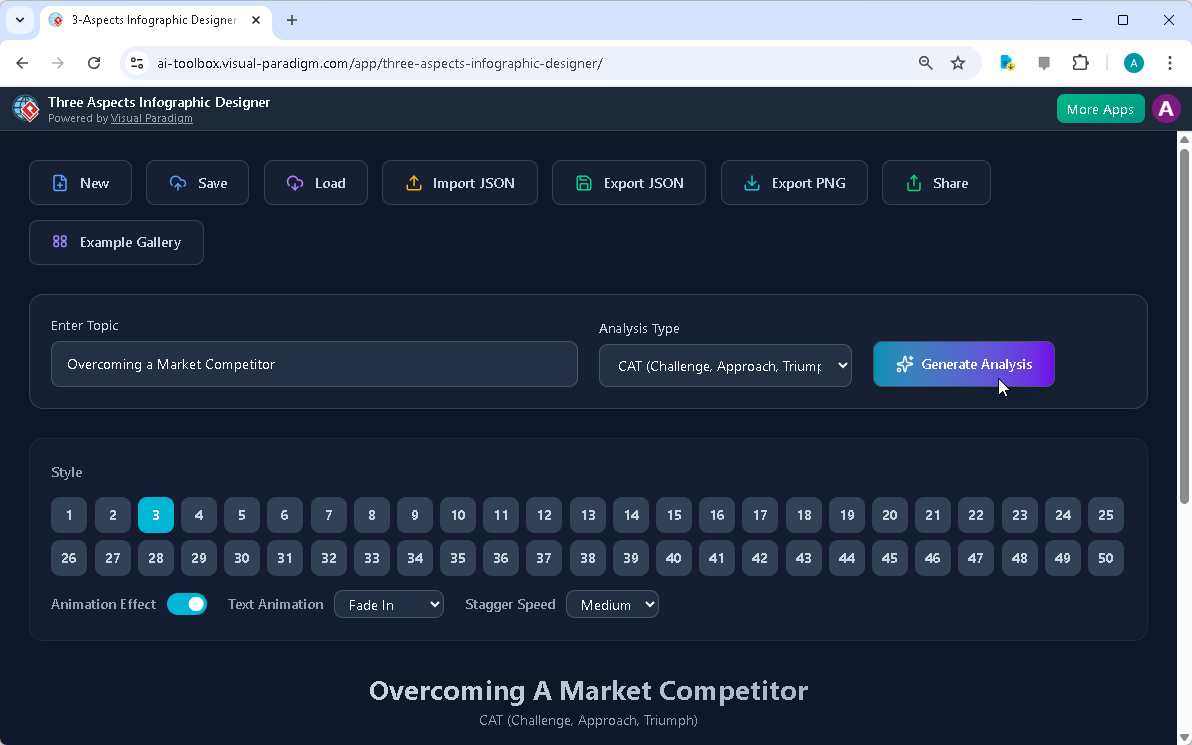
三部分信息图设计工具的工作流程旨在快速且简便。过程从主界面开始,用户输入主题并选择分析类型。如图所示:
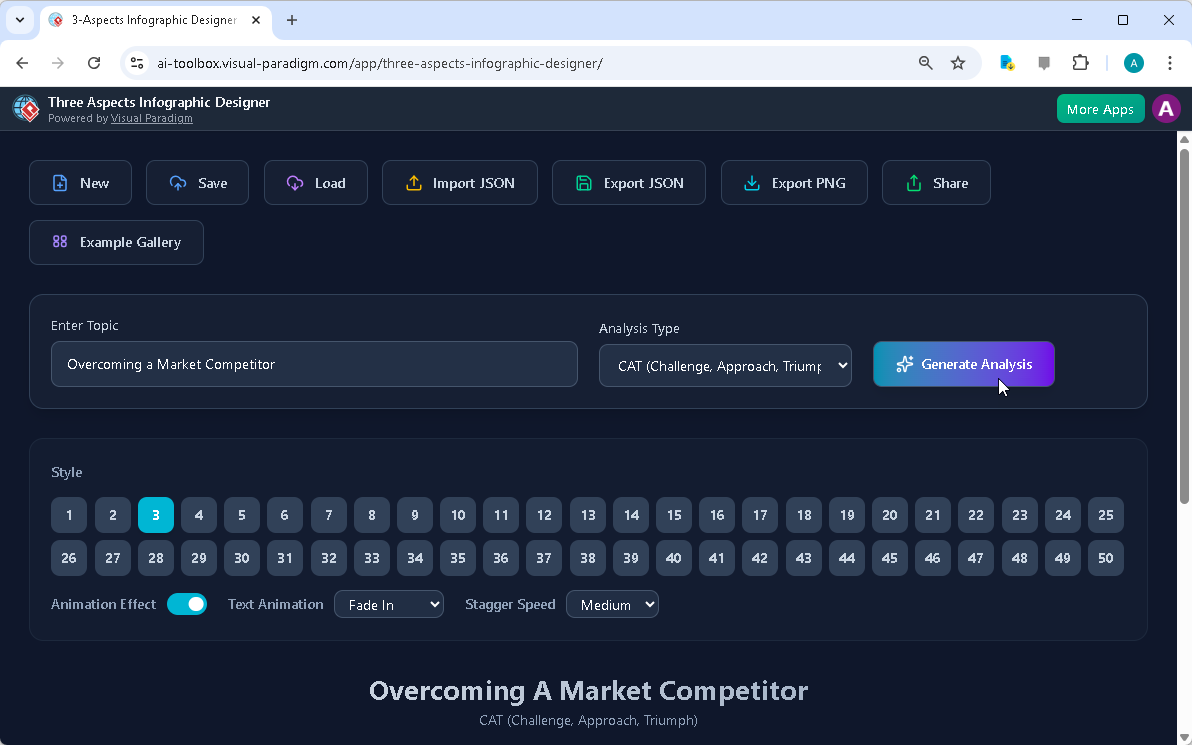
Visual Paradigm’s AI-Powered Three Aspects Infographic Designer's landing screen, where users begin by entering a brief descr

用户输入了主题“战胜市场竞争对手”,并选择了“CAT(挑战、方法、胜利)”框架。这一步至关重要,因为它引导人工智能为三个不同方面生成相关内容。人工智能分析主题和选定的框架,生成全面的分析,并用相关且结构化的信息填充信息图。这种自动化显著减少了创建专业级视觉内容所需的时间和精力。

一旦人工智能生成内容,用户即可根据自身需求自定义信息图。界面提供多种自定义选项,包括不同的视觉风格和文字动画。用户可以从50多种不同布局中选择,以最适合其受众和演示风格的方式呈现三个部分。动画效果(如“淡入”或“滑入”)可进行调整以增强互动性。这种控制程度使用户能够精细调整信息图的视觉吸引力和影响力。能够在设计界面中直接编辑内容,确保最终产品准确反映用户的洞察和数据。

创建专业的CAT信息图

三部分信息图设计工具在为战略分析创建结构化、专业视觉内容方面表现出色。CAT(挑战、方法、胜利)框架是总结商业历程的强大工具。如图所示:
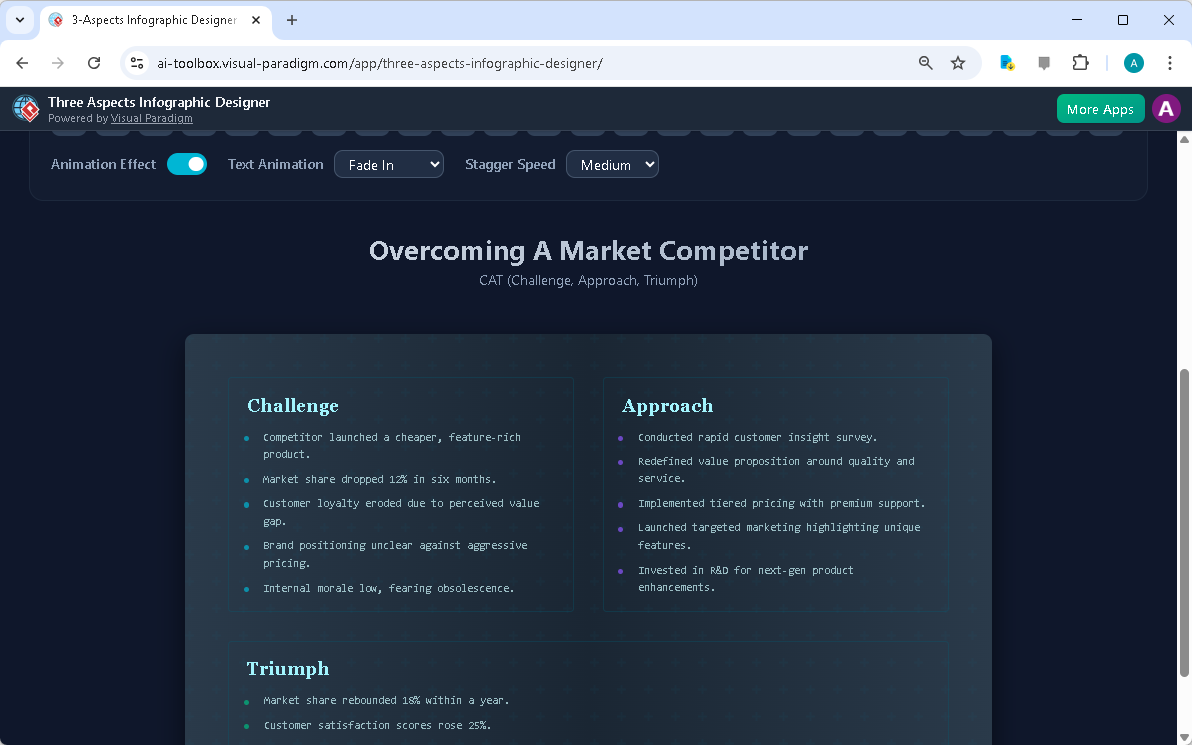
This is the screenshot of Visual Paradigm’s AI-Powered Three Aspects Infographic Designer. In the previous step the user has

该工具生成简洁、结构清晰的信息图,明确区分商业战略的三个关键阶段。“挑战”部分突出显示问题,“方法”部分详细说明解决方案,“胜利”部分展示成果。这种结构使利益相关者能够轻松理解叙事内容和策略的影响。人工智能生成的内容提供了坚实基础,用户可在此基础上进一步完善,添加具体数据、洞察或公司特定细节。

自定义是该设计工具的关键功能。用户可调整布局、选择不同的配色方案,并应用各种文字动画,使信息图更具吸引力。能够预览不同风格,帮助用户找到最适合其内容的视觉呈现方式。例如,正式演示可采用简洁、极简的布局,而创意提案则可能受益于更具动感和色彩的设计。该工具还允许用户将项目保存至云端,确保工作安全且可在任何设备上访问。这种基于云的项目管理对于协作至关重要,确保用户可随时随地工作。

分享并展示您的洞察

一旦信息图完成,与他人分享就变得非常简单。三部分信息图设计工具包含专用的“分享”功能,如图所示:
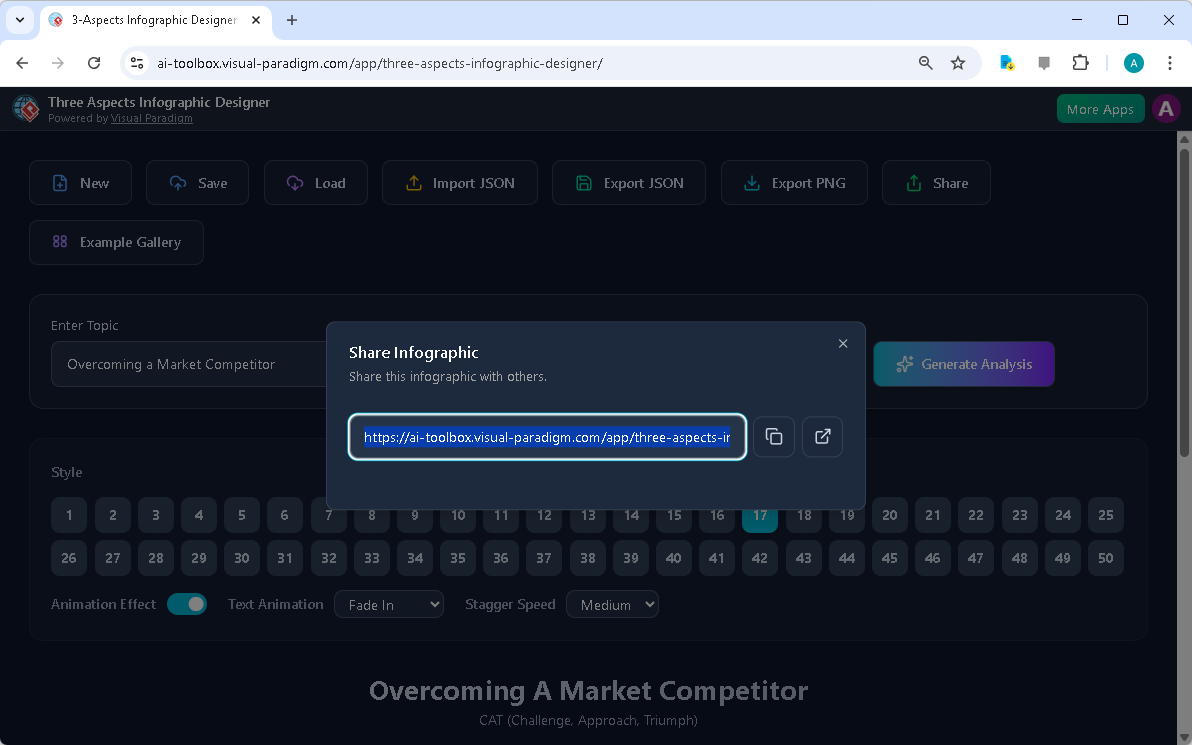
This is the screenshot of Visual Paradigm’s AI-Powered Three Aspects Infographic Designer. It shows the share screen - user c

用户可生成唯一链接,与同事、客户或利益相关者分享其信息图。该链接以只读“查看模式”打开信息图,确保接收者可查看内容但无法编辑。这在演示中尤为实用,因为它提供了清晰、专业的界面来分享洞察。共享链接可轻松复制并通过电子邮件或即时通讯平台发送,便于向广泛受众分发信息图。

分享信息图不仅仅是发送链接,更是促进有效沟通。信息图的视觉特性使复杂信息更易于理解且更令人难忘。通过以清晰、结构化的方式呈现三部分分析,设计工具帮助用户更有效地传达战略思维。这有助于提升决策质量、促进协作并取得更强的业务成果。只需一键即可分享专业且带有动画的信息图,使用户能够以极具吸引力的方式展示其洞察。

结论

Visual Paradigm其人工智能驱动的三部分信息图设计工具是任何需要传达三部分分析的人的强力工具。通过自动化内容生成过程,它使用户能够专注于完善信息并创建视觉吸引力强的演示。该工具的直观界面、丰富的自定义选项以及无缝的分享功能,使其成为商业战略家、产品经理和市场营销专业人士的必备工具。无论您是在分析新产品发布、展示季度业务回顾,还是规划战略方案,该工具都能帮助您创建专业信息图,有效传达您的洞察。

相关链接

准备好将您的复杂想法转化为清晰的视觉故事了吗?立即尝试三部分信息图设计工具,看看它如何彻底改变您的沟通方式。

  • 人工智能五部分信息图设计工具与生成器: AI驱动的5个方面信息图设计师。5个方面信息图设计师将引导您创建全面的、动态的五部分视觉内容,适用于复杂的策略、模型或转型路线图。

  • AI驱动的6个方面信息图设计师: AI驱动的6个方面信息图设计师。立即将复杂策略转化为惊艳的视觉效果。6个方面信息图设计师将引导您通过系统化流程,设计出针对复杂战略沟通的引人入胜的六部分信息图。

  • 8个方面信息图设计师 | AI驱动的战略……: 8个方面信息图设计师。轻松将8因素框架转化为清晰且引人入胜的信息图。由AI驱动,该工具支持8P、8C等模型以及自定义的8方面分析,让您完全掌控每个布局和细节的编辑。

  • 使用AI创建麦肯锡7S信息图 | Visual Paradigm: Visual Paradigm的七方面信息图设计师是任何需要可视化复杂信息的人的终极工具。无论您是在分析组织变革、制定产品战略,还是进行学术研究,这款AI驱动的软件都能让您快速、轻松且专业地完成任务。
使用人工智能驱动的网站构建工具,几分钟内创建专业简历

Discover how Visual Paradigm’s AI-powered site builder creates professional resumes in seconds from simple text prompts.

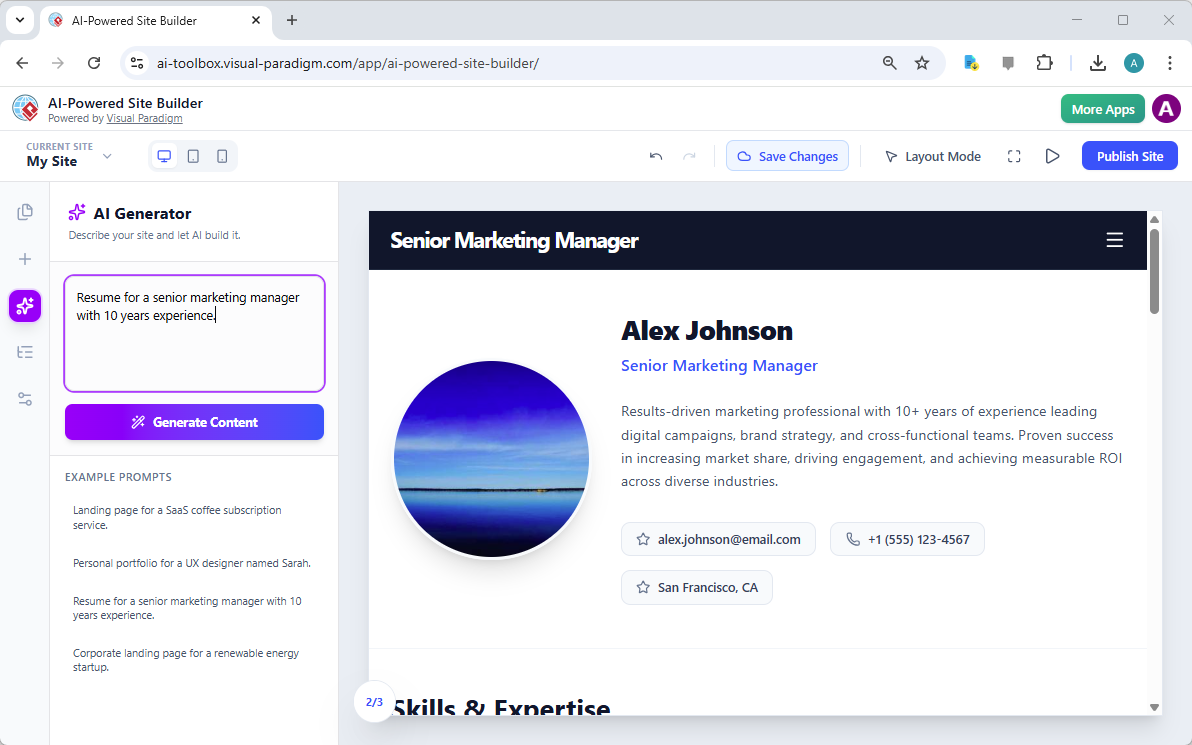
Visual Paradigm的人工智能驱动网站构建工具正在彻底改变专业人士创建在线形象的方式,从着陆页到全面的个人作品集。该工具的核心优势在于能够将简单的文本提示在几秒钟内转化为一个完整设计的多部分网站。这一能力在提供的图片中得到了生动展示,图片展示了一个由提示“拥有10年经验的高级市场营销经理简历”生成的专业简历。结果是一个为“Alex Johnson”打造的精致、现代的数字档案,包含专业头像、引人注目的摘要、联系方式以及技能与专长部分。这不仅仅是一个模板,而是一个可即时自定义和发布的动态AI生成网页。对于寻求现代、专业在线形象的专业人士而言,这一人工智能驱动的网站构建工具提供了一个强大解决方案,消除了传统设计与开发的障碍。

这一变革的核心是AI生成器,该功能允许用户通过简单的文本描述来定义网站的目的。用户输入清晰的提示后,AI会立即构建出完整的页面布局。如图所示,生成的内容并非通用模板,而是根据提示中提到的具体职位和经验水平量身定制。这种智能方法确保了初始草稿高度相关,为后续个性化提供了坚实基础。整个过程直观高效,使用户能够专注于内容优化,而非纠结于设计的复杂性。人工智能与可视化、基于区块的编辑器的这一强大结合,使任何技术水平的人都能轻松创建专业网站。

This is a screenshot of Visual Paradigm's AI-Powered Site Builder. It shows the web page generated from the prompt 'Resume fo

人工智能驱动的网站构建工具如何工作

使用人工智能驱动的网站构建工具创建网站的过程被设计得尽可能简单,利用人工智能的力量处理过程中最复杂的部分:初始设计。工作流程从用户在文本框中定义目标开始。AI随后分析该提示,并生成一个完整的多部分网页。这并非简单的模板;AI能够理解上下文,创建与内容相匹配的布局。例如,一个简历提示会生成一个包含专业标题、个人简介、详细传记和技能部分的页面,所有内容均以视觉上吸引人且逻辑清晰的方式排列。这解决了常常阻碍创作过程的“空白页面”问题。

从提示到发布:无缝的工作流程

一旦AI生成了初始设计,用户将获得一个完全交互式的可视化编辑器。如图所示,界面包含一个中央画布用于显示网站,以及一个包含工具和选项的侧边栏。用户可以开始自定义网站。点击任何元素,例如“高级市场营销经理”标题或“成果导向的市场营销专业人士”文字,将打开一个属性面板。该面板支持直接编辑文本、上传图片以及调整样式。这种“所见即所得”(WYSIWYG)体验确保更改立即可见。用户随后可以通过从侧边栏拖拽的方式添加更多区块,例如“技能与专长”部分或“联系”表单。整个过程设计得直观高效,使用户能在几分钟内构建出专业网站。

人工智能驱动网站构建工具的核心优势

人工智能驱动的网站构建工具为需要快速便捷创建专业网站的用户提供了多项显著优势。最突出的优势是速度。用户无需花费数小时甚至数天从零开始设计网站,只需几分钟即可从一个简单想法转化为一个完整设计且功能齐全的网站。这得益于AI能够基于单一提示生成完整的布局和内容。这种高效性对需要频繁更新在线形象的专业人士,或需要为营销活动创建新着陆页的企业尤为宝贵。

易用性与专业性

另一个重大优势是易用性。该工具无需任何编程知识,使广大用户都能轻松使用。可视化、基于区块的编辑器允许用户通过简单拖放预设组件(如英雄区块、画廊和价格表)来构建复杂页面。这种模式使网页设计民主化,赋能创业者、自由职业者和小型企业主无需雇佣开发人员即可创建专业网站。AI生成的内容也基于现代设计原则,确保最终成果一上线就显得精致专业。用户随后可自定义网站,使其完全契合品牌与个人风格,从而完全掌控最终效果。

实际应用与使用场景

人工智能驱动网站构建工具的多功能性使其适用于广泛的应用场景。简历图片展示了一个强有力的使用案例:为求职者创建专业在线档案。该工具非常适合希望打造个人作品集、企业网站或营销着陆页的任何人。例如,自由职业平面设计师可使用该工具创建展示其最佳作品的个人作品集网站;初创企业创始人可为新产品发布生成着陆页;小型企业主可建立简单网站以吸引本地客户。用户只需向AI生成器提供所需网站的描述,系统便会创建定制化布局。用户随后可自由自定义每一个细节,从文字和图片到配色方案和整体结构。

创建多页面网站

尽管图片展示的是单页简历,但该工具的功能远不止于此。用户可通过在项目中添加新页面来创建多页面网站。例如,专业人士可创建一个包含简历的主“首页”,以及一个包含详细传记的独立“关于”页面。侧边栏中的“页面”标签允许用户在一个项目中管理所有页面,便于构建完整的网站结构。这一功能对于创建能够引导访客从简要介绍逐步深入到详细作品集的全面在线形象至关重要。

结论

Visual Paradigm的人工智能驱动网站构建工具代表了网站创建领域的一次重大飞跃。它使用户能够无需任何技术技能,快速轻松地生成专业且响应式的网站。该工具将简单文本提示转化为完整设计的多部分网页的能力,充分展现了人工智能在简化复杂任务方面的强大实力。高级市场营销经理简历的示例,充分展示了该工具在创建精致专业数字档案方面的有效性。对于任何希望建立强大在线形象的人来说,这一工具提供了一个快速、高效且易于使用的解决方案。

准备好创建属于自己的专业网站了吗?立即试用人工智能驱动的网站构建工具,看看您如何快速将想法变为一个真实运行的专业网站。

立即试用

相关链接

Creating a Professional Resume in Minutes with AI-Powered Site Builder

Discover how Visual Paradigm’s AI-powered site builder creates professional resumes in seconds from simple text prompts.

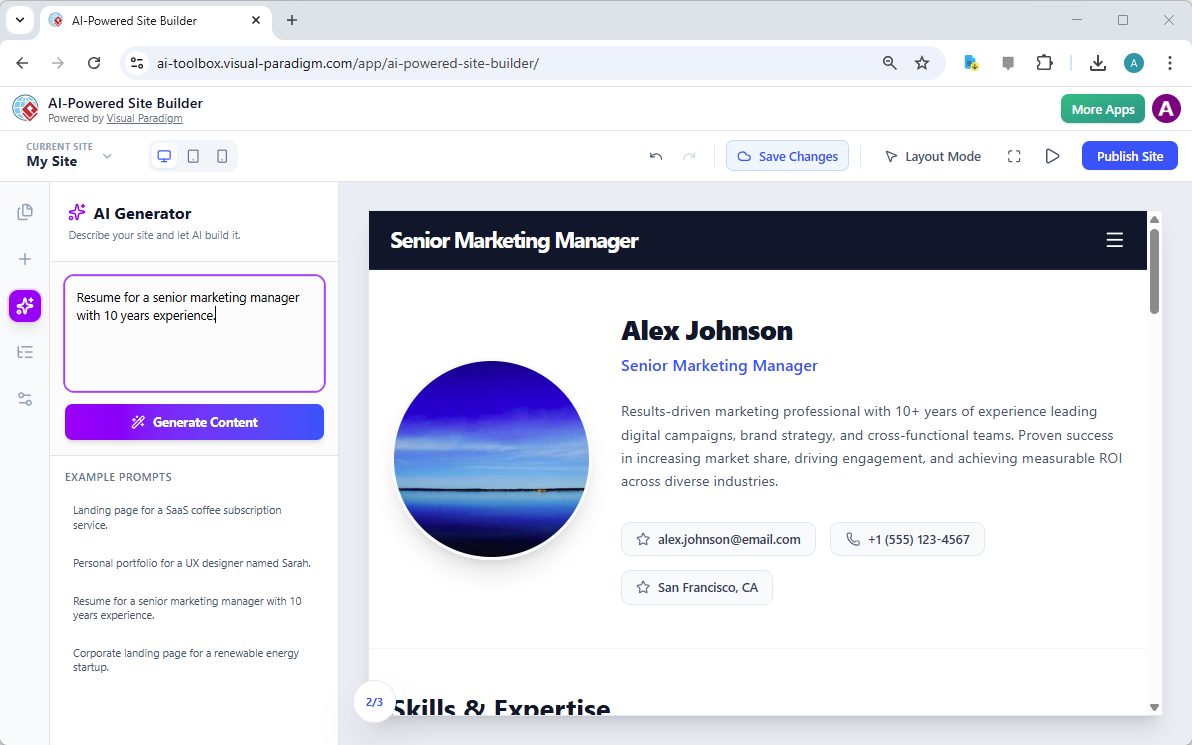
Visual Paradigm’s AI-Powered Site Builder is revolutionizing the way professionals create their online presence, from landing pages to comprehensive portfolios. The tool’s core strength lies in its ability to transform a simple text prompt into a fully designed, multi-section website in seconds. This capability is vividly demonstrated in the provided image, which showcases a professional resume generated from the prompt “Resume for a senior marketing manager with 10 years experience.” The result is a polished, modern digital profile for “Alex Johnson,” complete with a professional headshot, a compelling summary, contact information, and a section for skills and expertise. This is not just a template; it is a dynamic, AI-generated webpage that can be customized and published instantly. For professionals seeking a modern, professional online identity, this AI-powered site builder offers a powerful solution that eliminates the traditional barriers of design and development.

At the heart of this transformation is the AI Generator, a feature that allows users to define their website’s purpose with a simple text description. The user inputs a clear prompt, and the AI instantly constructs a complete page layout. The generated content, as seen in the image, is not generic; it is tailored to the specific role and experience level mentioned in the prompt. This intelligent approach ensures that the initial draft is highly relevant, providing a strong foundation for further personalization. The process is intuitive and efficient, allowing users to focus on refining their content rather than struggling with the mechanics of design. This powerful combination of AI and a visual, block-based editor makes the creation of professional websites accessible to anyone, regardless of their technical skills.

This is a screenshot of Visual Paradigm's AI-Powered Site Builder. It shows the web page generated from the prompt 'Resume fo

How the AI-Powered Site Builder Works

The process of creating a website with the AI-Powered Site Builder is designed to be as simple as possible, leveraging the power of artificial intelligence to handle the most complex part of the process: the initial design. The workflow begins with the user defining their goal in a text box. The AI then analyzes this prompt and generates a complete, multi-section webpage. This is not a simple template; the AI understands the context and creates a layout that is appropriate for the content. For instance, a resume prompt generates a page with a professional header, a profile section, a detailed bio, and a skills section, all arranged in a visually appealing and logical manner. This eliminates the “blank page” problem that often hinders the creative process.

From Prompt to Publication: A Seamless Workflow

Once the AI has generated the initial design, the user is presented with a fully interactive, visual editor. The interface, as seen in the image, features a central canvas where the website is displayed and a sidebar with tools and options. The user can then begin to customize the site. Clicking on any element, such as the “Senior Marketing Manager” title or the “Results-driven marketing professional” text, opens a properties panel. This panel allows for direct editing of the text, uploading of images, and adjustment of styles. This “what you see is what you get” (WYSIWYG) experience ensures that changes are immediate and visible. The user can then add more blocks, such as a “Skills & Expertise” section or a “Contact” form, by dragging and dropping them from the sidebar. The entire process is designed to be intuitive and efficient, allowing users to build a professional website in minutes.

Key Benefits of the AI-Powered Site Builder

The AI-Powered Site Builder offers several significant advantages for users who need a professional website quickly and easily. The most prominent benefit is speed. Instead of spending hours or days designing a site from scratch, users can go from a simple idea to a fully designed, functional website in a matter of minutes. This is made possible by the AI’s ability to generate a complete layout and content based on a single prompt. This efficiency is particularly valuable for professionals who need to update their online presence frequently or for businesses that require new landing pages for marketing campaigns.

Accessibility and Professionalism

Another major benefit is accessibility. The tool requires no coding knowledge, making it accessible to a broad audience. The visual, block-based editor allows users to build complex pages by simply dragging and dropping pre-designed components, such as hero sections, galleries, and pricing tables. This approach democratizes web design, empowering entrepreneurs, freelancers, and small business owners to create professional websites without hiring a developer. The AI-generated content is also built on modern design principles, ensuring that the final product looks polished and professional right out of the box. Users can then customize the site to perfectly match their brand and personal style, giving them full control over the final outcome.

Practical Applications and Use Cases

The versatility of the AI-Powered Site Builder makes it suitable for a wide range of applications. The image of the resume demonstrates one powerful use case: creating a professional online profile for a job seeker. This tool is ideal for anyone looking to build a personal portfolio, a business website, or a marketing landing page. For example, a freelance graphic designer could use the tool to create a portfolio site showcasing their best work. A startup founder could generate a landing page for a new product launch. A small business owner could build a simple website to attract local customers. The AI generator can be prompted with a description of the desired site, and it will create a tailored layout. The user then has the freedom to customize every detail, from the text and images to the color scheme and overall structure.

Creating a Multi-Page Website

While the image shows a single-page resume, the tool’s capabilities extend beyond a single page. Users can create multi-page websites by adding new pages to their project. For instance, a professional might create a main “Home” page with a resume and a separate “About” page with a detailed biography. The “Pages” tab in the sidebar allows users to manage all pages within a single project, making it easy to structure a complete website. This feature is essential for creating a comprehensive online presence that can guide visitors through a narrative, from a brief introduction to a detailed portfolio.

Conclusion

The AI-Powered Site Builder from Visual Paradigm represents a significant leap forward in website creation. It empowers users to generate professional, responsive websites quickly and easily, without requiring any technical skills. The tool’s ability to transform a simple text prompt into a fully designed, multi-section webpage is a testament to the power of AI in simplifying complex tasks. The example of the senior marketing manager’s resume demonstrates the tool’s effectiveness in creating a polished and professional digital profile. For anyone looking to establish a strong online presence, this tool offers a fast, efficient, and accessible solution.

Ready to create your own professional website? Try the AI-Powered Site Builder today and see how quickly you can turn your ideas into a live, professional website.

Try Now

Related Links

Visualizing Business Strategy: Creating a CAT Infographic with AI

Visual Paradigm’s AI tool transforms business strategies into engaging CAT infographics, simplifying complex narratives into clear visual stories.

Visual Paradigm’s AI-Powered Infographic Designer is a professional tool for transforming complex business narratives into compelling visual stories. This application enables users to generate content-rich, structured infographics based on a three-part framework, such as CAT (Challenge, Approach, Triumph), in minutes. The process begins with a simple input: a topic and a chosen analysis type. The AI then analyzes this information and populates a visually engaging infographic with relevant content, eliminating the need for manual design. This tool is ideal for professionals seeking to communicate strategic insights, such as overcoming a market competitor, with clarity and impact. Its intuitive interface and powerful AI capabilities make it an essential asset for anyone who needs to present a three-part analysis.

Creating a professional infographic from scratch is often a time-consuming process. It requires not only design skills but also a deep understanding of the subject matter to structure the information effectively. The Three Aspects Infographic Designer addresses these challenges by automating the core content generation. Users can focus on refining the message rather than crafting the visual presentation. The tool’s AI engine generates relevant content for each of the three aspects, providing a strong starting point for any analysis. This approach is particularly beneficial for business strategists, product managers, and marketing professionals who need to convey complex ideas quickly and clearly. By leveraging AI, the designer empowers users to create polished, professional visuals that enhance communication and drive results.

Quick Summary

  • AI-Powered tool for creating 3-part infographics.

  • Generate content for frameworks like CAT (Challenge, Approach, Triumph).

  • Choose from 50+ customizable styles and animations.

  • Save, share, and present your infographics professionally.

How the Three Aspects Infographic Designer Works

The workflow of the Three Aspects Infographic Designer is designed for speed and simplicity. The process begins on the main interface, where users enter a topic and select an analysis type. As shown in:

Visual Paradigm’s AI-Powered Three Aspects Infographic Designer's landing screen, where users begin by entering a brief descr

The user has input the topic “Overcoming a Market Competitor” and selected the “CAT (Challenge, Approach, Triumph)” framework. This initial step is crucial, as it guides the AI to generate relevant content for each of the three distinct aspects. The AI analyzes the topic and the selected framework to produce a comprehensive analysis, populating the infographic with content that is both relevant and structured. This automation significantly reduces the time and effort required to create a professional-quality visual.

Once the AI generates the content, users can customize the infographic to fit their specific needs. The interface provides a range of customization options, including various visual styles and text animations. Users can select from 50+ different layouts to present the three aspects in a way that best suits their audience and presentation style. The animation effects, such as “Fade In” or “Slide Up,” can be adjusted to enhance engagement. This level of control allows users to fine-tune the visual appeal and impact of their infographic. The ability to edit the content directly within the design interface ensures that the final product accurately reflects the user’s insights and data.

Creating a Professional CAT Infographic

The Three Aspects Infographic Designer excels at creating structured, professional visuals for strategic analysis. The CAT (Challenge, Approach, Triumph) framework is a powerful tool for summarizing a business journey. As demonstrated in:

This is the screenshot of Visual Paradigm’s AI-Powered Three Aspects Infographic Designer. In the previous step the user has

The tool generates a clean, well-organized infographic that clearly delineates the three key stages of a business strategy. The “Challenge” section highlights the problem, the “Approach” section details the solution, and the “Triumph” section showcases the results. This structure makes it easy for stakeholders to understand the narrative and the impact of the strategy. The AI-generated content provides a solid foundation, which users can then refine to add specific data, insights, or company-specific details.

Customization is a key feature of the designer. Users can adjust the layout, choose different color schemes, and apply various text animations to make the infographic more engaging. The ability to preview different styles allows users to find the best visual representation for their content. For example, a more formal presentation might use a clean, minimalist layout, while a creative pitch could benefit from a more dynamic and colorful design. The tool also allows users to save their projects to the cloud, ensuring that their work is secure and accessible from any device. This cloud-based project management is essential for collaboration and ensures that users can work on their infographics from anywhere.

Sharing and Presenting Your Insights

Once an infographic is complete, sharing it with others is a simple process. The Three Aspects Infographic Designer includes a dedicated “Share” function, as shown in:

This is the screenshot of Visual Paradigm’s AI-Powered Three Aspects Infographic Designer. It shows the share screen - user c

Users can generate a unique URL to share their infographic with colleagues, clients, or stakeholders. This link opens the infographic in a read-only “viewer mode,” which ensures that the recipient can view the content without the ability to edit it. This is particularly useful for presentations, as it provides a clean, professional interface for sharing insights. The shared link can be easily copied and sent via email or messaging platforms, making it simple to distribute the infographic to a wide audience.

Sharing an infographic is more than just sending a link; it’s about enabling effective communication. The visual nature of the infographic makes complex information more digestible and memorable. By presenting a three-part analysis in a clear, structured format, the designer helps users communicate their strategic thinking more effectively. This can lead to better decision-making, improved collaboration, and stronger business outcomes. The ability to share a professional, animated infographic with a single click makes it easy for users to present their insights in a compelling way.

Conclusion

Visual Paradigm’s AI-Powered Three Aspects Infographic Designer is a powerful tool for anyone who needs to communicate a three-part analysis. By automating the content generation process, it allows users to focus on refining their message and creating a visually appealing presentation. The tool’s intuitive interface, extensive customization options, and seamless sharing capabilities make it an essential asset for business strategists, product managers, and marketing professionals. Whether you are analyzing a new product launch, presenting a quarterly business review, or outlining a strategic plan, this tool can help you create a professional infographic that effectively communicates your insights.

Related Links

Ready to transform your complex ideas into clear, visual stories? Try the Three Aspects Infographic Designer today and see how it can revolutionize your communication.

  • AI 5- Aspects Infographic Designer & Generator: AI -Powered 5- Aspects Infographic Designer .The 5- Aspects Infographic Designer guides you through creating comprehensive, animated five-part visuals suitable for complex strategies, models, or transformation roadmaps.

  • AI -Powered 6- Aspects Infographic Designer: AI -Powered 6- Aspects Infographic Designer . Transform Complex Strategies into Stunning Visuals Instantly.The 6- Aspects Infographic Designer leads you through a methodical process for designing compelling six-part infographics tailored to complex strategic communication.

  • 8-Aspects Infographic Designer | AI-Powered Strategic …: 8- Aspects Infographic Designer Effortlessly turn 8-factor frameworks into clear, compelling infographics . Powered by AI , this tool supports models like 8P, 8C, and custom 8- aspect analyses, giving you complete control to edit every layout and detail.

  • Create McKinsey 7S Infographics with AI | Visual Paradigm: The Seven Aspects Infographic Designer from Visual Paradigm is the ultimate tool for anyone who needs to visualize complex information. Whether you’re analyzing organizational change, developing a product strategy, or conducting academic research, this AI -powered software makes it fast, easy, and professional.