使用 Visual Paradigm Online 的 Fliplify 创建精美翻页书的全面教程

简介

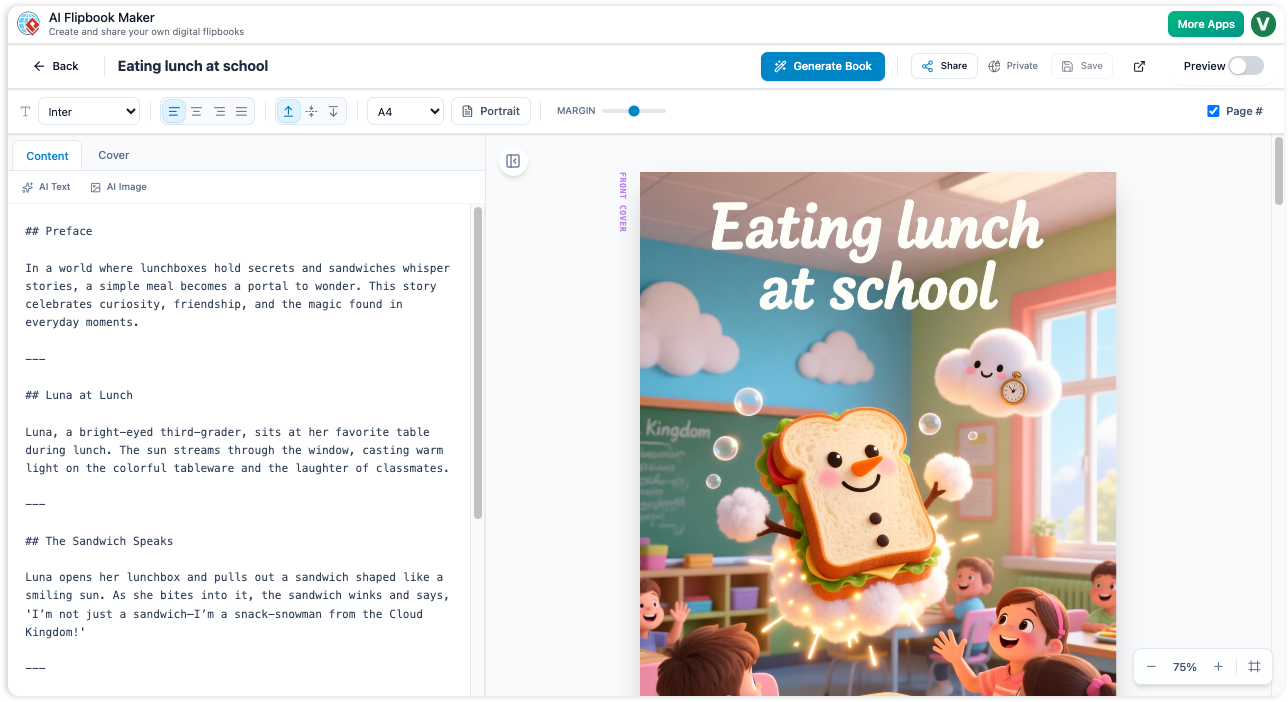
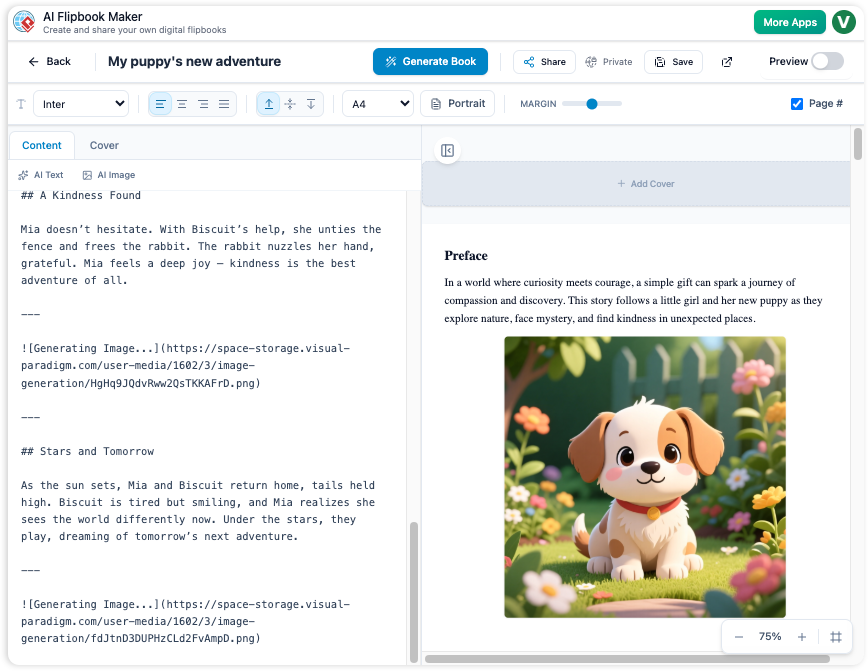
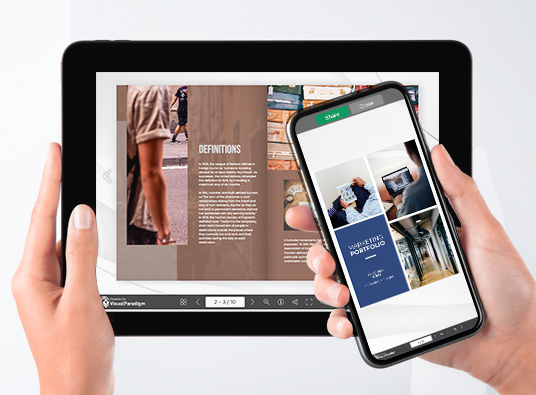
Fliplify 是 Visual Paradigm Online 的一部分,是一款功能强大的工具,旨在帮助用户创建引人入胜的数字翻页书和幻灯片。无论您是从零开始,还是上传现有内容,Fliplify 都能提供无缝且用户友好的体验。本教程将引导您完成创建精美翻页书的过程,突出其关键功能、应用领域以及 Fliplify 的独特优势。

为什么选择 Fliplify?

  1. 用户友好的界面:

    • Fliplify 提供直观且用户友好的界面,使用户无需具备广泛的技术知识即可轻松创建外观专业的翻页书。24.
  2. 内容创作的多功能性:

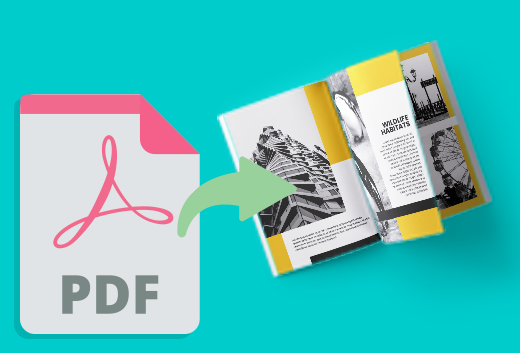
    • 用户可以从多种来源创建翻页书,包括 PDF、PowerPoint 等。这种多功能性使得各种内容都能转化为引人入胜的翻页书。24.
  3. 自定义选项:

    • Fliplify 使用户能够自定义翻页书的各个方面,从版式设计到交互元素。这确保了呈现效果精致专业,完全符合特定需求。24.
  4. 交互式元素:

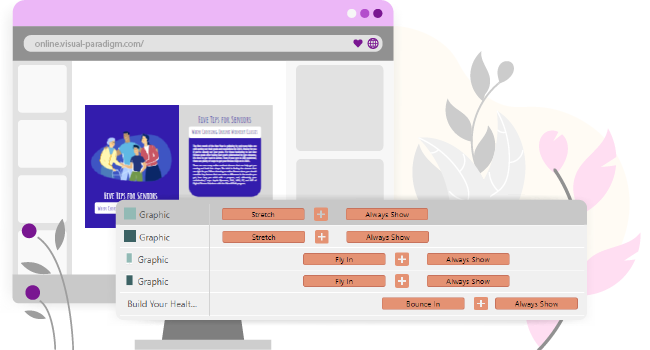
    • 该工具支持添加交互式元素,如注释、高亮和评论,从而提升内容的互动性和理解度。25.
  5. 无缝集成:

    • Fliplify 与 Visual Paradigm Online 的其他功能无缝集成,为您的所有创意需求提供全面的解决方案。这种集成确保了流畅且高效的工作体验。26.

应用领域

  1. 商业演示:

    • 创建引人入胜且互动性强的商业演示,吸引观众并有效传达关键信息。
  2. 教育内容:

    • 开发视觉吸引力强且互动性强的教育材料,提升学生的学习体验。
  3. 营销材料:

    • 设计数字宣传册、产品目录及其他营销材料,使其脱颖而出并吸引潜在客户。
  4. 个人项目:

    • 使用 Fliplify 进行个人项目,例如制作相册、旅行日记,或任何需要互动性和视觉吸引力的内容。

Fliplify 的独特之处

  1. 全面的工具包:

    • Fliplify 提供了一套强大的工具,用于创建、编辑和发布翻页书。从基础设计元素到高级自定义选项,Fliplify 提供了打造精美翻页书所需的一切。26.
  2. 易于使用:

    • 该平台设计简洁易用,界面直观,让用户无需繁琐的软件安装即可专注于创意项目。24.
  3. 高质量输出:

    • Fliplify 确保发布的翻页书质量上乘,拥有专业外观的设计和互动元素,提升用户体验。24.
  4. 客户支持:

    • Visual Paradigm Online 提供出色的客户支持,帮助用户解决在使用翻页书功能时可能遇到的任何问题或疑问27.

功能列表

  1. 可定制模板:

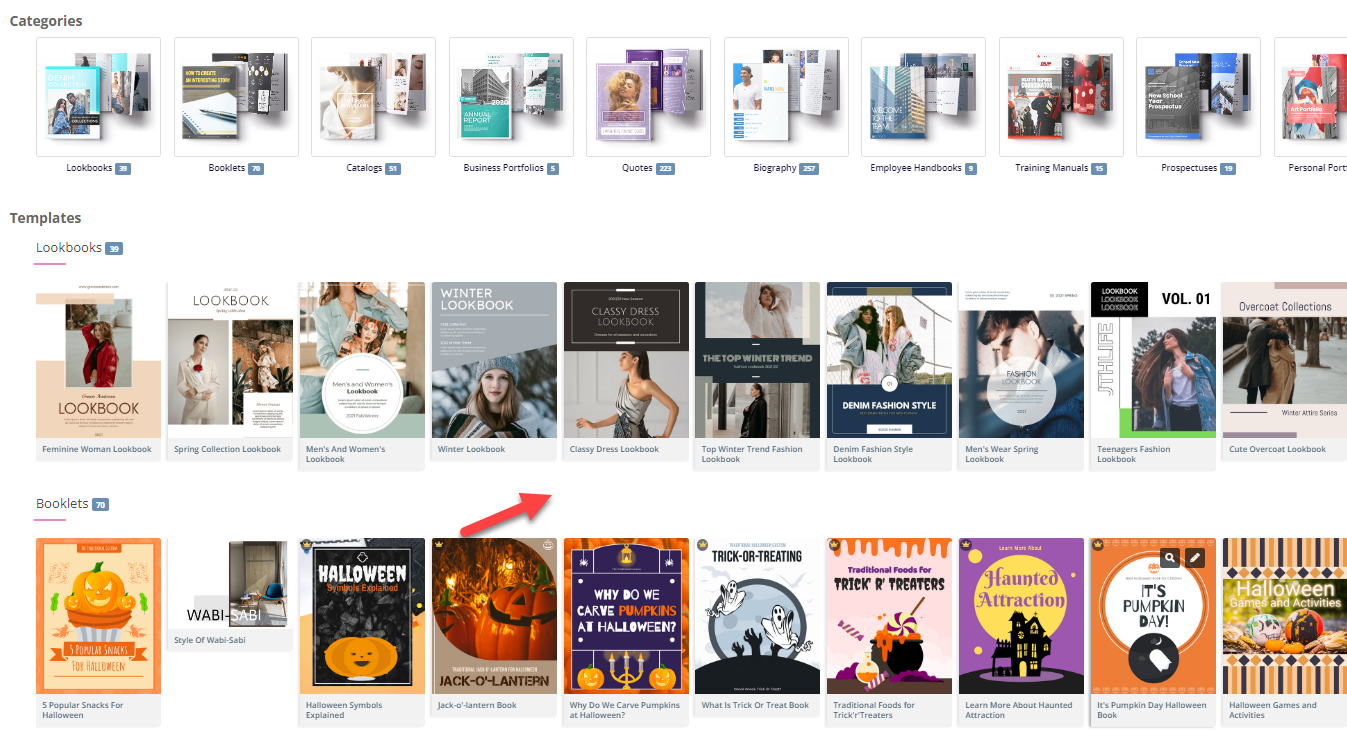
    • 从多种可定制模板中选择,开始您的翻页书项目。这些模板为您的设计提供基础,可轻松定制以满足您的特定需求26.
  2. 互动注释:

    • 在您的翻页书中添加注释、高亮和评论,以增强参与度和理解力。这些互动元素使内容更加生动且个性化25.
  3. 多种文件格式支持:

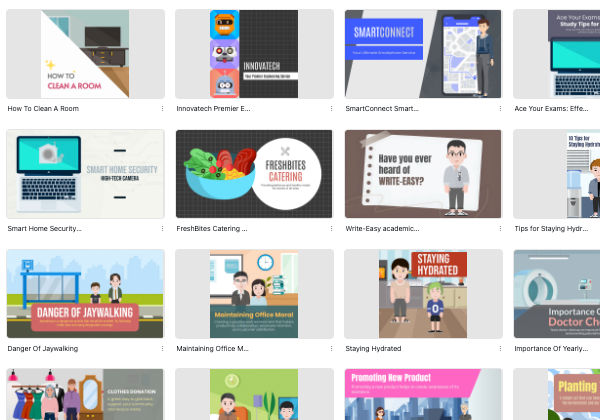
    • 将各种文件类型转换为翻页书,包括 PDF、PowerPoint、电子书和电子表格。这种多功能性使各种内容都能转化为引人入胜的翻页书27.
  4. 高级设计工具:

    • 使用高级设计工具来自定义翻页书的布局、设计和互动元素。这些工具确保呈现效果精致且专业26.
  5. 与 Visual Paradigm Online 的无缝集成:

    • Fliplify 与 Visual Paradigm Online 的其他功能无缝集成,为您的所有创意需求提供全面的解决方案。这种集成确保了流畅且高效的工作体验26.

结论

Visual Paradigm Online 的 Fliplify 以其强大且用户友好的特性,成为制作精美翻页书的出色工具。凭借其直观的界面、多样的内容创作选项以及先进的设计工具,Fliplify 提供了创建引人入胜且互动性强的翻页书所需的一切。无论是用于商业演示、教育内容、营销材料还是个人项目,Fliplify 都能提供流畅且高效的操作体验,是满足您所有翻页书需求的理想选择。

使用 Visual Paradigm 的 AniFuzion 和 Fliplify 创建精彩动画翻页书的全面教程

简介

制作动画翻页书将动画的吸引力与翻页书的互动体验相结合。Visual Paradigm 的 AniFuzion 和 Fliplify 工具提供了一种无缝的方式来实现这一目标,使用户能够创建出引人注目的、独具特色的精彩内容。本教程将引导您完成制作动画翻页书的全过程,突出说明为何这些工具是绝佳选择,以及它们如何让您的内容更具吸引力和互动性。

为何选择 Visual Paradigm 的 AniFuzion 和 Fliplify?

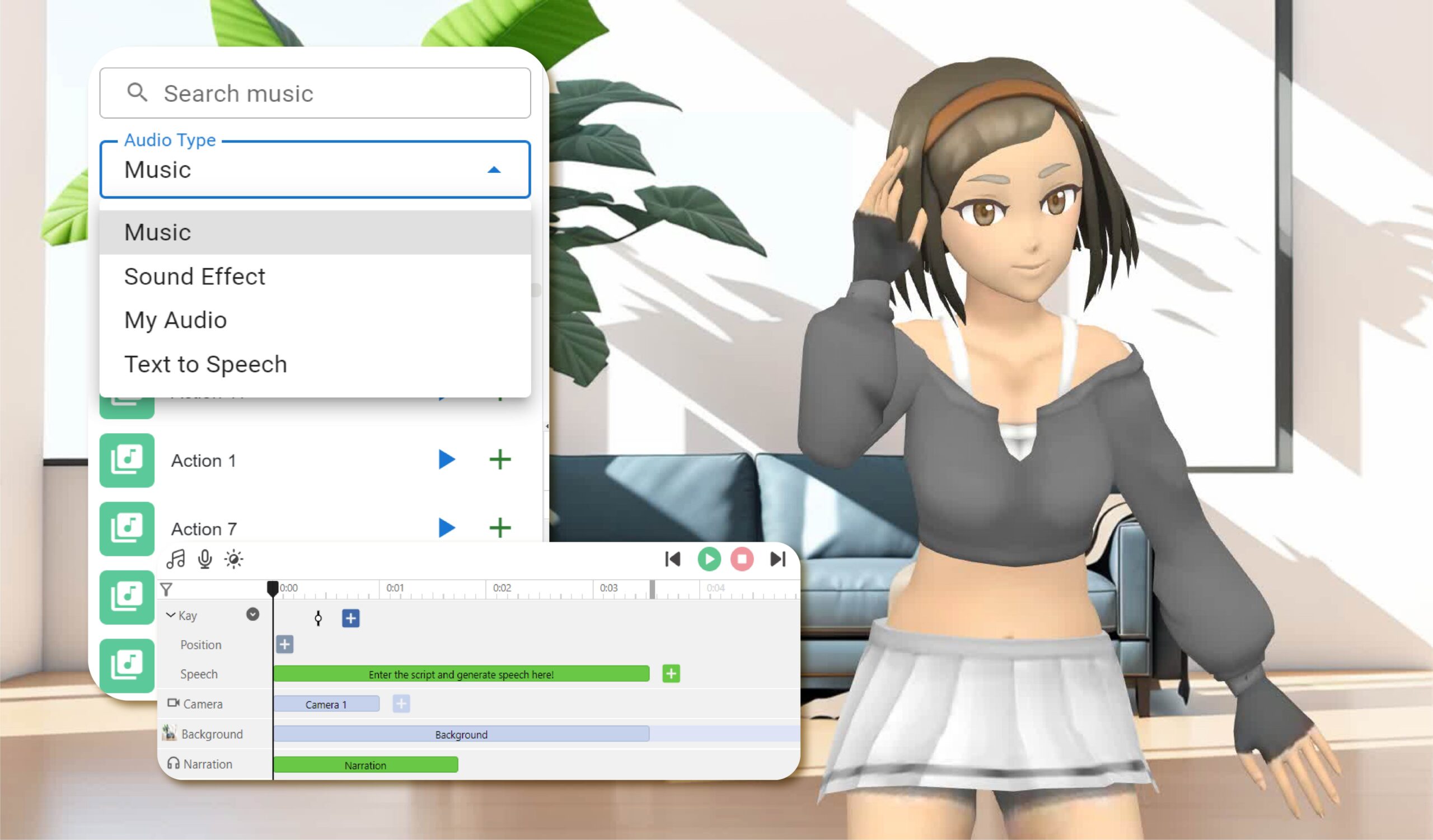
Elevate Your Animations with Sound in AniFuzion - AniFuzion

  1. 用户友好的界面:

    • AniFuzion 和 Fliplify 均提供直观的界面,无论用户的技术水平如何,都能轻松创建专业品质的动画和翻页书2024.
  2. 全面的工具包:

    • 这些工具提供丰富的功能,包括 2D 和 3D 动画、可自定义模板以及交互式元素,确保用户能够拥有创建吸引人内容所需的一切2126.
  3. 无缝集成:

    • AniFuzion 和 Fliplify 可与彼此以及 Visual Paradigm Online 的其他功能无缝集成,为您的所有创意需求提供一个全面的解决方案2126.
  4. 高质量输出:

    • 这些工具确保最终输出具有高质量,动画和翻页书经过精心打磨,外观专业,能够吸引观众2024.
  5. 客户支持:

    • Visual Paradigm 提供出色的客户支持,帮助用户解决在使用工具过程中可能遇到的任何问题或疑问27.

动画翻页书如何让内容更具吸引力和参与感

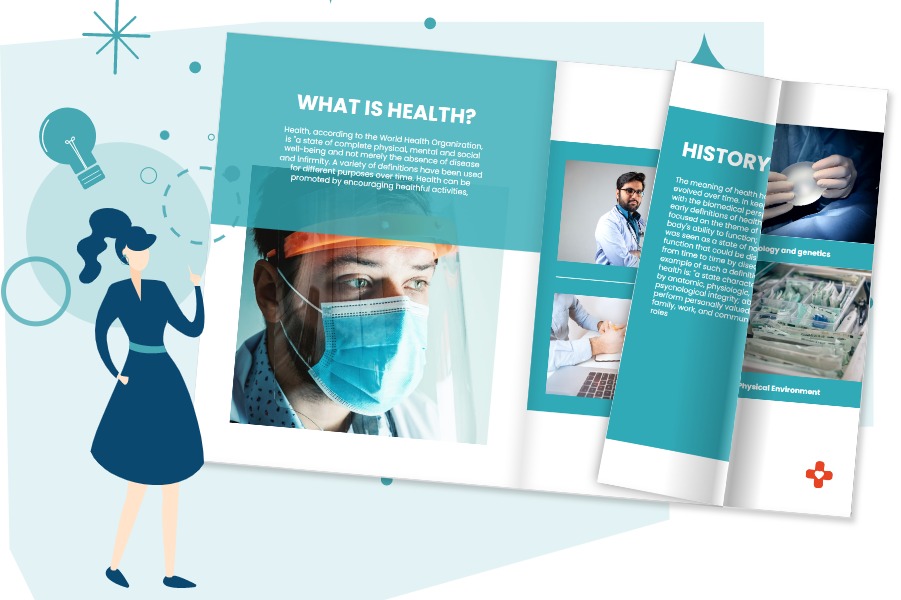
Flipping Book Animation Software - Visual Paradigm Blog

  1. 视觉吸引力:

    • 动画翻页书将动画的视觉吸引力与翻页书的互动体验相结合,使内容更具吸引力和视觉美感20.
  2. 互动体验:

    • 翻页书的互动特性使用户能够以更动态的方式参与内容,从而提升理解和记忆效果25.
  3. 讲故事:

    • 动画翻页书使用户能够以更具吸引力的方式讲述故事,通过动画让角色和场景栩栩如生21.
  4. 多功能性:

    • 动画翻页书可用于多种用途,从教育内容、商业演示到营销材料和个人项目2426.

教程:使用 AniFuzion 和 Fliplify 制作动画翻页书

Visual Paradigm Flipbook Maker: Elevate Your Digital Presence with Dynamic and Engaging Flipbooks - Visual Paradigm Blog

步骤 1:使用 AniFuzion 创建动画
  1. 注册并登录:

    • 注册 Visual Paradigm Online 账户并登录,以访问 AniFuzion
  2. 选择一个模板或从零开始:

    • 浏览可用的模板,或选择从零开始。模板为您的动画提供基础,而从零开始则允许更多自定义21.
  3. 设计您的动画:

    • 使用直观的界面来设计您的动画。添加角色、场景和道具,并自定义它们的外观和动作。利用2D和3D动画功能将您的构想变为现实20.
  4. 添加互动元素:

    • 融入注释、高亮和评论等互动元素,以增强参与度和理解度25.
  5. 预览并导出:

    • 预览您的动画,确保符合您的期望。满意后,以所需格式导出动画20.
步骤2:使用Fliplify创建翻页书
  1. 上传您的动画:

    • 登录Visual Paradigm Online并访问Fliplify。上传您导出的动画,用作翻页书的内容24.
  2. 选择一个模板或从零开始:

    • 浏览可用的翻页书模板,或选择从零开始。模板为您的翻页书提供基础,而从零开始则允许更多自定义26.
  3. 设计你的翻页书:

    • 使用直观的界面来设计你的翻页书。添加页面,自定义布局,并加入互动元素,例如注释和高亮显示24.
  4. 整合你的动画:

    • 将你的动画整合到翻页书中,确保它与其余内容流畅衔接。利用 Fliplify 的互动功能,提升动画的吸引力和理解度25.
  5. 预览并发布:

    • 预览你的翻页书,确保它符合你的期望。满意后,发布翻页书并与你的受众分享24.

结论

使用 Visual Paradigm 的 AniFuzion 和 Fliplify 制作动画翻页书,是让内容更具吸引力和互动性的有力方式。凭借用户友好的界面、全面的工具包、无缝集成以及高质量的输出,这些工具提供了创建引人入胜的动画翻页书所需的一切。无论是用于教育内容、商业演示、营销材料还是个人项目,AniFuzion 和 Fliplify 都能提供流畅且高效的操作体验,是满足你所有创意需求的理想选择。

创建翻页书并将其整理成精美虚拟书架的全面指南

简介

使用 Visual Paradigm Online 创建翻页书是一种无缝且引人入胜的内容展示方式。无论您是在设计教育材料、商业演示还是个人项目,Visual Paradigm 的工具都提供了一套全面的功能,帮助您将创意变为现实。本指南将引导您完成创建翻页书的过程,融入 2D 和 3D 动画、文本转语音(TTS)以及 AI 人声,并将它们整理成一个精美的虚拟书架。

Fliplify:Visual Paradigm Online的翻页书设计大师| 學習EA, Agile & UML 和使用Visual Paradigm 技能- 點部落

第一步:开始使用 Visual Paradigm Online

  1. 注册并登录:

    • 访问 Visual Paradigm Online 网站,如果您还没有账户,请注册一个。
    • 登录以访问全套工具,包括用于创建翻页书的 Fliplify 和用于添加动画的 AniFuzion。
  2. 探索仪表板:

    • 熟悉仪表板,它提供了对各种工具和功能的访问。
    • 导航至 Fliplify 部分,开始创建您的翻页书。

Make Your Flipbook Stand Out with AniFuzion - Fliplify

第二步:使用 Fliplify 创建翻页书

  1. 选择模板或从零开始:

    • 浏览可用的翻页书模板,或选择从零开始。模板为您的设计提供基础,而从零开始则允许更多自定义。26.
  2. 设计您的翻页书:

    • 使用直观的界面设计您的翻页书。添加页面,自定义布局,并融入注释、高亮和评论等互动元素。24.
    • 使用高级设计工具,确保呈现效果精致且专业。
  3. 集成 2D 和 3D 动画:

    • 使用 AniFuzion 创建或导入 2D 和 3D 动画。这些动画可以无缝集成到您的翻页书中,以增强互动性和视觉吸引力。20.
    • 确保动画与内容的其他部分流畅衔接,利用Fliplify的交互功能来增强理解25.

Visual Paradigm Online: Revolutionizing Digital Content Creation - Cybermedian

  1. 添加文本转语音(TTS)和AI真人语音:

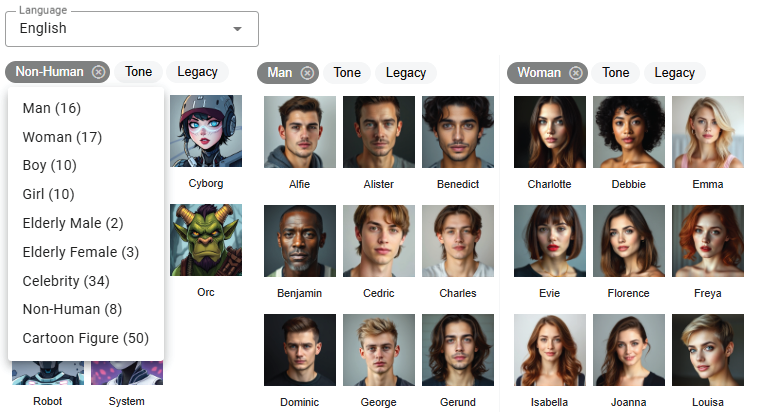
    • 使用TTS和AI真人语音为您的翻页书配音。此功能可增强交互体验,使内容更具吸引力且更易访问20.
    • 自定义语音设置,以匹配您的翻页书的语气和风格

Bring Your Characters to Life with Enhanced TTS Support - Visual Paradigm  News

  1. 预览并发布:

    • 预览您的翻页书,确保其符合您的期望。如有必要,请对设计和内容进行调整
    • 满意后,发布翻页书并与您的受众分享24.

步骤3:将翻页书整理到虚拟书架中

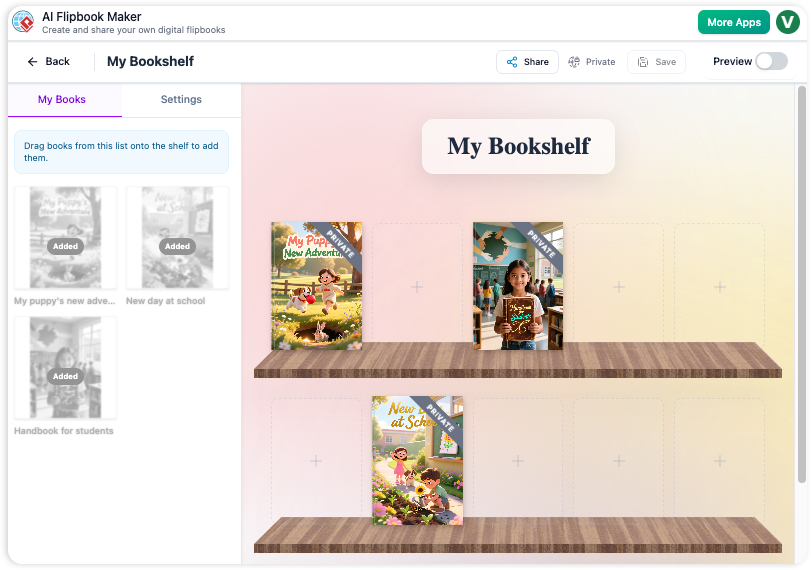
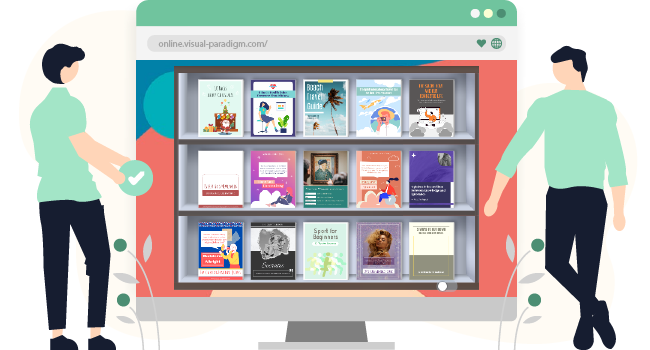
  1. 创建一个虚拟书架:

    • 进入Visual Paradigm Online中的虚拟书架功能
    • 创建一个新书架,并自定义其外观以匹配您的品牌或个人风格
  2. 将翻页书添加到书架中:

    • 将您发布的翻页书添加到虚拟书架中。按类别、主题或其他对您的内容有意义的标准进行分类
    • 自定义每个翻页书的缩略图和描述,使其视觉上更具吸引力且信息丰富
  3. 自定义书架布局:

    • 以视觉上吸引人的方式排列书架上的翻页书。使用布局工具调整翻页书的位置和间距
    • 添加交互元素,例如相关内容或额外资源的链接,以提升用户体验
  4. 分享您的虚拟书架:

    • 通过提供链接或将其嵌入您的网站,与您的受众分享您的虚拟书架。
    • 通过社交媒体、电子邮件通讯和其他营销渠道推广您的书架,以触达更广泛的受众。

步骤4:通过互动功能提升参与度

  1. 互动注释:

    • 在您的翻页书中添加注释、高亮和评论,以增强参与度和理解力。这些互动元素使内容更加生动且个性化。25.
  2. 测验与投票:

    • 在您的翻页书中加入测验和投票,以吸引受众并收集反馈。此功能特别适用于教育内容和商业演示。
  3. 多媒体集成:

    • 集成视频、图片和音频片段等多媒体元素,以提升翻页书的视觉吸引力和参与度。
    • 确保多媒体元素与内容其他部分无缝集成,并利用 Fliplify 的互动功能来增强理解。25.

How to Add Voice to Characters by Text-to-Speech with Perfect Lip Sync-  AniFuzion


结论

使用 Visual Paradigm Online 制作翻页书,并将其整理成一个精美的虚拟书架,是一种引人入胜且互动性强的内容展示方式。借助 2D 和 3D 动画、文本转语音(TTS)以及 AI 人声等功能,您可以提升翻页书的视觉吸引力和互动性。无论用于教育内容、商业演示还是个人项目,Visual Paradigm 的工具都提供了一套全面的功能,帮助您实现创意,吸引观众。

全面教程:使用 Visual Paradigm Online 在几 clicks 内将 PDF 转换为精美的翻页书

简介

在当今的数字时代,以引人入胜且互动性强的方式呈现内容,对于吸引并留住观众注意力至关重要。一种有效的方法是将传统的 PDF 文档转换为动态翻页书。Visual Paradigm Online 通过其 Fliplify 工具,提供了一个强大且易于使用的解决方案来实现这一转换。本全面教程将引导您仅通过几次点击,将 PDF 转换为精美的翻页书,同时突出展示使用 Visual Paradigm Online 的关键功能和优势。无论您是在制作教育材料、商业演示还是个人项目,本指南都将帮助您充分发挥翻页书的潜力,让您的内容脱颖而出。

Can I turn my PDF into a Flipbook? - Visual Paradigm Blog

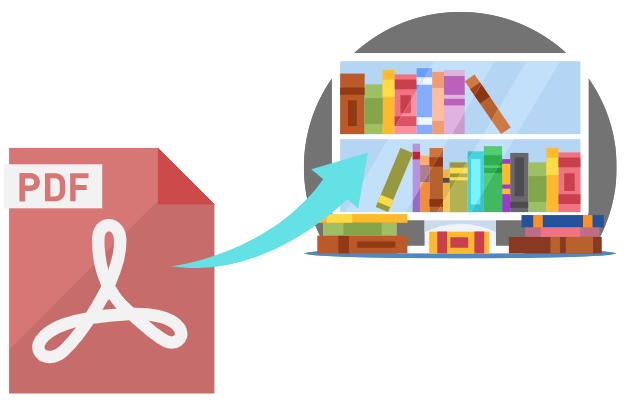
将 PDF 转换为引人入胜的翻页书,可以显著提升内容的展示效果和互动性。Visual Paradigm Online 通过其强大的 Fliplify 工具,提供了一种无缝且用户友好的方式来实现这一目标。本教程将引导您仅通过几次点击,将 PDF 转换为翻页书,同时突出展示使用 Visual Paradigm Online 的关键功能和优势。

Transform Your PDFs into Engaging Flipbooks with Our Powerful Tools - Visual Paradigm Blog

步骤 1:开始使用 Visual Paradigm Online

  1. 注册并登录:

    • 访问 Visual Paradigm Online网站,如果尚未注册,请立即注册账户。
    • 登录以访问全套工具,包括用于创建翻页书的 Fliplify。
  2. 导航至 Fliplify:

    • 登录后,从仪表板进入 Fliplify 部分。您将在此处将 PDF 转换为翻页书。

步骤 2:上传您的 PDF

  1. 上传 PDF:

    • 点击“创建翻页书”按钮,并选择上传 PDF 的选项。
    • 从您的电脑或云存储中选择您想要转换为翻页书的 PDF 文件。
  2. 处理 PDF:

    • Visual Paradigm Online 将自动处理上传的 PDF,并将其转换为翻页书格式。该过程通常只需几秒钟,具体时间取决于 PDF 的大小。

步骤 3:自定义您的翻页书

  1. 选择模板:

    • 浏览可用的翻页书模板,并选择最适合您内容的一款。模板为您的设计提供基础,便于轻松自定义26.

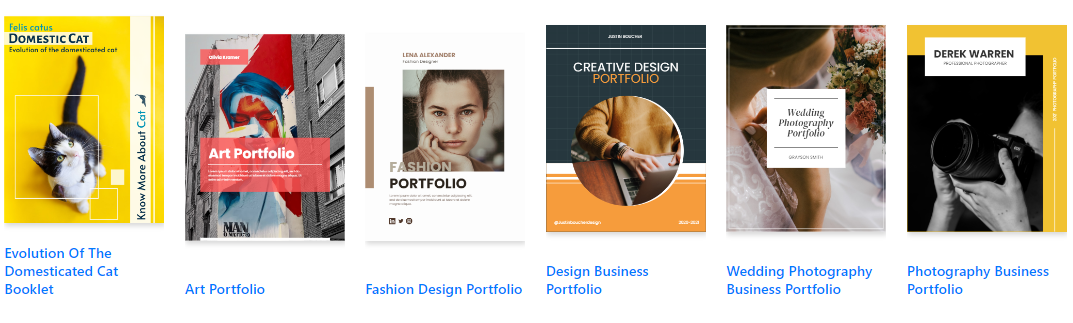
Flipping into the Future: The Magic of Flipbooks with Animation Capability  - Visual Paradigm Blog

  1. 自定义布局:

    • 使用直观的界面来自定义您的翻页书布局。调整页面布局,添加注释、高亮和评论等互动元素以增强参与度24.
  2. 添加互动元素:

    • 融入链接、视频和音频片段等互动元素,使您的翻页书更具吸引力。这些元素可通过拖放界面轻松添加25.
  3. 集成动画(可选):

    • 如果您希望用动画增强您的翻页书,可以使用 Visual Paradigm 的 AniFuzion 工具创建或导入 2D 和 3D 动画。这些动画可无缝集成到您的翻页书中,提升视觉吸引力20.

步骤 4:添加文本转语音(TTS)和 AI 人声

  1. 启用 TTS:

    • 加入文本转语音(TTS)功能来为您的翻页书配音。此功能可提升互动体验,使内容更具吸引力且更易访问20.
  2. 自定义 AI 人声:

    • 自定义 AI 人声以匹配您的翻页书的语气和风格。调整语音设置,确保语音自然且专业

步骤 5:预览和发布您的翻页书

  1. 预览翻页书:

    • 预览您的翻页书,确保符合您的预期。检查布局、互动元素和动画,确保一切就位
  2. 发布翻页书:

    • 确认满意后,点击“发布”按钮使您的翻页书上线。您可以通过提供链接或将其嵌入网站来与受众分享翻页书24.

第6步:整理您的翻页书

  1. 创建一个虚拟书架:

    • 进入 Visual Paradigm Online 中的虚拟书架功能。
    • 创建一个新书架,并自定义其外观以匹配您的品牌或个人风格。
  2. 将翻页书添加到书架上:

    • 将您发布的翻页书添加到虚拟书架上。根据类别、主题或其他对您的内容有意义的标准进行分类。
    • 自定义每个翻页书的缩略图和描述,使其视觉上吸引人且富有信息量。
  3. 分享您的虚拟书架:

    • 通过提供链接或将其嵌入您的网站,与您的受众分享您的虚拟书架。
    • 通过社交媒体、电子邮件通讯和其他营销渠道推广您的书架,以触达更广泛的受众。

Flipping Book Animation Software - Visual Paradigm Blog

结论

使用 Visual Paradigm Online 将 PDF 转换为精美的翻页书,是一种简单且富有吸引力的内容展示方式。借助可自定义模板、交互元素、动画、文本转语音(TTS)以及人工智能人声等功能,您可以创建出引人注目的翻页书,脱颖而出。无论是用于教育内容、商业演示还是个人项目,Visual Paradigm 的工具都提供了一套全面的功能,帮助您实现创意并吸引观众。通过遵循本教程,您可以轻松将静态的 PDF 转化为动态且互动的翻页书,显著提升内容的展示效果和用户参与度。

通过视觉范式AI波特五力分析器主宰您的市场

Dominate your market with Visual Paradigm’s AI Porter’s Five Forces Analyzer. Generate fast, professional industry reports with actionable strategic insights.

揭开您所在行业的秘密,通过AI驱动的波特五力分析器视觉范式!在当今快节奏的商业环境中,理解塑造您盈利能力的结构性力量不仅是一种优势,更是生存的必需。无论您是初创企业创始人还是经验丰富的战略家,这款专业行业分析工具为您提供做出制胜决策所需的清晰视野。登录界面邀请您进入无缝体验,只需描述您的业务,即可启动为您服务的高级战略引擎!

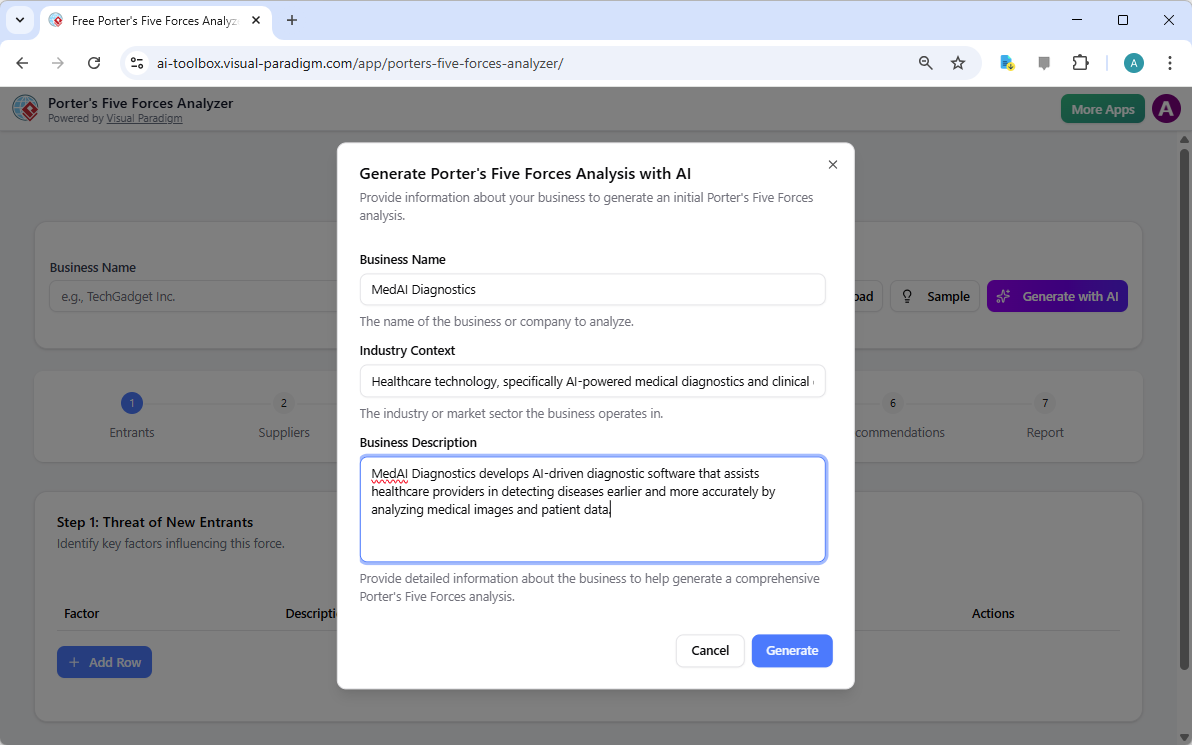
如初始设置所示,用户可以输入具体信息,如公司名称和行业背景——例如一家前沿的医疗诊断公司——以获得量身定制的分析。这一智能界面如同您的私人顾问,弥合原始数据与可操作情报之间的差距。

Visual Paradigm’s AI-Powered Porter's Five Forces Analysis Tool landing screen, where users begin by entering a brief busines

为什么每家企业都需要AI驱动的战略优势

进行手动行业研究可能需要数天的艰苦调研。然而,借助视觉范式的易于使用的战略规划软件,您可以在几秒钟内生成一份全面的初稿!该工具不仅罗列事实,更能解读您特定市场细分的竞争激烈程度,让您专注于高层次验证,而非繁琐的数据录入。它是追求速度与精准的用户最理想的最佳行业分析工具,适合重视速度与精准的用户。

关键优势快速概览

  • 闪电般的快速分析:借助先进的AI辅助,几分钟内即可生成完整的五力报告。

  • 结构化七步逻辑:遵循经过验证的专业工作流程,确保事无巨细。

  • 完全隐私:将您的敏感战略数据本地保存为.json文件——无需云存储!

  • 可操作的智能:超越理论,获得具体的战略建议,专为您的业务量身定制。

  • 专业输出:生成高质量报告,非常适合利益相关者汇报和董事会会议。

第一步:应对新进入者的威胁

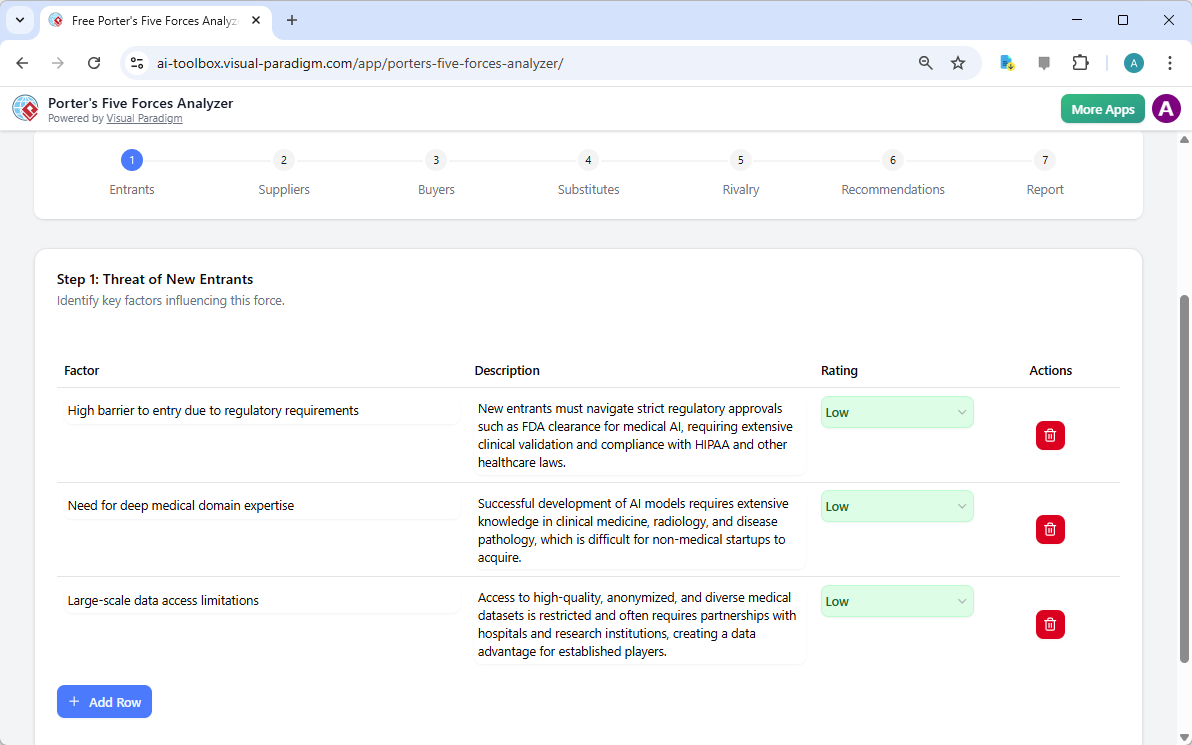
任何稳健分析的第一步是评估新竞争者进入您领域的难易程度。使用AI驱动的波特五力分析器,您可以识别进入的关键壁垒,如监管要求、资本成本以及对专业领域知识的需求。以一家AI医疗公司为例,该工具突出了FDA认证和深厚的医学知识如何成为现有企业强大的保护屏障。

通过将这些因素评为低、中或高,您将立即获得市场防御力的直观视觉呈现。这在线战略工具确保您永远不会被一夜之间出现的新竞争对手打个措手不及!

The screenshot of Step 1 of Visual Paradigm AI-Powered Porter's Five Forces Analysis Tool. - Professional online diagram make

步骤2:评估供应商的议价能力

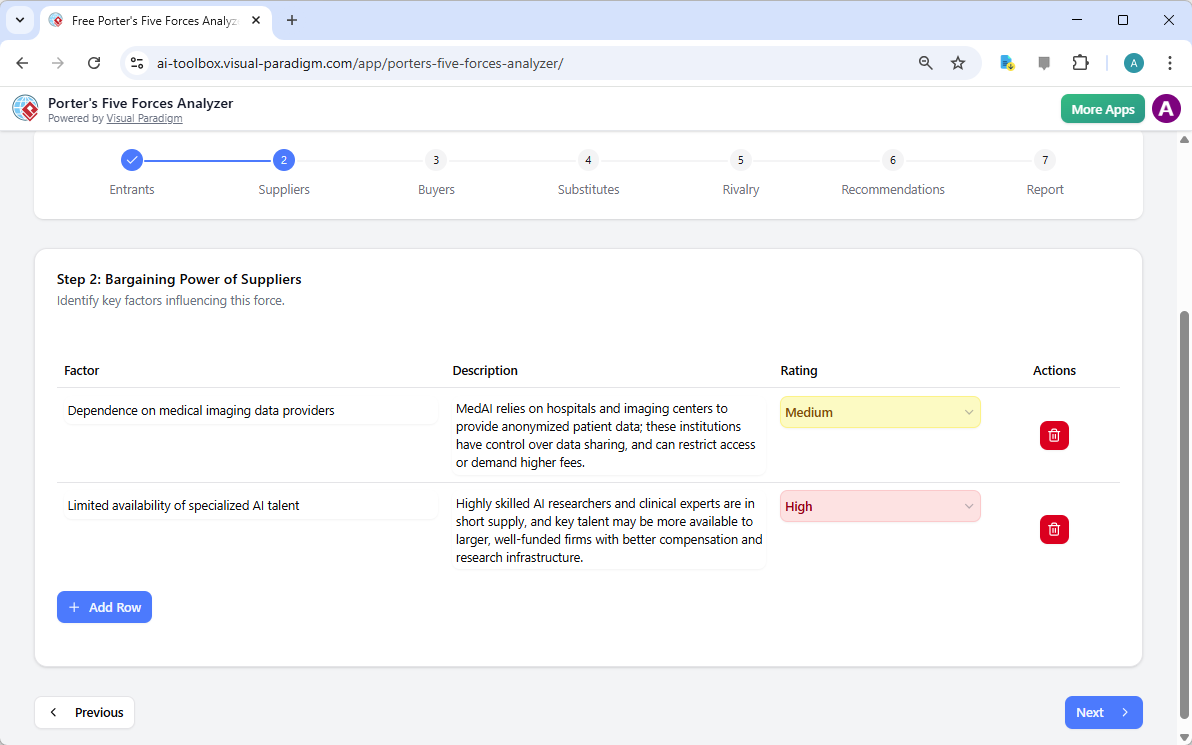
您的供应商是否在压缩您的利润空间?工作流程的第二步聚焦于供应商的议价能力。本部分帮助您判断您的业务是否过度依赖少数关键供应商,例如专业的人工智能人才或独特的数据提供商。及早识别这些瓶颈,有助于您制定多元化策略,在它们成为关键问题之前。

交互式动态表格允许您添加自定义行并优化AI生成的建议,确保分析能够反映您供应链的“实际情况”。让战略管理变得简单而高效!

The screenshot of Step 2 of the Visual Paradigm  AI-Powered Porter's Five Forces Analysis Tool. - Professional online diagram

步骤3:掌握买方的议价能力

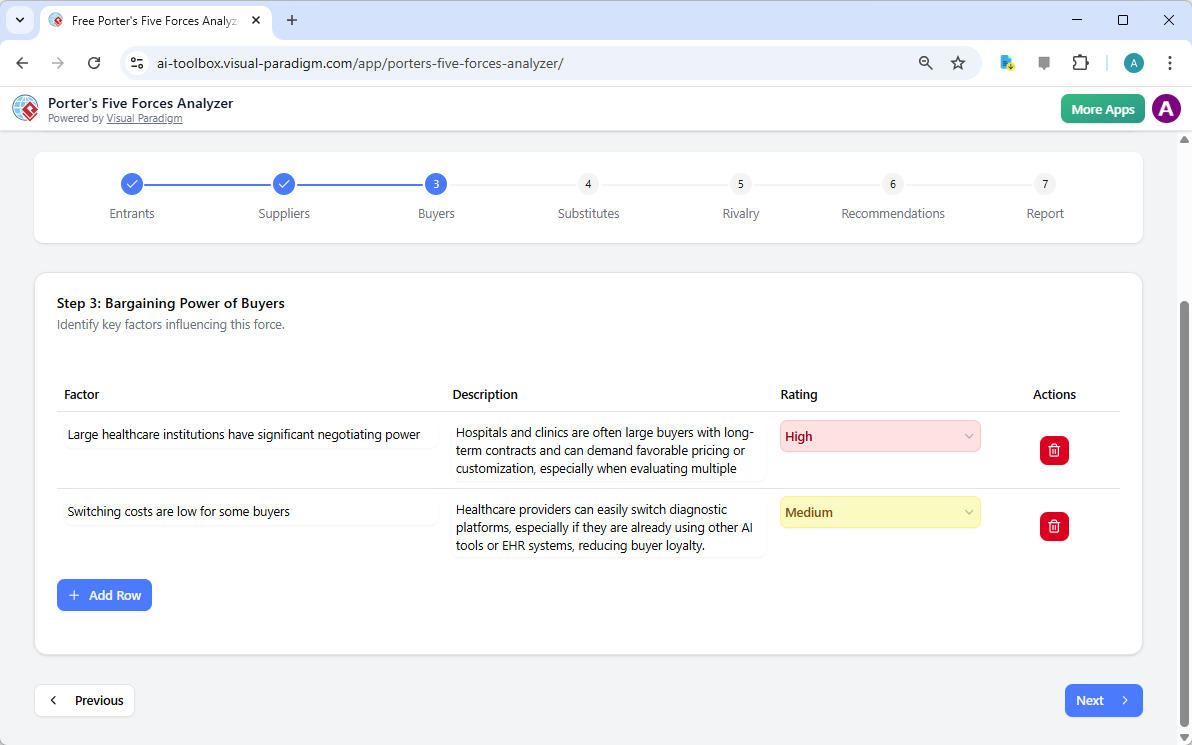
您的客户是您的生命线,但其压低价格的能力可能构成重大威胁。在第三步中,最佳AI驱动的波特五力分析器分析了买方的议价能力。对于一家医疗科技公司而言,这可能涉及分析大型医疗机构的议价能力,或可能降低品牌忠诚度的低转换成本。

理解这些动态对于您的定价策略至关重要。当认识到买方力量较强时,您可以将重点转向差异化和增值服务,使您的产品不可或缺。

The screenshot of Step 3 of the Visual Paradigm  AI-Powered Porter's Five Forces Analysis Tool. - Professional online diagram

步骤4:识别替代品的威胁

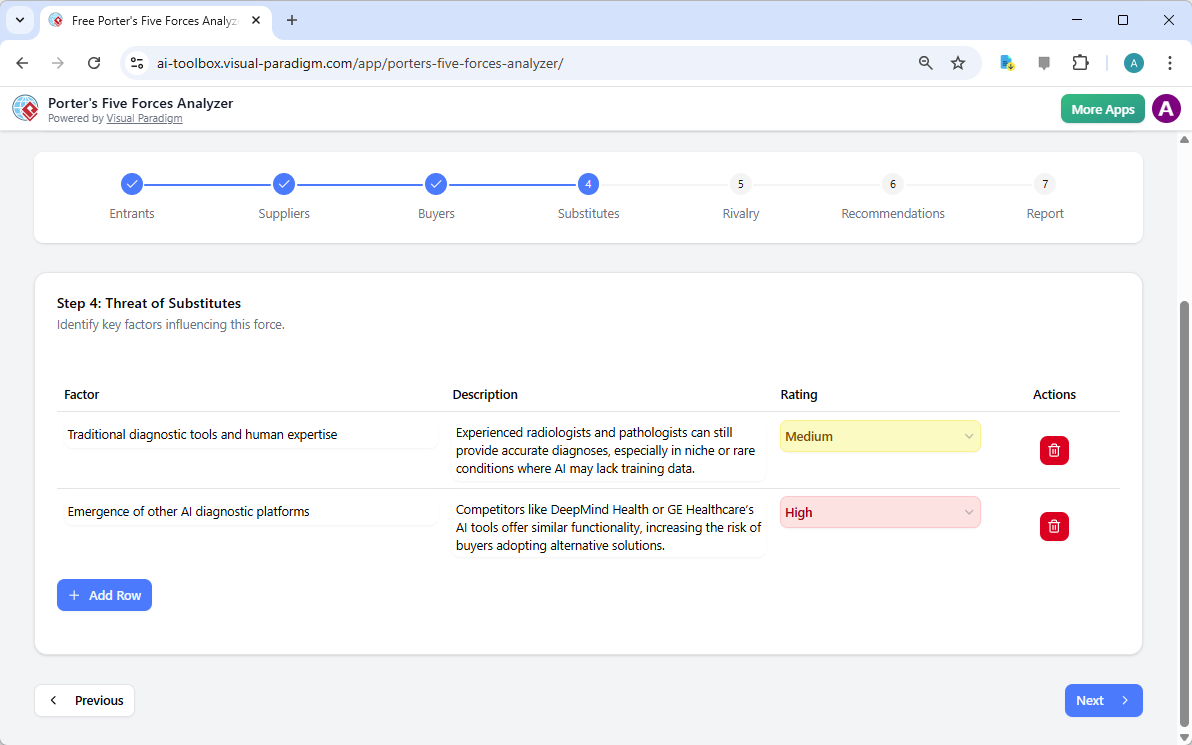
竞争并不总是来自直接对手;有时,它来自解决同一问题的完全不同的方式。第四步引导您识别替代品的威胁。无论是传统的人类专业知识与人工智能竞争,还是全新的技术,此工具确保您从全局视角进行考量。

评估这些替代品的强度有助于您确定在营销和研发工作中哪些威胁需要重点关注。借助这款专业级分析软件,您将始终领先市场变化一步!

The screenshot of Step 4 of the Visual Paradigm  AI-Powered Porter's Five Forces Analysis Tool. - Professional online diagram

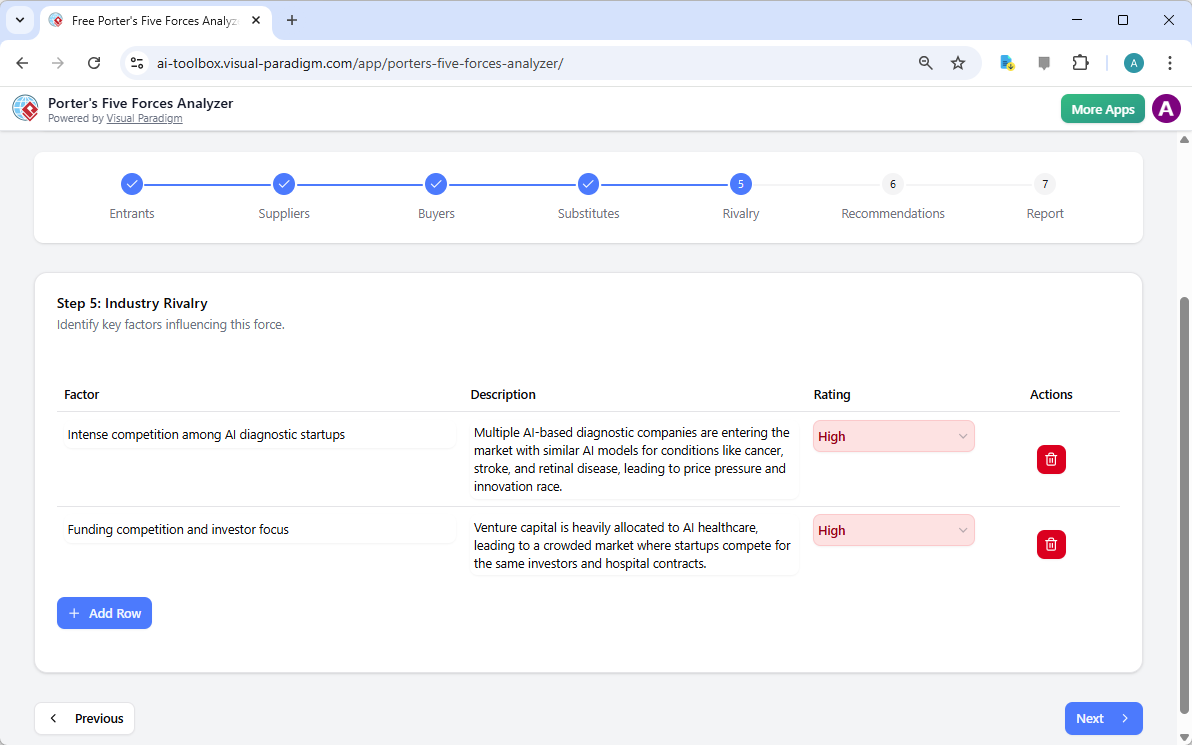
步骤5:应对现有竞争者的竞争

该框架中的最后一个因素是现有竞争者之间的竞争。这通常是压力最集中的地方,表现为价格战、激进的广告宣传和快速创新。该工具会提示您评估竞争者的数量和行业增长速度,以判断市场的整体热度。

在人工智能医疗这样的拥挤领域中,理解“创新竞赛”至关重要。这一步有助于您可视化竞争格局,从而发现竞争较不激烈的“蓝海”机遇。

The screenshot of Step 5 of the Visual Paradigm  AI-Powered Porter's Five Forces Analysis Tool. - Professional online diagram

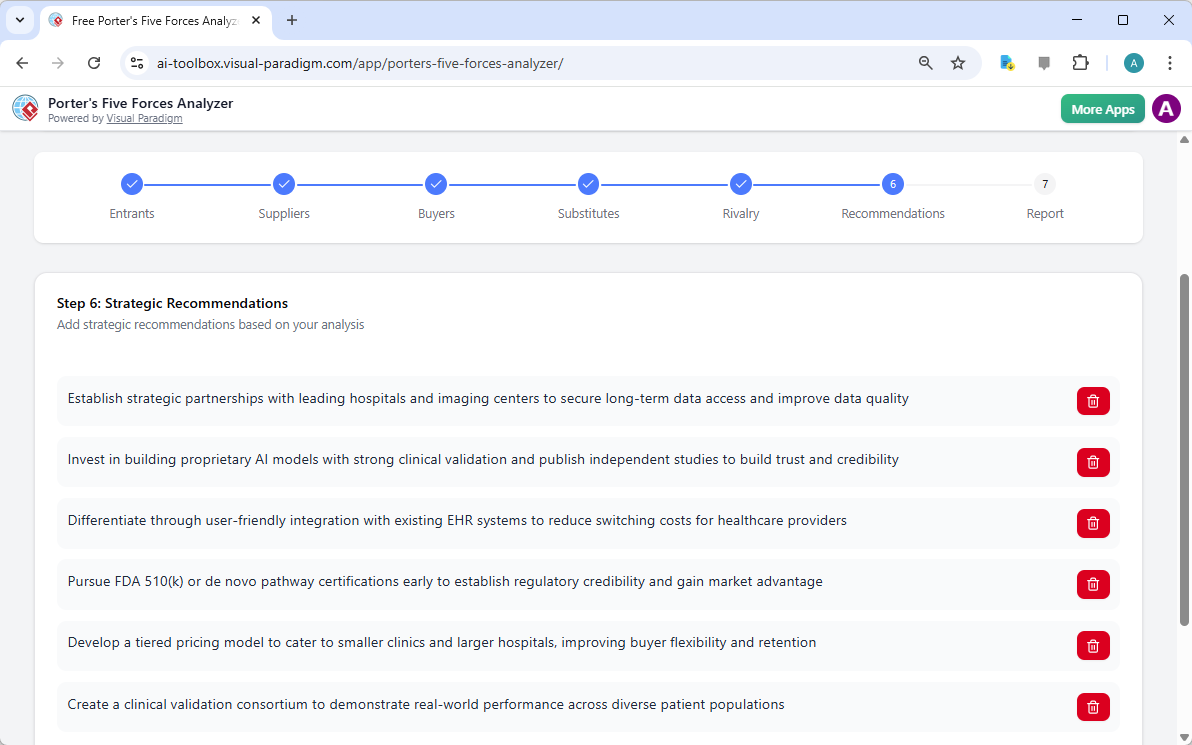
第6步:制定制胜的战略建议

分析的价值取决于它所激发的行动!第6步是由人工智能驱动的波特五力分析器正是魔法发生的地方。基于前几步收集的数据,人工智能会提出有力的战略建议。这可能包括追求特定认证、建立战略合作伙伴关系,或制定分层定价模式以获取更多市场份额。

在这里,您将洞察转化为成功的路线图。您可以编辑这些建议,使其与您公司的独特愿景和资源能力完美契合。

The screenshot of Step 6 of the Visual Paradigm  AI-Powered Porter's Five Forces Analysis Tool - Professional online diagram

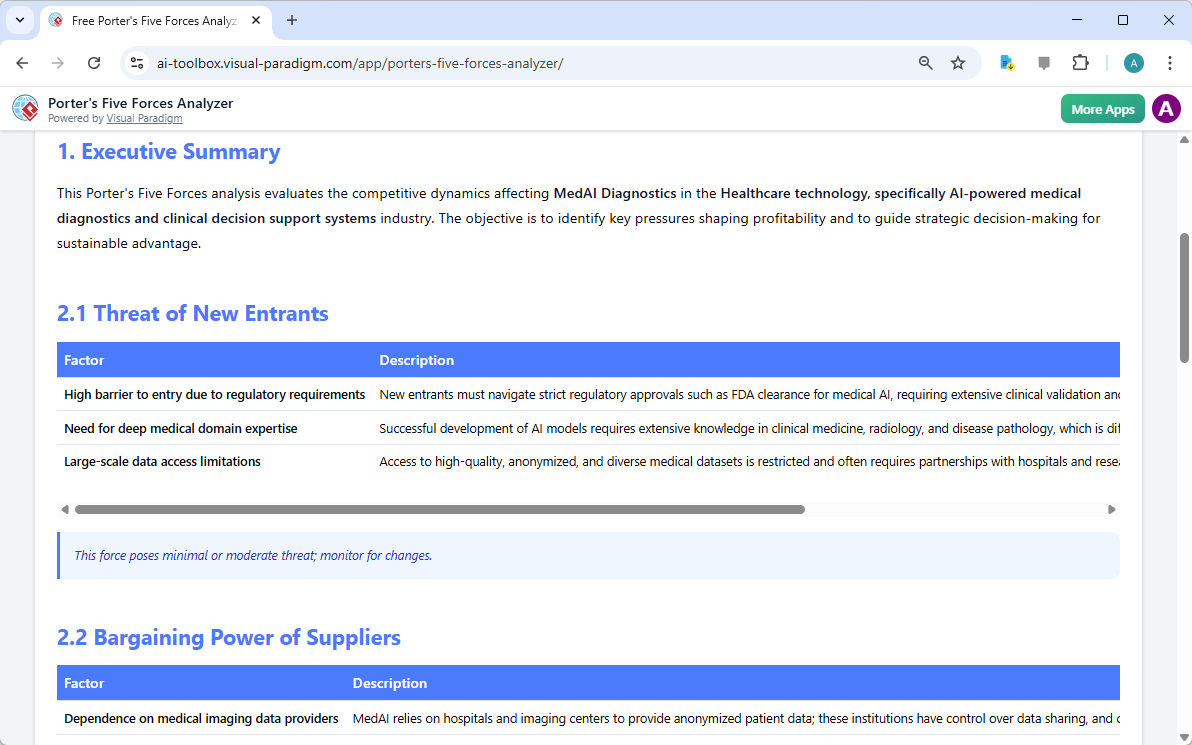
第7步:生成您的专业最终报告

您辛勤工作的最终成果是一份整合的最终报告。第7步将所有因素、影响评分和建议整合为专业且易于阅读的格式。这份文件将赢得投资者青睐,并统一团队目标。它包含执行摘要以及每个力量的详细分析,全面展示您所在行业的吸引力。

您可以直接打印此报告,或将其保存为PDF格式,从而非常方便地与利益相关者分享,或纳入您的正式商业计划中。这是任何专业商务人士的终极交付成果!

The screenshot of Step 7 of the Visual Paradigm  AI-Powered Porter's Five Forces Analysis Tool, displaying the automatically

今天就掌握您的战略!

从未有过比现在更好的时机来掌控您的竞争命运。Visual Paradigm的由人工智能驱动的波特五力分析器旨在赋予您在任何行业中取得成功的洞察力。从识别隐藏威胁到把握未开发机遇,这一工具是您通往战略卓越不要将成功寄托于运气——请基于行业分析的黄金标准做出决策!

准备好了解您的企业在竞争格局中的位置了吗?使用这个易于使用的战略规划工具将您的行业知识立即转化为可辩护的竞争优势!

体验人工智能驱动战略的力量:

立即试用波特五力分析器!

了解我们创新的战略工具。

相关链接

Dominate Your Market with Visual Paradigm’s AI Porter’s Five Forces Analyzer

Dominate your market with Visual Paradigm’s AI Porter’s Five Forces Analyzer. Generate fast, professional industry reports with actionable strategic insights.

Unlock the secrets of your industry and outmaneuver the competition with the AI-powered Porter’s Five Forces Analyzer from Visual Paradigm! In today’s fast-paced business environment, understanding the structural forces that shape your profitability isn’t just an advantage—it’s a necessity for survival. Whether you are a startup founder or a seasoned strategist, this professional industry analysis tool provides the clarity you need to make winning decisions. The landing screen invites you into a seamless experience where you simply describe your business to ignite a high-level strategic engine that works for you!

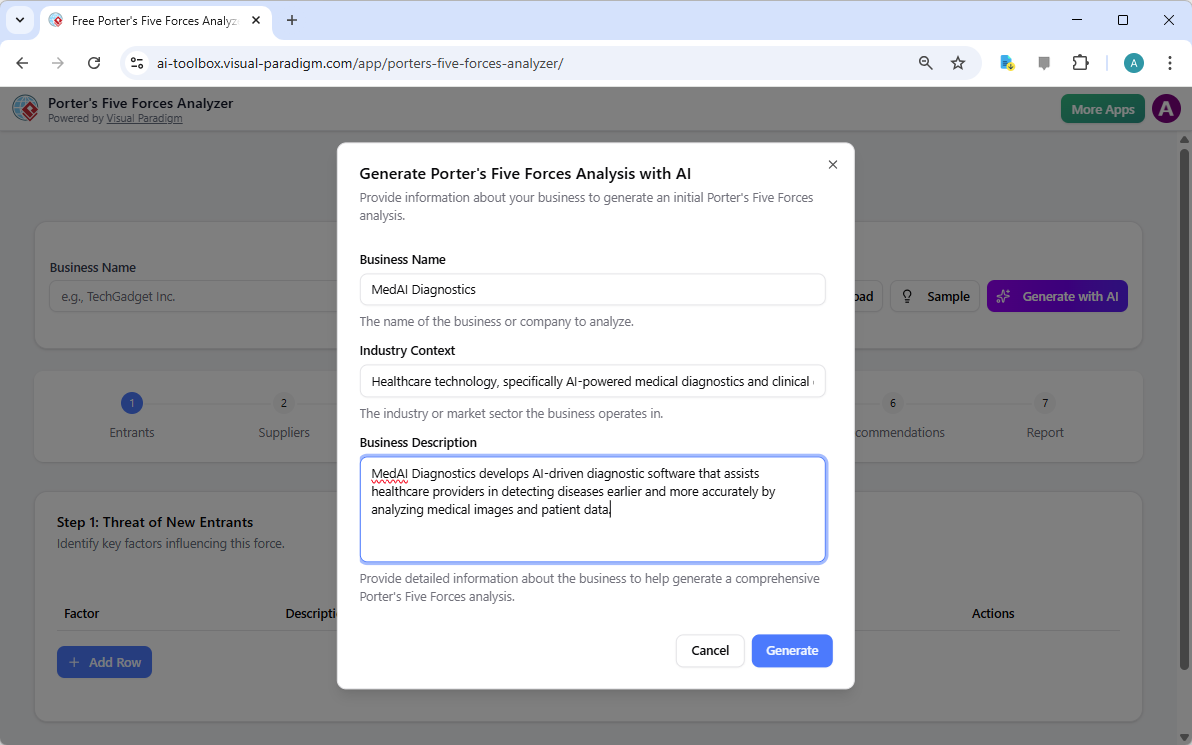
As seen in the initial setup, users can input specific details like business name and industry context—such as a cutting-edge medical diagnostics firm—to receive a tailored analysis. This intelligent interface acts as your personal consultant, bridging the gap between raw data and actionable intelligence.

Visual Paradigm’s AI-Powered Porter's Five Forces Analysis Tool landing screen, where users begin by entering a brief busines

Why Every Business Needs an AI-Powered Strategic Edge

Conducting a manual industry study can take days of grueling research. However, with Visual Paradigm’s easy-to-use strategic planning software, you can generate a comprehensive draft in seconds! This tool doesn’t just list facts; it interprets the competitive intensity of your specific market niche, allowing you to focus on high-level validation rather than tedious data entry. It is the ultimate best industry analysis tool for those who value both speed and precision.

Quick Summary of Key Benefits

  • Lightning-Fast Analysis: Generate a full Five Forces report in minutes using advanced AI assistance.

  • Structured 7-Step Logic: Follow a proven, professional workflow that leaves no stone unturned.

  • Total Privacy: Save your sensitive strategic data locally as .json files—no cloud storage required!

  • Actionable Intelligence: Move beyond theory with specific strategic recommendations tailored to your business.

  • Professional Output: Produce high-quality reports perfect for stakeholder presentations and board meetings.

Step 1: Confronting the Threat of New Entrants

The first step in any robust analysis is evaluating how easy it is for new players to enter your territory. Using the AI-powered Porter’s Five Forces Analyzer, you can identify critical barriers to entry such as regulatory requirements, capital costs, and the need for specialized domain expertise. In the example of an AI medical firm, the tool highlights how FDA clearances and deep medical knowledge act as powerful shields for established players.

By rating these factors as Low, Medium, or High, you gain an immediate visual representation of your market’s defensibility. This online strategic tool ensures that you are never blindsided by a new competitor appearing overnight!

The screenshot of Step 1 of Visual Paradigm AI-Powered Porter's Five Forces Analysis Tool. - Professional online diagram make

Step 2: Evaluating the Bargaining Power of Suppliers

Are your suppliers squeezing your margins? Step 2 of the workflow focuses on the Bargaining Power of Suppliers. This section helps you identify if your business is overly dependent on a few key providers, such as specialized AI talent or unique data providers. Identifying these bottlenecks early allows you to develop diversification strategies before they become critical issues.

The interactive dynamic tables allow you to add custom rows and refine AI-generated suggestions, ensuring the analysis reflects the “on-the-ground” reality of your supply chain. It’s strategic management made simple and effective!

The screenshot of Step 2 of the Visual Paradigm  AI-Powered Porter's Five Forces Analysis Tool. - Professional online diagram

Step 3: Mastering the Bargaining Power of Buyers

Your customers are your lifeblood, but their power to drive down prices can be a major threat. In Step 3, the best AI-powered Porter’s Five Forces Analyzer examines the Bargaining Power of Buyers. For a medical tech company, this might involve analyzing the negotiating leverage of large healthcare institutions or the low switching costs that might reduce brand loyalty.

Understanding these dynamics is crucial for your pricing strategy. By recognizing when buyer power is high, you can shift your focus toward differentiation and value-added services that make your product indispensable.

The screenshot of Step 3 of the Visual Paradigm  AI-Powered Porter's Five Forces Analysis Tool. - Professional online diagram

Step 4: Identifying the Threat of Substitute Products

Competition doesn’t always come from direct rivals; sometimes, it comes from entirely different ways of solving the same problem. Step 4 guides you through identifying the Threat of Substitutes. Whether it’s traditional human expertise competing against AI or a completely new technology, this tool ensures you are looking at the big picture.

Rating the intensity of these substitutes helps you prioritize which threats need the most attention in your marketing and R&D efforts. With this professional-grade analysis software, you’ll always stay one step ahead of market shifts!

The screenshot of Step 4 of the Visual Paradigm  AI-Powered Porter's Five Forces Analysis Tool. - Professional online diagram

Step 5: Navigating Rivalry Among Existing Competitors

The final force in the framework is the Rivalry Among Existing Competitors. This is often where the most intense pressure is felt, characterized by price wars, aggressive advertising, and rapid innovation. The tool prompts you to assess the number of competitors and the rate of industry growth to determine the overall heat of the market.

In a crowded field like AI healthcare, understanding the “innovation race” is vital. This step helps you visualize the competitive landscape so you can find “Blue Ocean” opportunities where rivalry is less intense.

The screenshot of Step 5 of the Visual Paradigm  AI-Powered Porter's Five Forces Analysis Tool. - Professional online diagram

Step 6: Developing Winning Strategic Recommendations

An analysis is only as good as the actions it inspires! Step 6 of the AI-powered Porter’s Five Forces Analyzer is where the magic happens. Based on the data gathered in the previous steps, the AI suggests powerful strategic recommendations. These might include pursuing specific certifications, forming strategic partnerships, or creating tiered pricing models to capture more market share.

This is where you transform insights into a roadmap for success. You can edit these recommendations to align perfectly with your company’s unique vision and resource capabilities.

The screenshot of Step 6 of the Visual Paradigm  AI-Powered Porter's Five Forces Analysis Tool - Professional online diagram

Step 7: Generating Your Professional Final Report

The culmination of your hard work is a consolidated final report. Step 7 gathers every factor, impact rating, and recommendation into a professional, easy-to-read format. This is the document that wins over investors and aligns your team. It includes an executive summary and a detailed breakdown of each force, providing a complete 360-degree view of your industry’s attractiveness.

You can print this report directly or save it as a PDF, making it incredibly easy to share with stakeholders or include in your formal business plan. It’s the ultimate deliverable for any serious business professional!

The screenshot of Step 7 of the Visual Paradigm  AI-Powered Porter's Five Forces Analysis Tool, displaying the automatically

Master Your Strategy Today!

There has never been a better time to take control of your competitive destiny. Visual Paradigm’s AI-powered Porter’s Five Forces Analyzer is designed to empower you with the insights needed to thrive in any industry. From identifying hidden threats to capitalizing on untapped opportunities, this tool is your gateway to strategic excellence. Don’t leave your success to chance—base your decisions on the gold standard of industry analysis!

Ready to see where your business stands in the competitive landscape? Use this easy-to-use strategic planning tool to transform your industry knowledge into a defensible competitive advantage right now!

Experience the power of AI-driven strategy:

Try the Porter’s Five Forces Analyzer Now!

Learn more about our innovative strategic tools.

Related Links

Comprehensive Tutorial: Convert a PDF to a Wonderful Flipbook in a Few Clicks Using Visual Paradigm Online

Introduction

In today’s digital age, presenting content in an engaging and interactive manner is crucial for capturing and retaining audience attention. One effective way to achieve this is by converting traditional PDF documents into dynamic flipbooks. Visual Paradigm Online offers a powerful and user-friendly solution for this transformation with its Fliplify tool. This comprehensive tutorial will guide you through the process of converting a PDF to a wonderful flipbook in just a few clicks, highlighting the key features and benefits of using Visual Paradigm Online. Whether you are creating educational materials, business presentations, or personal projects, this guide will help you leverage the full potential of flipbooks to make your content stand out.

Can I turn my PDF into a Flipbook? - Visual Paradigm Blog

Converting a PDF to an engaging flipbook can significantly enhance the presentation and interactivity of your content. Visual Paradigm Online offers a seamless and user-friendly way to achieve this with its powerful Fliplify tool. This tutorial will guide you through the process of converting a PDF to a flipbook in just a few clicks, highlighting the key features and benefits of using Visual Paradigm Online.

Transform Your PDFs into Engaging Flipbooks with Our Powerful Tools - Visual Paradigm Blog

Step 1: Getting Started with Visual Paradigm Online

  1. Sign Up and Log In:

    • Visit the Visual Paradigm Online website and sign up for an account if you don’t already have one.
    • Log in to access the suite of tools, including Fliplify for creating flipbooks.
  2. Navigate to Fliplify:

    • Once logged in, navigate to the Fliplify section from the dashboard. This is where you will convert your PDF into a flipbook.

Step 2: Uploading Your PDF

  1. Upload the PDF:

    • Click on the “Create Flipbook” button and select the option to upload a PDF.
    • Choose the PDF file from your computer or cloud storage that you want to convert into a flipbook.
  2. Processing the PDF:

    • Visual Paradigm Online will automatically process the uploaded PDF and convert it into a flipbook format. This process typically takes just a few moments, depending on the size of the PDF.

Step 3: Customizing Your Flipbook

  1. Choose a Template:

    • Browse through the available flipbook templates and select one that best suits your content. Templates provide a foundation for your design, allowing for easy customization 26.

Flipping into the Future: The Magic of Flipbooks with Animation Capability  - Visual Paradigm Blog

  1. Customize the Layout:

    • Use the intuitive interface to customize the layout of your flipbook. Adjust the page layout, add interactive elements like annotations, highlights, and comments to enhance engagement 24.
  2. Add Interactive Elements:

    • Incorporate interactive elements such as links, videos, and audio clips to make your flipbook more engaging. These elements can be easily added using the drag-and-drop interface 25.
  3. Integrate Animations (Optional):

    • If you want to enhance your flipbook with animations, you can use Visual Paradigm’s AniFuzion tool to create or import 2D and 3D animations. These animations can be seamlessly integrated into your flipbook to add visual appeal 20.

Step 4: Adding Text-to-Speech (TTS) and AI Human Voices

  1. Enable TTS:

    • Incorporate Text-to-Speech (TTS) to narrate your flipbook. This feature enhances the interactive experience, making the content more engaging and accessible 20.
  2. Customize AI Human Voices:

    • Customize the AI human voices to match the tone and style of your flipbook. Adjust the voice settings to ensure a natural and professional narration.

Step 5: Previewing and Publishing Your Flipbook

  1. Preview the Flipbook:

    • Preview your flipbook to ensure it meets your expectations. Check the layout, interactive elements, and animations to make sure everything is in place.
  2. Publish the Flipbook:

    • Once satisfied, click on the “Publish” button to make your flipbook live. You can share the flipbook with your audience by providing a link or embedding it on your website 24.

Step 6: Organizing Your Flipbooks

  1. Create a Virtual Bookshelf:

    • Navigate to the virtual bookshelf feature in Visual Paradigm Online.
    • Create a new bookshelf and customize its appearance to match your branding or personal style.
  2. Add Flipbooks to the Bookshelf:

    • Add your published flipbooks to the virtual bookshelf. Organize them by category, topic, or any other criteria that make sense for your content.
    • Customize the thumbnails and descriptions of each flipbook to make them visually appealing and informative.
  3. Share Your Virtual Bookshelf:

    • Share your virtual bookshelf with your audience by providing a link or embedding it on your website.
    • Promote your bookshelf through social media, email newsletters, and other marketing channels to reach a wider audience.

Flipping Book Animation Software - Visual Paradigm Blog

Conclusion

Converting a PDF to a wonderful flipbook using Visual Paradigm Online is a straightforward and engaging way to present your content. With features like customizable templates, interactive elements, animations, text-to-speech (TTS), and AI human voices, you can create captivating flipbooks that stand out. Whether for educational content, business presentations, or personal projects, Visual Paradigm’s tools offer a comprehensive suite of features to bring your ideas to life and captivate your audience. By following this tutorial, you can transform your static PDFs into dynamic and interactive flipbooks, enhancing the presentation and engagement of your content with ease.

Comprehensive Guide to Creating Flipbooks and Organizing Them into a Beautiful Virtual Bookshelf

Introduction

Creating flipbooks with Visual Paradigm Online is a seamless and engaging way to present your content. Whether you’re designing educational materials, business presentations, or personal projects, Visual Paradigm’s tools offer a comprehensive suite of features to bring your ideas to life. This guide will walk you through the process of creating flipbooks, incorporating 2D and 3D animations, text-to-speech (TTS), and AI human voices, and organizing them into a beautiful virtual bookshelf.

Fliplify:Visual Paradigm Online的翻页书设计大师| 學習EA, Agile & UML 和使用Visual Paradigm 技能- 點部落

Step 1: Getting Started with Visual Paradigm Online

  1. Sign Up and Log In:

    • Visit the Visual Paradigm Online website and sign up for an account if you don’t already have one.
    • Log in to access the suite of tools, including Fliplify for creating flipbooks and AniFuzion for adding animations.
  2. Explore the Dashboard:

    • Familiarize yourself with the dashboard, which provides access to various tools and features.
    • Navigate to the Fliplify section to start creating your flipbook.

Make Your Flipbook Stand Out with AniFuzion - Fliplify

Step 2: Creating a Flipbook with Fliplify

  1. Choose a Template or Start from Scratch:

    • Browse through the available flipbook templates or choose to start from scratch. Templates provide a foundation for your design, while starting from scratch allows for more customization 26.
  2. Design Your Flipbook:

    • Use the intuitive interface to design your flipbook. Add pages, customize the layout, and incorporate interactive elements such as annotations, highlights, and comments 24.
    • Utilize the advanced design tools to ensure a polished and professional presentation.
  3. Integrate 2D and 3D Animations:

    • Use AniFuzion to create or import 2D and 3D animations. These animations can be seamlessly integrated into your flipbook to enhance engagement and visual appeal 20.
    • Ensure that the animations flow seamlessly with the rest of the content, using the interactive features of Fliplify to enhance comprehension 25.

Visual Paradigm Online: Revolutionizing Digital Content Creation - Cybermedian

  1. Add Text-to-Speech (TTS) and AI Human Voices:

    • Incorporate TTS and AI human voices to narrate your flipbook. This feature enhances the interactive experience, making the content more engaging and accessible 20.
    • Customize the voice settings to match the tone and style of your flipbook.

Bring Your Characters to Life with Enhanced TTS Support - Visual Paradigm  News

  1. Preview and Publish:

    • Preview your flipbook to ensure it meets your expectations. Make any necessary adjustments to the design and content.
    • Once satisfied, publish the flipbook and share it with your audience 24.

Step 3: Organizing Flipbooks into a Virtual Bookshelf

  1. Create a Virtual Bookshelf:

    • Navigate to the virtual bookshelf feature in Visual Paradigm Online.
    • Create a new bookshelf and customize its appearance to match your branding or personal style.
  2. Add Flipbooks to the Bookshelf:

    • Add your published flipbooks to the virtual bookshelf. Organize them by category, topic, or any other criteria that make sense for your content.
    • Customize the thumbnails and descriptions of each flipbook to make them visually appealing and informative.
  3. Customize the Bookshelf Layout:

    • Arrange the flipbooks on the bookshelf in a visually appealing manner. Use the layout tools to adjust the positioning and spacing of the flipbooks.
    • Add interactive elements, such as links to related content or additional resources, to enhance the user experience.
  4. Share Your Virtual Bookshelf:

    • Share your virtual bookshelf with your audience by providing a link or embedding it on your website.
    • Promote your bookshelf through social media, email newsletters, and other marketing channels to reach a wider audience.

Step 4: Enhancing Engagement with Interactive Features

  1. Interactive Annotations:

    • Add annotations, highlights, and comments to your flipbooks to enhance engagement and comprehension. These interactive elements make the content more dynamic and personalized 25.
  2. Quizzes and Polls:

    • Incorporate quizzes and polls within your flipbooks to engage your audience and gather feedback. This feature is particularly useful for educational content and business presentations.
  3. Multimedia Integration:

    • Integrate multimedia elements, such as videos, images, and audio clips, to enhance the visual appeal and engagement of your flipbooks.
    • Ensure that the multimedia elements are seamlessly integrated with the rest of the content, using the interactive features of Fliplify to enhance comprehension 25.

How to Add Voice to Characters by Text-to-Speech with Perfect Lip Sync-  AniFuzion


Conclusion

Creating flipbooks with Visual Paradigm Online and organizing them into a beautiful virtual bookshelf is a powerful way to present your content engagingly and interactively. With features like 2D and 3D animations, TTS, and AI human voices, you can enhance the visual appeal and engagement of your flipbooks. Whether for educational content, business presentations, or personal projects, Visual Paradigm’s tools offer a comprehensive suite of features to bring your ideas to life and captivate your audience.

Comprehensive Tutorial for Creating Wonderful Animation Flipbooks with Visual Paradigm’s AniFuzion and Fliplify

Introduction

Creating an animation flipbook combines the engaging nature of animations with the interactive experience of flipbooks. Visual Paradigm’s AniFuzion and Fliplify tools offer a seamless way to achieve this, allowing users to create captivating content that stands out. This tutorial will guide you through the process of creating an animation flipbook, highlighting why these tools are an excellent choice and how they can make your content more attractive and engaging.

Why Choose Visual Paradigm’s AniFuzion and Fliplify?

Elevate Your Animations with Sound in AniFuzion - AniFuzion

  1. User-Friendly Interface:

    • Both AniFuzion and Fliplify provide intuitive interfaces that make it easy for users, regardless of their technical expertise, to create professional-quality animations and flipbooks 2024.
  2. Comprehensive Toolkit:

    • These tools offer a wide range of features, including 2D and 3D animation, customizable templates, and interactive elements, ensuring that users have everything they need to create engaging content 2126.
  3. Seamless Integration:

    • AniFuzion and Fliplify integrate seamlessly with each other and with other features of Visual Paradigm Online, creating a comprehensive suite for all your creative needs 2126.
  4. High-Quality Output:

    • The tools ensure that the final output is of high quality, with polished and professional-looking animations and flipbooks that captivate audiences 2024.
  5. Customer Support:

    • Visual Paradigm provides excellent customer support, assisting users with any issues or questions they may have while using the tools 27.

How Animated Flipbooks Make Content Attractive and Engaging

Flipping Book Animation Software - Visual Paradigm Blog

  1. Visual Appeal:

    • Animated flipbooks combine the visual appeal of animations with the interactive experience of flipbooks, making the content more engaging and visually appealing 20.
  2. Interactive Experience:

    • The interactive nature of flipbooks allows users to engage with the content in a more dynamic way, enhancing comprehension and retention 25.
  3. Storytelling:

    • Animated flipbooks enable users to tell stories in a more compelling way, using animations to bring characters and scenes to life 21.
  4. Versatility:

    • Animated flipbooks can be used for a wide range of purposes, from educational content and business presentations to marketing materials and personal projects 2426.

Tutorial: Creating an Animation Flipbook with AniFuzion and Fliplify

Visual Paradigm Flipbook Maker: Elevate Your Digital Presence with Dynamic and Engaging Flipbooks - Visual Paradigm Blog

Step 1: Create Animations with AniFuzion
  1. Sign Up and Log In:

    • Sign up for a Visual Paradigm Online account and log in to access AniFuzion.
  2. Choose a Template or Start from Scratch:

    • Browse through the available templates or choose to start from scratch. Templates provide a foundation for your animation, while starting from scratch allows for more customization 21.
  3. Design Your Animation:

    • Use the intuitive interface to design your animation. Add characters, scenes, and props, and customize their appearance and actions. Utilize the 2D and 3D animation features to bring your vision to life 20.
  4. Add Interactive Elements:

    • Incorporate interactive elements, such as annotations, highlights, and comments, to enhance engagement and comprehension 25.
  5. Preview and Export:

    • Preview your animation to ensure it meets your expectations. Once satisfied, export the animation in the desired format 20.
Step 2: Create a Flipbook with Fliplify
  1. Upload Your Animation:

    • Log in to Visual Paradigm Online and access Fliplify. Upload your exported animation to use as content for your flipbook 24.
  2. Choose a Template or Start from Scratch:

    • Browse through the available flipbook templates or choose to start from scratch. Templates provide a foundation for your flipbook, while starting from scratch allows for more customization 26.
  3. Design Your Flipbook:

    • Use the intuitive interface to design your flipbook. Add pages, customize the layout, and incorporate interactive elements, such as annotations and highlights 24.
  4. Integrate Your Animation:

    • Integrate your animation into the flipbook, ensuring that it flows seamlessly with the rest of the content. Utilize the interactive features of Fliplify to enhance the engagement and comprehension of the animation 25.
  5. Preview and Publish:

    • Preview your flipbook to ensure it meets your expectations. Once satisfied, publish the flipbook and share it with your audience 24.

Conclusion

Creating an animation flipbook with Visual Paradigm’s AniFuzion and Fliplify is a powerful way to make your content more attractive and engaging. With their user-friendly interfaces, comprehensive toolkits, seamless integration, and high-quality output, these tools provide everything needed to create captivating animation flipbooks. Whether for educational content, business presentations, marketing materials, or personal projects, AniFuzion and Fliplify offer a seamless and productive experience, making them an ideal choice for all your creative needs.

Comprehensive Tutorial for Creating Stunning Flipbooks with Fliplify of Visual Paradigm Online

Introduction

Fliplify, part of Visual Paradigm Online, is a powerful tool designed to help users create captivating digital flipbooks and slideshows. Whether you are starting from scratch or uploading existing content, Fliplify offers a seamless and user-friendly experience. This tutorial will guide you through the process of creating stunning flipbooks, highlighting the key features, application areas, and reasons why Fliplify stands out.

Why Choose Fliplify?

  1. User-Friendly Interface:

    • Fliplify provides an intuitive and user-friendly interface that makes it easy for users to create professional-looking flipbooks without the need for extensive technical knowledge 24.
  2. Versatile Content Creation:

    • Users can craft flipbooks from various sources, including PDFs, PowerPoints, and more. This versatility allows for a wide range of content to be transformed into engaging flipbooks 24.
  3. Customization Options:

    • Fliplify empowers users to customize every aspect of their flipbooks, from layout and design to interactive elements. This ensures a polished and professional presentation tailored to specific needs 24.
  4. Interactive Elements:

    • The tool allows for the addition of interactive elements, such as annotations, highlights, and comments, enhancing the engagement and comprehension of the content 25.
  5. Seamless Integration:

    • Fliplify seamlessly integrates with other features of Visual Paradigm Online, creating a comprehensive suite for all your creative needs. This integration ensures a smooth and productive experience 26.

Application Areas

  1. Business Presentations:

    • Create engaging and interactive business presentations that captivate audiences and effectively communicate key messages.
  2. Educational Content:

    • Develop educational materials that are visually appealing and interactive, enhancing the learning experience for students.
  3. Marketing Materials:

    • Design digital brochures, product catalogs, and other marketing materials that stand out and engage potential customers.
  4. Personal Projects:

    • Use Fliplify for personal projects, such as creating photo albums, travel journals, or any other content that benefits from an interactive and visually appealing format.

Why Fliplify Stands Out

  1. Comprehensive Toolkit:

    • Fliplify offers a robust set of tools for creating, editing, and publishing flipbooks. From basic design elements to advanced customization options, Fliplify provides everything needed to create stunning flipbooks 26.
  2. Easy to Use:

    • The platform is designed to be easy to use, with a straightforward interface that allows users to focus on their creative projects without the hassle of complex software installations 24.
  3. High-Quality Output:

    • Fliplify ensures that the published flipbooks are of high quality, with professional-looking designs and interactive elements that enhance the user experience 24.
  4. Customer Support:

    • Visual Paradigm Online provides excellent customer support, assisting users with any issues or questions they may have while using the Flipbook feature 27.

Feature List

  1. Customizable Templates:

    • Choose from a variety of customizable templates to start your flipbook project. These templates provide a foundation for your design, allowing for easy customization to fit your specific needs 26.
  2. Interactive Annotations:

    • Add annotations, highlights, and comments to your flipbooks to enhance engagement and comprehension. These interactive elements make the content more dynamic and personalized 25.
  3. Multiple File Format Support:

    • Convert various file types into flipbooks, including PDFs, PowerPoints, eBooks, and spreadsheets. This versatility allows for a wide range of content to be transformed into engaging flipbooks 27.
  4. Advanced Design Tools:

    • Utilize advanced design tools to customize the layout, design, and interactive elements of your flipbooks. These tools ensure a polished and professional presentation 26.
  5. Seamless Integration with Visual Paradigm Online:

    • Fliplify integrates seamlessly with other features of Visual Paradigm Online, creating a comprehensive suite for all your creative needs. This integration ensures a smooth and productive experience 26.

Conclusion

Fliplify of Visual Paradigm Online stands out as a powerful and user-friendly tool for creating stunning flipbooks. With its intuitive interface, versatile content creation options, and advanced design tools, Fliplify provides everything needed to create engaging and interactive flipbooks. Whether for business presentations, educational content, marketing materials, or personal projects, Fliplify offers a seamless and productive experience, making it an ideal choice for all your flipbook needs.