为软件开发撰写清晰明确的问题陈述

Use Visual Paradigm’s AI-powered tool to craft clear, structured problem statements for software projects with templates and real-time feedback.

在表达你的软件项目要解决的核心挑战时感到困难吗?问题描述生成器来自Visual Paradigm是终极的AI驱动工具,可将项目初期的混乱转化为清晰、专注且富有吸引力的叙述。这一创新解决方案使项目经理、业务分析师和产品负责人能够以前所未有的速度和精度定义工作背后的“为什么”。通过利用结构化模板库和实时AI反馈,该工具确保你的问题陈述不仅被撰写出来,而且从第一天起就经过优化以实现最大影响力。它是启动项目时精准聚焦的制胜法宝,为成功奠定基础。

核心要点:

  • 采用模板驱动的方法,确保问题陈述全面且结构清晰。

  • 填写特定变量,为你的独特项目定制描述。

  • 获得即时AI反馈,以提升问题陈述的清晰度和有效性。

  • 以扎实且清晰的理解启动任何项目,明确核心问题。

步骤1:选择模板——强大问题陈述的基础

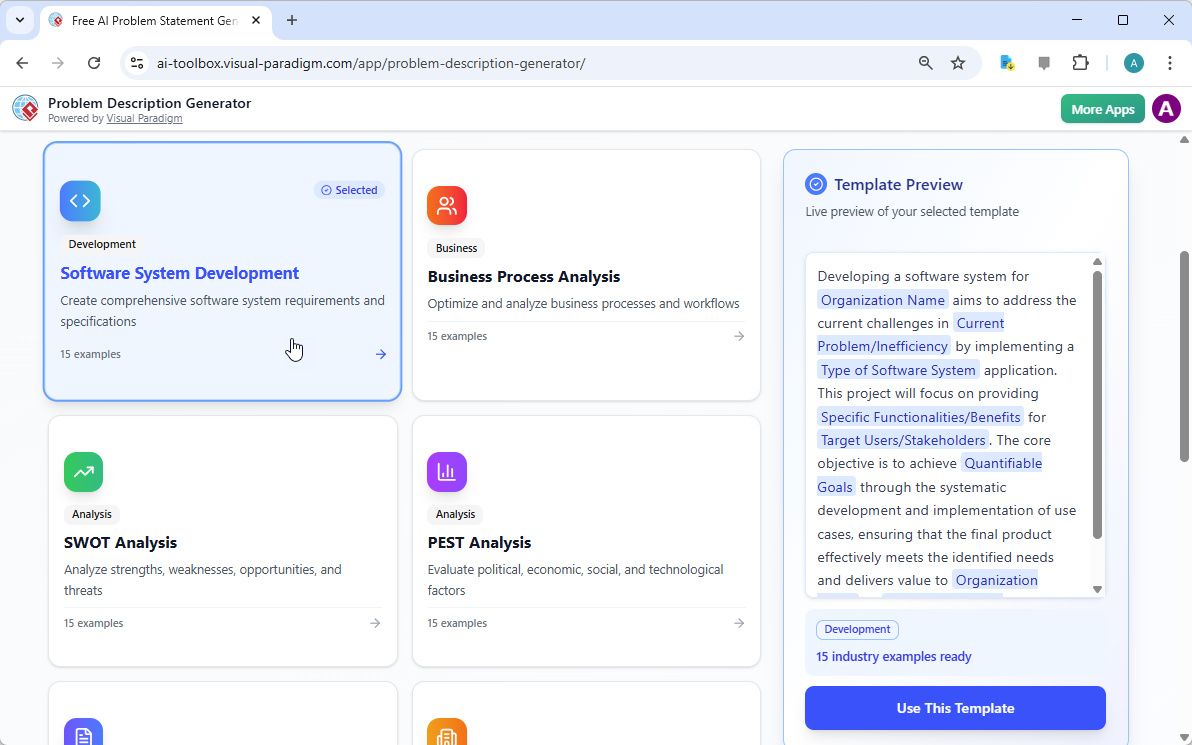
每个伟大的项目都始于坚实的基础,而问题陈述的基础正是合适的模板。使用AI驱动的问题描述生成器的第一步,是选择一个与项目性质完全契合的模板。如图所示
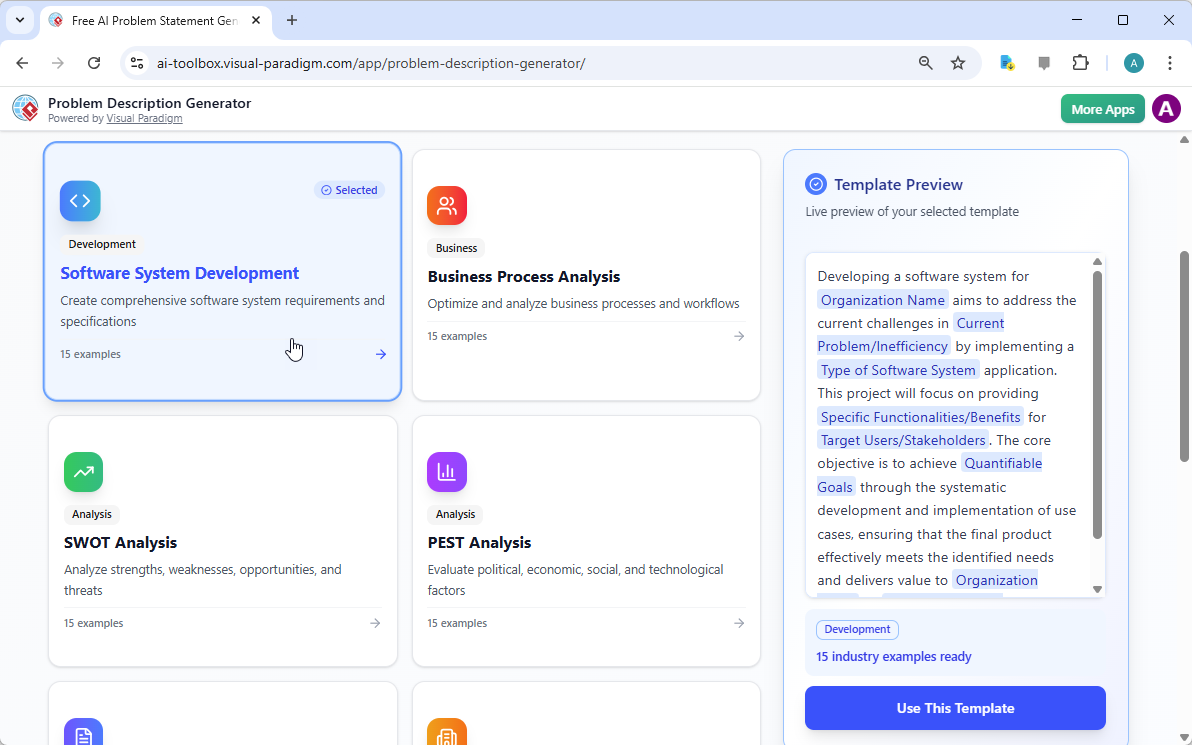
This is a screenshot of Visual Paradigm's AI Powered Problem Description Generator. It shows the first step, which involves c

,界面呈现一个简洁直观的仪表板,提供多种适用于不同业务需求的模板。无论你正在应对软件开发项目、优化业务流程,还是进行SWOT或PEST等战略分析,都能找到专属模板。例如,“软件系统开发”模板专为帮助你制定全面的软件系统需求和规格而设计。通过选择正确的模板,你立即建立起专业结构,引导你涵盖问题的所有关键方面,确保不会遗漏任何重要细节。这一步至关重要,因为它为整个问题描述设定了基调和框架,使后续步骤更加高效和有效。

步骤2:填写变量——定制你的叙述

选定模板后,神奇之处就出现在“编辑参数”部分。
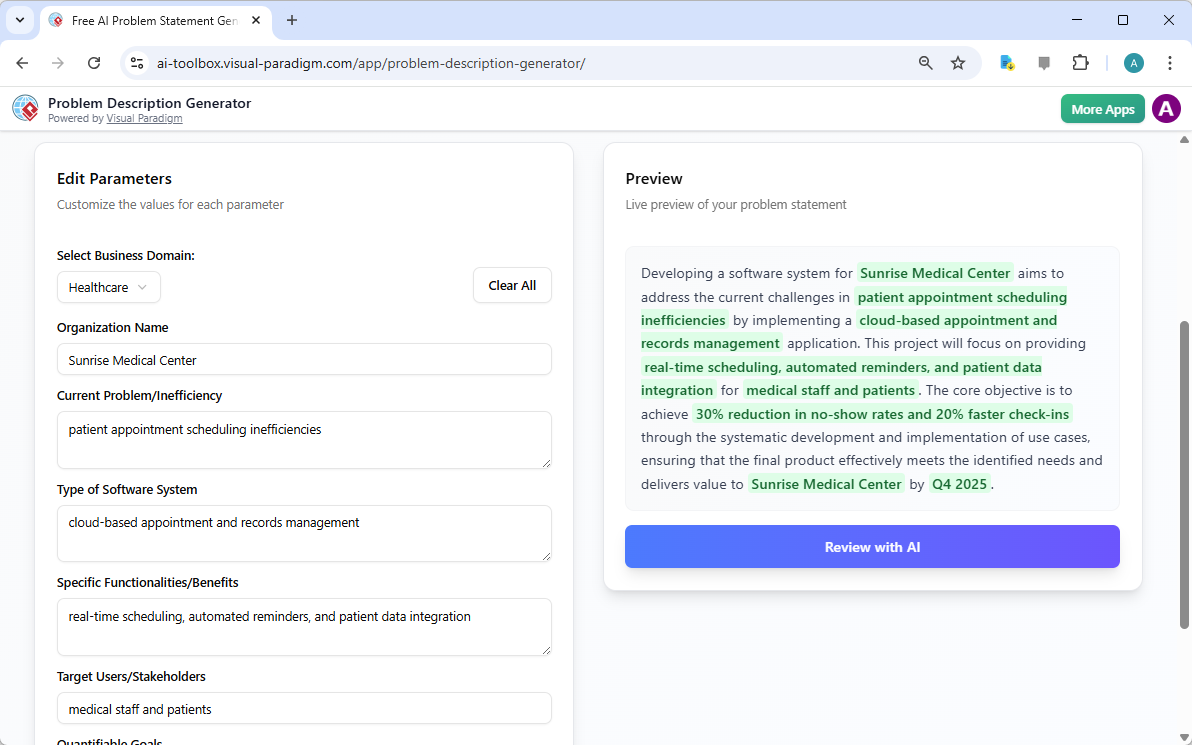
This is a screenshot of Visual Paradigm's AI Powered Problem Description Generator. It shows the second step, which involves

生动地展示了这第二步。左侧是一个包含具体字段的表单,例如“组织名称”、“当前问题/低效之处”和“软件系统类型”。这就是注入项目独特基因的地方。当你输入细节时,右侧的实时预览会动态更新,清晰展示你填写的变量在最终问题描述中的呈现效果。这一实时预览功能极为强大。它让你看到输入内容所形成的叙述,发现任何不自然的表达,并即时调整。变量以绿色高亮显示,便于你清楚了解哪些内容正被插入模板。这一过程不仅仅是填空,更是塑造一个连贯的故事,清晰阐述问题、其影响及期望结果。能够实时看到描述的演变,是提升清晰度与信心的变革性体验。

步骤3:AI审查——你的即时专家编辑

最后一步,也是最具威力的一步,是AI审查。在你填完所有变量并满意于实时预览后,可以点击“通过AI审查”按钮。
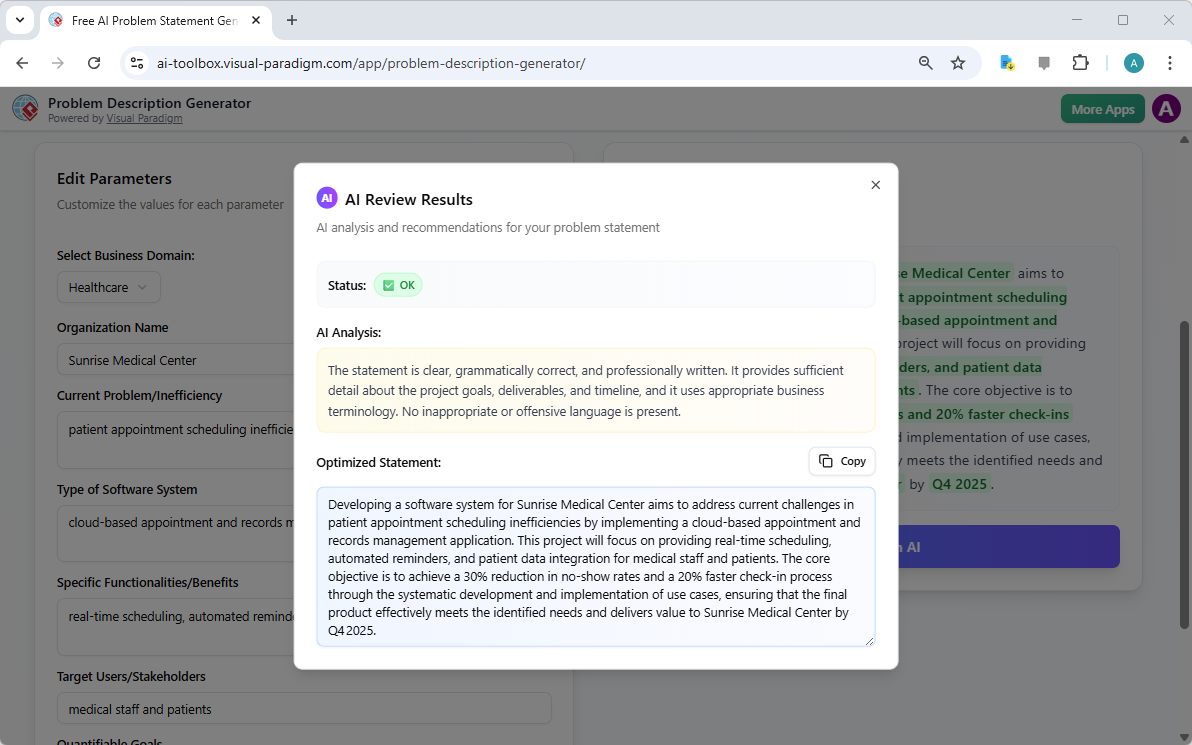
This is a screenshot of Visual Paradigm's AI Powered Problem Description Generator. Once the details are filled in, you can c

完美捕捉了这一时刻。弹窗出现,对生成的问题陈述进行详细分析。AI不仅检查语法,还评估陈述的清晰度、完整性、逻辑流畅性以及业务术语的恰当使用。它提供明确的“状态”(如“正常”)和详细的“AI分析”,突出优点并提出改进建议。例如,AI可能确认你的陈述清晰且专业,或建议用更具冲击力的方式表述关键目标。这种即时且客观的反馈如同一位虚拟专家编辑,帮助你优化问题陈述,确保其不仅准确,而且能高效传达项目目标。这最后一步确保你的问题陈述可以自信地与利益相关者、开发人员或客户分享。

释放项目的潜力

定义问题是任何项目中最困难的部分。模糊或表达不清的问题陈述可能导致资源浪费、解决方案错位,最终导致项目失败。Visual Paradigm的问题描述生成器解决了这一根本挑战。它将结构化模板的力量与AI的智能相结合,打造了一个既高效又有效的流程。通过遵循三个简单步骤——选择模板、填写变量、通过AI审查,你可以在几分钟内将最初的项目构想转化为清晰、有力且专业的陈述。这一工具不仅是一种便利,更是一种战略优势,确保你的项目从一开始就走上正轨。停止猜测,自信地开始定义。立即试用AI驱动的问题描述生成器并亲身体验它带来的改变。

相关链接

通过视觉范式AI驱动的利益相关方管理工具优化员工参与平台的推广

Optimize employee engagement platform rollouts using Visual Paradigm’s AI tool. A 7-step guide to stakeholder management and organizational change.

成功的组织变革,例如公司范围内的数字员工参与平台的实施,更多依赖于其背后的人际动态,而非技术本身。利用专业的利益相关方管理软件对希望最小化阻力并最大化采纳率的项目领导者而言,已不再是可选项。视觉范式AI驱动的利益相关方管理工具提供了一套系统化的七步方法,帮助应对这些复杂的人际关系格局。通过自动化识别和分析阶段,项目经理可在几分钟内将抽象概念转化为可执行的参与策略,确保每一位相关人员——从高管赞助者到工会代表——都得到恰当管理。

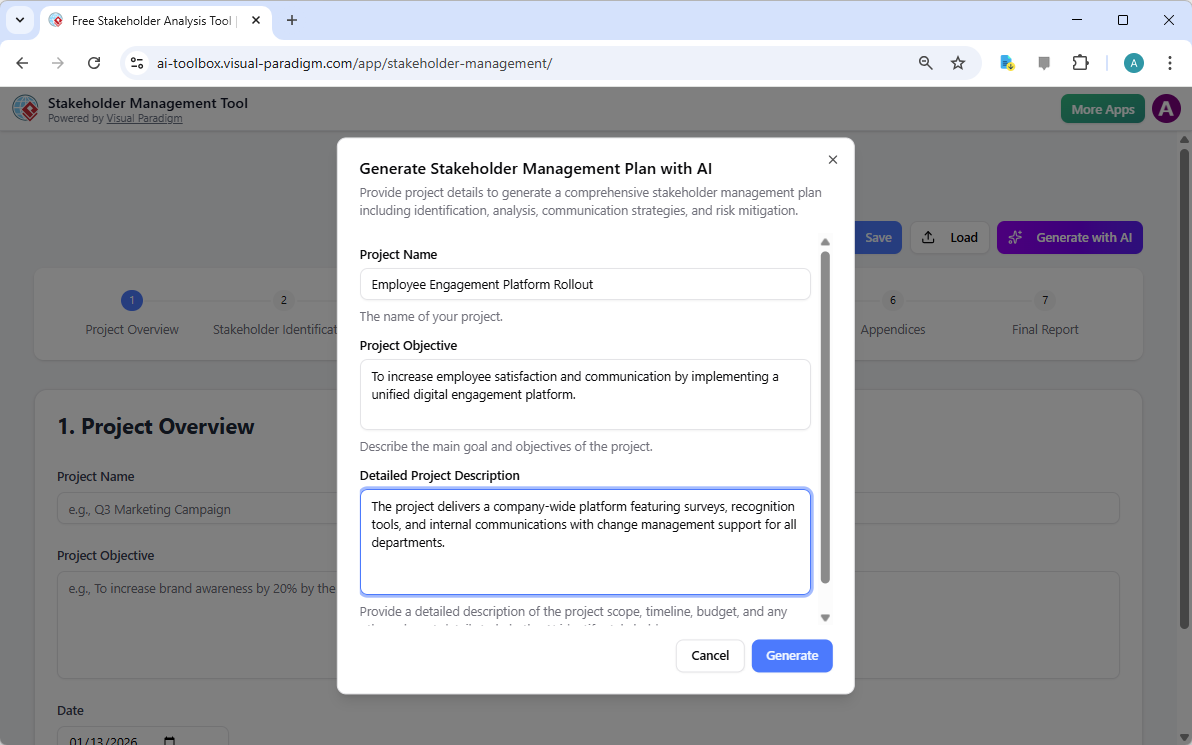
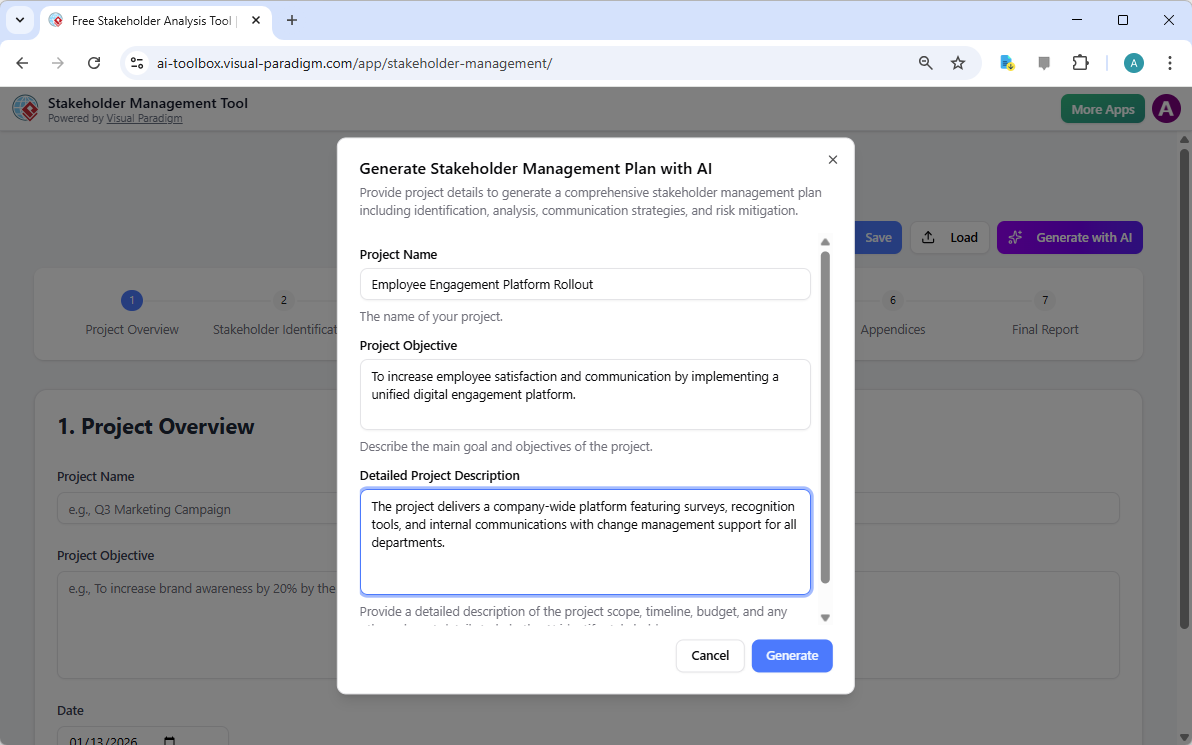
该过程始于项目的背景设定。在界面中,用户定义项目的范围、目标及具体细节。例如,在“员工参与平台推广”项目中,该工具会提示用户描述平台的功能,如调查工具和认可机制,以及变革管理支持的必要性。这一初始输入成为人工智能生成定制化管理计划的基础数据。

This is the screenshot of Visual Paradigm's AI-Powered Stakeholder Management Tool. It is now at AI generation screen, where

项目治理的结构化方法

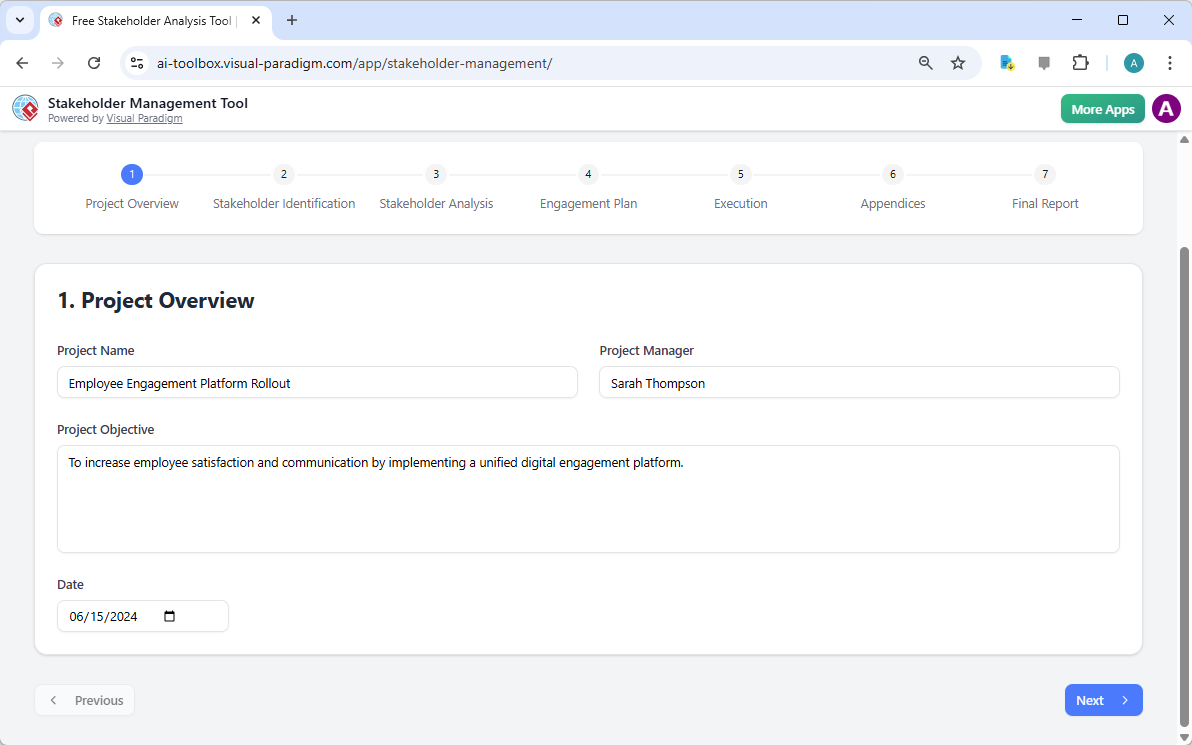
项目文档的精确性是严谨管理者的重要标志。工作流程的第一步——项目概览——确保在进入复杂分析之前已全面收集基础数据。此步骤记录项目名称、目标及指定负责人,为后续所有战略决策提供清晰参考。尽早确立这些参数至关重要,以确保项目全生命周期中的持续一致。

This is the screenshot of Visual Paradigm's AI-Powered Stakeholder Management Tool. The initial data is generated by AI and i

有效利益相关方管理的关键要点

  • 系统化的七步工作流程:引导用户从最初的识别,到执行,再到最终报告。

  • AI驱动的策略生成:根据项目背景,快速生成利益相关方、利益点及参与程度的全面草案。

  • 以隐私为中心的数据处理:所有项目数据均以.json文件本地保存,确保敏感的组织信息不会上传至云端。

  • 动态沟通规划:促进定制化信息传递计划和风险缓解策略的制定。

  • 专业报告:生成一份适合高管审查和团队协同的综合摘要。

识别并分类人为因素

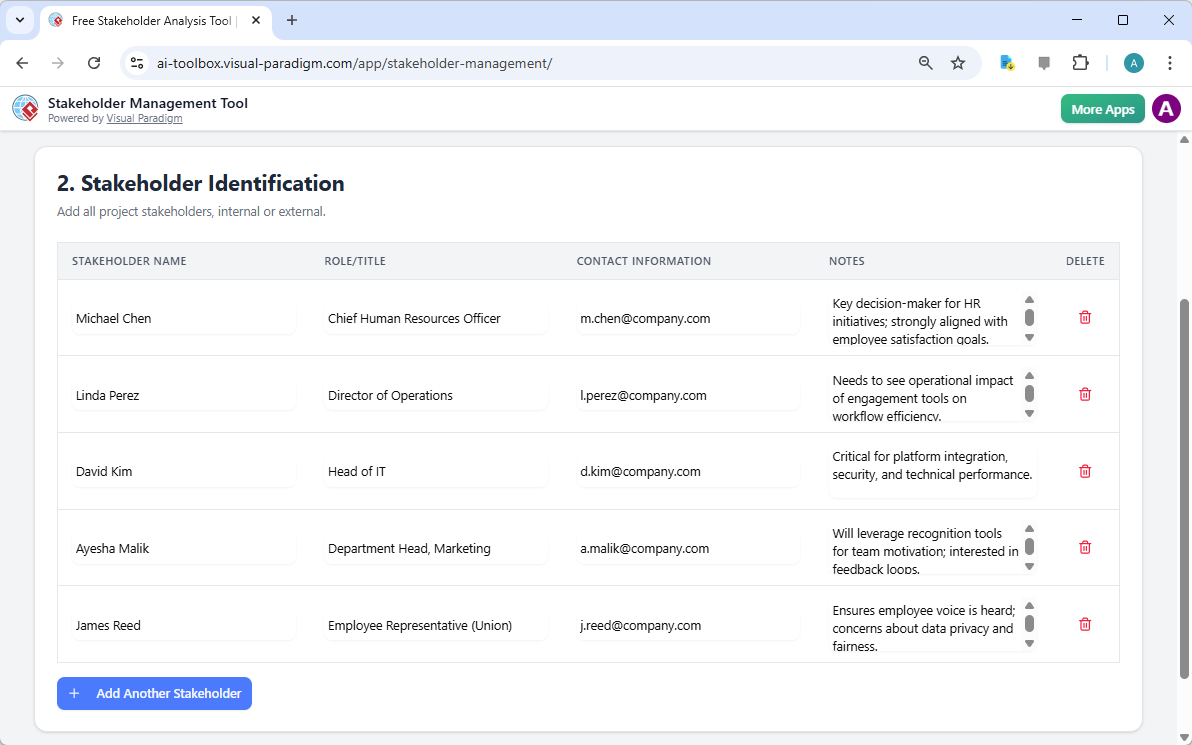
项目参数设定后,接下来的关键阶段是利益相关方识别。此步骤需列出所有可能影响或受该举措影响的个人或群体。在员工参与平台的背景下,这包括首席人力资源官、运营总监及部门主管等角色。一个易于使用的利益相关方管理应用程序必须支持详细的人物画像,包括联系方式以及针对每个人独特观点或关切的具体备注。

This is the screenshot of Visual Paradigm's AI-Powered Stakeholder Management Tool. It is now at step 2 - Professional online

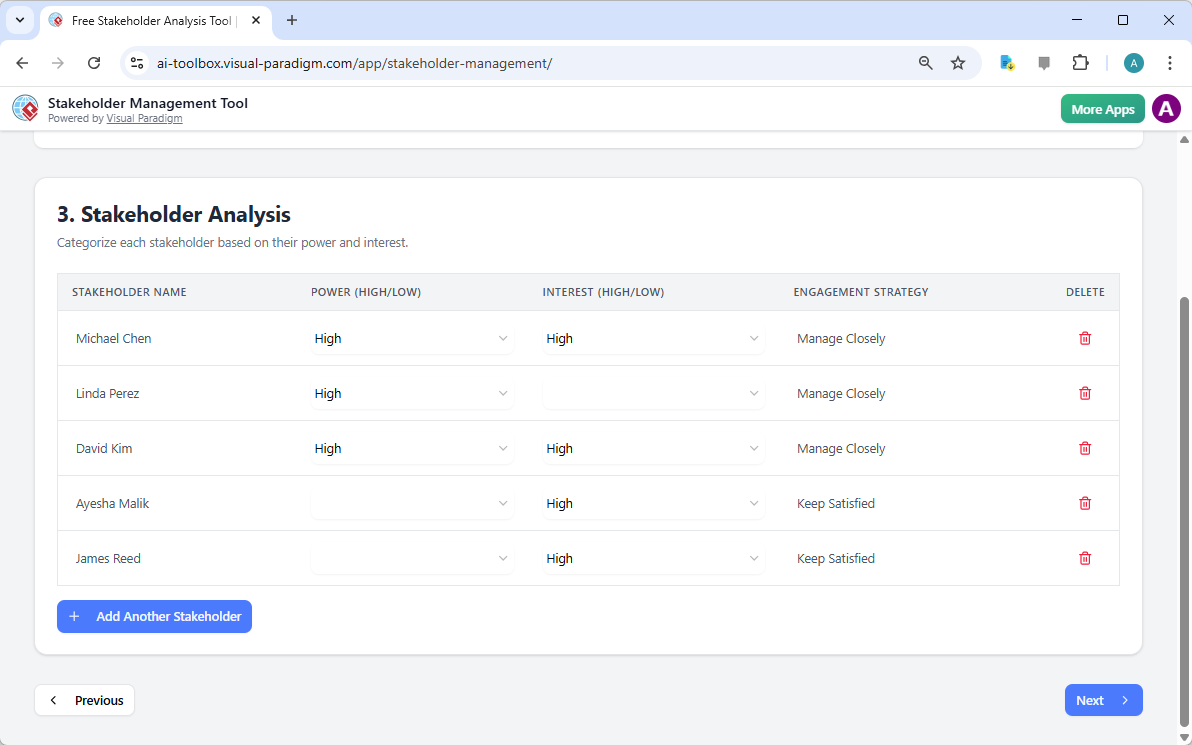
仅进行识别是不够的,必须进行严格的利益相关方分析以优先安排参与工作。这通常通过评估两个核心变量——权力(影响力)和兴趣——来实现。高权力且高兴趣的利益相关方,如IT主管或首席人力资源官,需要“密切管理”;而影响力较低者则只需“保持满意”或“保持知情”。这种分类确保有限的沟通资源被分配到对项目成功最具影响力的领域。

This is the screenshot of Visual Paradigm's AI-Powered Stakeholder Management Tool. It is now at step 3 - Professional online

战略性参与与风险缓解

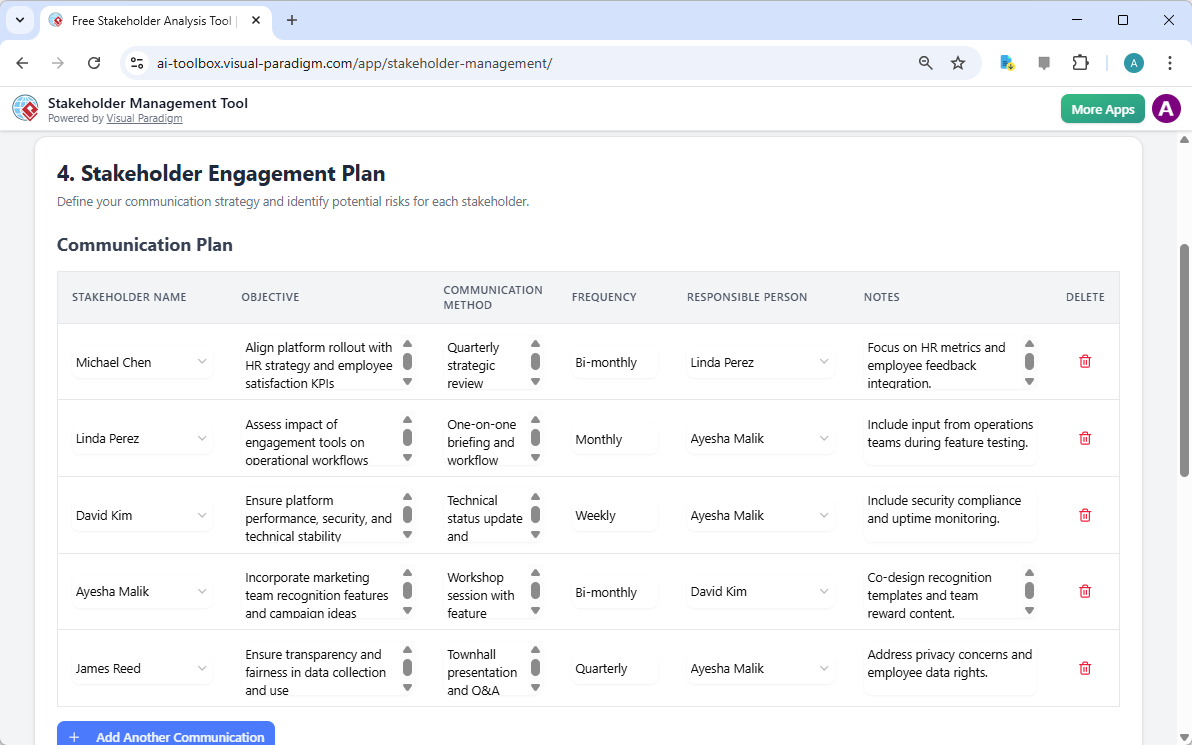
分析完成后,重点转向利益相关方参与计划。这是将战略意图转化为战术沟通计划的阶段。每位利益相关方都会被分配具体的沟通目标、偏好的沟通方式(如季度审查或全员大会)以及频率。这种细致程度可防止常导致项目延误的沟通断层。例如,IT部门可能每周安排一次技术状态更新,以确保平台稳定;而面向全体员工的全员大会则可每季度举行一次。

This is the screenshot of Visual Paradigm's AI-Powered Stakeholder Management Tool. It is now at the upper part of step 4 - P

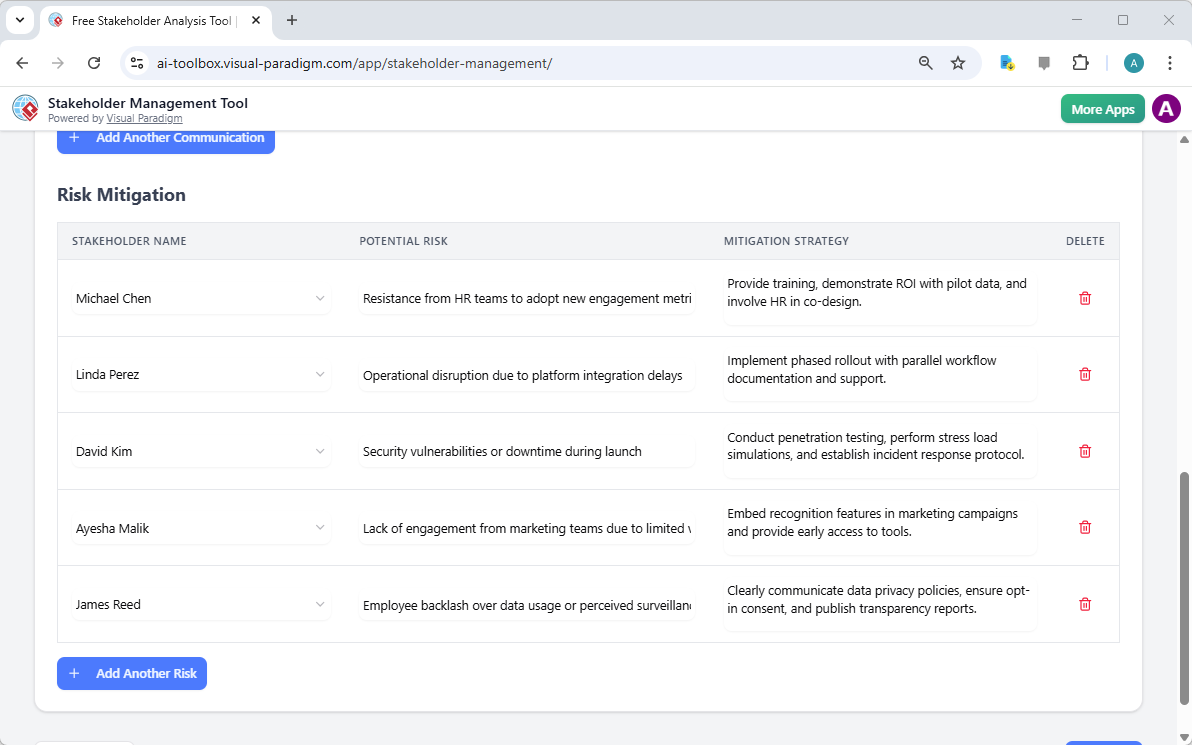
此外,主动应对需要识别潜在风险并制定缓解策略。抵制是变革的自然产物,但可以加以管理。如果AI识别出“员工对数据使用产生负面反应”等风险,该工具允许管理者记录具体的缓解策略,例如发布透明度报告或清晰传达数据隐私政策。这种前瞻性方法正是区分专业的利益相关者管理软件从一个简单的电子表格开始。

This is the screenshot of Visual Paradigm's AI-Powered Stakeholder Management Tool. It is now at the lower part of step 4 - P

跟踪执行并确保问责

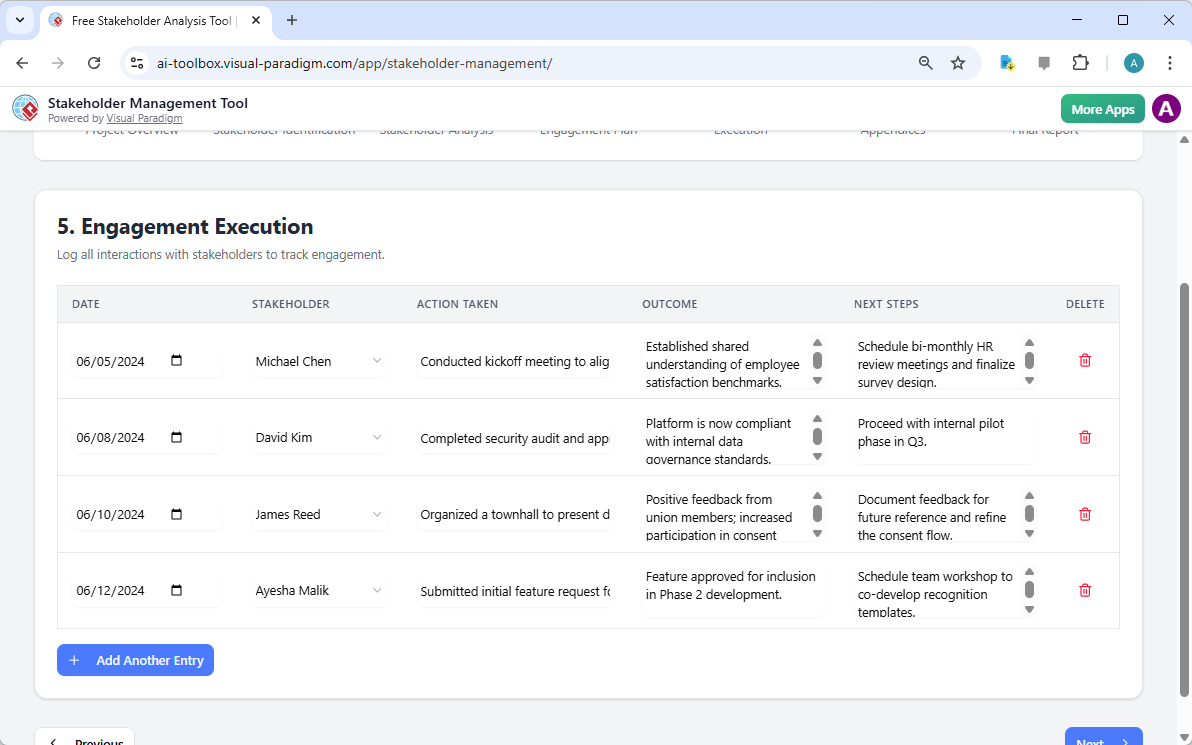
战略在执行之前始终停留在理论层面。参与执行步骤充当所有互动的记录簿。通过记录日期、涉及的利益相关者、采取的行动以及产生的结果,项目经理能够保持其参与工作的透明审计轨迹。如果某个特定利益相关者的态度发生变化,或在实施过程中出现意外障碍,这一历史记录对于在项目中期调整策略具有不可估量的价值。

This is the screenshot of Visual Paradigm's AI-Powered Stakeholder Management Tool. It is now at step 5 - Professional online

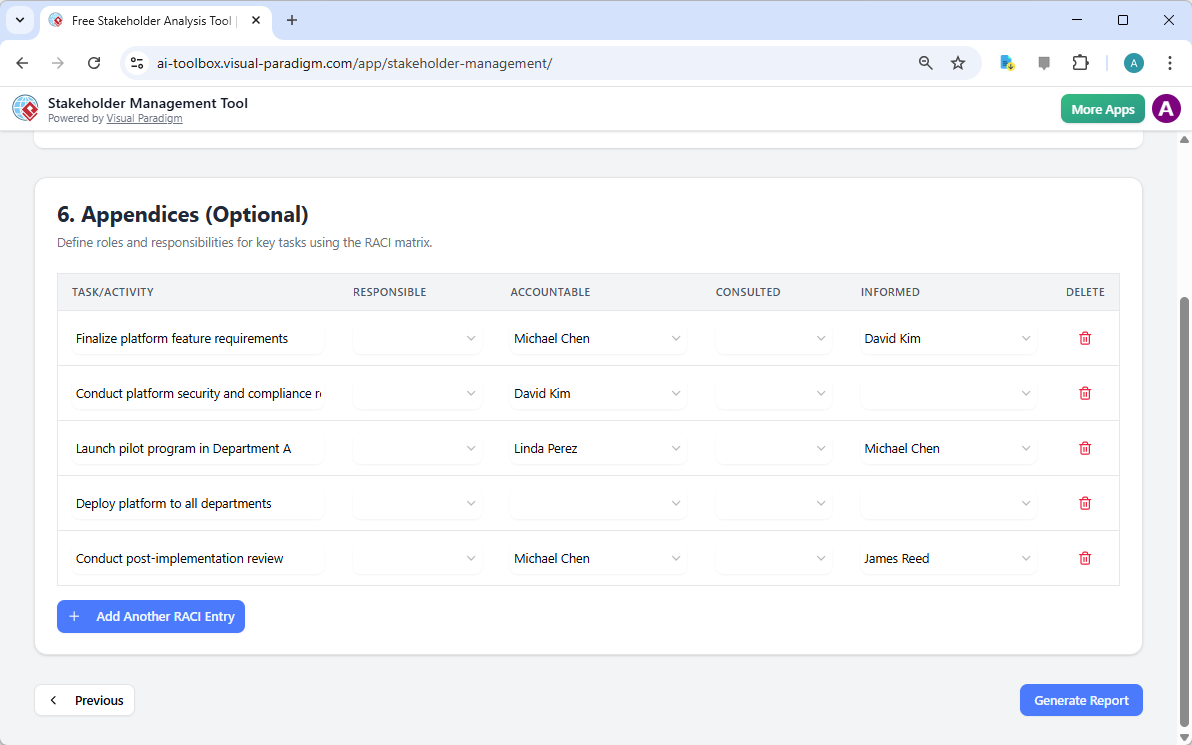
为了确保这些任务不仅被记录,而且得到有效管理,该工具包含一个附录部分,其中包含一个RACI矩阵(负责、问责、咨询、知情)。在实施参与平台时,明确谁对最终确定平台需求负有“问责”责任,而谁只需“知情”试点项目启动,这一点至关重要。明确定义这些角色可以消除模糊性,防止大型企业项目中常见的“责任分散”问题。

This is the screenshot of Visual Paradigm's AI-Powered Stakeholder Management Tool. It is now at step 6 - Professional online

将情报整合为最终报告

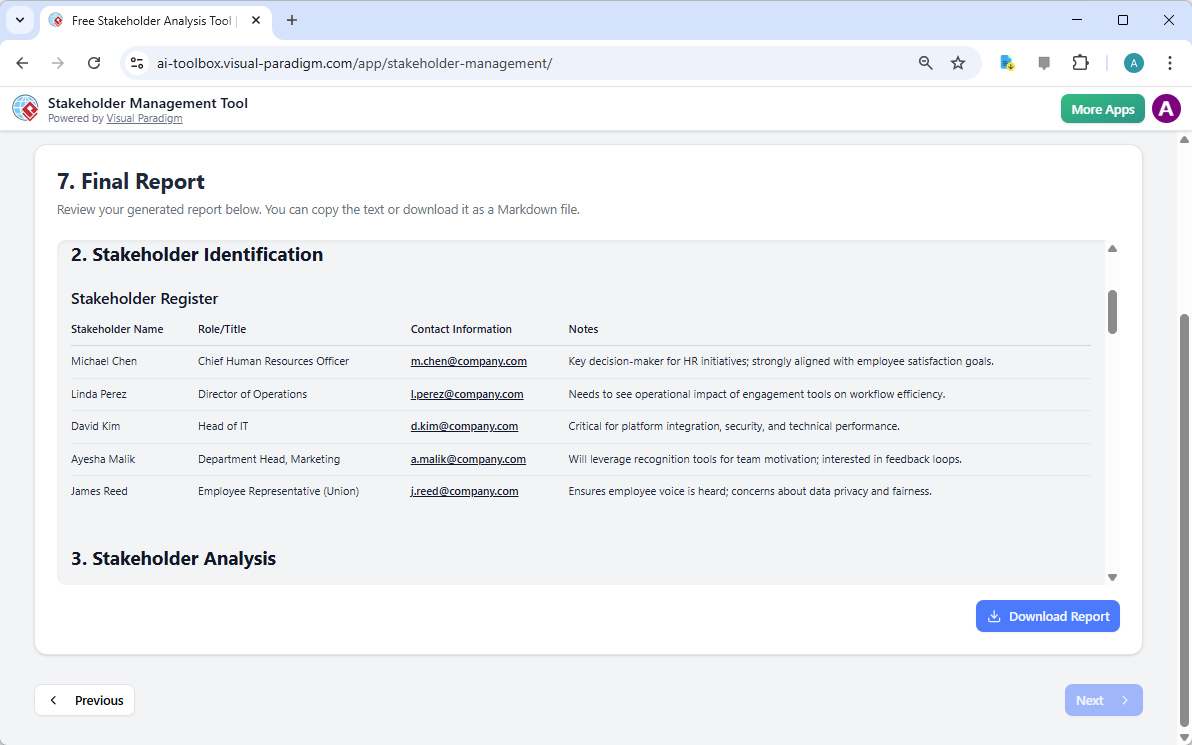
这一七步流程的最终成果是最终报告。该文件将每一次识别、分析、沟通计划和执行日志整合为专业且易于阅读的格式。它是项目利益相关者策略的权威信息来源。由于这一最佳在线利益相关者管理应用优先考虑数据主权,最终报告可从您的浏览器打印或保存为PDF,而底层数据则安全地存储在您的本地设备上。

This is the screenshot of Visual Paradigm's AI-Powered Stakeholder Management Tool. It is now at step 7. A report is produced

总之,应对组织变革的复杂性不仅需要直觉,更需要由智能工具支持的结构化方法。Visual Paradigm的人工智能驱动的利益相关者管理工具简化了项目治理中最耗时的环节,使领导者能够专注于真正重要的事情:建立关系并推动成果。通过遵循引导式的七步工作流程,您可以确保没有任何利益相关者被忽视,且每个风险都在演变为危机之前得到解决。

准备好掌握您的利益相关者关系了吗?

有效的管理始于正确的框架。无论您是项目经理、业务分析师还是变革领导者,快速生成并执行利益相关者参与计划的能力都是一项关键能力。我们诚邀您亲身体验人工智能驱动方法的高效性。

开始您的项目:

  1. 通过以下链接访问该工具:立即试用下方链接。

  2. 在“项目概览”中输入您的项目名称和目标。

  3. 使用“AI生成”功能来生成您的初步识别与分析。

  4. 完善数据并本地保存进度,以确保完全隐私。

了解更多方法论:Visual Paradigm利益相关者管理指南

立即启动您的项目:立即试用人工智能驱动的利益相关者管理工具

相关链接

Optimizing Employee Engagement Platform Rollouts with Visual Paradigm’s AI-Powered Stakeholder Management Tool

Optimize employee engagement platform rollouts using Visual Paradigm’s AI tool. A 7-step guide to stakeholder management and organizational change.

Successful organizational change, such as the implementation of a company-wide digital engagement platform, depends less on the technology itself and more on the human dynamics surrounding it. Utilizing a professional stakeholder management software is no longer optional for project leaders who aim to minimize resistance and maximize adoption. Visual Paradigm’s AI-powered stakeholder management tool offers a systematic, 7-step methodology to navigate these complex interpersonal landscapes. By automating the identification and analysis phases, project managers can move from abstract concepts to actionable engagement strategies in a matter of minutes, ensuring that every individual—from executive sponsors to union representatives—is appropriately managed.

The process begins with the contextualization of the project. Within the interface, the user defines the scope, objectives, and specific nuances of the initiative. For instance, in an “Employee Engagement Platform Rollout,” the tool prompts the user to describe the platform’s features, such as surveys and recognition tools, and the necessity for change management support. This initial input serves as the foundational data for the artificial intelligence to generate a tailored management plan.

This is the screenshot of Visual Paradigm's AI-Powered Stakeholder Management Tool. It is now at AI generation screen, where

A Structured Approach to Project Governance

Precision in project documentation is the hallmark of a disciplined manager. The first step of the workflow, the Project Overview, ensures that all foundational data is captured before moving into complex analysis. This step records the project name, the objective, and the designated manager, providing a clear reference point for all subsequent strategic decisions. It is essential to establish these parameters early to maintain alignment throughout the project lifecycle.

This is the screenshot of Visual Paradigm's AI-Powered Stakeholder Management Tool. The initial data is generated by AI and i

Key Takeaways for Effective Stakeholder Management

  • Systematic 7-Step Workflow: Guides users from initial identification through to execution and final reporting.

  • AI-Driven Strategy Generation: Quickly produces a comprehensive draft of stakeholders, interests, and engagement levels based on project context.

  • Privacy-Centric Data Handling: All project data is saved locally as .json files, ensuring sensitive organizational information remains off the cloud.

  • Dynamic Communication Planning: Facilitates the creation of tailored messaging schedules and risk mitigation strategies.

  • Professional Reporting: Generates a consolidated summary suitable for executive review and team alignment.

Identifying and Categorizing the Human Element

Once the project parameters are set, the next critical phase is Stakeholder Identification. This step involves listing every individual or group that may affect or be affected by the initiative. In the context of an engagement platform, this includes roles such as the Chief Human Resources Officer, the Director of Operations, and Department Heads. An easy-to-use stakeholder management app must allow for detailed profiling, including contact information and specific notes regarding each person’s unique perspective or concerns.

This is the screenshot of Visual Paradigm's AI-Powered Stakeholder Management Tool. It is now at step 2 - Professional online

Identification alone is insufficient; one must apply a rigorous Stakeholder Analysis to prioritize engagement efforts. This is typically achieved by evaluating two primary variables: Power (Influence) and Interest. Stakeholders with high power and high interest, such as the Head of IT or the CHRO, require “close management,” whereas those with lower influence may simply need to be “kept satisfied” or “informed.” This categorization ensures that limited communication resources are allocated where they will have the most significant impact on project success.

This is the screenshot of Visual Paradigm's AI-Powered Stakeholder Management Tool. It is now at step 3 - Professional online

Strategic Engagement and Risk Mitigation

With the analysis complete, the focus shifts to the Stakeholder Engagement Plan. This is where strategic intent is converted into a tactical communication plan. Each stakeholder is assigned a specific communication objective, a preferred method (such as quarterly reviews or town halls), and a frequency. This level of detail prevents communication gaps that often lead to project delays. For example, a Technical Status Update might be scheduled weekly for the IT department to ensure platform stability, while a broader Town Hall might occur quarterly for the general employee population.

This is the screenshot of Visual Paradigm's AI-Powered Stakeholder Management Tool. It is now at the upper part of step 4 - P

Furthermore, a proactive approach requires the identification of potential risks and the development of mitigation strategies. Resistance is a natural byproduct of change; however, it can be managed. If the AI identifies a risk such as “employee backlash over data usage,” the tool allows the manager to document a specific mitigation strategy, such as publishing transparency reports or clearly communicating data privacy policies. This forward-thinking approach is what distinguishes a professional stakeholder management software from a simple spreadsheet.

This is the screenshot of Visual Paradigm's AI-Powered Stakeholder Management Tool. It is now at the lower part of step 4 - P

Tracking Execution and Ensuring Accountability

Strategy remains theoretical until it is executed. The Engagement Execution step serves as a ledger for all interactions. By logging the date, the stakeholder involved, the action taken, and the resulting outcome, project managers maintain a transparent audit trail of their engagement efforts. This historical record is invaluable for adjusting strategies mid-project if a particular stakeholder’s sentiment shifts or if unexpected obstacles arise during the rollout.

This is the screenshot of Visual Paradigm's AI-Powered Stakeholder Management Tool. It is now at step 5 - Professional online

To ensure that these tasks are not merely recorded but effectively managed, the tool includes an Appendices section featuring a RACI matrix (Responsible, Accountable, Consulted, Informed). In the rollout of an engagement platform, it is vital to know exactly who is “Accountable” for finalizing platform requirements versus who merely needs to be “Informed” of the pilot program launch. Defining these roles eliminates ambiguity and prevents the “diffusion of responsibility” that often plagues large-scale corporate initiatives.

This is the screenshot of Visual Paradigm's AI-Powered Stakeholder Management Tool. It is now at step 6 - Professional online

Consolidating Intelligence into a Final Report

The culmination of this 7-step process is the Final Report. This document consolidates every identification, analysis, communication schedule, and execution log into a professional, easy-to-read format. It serves as the definitive source of truth for the project’s stakeholder strategy. Because this best online stakeholder management app prioritizes data sovereignty, the final report can be printed or saved as a PDF from your browser, while the underlying data remains securely stored on your local machine.

This is the screenshot of Visual Paradigm's AI-Powered Stakeholder Management Tool. It is now at step 7. A report is produced

In summary, navigating the complexities of organizational change requires more than just intuition; it requires a structured methodology supported by intelligent tools. Visual Paradigm’s AI-powered stakeholder management tool streamlines the most labor-intensive aspects of project governance, allowing leaders to focus on what truly matters: building relationships and driving results. By following a guided 7-step workflow, you ensure that no stakeholder is overlooked and every risk is addressed before it becomes a crisis.

Ready to Master Your Stakeholder Relationships?

Effective management begins with the right framework. Whether you are a project manager, a business analyst, or a change leader, the ability to rapidly generate and execute a stakeholder engagement plan is a critical competency. We invite you to experience the efficiency of an AI-driven approach firsthand.

To begin your project:

  1. Access the tool via the Try Now link below.

  2. Enter your project name and objective in the “Project Overview.”

  3. Use the “Generate with AI” feature to produce your initial identification and analysis.

  4. Refine the data and save your progress locally to maintain full privacy.

Learn more about the methodology: Visual Paradigm Stakeholder Management Guide

Start your project today: Try the AI-Powered Stakeholder Management Tool Now

Related Links

Crafting a Crystal-Clear Problem Statement for Software Development

Use Visual Paradigm’s AI-powered tool to craft clear, structured problem statements for software projects with templates and real-time feedback.

Struggling to articulate the core challenge your software project aims to solve? The Problem Description Generator from Visual Paradigm is the ultimate AI-powered tool to transform your project’s initial chaos into a clear, focused, and compelling narrative. This innovative solution empowers project managers, business analysts, and product owners to define the “why” behind their work with unprecedented speed and precision. By leveraging a library of structured templates and real-time AI feedback, this tool ensures your problem statement is not just written, but optimized for maximum impact from day one. It’s the secret weapon for launching projects with laser focus and setting the stage for success.

Key Takeaways:

  • Use a template-driven approach to ensure your problem statement is comprehensive and structured.

  • Fill in specific variables to customize the description for your unique project.

  • Get instant AI feedback to refine your problem statement for clarity and effectiveness.

  • Start any project with a solid, well-articulated understanding of the core issue.

Step 1: Choose Your Template – The Foundation of a Strong Problem Statement

Every great project begins with a solid foundation, and for a problem statement, that foundation is the right template. The first step in using the AI-Powered Problem Description Generator is to select a template that perfectly aligns with your project’s nature. As shown in

This is a screenshot of Visual Paradigm's AI Powered Problem Description Generator. It shows the first step, which involves c

, the interface presents a clean, intuitive dashboard with a variety of templates for different business needs. Whether you’re tackling a software development initiative, optimizing a business process, or conducting a strategic analysis like a SWOT or PEST analysis, you can find a dedicated template. The “Software System Development” template, for instance, is specifically designed to help you create comprehensive software system requirements and specifications. By selecting the correct template, you immediately establish a professional structure that guides you to cover all critical aspects of the problem, ensuring no vital detail is overlooked. This step is crucial because it sets the tone and framework for the entire problem description, making the subsequent steps much more efficient and effective.

Step 2: Fill in the Variables – Customize Your Narrative

Once you’ve chosen your template, the magic happens in the “Edit Parameters” section.

This is a screenshot of Visual Paradigm's AI Powered Problem Description Generator. It shows the second step, which involves

vividly illustrates this second step. On the left, you’re presented with a form filled with specific fields, such as “Organization Name,” “Current Problem/Inefficiency,” and “Type of Software System.” This is where you inject your project’s unique DNA. As you type in the details, the tool’s real-time preview on the right side dynamically updates, showing you exactly how your filled-in variables will look in the final problem description. This live preview is incredibly powerful. It allows you to see the narrative form your inputs are creating, spot any awkward phrasing, and make adjustments on the fly. The variables are highlighted in green, making it easy to see exactly what content is being inserted into the template. This process is not just about filling blanks; it’s about shaping a coherent story that clearly explains the problem, its impact, and the desired outcome. The ability to see your description evolve in real-time is a game-changer for clarity and confidence.

Step 3: Review with AI – Your Instant Expert Editor

The final, and arguably most powerful, step is the AI review. After you’ve filled in all the variables and are satisfied with the live preview, you can click the “Review with AI” button.

This is a screenshot of Visual Paradigm's AI Powered Problem Description Generator. Once the details are filled in, you can c

captures this moment perfectly. A modal window appears, presenting a detailed analysis of your generated problem statement. The AI doesn’t just check for grammar; it evaluates the statement for clarity, completeness, logical flow, and the use of appropriate business terminology. It provides a clear “Status” (like “OK”) and a detailed “AI Analysis” that highlights strengths and suggests improvements. For example, the AI might confirm that your statement is clear and professionally written, or it might suggest a more impactful way to phrase a key objective. This instant, objective feedback acts as a virtual expert editor, helping you refine your problem statement to ensure it is not only correct but also highly effective in communicating the project’s purpose. This final step ensures that your problem statement is ready to be shared with stakeholders, developers, or clients with confidence.

Unlock Your Project’s Potential

Defining a problem is often the hardest part of any initiative. A vague or poorly articulated problem statement can lead to wasted effort, misaligned solutions, and ultimately, project failure. The Problem Description Generator from Visual Paradigm solves this fundamental challenge. It combines the power of structured templates with the intelligence of AI to create a workflow that is both efficient and effective. By following the three simple steps—choose a template, fill in the variables, and review with AI—you can transform your initial project idea into a clear, compelling, and professional problem statement in minutes. This tool is not just a convenience; it’s a strategic advantage that ensures your project starts on the right foot. Stop guessing and start defining with confidence. Try the AI-Powered Problem Description Generator now and experience the difference it makes.

Related Links