为软件开发撰写清晰明确的问题陈述

Use Visual Paradigm’s AI-powered tool to craft clear, structured problem statements for software projects with templates and real-time feedback.

在表达你的软件项目要解决的核心挑战时感到困难吗?问题描述生成器来自Visual Paradigm是终极的AI驱动工具,可将项目初期的混乱转化为清晰、专注且富有吸引力的叙述。这一创新解决方案使项目经理、业务分析师和产品负责人能够以前所未有的速度和精度定义工作背后的“为什么”。通过利用结构化模板库和实时AI反馈,该工具确保你的问题陈述不仅被撰写出来,而且从第一天起就经过优化以实现最大影响力。它是启动项目时精准聚焦的制胜法宝,为成功奠定基础。

核心要点:

  • 采用模板驱动的方法,确保问题陈述全面且结构清晰。

  • 填写特定变量,为你的独特项目定制描述。

  • 获得即时AI反馈,以提升问题陈述的清晰度和有效性。

  • 以扎实且清晰的理解启动任何项目,明确核心问题。

步骤1:选择模板——强大问题陈述的基础

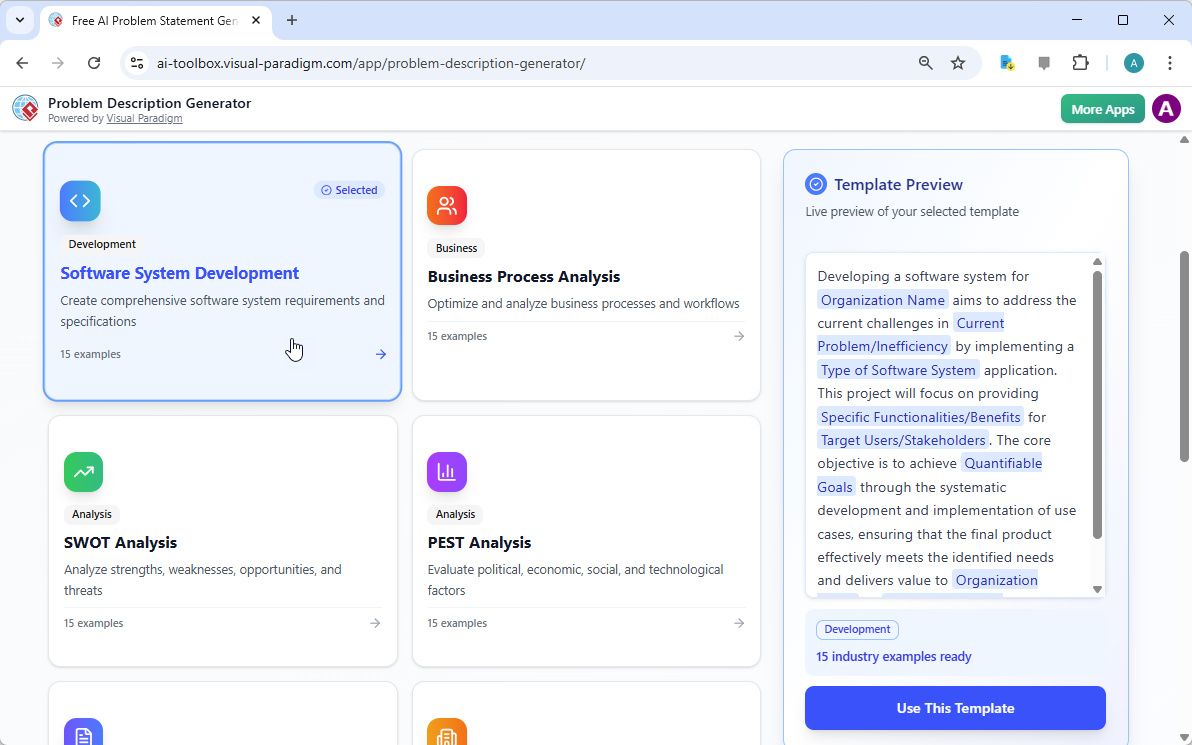
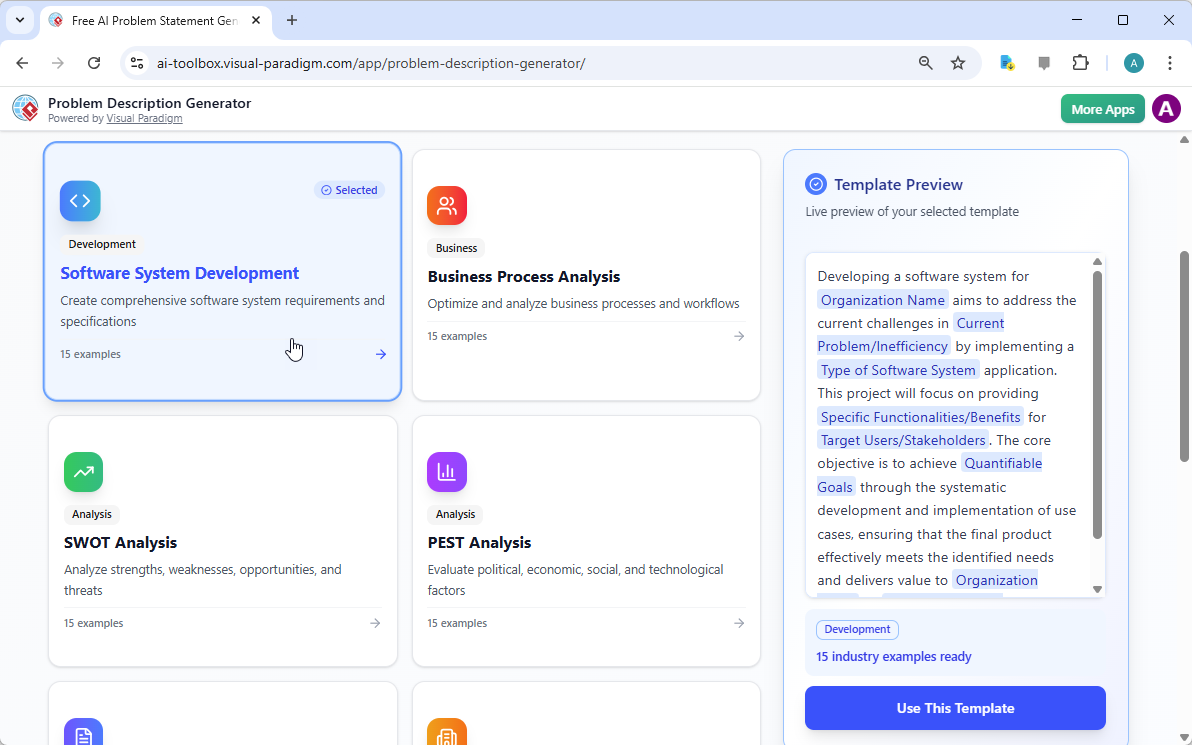
每个伟大的项目都始于坚实的基础,而问题陈述的基础正是合适的模板。使用AI驱动的问题描述生成器的第一步,是选择一个与项目性质完全契合的模板。如图所示

This is a screenshot of Visual Paradigm's AI Powered Problem Description Generator. It shows the first step, which involves c

,界面呈现一个简洁直观的仪表板,提供多种适用于不同业务需求的模板。无论你正在应对软件开发项目、优化业务流程,还是进行SWOT或PEST等战略分析,都能找到专属模板。例如,“软件系统开发”模板专为帮助你制定全面的软件系统需求和规格而设计。通过选择正确的模板,你立即建立起专业结构,引导你涵盖问题的所有关键方面,确保不会遗漏任何重要细节。这一步至关重要,因为它为整个问题描述设定了基调和框架,使后续步骤更加高效和有效。

步骤2:填写变量——定制你的叙述

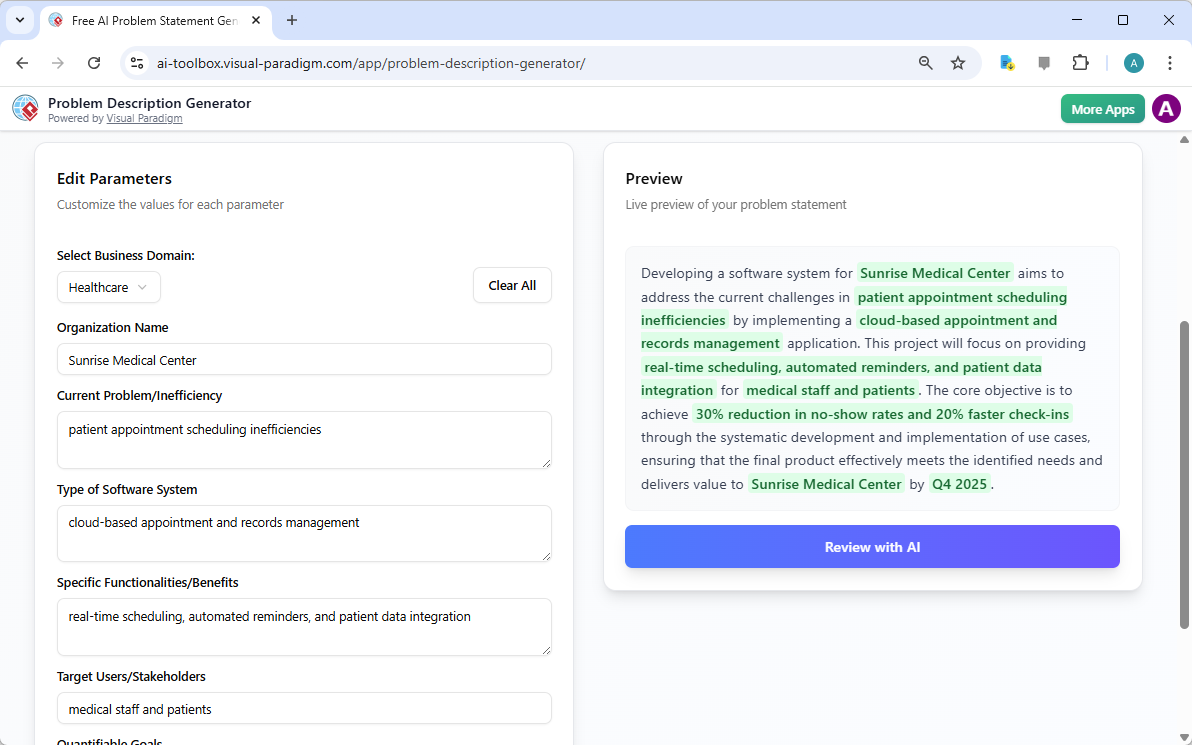
选定模板后,神奇之处就出现在“编辑参数”部分。

This is a screenshot of Visual Paradigm's AI Powered Problem Description Generator. It shows the second step, which involves

生动地展示了这第二步。左侧是一个包含具体字段的表单,例如“组织名称”、“当前问题/低效之处”和“软件系统类型”。这就是注入项目独特基因的地方。当你输入细节时,右侧的实时预览会动态更新,清晰展示你填写的变量在最终问题描述中的呈现效果。这一实时预览功能极为强大。它让你看到输入内容所形成的叙述,发现任何不自然的表达,并即时调整。变量以绿色高亮显示,便于你清楚了解哪些内容正被插入模板。这一过程不仅仅是填空,更是塑造一个连贯的故事,清晰阐述问题、其影响及期望结果。能够实时看到描述的演变,是提升清晰度与信心的变革性体验。

步骤3:AI审查——你的即时专家编辑

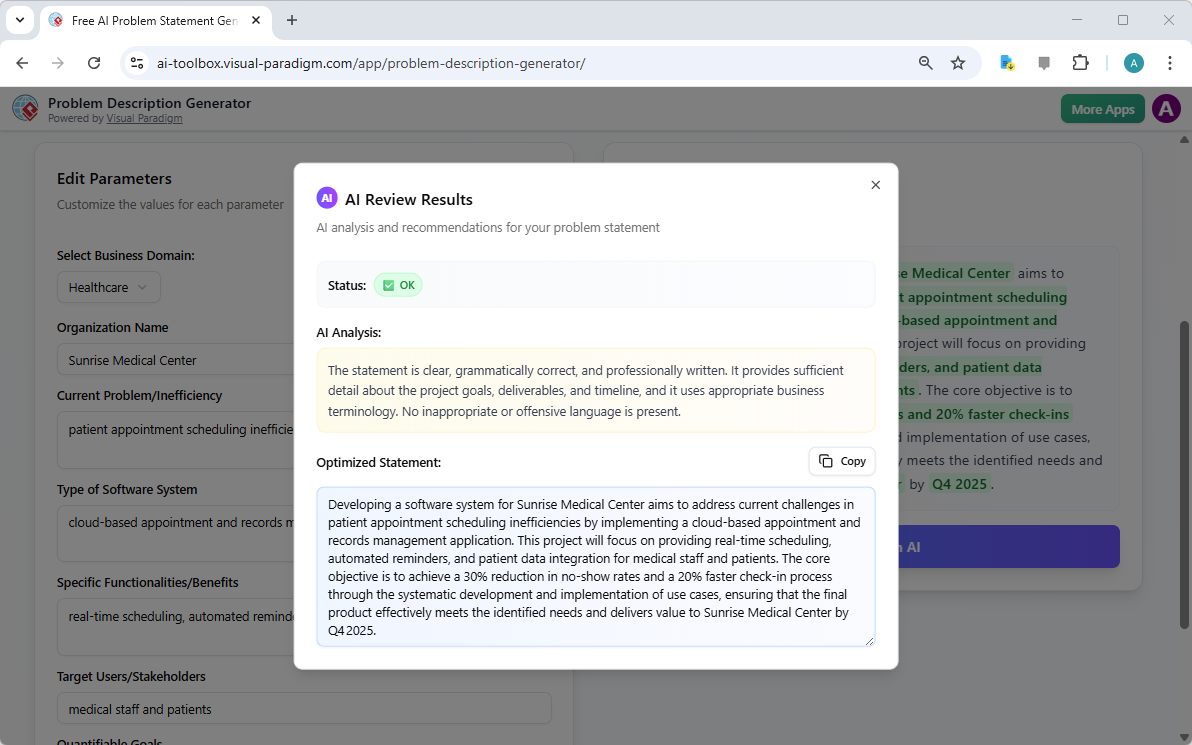
最后一步,也是最具威力的一步,是AI审查。在你填完所有变量并满意于实时预览后,可以点击“通过AI审查”按钮。

This is a screenshot of Visual Paradigm's AI Powered Problem Description Generator. Once the details are filled in, you can c

完美捕捉了这一时刻。弹窗出现,对生成的问题陈述进行详细分析。AI不仅检查语法,还评估陈述的清晰度、完整性、逻辑流畅性以及业务术语的恰当使用。它提供明确的“状态”(如“正常”)和详细的“AI分析”,突出优点并提出改进建议。例如,AI可能确认你的陈述清晰且专业,或建议用更具冲击力的方式表述关键目标。这种即时且客观的反馈如同一位虚拟专家编辑,帮助你优化问题陈述,确保其不仅准确,而且能高效传达项目目标。这最后一步确保你的问题陈述可以自信地与利益相关者、开发人员或客户分享。

释放项目的潜力

定义问题是任何项目中最困难的部分。模糊或表达不清的问题陈述可能导致资源浪费、解决方案错位,最终导致项目失败。Visual Paradigm的问题描述生成器解决了这一根本挑战。它将结构化模板的力量与AI的智能相结合,打造了一个既高效又有效的流程。通过遵循三个简单步骤——选择模板、填写变量、通过AI审查,你可以在几分钟内将最初的项目构想转化为清晰、有力且专业的陈述。这一工具不仅是一种便利,更是一种战略优势,确保你的项目从一开始就走上正轨。停止猜测,自信地开始定义。立即试用AI驱动的问题描述生成器并亲身体验它带来的改变。

相关链接

从问题到报告:人工智能如何引导您的用例之旅

Discover how AI guides your use case journey from problem to report with Visual Paradigm’s intelligent development assistant.

想象一下,你是一名项目经理,负责推出一个新的在线课程平台。首要挑战是清晰地阐述问题,然后将其转化为一个功能系统。这时,用例驱动开发助手,这是来自Visual Paradigm的AI驱动工具,它会介入其中。它不仅帮助你撰写文档,还引导你完成一个完整且结构化的流程,将模糊的想法转化为详细且可执行的项目计划。这一过程如此直观,仿佛有一位经验丰富的业务分析师和技术架构师与你并肩工作。本文深入探讨了这一强大工具的核心功能,通过一个在线课程平台的真实案例,展示它如何简化整个用例生命周期。

快速概览:用例驱动开发助手的核心要点

  • 从清晰的问题陈述开始,以明确项目的核心目标。

  • 使用人工智能自动生成候选用例和参与者列表。

  • 通过人工智能生成的用例图和活动图.

  • 使用结构化的MoSCoW方法对功能进行优先级排序,以聚焦高价值工作。

  • 生成详细的用例描述和可执行的Gherkin测试场景。

  • 创建全面的报告,以传达项目范围和计划。

  • 通过中央仪表板跟踪进度,并保持单一真实信息源。

步骤1:借助人工智能定义问题

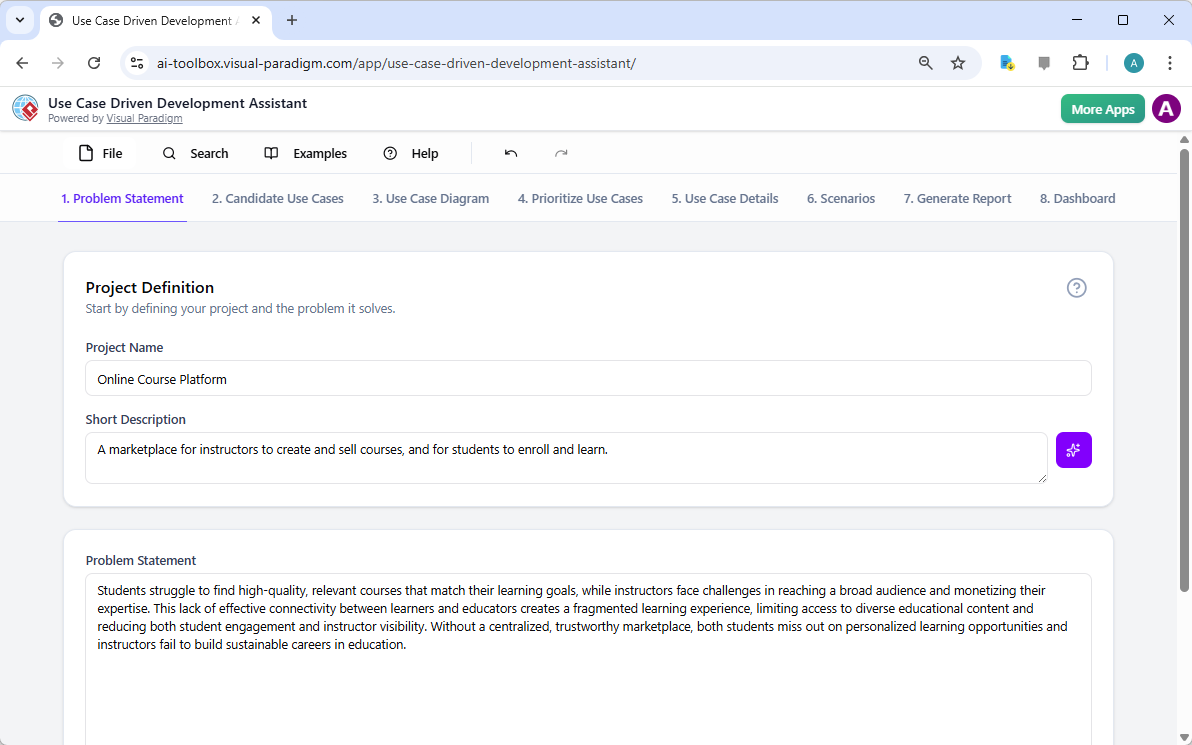
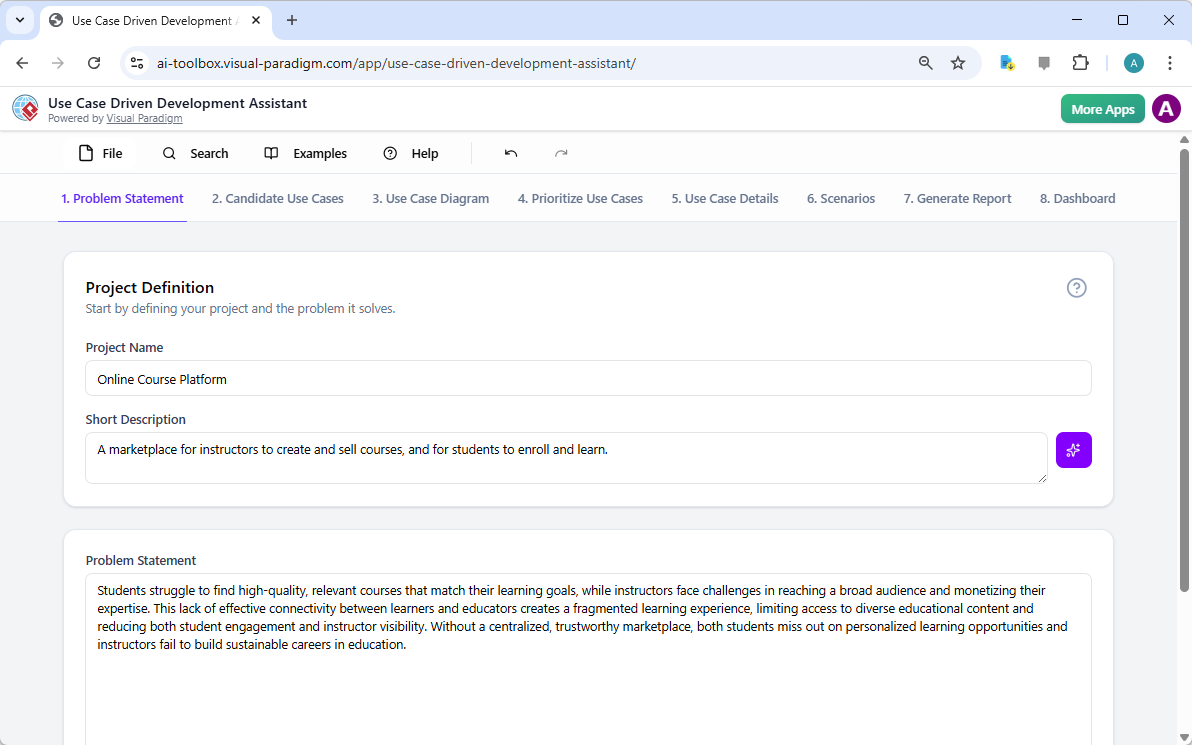
每个成功的项目都始于对所要解决的问题的清晰理解。使用用例驱动开发助手的旅程始于“问题陈述”标签页。在这里,你输入项目名称和简短描述。人工智能随后利用这些信息生成一份全面的问题陈述。如图1所示,该工具已将项目名称“在线课程平台”和简短描述“一个供讲师创建和销售课程、学生注册学习的市场”转化为详尽的叙述。该叙述指出了核心痛点:学生难以找到相关课程,而讲师则面临难以触达广泛受众以及变现专业知识的挑战。这一由人工智能生成的问题陈述成为项目的基石,确保团队成员从一开始就拥有统一的理解。

This is a screenshot of Visual Paradigm's AI Powered Use Case Driven Development Assistant. we are now in step 1. It shows th

步骤2:借助人工智能识别用例

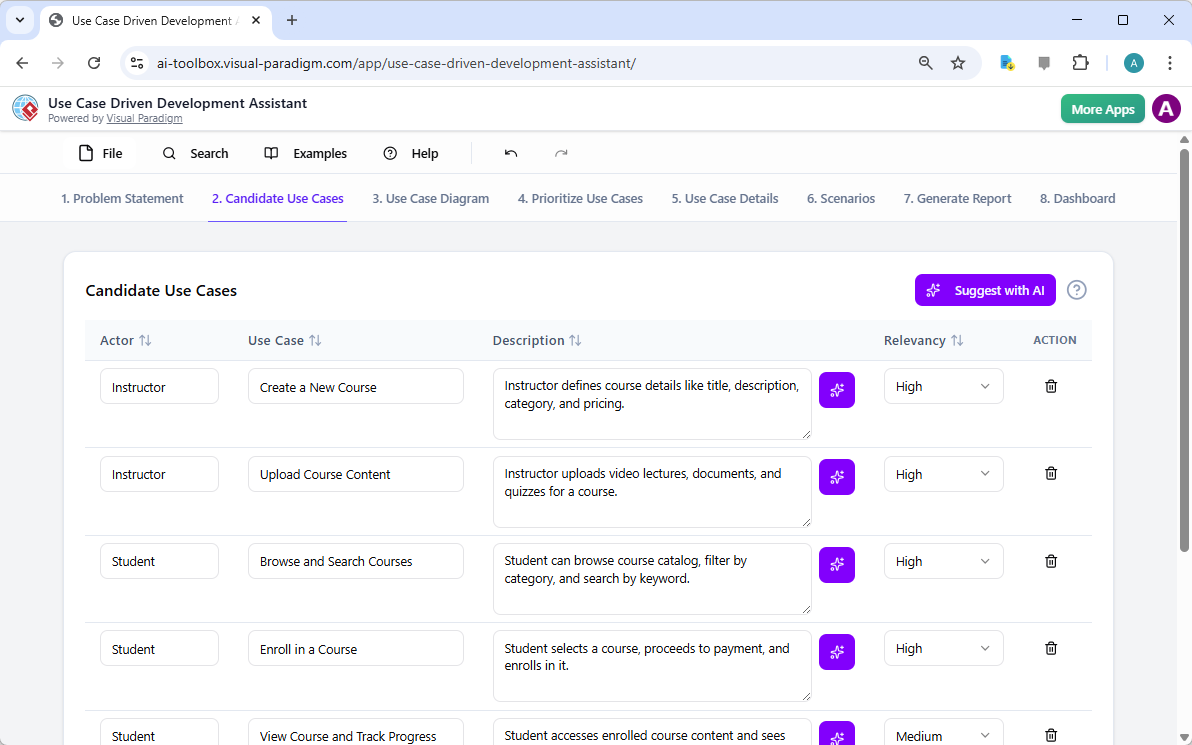
问题明确后,下一步是识别系统必须提供的关键功能。助手的“候选用例”标签页,如图2所示,该过程实现了自动化。在分析问题陈述后,人工智能会提出一组用例,每个用例都与一个参与者(如讲师、学生或管理员)相关联。对于我们的在线课程平台,人工智能提出了诸如“创建新课程”、“上传课程内容”、“浏览和搜索课程”以及“注册课程”等用例。这一列表提供了坚实的基础,节省了原本需要在头脑风暴会议中耗费的大量时间和精力。你可以进一步优化这些建议,添加新用例,或删除无关项,从而形成一份全面的系统功能列表。

This is a screenshot of Visual Paradigm's AI Powered Use Case Driven Development Assistant. We are now in step 2. It shows a

步骤3:通过用例图可视化系统

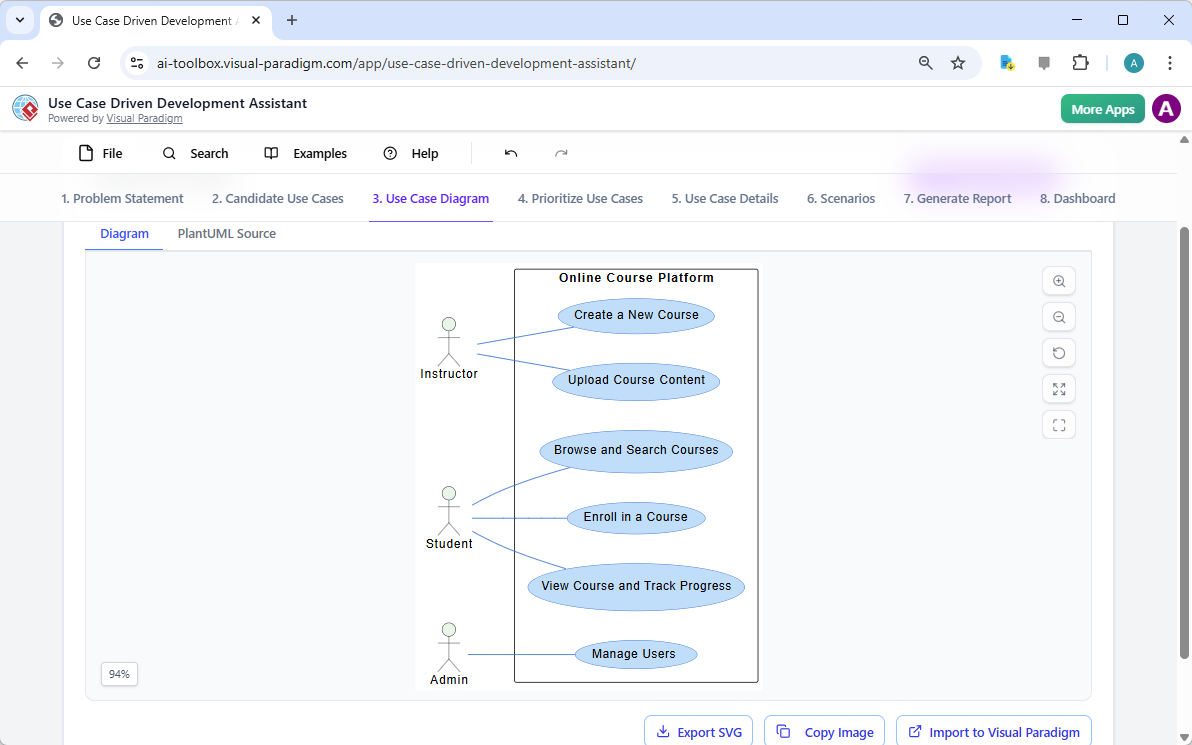
在确定用例后,至关重要的是可视化它们与系统参与者的交互方式。在“用例图”标签页中,如图3所示,该工具将用例和参与者列表自动转化为清晰的图形化表示。该图展示了参与者(讲师、学生、管理员)与系统功能(如创建新课程等)之间的关系。人工智能驱动的生成确保了图表的准确性与专业排版。这一可视化工具在沟通中极为宝贵,使利益相关者、开发人员和设计师无需阅读冗长的文本文档,即可快速理解系统的范围和功能。

This is a screenshot of Visual Paradigm's AI Powered Use Case Driven Development Assistant. We are now in step 3. It shows a

步骤4:优先排序功能以实现最大影响

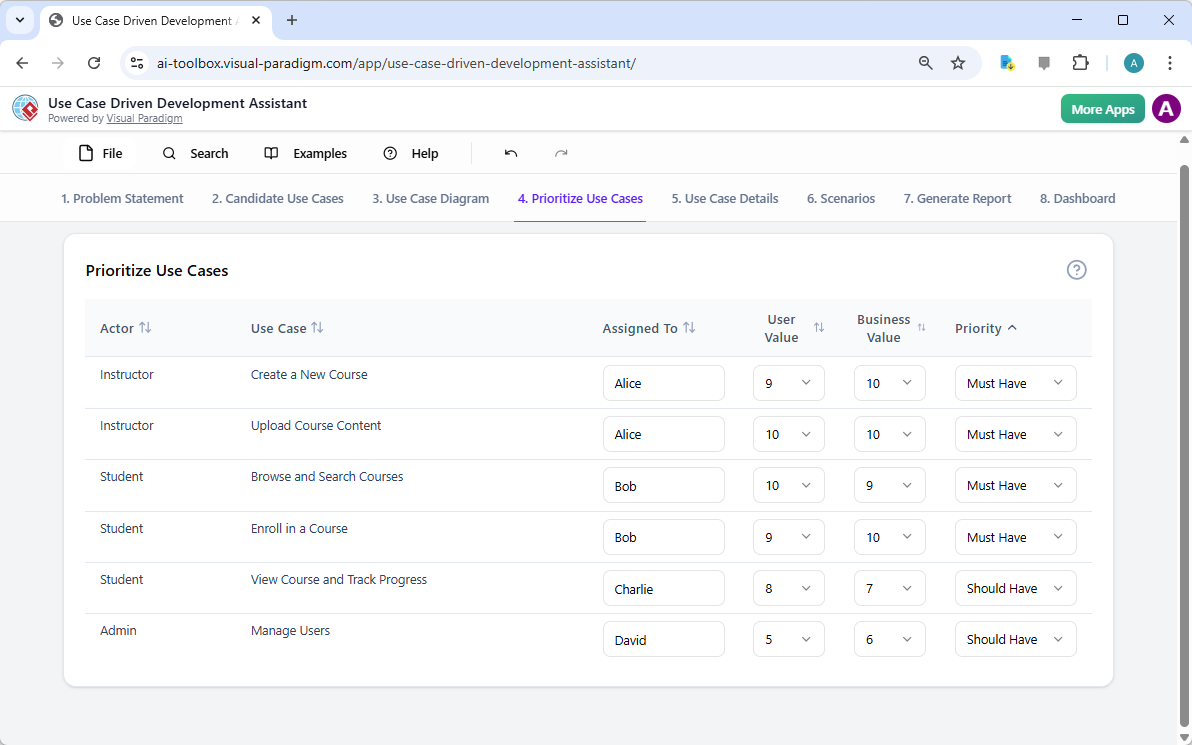
并非所有用例都同等重要。项目的成功往往取决于首先聚焦于最关键的功能。如图4,提供了一个强大的框架。它允许你为每个用例分配用户价值和业务价值(在0-10的量表上),然后应用MoSCoW优先级方法(必须有、应该有、可以有、不会有的)。在我们的示例中,AI已帮助识别出“创建新课程”和“上传课程内容”是“必须有”的功能,因为它们对平台的核心功能至关重要。这种结构化的优先级划分确保开发团队专注于为用户和业务提供最高价值,避免在低优先级功能上浪费精力。

This is a screenshot of Visual Paradigm's AI Powered Use Case Driven Development Assistant. We are now in step 4. It shows th

步骤5:详细说明用例并生成活动图

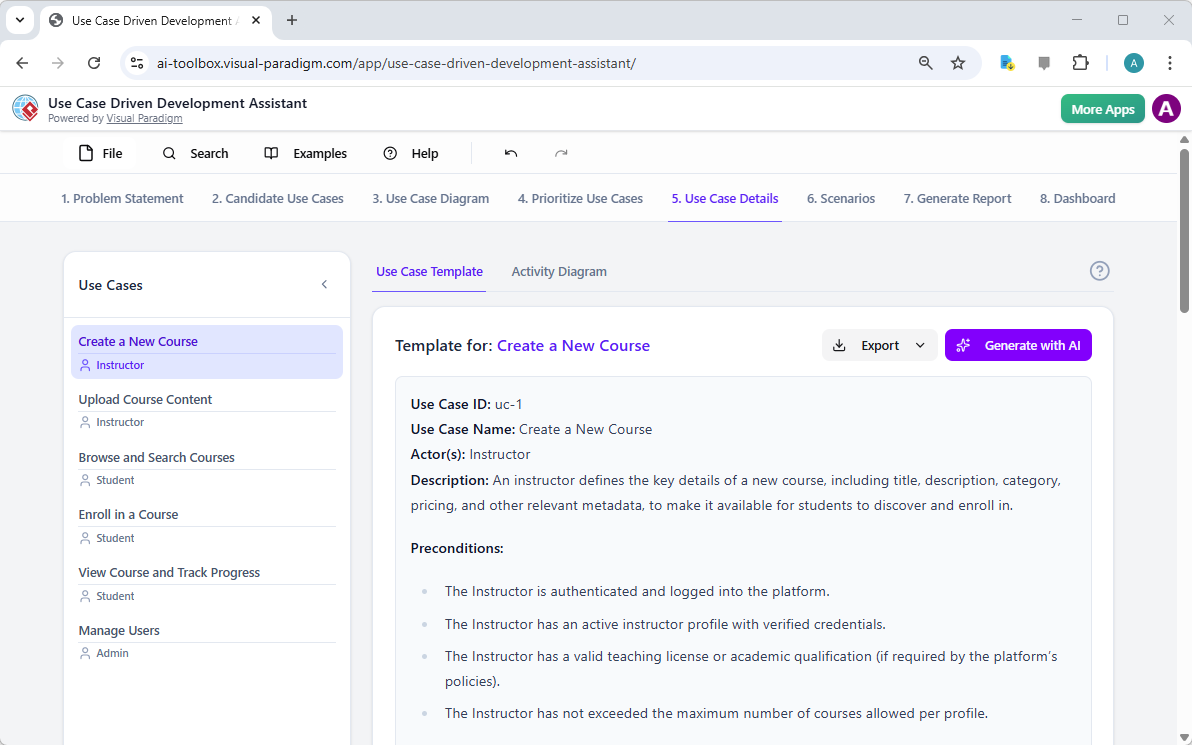
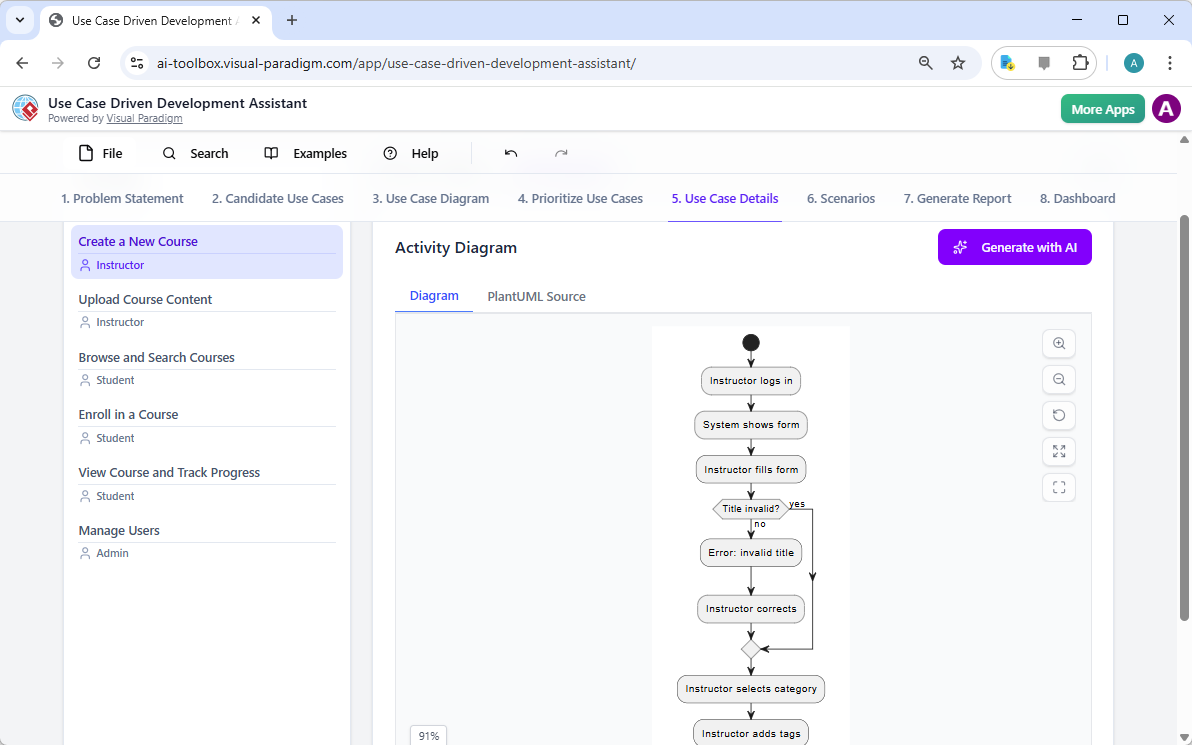
在建立高层视图后,下一步是深入每个用例的细节。如图所示,“用例详情”选项卡图5,允许你为选定的用例创建一个全面的模板。AI可以生成详细的描述,包括前置条件、主流程和替代流程。对于“创建新课程”用例,AI提供了一个结构化模板,列出了必要的步骤。为进一步增强理解,助手可以为同一用例生成“活动图”,如图所示图6。该图直观地展示了逐步的工作流程,从讲师登录到课程保存的整个操作序列。这种详细程度对开发人员和质量保证团队都至关重要。

This is a screenshot of Visual Paradigm's AI Powered Use Case Driven Development Assistant. We are now in step 5. It shows thThis is a screenshot of Visual Paradigm's AI Powered Use Case Driven Development Assistant. We are still in step 5. It shows

步骤6:生成测试场景和序列图

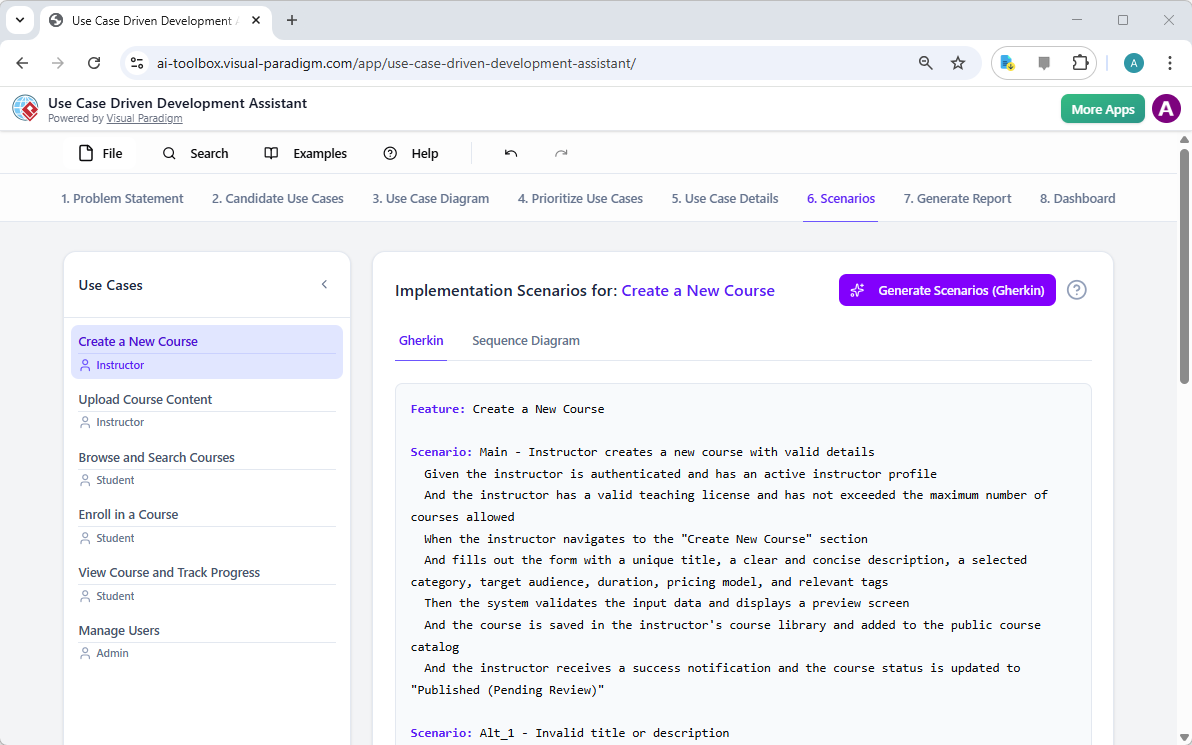
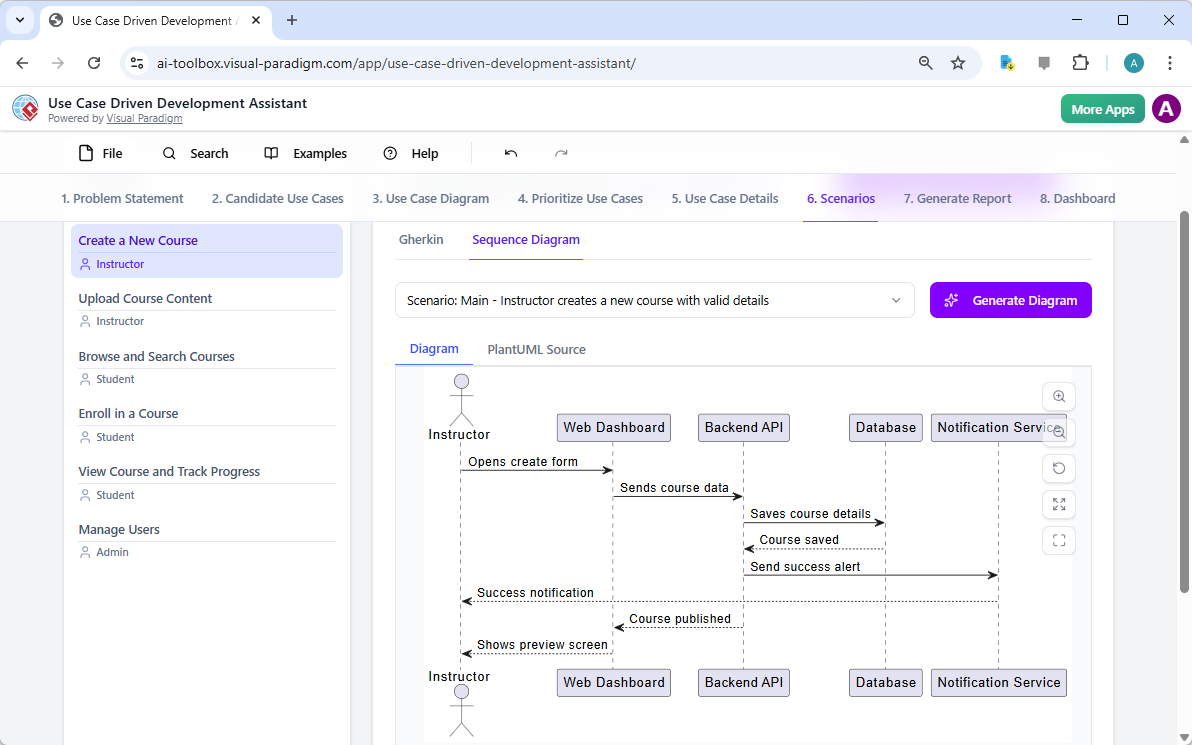
对于开发团队而言,下一步的关键步骤是创建可测试的场景。如图所示,“场景”选项卡图7,允许你直接从用例描述中生成可执行的Gherkin场景。这些场景以自然语言格式(给定-当-则)编写,非常适合自动化测试。AI可以生成主场景和替代场景,例如标题无效的情况。为进一步阐明系统的内部运作,助手可以生成“序列图”,如图所示图8。该图展示了讲师、网页仪表板、后端API、数据库和通知服务之间的交互,清晰地呈现了系统的架构和数据流。

This is a screenshot of Visual Paradigm's AI Powered Use Case Driven Development Assistant. We are in step 6. It shows the AIThis is a screenshot of Visual Paradigm's AI Powered Use Case Driven Development Assistant. We are still in step 6. It shows

步骤7:创建全面的项目报告

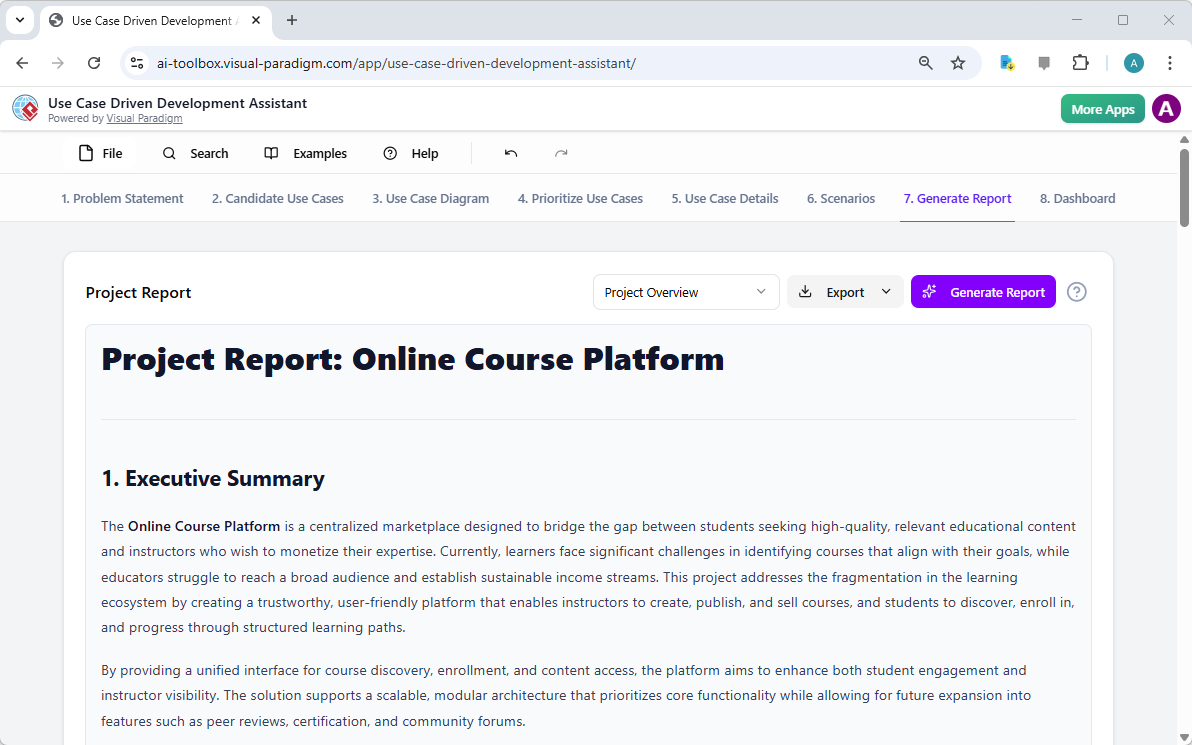
在整个开发过程中,向各类利益相关者沟通项目状态和计划至关重要。如图所示,“生成报告”选项卡图9,使这一过程变得简单。你可以生成多种报告,例如“项目概览”、“实施计划”、“质量保证测试计划”或“开发人员任务列表”。这些报告由AI辅助生成,确保内容一致且全面。例如,“项目概览”报告总结了整个项目,包括执行摘要、关键功能以及优先级划分的理由。这一单一信息源确保所有人员保持一致并充分知情。

This is a screenshot of Visual Paradigm's AI Powered Use Case Driven Development Assistant. We are in step 7. It shows a repo

步骤8:通过仪表板跟踪进度

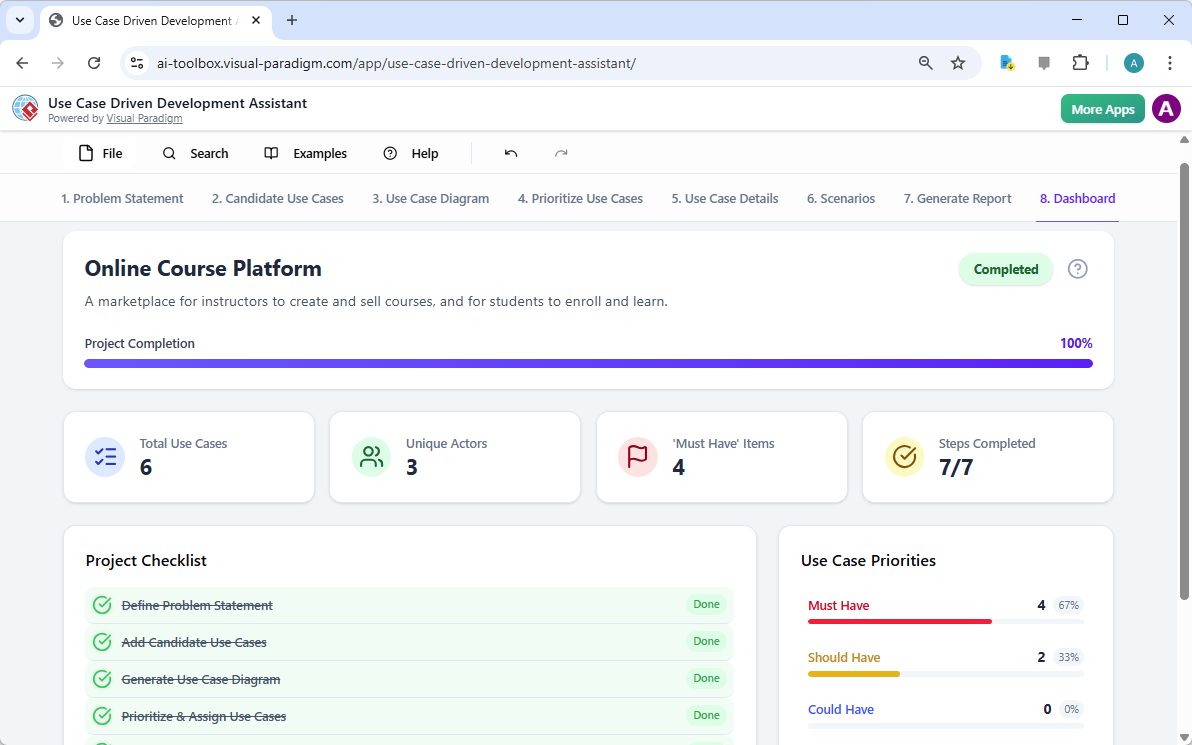
最后,整个过程在“仪表板”中达到顶点,如图所示图10。这个中心枢纽提供了项目状态的高层概览。它显示了项目完成百分比、用例总数以及“必须有”项目的数量。项目清单让你可以跟踪进度,每个完成的步骤都会标记为“已完成”。对项目健康状况的实时可视化对项目经理和团队负责人至关重要,有助于他们识别瓶颈并确保项目按计划推进。

This is a screenshot of Visual Paradigm's AI Powered Use Case Driven Development Assistant. We are in step 8. It shows the da

用例驱动的开发助手不仅仅是一个工具;它是一套全面的工作流程,为软件开发过程带来清晰性和效率。通过在每个阶段利用人工智能——从问题定义到报告生成——它帮助团队更快、更准确地从需求过渡到实现。结果是一个结构清晰、文档完善的项目,与业务目标和用户需求高度一致。如果你希望优化用例开发流程,这款人工智能驱动的工具是一个强大的解决方案。

准备好了解用例驱动的开发助手如何改变你的下一个项目吗?立即试用.

相关链接

用例建模是一种基础的软件工程技术,用于捕获功能需求通过可视化外部参与者和系统内部功能之间的交互。现代平台现在结合了基于人工智能的自动化来优化图表,生成全面的用例描述,并将模型转换为测试用例或活动图以保持设计的一致性和可追溯性。先进的工具如事件流编辑器场景分析器使开发团队能够验证并记录结构化的事件序列,以提高整个系统的清晰度。

  1. 什么是用例图?——UML建模完整指南:深入概述涵盖关键组件、目的和最佳实践用于需求建模。

  2. 逐步用例图教程——从入门到精通:实用资源,指导用户掌握从基础到高级的技术以创建有效的用例图。

  3. 关于用例建模你需要知道的一切:全面探讨用例建模的原则与应用在系统设计中的应用。

  4. Visual Paradigm – 用例描述功能: 详细说明用于精确记录用户交互以及结构化的系统行为。

  5. 掌握使用 Visual Paradigm 的 AI 驱动用例图: 介绍如何利用 AI 创建智能且动态的图表用于现代软件系统。

  6. 使用 Visual Paradigm 事件流编辑器的指南: 逐步说明如何记录结构化的事件序列在用例场景中。

  7. 通过用例场景分析器解析场景: 介绍如何使用分析器来检查和优化交互流程以提高系统清晰度。

  8. 将用例转换为活动图——AI 驱动的转换: 介绍自动化转换将用例转换为详细系统工作流。

  9. 使用 AI 从用例图生成场景和测试用例: 探讨 AI 工具如何自动化创建以需求为导向的测试流程.

  10. 用例图图库——模板与示例: 精心挑选的真实世界示例用于激发灵感、学习和快速原型设计。

From Problem to Report: How AI Guides Your Use Case Journey

Discover how AI guides your use case journey from problem to report with Visual Paradigm’s intelligent development assistant.

Imagine you’re a project manager tasked with launching a new online course platform. The first challenge is to articulate the problem clearly and then translate it into a functional system. This is where the Use Case Driven Development Assistant, an AI-powered tool from Visual Paradigm, steps in. It doesn’t just help you write documents; it guides you through a complete, structured workflow to transform a vague idea into a detailed, actionable project plan. The process is so intuitive, it feels like having a seasoned business analyst and a technical architect working side-by-side with you. This deep dive explores the core features of this powerful tool, using a real-world example of an online course platform to show how it streamlines the entire use case lifecycle.

Quick Summary: Key Takeaways from the Use Case Driven Development Assistant

  • Start with a clear problem statement to define the project’s core objective.

  • Use AI to automatically generate a list of candidate use cases and actors.

  • Visualize system functionality with AI-generated Use Case and Activity Diagrams.

  • Prioritize features using a structured MoSCoW method to focus on high-value work.

  • Generate detailed use case descriptions and executable Gherkin test scenarios.

  • Create comprehensive reports to communicate project scope and plans.

  • Track progress and maintain a single source of truth with a central dashboard.

Step 1: Defining the Problem with AI

Every successful project begins with a clear understanding of the problem it aims to solve. The journey with the Use Case Driven Development Assistant starts in the “Problem Statement” tab. Here, you input a project name and a short description. The AI then leverages this information to generate a comprehensive problem statement. As seen in Image 1, the tool has taken the project name “Online Course Platform” and the short description “A marketplace for instructors to create and sell courses, and for students to enroll and learn” to produce a detailed narrative. This narrative identifies the core pain points: students struggle to find relevant courses, while instructors face challenges in reaching a broad audience and monetizing their expertise. This AI-generated problem statement serves as the project’s foundation, ensuring everyone on the team shares a unified understanding from the very beginning.

This is a screenshot of Visual Paradigm's AI Powered Use Case Driven Development Assistant. we are now in step 1. It shows th

Step 2: Identifying Use Cases with AI Assistance

Once the problem is defined, the next logical step is to identify the key functionalities the system must provide. The assistant’s “Candidate Use Cases” tab, shown in Image 2, automates this process. After analyzing the problem statement, the AI suggests a list of use cases, each associated with an actor (like Instructor, Student, or Admin). For our online course platform, the AI proposes use cases such as “Create a New Course,” “Upload Course Content,” “Browse and Search Courses,” and “Enroll in a Course.” This list provides a solid starting point, saving significant time and effort that would otherwise be spent on brainstorming sessions. You can then refine these suggestions, add new ones, or delete irrelevant ones to create a comprehensive list of system functionalities.

This is a screenshot of Visual Paradigm's AI Powered Use Case Driven Development Assistant. We are now in step 2. It shows a

Step 3: Visualizing the System with a Use Case Diagram

After identifying the use cases, it’s crucial to visualize how they interact with the system’s actors. The “Use Case Diagram” tab, illustrated in Image 3, takes the list of use cases and actors and automatically generates a clear, graphical representation. This diagram shows the relationships between the actors (Instructor, Student, Admin) and the system’s functions (Create a New Course, etc.). The AI-powered generation ensures that the diagram is accurate and professionally formatted. This visual aid is invaluable for communication, allowing stakeholders, developers, and designers to quickly grasp the system’s scope and functionality without wading through text-heavy documents.

This is a screenshot of Visual Paradigm's AI Powered Use Case Driven Development Assistant. We are now in step 3. It shows a

Step 4: Prioritizing Features for Maximum Impact

Not all use cases are created equal. A project’s success often hinges on focusing on the most critical features first. The “Prioritize Use Cases” tab, as shown in Image 4, provides a powerful framework for this. It allows you to assign a user value and business value (on a scale of 0-10) to each use case and then apply the MoSCoW prioritization method (Must Have, Should Have, Could Have, Won’t Have). In our example, the AI has helped identify that “Create a New Course” and “Upload Course Content” are “Must Have” features, as they are essential for the platform’s core function. This structured prioritization ensures that the development team focuses on delivering the highest value to users and the business, avoiding wasted effort on low-priority features.

This is a screenshot of Visual Paradigm's AI Powered Use Case Driven Development Assistant. We are now in step 4. It shows th

Step 5: Detailing Use Cases and Generating Activity Diagrams

With the high-level view established, the next step is to dive into the details of each use case. The “Use Case Details” tab, shown in Image 5, allows you to create a comprehensive template for a selected use case. The AI can generate a detailed description, including pre-conditions, main flow, and alternative flows. For the “Create a New Course” use case, the AI provides a structured template that outlines the necessary steps. To further enhance understanding, the assistant can generate an “Activity Diagram” for the same use case, as seen in Image 6. This diagram visually maps out the step-by-step workflow, showing the sequence of actions from the instructor logging in to the course being saved. This level of detail is essential for both developers and QA teams.

This is a screenshot of Visual Paradigm's AI Powered Use Case Driven Development Assistant. We are now in step 5. It shows thThis is a screenshot of Visual Paradigm's AI Powered Use Case Driven Development Assistant. We are still in step 5. It shows

Step 6: Generating Test Scenarios and Sequence Diagrams

For a development team, the next critical step is to create testable scenarios. The “Scenarios” tab, shown in Image 7, allows you to generate executable Gherkin scenarios directly from your use case descriptions. These scenarios, written in a plain-language format (Given-When-Then), are perfect for automated testing. The AI can generate a main scenario and alternative scenarios, such as one for an invalid title. To further clarify the system’s internal workings, the assistant can generate a “Sequence Diagram,” as seen in Image 8. This diagram shows the interaction between the instructor, the web dashboard, the backend API, the database, and the notification service, providing a clear picture of the system’s architecture and data flow.

This is a screenshot of Visual Paradigm's AI Powered Use Case Driven Development Assistant. We are in step 6. It shows the AIThis is a screenshot of Visual Paradigm's AI Powered Use Case Driven Development Assistant. We are still in step 6. It shows

Step 7: Creating Comprehensive Project Reports

Throughout the development process, it’s essential to communicate the project’s status and plans to various stakeholders. The “Generate Report” tab, as shown in Image 9, makes this easy. You can generate a variety of reports, such as a “Project Overview,” “Implementation Plan,” “QA Test Plan,” or a “Developer Task List.” These reports are generated with AI assistance, ensuring they are consistent and comprehensive. For example, the “Project Overview” report summarizes the entire project, including the executive summary, key features, and the rationale behind the prioritization. This single source of truth ensures everyone is aligned and informed.

This is a screenshot of Visual Paradigm's AI Powered Use Case Driven Development Assistant. We are in step 7. It shows a repo

Step 8: Tracking Progress with the Dashboard

Finally, the journey culminates in the “Dashboard,” as seen in Image 10. This central hub provides a high-level overview of the project’s status. It shows the project completion percentage, the total number of use cases, and the number of “Must Have” items. The project checklist allows you to track your progress, with each completed step marked as “Done.” This real-time visibility into the project’s health is invaluable for project managers and team leads, enabling them to identify bottlenecks and ensure the project stays on track.

This is a screenshot of Visual Paradigm's AI Powered Use Case Driven Development Assistant. We are in step 8. It shows the da

The Use Case Driven Development Assistant is more than just a tool; it’s a comprehensive workflow that brings clarity and efficiency to the software development process. By leveraging AI at every stage—from defining the problem to generating reports—it helps teams move from requirements to implementation faster and with greater accuracy. The result is a well-structured, well-documented project that is aligned with business goals and user needs. If you’re looking to streamline your use case development process, this AI-powered tool is a powerful solution.

Ready to see how the Use Case Driven Development Assistant can transform your next project? Try it now.

Related Links

Use case modeling is a fundamental software engineering technique used to capture functional requirements by visualizing the interactions between external actors and a system’s internal functions. Modern platforms now incorporate AI-powered automation to refine diagrams, generate comprehensive use case descriptions, and convert models into test cases or activity diagrams to maintain design consistency and traceability. Advanced tools like the Flow of Events editor and Scenario Analyzer allow development teams to validate and document structured event sequences to improve overall system clarity.

  1. What Is a Use Case Diagram? – A Complete Guide to UML Modeling: An in-depth overview covering essential components, purposes, and best practices for requirements modeling.

  2. Step-by-Step Use Case Diagram Tutorial – From Beginner to Pro: A practical resource that guides users through foundational to advanced techniques for creating effective use case diagrams.

  3. All You Need to Know About Use Case Modeling: A comprehensive exploration of the principles and applications of use case modeling in system design.

  4. Visual Paradigm – Use Case Description Features: Details specialized tools used to precisely document user interactions and structured system behavior.

  5. Mastering AI-Driven Use Case Diagrams with Visual Paradigm: A tutorial on leveraging AI to create intelligent, dynamic diagrams for modern software systems.

  6. Guide to Using the Flow of Events Editor in Visual Paradigm: Step-by-step instructions for documenting structured event sequences within a use case scenario.

  7. Unraveling Scenarios with the Use Case Scenario Analyzer: A guide on using analyzers to examine and refine interaction flows for increased system clarity.

  8. Convert Use Case to Activity Diagram – AI-Powered Transformation: A resource explaining the automated conversion of use cases into detailed system workflows.

  9. Generating Scenarios and Test Cases from Use Case Diagrams Using AI: An exploration of how AI tools automate the creation of requirement-driven test procedures.

  10. Use Case Diagram Gallery – Templates & Examples: A curated collection of real-world examples for inspiration, learning, and rapid prototyping.

Crafting a Crystal-Clear Problem Statement for Software Development

Use Visual Paradigm’s AI-powered tool to craft clear, structured problem statements for software projects with templates and real-time feedback.

Struggling to articulate the core challenge your software project aims to solve? The Problem Description Generator from Visual Paradigm is the ultimate AI-powered tool to transform your project’s initial chaos into a clear, focused, and compelling narrative. This innovative solution empowers project managers, business analysts, and product owners to define the “why” behind their work with unprecedented speed and precision. By leveraging a library of structured templates and real-time AI feedback, this tool ensures your problem statement is not just written, but optimized for maximum impact from day one. It’s the secret weapon for launching projects with laser focus and setting the stage for success.

Key Takeaways:

  • Use a template-driven approach to ensure your problem statement is comprehensive and structured.

  • Fill in specific variables to customize the description for your unique project.

  • Get instant AI feedback to refine your problem statement for clarity and effectiveness.

  • Start any project with a solid, well-articulated understanding of the core issue.

Step 1: Choose Your Template – The Foundation of a Strong Problem Statement

Every great project begins with a solid foundation, and for a problem statement, that foundation is the right template. The first step in using the AI-Powered Problem Description Generator is to select a template that perfectly aligns with your project’s nature. As shown in

This is a screenshot of Visual Paradigm's AI Powered Problem Description Generator. It shows the first step, which involves c

, the interface presents a clean, intuitive dashboard with a variety of templates for different business needs. Whether you’re tackling a software development initiative, optimizing a business process, or conducting a strategic analysis like a SWOT or PEST analysis, you can find a dedicated template. The “Software System Development” template, for instance, is specifically designed to help you create comprehensive software system requirements and specifications. By selecting the correct template, you immediately establish a professional structure that guides you to cover all critical aspects of the problem, ensuring no vital detail is overlooked. This step is crucial because it sets the tone and framework for the entire problem description, making the subsequent steps much more efficient and effective.

Step 2: Fill in the Variables – Customize Your Narrative

Once you’ve chosen your template, the magic happens in the “Edit Parameters” section.

This is a screenshot of Visual Paradigm's AI Powered Problem Description Generator. It shows the second step, which involves

vividly illustrates this second step. On the left, you’re presented with a form filled with specific fields, such as “Organization Name,” “Current Problem/Inefficiency,” and “Type of Software System.” This is where you inject your project’s unique DNA. As you type in the details, the tool’s real-time preview on the right side dynamically updates, showing you exactly how your filled-in variables will look in the final problem description. This live preview is incredibly powerful. It allows you to see the narrative form your inputs are creating, spot any awkward phrasing, and make adjustments on the fly. The variables are highlighted in green, making it easy to see exactly what content is being inserted into the template. This process is not just about filling blanks; it’s about shaping a coherent story that clearly explains the problem, its impact, and the desired outcome. The ability to see your description evolve in real-time is a game-changer for clarity and confidence.

Step 3: Review with AI – Your Instant Expert Editor

The final, and arguably most powerful, step is the AI review. After you’ve filled in all the variables and are satisfied with the live preview, you can click the “Review with AI” button.

This is a screenshot of Visual Paradigm's AI Powered Problem Description Generator. Once the details are filled in, you can c

captures this moment perfectly. A modal window appears, presenting a detailed analysis of your generated problem statement. The AI doesn’t just check for grammar; it evaluates the statement for clarity, completeness, logical flow, and the use of appropriate business terminology. It provides a clear “Status” (like “OK”) and a detailed “AI Analysis” that highlights strengths and suggests improvements. For example, the AI might confirm that your statement is clear and professionally written, or it might suggest a more impactful way to phrase a key objective. This instant, objective feedback acts as a virtual expert editor, helping you refine your problem statement to ensure it is not only correct but also highly effective in communicating the project’s purpose. This final step ensures that your problem statement is ready to be shared with stakeholders, developers, or clients with confidence.

Unlock Your Project’s Potential

Defining a problem is often the hardest part of any initiative. A vague or poorly articulated problem statement can lead to wasted effort, misaligned solutions, and ultimately, project failure. The Problem Description Generator from Visual Paradigm solves this fundamental challenge. It combines the power of structured templates with the intelligence of AI to create a workflow that is both efficient and effective. By following the three simple steps—choose a template, fill in the variables, and review with AI—you can transform your initial project idea into a clear, compelling, and professional problem statement in minutes. This tool is not just a convenience; it’s a strategic advantage that ensures your project starts on the right foot. Stop guessing and start defining with confidence. Try the AI-Powered Problem Description Generator now and experience the difference it makes.

Related Links