UML活动图全面指南:从手动建模到AI驱动的自然语言生成

引言:UML活动图在现代软件开发中的演变角色

UML活动图是统一建模语言(UML)中最具表现力和强大性的行为建模形式之一。与类图或组件图等静态结构图不同,活动图关注的是动态行为系统的行为——即过程如何展开、决策如何做出,以及工作流如何随时间推进。

最初被设计为以一种形式化但直观的方式建模业务流程和软件工作流,UML活动图已发展成为连接高层次业务需求与详细系统逻辑的基础工具。如今,它们在需求分析、用户体验设计、流程自动化,甚至算法工作流规范中都至关重要。

UML活动图的核心概念与结构语义

从根本上说,活动图是一种基于流程的表示一系列动作、决策和事件的流程化表示。它使用定义明确的符号词汇来表示过程元素,既视觉清晰又语义严谨。


初始节点(●):标记工作流的起点。它是一个实心黑圆圈,通常出现在图的左上角,表示流程的开始——例如用户发起预订或系统接收请求。

  • 动作节点(圆角矩形):表示可执行的任务或活动。这些可以是用户操作(例如“选择房型”)或系统操作(例如“验证入住日期”)。每个动作都是一个独立的步骤,共同构成整个流程。
  • 控制流(箭头 →):有向边表示执行顺序。这些流程决定了步骤的执行顺序,支持线性推进、条件分支或并行执行。
  • 决策节点(◇):菱形表示基于条件的分支逻辑。例如,“入住日期是否早于退房日期?”会触发有效或无效输入的路径。守卫——写在边上的布尔表达式——提供精确的条件以影响流程方向。
  • 合并节点(◇):在分支后重新汇聚多个传入的流程。尽管在简单流程中常为隐式,但在多个并行或条件路径汇合为单一流程时(例如客户提交包含多个选项的表单后)至关重要。
  • 分叉与汇合节点(水平条):支持并发过程的建模。分叉将单一流程拆分为并行子流程(例如同时验证付款和预订房间),而汇合则将它们同步为统一结果。这在分布式系统或复杂事务工作流中尤为重要。
  • 最终节点(⊙):一个带圈的黑点标记活动的结束。这可能表示完成、系统响应或失败。在某些情况下,如果流程终止由上下文暗示,最终节点可以省略。
  • 泳道或分区:垂直或水平的泳道按责任或角色划分工作流(例如“用户”、“系统”、“支付网关”)。这提高了复杂系统中的可读性,并有助于利益相关者在流程所有权上达成一致。
  • 对象节点、引脚和异常流:对象表示可能被创建、修改或销毁的数据或实体(例如“预订对象”)。引脚用于在动作之间传递参数。异常流(通常以虚线表示)用于建模错误情况,如无效输入、网络故障或系统错误。

这些元素并非随意设定——它们在UML 2.5规范中有明确定义,旨在确保流程建模中的清晰性、精确性和可追溯性。结果是,该图不仅是一幅视觉草图,更是一种形式化的行为规范 可用于设计评审、测试,甚至代码生成。

UML 示例活动图

以下是对此的清晰解释:UML 活动图符号,以您提供的示例的结构和元素为指导。我将逐步讲解每一部分,将其与标准 UML 符号和规范对应起来。

What is Activity Diagram?上面的简单活动图涵盖了活动图中最常用的元素——是许多现实世界流程(例如用户注册、订单处理、预订系统)的绝佳代表示例。

1. 初始节点(开始)

  • 符号:(实心黑色圆圈)
  • 含义:整个活动/流程的起点。
  • 在您的图中:顶部在满足所有前置条件后流程开始的位置。

2. 动作/活动节点

  • 符号:圆角矩形(有时显示为药丸形状或圆角矩形)
  • 含义:表示系统或参与者执行的单个步骤、任务、操作或计算。
  • 在您的图中:
    • 步骤 1, 步骤 2, 步骤 3
    • 步骤 4.1以及步骤 4.2(并行步骤)
  • 常用标签:动词短语,例如“验证输入”、“处理付款”、“发送邮件”

3. 控制流(箭头)

  • 符号:实心箭头 →(有时带空心箭头头)
  • 含义:显示从一个动作到下一个动作的执行顺序。
  • 在你的图中:连接各个步骤的所有实心箭头。
  • 虚线箭头(—-→)有时非正式地用于表示参与者输入或数据流,尽管标准UML更倾向于使用实线表示控制流,虚线或点划线表示对象流。

4. 决策节点(分支 / 条件)

  • 符号:(菱形)
  • 含义:表示基于条件的分支点(是/否、真/假,或多个守卫条件)。
  • 守卫条件:在出边上的方括号内书写 [条件]。
  • 在你的图中:
    • 第一个带有“真?” → [是] 进入主流程,[否] 进入替代/扩展流程。
    • 第二个(返回替代流程)重新汇入主路径。

5. 合并节点

  • 符号:同样也是(菱形)——与决策节点形状相同,但用于重新组合输入流。
  • 含义:将多个输入路径同步为一个输出路径(无需条件)。
  • 在你的图中:下方的在替代流程返回主路径之后。

注意:在简单图中,人们有时会将同一个菱形同时用于决策和合并,但严格来说它们是不同的(决策节点有一个输入、多个输出;合并节点有多个输入、一个输出)。

6. 分叉节点(用于并行/并发活动)

  • 符号:粗水平条(某些工具中为垂直条)
  • 含义:将单一流程拆分为多个可独立执行的并发(并行)流程。
  • 在你的图表中:下方的条形步骤 3 分裂为步骤 4.1步骤 4.2.

7. 合并节点(同步)

  • 符号:粗水平条(与分叉相同,但用于合并)
  • 含义:等待所有所有传入的并行流程完成后才继续。
  • 在你的图表中:下方重新组合的条形步骤 4.1步骤 4.2 在进入最终节点之前。

8. 最终节点(活动最终)

  • 符号:(靶心:带填充内圆的圆)或有时仅在圆内
  • 含义:整个活动的结束——当流程完成时,所有流程都会汇聚到这里。
  • 在你的图表中:底部的在后置条件之后。

(某些图表还使用一个单独的流程最终节点来仅终止一条路径而不结束整个活动,但你的示例使用了完整的活动最终节点。)

其他常见元素(你的草图中没有,但经常出现)

  • 泳道 / 分区:垂直或水平的区域,用参与者/角色标注(例如:客户 | 系统 | 支付网关),以显示每个动作由谁执行。
  • 对象节点 / 针点:用于传递数据的矩形(例如:在动作之间流动的订单对象)。
  • 保护条件:[是]、[否]、[年龄 > 18]、[支付成功] 等。
  • 注释:带折叠角的小矩形,用于解释说明。

软件与业务环境中的关键应用领域

活动图在流程以过程行为、用户交互和条件逻辑为核心时尤为有效。当用于建模包含多条路径和错误条件的端到端工作流时,其价值会显著提升。

1. 业务流程建模

组织使用活动图来映射内部流程,例如员工入职、订单履行、发票处理或客户支持升级。通过可视化每个阶段——从初始请求到最终解决——团队可以识别瓶颈、冗余或合规风险。

2. 用例扩展与细化

用例图描述系统“做什么”;活动图解释“如何做”。例如,“预订房间”这一用例可以扩展为包含以下内容的详细活动流程:

  • 用户选择房型
  • 系统验证日期
  • 入住时间必须早于退房时间
  • 如果无效,请提示用户更正日期
  • 如果有效,检查房间可用性
  • 房间已确认或被拒绝
  • 用户收到电子邮件确认

这种详细程度能够在开发开始前实现准确估算、风险识别和功能验证。

3. 系统工作流程与流控设计

从登录流程到结账流程,活动图对于建模软件系统的内部逻辑至关重要。示例包括:

  • 包含多因素认证的登录流程
  • 集成支付网关的电子商务结账流程
  • 包含医生可用性检查的预约安排
  • 涉及大小验证和重试逻辑的视频上传工作流程

4. 算法与控制逻辑表示

复杂的软件逻辑,如基于循环的验证、迭代重试或条件阈值,可以使用活动图有效建模。例如,视频上传过程可能:

  1. 尝试上传
  2. 如果失败(由于大小或网络原因),延迟后重试
  3. 如果三次重试均失败,则通知用户

此类工作流程难以用纯文本描述,但通过循环、决策点和异常分支,活动图能自然地表达它们。

5. 需求验证与差距分析

在编码开始之前,活动图可作为验证工具。它们使利益相关者能够审查所有必要步骤、边缘情况和错误路径是否已被考虑。早期发现缺失的转换、未处理的异常或模糊的循环,可降低实施阶段出现昂贵返工的可能性。

人工智能在流程建模中的革命:几秒钟内实现从文本到UML

历史上,创建UML活动图需要掌握UML语法,熟悉建模工具(如Visual Paradigm、Lucidchart、Enterprise Architect),并进行迭代优化。这一过程耗时且常常导致不一致,尤其是在处理复杂的条件逻辑或并行流程时。

如今,自然语言处理(NLP)与UML生成工具的结合,彻底改变了团队构思和可视化工作流程的方式。例如:Visual Paradigm的AI活动图生成器——可通过其对话式聊天界面访问,网址为chat.visual-paradigm.com——允许用户用普通英语描述流程,并在几秒钟内获得完全符合标准的UML活动图。

AI工作流的运作方式

AI驱动的生成过程遵循一个结构化、多阶段的解析流程:

  1. 意图解析:系统分析用户输入,提取关键组件,如操作、条件、决策点和结果。它使用在特定领域业务语言上训练过的自然语言处理模型来解释语义含义。
  2. 元素映射:每个文本步骤都被映射为一个UML元素——例如,“用户选择房型”会变成一个标有“用户选择房型”的圆角矩形。
  3. 流程构建:控制流通过顺序和条件语句推断得出。例如,“如果入住日期在退房日期之后,则显示错误”会生成一个带有保护条件的决策节点,并有两个输出路径。
  4. 布局优化:AI对元素进行布局,以实现最佳可读性——平衡间距、流程方向和视觉层次,确保图表直观且易于理解。
  5. 验证与增强:生成的图表会与UML标准进行交叉核对。AI确保所有流程连接正确,所有决策都有保护条件,并在需要时正确应用合并点。

这一过程不仅仅是自动化——它引入了一个新的层次上下文智能。AI不仅生成图表,还能理解业务意图,预判常见边缘情况,并提出改进建议,以确保完整性和健壮性。

实际案例:酒店预订系统

考虑以下提示:

“为酒店预订系统中的预订房间流程生成一个活动图。用户选择房型,输入入住和退房日期,系统验证这些日期(入住日期在退房日期之前),检查房间可用性,若成功则发送确认邮件。如果日期无效或不可用,则显示错误信息,并提示用户修正输入。”
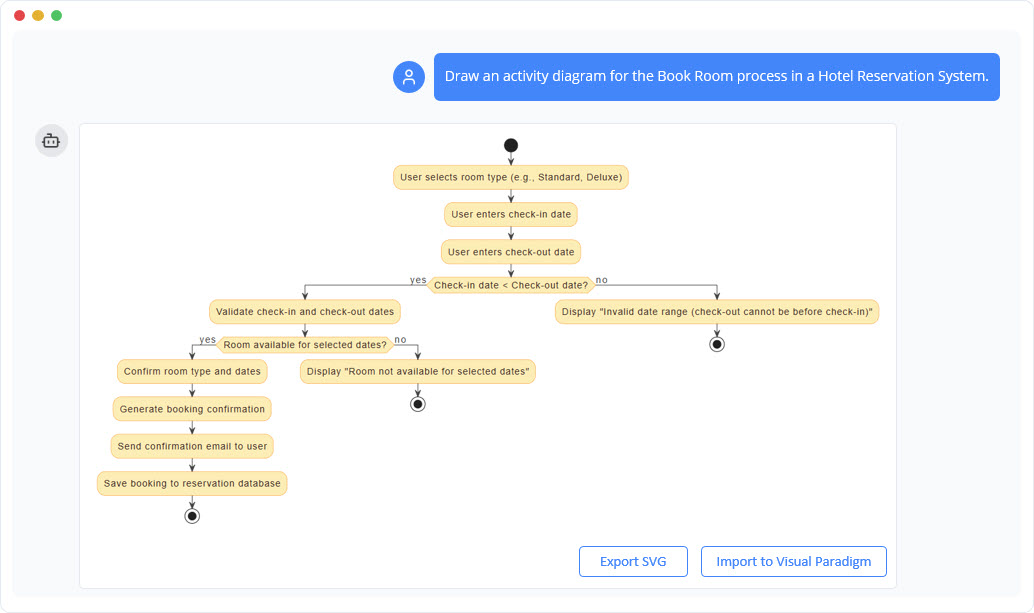
Example of using ai chatbot to generate activity diagram.

AI生成的图表包含:

  • 初始节点,标记开始
  • 用于用户输入和系统验证的操作节点
  • 带有保护条件的决策节点:“入住日期 < 退房日期?”
  • 两个输出分支:一个用于有效日期(继续到可用性检查),一个用于无效日期(返回到输入)
  • 流向房间可用性检查,带有条件结果
  • 成功路径导向邮件确认和数据库保存
  • 失败路径包含错误信息并返回到输入
  • 成功和失败结果的最终节点
  • 可选泳道:用户与系统

此示例展示了AI如何以足够的精确度理解自然语言,生成结构合理、符合标准的图表,准确反映现实世界的业务逻辑。

AI驱动的图表生成优势

采用AI驱动的工具进行活动图创建,在技术、运营和组织领域均带来显著优势:

  • 速度与效率:在不到10秒内即可生成完整的活动图,而传统工具则需要数小时的手动工作。
  • 降低技能门槛:无需先前的UML经验。业务分析师、产品负责人和非技术利益相关者现在可以通过自然语言参与流程建模。
  • 提升准确性:人工智能通过确保语法一致、流程连接正确,以及避免遗漏决策或合并,减少了人为错误。
  • 增强协作:团队可以通过对话式优化来迭代图表——例如,“在输入无效日期后添加一个重试循环”或“为支付模块添加一个泳道。”
  • 早期风险识别:人工智能会标记潜在问题,如未连接的流程、缺失的保护条件或不平衡的决策树,从而实现主动优化。
  • 可扩展性:团队可以快速原型化多个流程(例如预订、取消、退款),而无需重新学习建模基础。

局限性与注意事项

尽管功能强大,但AI生成的图表并非完美无缺。它们可能:

  • 忽略隐含假设或领域特定规则(例如房间取消政策)
  • 过度简化复杂决策树,粒度不足
  • 生成在逻辑上准确但在上下文中具有误导性的图表,若未经专家审查

因此,AI应被视为一种协作助手,而非人类判断的替代品。最终的图表应由领域专家审查和验证,以确保其完整性和与业务规则的一致性。

未来发展方向及对软件开发的影响

将人工智能融入UML建模标志着软件团队在构思和设计流程方面的一个关键转变。随着生成式AI的成熟,我们可以期待进一步的进展,例如:

  • 从用户故事自动生成图表:将类似“作为客人,我希望预订两晚的房间”这样的用户故事直接转换为完整的活动流程。
  • 随需求动态演化的“活”图表:当需求发生变化时,图表会自动更新——可能由用例变更或新业务规则触发。
  • 与代码和测试用例关联:人工智能系统生成初始图表,随后根据控制流自动生成桩代码或测试场景。
  • 代码与图表之间的自动化映射:设计与实现之间的双向流程,缩小规范与执行之间的差距。

这一演变指向一种对话式设计范式在该范式中,利益相关者通过自然语言与系统互动,系统则实时以可视化、形式化的模型作出回应。

结论:流程建模的未来是对话式的

UML活动图仍然是软件和业务流程建模的核心。其结构化、形式化的方法确保了复杂条件流程的清晰性——尤其是在与利益相关者沟通和技术设计结合使用时。

然而,人工智能驱动的自然语言生成技术使这些图表的使用更加普及。过去需要数小时建模工作、UML知识和专业工具才能完成的内容,如今只需通过简单的对话式提示,几分钟内即可实现。

随着团队持续采用这项技术,设计过程将变得更加包容、快速和准确。未来绘图不再关乎绘制——而在于对话.

文章与资源

简化软件架构:深入探讨AI辅助的UML类图生成器

系统建模是稳健软件开发的基石,然而创建准确的统一建模语言(UML)图往往显得很高。无论你是正在努力理解面向对象设计(OOD)概念的学生,还是希望快速绘制原型的资深架构师,语法和结构的复杂性都可能令人望而生畏。现在,迎来AI辅助的UML类图生成器,一个通过结合引导式学习与人工智能来揭开这一过程神秘面纱的交互式工具。

在本篇评测中,我们将探讨这一教育工具如何转变从文本到图表的工作流程,使从新手到专家的每个人都能轻松掌握专业系统设计。

什么是AI辅助的UML类图生成器?

AI辅助的UML类图生成器不仅仅是一个绘图画布;它是一个交互式向导,旨在引导用户创建结构化的UML类图。与那些假设用户已有先验知识的传统拖放编辑器不同,该工具将建模过程分解为一个逻辑十步工作流程.

其核心理念是“在实践中学习”。当用户在各个步骤中前行——从定义范围到分析最终设计——他们将获得AI驱动的辅助。该AI能够生成描述、识别潜在类、建议属性,甚至对最终架构进行评价。结果是将基于文本的输入无缝转化为专业的PlantUML图。

这个工具是为谁设计的?

该生成器的多功能性使其成为科技行业和学术界各类用户的宝贵资源:

  • 学生: 它提供了一种实践方法,帮助学习面向对象设计的原理,而不会因语法错误而陷入困境。
  • 有志于成为软件开发者的人员: 它提供了一个实践平台,用于理解软件架构.
  • 教育工作者和导师:教师可以利用它实时演示系统建模的概念和最佳实践。
  • 软件工程师与架构师:专业人士可以利用该工具快速创建新想法的草图,或记录现有的遗留系统。

脱颖而出的核心功能

1. 10步引导式向导

应用程序的核心是其线性向导。它引导用户完成创建过程中的每一个阶段,确保不会遗漏任何关键组件。这种结构化的方法为初学者提供了“安全网”,使建模这一复杂任务变得易于应对。它几乎就像一位专家导师,在恰当的时机提示用户输入特定信息。

2. 人工智能驱动的生成与分析

克服写作障碍是该工具最强大的功能之一。在关键阶段,用户可以点击“AI生成”按钮以自动生成内容。人工智能可以:

  • 起草项目的宗旨和范围。
  • 根据描述识别潜在的类.
  • 添加解释性说明。
  • 生成一份全面的AI分析报告,对图表的设计模式和潜在改进之处进行批判性分析。

3. 实时PlantUML渲染

对于欣赏文本即图表工具强大功能的用户,该生成器提供实时可视化。当在向导中定义类、属性和关系时,该工具会后台生成相应的PlantUML代码。这使用户能够即时预览其图表并访问源代码,这对技术文档至关重要。

4. 集成式教育内容

向导的每一步都配有专门的教育性文本。这确保用户不仅理解如何使用该工具的方法,还理解为什么他们执行特定操作的原因。它强化了关键的面向对象原则,使设计过程成为一个持续的学习体验。

工作原理:流程概览

该工具将设计过程组织成一个逻辑流程。创建新图表时,典型的流程如下:

  1. 定义目的和范围:用户首先描述系统(例如:“一个图书馆管理系统”)。人工智能可以帮助完善这一描述。
  2. 识别类: 根据范围,用户列出主要实体。AI 可以从描述中建议应作为类处理的名词。
  3. 添加详细信息(属性与操作): 用户向类中添加特定的数据字段和方法。
  4. 定义关系: 用户使用关联、继承或聚合来连接类。
  5. 验证: 内置检查清单有助于确保图表逻辑正确且完整。
  6. 生成与分析: 最后一步包括查看渲染后的图表并请求一个 AI 分析报告 以评估设计质量。

技术灵活性:保存、加载和导出

现代工具需要现代的数据可移植性。AI 辅助的 UML 类图生成器提供了多种强大的项目管理选项:

  • 云保存/加载: 用户可以将项目保存到云端,并从任何地方访问。
  • JSON 导出: 整个项目状态可以作为 JSON 文件下载,便于本地备份和离线使用。
  • PlantUML 导出: 最终输出可以导出为一个.puml 文件。这使得图表可以集成到其他文档系统中,或在任何支持 PlantUML 的 IDE 中进行编辑。

重要概念与术语

要充分利用该工具,了解向导中使用的术语很有帮助。应用程序为这些术语提供了上下文,但以下是一个快速参考:

术语 定义
创建对象的蓝图,表示系统中的主要实体(例如,“客户”)。
属性 类的属性或数据字段(例如,学号).
操作 类可以执行的行为或操作,通常称为方法(例如,calculateTotal()).
关系 类之间的连接,例如关联或继承。
可见性 定义访问级别:公共(+),私有(-),或受保护(#).
PlantUML 该工具用于生成可视化图表的基于文本的脚本语言。

优点与好处

使用AI辅助的UML类图生成器相较于手动绘图具有多个显著优势:

  • 加速工作流程: AI功能可自动完成样板文本的生成,显著减少绘制图表所需的时间。
  • 提升设计质量: 验证检查清单与AI分析报告的结合,有助于用户发现可能被忽视的逻辑错误和设计缺陷。
  • 消除UML的神秘感: 通过逐步引导用户,该工具消除了复杂建模语言带来的畏惧感。
  • 标准化输出: 由于它生成PlantUML代码,输出结果标准化、整洁,并易于进行版本控制。

结论

AI辅助的UML类图生成器弥合了教育理论与实际应用之间的差距。通过将结构化向导与AI的生成能力相结合,它提供了一个独特环境,使学生能够学习,专业人士能够快速迭代。无论您是想记录一个新的软件构想,还是仅仅希望更好地理解面向对象架构,该工具都提供了一个全面且用户友好的解决方案。

掌握冲刺准备:敏捷待办事项清单优化器的全面评测

在快速发展的软件开发领域,从高层次项目目标到可开发的待办事项清单之间的差距,往往是团队最难以应对的地方。待办事项清单优化——以前称为梳理——至关重要,但若缺乏合适的结构,可能会变得耗时且混乱。敏捷待办事项清单优化器旨在通过结合结构化的七步向导与智能AI自动化来解决这一问题。在本评测中,我们将探讨该工具如何促进将业务需求转化为可执行的史诗故事、用户故事以及冲刺计划.

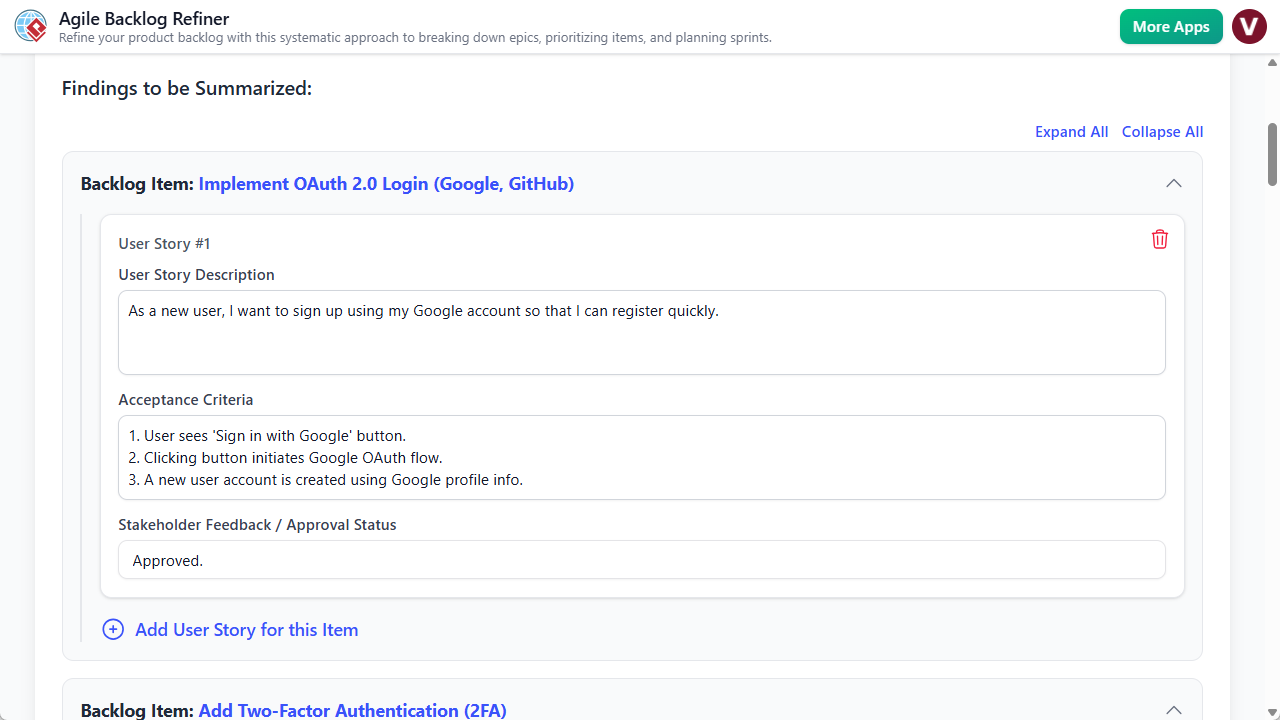
Ai Powered Backlog Refinement Tool

什么是敏捷待办事项清单优化器?

敏捷待办事项清单优化器是一款专门的网络应用程序,旨在引导产品负责人、Scrum主管和开发团队完成待办事项清单优化的整个生命周期。与那些假设你已定义好任务的通用项目管理看板不同,该工具专注于创建定义阶段。它充当一位智能助手,帮助将单一项目目标转化为一份包含优先级排序的用户故事、风险评估以及一份冲刺计划草案。

该工具采用两种主要模式:手动模式以实现精细控制,以及AI辅助模式,仅需简单描述即可生成完整的优化计划。输出结果是一份整合报告,作为利益相关者和开发人员的唯一可信信息来源。

核心功能与能力

1. 基于人工智能的待办事项清单生成

该工具最突出的功能是其能够利用人工智能来承担待办事项清单创建的繁重工作。只需输入一个高层次的项目描述(例如:“创建一个包含订单历史的用户个人资料页面”),AI引擎即可在整个工作流程中填充数据。它会起草史诗故事,将其分解为具体的用户故事,编写验收标准,甚至提出优先级建议。这一功能极大地缩短了准备时间,使产品负责人能够从一份扎实的草稿开始,而非从一张白纸起步。

2. 七步引导向导

为确保敏捷规划中的任何关键环节都不会被遗漏,该应用程序强制执行一个包含七个不同步骤的最佳实践工作流程:

  • 准备:设定背景和目标。
  • 分解史诗故事:将大型工作内容分解。
  • 优先级排序产品待办事项(PBIs):使用MoSCoW等方法对项目进行排序。
  • 细化用户故事: 添加细节和 验收标准.
  • 风险评估:尽早识别潜在陷阱。
  • 定稿与计划: 起草冲刺结构.
  • 最终报告:生成输出文档。

界面顶部的视觉进度条可跟踪进度,步骤完成后会变为绿色。这一游戏化元素带来成就感,并确保有条不紊地推进。

3. 结构化表单输入

用户界面围绕清晰、结构化的表单设计。无论您是手动输入数据还是编辑AI建议,该工具都为史诗、用户故事和风险定义提供了特定字段。这种结构如同数字工作表,在恰当的时间提示用户输入正确信息,从而直接提升待办事项列表的质量和一致性。

4. 灵活的数据管理

考虑到敏捷团队多样化的安全需求,该工具提供双重保存机制。用户可将项目保存至 ,以便在不同地点访问,或将其整个项目状态导出为本地 .json 文件。后者对于有严格数据隐私要求的团队,或希望手动对规划会话进行版本控制的团队尤其有用。

目标用户与使用场景

敏捷待办事项优化工具专为软件开发生命周期中的特定角色量身定制:

  • 产品负责人与经理: 它可作为待办事项梳理会议的准备材料,确保他们带着清晰、优先排序的工作列表进入会议。
  • Scrum 主管: 该工具作为促进工具,帮助团队保持专注,并确保那些常被跳过的步骤(如风险评估)得到落实。
  • 开发团队: 开发人员可以从清晰的用户故事和明确的验收标准中获益,从而在执行过程中减少歧义。

实际工作流程场景

AI辅助冲刺规划

对于需要为新功能快速建立待办事项列表的团队,AI工作流是理想选择。团队可以就一段描述达成一致,将其输入“使用AI生成”提示,即可获得一个完整的结构化计划。随后,会议将从 编写审查,团队调整优先级并估算基于其特定情境。

手动深入细化

对于需要细致人工监督的复杂功能,用户可以绕过AI。从一个空白项目开始,产品负责人可以在第2步手动输入一个史诗,第3步将其分解为产品待办事项(PBIs),并在第4步仔细定义验收标准。此模式非常适合严格控制技术需求。

局限性和注意事项

尽管敏捷待办事项优化器是一个强大的规划辅助工具,潜在用户应了解某些局限性以合理管理预期:

  • 无直接集成: 该工具生成优化后的计划,但不会自动与Jira同步、Trello或Azure DevOps。用户必须手动将最终的故事转移到其主要问题跟踪器中。
  • 单用户专注: 该应用程序专为引导者(例如产品负责人)主导会议而设计。它不支持多人同时输入的实时协作编辑。
  • AI记忆: AI将每次生成请求视为一个新会话;它不会保留对之前项目或长期组织背景的记忆。

结论

敏捷待办事项优化器有助于弥合抽象想法与具体开发任务之间的差距。通过强制执行结构化的七步流程,并利用AI消除“空白页面综合征”,它使团队能够开展更高效的会议并产出更高质量的文档。尽管与问题跟踪器缺乏直接集成会为工作流程增加一个手动步骤,但其在清晰度、风险评估和高效规划方面的价值,使其成为敏捷工具箱中值得添加的组成部分。

模型画布评测:借助人工智能革新战略规划

现代战略规划导论

在现代商业的复杂环境中,制定、可视化和传达战略的能力至关重要。无论你是初创企业创始人构思颠覆性创新,还是企业规划者分析市场风险,所使用的框架都至关重要。现在登场模型画布,一个多功能的Visual Paradigm基于人工智能的模型画布工作室旨在彻底改变我们进行战略文档编制的方式。与静态模板或零散的白板应用不同,模型画布将一个复杂且多层次的人工智能助手直接融入工作流程,承诺在几秒钟内将一个单一想法转化为一份全面的商业计划。

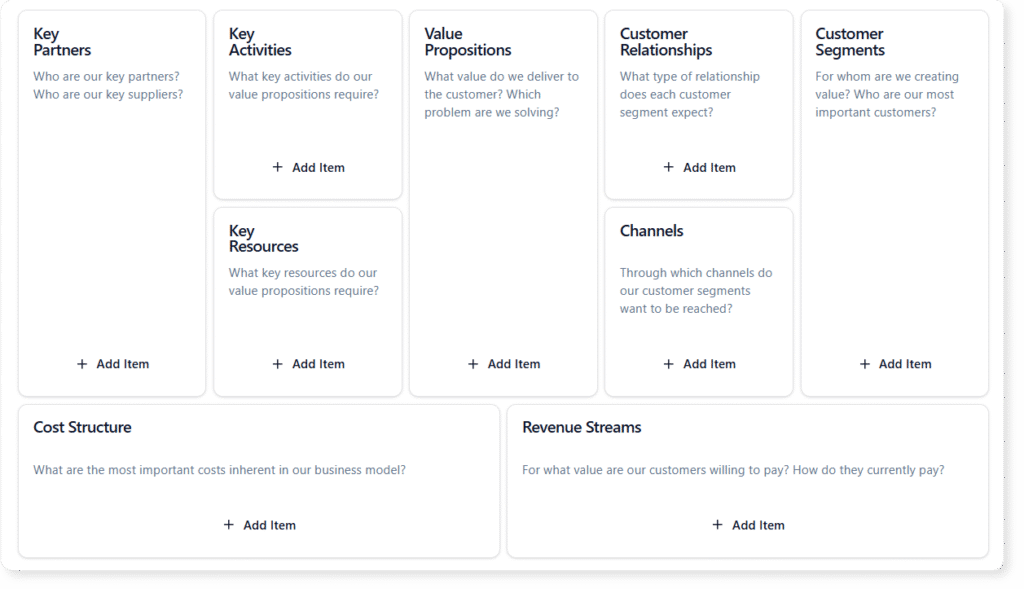
Layouts of blank Business Model Canvas

什么是模型画布工具?

其核心是Visual Paradigm模型画布工具,它是一套全面的战略模板。它作为一个数字工作室,用户可以在其中创建、分析和管理各种商业画布。尽管它以广受欢迎的商业模式画布为基础,其模板库还涵盖精益画布、SWOT分析, PESTLE以及产品经理和敏捷教练使用的数十种其他框架。

该工具通过其“混合”内容创作方式脱颖而出。用户可以手动进行头脑风暴——将界面当作一个结构化的数字白板使用——或利用内置人工智能来承担繁重的工作。这种灵活性使其既适用于教育场景(学生学习各种框架),也适用于专业环境(速度与深度至关重要)。

引擎:三层人工智能辅助

模型画布的突出特点是其人工智能的集成,它不仅作为文本生成器,更作为战略伙伴发挥作用。该应用将人工智能辅助分为三个不同层级,以适应规划过程的不同阶段。

一级:完整画布生成

此功能专为“从零到一”阶段设计。用户只需提供一个高层次的主题或简单的商业构想——例如,“一种稀有室内植物的订阅盒子服务”。随后,人工智能将生成一个完全填充的画布。它在每个部分都填充相关便签,从而在几秒钟内生成一份详细初稿。这一功能消除了面对空白页面的恐惧,并立即提供可优化的素材。

二级:上下文感知建议

战略规划常常会遇到瓶颈。你可能清楚价值主张,却难以定义关键合作伙伴。借助二级辅助,用户可以针对特定板块请求有针对性的建议。人工智能会分析整个画布的上下文以确保一致性,并为该区块提供一组特定的新想法。这感觉就像在问一位聪明的同事:“我漏掉了什么?”

三级:深入的战略分析

也许对高层决策最有价值的功能是专门的“AI分析”标签页。一旦画布填满,AI可以执行深入分析操作,将静态数据转化为动态洞察。功能包括:

  • 电梯演讲生成:将整个商业模式浓缩为一个引人入胜的叙述。
  • SWOT提取:识别模型中隐含的优势和劣势。
  • 风险评估:突出潜在的失败点。
  • 营销策略:根据客户群体建议进入市场的策略。

用户体验与核心功能

除了AI功能外,该应用程序还注重易用性和专业管理。

多画布切换器

该应用程序通过包含一个多画布切换器。该功能库允许用户根据当前任务在不同框架之间切换。产品经理可以先使用产品画布进行开发,再切换到精益画布进行市场验证,所有操作均在同一生态系统内完成。

双视图模式

为了支持整体思维和深度专注,Model Canvas提供两种主要视图模式。画布视图显示整个网格,使用户能够看到各部分之间的联系和“整体图景”。相反,专注模式隔离单个部分,消除干扰。这在头脑风暴会议中尤其有用,此时目标是彻底列出某一特定类别(如“客户细分”)的所有项目。

项目管理与共享

Model Canvas在云端便捷性与本地控制之间架起桥梁。项目可保存至云端以便跨设备访问,或导出为本地文件以保障隐私。共享通过只读链接实现,使利益相关者、投资者或顾问能够在不承担意外修改风险的情况下查看策略。这使其成为向潜在投资者发送精炼的“可行性检查”报告的理想工具。

目标用户

Model Canvas的多功能性使其成为广大专业人士的宝贵工具:

  • 创业者: 用于初创企业快速原型设计和业务模式转型。
  • 产品经理: 用于绘制客户旅程和竞争分析。
  • 敏捷教练: 通过团队画布等框架促进团队协同。
  • 商科学生: 作为教育沙盒,用于学习战略框架.

局限性与注意事项

尽管模型画布是一个强大的工具,但潜在用户应了解某些限制,以确保其符合自己的工作流程:

  • 单用户专注: 该工具专为个人使用设计。目前不支持实时协作编辑(如 Google Docs),这意味着团队无法同时在同一画布上工作。
  • 依赖互联网: 需要活跃的互联网连接才能访问所有 AI 功能和云存储功能。
  • 固定布局: 画布模板是预先定义的。用户无法创建自定义画布布局或修改现有模板的结构。

结论

模型画布代表了数字战略规划的一个重要进步。通过将大量经过验证的商业框架与多层 AI 助手相结合,它解决了战略中的两大难题:启动和深入。无论您是在为新项目生成商业计划书,还是为成熟企业进行 SWOT 分析,模型画布都能提供结构和智能,使整个过程更快、更精准、更专业。

在Visual Paradigm中升级至AI驱动的建模:全面指南

引言

软件架构和业务流程建模的格局正在经历重大变革。多年来,专业人士一直依赖于传统的手动绘图Visual Paradigm——一种以精确控制、拖放操作和手动定义关系为特征的方法。虽然有效,但这种方法耗时较长,尤其是在复杂系统初期草图阶段。

截至2026年,向AI驱动的生成式建模标志着Visual Paradigm用户在生产力上的重大飞跃。这一转变将工作流程从机械性操作转变为对话式、意图驱动的交互。用户不再需要手动放置图形,而是可以用自然语言描述想法,让AI即时生成、优化并分析图表。

本全面指南探讨了如何应对这一升级,详细说明了传统方法与AI方法之间的关键差异、切换的好处,以及将AI融入建模实践的逐步工作流程。

对比:传统建模 vs. AI生成式建模

要理解这一升级的重要性,必须将传统工作流程的机制与新的AI驱动的能力进行对比。虽然传统方法提供精细控制,但AI建模更注重速度、理解能力和自动化。

功能 传统建模 AI生成式建模
输入方式 通过桌面/在线编辑器进行手动交互(拖放、连接点)。 自然语言提示(例如:“为图书馆系统创建一个类图”)。
主要关注点 高精度、最终优化以及严格遵守标准(UML 2.5、BPMN)。 快速原型设计、降低认知负担以及处理初始结构。
速度 耗时较长,尤其是在构建大型模型或从零开始时。 几秒钟内即可即时生成复杂图表。
优化过程 手动迭代和布局调整。 对话式优化(例如:“在用户和管理员之间添加继承关系”)。
支持的符号 全面支持UML、BPMN、ArchiMate等。 广泛支持包括UML、C4模型、ArchiMate、SysML、ER图和思维导图。
技能要求 需要对符号语法和工具机制有深入理解。 降低入门门槛;通过自动化语法来增强现有技能。

需要注意的是AI不会取代传统技能;它会增强这些技能理解UML符号和架构模式的专业人士最能充分利用这些工具,因为他们能更快发现错误,编写更优的提示,并有效验证输出结果。

为什么要升级?专业优势

采用AI生成式建模Visual Paradigm这不仅仅是跟上潮流;更是切实提升工作流程效率和输出质量。根据用户反馈和平台功能,以下优势正推动专业人士进行升级:

  • 无与伦比的速度:能够在几秒钟内生成复杂图表,而非数小时,彻底改变了项目初期阶段。这种速度在启动会议、头脑风暴和快速原型设计中至关重要。
  • 生产力提升:AI自动化了重复性工作。例如,从基于文本的需求文档中即时提取类和关系,使架构师能够专注于高层次的设计决策。
  • 迭代式协作:聊天式界面充当“建模伙伴”。它允许在协作会议中实时调整,用户可通过口头提出修改要求,AI立即执行。
  • 一致性与标准:AI经过训练,能够遵守UML和BPMN规则。尽管仍需人工监督,但AI可处理基础验证,确保命名规范和标准关系从一开始就正确应用。
  • 无缝集成:Visual Paradigm最强大的功能之一是,AI生成的图表并非静态图像。它们可直接导出至Visual Paradigm项目中,用于代码生成、使用Hibernate/JPA的面向对象关系映射(ORM)、仿真以及双向工程。

用户普遍报告初始建模速度提升5至10倍尤其是在处理大规模架构或将非结构化需求转化为可视化模型时。

逐步指南:在 Visual Paradigm 中过渡到人工智能

升级您的工作流程并不需要复杂的迁移或为基本功能更换订阅层级。人工智能功能已集成到最新版本(18.0 及以上)中,并且VP Online。请遵循本指南开始您的过渡。

1. 访问人工智能工具

有多种进入人工智能功能的途径,旨在适应不同的工作流程偏好:

  • 人工智能聊天机器人:这是生成性工作的主要入口。它是一个基于浏览器的工具,可在特定的 Visual Paradigm 子域名中使用(例如:chat.visual-paradigm.com)。它可作为独立工具使用,但也能链接到您的项目。
  • 桌面端与在线集成: 在 Visual Paradigm 界面中,导航至 工具 > 人工智能聊天机器人 工具 > 人工智能图表。您也可能在人工智能工具箱中找到这些功能。
  • 许可: 基础使用通常可享受免费层级。然而,使用专业版或企业版账户登录可解锁高级功能,例如无限次生成和高级导出选项。

2. 从简单开始:第一个提示

为了适应新的以意图为导向的流程,建议从熟悉的图表类型开始。避免在首次尝试时过度复杂化。

示例提示: “生成一个在线购物车系统的 UML 类图,包含用户、产品、购物车和订单。”

提交该提示后,人工智能将生成类、属性、操作和关联,通常会应用整洁的自动布局。此后,您可以练习对话式优化:

  • “在购物车与产品之间的关联上添加多重性 1..*。”
  • “让订单继承一个名为支付的新类。”
  • “优化布局,避免线条重叠。”

3. 利用文本分析

对专业人士而言,最强大的功能之一是人工智能驱动的文本分析。您无需手动解析需求文档,可以直接将文本输入给人工智能。

工作流程: 将需求文档的一段内容粘贴到聊天机器人中。
提示: “分析这段需求文本,并根据所描述的实体和关系生成类图。”

AI将自动识别领域实体和关系,为非结构化文本提供结构化的视觉表示。

4. 迭代与专业优化

基础模型生成后,工作流程将转向迭代。使用后续命令来扩展模型的范围或功能:

  • 行为建模: “基于这些类,为结账流程添加一个时序图。”
  • 文档: “从此模型生成文档。”
  • 互操作性: “将此图导出为PlantUML格式。”

至关重要的是,应将AI生成的结果重新导入传统编辑器。这有助于微调、严格验证,并利用代码生成等高级功能。

5. 高级工作流程

对于企业级用户,AI工具的功能远超基础UML:

  • DBModeler AI: 用于数据库设计。描述您应用程序的数据需求,该工具将生成规范化的关系图(ERD)和相应的类图。
  • 用例建模工作室: 此功能可处理完整流程生成。您可以从目标陈述开始,AI将生成用例、图表,甚至测试用例。
  • C4架构: 用于高层软件架构,可请求分层视图。示例:“为基于微服务的银行应用程序创建一个C4组件图。”

顺利过渡的最佳实践

为了最大化AI在Visual Paradigm中的效果,请考虑以下最佳实践:

  1. 提示要具体: 模糊性会导致结果泛化。在初始提示中,务必包含图表类型、关键实体和具体关系。
  2. 人工参与验证: 始终审查AI输出。根据项目需求检查基数、构造型和约束。AI是提升效率的工具,而非架构责任的替代品。
  3. 混合工作流程: 最有效的专业人士会将AI草图导出到主项目中,以融合不同方法。使用AI完成创建的“重体力劳动”,而用传统工具完成最终的精确化。
  4. 保留传统知识: 你对UML和建模理论的理解,使你能够制定出有效的提示,并发现AI逻辑中的细微错误。

实际案例

以下是AI生成在特定场景中表现出色的实例,对应常见的专业问题:

  • UML类图: 粘贴一个问题描述(例如酒店预订系统),观察AI立即提取类、属性、方法和关系。
  • C4架构: 提示 “为一个电子商务平台生成C4模型(上下文+容器+组件)” 一次交互即可生成分层视图,节省数小时的设置时间。
  • 状态机: 描述一个生命周期,例如 “为3D打印机流程创建一个UML状态机:空闲 → 打印 → 暂停 → 错误处理,” 以可视化方式呈现复杂的逻辑流程。
  • 数据库设计: 使用DBModeler AI将应用需求的描述转换为完全规范化的ER图。

用户体验与评价(2025–2026)

这些功能在Visual Paradigm社区中获得了压倒性的积极反响。来自博客、教程和平台评价的反馈凸显了其在现实中的实际影响:

玛丽亚·汤普森,解决方案架构师: “我过去常常花数小时绘制系统上下文。现在我专注于架构决策,而AI负责绘图。这彻底改变了我处理项目初期阶段的方式。”

丹尼尔·里韦拉,项目经理: “只需一条命令就能将图表转换为报告,评审时节省数小时——工作流程高效得多。”

教程用户和开发者都表达了类似感受。初学者欣赏“与专家对话”的体验,这能引导他们创建带有分支逻辑的复杂时序图。资深用户称赞其迭代优化能力,指出他们可以生成模型、进行审查,再输入“添加错误处理”指令,不到五分钟就能得到一张完美的图表。共识表明,初始草图的制作时间可节省80%–90%的时间节省,工具给人的感觉不再是软件,而更像一位“博学的同事”。

结论

在Visual Paradigm中转向AI驱动的建模,对任何软件专业人士而言都是一次战略性升级。通过结合生成式AI的速度与传统编辑工具的精准性,用户能够实现既快速又稳健的工作流程。无论你是在建模一个简单的图书馆系统,还是复杂的微服务架构,AI工具都能提供坚实基础,让你专注于高价值的设计决策,而非手动绘图。

Upgrading to AI-Powered Modeling in Visual Paradigm: A Comprehensive Guide

Introduction

The landscape of software architecture and business process modeling is undergoing a significant transformation. For years, professionals have relied on traditional manual diagramming within Visual Paradigm—a method characterized by precise control, drag-and-drop mechanics, and manual definition of relationships. While effective, this approach can be time-intensive, particularly during the initial drafting phases of complex systems.

As of 2026, the transition to AI-powered generative modeling marks a major productivity leap for Visual Paradigm users. This shift moves the workflow from a mechanical process to a conversational, intent-driven interaction. Instead of manually placing shapes, users can now describe ideas in natural language, allowing the AI to generate, refine, and analyze diagrams instantly.

This comprehensive guide explores how to navigate this upgrade, detailing the key differences between traditional and AI approaches, the benefits of making the switch, and a step-by-step workflow for integrating AI into your modeling practices.

Comparison: Traditional vs. AI-Generative Modeling

To understand the magnitude of this upgrade, it is essential to compare the mechanics of the traditional workflow against the new AI-driven capabilities. While traditional methods offer granular control, AI modeling focuses on speed, interpretation, and automation.

Feature Traditional Modeling AI-Generative Modeling
Input Method Manual interaction via desktop/online editor (drag-and-drop, connection points). Natural language prompts (e.g., “Create a class diagram for a library system”).
Primary Focus High precision, final refinements, and strict standards compliance (UML 2.5, BPMN). Rapid prototyping, reducing cognitive load, and handling initial structures.
Speed Time-intensive, especially for large models or starting from scratch. Instant generation of complex diagrams in seconds.
Refinement Process Manual iteration and layout adjustments. Conversational refinement (e.g., “Add inheritance between User and Admin”).
Supported Notations Full support for UML, BPMN, ArchiMate, etc. Extensive support including UML, C4 models, ArchiMate, SysML, ERDs, and Mind Maps.
Skill Requirement Requires deep knowledge of notation syntax and tool mechanics. Lowers barrier to entry; amplifies existing skills by automating syntax.

It is important to note that AI does not replace traditional skills; it amplifies them. Professionals who understand UML notations and architectural patterns are best positioned to use these tools, as they can spot inaccuracies faster, craft superior prompts, and validate outputs effectively.

Why Upgrade? The Professional Benefits

Adopting AI-generative modeling in Visual Paradigm is not just about keeping up with trends; it is about tangible improvements in workflow efficiency and output quality. Based on user feedback and platform capabilities, the following benefits are driving professionals to upgrade:

  • Unmatched Speed: The ability to generate complex diagrams in seconds rather than hours transforms the early stages of a project. This speed is invaluable for kickoff meetings, brainstorming sessions, and rapid prototyping.
  • Productivity Boost: AI automates the boilerplate work. For example, extracting classes and relationships from a text-based requirements document can be done instantly, freeing architects to focus on high-level design decisions.
  • Iterative Collaboration: The chat-like interface acts as a “modeling partner.” It allows for real-time tweaks during collaborative sessions, where changes can be requested verbally and implemented immediately by the AI.
  • Consistency & Standards: The AI is trained to respect UML and BPMN rules. While human oversight is still required, the AI handles basic validation, ensuring that naming conventions and standard relationships are applied correctly from the start.
  • Seamless Integration: One of the strongest features of Visual Paradigm is that AI-generated diagrams are not static images. They can be exported directly into Visual Paradigm projects for code generation, Object-Relational Mapping (ORM) with Hibernate/JPA, simulation, and round-trip engineering.

Users consistently report 5–10x faster initial modeling, particularly when dealing with large-scale architectures or translating unstructured requirements into visual models.

Step-by-Step Guide: Transitioning to AI in Visual Paradigm

Upgrading your workflow does not require a complex migration or a new subscription tier for basic features. AI capabilities are integrated into recent versions (18.0+) and VP Online. Follow this guide to begin your transition.

1. Accessing the AI Tools

There are multiple entry points to the AI features, designed to fit different workflow preferences:

  • The AI Chatbot: This is the primary entry point for generative work. It is a browser-based tool available at specific Visual Paradigm subdomains (e.g., chat.visual-paradigm.com). It works as a standalone tool but links to your projects.
  • Desktop & Online Integration: Within the Visual Paradigm interface, navigate to Tools > AI Chatbot or Tools > AI Diagram. You may also find these features in the AI toolbox.
  • Licensing: A free tier is often available for basic usage. However, logging in with a Pro or Enterprise account unlocks advanced capabilities, such as unlimited generations and advanced export options.

2. Starting Simple: The First Prompt

To acclimate to the new intent-driven process, start with familiar diagram types. Avoid over-complicating your first attempt.

Example Prompt: “Generate a UML class diagram for an online shopping cart system including User, Product, Cart, and Order.”

Upon submitting this prompt, the AI will produce classes, attributes, operations, and associations, often applying a clean auto-layout. From here, you can practice conversational refinement:

  • “Add multiplicity 1..* to the association between Cart and Product.”
  • “Make Order inherit from a new class called Payment.”
  • “Improve the layout to avoid overlapping lines.”

3. Leveraging Textual Analysis

One of the most powerful features for professionals is the AI-Powered Textual Analysis. Instead of manually parsing a requirements document, you can feed the text directly to the AI.

Workflow: Paste a segment of a requirements document into the chatbot.
Prompt: “Analyze this requirements text and generate a class diagram based on the entities and relationships described.”

The AI will identify domain entities and relationships automatically, providing a structured visual representation of the unstructured text.

4. Iteration and Professional Refinement

Once the base model is generated, the workflow shifts to iteration. Use follow-up commands to expand the model’s scope or utility:

  • Behavioral Modeling: “Add a sequence diagram for the checkout process based on these classes.”
  • Documentation: “Generate documentation from this model.”
  • Interoperability: “Export this diagram to PlantUML.”

Crucially, you should import the AI-generated result back into the traditional editor. This allows for fine-tuning, strict validation, and utilization of advanced features like code generation.

5. Advanced Workflows

For enterprise-level users, the AI tools extend beyond basic UML:

  • DBModeler AI: Use this for database design. Describe your application’s data needs, and the tool will generate a normalized Entity-Relationship Diagram (ERD) and corresponding class diagram.
  • Use Case Modeling Studio: This feature handles full flow generation. You can start with a goal statement, and the AI will generate use cases, diagrams, and even test cases.
  • C4 Architecture: For high-level software architecture, prompt for layered views. Example: “Create a C4 component diagram for a microservices-based banking app.”

Best Practices for a Smooth Transition

To maximize the efficacy of AI in Visual Paradigm, consider the following best practices:

  1. Be Specific in Prompts: Ambiguity leads to generic results. Always include the diagram type, key entities, and specific relationships in your initial prompt.
  2. Human-in-the-Loop Validation: Always review AI outputs. Check cardinalities, stereotypes, and constraints against project requirements. The AI is a tool for speed, not a replacement for architectural responsibility.
  3. Hybrid Workflow: The most effective professionals export AI drafts into the main project to blend approaches. Use AI for the “heavy lifting” of creation and traditional tools for the precision of finalization.
  4. Retain Traditional Knowledge: Your understanding of UML and modeling theory is what allows you to craft effective prompts and catch subtle errors in the AI’s logic.

Practical Examples

Here are specific scenarios where AI generation excels, matching common professional queries:

  • UML Class Diagrams: Paste a problem description (e.g., a hotel reservation system) and watch the AI extract classes, attributes, methods, and relationships instantly.
  • C4 Architecture: Prompting “Generate C4 model (Context + Containers + Components) for an e-commerce platform” yields layered views from a single interaction, saving hours of setup time.
  • State Machines: Describe a lifecycle, such as “Create a UML state machine for a 3D printer process: idle → printing → paused → error handling,” to visualize complex logic flows.
  • Database Design: Using DBModeler AI to convert a description of application needs into a fully normalized ERD.

User Experiences & Testimonials (2025–2026)

The reception of these features within the Visual Paradigm community has been overwhelmingly positive. Feedback from blogs, tutorials, and platform testimonials highlights the real-world impact:

Maria Thompson, Solution Architect: “I used to spend hours sketching system contexts. Now I focus on architecture decisions while AI handles the drawing. It has completely changed how I approach the initial phases of a project.”

Daniel Rivera, Project Manager: “Turning diagrams into reports with one command saves hours during reviews—the workflow is much more efficient.”

Tutorial users and developers echo these sentiments. Beginners appreciate the “chat with an expert” feel, which guides them through creating complex sequence diagrams with branching logic. Experienced users praise the iterative refinement capabilities, noting that they can generate a model, review it, command “add error handling,” and arrive at a perfect diagram in under five minutes. The consensus indicates an 80–90% time saving on initial drafts, with the tool feeling less like software and more like a “knowledgeable colleague.”

Conclusion

Transitioning to AI-powered modeling in Visual Paradigm is a strategic upgrade for any software professional. By combining the speed of generative AI with the precision of traditional editing tools, users can achieve a workflow that is both rapid and robust. Whether you are modeling a simple library system or a complex microservices architecture, the AI tools provide a foundation that lets you focus on high-value design decisions rather than manual drawing.

Model Canvas Review: Revolutionizing Strategic Planning with AI

Introduction to Modern Strategic Planning

In the complex landscape of modern business, the ability to formulate, visualize, and communicate strategy is paramount. Whether you are a startup founder sketching a disruption or a corporate planner analyzing market risks, the frameworks you use matter. Enter Model Canvas, a versatile, Visual Paradigm AI-powered model canvas studio designed to transform how we approach strategic documentation. Unlike static templates or disjointed whiteboard apps, Model Canvas integrates a sophisticated multi-layered AI assistant directly into the workflow, promising to turn a single idea into a comprehensive business plan in seconds.

Layouts of blank Business Model Canvas

What is Model Canvas Tool?

At its core, Visual Paradigm Model Canvas Tool is a comprehensive suite of strategic templates. It acts as a digital studio where users can create, analyze, and manage a wide variety of business canvases. While it anchors on the popular Business Model Canvas, its library extends to Lean Canvas, SWOT Analysis, PESTLE, and dozens of other frameworks used by product managers and agile coaches.

The tool distinguishes itself through its “hybrid” approach to content creation. Users can brainstorm manually—using the interface like a structured digital whiteboard—or they can leverage the built-in AI to handle the heavy lifting. This flexibility makes it suitable for both educational purposes, where students learn the frameworks, and professional environments, where speed and depth are critical.

The Engine: Three Tiers of AI Assistance

The standout feature of Model Canvas is its integration of Artificial Intelligence, which functions not just as a text generator, but as a strategic partner. The application breaks down AI assistance into three distinct tiers, catering to different stages of the planning process.

Tier 1: Full Canvas Generation

This feature is designed for the “Zero to One” phase. Users provide a high-level topic or a simple business idea—for example, “A subscription box service for rare, indoor plants.” The AI then generates a completely filled-in canvas. It populates every section with relevant sticky notes, effectively creating a detailed first draft in seconds. This functionality eliminates the intimidation of a blank page and provides immediate material for refinement.

Tier 2: Context-Aware Suggestions

Strategic planning often hits roadblocks. You might have a clear Value Proposition but struggle to define Key Partnerships. With Tier 2 assistance, users can request targeted suggestions for specific sections. The AI analyzes the context of the entire canvas to ensure consistency and offers a list of new ideas specifically for that block. It feels akin to asking a smart colleague, “What am I missing here?”

Tier 3: In-Depth Strategic Analysis

Perhaps the most valuable feature for high-level decision-making is the specialized “AI Analysis” tab. Once a canvas is populated, the AI can perform deep-dive operations, transforming static data into dynamic insights. Capabilities include:

  • Elevator Pitch Generation: Summarizing the entire business model into a compelling narrative.
  • SWOT Extraction: Identifying strengths and weaknesses implicit in the model.
  • Risk Assessment: Highlighting potential points of failure.
  • Marketing Strategy: Suggesting go-to-market approaches based on customer segments.

User Experience and Core Features

Beyond the AI, the application is built with a focus on usability and professional management.

Multi-Canvas Switcher

The application avoids the “one-size-fits-all” trap by including a Multi-Canvas Switcher. This library allows users to toggle between different frameworks depending on the task at hand. A product manager might start with a Product Canvas for development and switch to a Lean Canvas for market validation, all within the same ecosystem.

Dual Viewing Modes

To support both holistic thinking and deep focus, Model Canvas offers two primary viewing modes. Canvas View displays the entire grid, allowing users to see connections and the “big picture.” Conversely, Focus Mode isolates a single section, removing distractions. This is particularly useful during brainstorming sessions where the goal is to exhaustively list items for a specific category, such as “Customer Segments.”

Project Management and Sharing

Model Canvas creates a bridge between cloud convenience and local control. Projects can be saved to the cloud for access across devices or exported as local files for privacy. Sharing is handled through read-only links, allowing stakeholders, investors, or advisors to view the strategy without the risk of accidental edits. This makes it an excellent tool for sending a polished “viability check” to a potential investor.

Target Audience

The versatility of Model Canvas makes it an asset for a broad spectrum of professionals:

  • Entrepreneurs: For rapid prototyping of startups and pivoting business models.
  • Product Managers: For mapping customer journeys and competitive analysis.
  • Agile Coaches: For facilitating team alignment via frameworks like the Team Canvas.
  • Business Students: As an educational sandbox to learn strategic frameworks.

Limitations and Considerations

While Model Canvas is a robust tool, potential users should be aware of certain constraints to ensure it fits their workflow:

  • Single-User Focus: The tool is designed for individual use. It does not currently support real-time collaborative editing (like Google Docs), meaning teams cannot work on the same canvas simultaneously.
  • Internet Dependency: An active internet connection is required to access all AI features and cloud storage capabilities.
  • Fixed Layouts: The canvas templates are pre-defined. Users cannot create custom canvas layouts or modify the structure of existing templates.

Conclusion

Model Canvas represents a significant step forward in digital strategic planning. By combining a vast library of proven business frameworks with a multi-layered AI assistant, it solves the two biggest problems in strategy: getting started and going deep. Whether you are generating a pitch for a new venture or conducting a SWOT analysis for an established corporation, Model Canvas provides the structure and intelligence to make the process faster, sharper, and more professional.

Mastering Sprint Preparation: A Comprehensive Review of the Agile Backlog Refiner

In the fast-paced world of software development, the gap between a high-level project goal and a development-ready backlog is often where teams struggle the most. Backlog refinement—formerly known as grooming—is essential, yet it can be time-consuming and chaotic without the right structure. The Agile Backlog Refiner aims to solve this problem by combining a structured 7-step wizard with intelligent AI automation. In this review, we explore how this tool facilitates the translation of business requirements into actionable epics, user stories, and sprint plans.

Ai Powered Backlog Refinement Tool

What is the Agile Backlog Refiner?

The Agile Backlog Refiner is a specialized web application designed to guide Product Owners, Scrum Masters, and development teams through the entire lifecycle of backlog refinement. Unlike generic project management boards that assume you already have your tasks defined, this tool focuses on the creation and definition phase. It functions as an intelligent assistant that helps transform a single project goal into a comprehensive report containing prioritized user stories, risk assessments, and a draft sprint plan.

The tool operates on two main modalities: a manual mode for granular control and an AI-assisted mode that generates a complete refinement plan from a simple description. The output is a consolidated report that serves as a single source of truth for stakeholders and developers alike.

Key Features and Capabilities

1. AI-Powered Backlog Generation

The standout feature of this tool is its ability to utilize Artificial Intelligence to perform the heavy lifting of backlog creation. By simply entering a high-level project description (e.g., “Create a user profile page with order history”), the AI engine populates data across the entire workflow. It drafts epics, decomposes them into specific user stories, writes acceptance criteria, and even suggests priorities. This feature massively accelerates preparation time, allowing Product Owners to start with a solid draft rather than a blank page.

2. The 7-Step Guided Wizard

To ensure no critical aspect of agile planning is overlooked, the application enforces a best-practice workflow consisting of seven distinct steps:

  • Preparation: Setting the stage and goals.
  • Decompose Epics: Breaking down large bodies of work.
  • Prioritize PBIs: Using methods like MoSCoW to rank items.
  • Refine Stories: Adding detail and acceptance criteria.
  • Risk Assessment: Identifying potential pitfalls early.
  • Finalize & Plan: Drafting the sprint structure.
  • Final Report: Generating the output document.

A visual stepper at the top of the interface tracks progress, turning green as steps are completed. This gamified element provides a sense of accomplishment and ensures methodical progress.

3. Structured Form-Based Input

The user interface is designed around clear, structured forms. Whether you are manually entering data or editing AI suggestions, the tool provides specific fields for Epics, User Stories, and Risk definitions. This structure acts as a digital worksheet, prompting the user for the right information at the right time, which directly improves the quality and consistency of the backlog.

4. Flexible Data Management

Recognizing the diverse security needs of agile teams, the tool offers dual saving mechanisms. Users can save projects to the cloud for accessibility across different locations or export the entire project state as a local .json file. The latter is particularly useful for teams with strict data privacy requirements or for those who wish to version-control their planning sessions manually.

Target Audience and Use Cases

The Agile Backlog Refiner is tailored for specific roles within the software development lifecycle:

  • Product Owners & Managers: It serves as a preparation deck for backlog refinement sessions, ensuring they enter meetings with a clear, prioritized list of work.
  • Scrum Masters: The tool acts as a facilitation aid, keeping the team focused and ensuring that often-skipped steps, like risk assessment, are covered.
  • Development Teams: Developers benefit from the clarity of well-written user stories and defined acceptance criteria, which reduces ambiguity during execution.

Practical Workflow Scenarios

AI-Assisted Sprint Planning

For teams needing to quickly spin up a backlog for a new feature, the AI workflow is ideal. The team can agree on a one-paragraph description, input it into the “Generate with AI” prompt, and receive a fully structured plan. The session then shifts from writing to reviewing, where the team tweaks priorities and estimates based on their specific context.

Manual Deep-Dive Refinement

For complex features requiring granular human oversight, users can bypass the AI. Starting with a blank project, a Product Owner can manually input an Epic in Step 2, decompose it into Product Backlog Items (PBIs) in Step 3, and meticulously define acceptance criteria in Step 4. This mode is excellent for maintaining strict control over technical requirements.

Limitations and Considerations

While the Agile Backlog Refiner is a powerful planning aid, potential users should be aware of certain limitations to manage expectations:

  • No Direct Integration: The tool creates a refined plan, but it does not automatically sync with Jira, Trello, or Azure DevOps. Users must manually transfer the final stories into their primary issue tracker.
  • Single-User Focus: The application is designed for a facilitator (e.g., the Product Owner) to drive the session. It does not support real-time collaborative editing where multiple team members type simultaneously.
  • AI Memory: The AI treats every generation request as a new session; it does not retain memory of previous projects or long-term organizational context.

Conclusion

The Agile Backlog Refiner helps bridge the gap between abstract ideas and concrete development tasks. By enforcing a structured 7-step process and leveraging AI to eliminate the “blank page syndrome,” it allows teams to run more productive meetings and produce higher-quality documentation. While the lack of direct integration with issue trackers adds a manual step to the workflow, the value gained in clarity, risk assessment, and efficient planning makes it a worthy addition to the Agile toolkit.

Simplifying Software Architecture: A Deep Dive into the AI-Assisted UML Class Diagram Generator

System modeling is a cornerstone of robust software development, yet the barrier to entry for creating accurate Unified Modeling Language (UML) diagrams can often feel high. Whether you are a student grappling with Object-Oriented Design (OOD) concepts or a seasoned architect looking to draft a quick prototype, the complexity of syntax and structure can be daunting. Enter the AI-Assisted UML Class Diagram Generator, an interactive tool designed to demystify this process through a blend of guided learning and artificial intelligence.

In this review, we explore how this educational tool transforms the text-to-diagram workflow, making professional system design accessible to everyone from novices to experts.

What is the AI-Assisted UML Class Diagram Generator?

The AI-Assisted UML Class Diagram Generator is more than just a drawing canvas; it is an interactive wizard designed to guide users through the creation of structured UML class diagrams. Unlike traditional drag-and-drop editors that assume prior knowledge, this tool breaks the modeling process down into a logical 10-step workflow.

Its primary philosophy is “Learn by Doing.” As users navigate through the steps—from defining the scope to analyzing the final design—they are supported by AI-powered assistance. This AI can generate descriptions, identify potential classes, suggest attributes, and even critique the final architecture. The result is a seamless transformation of text-based inputs into professional PlantUML diagrams.

Who Is This Tool Designed For?

The versatility of the generator makes it a valuable asset for a wide range of users in the tech industry and academia:

  • Students: It provides a hands-on method to learn the principles of object-oriented design without getting bogged down by syntax errors.
  • Aspiring Software Developers: It serves as a practice ground for understanding the core components of software architecture.
  • Educators and Tutors: Teachers can use it to demonstrate system modeling concepts and best practices in real-time.
  • Software Engineers & Architects: Professionals can utilize the tool to rapidly create draft diagrams for new ideas or document existing legacy systems.

Core Features That Stand Out

1. The Guided 10-Step Wizard

The heart of the application is its linear wizard. It walks the user through every stage of creation, ensuring no critical component is overlooked. This structured approach provides a “safety net” for beginners, making the complex task of modeling feel manageable. It acts almost like an expert tutor, prompting the user for specific information at the right time.

2. AI-Powered Generation and Analysis

Combating writer’s block is one of the tool’s strongest suits. At key stages, users can click an “AI Generate” button to automatically draft content. The AI can:

3. Real-Time PlantUML Rendering

For those who appreciate the power of text-as-diagram tools, the generator offers real-time visualization. As classes, attributes, and relationships are defined in the wizard, the tool generates the corresponding PlantUML code in the background. This allows users to instantly preview their diagram and access the source code, which is invaluable for technical documentation.

4. Integrated Educational Content

Each step of the wizard is accompanied by dedicated educational text. This ensures that the user understands not just how to use the tool, but why they are performing specific actions. It reinforces key object-oriented principles, turning the design process into a continuous learning experience.

How It Works: A Workflow Overview

The tool structures the design process into a logical sequence. Here is what a typical workflow looks like when creating a new diagram:

  1. Define Purpose and Scope: The user starts by describing the system (e.g., “A Library Management System“). The AI can assist in fleshing out this description.
  2. Identify Classes: Based on the scope, the user lists the main entities. The AI can suggest nouns from the description that should be treated as classes.
  3. Add Details (Attributes & Operations): The user adds specific data fields and methods to the classes.
  4. Define Relationships: The user connects classes using associations, inheritance, or aggregations.
  5. Validation: A built-in checklist helps ensure the diagram is logical and complete.
  6. Generation & Analysis: The final steps involve viewing the rendered diagram and requesting an AI analysis report to review the design quality.

Technical flexibility: Save, Load, and Export

Modern tools require modern data portability. The AI-Assisted UML Class Diagram Generator offers several robust options for managing projects:

  • Cloud Save/Load: Users can save their projects to the cloud and access them from anywhere.
  • JSON Export: The entire project state can be downloaded as a JSON file, allowing for local backups and offline use.
  • PlantUML Export: The final output can be exported as a .puml file. This allows the diagram to be integrated into other documentation systems or edited in any IDE that supports PlantUML.

Important Concepts and Terminology

To fully utilize the tool, it helps to understand the terminology used within the wizard. The application provides context for these terms, but here is a quick reference:

Term Definition
Class A blueprint for creating objects, representing a main entity in the system (e.g., “Customer”).
Attribute A property or data field of a class (e.g., studentId).
Operation A behavior or action a class can perform, often called a method (e.g., calculateTotal()).
Relationship A connection between classes, such as Association or Inheritance.
Visibility Defines access levels: Public (+), Private (-), or Protected (#).
PlantUML The text-based scripting language used by the tool to render the visual diagrams.

Pros and Benefits

Using the AI-Assisted UML Class Diagram Generator offers several distinct advantages over manual diagramming:

  • Accelerated Workflow: The AI features automate the generation of boilerplate text, significantly reducing the time required to draft a diagram.
  • Improved Design Quality: The combination of a validation checklist and an AI analysis report helps users spot logical errors and design flaws that might otherwise go unnoticed.
  • Demystification of UML: By guiding the user step-by-step, the tool removes the intimidation factor associated with complex modeling languages.
  • Standardized Output: Because it generates PlantUML code, the output is standardized, clean, and easily version-controlled.

Conclusion

The AI-Assisted UML Class Diagram Generator bridges the gap between educational theory and practical application. By combining a structured wizard with the generative capabilities of AI, it provides a unique environment where students can learn and professionals can iterate quickly. Whether you are looking to document a new software idea or simply want to better understand object-oriented architecture, this tool offers a comprehensive, user-friendly solution.