统一建模语言(UML)综合指南

UML简介

统一建模语言(UML)是一种标准化的建模语言,由一组集成的图表组成,旨在帮助您可视化系统的设计。UML广泛应用于软件工程中,用于指定、可视化、构建和记录软件系统的各种构件。它提供了一种标准的方式来可视化系统的架构蓝图,包括参与者、过程、活动、逻辑分组、注释等元素。

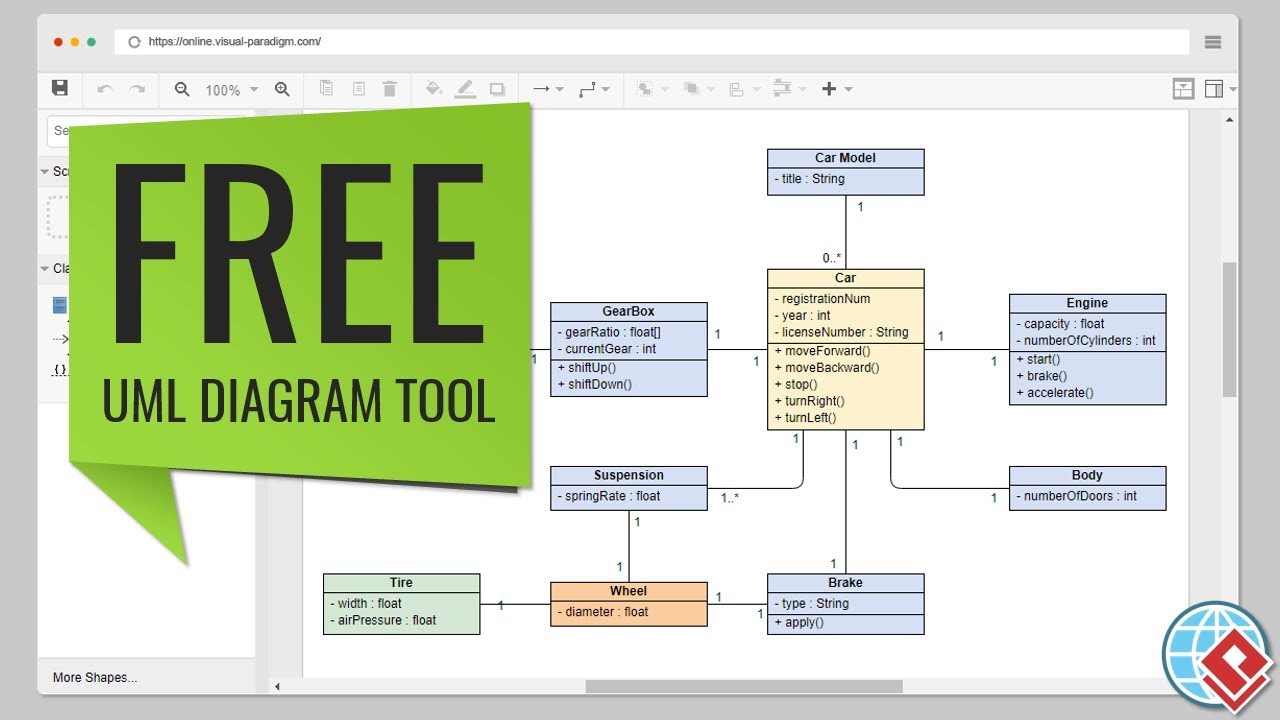
Free UML Tool

关键概念

1. 模型

UML中的模型是系统或系统某一部分的简化表示。它有助于理解并沟通系统的结构与设计。

2. 图表

UML图表是系统架构的图形化表示。它们主要分为两类:结构图和行为图。

3. 元素

UML元素是构建模型的基本构件,包括类、对象、接口、组件、节点、用例、参与者等。

4. 关系

UML中的关系定义了元素之间的连接方式。常见的关系包括关联、泛化、依赖和实现。

5. 符号

UML使用一组标准符号来表示不同的元素和关系。这些符号有助于创建一致且易于理解的图表。

图表类型

UML包含14种图表类型,主要分为两类:结构图和行为图。

Overview of the 14 UML Diagram Types

结构图

  1. 类图

    • 通过展示系统的类、属性、方法以及类之间的关系,来表示系统的静态结构。
    • 示例:一个图书馆管理系统类图,展示如下类:图书会员,以及借阅.
  2. 对象图

    • 显示系统在某一特定时间点的详细状态快照。
    • 示例:表示系统中实例的对象图,例如 图书 和 成员 类在图书馆系统中。
  3. 组件图

    • 展示一组组件之间的组织结构和依赖关系。
    • 示例:用于Web应用程序的组件图,展示如 用户界面业务逻辑,和 数据库.
  4. 部署图

    • 显示工件在节点上的物理部署情况。
    • 示例:用于Web应用程序的部署图,展示服务器、数据库及其交互关系。
  5. 包图

    • 将模型的元素组织成组,提供一种结构化和管理复杂系统的方法。
    • 示例:用于软件项目的包图,展示如 用户界面服务,和 数据访问.
  6. 配置文件图

    • 使用标准扩展机制自定义UML模型。
    • 示例:一个用于特定领域(如医疗或金融)扩展UML的配置文件图。

行为图

  1. 用例图

    • 通过展示用户(参与者)与系统之间的交互来捕获系统的功能需求。
    • 示例:一个在线购物系统的用例图,展示如下用例:浏览产品添加到购物车结账.
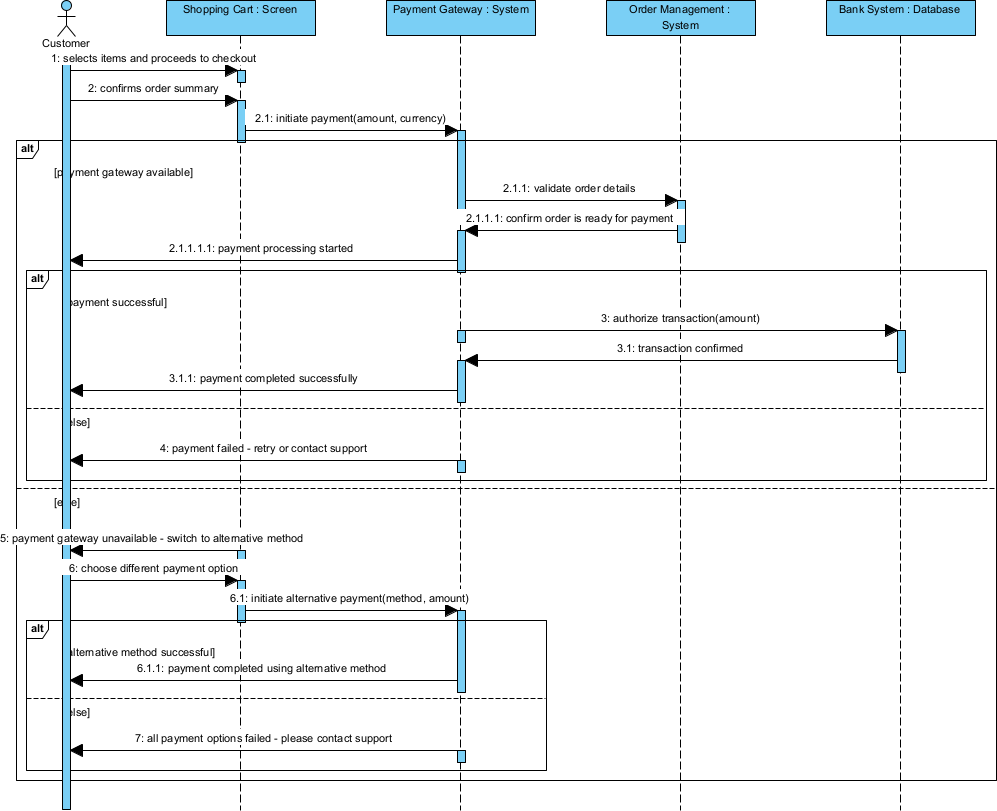
  2. 顺序图

    • 展示在用例的特定场景中对象之间的交互,重点关注交换消息的顺序。
    • 示例:在线购物系统中“结账”用例的顺序图。
  3. 通信图

    • 强调对象之间的结构关系以及它们交换的消息。
    • 示例:在线购物系统中“结账”用例的通信图,展示客户订单支付对象之间的交互。
  4. 状态机图

    • 表示对象的状态以及由于事件导致的状态之间的转换。
    • 示例:在线购物系统中一个对象的状态机图订单在线购物系统中的一个对象。
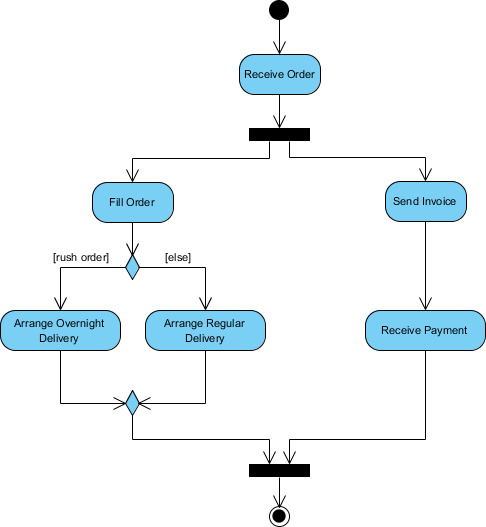
  5. 活动图

    • 通过展示活动的顺序和控制流来建模系统的流程。
    • 示例:在线购物系统中订单处理流程的活动图订单处理流程。
  6. 交互概览图

    • 提供系统不同部分之间交互的高层次概览。
    • 示例:在线购物系统中订单处理流程的交互概览图订单处理流程,展示客户订单支付组件之间的交互。
  7. 时序图

    • 在表示时间的单一轴上展示对象之间的交互。
    • 示例:在线购物系统中订单处理流程的时序图订单处理流程,展示客户订单支付对象之间的交互时间。

应用领域

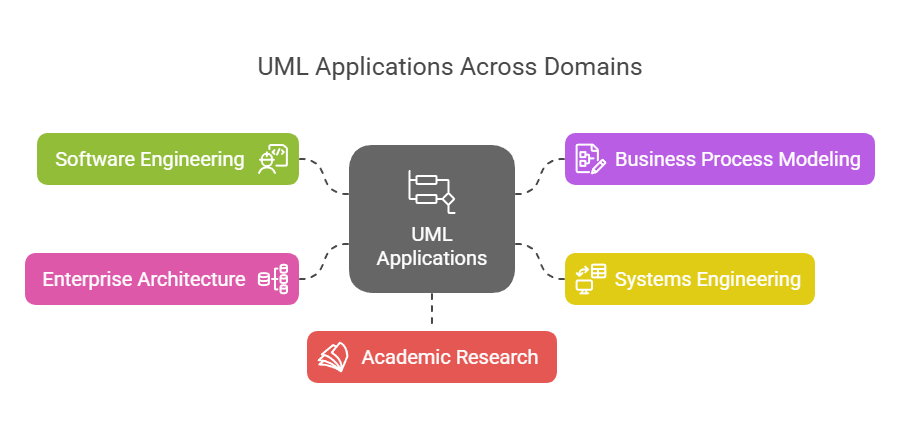
UML 广泛应用于各个领域和行业,包括:

UML Applications Areas - Visual Paradigm

  1. 软件工程

    • 软件设计与架构
    • 需求分析与规范
    • 系统建模与文档编制
  2. 业务流程建模

    • 工作流分析与优化
    • 业务流程再造
  3. 系统工程

    • 软硬件协同设计
    • 嵌入式系统开发
  4. 企业架构

    • 企业级系统集成
    • IT 战略与规划
  5. 学术研究

    • 形式化方法与验证
    • 软件工程教育

示例

示例 1:图书馆管理系统

  • 类图

    • 类:图书成员借阅
    • 关系:成员借阅借阅关联成员
  • 用例图

    • 参与者:图书管理员成员
    • 用例:借书还书搜索目录
  • 顺序图

    • 场景:借书
    • 对象:成员图书管理员借阅
    • 消息:会员请求借阅书籍图书管理员检查可用性,借阅已创建

示例2:在线购物系统

  • 类图

    • 类:客户产品订单支付
    • 关系:客户下单订单订单包含产品支付处理订单
  • 用例图

    • 参与者:客户管理员
    • 用例:浏览产品添加到购物车结账管理库存
  • 活动图

    • 工作流程:订单处理
    • 活动:客户下单订单被验证支付已处理订单已发货

结论

UML是一种强大且多功能的建模语言,有助于可视化、规范、构建和记录软件系统的各种构件。其丰富的图表类型和标准化的符号使其成为软件工程师、业务分析师和系统架构师不可或缺的工具。通过理解UML的关键概念、图表类型和应用领域,您可以有效地利用它来设计和沟通复杂系统。

由于其功能全面且与敏捷方法论无缝集成,Visual Paradigm被强烈推荐为IT软件开发团队的最佳UML工具。以下是Visual Paradigm脱颖而出的一些关键原因:

  1. 全面的建模支持:Visual Paradigm支持多种建模标准,包括UML、SysML、BPMN、ERD、DFD和ArchiMate。这使其成为各类软件开发项目的多功能工具123.

  2. 敏捷集成: Visual Paradigm 旨在辅助敏捷软件开发流程。它将 UML 建模与 Scrum 和 Kanban 等敏捷实践相结合,使团队可以根据需要创建 UML 图表,以支持沟通和文档编写,同时不牺牲敏捷性45.

  3. 协作功能: 该工具支持实时和异步团队协作,使多名团队成员能够同时处理同一项目。这一功能对需要持续沟通与协作的敏捷团队至关重要15.

  4. 代码工程能力: Visual Paradigm 提供代码生成和逆向工程能力,可显著加快开发进程。它支持 ORM 和 REST 等多种技术,使从设计到实现的过渡更加便捷16.

  5. 用户友好的界面: 该工具提供直观且易于使用的界面,有助于高效创建和管理复杂图表。它还包含线框图、故事板和原型设计等功能,这些对用户体验设计至关重要15.

  6. 与 IDE 的集成: Visual Paradigm 可与主流集成开发环境(IDE)无缝集成,确保从分析到设计和实现的平滑过渡。这种集成可减少软件开发生命周期各阶段的工作量7.

  7. 报告与文档: 该工具可生成 PDF、Word 和 HTML 等多种格式的专业报告。此功能有利于文档编制和利益相关者沟通8.

  8. 行业认可:Visual Paradigm 被数百万用户信赖,包括政府机构、大型企业及教育机构。它荣获多项重大IT奖项,进一步验证了其在行业中的可靠性和有效性。5.

总之,Visual Paradigm 功能强大、敏捷集成、协作能力强以及获得行业认可,使其成为希望提升UML建模和软件开发流程的IT软件开发团队的理想选择。

教程:UML 与 BPMN 对比——关键概念与示例

简介

统一建模语言(UML)和业务流程模型与符号(BPMN)是软件开发和业务流程管理中两种常用的建模语言。尽管两者都用于可视化和记录流程,但它们针对系统设计的不同方面,具有不同的用途。本教程将对比 UML 和 BPMN,突出它们的关键概念、差异,并通过示例说明它们的应用场景。

Free Online UML Tool - Visual Paradigm

关键概念

统一建模语言(UML)

UML 是一种标准化的建模语言,主要用于软件工程中,用于指定、可视化、构建和记录软件系统的各种构件。它提供了一组图表,用于表示系统的结构和行为。

UML 中的关键图表

  1. 类图

    • 通过展示系统的类、属性、方法以及类之间的关系,来表示系统的静态结构。
    • 示例:一个图书馆管理系统类图,展示如下类:图书会员,以及借阅.
  2. 顺序图

    • 展示在某个用例的具体场景中对象之间的交互,重点关注消息传递的顺序。
    • 示例:一个用于结账用例的顺序图,应用于在线购物系统。
  3. 用例图

    • 通过展示用户(参与者)与系统之间的交互,来捕捉系统的功能需求。
    • 示例:一个在线购物系统的用例图,展示如下用例:浏览商品加入购物车,以及结账.
  4. 活动图

    • 通过展示活动的顺序和控制流来建模系统的流程。
    • 示例:一个在线购物系统中 订单处理工作流程的活动图。

业务流程模型与符号(BPMN)

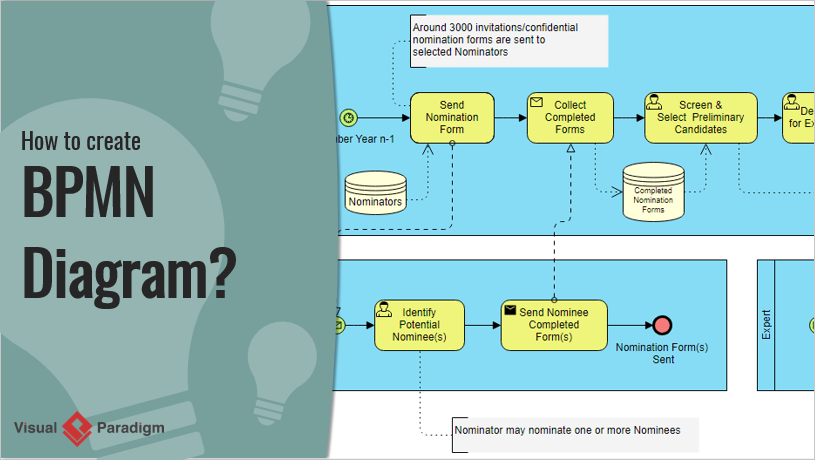
BPMN 是一种用于在工作流中指定业务流程的图形化表示法。它旨在让所有业务利益相关者(从业务分析师到技术开发人员)都能理解。

How to Create BPMN Diagram? Visual Paradigm

BPMN 中的关键元素

  1. 事件

    • 表示过程中发生的某些事件,例如开始事件、结束事件或中间事件。
    • 示例:由客户下单触发的开始事件。
  2. 活动

    • 表示流程中执行的工作。活动可以是任务或子流程。
    • 示例:订单履行流程中的一个任务,用于 处理付款在订单履行流程中。
  3. 网关

    • 控制流程的流向,决定路径的分支、分叉、合并和汇合。
    • 示例:一个根据付款状态决定是否 发货订单或 取消订单的网关。
  4. 流程对象

    • 包括事件、活动和网关,通过顺序流连接以定义执行顺序。
    • 示例:从 处理付款到 发货订单.

UML 与 BPMN:主要区别

  1. 目的

    • UML:主要用于软件设计与开发,关注软件系统的结构和行为。
    • BPMN:用于业务流程管理,关注业务流程中的工作流和交互。
  2. 受众

    • UML:面向软件开发人员、架构师和工程师。
    • BPMN:面向业务分析师、流程负责人以及参与业务运营的利益相关者。
  3. 范围

    • UML:涵盖软件系统不同方面的多种图表,包括结构、行为和交互。
    • BPMN:专门关注业务流程,提供工作流和交互的详细表示。
  4. 复杂性

    • UML:由于图表和符号的多样性,可能较为复杂,需要对软件工程概念有更深入的理解。
    • BPMN:通常更简单且更直观,旨在让非技术利益相关者也能理解。

示例

示例 1:在线购物系统

UML 用例图

  • 参与者:客户,管理员
  • 用例:浏览商品,加入购物车,结账,管理库存
  • 描述:展示客户与在线购物系统之间的交互,突出主要功能。

BPMN 流程图

  • 事件:开始(客户下单),结束(订单已发货)
  • 活动:处理支付,准备订单,发货
  • 网关:决策网关,用于检查支付状态
  • 描述: 描述了从付款到发货的订单处理流程,包含明确的决策点。

示例 2:图书馆管理系统

UML 类图

  • : 图书、成员、借阅
  • 关系: 成员借阅图书,借阅关联成员与图书
  • 描述: 表示图书馆管理系统的静态结构,展示关键实体之间的关系。

BPMN 流程图

  • 事件: 开始(成员请求图书),结束(图书归还)
  • 活动: 检查可用性,发放图书,发送提醒
  • 网关: 用于检查图书可用性的决策网关
  • 描述: 展示了从请求到归还图书的借阅流程,包含用于检查可用性的决策点。

UML 与 BPMN 的主要区别

以下是一个对比表格,突出显示了 UML 与 BPMN 的主要区别:

特性 UML(统一建模语言) BPMN(业务流程模型与符号)
目的 主要用于软件设计与开发,关注软件系统的结构与行为。 用于业务流程管理,关注业务流程中的工作流与交互。
受众 面向软件开发人员、架构师和工程师。 面向业务分析师、流程负责人以及参与业务运营的利益相关者。
范围 涵盖软件系统不同方面的广泛图表,包括结构、行为和交互。 特别关注业务流程,提供工作流和交互的详细表示。
复杂性 由于图表和符号的多样性,可能较为复杂,需要对软件工程概念有更深入的理解。 通常更简单直观,旨在让非技术利益相关者能够理解。
关键图表/元素 – 类图
– 顺序图
– 用例图
– 活动图
– 状态机图
– 组件图
– 事件(开始、结束、中间)
– 活动(任务、子流程)
– 网关(决策、并行、基于事件)
– 流对象(顺序流、消息流)
示例用例 – 软件架构设计
– 系统行为建模
– 需求分析
– 面向对象设计
– 业务流程映射
– 工作流自动化
– 流程改进
– 业务与IT对齐
集成 通常与软件开发工具和集成开发环境(IDE)集成。 通常与业务流程管理套件和企业架构工具集成。
标准化 由对象管理组(OMG)标准化。 由对象管理组(OMG)标准化。
灵活性 具有高度灵活性,可通过多种图表来建模系统的不同方面。 更专注于业务流程,但可以通过附加符号来扩展以满足特定需求。
可视化 提供系统架构和行为的全面视图。 提供业务流程和工作流的清晰直观视图。

此表格总结了UML与BPMN之间的关键差异,有助于您理解它们在软件开发和业务流程管理中的各自优势和应用场景。

推荐的UML和BPMN工具

由于其全面的功能和两种建模语言的无缝集成,强烈推荐使用Visual Paradigm来同时进行UML和BPMN建模。以下是Visual Paradigm脱颖而出的一些关键原因:

  1. 全面的建模支持:Visual Paradigm支持多种建模标准,包括UML、BPMN、ERD、DFD等。这使其成为各类软件开发和业务流程管理项目中的多功能工具910.

  2. 集成环境:该工具提供一体化套件,将UML和BPMN建模与敏捷开发工具、项目管理图表以及代码工程功能集成在一起。这种集成有助于轻松管理项目,并确保从设计到实现的平滑过渡911.

  3. 易于使用:Visual Paradigm提供直观且易于使用的界面,使初学者和经验丰富的用户都能轻松上手。该工具包含自动拉伸泳道、智能连接器修正和可扩展子流程等功能,简化了建模过程11.

  4. 代码工程:该工具通过支持代码生成和逆向工程,弥合了UML设计模型与源代码之间的差距。这一功能对开发人员有益,有助于保持设计与实现之间的一致性10.

  5. 协作功能:Visual Paradigm支持实时和异步团队协作,允许多名团队成员同时在同一项目上工作。这一功能对需要持续沟通与协作的敏捷团队至关重要9.

  6. 高质量文档:该工具可生成高质量的流程文档和报告,这对于文档编制和利益相关者沟通至关重要。此功能有助于保持项目进展和设计决策的清晰简洁记录10.

  7. 行业认可:Visual Paradigm 被领先企业信赖,并荣获多项重大IT奖项。其行业独有的TOGAF ADM生命周期工具及其他企业架构工具,使其成为专业使用的可靠选择9.

  8. 性价比:Visual Paradigm 提供高度实惠的可视化建模工具集,支持UML、BPMN及其他关键图表。这使其在不牺牲功能的前提下,对小型团队、个人用户和学生都易于使用10.

  9. 教程与支持:Visual Paradigm 提供一系列免费教程和资源,帮助用户快速上手UML和BPMN建模。这些资源包括逐步指南、视频和文档,确保用户能够有效利用该工具完成项目1213.

总之,Visual Paradigm功能全面、易于使用、具备协作能力且广受行业认可,是希望将UML和BPMN建模融入软件开发和业务流程管理项目的团队的理想选择

结论

UML和BPMN在系统设计和流程管理领域中各有不同的用途。UML非常适合软件开发,提供一套全面的图表来建模软件系统的结构和行为。而BPMN则专为业务流程管理设计,提供一种清晰直观的方式来可视化业务流程中的工作流和交互。理解UML和BPMN的关键概念及其差异,将有助于您根据具体需求选择合适的工具,确保项目中的有效沟通和文档编制

UML活动图全面指南:关键概念与示例

引言

在软件开发和系统建模领域,UML(统一建模语言)活动图在可视化系统内流程的工作流方面起着至关重要的作用。这些图表以清晰且结构化的方式展示了实现特定目标所涉及的活动、决策和交互的顺序。UML(统一建模语言)活动图是建模系统工作流的强大工具,能够展示实现特定目标所涉及的活动、决策和流程的顺序。本指南将涵盖UML活动图的关键概念,提供示例,并推荐Visual Paradigm作为IT软件开发的理想工具。

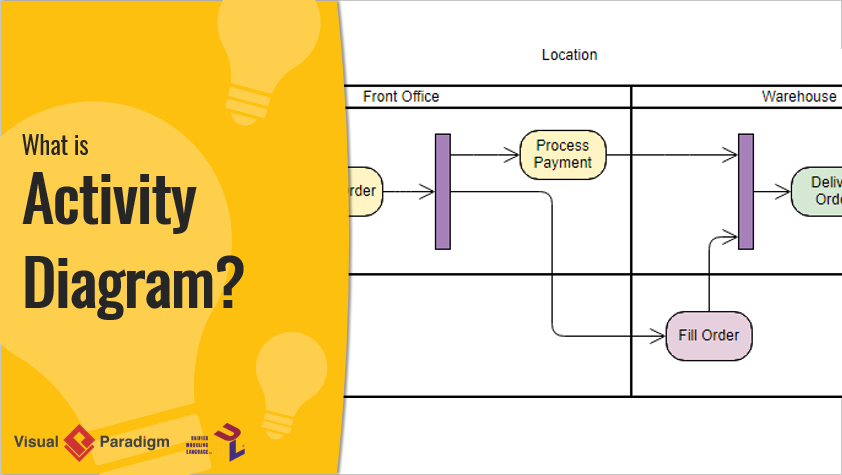
What is Activity Diagram?

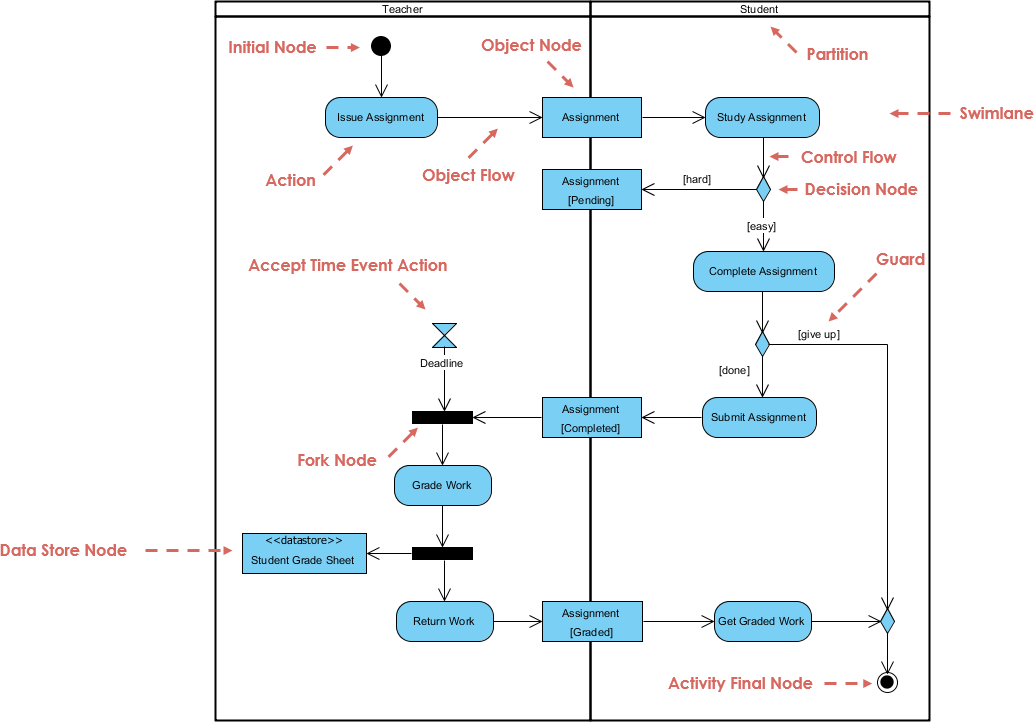
本文深入探讨了UML活动图的复杂性,通过一个详细示例,展示了一个作业从发布到评分和返还的整个生命周期,涉及教师和学生双方。通过分解图表的关键组件和工作流程,我们旨在全面阐述如何有效利用UML活动图来建模复杂流程。无论您是经验丰富的开发者还是初次接触UML,本指南都将帮助您掌握活动图的基本原理和高级概念,使您能够自信地将其应用于自己的项目中。

UML活动图的关键概念

What is Activity Diagram?

  1. 活动:

    • 表示系统内执行的操作或任务。
    • 以圆角矩形表示。
  2. 动作:

    • 活动图中最基本的工作单元。
    • 以带圆角的矩形表示。
  3. 控制流:

    • 显示活动执行的顺序。
    • 通过连接活动的实线箭头表示。
  4. 决策节点:

    • 表示根据条件可以分支控制流的点。
    • 以菱形表示。
  5. 分叉和汇合节点:

    • 分叉节点将单一流程拆分为多个并发流程。
    • 汇合节点将多个流程重新合并为单一流程。
    • 两者均以水平条形表示。
  6. 初始节点和最终节点:

    • 初始节点表示工作流的开始。
    • 最终节点表示工作流的结束。
    • 两者均以黑色圆圈表示,初始节点带有出射箭头,最终节点带有入射箭头。
  7. 对象流:

    • 显示活动之间对象的流动。
    • 用虚线箭头表示。

UML活动图示例

活动图对管理作业生命周期(从发放到评分和返还)的问题进行建模,涉及教师与学生之间的交互。问题的关键方面包括:

  1. 作业发放与学习:

    • 教师发放作业,学生对其进行学习。
    • 学生对作业难度的感知会影响其完成作业的方式。
  2. 作业完成与提交:

    • 学生完成作业并提交给教师。
    • 学生可能根据某些条件决定放弃作业。
  3. 截止日期管理:

    • 教师为作业提交设定截止日期。
    • 工作流考虑了截止日期,并据此进行。
  4. 评分与返还:

    • 教师对提交的作业进行评分并存储成绩。
    • 评分后的作业返还给学生。
  5. 并发活动:

    • 该图使用分叉和汇合节点对并发活动(如评分作业和存储成绩)进行建模。

关键组件与工作流

  1. 初始节点:

    • 过程从初始节点用一个黑圆圈表示。这表示工作流的开始。
  2. 发布作业(教师):

    • 教师发布作业,用动作表示“发布作业”.
    • 一个对象节点(作业)被创建,表示生成了一个作业对象。
  3. 作业(对象流):

    • 作业对象从教师流向学生,用对象流箭头表示。
  4. 学习作业(学生):

    • 学生接收作业并开始学习,用动作表示“学习作业”.
    • 此操作位于学生泳道,表示这是学生的责任。
  5. 决策节点(控制流):

    • 学生决定作业是难还是容易,用决策节点(菱形)表示。
    • 根据决定,控制流分为两条路径:
      • [难]:如果作业很难,学生将继续学习。
      • [简单]:如果作业简单,学生继续完成作业。
  6. 完成作业(学生):

    • 学生完成作业,由动作表示“完成作业”.
    • 一个守卫条件[放弃]决定学生是提交作业还是放弃。
  7. 提交作业(学生):

    • 如果学生完成作业,他们将提交作业,由动作表示“提交作业”.
    • 作业对象流回教师,由表示对象流箭头。
  8. 接受时间事件动作(教师):

    • 教师为作业设定截止日期,由表示接受时间事件动作(沙漏符号)。
    • 如果截止日期到达,工作流将进入分支节点.
  9. 分支节点:

    • 分支节点(粗水平条)将工作流分为两条并行路径:
      • 评分工作(教师):教师对提交的作业进行评分,由操作 “评分工作”.
      • 数据存储节点:已评分的作业存储在数据存储中,由 数据存储节点(<<datastore>> 学生成绩表)。
  10. 返还作业(教师):

    • 教师将评分后的作业返还给学生,由操作 “返还作业”.
    • 作业对象流回学生,由 对象流箭头。
  11. 获取已评分作业(学生):

    • 学生接收已评分的作业,由操作 “获取已评分作业”.
  12. 活动最终节点:

    • 流程以 活动最终节点结束,用带边框的黑色圆圈表示,表明工作流已完成。

此UML活动图有效地模拟了管理作业的工作流程,突出了教师与学生之间的互动、决策点以及涉及的并发活动。它清晰地展示了作业生命周期的视觉表示,从发布到评分和返还,使该过程更易于理解和管理。

推荐使用Visual Paradigm进行IT软件开发

尽管上述示例展示了UML活动图的基本原理,但Visual Paradigm为软件开发提供了更全面且直观的方法。以下是Visual Paradigm为何是IT软件开发理想工具的原因:

  1. 全面的UML支持:

    • Visual Paradigm支持所有类型的UML图,包括活动图、类图、序列图等。
    • 它提供了一套丰富的工具和功能,用于创建、编辑和管理UML图。
  2. 用户友好的界面:

    • 直观的拖放式界面使得创建和修改UML图变得简单。
    • 该工具提供了广泛的自定义选项,以满足特定需求。
  3. 与其他工具的集成:

    • Visual Paradigm可与其它开发工具无缝集成,例如IDE、版本控制系统和项目管理工具。
    • 这种集成确保了工作流程的顺畅,并提升了生产力。
  4. 协作功能:

    • Visual Paradigm支持协作工作,允许多个用户同时在同一项目上工作。
    • 该工具包含版本控制、团队协作和实时更新等功能。
  5. 高级建模能力:

    • Visual Paradigm提供高级建模能力,包括对敏捷方法、企业架构和系统建模的支持。
    • 该工具提供了一套全面的功能,用于建模复杂系统和工作流程。
  6. 丰富的文档和支持:

    • Visual Paradigm提供丰富的文档、教程和支持资源,帮助用户入门并掌握该工具。
    • 该工具提供多种学习资源,包括视频教程、指南和示例。

结论

UML活动图是建模系统工作流程的强大工具,能够清晰展示实现特定目标所涉及的活动、决策和流程顺序。所提供的示例展示了创建UML活动图的基本方法。然而,若要采用更全面且直观的软件开发方法,Visual Paradigm是理想的选择。凭借其全面的UML支持、用户友好的界面、与其他工具的集成、协作功能、高级建模能力以及丰富的文档和支持资源,Visual Paradigm提供了有效创建、管理和协作UML图所需的一切。无论您是初学者还是经验丰富的开发者,Visual Paradigm都能提供实现软件开发项目所需的工具与支持。

UML 类图全面指南

简介

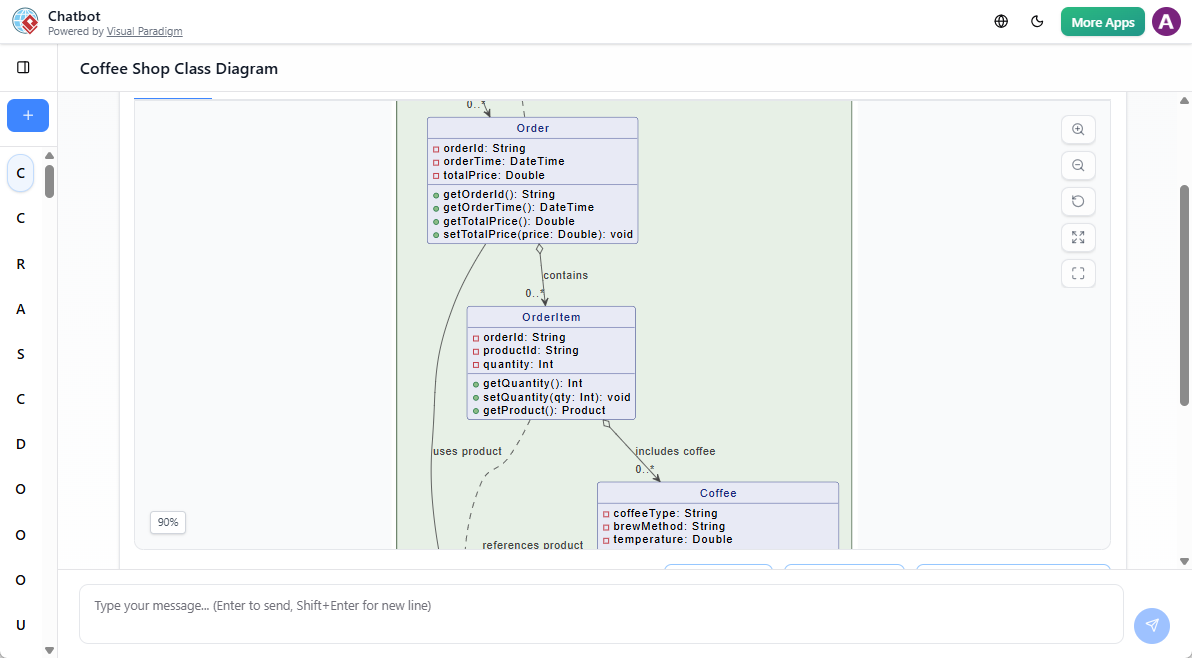
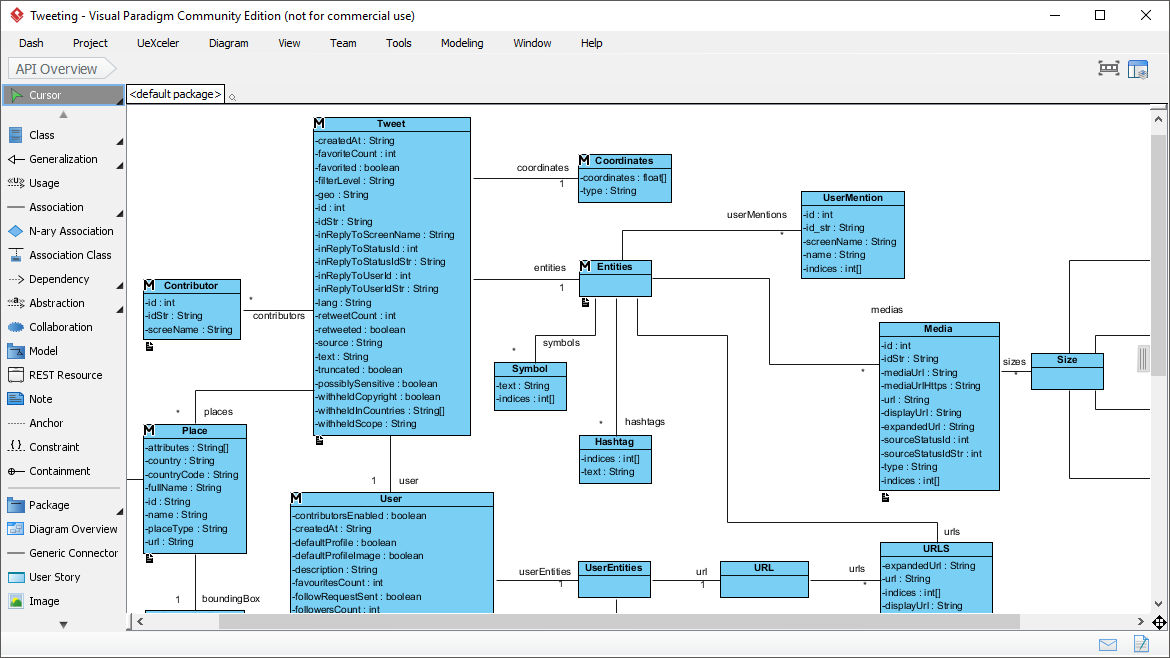
类图是统一建模语言(UML)的一种静态图,通过展示系统的类、属性、操作以及对象之间的关系,直观地表示系统的结构。它作为面向对象软件设计的蓝图,提供了一种清晰且简洁的方式来理解和记录系统的架构。

目的与功能

可视化系统结构

类图通过展示不同类之间的交互与关系,帮助开发人员理解并记录系统的结构。这种可视化表示对于设计健壮且可维护的软件系统至关重要。

软件建模

类图能够以高层次的抽象方式对软件进行建模,使开发人员可以专注于设计而无需深入源代码。这种抽象有助于在开发早期阶段发现潜在问题。

面向对象设计

类图是面向对象建模的基础。它们描绘了系统的构成要素及其相互作用,使得实现封装、继承和多态等面向对象原则变得更加容易。

数据建模

类图也可用于数据建模,表示系统内数据的结构和关系。这在数据库设计中尤其有用,因为需要明确界定实体及其相互关系。

代码蓝图

类图作为构建软件应用程序可执行代码的蓝图,为开发人员提供了清晰的路线图,确保实现与设计架构保持一致。

关键组件

类用被分为三个部分的矩形表示:

  1. 类名:顶部部分包含类的名称。
  2. 属性:中间部分列出定义类状态的属性或数据成员。
  3. 操作(方法):底部部分列出类可以执行的操作或函数。

关系

类之间的关系通过线条和符号表示:

  1. 泛化:表示继承关系,即一个类(子类)从另一个类(父类)继承属性和操作。它通过一个空心箭头表示,箭头从子类指向父类。
  2. 聚合:表示一个类包含另一个类的实例,但被包含的类可以独立存在。它通过连接到包含类的线条末端的空心菱形表示。
  3. 组合: 一种更强的聚合形式,其中包含的类不能脱离包含类而存在。它通过在连接到包含类的线条末端的实心菱形来表示。
  4. 关联: 表示两个类之间的关系,表明一个类使用或与另一个类交互。它通过一条实线连接两个类来表示。

使用 PlantUML 的示例图

基本类图

包含聚合和组合的图

包含关联的图

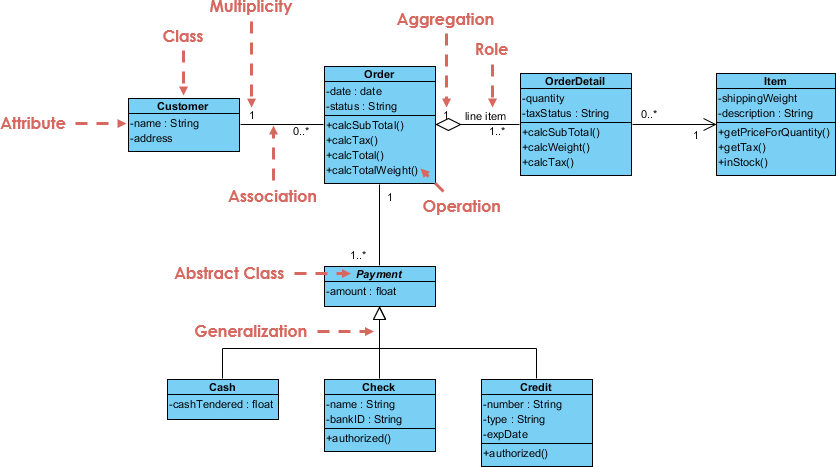
示例 – 订单系统

SDE | Uml Class Diagrams

关键元素

  1. :

    • 客户: 表示下订单的客户。
      • 属性:姓名(字符串),地址(字符串)。
    • 订单: 表示客户下的订单。
      • 属性:日期(日期),状态(字符串)。
      • 操作:计算小计()计算税额()calcTotal()calcTotalWeight().
    • 订单明细: 表示订单中每个项目的详细信息。
      • 属性:数量(整数),税额状态(字符串)。
      • 操作:calcSubTotal()calcWeight()calcTax().
    • 项目: 表示所订购的项目。
      • 属性:运输重量(浮点数),描述(字符串)。
      • 操作:getPriceForQuantity()getTax()inStock().
    • 付款 (抽象类): 表示订单的付款。
      • 属性: 金额 (浮点数)。
    • 现金: Payment 的子类,表示现金付款。
      • 属性: 支付金额 (浮点数)。
    • 支票: Payment 的子类,表示支票付款。
      • 属性: 姓名 (字符串), 银行编号 (字符串), 是否授权 (布尔值)。
    • 信用卡: Payment 的子类,表示信用卡付款。
      • 属性: 卡号 (字符串), 类型 (字符串), 有效期 (日期), 已授权 (布尔值)。
  2. 关系:

    • 关联:
      • 客户订单: 客户可以下多个订单(0..* 订单端的多重性)。
      • 订单订单明细: 一个订单可以包含多个订单明细(1..* 订单明细端的多重性)。
      • 订单明细商品: 每个订单明细关联一个商品(1 商品端的多重性)。
    • 聚合:
      • 订单订单明细: 表示订单明细是订单的一部分,但订单明细可以独立存在。
    • 泛化:
      • 支付及其子类(现金支票信用):表示继承关系,其中现金、支票和信用是支付的具体类型。
    • 角色:
      • 订单明细项目:角色行项目表示订单明细在订单上下文中的特定角色。
  3. 多重性:

    • 表示一个类的实例可以与另一个类的单个实例关联的实例数量。例如,一个客户可以下多个订单(0..*).
  4. 抽象类:

    • 支付:标记为抽象类,表示它不能被直接实例化,并作为其他支付类型的基类。

说明

  • 客户:表示下单的实体,具有姓名和地址等基本属性。
  • 订单: 表示订单本身,包含日期和状态等属性,以及计算小计、税额、总额和总重量的操作。
  • 订单明细: 表示订单中每个项目的详细信息,包括数量和税额状态,以及计算小计、重量和税额的操作。
  • 商品: 表示所订购的商品,包含运输重量、描述等属性,以及获取数量价格、税额和库存状态的操作。
  • 支付: 一个抽象类,表示订单的支付,包含金额属性。它有不同支付方式的子类:
    • 现金: 表示现金支付,包含已支付现金的属性。
    • 支票: 表示支票支付,包含姓名、银行编号和授权状态属性。
    • 信用卡: 表示信用卡支付,包含卡号、类型、有效期和授权状态属性。

该图有效地捕捉了订单处理系统内部的结构和关系,清晰地展示了各个组件之间的交互方式。

结论

类图是UML建模中的重要工具,能够以清晰且结构化的方式表示系统的架构。通过理解关键组件及其关系,开发人员可以设计出健壮且可维护的软件。使用PlantUML等工具,这些图可以轻松可视化并在团队成员间共享,从而提升协作效率,并确保对系统结构有统一的理解。

参考文献

  1. Visual Paradigm Online 免费版:

    • Visual Paradigm Online(VP Online)免费版是一款免费的在线绘图软件,支持类图、其他UML图、ER图工具和组织结构图工具。它配备了一个简单但功能强大的编辑器,可快速轻松地创建类图。该工具提供无限制访问,不限制您创建的图表或图形数量,且无广告。您对个人和非商业用途所创建的图表拥有所有权。编辑器包含拖拽创建图形、内联编辑类属性和操作、多种格式化工具等功能。您还可以以不同格式(PNG、JPG、SVG、GIF、PDF)打印、导出和分享您的作品。123.
  2. 出色的绘图功能:

    • Visual Paradigm Online 提供了高级格式化选项,以增强您的图表效果。您可以使用对齐指南精确放置图形,并通过图形和线条格式化选项、字体样式、可旋转图形、嵌入的图片和URL以及阴影效果来美化您的类图。该工具支持跨平台使用(Windows、Mac、Linux),可通过任何网页浏览器访问。它还支持 Google Drive 集成,实现图表的无缝保存和访问。23.
  3. 全面的绘图选项:

    • Visual Paradigm Online 支持多种图表类型,包括 UML 图(类图、用例图、顺序图、活动图、状态图、组件图和部署图)、ERD 工具、组织结构图、平面图设计工具、ITIL 以及业务概念图。该工具设计简洁易用,具备拖拽功能和智能连接线,可自动对齐。它还提供丰富的格式化选项,包括 40 多种连接线类型和多种填充样式45.
  4. 学习与自定义:

    • Visual Paradigm 提供了一个易于使用的平台,用于创建和管理类图,是软件开发人员和工程师的绝佳选择。您可以通过更改颜色、字体和布局来自定义类图。该工具还支持创建类之间的各种关系,如关联、继承和依赖。Visual Paradigm 是一款强大的 UML 建模工具,有助于展现系统的静态结构,包括系统的类、属性、方法以及它们之间的关系67.
  5. 社区与支持:

    • Visual Paradigm 社区版是一款免费的 UML 软件,支持所有 UML 图表类型。它旨在帮助用户更快、更轻松、更高效地学习 UML。该工具界面直观,可轻松创建您自己的类图。Visual Paradigm 已被超过 32 万名专业人士和组织信赖,包括中小企业、财富 500 强公司、高等院校和政府机构。它被用于培养下一代 IT 开发人员,使其具备职场所需的专项技能89.

这些参考内容突出了使用 Visual Paradigm 创建类图的全面功能和优势,使其成为个人和专业用途的推荐工具

Visual Paradigm AI 包图生成器:文本转 UML 包

你正在设计一个新的内容管理系统,盯着各层、模块和依赖关系——表现层、业务规则、持久化、安全——但整体结构依然模糊不清。手动创建包、子包和依赖箭头对于初稿来说显得过于繁琐。现在,Visual Paradigm 的 AI 登场了包图生成器:用通俗语言描述你的系统,几秒钟内即可获得一份整洁、符合标准的 UML 包图。这是从思维模型到可视化蓝图的快速通道。

为什么这个 AI 改变了软件架构

  • 自然语言 → 立即生成完整的 UML 包图
  • 自动识别包、子包、依赖关系和构造型
  • 支持分层、模块化和微服务风格的架构
  • 完全可编辑的原生模型——可优化、添加注释、合并包
  • 桌面端精准操作 + 浏览器聊天机器人,实现快速迭代

1. 桌面端:提示 → 结构化架构

在 Visual Paradigm 桌面端:

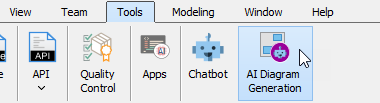
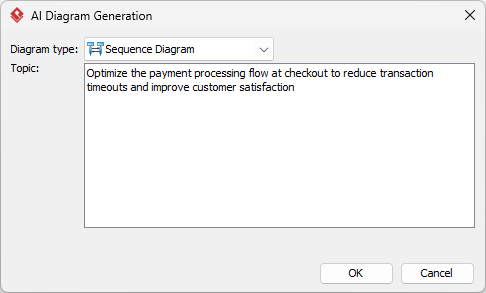
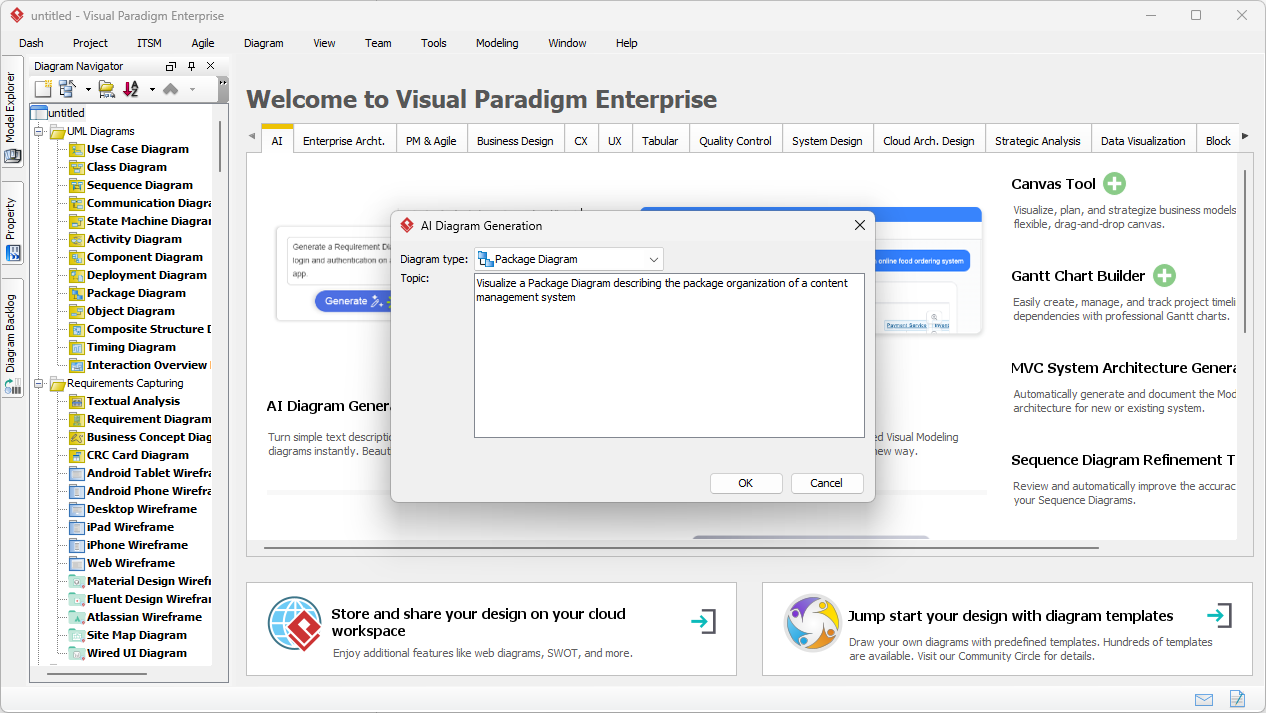
工具 → AI 图形生成 → 选择“包图” → 描述你的系统:

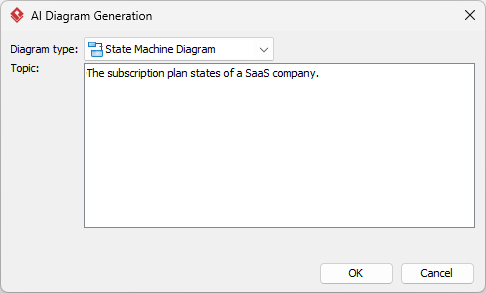
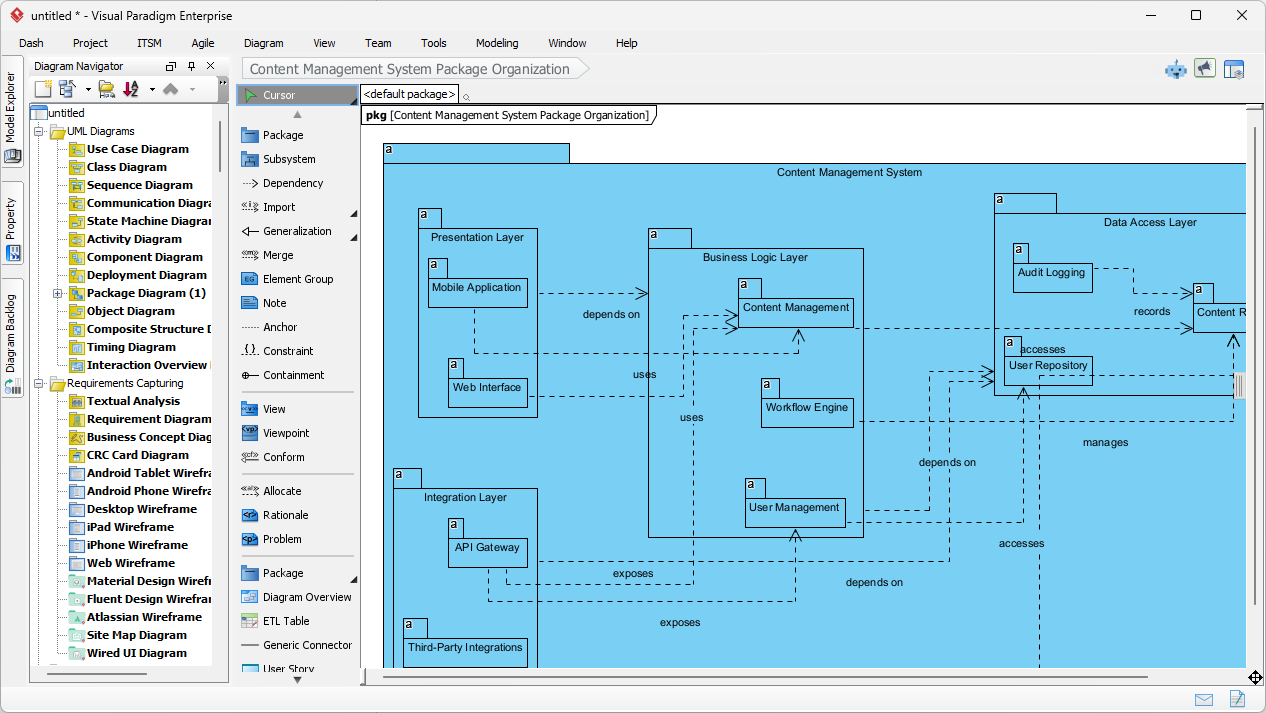
“生成一个UML 包图用于内容管理系统,包含表现层(Web UI、移动应用)、业务逻辑层(内容服务、用户管理、工作流引擎)、数据访问层(仓库、审计日志),并展示各层之间的依赖关系。”

输入对话框简洁且专注:

Visual Paradigm Desktop AI Package Diagram generation prompt interface

AI 生成:

  • 顶层包:表现层、业务逻辑层、数据访问层
  • 子包:Web UI、移动应用、内容服务、仓库
  • 清晰的依赖箭头(虚线)展示各层之间的流程

生成的内容管理系统包图——逻辑清晰、分层明确,可直接用于评审

AI-generated UML Package Diagram for Content Management System

立即编辑:添加安全包、调整依赖关系,或与类图集成。

2. 聊天机器人:随时随地进行对话式架构设计

用于快速草图或远程头脑风暴,打开Visual Paradigm AI 聊天机器人:

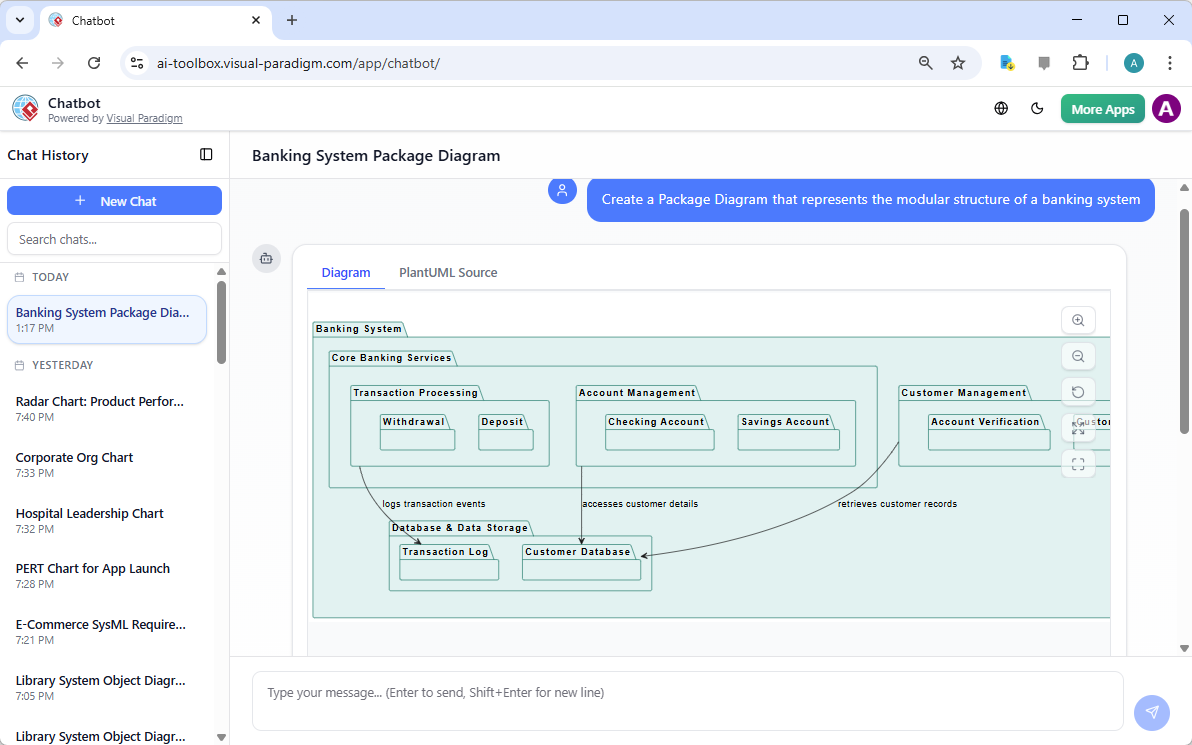
“为一个银行系统创建 UML 包图:核心银行服务、账户管理、客户管理、交易处理、合规与审计。”

聊天机器人实时生成——包、子包和依赖关系立即呈现。银行系统的示例输出:

AI-generated UML Package Diagram for Banking System via Chatbot

在对话中优化:“添加支付网关包,并与交易处理建立依赖关系。”立即更新。非常适合早期设计讨论或教授 UML。

为什么包图 + 人工智能在2026年至关重要

良好的架构始于清晰的边界。在编写任何代码之前,包图就能展示模块化、层级结构和依赖关系。手动创建会拖慢进度;而人工智能则消除了这一障碍。

亮点应用场景:

  • 分层企业应用
  • 微服务边界
  • 教授模块化设计
  • 快速重构规划

讨论中途改变范围?重新生成。需要新增模块?直接添加。这种速度让架构保持敏捷,团队沟通更加高效。

准备好可视化你的系统结构了吗?

Visual Paradigm 的AI 包图生成器能快速将模糊的想法转化为专业的UML包——无论是用于内容管理系统、银行系统、电子商务,还是任何模块化系统。

停止与方框和箭头搏斗。从今天开始,更智能地进行设计。

相关链接

这些文章解释了如何利用人工智能应用于UML 包图来自动化系统元素的逻辑分组,使开发人员能够从自然语言提示中即时生成架构结构,从而更好地管理软件依赖关系以及系统可扩展性.

  1. AI 图形生成器现已支持 Visual Paradigm 中的包图本文详细介绍了新功能的发布,这些功能可借助人工智能生成包图,以改善软件架构的可视化效果。
  2. 使用 Visual Paradigm AI 立即生成 UML 包图本指南专注于利用人工智能驱动的工具,在极少手动操作的情况下创建专业的 UML 包图。
  3. 交互式 UML 包图生成器本资源提供了一个交互式工具,可通过对话式人工智能界面实时创建和编辑包图。
  4. UML 包图:使用人工智能构建代码库结构的权威指南本全面指南解释了人工智能如何帮助组织代码库、管理复杂依赖关系,并保持架构完整性。
  5. 通过文本提示生成 UML 包图本文探讨了如何利用先进的 AI 建模功能,将原始想法和文本提示转化为详细的 UML 包图。
  6. 使用 Visual Paradigm 的 UML 包图教程本教程提供逐步指导,帮助使用包图来组织软件组件,并有效可视化它们之间的关系。
  7. 包图软件功能 – Visual Paradigm 在线版本概述突出了可用于协作管理包图的在线工具,包括版本控制和实时编辑功能。
  8. UML 中的包图是什么?——Visual Paradigm 指南本基础资源介绍了包图通过逻辑分组在组织复杂软件系统中的作用。
  9. 使用 UML 包图建模软件架构本文讨论了使用包图来组织和传达系统架构模块化结构的最佳实践。
  10. 包图示例与模板 – Visual Paradigm 图库本图库提供了一系列真实世界的模板和示例,以激发并加速模块化软件设计。

从问题到报告:人工智能如何引导您的用例之旅

Discover how AI guides your use case journey from problem to report with Visual Paradigm’s intelligent development assistant.

想象一下,你是一名项目经理,负责推出一个新的在线课程平台。首要挑战是清晰地阐述问题,然后将其转化为一个功能系统。这时,用例驱动开发助手,这是来自Visual Paradigm的AI驱动工具,它会介入其中。它不仅帮助你撰写文档,还引导你完成一个完整且结构化的流程,将模糊的想法转化为详细且可执行的项目计划。这一过程如此直观,仿佛有一位经验丰富的业务分析师和技术架构师与你并肩工作。本文深入探讨了这一强大工具的核心功能,通过一个在线课程平台的真实案例,展示它如何简化整个用例生命周期。

快速概览:用例驱动开发助手的核心要点

  • 从清晰的问题陈述开始,以明确项目的核心目标。

  • 使用人工智能自动生成候选用例和参与者列表。

  • 通过人工智能生成的用例图和活动图.

  • 使用结构化的MoSCoW方法对功能进行优先级排序,以聚焦高价值工作。

  • 生成详细的用例描述和可执行的Gherkin测试场景。

  • 创建全面的报告,以传达项目范围和计划。

  • 通过中央仪表板跟踪进度,并保持单一真实信息源。

步骤1:借助人工智能定义问题

每个成功的项目都始于对所要解决的问题的清晰理解。使用用例驱动开发助手的旅程始于“问题陈述”标签页。在这里,你输入项目名称和简短描述。人工智能随后利用这些信息生成一份全面的问题陈述。如图1所示,该工具已将项目名称“在线课程平台”和简短描述“一个供讲师创建和销售课程、学生注册学习的市场”转化为详尽的叙述。该叙述指出了核心痛点:学生难以找到相关课程,而讲师则面临难以触达广泛受众以及变现专业知识的挑战。这一由人工智能生成的问题陈述成为项目的基石,确保团队成员从一开始就拥有统一的理解。

This is a screenshot of Visual Paradigm's AI Powered Use Case Driven Development Assistant. we are now in step 1. It shows th

步骤2:借助人工智能识别用例

问题明确后,下一步是识别系统必须提供的关键功能。助手的“候选用例”标签页,如图2所示,该过程实现了自动化。在分析问题陈述后,人工智能会提出一组用例,每个用例都与一个参与者(如讲师、学生或管理员)相关联。对于我们的在线课程平台,人工智能提出了诸如“创建新课程”、“上传课程内容”、“浏览和搜索课程”以及“注册课程”等用例。这一列表提供了坚实的基础,节省了原本需要在头脑风暴会议中耗费的大量时间和精力。你可以进一步优化这些建议,添加新用例,或删除无关项,从而形成一份全面的系统功能列表。
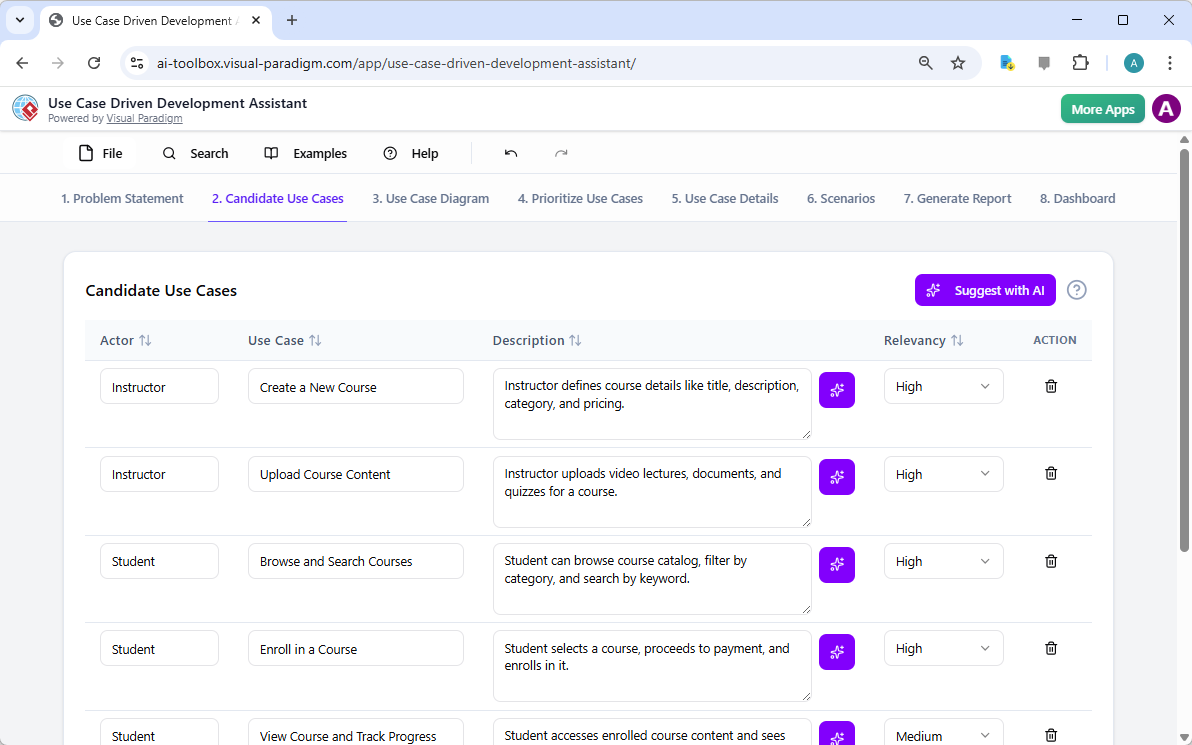
This is a screenshot of Visual Paradigm's AI Powered Use Case Driven Development Assistant. We are now in step 2. It shows a

步骤3:通过用例图可视化系统

在确定用例后,至关重要的是可视化它们与系统参与者的交互方式。在“用例图”标签页中,如图3所示,该工具将用例和参与者列表自动转化为清晰的图形化表示。该图展示了参与者(讲师、学生、管理员)与系统功能(如创建新课程等)之间的关系。人工智能驱动的生成确保了图表的准确性与专业排版。这一可视化工具在沟通中极为宝贵,使利益相关者、开发人员和设计师无需阅读冗长的文本文档,即可快速理解系统的范围和功能。
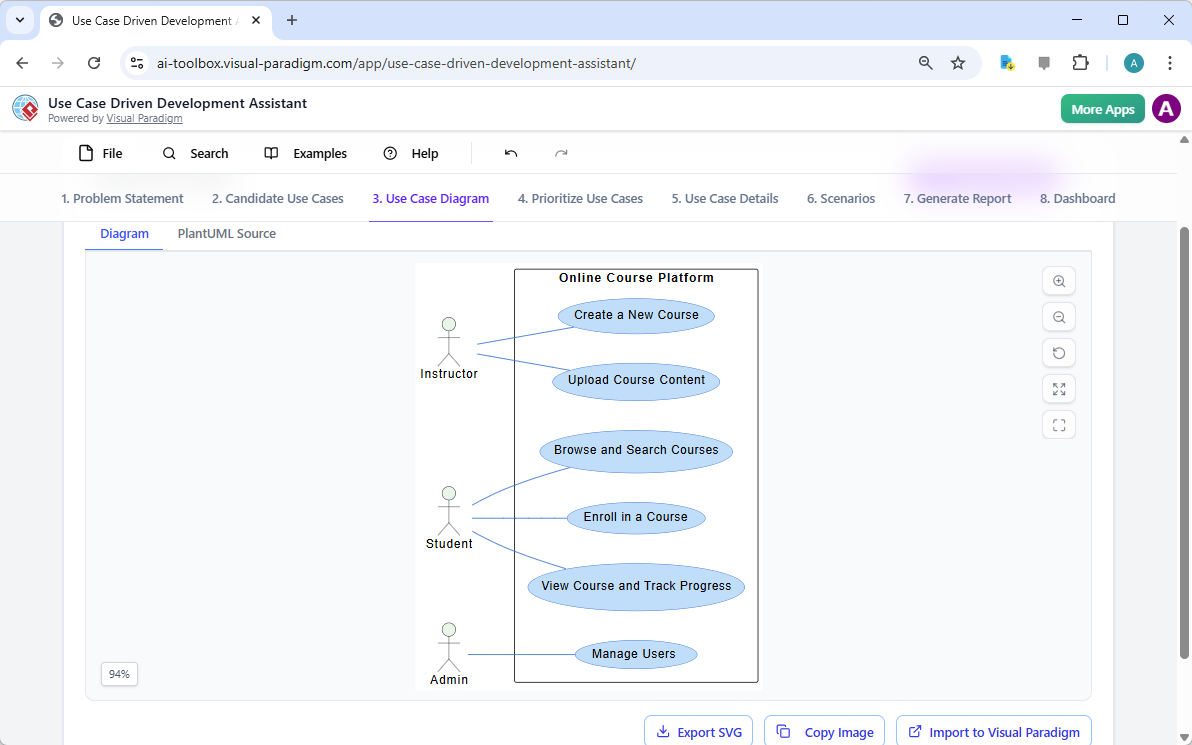
This is a screenshot of Visual Paradigm's AI Powered Use Case Driven Development Assistant. We are now in step 3. It shows a

步骤4:优先排序功能以实现最大影响

并非所有用例都同等重要。项目的成功往往取决于首先聚焦于最关键的功能。如图4,提供了一个强大的框架。它允许你为每个用例分配用户价值和业务价值(在0-10的量表上),然后应用MoSCoW优先级方法(必须有、应该有、可以有、不会有的)。在我们的示例中,AI已帮助识别出“创建新课程”和“上传课程内容”是“必须有”的功能,因为它们对平台的核心功能至关重要。这种结构化的优先级划分确保开发团队专注于为用户和业务提供最高价值,避免在低优先级功能上浪费精力。
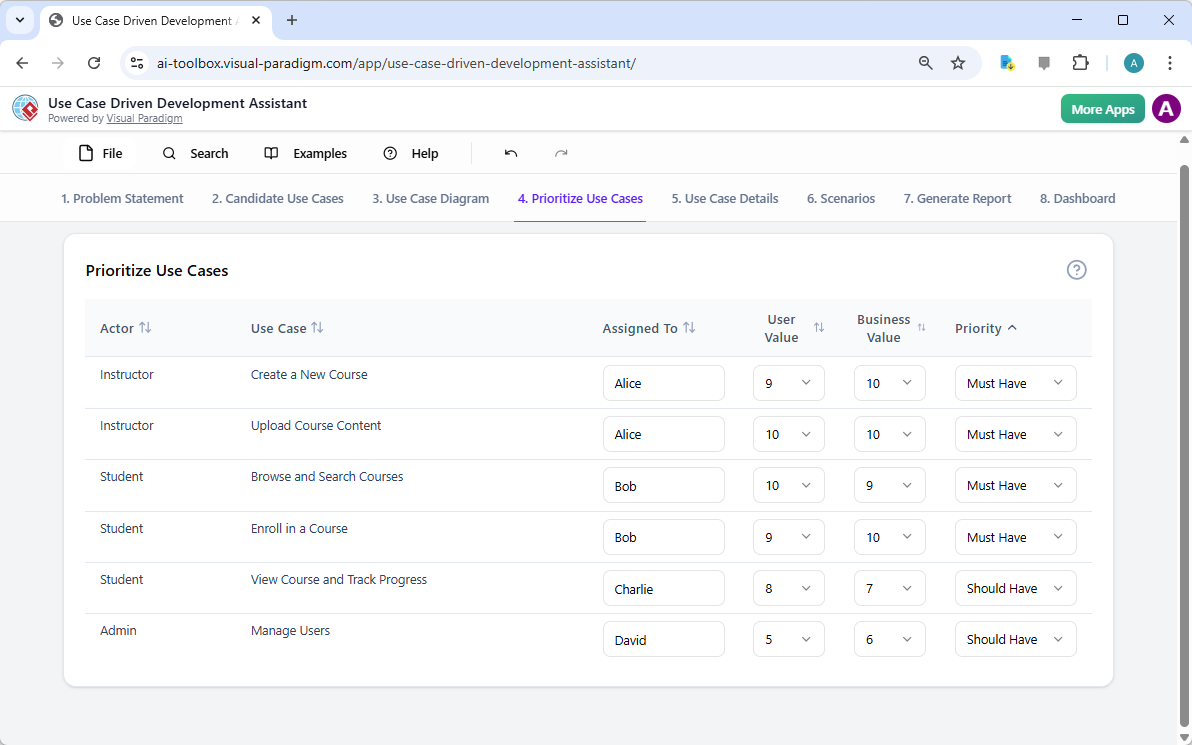
This is a screenshot of Visual Paradigm's AI Powered Use Case Driven Development Assistant. We are now in step 4. It shows th

步骤5:详细说明用例并生成活动图

在建立高层视图后,下一步是深入每个用例的细节。如图所示,“用例详情”选项卡图5,允许你为选定的用例创建一个全面的模板。AI可以生成详细的描述,包括前置条件、主流程和替代流程。对于“创建新课程”用例,AI提供了一个结构化模板,列出了必要的步骤。为进一步增强理解,助手可以为同一用例生成“活动图”,如图所示图6。该图直观地展示了逐步的工作流程,从讲师登录到课程保存的整个操作序列。这种详细程度对开发人员和质量保证团队都至关重要。
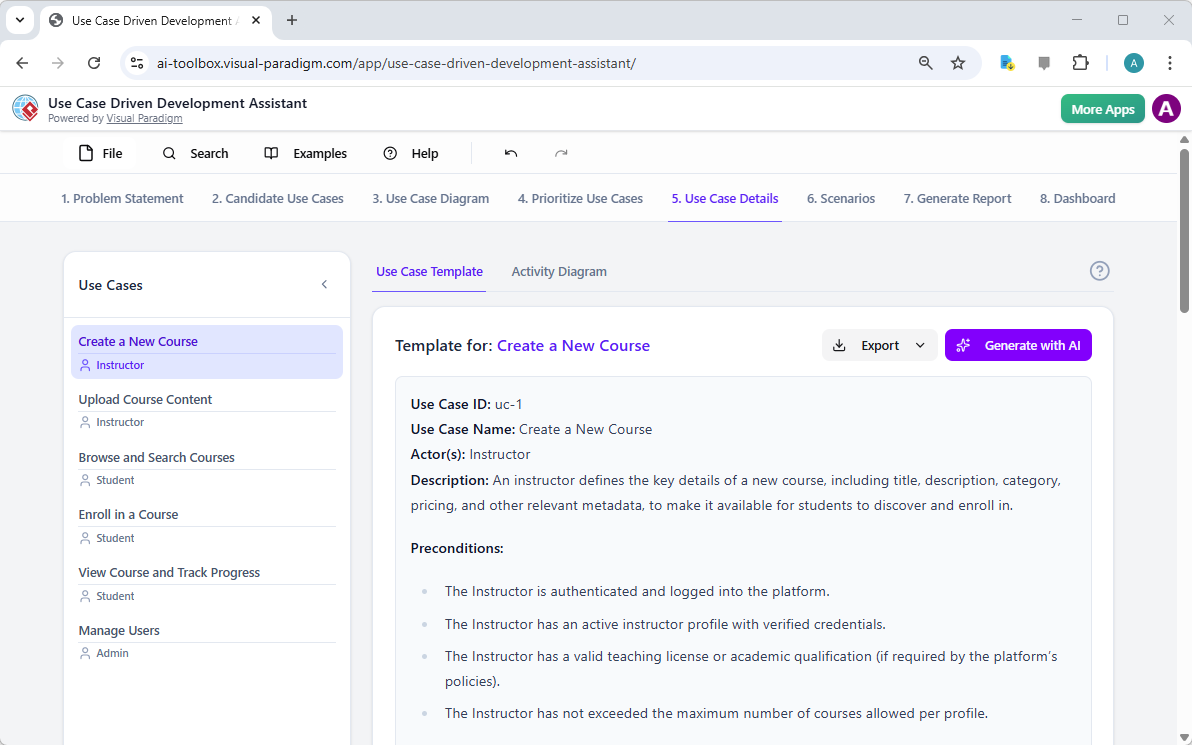
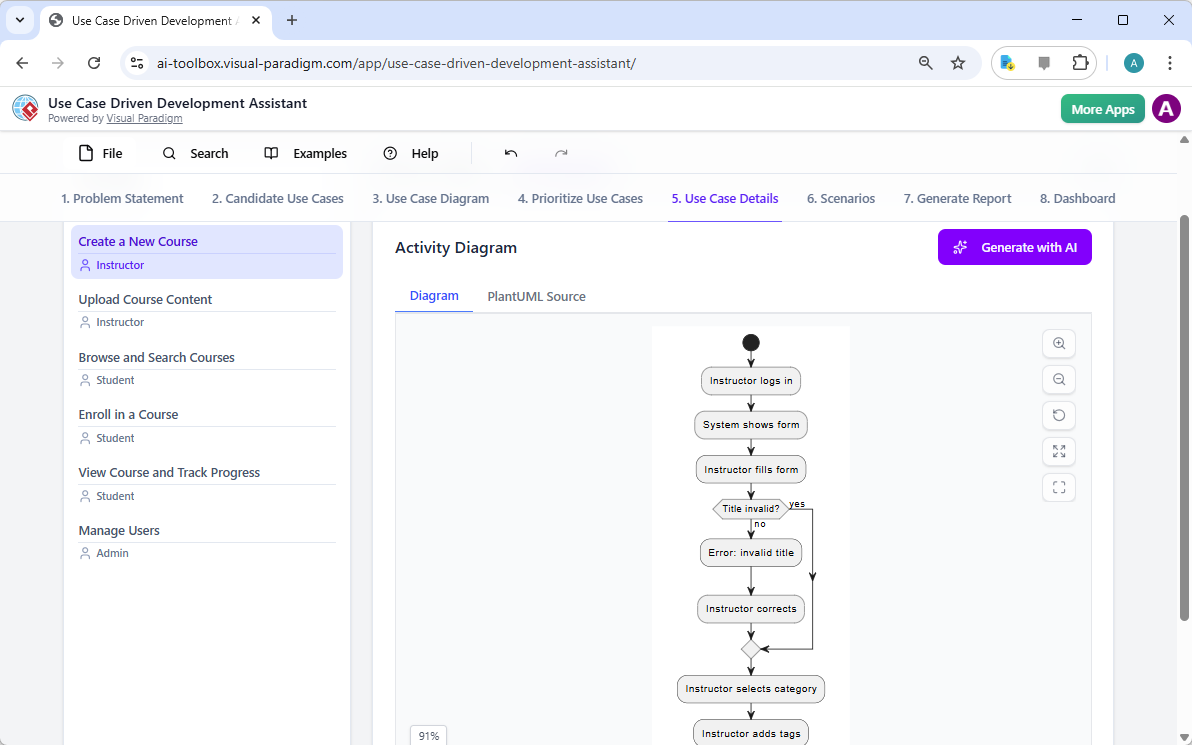
This is a screenshot of Visual Paradigm's AI Powered Use Case Driven Development Assistant. We are now in step 5. It shows thThis is a screenshot of Visual Paradigm's AI Powered Use Case Driven Development Assistant. We are still in step 5. It shows

步骤6:生成测试场景和序列图

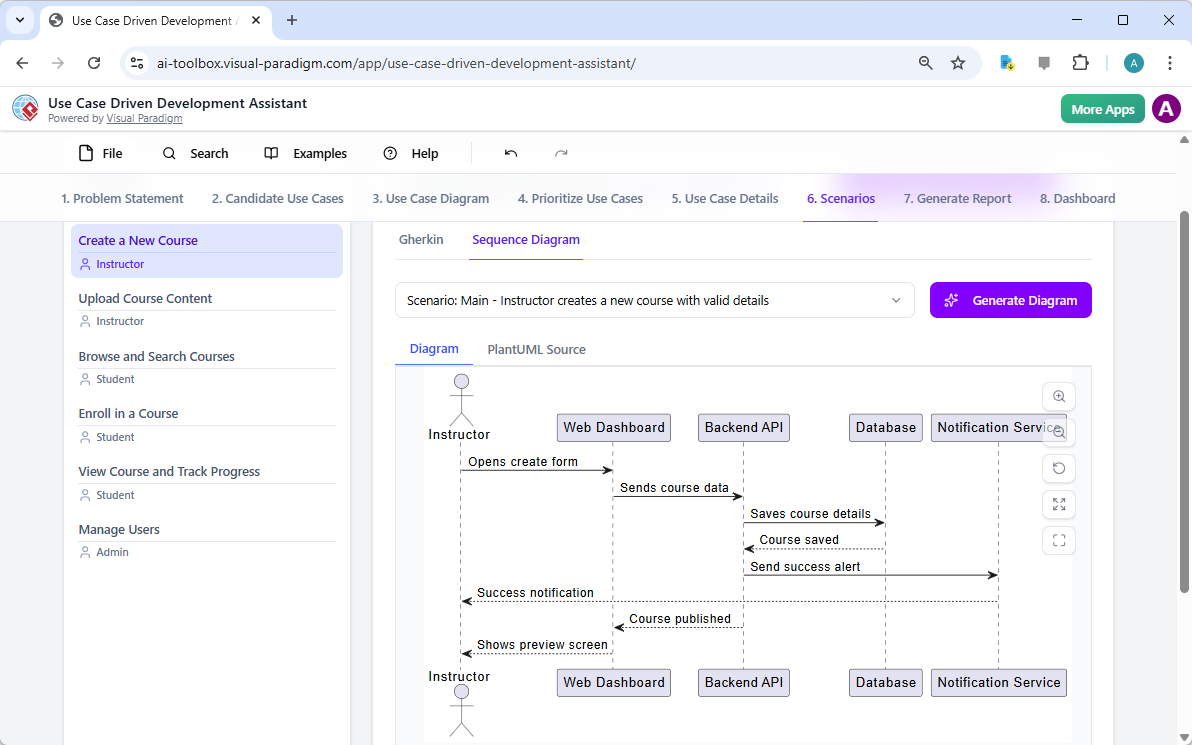
对于开发团队而言,下一步的关键步骤是创建可测试的场景。如图所示,“场景”选项卡图7,允许你直接从用例描述中生成可执行的Gherkin场景。这些场景以自然语言格式(给定-当-则)编写,非常适合自动化测试。AI可以生成主场景和替代场景,例如标题无效的情况。为进一步阐明系统的内部运作,助手可以生成“序列图”,如图所示图8。该图展示了讲师、网页仪表板、后端API、数据库和通知服务之间的交互,清晰地呈现了系统的架构和数据流。
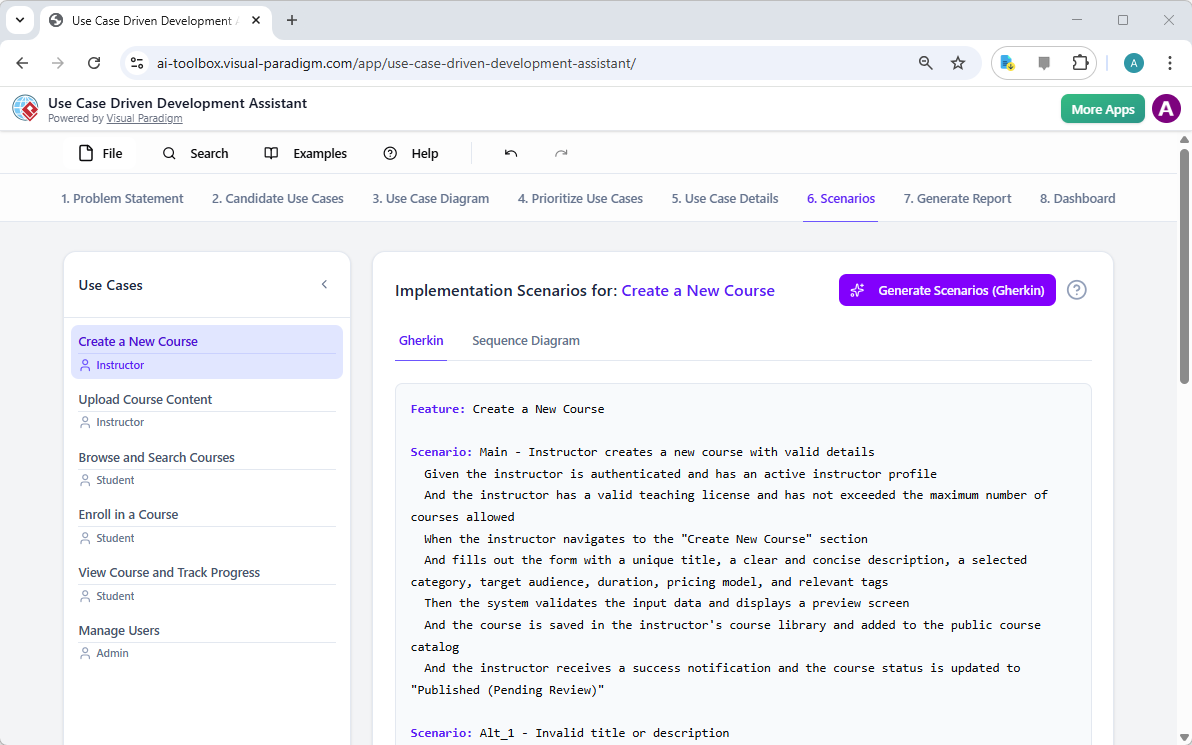
This is a screenshot of Visual Paradigm's AI Powered Use Case Driven Development Assistant. We are in step 6. It shows the AIThis is a screenshot of Visual Paradigm's AI Powered Use Case Driven Development Assistant. We are still in step 6. It shows

步骤7:创建全面的项目报告

在整个开发过程中,向各类利益相关者沟通项目状态和计划至关重要。如图所示,“生成报告”选项卡图9,使这一过程变得简单。你可以生成多种报告,例如“项目概览”、“实施计划”、“质量保证测试计划”或“开发人员任务列表”。这些报告由AI辅助生成,确保内容一致且全面。例如,“项目概览”报告总结了整个项目,包括执行摘要、关键功能以及优先级划分的理由。这一单一信息源确保所有人员保持一致并充分知情。

This is a screenshot of Visual Paradigm's AI Powered Use Case Driven Development Assistant. We are in step 7. It shows a repo

步骤8:通过仪表板跟踪进度

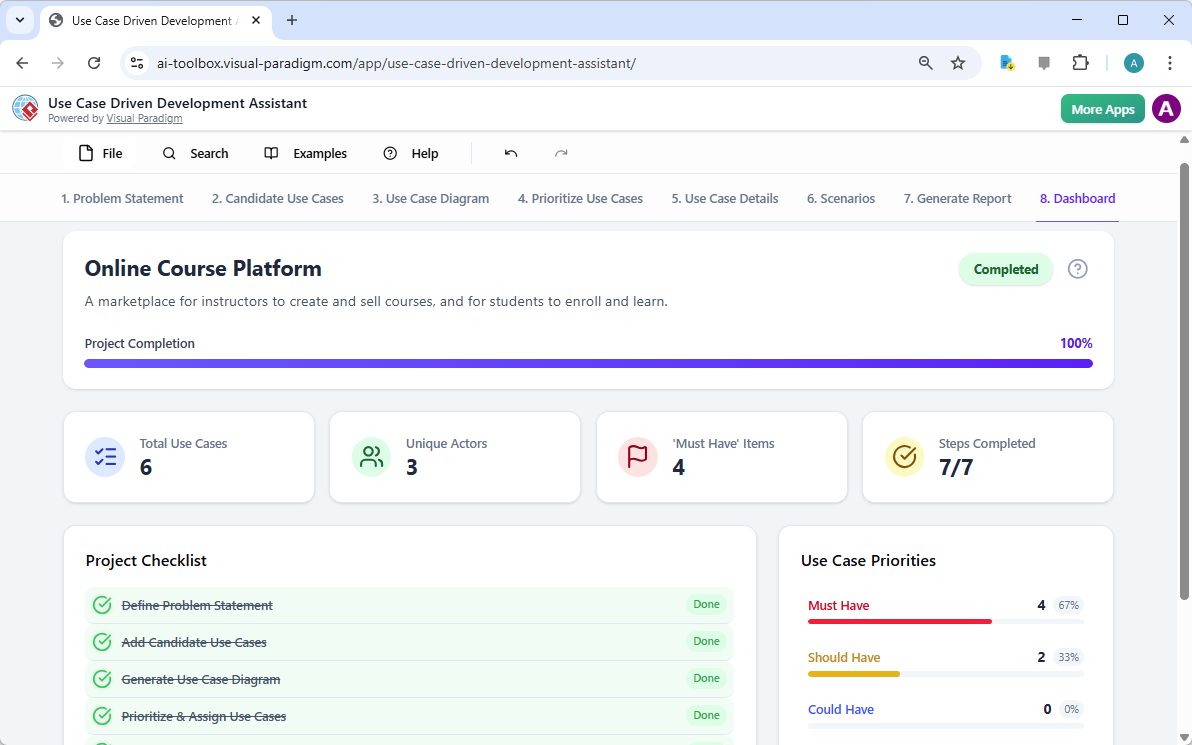
最后,整个过程在“仪表板”中达到顶点,如图所示图10。这个中心枢纽提供了项目状态的高层概览。它显示了项目完成百分比、用例总数以及“必须有”项目的数量。项目清单让你可以跟踪进度,每个完成的步骤都会标记为“已完成”。对项目健康状况的实时可视化对项目经理和团队负责人至关重要,有助于他们识别瓶颈并确保项目按计划推进。
This is a screenshot of Visual Paradigm's AI Powered Use Case Driven Development Assistant. We are in step 8. It shows the da

用例驱动的开发助手不仅仅是一个工具;它是一套全面的工作流程,为软件开发过程带来清晰性和效率。通过在每个阶段利用人工智能——从问题定义到报告生成——它帮助团队更快、更准确地从需求过渡到实现。结果是一个结构清晰、文档完善的项目,与业务目标和用户需求高度一致。如果你希望优化用例开发流程,这款人工智能驱动的工具是一个强大的解决方案。

准备好了解用例驱动的开发助手如何改变你的下一个项目吗?立即试用.

相关链接

用例建模是一种基础的软件工程技术,用于捕获功能需求通过可视化外部参与者和系统内部功能之间的交互。现代平台现在结合了基于人工智能的自动化来优化图表,生成全面的用例描述,并将模型转换为测试用例或活动图以保持设计的一致性和可追溯性。先进的工具如事件流编辑器场景分析器使开发团队能够验证并记录结构化的事件序列,以提高整个系统的清晰度。

  1. 什么是用例图?——UML建模完整指南:深入概述涵盖关键组件、目的和最佳实践用于需求建模。

  2. 逐步用例图教程——从入门到精通:实用资源,指导用户掌握从基础到高级的技术以创建有效的用例图。

  3. 关于用例建模你需要知道的一切:全面探讨用例建模的原则与应用在系统设计中的应用。

  4. Visual Paradigm – 用例描述功能: 详细说明用于精确记录用户交互以及结构化的系统行为。

  5. 掌握使用 Visual Paradigm 的 AI 驱动用例图: 介绍如何利用 AI 创建智能且动态的图表用于现代软件系统。

  6. 使用 Visual Paradigm 事件流编辑器的指南: 逐步说明如何记录结构化的事件序列在用例场景中。

  7. 通过用例场景分析器解析场景: 介绍如何使用分析器来检查和优化交互流程以提高系统清晰度。

  8. 将用例转换为活动图——AI 驱动的转换: 介绍自动化转换将用例转换为详细系统工作流。

  9. 使用 AI 从用例图生成场景和测试用例: 探讨 AI 工具如何自动化创建以需求为导向的测试流程.

  10. 用例图图库——模板与示例: 精心挑选的真实世界示例用于激发灵感、学习和快速原型设计。

From Problem to Report: How AI Guides Your Use Case Journey

Discover how AI guides your use case journey from problem to report with Visual Paradigm’s intelligent development assistant.

Imagine you’re a project manager tasked with launching a new online course platform. The first challenge is to articulate the problem clearly and then translate it into a functional system. This is where the Use Case Driven Development Assistant, an AI-powered tool from Visual Paradigm, steps in. It doesn’t just help you write documents; it guides you through a complete, structured workflow to transform a vague idea into a detailed, actionable project plan. The process is so intuitive, it feels like having a seasoned business analyst and a technical architect working side-by-side with you. This deep dive explores the core features of this powerful tool, using a real-world example of an online course platform to show how it streamlines the entire use case lifecycle.

Quick Summary: Key Takeaways from the Use Case Driven Development Assistant

  • Start with a clear problem statement to define the project’s core objective.

  • Use AI to automatically generate a list of candidate use cases and actors.

  • Visualize system functionality with AI-generated Use Case and Activity Diagrams.

  • Prioritize features using a structured MoSCoW method to focus on high-value work.

  • Generate detailed use case descriptions and executable Gherkin test scenarios.

  • Create comprehensive reports to communicate project scope and plans.

  • Track progress and maintain a single source of truth with a central dashboard.

Step 1: Defining the Problem with AI

Every successful project begins with a clear understanding of the problem it aims to solve. The journey with the Use Case Driven Development Assistant starts in the “Problem Statement” tab. Here, you input a project name and a short description. The AI then leverages this information to generate a comprehensive problem statement. As seen in Image 1, the tool has taken the project name “Online Course Platform” and the short description “A marketplace for instructors to create and sell courses, and for students to enroll and learn” to produce a detailed narrative. This narrative identifies the core pain points: students struggle to find relevant courses, while instructors face challenges in reaching a broad audience and monetizing their expertise. This AI-generated problem statement serves as the project’s foundation, ensuring everyone on the team shares a unified understanding from the very beginning.

This is a screenshot of Visual Paradigm's AI Powered Use Case Driven Development Assistant. we are now in step 1. It shows th

Step 2: Identifying Use Cases with AI Assistance

Once the problem is defined, the next logical step is to identify the key functionalities the system must provide. The assistant’s “Candidate Use Cases” tab, shown in Image 2, automates this process. After analyzing the problem statement, the AI suggests a list of use cases, each associated with an actor (like Instructor, Student, or Admin). For our online course platform, the AI proposes use cases such as “Create a New Course,” “Upload Course Content,” “Browse and Search Courses,” and “Enroll in a Course.” This list provides a solid starting point, saving significant time and effort that would otherwise be spent on brainstorming sessions. You can then refine these suggestions, add new ones, or delete irrelevant ones to create a comprehensive list of system functionalities.

This is a screenshot of Visual Paradigm's AI Powered Use Case Driven Development Assistant. We are now in step 2. It shows a

Step 3: Visualizing the System with a Use Case Diagram

After identifying the use cases, it’s crucial to visualize how they interact with the system’s actors. The “Use Case Diagram” tab, illustrated in Image 3, takes the list of use cases and actors and automatically generates a clear, graphical representation. This diagram shows the relationships between the actors (Instructor, Student, Admin) and the system’s functions (Create a New Course, etc.). The AI-powered generation ensures that the diagram is accurate and professionally formatted. This visual aid is invaluable for communication, allowing stakeholders, developers, and designers to quickly grasp the system’s scope and functionality without wading through text-heavy documents.

This is a screenshot of Visual Paradigm's AI Powered Use Case Driven Development Assistant. We are now in step 3. It shows a

Step 4: Prioritizing Features for Maximum Impact

Not all use cases are created equal. A project’s success often hinges on focusing on the most critical features first. The “Prioritize Use Cases” tab, as shown in Image 4, provides a powerful framework for this. It allows you to assign a user value and business value (on a scale of 0-10) to each use case and then apply the MoSCoW prioritization method (Must Have, Should Have, Could Have, Won’t Have). In our example, the AI has helped identify that “Create a New Course” and “Upload Course Content” are “Must Have” features, as they are essential for the platform’s core function. This structured prioritization ensures that the development team focuses on delivering the highest value to users and the business, avoiding wasted effort on low-priority features.

This is a screenshot of Visual Paradigm's AI Powered Use Case Driven Development Assistant. We are now in step 4. It shows th

Step 5: Detailing Use Cases and Generating Activity Diagrams

With the high-level view established, the next step is to dive into the details of each use case. The “Use Case Details” tab, shown in Image 5, allows you to create a comprehensive template for a selected use case. The AI can generate a detailed description, including pre-conditions, main flow, and alternative flows. For the “Create a New Course” use case, the AI provides a structured template that outlines the necessary steps. To further enhance understanding, the assistant can generate an “Activity Diagram” for the same use case, as seen in Image 6. This diagram visually maps out the step-by-step workflow, showing the sequence of actions from the instructor logging in to the course being saved. This level of detail is essential for both developers and QA teams.

This is a screenshot of Visual Paradigm's AI Powered Use Case Driven Development Assistant. We are now in step 5. It shows thThis is a screenshot of Visual Paradigm's AI Powered Use Case Driven Development Assistant. We are still in step 5. It shows

Step 6: Generating Test Scenarios and Sequence Diagrams

For a development team, the next critical step is to create testable scenarios. The “Scenarios” tab, shown in Image 7, allows you to generate executable Gherkin scenarios directly from your use case descriptions. These scenarios, written in a plain-language format (Given-When-Then), are perfect for automated testing. The AI can generate a main scenario and alternative scenarios, such as one for an invalid title. To further clarify the system’s internal workings, the assistant can generate a “Sequence Diagram,” as seen in Image 8. This diagram shows the interaction between the instructor, the web dashboard, the backend API, the database, and the notification service, providing a clear picture of the system’s architecture and data flow.

This is a screenshot of Visual Paradigm's AI Powered Use Case Driven Development Assistant. We are in step 6. It shows the AIThis is a screenshot of Visual Paradigm's AI Powered Use Case Driven Development Assistant. We are still in step 6. It shows

Step 7: Creating Comprehensive Project Reports

Throughout the development process, it’s essential to communicate the project’s status and plans to various stakeholders. The “Generate Report” tab, as shown in Image 9, makes this easy. You can generate a variety of reports, such as a “Project Overview,” “Implementation Plan,” “QA Test Plan,” or a “Developer Task List.” These reports are generated with AI assistance, ensuring they are consistent and comprehensive. For example, the “Project Overview” report summarizes the entire project, including the executive summary, key features, and the rationale behind the prioritization. This single source of truth ensures everyone is aligned and informed.

This is a screenshot of Visual Paradigm's AI Powered Use Case Driven Development Assistant. We are in step 7. It shows a repo

Step 8: Tracking Progress with the Dashboard

Finally, the journey culminates in the “Dashboard,” as seen in Image 10. This central hub provides a high-level overview of the project’s status. It shows the project completion percentage, the total number of use cases, and the number of “Must Have” items. The project checklist allows you to track your progress, with each completed step marked as “Done.” This real-time visibility into the project’s health is invaluable for project managers and team leads, enabling them to identify bottlenecks and ensure the project stays on track.

This is a screenshot of Visual Paradigm's AI Powered Use Case Driven Development Assistant. We are in step 8. It shows the da

The Use Case Driven Development Assistant is more than just a tool; it’s a comprehensive workflow that brings clarity and efficiency to the software development process. By leveraging AI at every stage—from defining the problem to generating reports—it helps teams move from requirements to implementation faster and with greater accuracy. The result is a well-structured, well-documented project that is aligned with business goals and user needs. If you’re looking to streamline your use case development process, this AI-powered tool is a powerful solution.

Ready to see how the Use Case Driven Development Assistant can transform your next project? Try it now.

Related Links

Use case modeling is a fundamental software engineering technique used to capture functional requirements by visualizing the interactions between external actors and a system’s internal functions. Modern platforms now incorporate AI-powered automation to refine diagrams, generate comprehensive use case descriptions, and convert models into test cases or activity diagrams to maintain design consistency and traceability. Advanced tools like the Flow of Events editor and Scenario Analyzer allow development teams to validate and document structured event sequences to improve overall system clarity.

  1. What Is a Use Case Diagram? – A Complete Guide to UML Modeling: An in-depth overview covering essential components, purposes, and best practices for requirements modeling.

  2. Step-by-Step Use Case Diagram Tutorial – From Beginner to Pro: A practical resource that guides users through foundational to advanced techniques for creating effective use case diagrams.

  3. All You Need to Know About Use Case Modeling: A comprehensive exploration of the principles and applications of use case modeling in system design.

  4. Visual Paradigm – Use Case Description Features: Details specialized tools used to precisely document user interactions and structured system behavior.

  5. Mastering AI-Driven Use Case Diagrams with Visual Paradigm: A tutorial on leveraging AI to create intelligent, dynamic diagrams for modern software systems.

  6. Guide to Using the Flow of Events Editor in Visual Paradigm: Step-by-step instructions for documenting structured event sequences within a use case scenario.

  7. Unraveling Scenarios with the Use Case Scenario Analyzer: A guide on using analyzers to examine and refine interaction flows for increased system clarity.

  8. Convert Use Case to Activity Diagram – AI-Powered Transformation: A resource explaining the automated conversion of use cases into detailed system workflows.

  9. Generating Scenarios and Test Cases from Use Case Diagrams Using AI: An exploration of how AI tools automate the creation of requirement-driven test procedures.

  10. Use Case Diagram Gallery – Templates & Examples: A curated collection of real-world examples for inspiration, learning, and rapid prototyping.

Visual Paradigm AI Package Diagram Generator: Text to UML Packages

You’re architecting a new content management system, staring at layers, modules, and dependencies — presentation, business rules, persistence, security — but the high-level structure stays fuzzy. Manually creating packages, subpackages, and dependency arrows feels like overkill for a first draft. Enter Visual Paradigm’s AI Package Diagram Generator: describe your system in plain words, and get a clean, standards-compliant UML package diagram in seconds. It’s the fast lane from mental model to visual blueprint.

Why This AI Changes Software Architecture

  • Natural language → full UML package diagram instantly
  • Auto-identifies packages, subpackages, dependencies, and stereotypes
  • Handles layered, modular, and microservices-style structures
  • Fully editable native model — refine, add notes, merge packages
  • Desktop precision + browser chatbot for rapid iteration

1. Desktop: Prompt → Structured Architecture

In Visual Paradigm Desktop:

Tools → AI Diagram Generation → select “Package Diagram” → describe your system:

“Generate a UML Package Diagram for a content management system with Presentation Layer (Web UI, Mobile App), Business Logic Layer (Content Service, User Management, Workflow Engine), Data Access Layer (Repository, Audit Logging), and show dependencies between layers.”

The input dialog keeps it simple and focused:

Visual Paradigm Desktop AI Package Diagram generation prompt interface

AI builds:

  • Top-level packages: Presentation Layer, Business Logic Layer, Data Access Layer
  • Subpackages: Web UI, Mobile App, Content Service, Repository
  • Clear dependency arrows (dashed) showing flow between layers

Resulting content management system package diagram — logical, layered, and ready for review:

AI-generated UML Package Diagram for Content Management System

Immediately edit: add security package, adjust dependencies, or integrate with class diagrams.

2. Chatbot: Conversational Architecture on the Go

For quick sketches or remote brainstorming, open the Visual Paradigm AI Chatbot:

“Create UML Package Diagram for a banking system: Core Banking Services, Account Management, Customer Management, Transaction Processing, Compliance & Auditing.”

The chatbot generates it live — packages, subpackages, and dependencies appear instantly. Example output for a banking system:

AI-generated UML Package Diagram for Banking System via Chatbot

Refine in conversation: “Add Payment Gateway package with dependency to Transaction Processing.” Instant update. Perfect for early design sessions or teaching UML.

Why Package Diagrams + AI Matter in 2026

Good architecture starts with clear boundaries. Package diagrams show modularity, layers, and dependencies before a single line of code is written. Manual creation slows you down; AI removes the friction.

Use cases that shine:

  • Layered enterprise apps
  • Microservices boundaries
  • Teaching modular design
  • Quick refactoring planning

Change scope mid-discussion? Regenerate. New module needed? Add it. That speed keeps architecture agile and team communication sharp.

Ready to Visualize Your System Structure?

Visual Paradigm’s AI Package Diagram Generator turns vague ideas into professional UML packages fast — whether for CMS, banking, e-commerce, or any modular system.

  • Download Visual Paradigm Desktop → Full modeling power: Get Desktop Now
  • Try AI Chatbot Online → Instant architecture sketches: Start Chatting

Stop wrestling with boxes and arrows. Start designing smarter — today.

Related Links

These articles explain how artificial intelligence is applied to UML package diagrams to automate the logical grouping of system elements, enabling developers to instantly generate architectural structures from natural language prompts to better manage software dependencies and system scalability.

  1. AI Diagram Generator Now Supports Package Diagrams in Visual Paradigm: This article details the release of new features that allow for the AI-powered generation of package diagrams to improve software architecture visualization.
  2. Generate UML Package Diagrams Instantly with Visual Paradigm AI: This guide focuses on utilizing AI-driven tools to create professional UML package diagrams with minimal manual effort.
  3. Interactive UML Package Diagram Generator: This resource provides access to an interactive tool for creating and editing package diagrams in real time through a conversational AI interface.
  4. UML Package Diagram: A Definitive Guide to Structuring Your Codebase with AI: This comprehensive guide explains how AI assists in structuring codebases, managing complex dependencies, and maintaining architectural integrity.
  5. Generating UML Package Diagrams from Text Prompts: This article explores how to transform raw ideas and textual prompts into detailed UML package diagrams using advanced AI modeling features.
  6. UML Package Diagram Tutorial Using Visual Paradigm: This tutorial provides a step-by-step approach to using package diagrams to structure software components and visualize their relationships effectively.
  7. Features of Package Diagram Software – Visual Paradigm Online: This overview highlights the online tools available for collaborative package diagram management, including version control and real-time editing.
  8. What is a Package Diagram in UML? – Visual Paradigm Guide: This foundational resource introduces the role of package diagrams in organizing complex software systems through logical grouping.
  9. Modeling Software Architecture with UML Package Diagrams: This article discusses best practices for using package diagrams to organize and communicate the modular structure of a system’s architecture.
  10. Package Diagram Examples & Templates – Visual Paradigm Gallery: This gallery offers a collection of real-world templates and examples to inspire and accelerate modular software design.

Comprehensive Guide to Class Diagrams in UML

Introduction

A class diagram is a static type of Unified Modeling Language (UML) diagram that visually represents the structure of a system by showing its classes, attributes, operations, and relationships between objects. It serves as a blueprint for object-oriented software design, providing a clear and concise way to understand and document the architecture of a system.

Purpose and Functionality

Visualizing System Structure

Class diagrams help developers understand and document the structure of a system by showing how different classes interact and relate to each other. This visual representation is crucial for designing robust and maintainable software systems.

Modeling Software

Class diagrams enable the modeling of software at a high level of abstraction, allowing developers to focus on the design without delving into the source code. This abstraction helps in identifying potential issues early in the development process.

Object-Oriented Design

Class diagrams are fundamental to object-oriented modeling. They outline the building blocks of a system and their interactions, making it easier to implement object-oriented principles such as encapsulation, inheritance, and polymorphism.

Data Modeling

Class diagrams can also be used for data modeling, representing the structure and relationships of data within a system. This is particularly useful in database design, where entities and their relationships need to be clearly defined.

Blueprint for Code

Class diagrams serve as a blueprint for constructing executable code for software applications. They provide a clear roadmap for developers, ensuring that the implementation aligns with the designed architecture.

Key Components

Classes

Classes are represented by rectangles divided into three sections:

  1. Class Name: The top section contains the name of the class.
  2. Attributes: The middle section lists the attributes or data members that define the state of the class.
  3. Operations (Methods): The bottom section lists the operations or functions that the class can perform.

Relationships

Relationships between classes are shown using lines and symbols:

  1. Generalization: Represents inheritance, where a class (subclass) inherits attributes and operations from another class (superclass). It is depicted by a hollow arrowhead pointing from the subclass to the superclass.
  2. Aggregation: Indicates that one class contains instances of another class, but the contained class can exist independently. It is depicted by a hollow diamond at the end of the line connected to the containing class.
  3. Composition: A stronger form of aggregation where the contained class cannot exist without the containing class. It is depicted by a filled diamond at the end of the line connected to the containing class.
  4. Association: Represents a relationship between two classes, indicating that one class uses or interacts with another. It is depicted by a solid line connecting the two classes.

Example Diagrams using PlantUML

Basic Class Diagram

Diagram with Aggregation and Composition

Diagram with Association

Example –  Order system

SDE | Uml Class Diagrams

Key Elements

  1. Classes:

    • Customer: Represents the customer placing the order.
      • Attributes: name (String), address (String).
    • Order: Represents the order placed by the customer.
      • Attributes: date (Date), status (String).
      • Operations: calcSubTotal()calcTax()calcTotal()calcTotalWeight().
    • OrderDetail: Represents the details of each item in the order.
      • Attributes: quantity (int), taxStatus (String).
      • Operations: calcSubTotal()calcWeight()calcTax().
    • Item: Represents the items being ordered.
      • Attributes: shippingWeight (float), description (String).
      • Operations: getPriceForQuantity()getTax()inStock().
    • Payment (Abstract Class): Represents the payment for the order.
      • Attributes: amount (float).
    • Cash: Subclass of Payment, represents cash payments.
      • Attributes: cashTendered (float).
    • Check: Subclass of Payment, represents check payments.
      • Attributes: name (String), bankID (String), isAuthorized (boolean).
    • Credit: Subclass of Payment, represents credit card payments.
      • Attributes: number (String), type (String), expDate (Date), isAuthorized (boolean).
  2. Relationships:

    • Association:
      • Customer and Order: A customer can place multiple orders (0..* multiplicity on the Order side).
      • Order and OrderDetail: An order can have multiple order details (1..* multiplicity on the OrderDetail side).
      • OrderDetail and Item: Each order detail is associated with one item (1 multiplicity on the Item side).
    • Aggregation:
      • Order and OrderDetail: Indicates that OrderDetail is a part of Order, but OrderDetail can exist independently.
    • Generalization:
      • Payment and its subclasses (CashCheckCredit): Indicates inheritance, where Cash, Check, and Credit are specific types of Payment.
    • Role:
      • OrderDetail and Item: The role line item indicates the specific role of OrderDetail in the context of an Order.
  3. Multiplicity:

    • Indicates the number of instances of one class that can be associated with a single instance of another class. For example, a Customer can place multiple Orders (0..*).
  4. Abstract Class:

    • Payment: Marked as an abstract class, meaning it cannot be instantiated directly and serves as a base class for other payment types.

Explanation

  • Customer: Represents the entity placing the order, with basic attributes like name and address.
  • Order: Represents the order itself, with attributes like date and status, and operations to calculate subtotal, tax, total, and total weight.
  • OrderDetail: Represents the details of each item in the order, including quantity and tax status, with operations to calculate subtotal, weight, and tax.
  • Item: Represents the items being ordered, with attributes like shipping weight and description, and operations to get price for quantity, tax, and stock status.
  • Payment: An abstract class representing the payment for the order, with an attribute for the amount. It has subclasses for different payment methods:
    • Cash: Represents cash payments with an attribute for the cash tendered.
    • Check: Represents check payments with attributes for the name, bank ID, and authorization status.
    • Credit: Represents credit card payments with attributes for the card number, type, expiration date, and authorization status.

The diagram effectively captures the structure and relationships within an order processing system, providing a clear visual representation of how different components interact.

Conclusion

Class diagrams are an essential tool in UML modeling, providing a clear and structured way to represent the architecture of a system. By understanding the key components and relationships, developers can create robust and maintainable software designs. Using tools like PlantUML, these diagrams can be easily visualized and shared among team members, enhancing collaboration and ensuring a consistent understanding of the system’s structure.

References

  1. Visual Paradigm Online Free Edition:

    • Visual Paradigm Online (VP Online) Free Edition is a free online drawing software that supports Class Diagrams, other UML diagrams, ERD tools, and Organization Chart tools. It features a simple yet powerful editor that allows you to create Class Diagrams quickly and easily. The tool offers unlimited access with no restrictions on the number of diagrams or shapes you can create, and it is ad-free. You own the diagrams you create for personal and non-commercial use. The editor includes features such as drag-to-create shapes, inline editing of class attributes and operations, and a variety of formatting tools. You can also print, export, and share your work in different formats (PNG, JPG, SVG, GIF, PDF) 123.
  2. Impressive Drawing Features:

    • Visual Paradigm Online provides advanced formatting options to enhance your diagrams. You can position shapes precisely using alignment guides and format your Class Diagrams with shape and line formatting options, font styles, rotatable shapes, embedded images and URLs, and shadow effects. The tool is cross-platform compatible (Windows, Mac, Linux) and can be accessed through any web browser. It also supports Google Drive integration for seamless saving and accessing of your diagrams 23.
  3. Comprehensive Diagramming Options:

    • Visual Paradigm Online supports a wide range of diagram types, including UML diagrams (class, use case, sequence, activity, state, component, and deployment diagrams), ERD tools, Organization Charts, Floor Plan Designers, ITIL, and Business Concept Diagrams. The tool is designed to be easy to use, with drag-and-drop functionality and smart connectors that snap into place. It also offers a rich set of formatting options, including over 40 connector types and various paint options 45.
  4. Learning and Customization:

    • Visual Paradigm provides an easy-to-use platform for creating and managing class diagrams, making it an excellent choice for software developers and engineers. You can customize your class diagrams by changing colors, fonts, and layout. The tool also supports creating relationships between classes, such as associations, inheritance, and dependencies. Visual Paradigm is a powerful UML modeling tool that helps in representing the static structure of a system, including the system’s classes, their attributes, methods, and the relationships between them 67.
  5. Community and Support:

    • Visual Paradigm Community Edition is a free UML software that supports all UML diagram types. It is designed to help users learn UML faster, easier, and quicker. The tool is intuitive and allows you to create your own Class Diagrams with ease. Visual Paradigm is trusted by over 320,000 professionals and organizations, including small businesses, Fortune 500 companies, universities, and government sectors. It is used to prepare the next generation of IT developers with the specialized skills needed for the workspace 89.

These references highlight the comprehensive features and benefits of using Visual Paradigm for creating class diagrams, making it a recommended tool for both individual and professional use.

Comprehensive Guide to UML Activity Diagrams: Key Concepts and Examples

Introduction

In the realm of software development and system modeling, UML (Unified Modeling Language) activity diagrams play a crucial role in visualizing the workflow of processes within a system. These diagrams provide a clear and structured way to represent the sequence of activities, decisions, and interactions involved in achieving specific goals. UML (Unified Modeling Language) activity diagrams are a powerful tool for modeling the workflow of a system, illustrating the sequence of activities, decisions, and processes involved in achieving a specific goal. This guide will cover the key concepts of UML activity diagrams, provide examples, and recommend Visual Paradigm as an ideal tool for IT software development.

What is Activity Diagram?

This article delves into the intricacies of UML activity diagrams, using a detailed example to illustrate the lifecycle of an assignment, from issuance to grading and return, involving both a teacher and a student. By breaking down the key components and workflow of the diagram, we aim to provide a comprehensive understanding of how UML activity diagrams can be used to model complex processes effectively. Whether you are a seasoned developer or new to UML, this guide will help you grasp the fundamentals and advanced concepts of activity diagrams, enabling you to apply them to your own projects with confidence.

Key Concepts of UML Activity Diagrams

What is Activity Diagram?

  1. Activities:

    • Represent actions or tasks performed within the system.
    • Depicted as rounded rectangles.
  2. Actions:

    • The most basic unit of work in an activity diagram.
    • Represented as rectangles with rounded corners.
  3. Control Flow:

    • Shows the sequence in which activities are performed.
    • Represented by solid arrows connecting activities.
  4. Decision Nodes:

    • Represent points where the flow of control can branch based on conditions.
    • Depicted as diamonds.
  5. Fork and Join Nodes:

    • Fork nodes split a single flow into multiple concurrent flows.
    • Join nodes merge multiple flows back into a single flow.
    • Both are depicted as horizontal bars.
  6. Initial and Final Nodes:

    • Initial node represents the start of the workflow.
    • Final node represents the end of the workflow.
    • Both are depicted as black circles, with the initial node having an outgoing arrow and the final node having an incoming arrow.
  7. Object Flow:

    • Shows the flow of objects between activities.
    • Represented by dashed arrows.

Examples of UML Activity Diagrams

The activity diagram models the problem of managing the lifecycle of an assignment, from issuance to grading and return, involving interactions between a teacher and a student. The key aspects of the problem include:

  1. Assignment Issuance and Study:

    • The teacher issues an assignment, and the student studies it.
    • The student’s perception of the assignment’s difficulty influences their approach to completing it.
  2. Assignment Completion and Submission:

    • The student completes the assignment and submits it to the teacher.
    • The student may decide to give up on the assignment based on certain conditions.
  3. Deadline Management:

    • The teacher sets a deadline for the assignment submission.
    • The workflow accounts for the deadline and proceeds accordingly.
  4. Grading and Return:

    • The teacher grades the submitted assignment and stores the grades.
    • The graded assignment is returned to the student.
  5. Concurrent Activities:

    • The diagram models concurrent activities, such as grading the assignment and storing the grades, using fork and join nodes.

Key Components and Workflow

  1. Initial Node:

    • The process begins with the Initial Node, represented by a black circle. This indicates the start of the workflow.
  2. Issue Assignment (Teacher):

    • The teacher issues the assignment, represented by the action “Issue Assignment”.
    • An Object Node (Assignment) is created, indicating that an assignment object is generated.
  3. Assignment (Object Flow):

    • The assignment object flows from the teacher to the student, represented by the Object Flow arrow.
  4. Study Assignment (Student):

    • The student receives the assignment and begins studying it, represented by the action “Study Assignment”.
    • This action is within the Student swimlane, indicating that it is the student’s responsibility.
  5. Decision Node (Control Flow):

    • The student decides whether the assignment is hard or easy, represented by the Decision Node (diamond shape).
    • Depending on the decision, the control flow branches into two paths:
      • [hard]: If the assignment is hard, the student continues to study.
      • [easy]: If the assignment is easy, the student proceeds to complete the assignment.
  6. Complete Assignment (Student):

    • The student completes the assignment, represented by the action “Complete Assignment”.
    • Guard condition [give up] determines whether the student submits the assignment or gives up.
  7. Submit Assignment (Student):

    • If the student completes the assignment, they submit it, represented by the action “Submit Assignment”.
    • The assignment object flows back to the teacher, represented by the Object Flow arrow.
  8. Accept Time Event Action (Teacher):

    • The teacher sets a deadline for the assignment, represented by the Accept Time Event Action (hourglass symbol).
    • If the deadline is reached, the workflow proceeds to the Fork Node.
  9. Fork Node:

    • The Fork Node (thick horizontal bar) splits the workflow into two concurrent paths:
      • Grade Work (Teacher): The teacher grades the submitted assignment, represented by the action “Grade Work”.
      • Data Store Node: The graded assignment is stored in a datastore, represented by the Data Store Node (<<datastore>> Student Grade Sheet).
  10. Return Work (Teacher):

    • The teacher returns the graded work to the student, represented by the action “Return Work”.
    • The assignment object flows back to the student, represented by the Object Flow arrow.
  11. Get Graded Work (Student):

    • The student receives the graded work, represented by the action “Get Graded Work”.
  12. Activity Final Node:

    • The process ends with the Activity Final Node, represented by a black circle with a border, indicating the completion of the workflow.

This UML activity diagram effectively models the workflow of managing an assignment, highlighting the interactions between the teacher and the student, the decision points, and the concurrent activities involved. It provides a clear visual representation of the assignment lifecycle, from issuance to grading and return, making it easier to understand and manage the process.

Recommending Visual Paradigm for IT Software Development

While the examples above illustrate the basics of UML activity diagrams, Visual Paradigm offers a more comprehensive and visual approach to software development. Here’s why Visual Paradigm is an ideal tool for IT software development:

  1. Comprehensive UML Support:

    • Visual Paradigm supports all types of UML diagrams, including activity diagrams, class diagrams, sequence diagrams, and more.
    • It provides a rich set of tools and features for creating, editing, and managing UML diagrams.
  2. User-Friendly Interface:

    • The intuitive drag-and-drop interface makes it easy to create and modify UML diagrams.
    • The tool offers a wide range of customization options to tailor diagrams to specific needs.
  3. Integration with Other Tools:

    • Visual Paradigm integrates seamlessly with other development tools, such as IDEs, version control systems, and project management tools.
    • This integration ensures a smooth workflow and enhances productivity.
  4. Collaboration Features:

    • Visual Paradigm supports collaborative work, allowing multiple users to work on the same project simultaneously.
    • The tool includes features for version control, team collaboration, and real-time updates.
  5. Advanced Modeling Capabilities:

    • Visual Paradigm offers advanced modeling capabilities, including support for agile methodologies, enterprise architecture, and system modeling.
    • The tool provides a comprehensive suite of features for modeling complex systems and workflows.
  6. Extensive Documentation and Support:

    • Visual Paradigm provides extensive documentation, tutorials, and support resources to help users get started and master the tool.
    • The tool offers a range of learning resources, including video tutorials, guides, and examples.

Conclusion

UML activity diagrams are a powerful tool for modeling the workflow of a system, illustrating the sequence of activities, decisions, and processes involved in achieving a specific goal. The examples provided demonstrate the basics of creating UML activity diagrams. However, for a more comprehensive and visual approach to software development, Visual Paradigm is an ideal tool. With its comprehensive UML support, user-friendly interface, integration with other tools, collaboration features, advanced modeling capabilities, and extensive documentation and support, Visual Paradigm provides everything needed to create, manage, and collaborate on UML diagrams effectively. Whether you are a beginner or an experienced developer, Visual Paradigm offers the tools and support needed to bring your software development projects to life.