分享蓝图,而非文件:通过可共享的AI聊天记录协作设计架构

在复杂项目中,仅以静态文件(PNG、PDF)形式分享图表根本不够。它只提供了最终结果但却忽略了关键背景:为什么图表会以这种方式创建,提出了修改请求,以及*哪些*替代方案被考虑过。这迫使利益相关者启动繁琐的邮件往来并提出重复问题,导致关键审批延迟,并增加了误解的风险。有效的协作需要分享设计的逻辑与演进过程模型的逻辑与演进过程,而不仅仅是最终图像。设计过程——即对话本身——与最终成果同等重要。

Visual Paradigm的AI聊天机器人通过将整个设计对话视为决定性成果,解决了这一问题,使其非常适合现代、透明且异步的协作。

分享演进过程,而不仅仅是最终结果

AI提供了两种强大的协作功能,重新定义了团队与模型协作的方式:

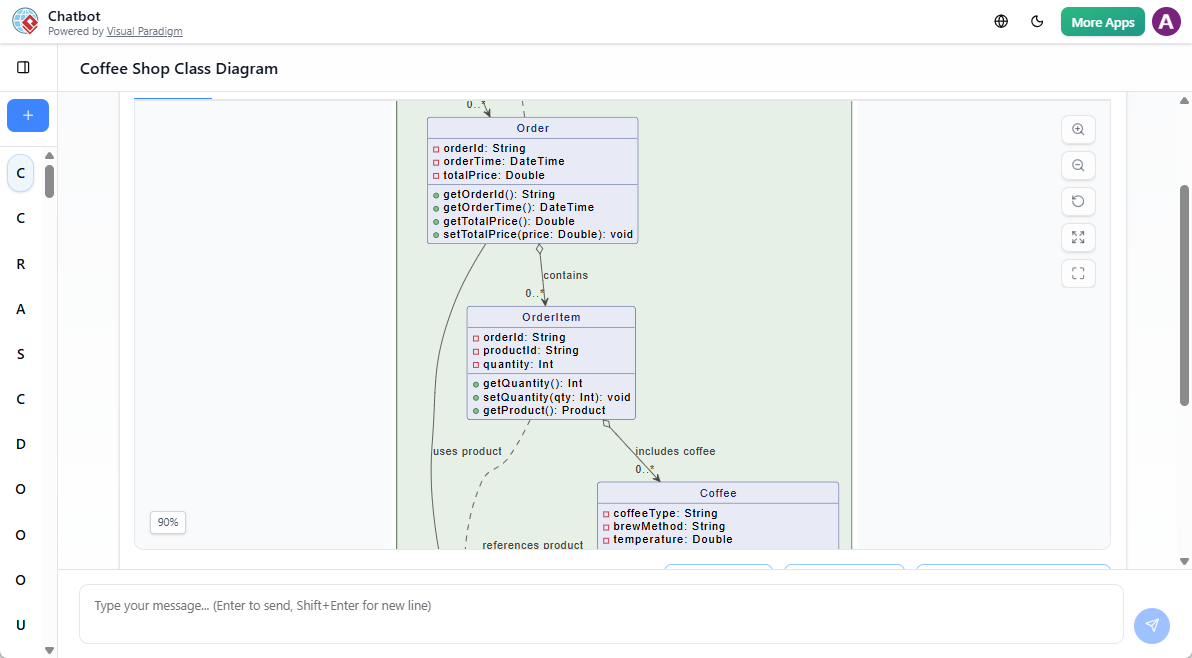
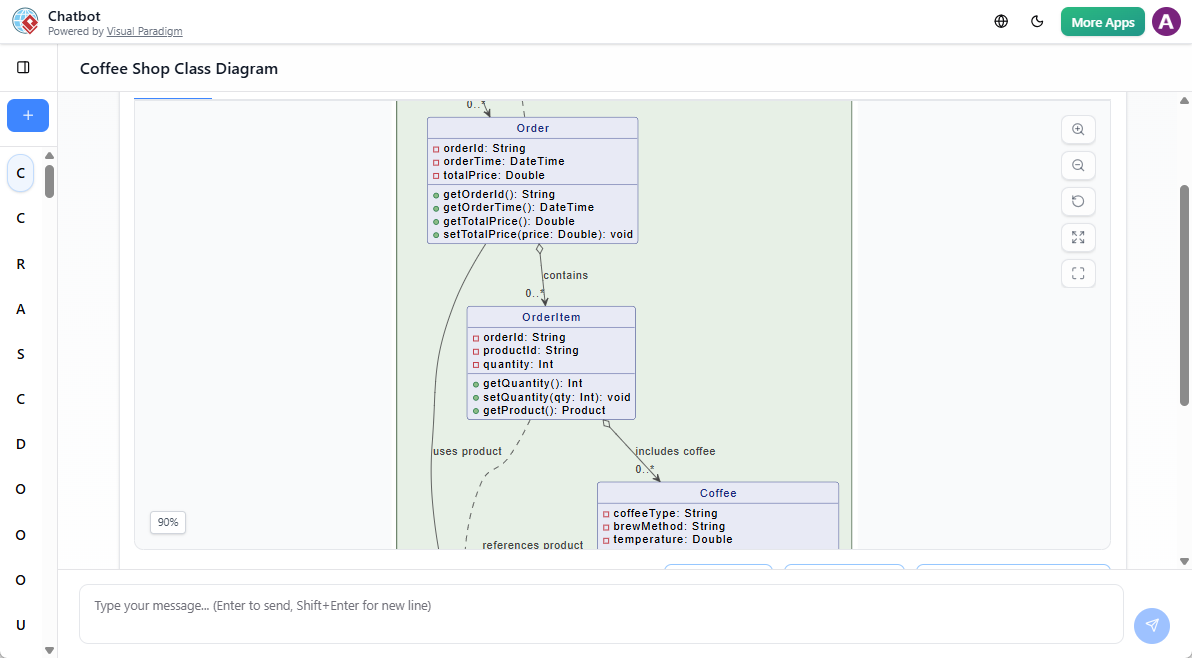
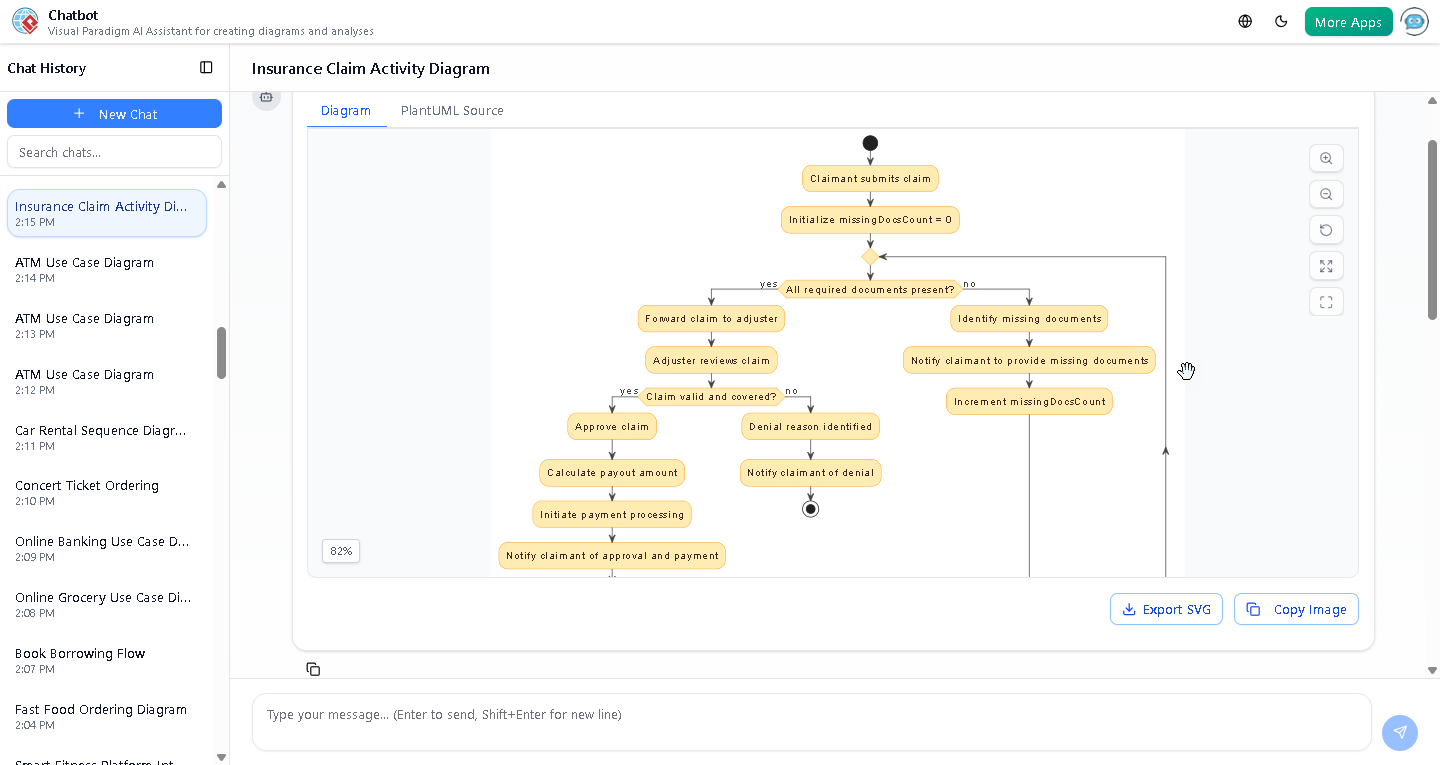
  1. 持久化聊天记录:每一次互动——初始提示、生成的图表(UML、C4、ArchiMate),后续每一次修改操作(例如“添加容器”、“重命名系统”),以及每一次AI回复——都会自动保存在持久化的**聊天记录**中。该记录是设计决策的最终真相来源。
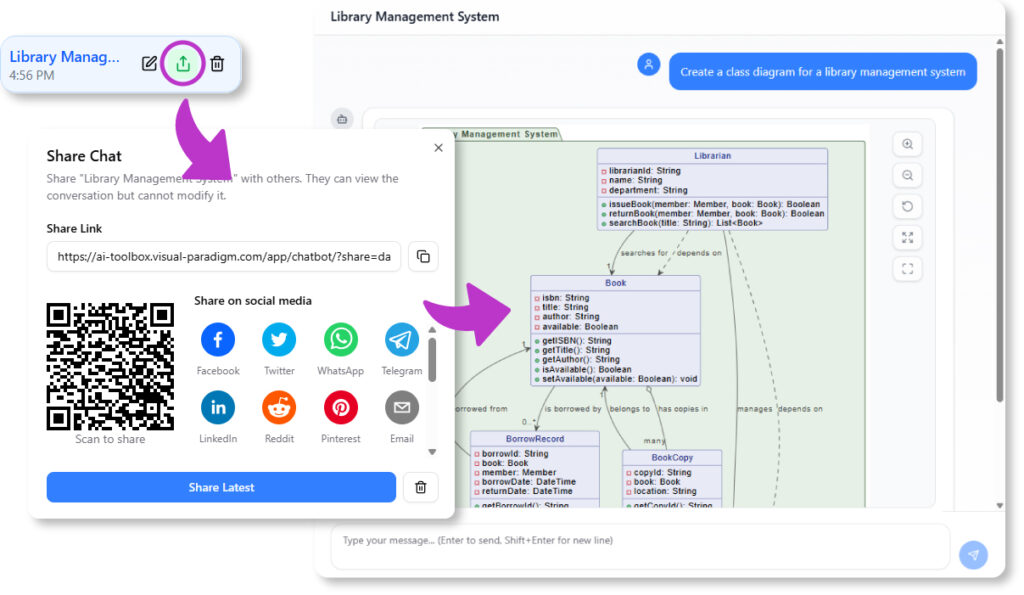
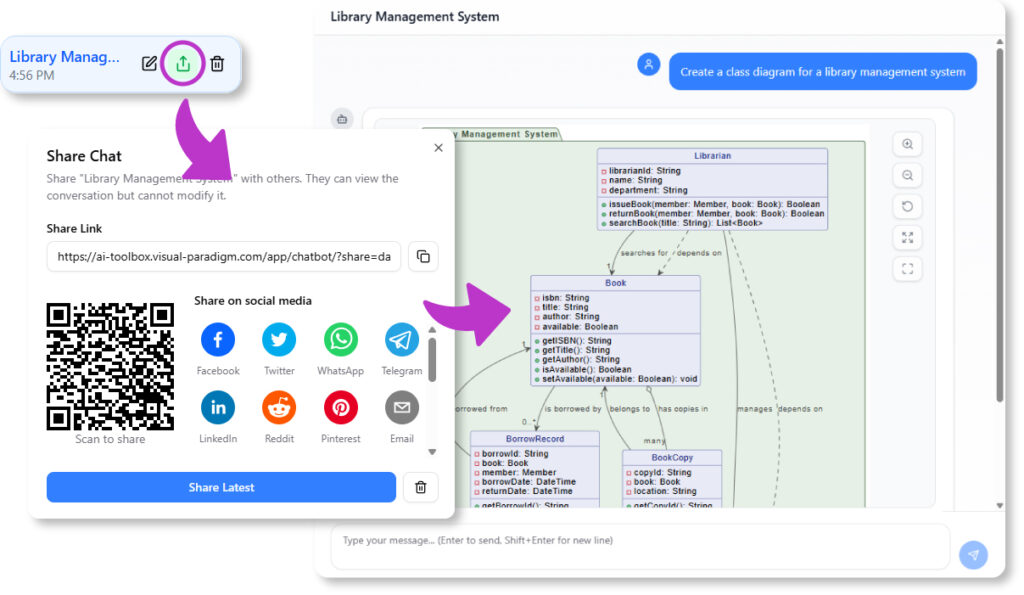
  2. 可共享链接:您可以**通过URL与他人共享聊天会话**。当利益相关者打开链接时,可以看到完整的对话记录。他们可以从高层次描述开始,逐步回顾设计的演进过程,直至最终的详细**UML类图**或**C4部署图**.

这为项目创建了完整且具有上下文的审计轨迹,大幅减少了来回沟通,并确保所有利益相关者都理解架构背后的*原因*。

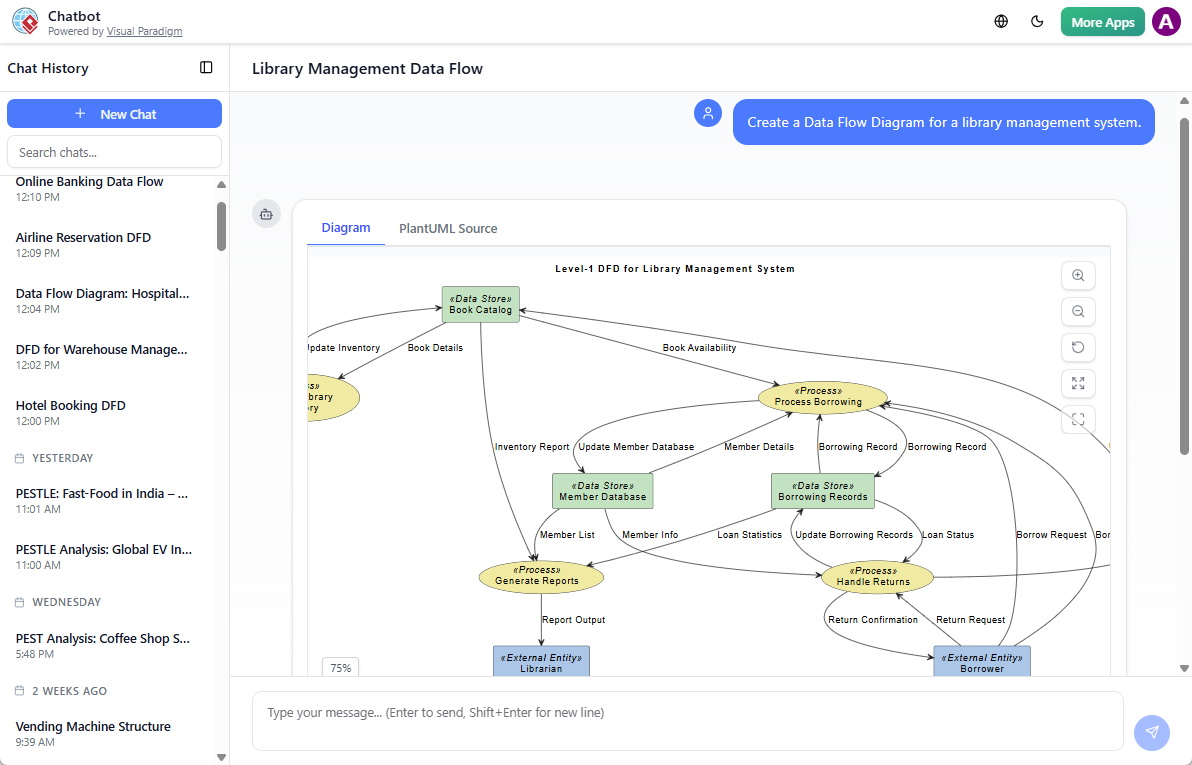
We can share our chat history with others to better understand the workflow

增强的评审与问责机制

这种动态共享功能对于多个关键团队活动至关重要,因为透明度是这些活动的核心:

  • 利益相关者评审: 不再发送静态演示,而是发送聊天记录。利益相关者可以回顾模型的演变过程,并立即看到AI的**建议后续问题**,引导他们关注设计的深层含义,而不仅仅是评论外观。
  • 入职与培训: 新成员可以查阅关键模型的聊天记录,快速掌握项目的架构以及塑造它的各项决策。历史记录充当一个动态的知识库,在具体情境中解释复杂概念。
  • 咨询与客户工作: 咨询顾问可以使用可分享的链接作为所有建模工作的透明记录,向客户展示设计过程、决策依据和模型合规性检查的无可辩驳且清晰的记录。
  • 可审计性: 能够追踪导致设计变更的精确提示,为监管合规或事后技术审查提供了不可或缺的记录。

超越图表的协作

AI确保项目沟通的所有方面都在协作聊天会话中得到涵盖。

  • 集成化文档: 在分享之前,您可以要求AI**生成一份叙述性报告**,总结该模型。该报告及生成提示也保存在可分享的历史记录中,实现了视觉与文本文档的完美结合。
  • 标准遵循: 由于AI经过主要标准的精心训练,共享的模型遵循明确的合规规则,使分布式团队能够在无需持续手动验证的情况下高效协作。
  • 建模连续性: 即使在对话被分享后,原始用户仍可将模型**导入Visual Paradigm**,进行专业的版本控制和仓库管理,确保从最初的协作对话到最终实现的设计连续性。

停止发送过时的PDF和静态图像。开始分享您设计过程的动态协作蓝图。建筑评审的未来是对话式且透明的。

今天就在以下平台开启透明的建筑协作:chat.visual-paradigm.com.

Visual Paradigm:2026年全面的AI赋能可视化建模平台

可视化建模在软件开发、系统工程、企业架构和业务流程设计中持续发挥核心作用。到2026年,AI赋能的可视化建模平台使专业人士能够更高效地创建结构化图表——将描述、需求或讨论转化为准确、易读的视觉内容,以支持分析、协作和决策。Visual Paradigm将先进的生成式AI功能(包括)对话式AI聊天机器人以及即时图表生成器——整合到一个强大的可视化建模环境中。这种结合使用户能够在保持对符号、布局、验证和展示完全控制的前提下,快速生成高质量的图表。

AI如何增强可视化建模工作流程

该平台的AI功能专注于在不降低图表质量的前提下,使可视化创作更快捷、更直观:

  • 用户用自然语言描述所需的图表(“创建一个活动图,展示用户注册流程,包含邮件验证和审批步骤”)
  • AI生成一个完整且符合标准的可视化模型
  • 后续优化提升了清晰度和结构(“为不同角色使用泳道”,“为拒绝路径添加决策节点”,“为决策元素应用一致的颜色方案”)
  • 用户可直接向模型提问(“在该顺序图中突出显示关键路径”,“建议提升可读性的视觉优化”)

这种迭代式方法支持团队自然地开发和优化可视化模型——从宏观开始,逐步添加细节和精炼。

支持广泛的可视化建模符号

Visual Paradigm的AI图表生成器可生成符合广泛使用建模标准的精确视觉内容:

符号 常见的AI生成图表类型 视觉目的与优势
UML 类图、顺序图、活动图、用例图、组件图、部署图、状态机图 清晰呈现结构、行为和交互
SysML 块定义(BDD)、内部块(IBD)、需求、参数 结构化系统组成与可追溯性可视化
ArchiMate 动机、业务、应用、技术、实施与迁移视角 分层的企业架构概览
C4模型 系统上下文、容器、组件、代码视图 分层、易读的软件架构文档
BPMN 2.0 流程、协作、对话 精确的工作流和基于角色的流程可视化
ERD 逻辑与物理ER图(陈氏 / 鸟足法) 清晰的数据库模式和关系可视化

AI尊重官方标注规则,确保生成的图表可立即用于专业场景——从内部评审到外部交付。

从AI生成到精炼的可视化模型

Visual Paradigm 支持完整的可视化建模流程:

  • 快速AI辅助启动在浏览器中进行——非常适合头脑风暴、工作坊或初步草图
  • 无缝过渡到桌面端 — 在完整的 Visual Paradigm 桌面应用程序中打开AI生成的模型,进行详细的视觉优化
  • 专业的可视化工具:
    • 多种布局算法(层次式、正交式、有机式)
    • 自定义主题、配色方案和图标集
    • 图层管理、视觉过滤和选择性隐藏
    • 注释、超链接、标注和嵌入的图像
  • 验证与仿真 — 可视化规则检查、BPMN路径仿真、SysML约束评估
  • 导出选项 — 高分辨率PNG/SVG、交互式PDF、Visio兼容文件、可嵌入的HTML

这一工作流程确保快速生成的AI可视化内容能够演变为清晰、可直接用于演示的图表,而无需切换工具。

支持视觉清晰度的附加AI功能

多种专用AI工具进一步提升可视化建模效果:

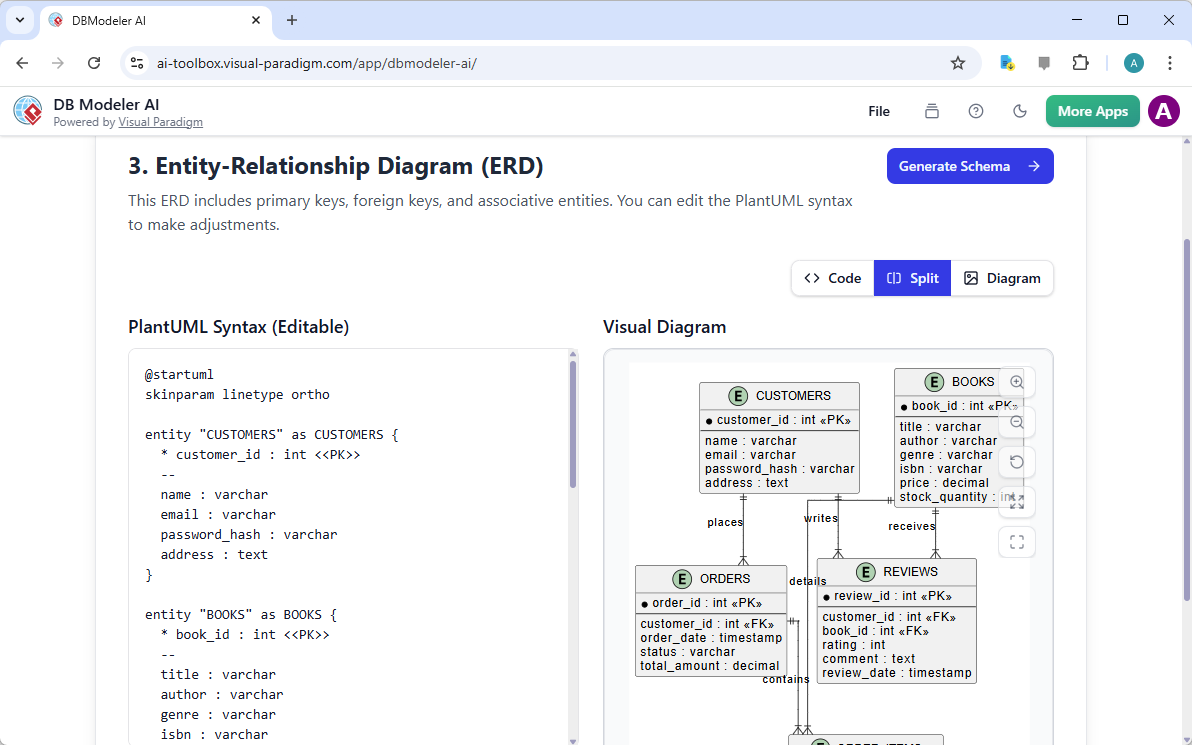
  • DBModeler AI — 生成结构清晰的ER图,包含明确的关键标识、关系线和基数标注
  • 文本 → 可视化提取 — 从需求文本中识别概念,并将其放置在结构化的类图或ER图中
  • 战略视觉生成器 — 创建平衡的商业模式画布、SWOT矩阵、OKR树及其他具有强大视觉层次结构的框架

结论

Visual Paradigm 作为一个可靠的 AI 驱动的视觉建模平台,兼顾速度与质量。其结合了对话式 AI 生成、准确的符号支持、先进的视觉编辑工具以及无缝的工作流连续性,非常适合依赖清晰、精确图表开展日常工作的专业人士。

免费在线试用可立即访问 AI 聊天机器人和视觉建模功能——一种轻松探索其在您特定用例中能力的方式。

访问:www.visual-paradigm.com

相关链接

Visual Paradigm AI 包图生成器:文本转 UML 包

你正在设计一个新的内容管理系统,盯着各层、模块和依赖关系——表现层、业务规则、持久化、安全——但整体结构依然模糊不清。手动创建包、子包和依赖箭头对于初稿来说显得过于繁琐。现在,Visual Paradigm 的 AI 登场了包图生成器:用通俗语言描述你的系统,几秒钟内即可获得一份整洁、符合标准的 UML 包图。这是从思维模型到可视化蓝图的快速通道。

为什么这个 AI 改变了软件架构

  • 自然语言 → 立即生成完整的 UML 包图
  • 自动识别包、子包、依赖关系和构造型
  • 支持分层、模块化和微服务风格的架构
  • 完全可编辑的原生模型——可优化、添加注释、合并包
  • 桌面端精准操作 + 浏览器聊天机器人,实现快速迭代

1. 桌面端:提示 → 结构化架构

在 Visual Paradigm 桌面端:

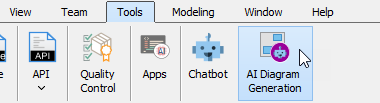
工具 → AI 图形生成 → 选择“包图” → 描述你的系统:

“生成一个UML 包图用于内容管理系统,包含表现层(Web UI、移动应用)、业务逻辑层(内容服务、用户管理、工作流引擎)、数据访问层(仓库、审计日志),并展示各层之间的依赖关系。”

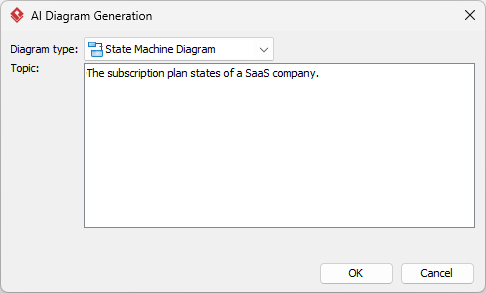
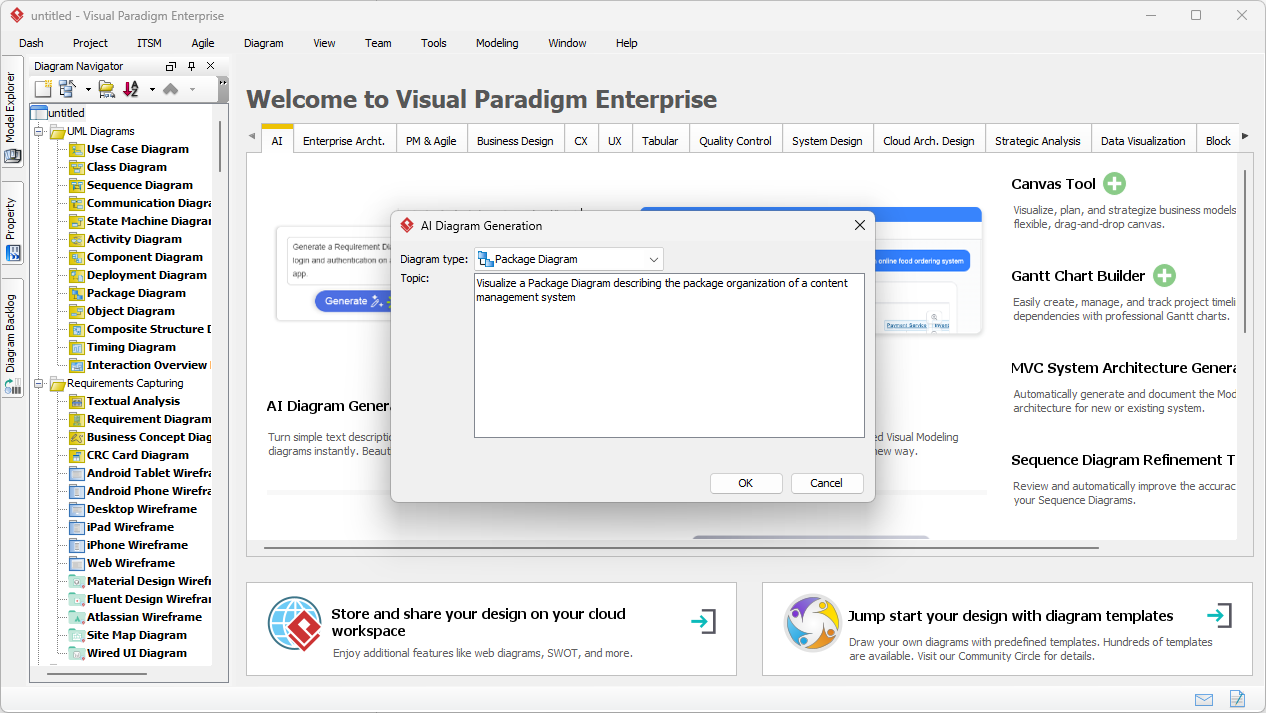
输入对话框简洁且专注:

Visual Paradigm Desktop AI Package Diagram generation prompt interface

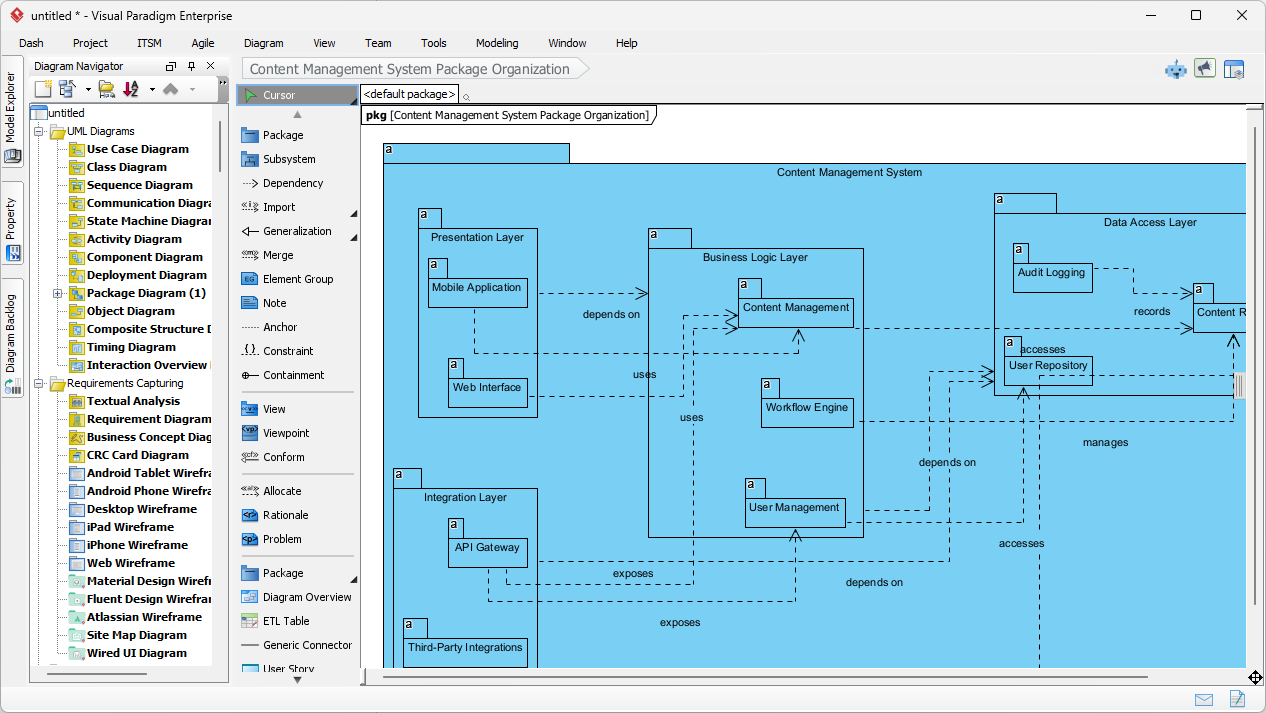
AI 生成:

  • 顶层包:表现层、业务逻辑层、数据访问层
  • 子包:Web UI、移动应用、内容服务、仓库
  • 清晰的依赖箭头(虚线)展示各层之间的流程

生成的内容管理系统包图——逻辑清晰、分层明确,可直接用于评审

AI-generated UML Package Diagram for Content Management System

立即编辑:添加安全包、调整依赖关系,或与类图集成。

2. 聊天机器人:随时随地进行对话式架构设计

用于快速草图或远程头脑风暴,打开Visual Paradigm AI 聊天机器人:

“为一个银行系统创建 UML 包图:核心银行服务、账户管理、客户管理、交易处理、合规与审计。”

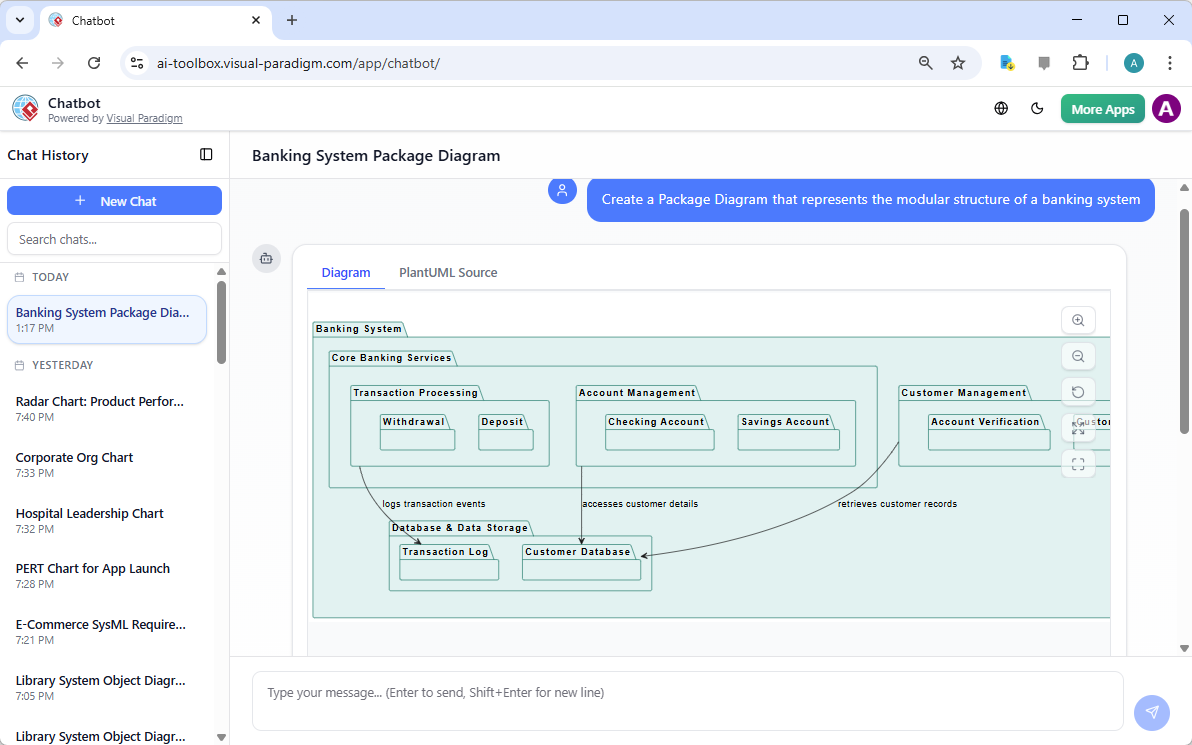
聊天机器人实时生成——包、子包和依赖关系立即呈现。银行系统的示例输出:

AI-generated UML Package Diagram for Banking System via Chatbot

在对话中优化:“添加支付网关包,并与交易处理建立依赖关系。”立即更新。非常适合早期设计讨论或教授 UML。

为什么包图 + 人工智能在2026年至关重要

良好的架构始于清晰的边界。在编写任何代码之前,包图就能展示模块化、层级结构和依赖关系。手动创建会拖慢进度;而人工智能则消除了这一障碍。

亮点应用场景:

  • 分层企业应用
  • 微服务边界
  • 教授模块化设计
  • 快速重构规划

讨论中途改变范围?重新生成。需要新增模块?直接添加。这种速度让架构保持敏捷,团队沟通更加高效。

准备好可视化你的系统结构了吗?

Visual Paradigm 的AI 包图生成器能快速将模糊的想法转化为专业的UML包——无论是用于内容管理系统、银行系统、电子商务,还是任何模块化系统。

停止与方框和箭头搏斗。从今天开始,更智能地进行设计。

相关链接

这些文章解释了如何利用人工智能应用于UML 包图来自动化系统元素的逻辑分组,使开发人员能够从自然语言提示中即时生成架构结构,从而更好地管理软件依赖关系以及系统可扩展性.

  1. AI 图形生成器现已支持 Visual Paradigm 中的包图本文详细介绍了新功能的发布,这些功能可借助人工智能生成包图,以改善软件架构的可视化效果。
  2. 使用 Visual Paradigm AI 立即生成 UML 包图本指南专注于利用人工智能驱动的工具,在极少手动操作的情况下创建专业的 UML 包图。
  3. 交互式 UML 包图生成器本资源提供了一个交互式工具,可通过对话式人工智能界面实时创建和编辑包图。
  4. UML 包图:使用人工智能构建代码库结构的权威指南本全面指南解释了人工智能如何帮助组织代码库、管理复杂依赖关系,并保持架构完整性。
  5. 通过文本提示生成 UML 包图本文探讨了如何利用先进的 AI 建模功能,将原始想法和文本提示转化为详细的 UML 包图。
  6. 使用 Visual Paradigm 的 UML 包图教程本教程提供逐步指导,帮助使用包图来组织软件组件,并有效可视化它们之间的关系。
  7. 包图软件功能 – Visual Paradigm 在线版本概述突出了可用于协作管理包图的在线工具,包括版本控制和实时编辑功能。
  8. UML 中的包图是什么?——Visual Paradigm 指南本基础资源介绍了包图通过逻辑分组在组织复杂软件系统中的作用。
  9. 使用 UML 包图建模软件架构本文讨论了使用包图来组织和传达系统架构模块化结构的最佳实践。
  10. 包图示例与模板 – Visual Paradigm 图库本图库提供了一系列真实世界的模板和示例,以激发并加速模块化软件设计。

Visual Paradigm AI Package Diagram Generator: Text to UML Packages

You’re architecting a new content management system, staring at layers, modules, and dependencies — presentation, business rules, persistence, security — but the high-level structure stays fuzzy. Manually creating packages, subpackages, and dependency arrows feels like overkill for a first draft. Enter Visual Paradigm’s AI Package Diagram Generator: describe your system in plain words, and get a clean, standards-compliant UML package diagram in seconds. It’s the fast lane from mental model to visual blueprint.

Why This AI Changes Software Architecture

  • Natural language → full UML package diagram instantly
  • Auto-identifies packages, subpackages, dependencies, and stereotypes
  • Handles layered, modular, and microservices-style structures
  • Fully editable native model — refine, add notes, merge packages
  • Desktop precision + browser chatbot for rapid iteration

1. Desktop: Prompt → Structured Architecture

In Visual Paradigm Desktop:

Tools → AI Diagram Generation → select “Package Diagram” → describe your system:

“Generate a UML Package Diagram for a content management system with Presentation Layer (Web UI, Mobile App), Business Logic Layer (Content Service, User Management, Workflow Engine), Data Access Layer (Repository, Audit Logging), and show dependencies between layers.”

The input dialog keeps it simple and focused:

Visual Paradigm Desktop AI Package Diagram generation prompt interface

AI builds:

  • Top-level packages: Presentation Layer, Business Logic Layer, Data Access Layer
  • Subpackages: Web UI, Mobile App, Content Service, Repository
  • Clear dependency arrows (dashed) showing flow between layers

Resulting content management system package diagram — logical, layered, and ready for review:

AI-generated UML Package Diagram for Content Management System

Immediately edit: add security package, adjust dependencies, or integrate with class diagrams.

2. Chatbot: Conversational Architecture on the Go

For quick sketches or remote brainstorming, open the Visual Paradigm AI Chatbot:

“Create UML Package Diagram for a banking system: Core Banking Services, Account Management, Customer Management, Transaction Processing, Compliance & Auditing.”

The chatbot generates it live — packages, subpackages, and dependencies appear instantly. Example output for a banking system:

AI-generated UML Package Diagram for Banking System via Chatbot

Refine in conversation: “Add Payment Gateway package with dependency to Transaction Processing.” Instant update. Perfect for early design sessions or teaching UML.

Why Package Diagrams + AI Matter in 2026

Good architecture starts with clear boundaries. Package diagrams show modularity, layers, and dependencies before a single line of code is written. Manual creation slows you down; AI removes the friction.

Use cases that shine:

  • Layered enterprise apps
  • Microservices boundaries
  • Teaching modular design
  • Quick refactoring planning

Change scope mid-discussion? Regenerate. New module needed? Add it. That speed keeps architecture agile and team communication sharp.

Ready to Visualize Your System Structure?

Visual Paradigm’s AI Package Diagram Generator turns vague ideas into professional UML packages fast — whether for CMS, banking, e-commerce, or any modular system.

  • Download Visual Paradigm Desktop → Full modeling power: Get Desktop Now
  • Try AI Chatbot Online → Instant architecture sketches: Start Chatting

Stop wrestling with boxes and arrows. Start designing smarter — today.

Related Links

These articles explain how artificial intelligence is applied to UML package diagrams to automate the logical grouping of system elements, enabling developers to instantly generate architectural structures from natural language prompts to better manage software dependencies and system scalability.

  1. AI Diagram Generator Now Supports Package Diagrams in Visual Paradigm: This article details the release of new features that allow for the AI-powered generation of package diagrams to improve software architecture visualization.
  2. Generate UML Package Diagrams Instantly with Visual Paradigm AI: This guide focuses on utilizing AI-driven tools to create professional UML package diagrams with minimal manual effort.
  3. Interactive UML Package Diagram Generator: This resource provides access to an interactive tool for creating and editing package diagrams in real time through a conversational AI interface.
  4. UML Package Diagram: A Definitive Guide to Structuring Your Codebase with AI: This comprehensive guide explains how AI assists in structuring codebases, managing complex dependencies, and maintaining architectural integrity.
  5. Generating UML Package Diagrams from Text Prompts: This article explores how to transform raw ideas and textual prompts into detailed UML package diagrams using advanced AI modeling features.
  6. UML Package Diagram Tutorial Using Visual Paradigm: This tutorial provides a step-by-step approach to using package diagrams to structure software components and visualize their relationships effectively.
  7. Features of Package Diagram Software – Visual Paradigm Online: This overview highlights the online tools available for collaborative package diagram management, including version control and real-time editing.
  8. What is a Package Diagram in UML? – Visual Paradigm Guide: This foundational resource introduces the role of package diagrams in organizing complex software systems through logical grouping.
  9. Modeling Software Architecture with UML Package Diagrams: This article discusses best practices for using package diagrams to organize and communicate the modular structure of a system’s architecture.
  10. Package Diagram Examples & Templates – Visual Paradigm Gallery: This gallery offers a collection of real-world templates and examples to inspire and accelerate modular software design.

Visual Paradigm: A Comprehensive AI-Powered Visual Modeling Platform in 2026

Visual modeling continues to play a central role in software development, systems engineering, enterprise architecture, and business process design. In 2026, AI-powered visual modeling platforms enable professionals to create structured diagrams more efficiently — transforming descriptions, requirements, or discussions into accurate, readable visuals that support analysis, collaboration, and decision-making. Visual Paradigm integrates advanced generative AI features — including a conversational AI Chatbot and instant diagram generator — into a robust visual modeling environment. This combination allows users to produce high-quality diagrams rapidly while retaining full control over notation, layout, validation, and presentation.

How AI Enhances Visual Modeling Workflows

The platform’s AI capabilities focus on making visual creation faster and more intuitive without compromising diagram quality:

  • Users describe the desired diagram in natural language (“Create an activity diagram showing the user onboarding process with email verification and approval steps”)
  • The AI generates a complete, standards-compliant visual model
  • Follow-up refinements improve clarity and structure (“Use swimlanes for different roles”, “Add decision nodes for rejection paths”, “Apply a consistent color scheme for decision elements”)
  • Users can query the model directly (“Highlight the critical path in this sequence diagram”, “Suggest visual improvements for readability”)

This iterative approach supports the natural way teams develop and refine visual models — starting broad and progressively adding detail and polish.

Wide Range of Supported Visual Modeling Notations

Visual Paradigm’s AI diagram generator produces precise visuals across widely used modeling standards:

Notation Common AI-Generated Diagram Types Visual Purpose & Benefit
UML Class, Sequence, Activity, Use Case, Component, Deployment, State Machine Clear representation of structure, behavior, and interactions
SysML Block Definition (BDD), Internal Block (IBD), Requirement, Parametric Structured system composition and traceability visuals
ArchiMate Motivation, Business, Application, Technology, Implementation & Migration viewpoints Layered enterprise architecture overviews
C4 Model System Context, Containers, Components, Code views Hierarchical, readable software architecture documentation
BPMN 2.0 Processes, Collaborations, Conversations Precise workflow and role-based process visuals
ERD Logical & Physical ER Diagrams (Chen / Crow’s Foot) Clean database schema and relationship visuals

The AI respects official notation rules, ensuring generated diagrams are immediately usable in professional contexts — from internal reviews to external deliverables.

From AI Generation to Polished Visual Models

Visual Paradigm supports the complete visual modeling process:

  • Quick AI-assisted start in the browser — ideal for brainstorming, workshops, or initial drafts
  • Seamless handoff to desktop — open AI-generated models in the full Visual Paradigm Desktop application for detailed visual refinement
  • Professional visual tools:
    • Multiple layout algorithms (hierarchical, orthogonal, organic)
    • Custom themes, color palettes, and icon sets
    • Layer management, visual filters, and selective hiding
    • Annotations, hyperlinks, callouts, and embedded images
  • Validation & simulation — visual rule checking, BPMN path simulation, SysML constraint evaluation
  • Export options — high-resolution PNG/SVG, interactive PDF, Visio-compatible files, embeddable HTML

This workflow ensures that fast AI-generated visuals can evolve into clear, presentation-ready diagrams without switching tools.

Additional AI Features That Support Visual Clarity

Several specialized AI tools further improve visual modeling outcomes:

  • DBModeler AI — produces well-organized ER diagrams with clear key indicators, relationship lines, and cardinality notation
  • Text → Visual Extraction — identifies concepts from requirements text and places them into structured class or ER visuals
  • Strategic Visual Generators — creates balanced Business Model Canvas, SWOT matrices, OKR trees, and other frameworks with strong visual hierarchy

Conclusion

Visual Paradigm serves as a reliable AI-powered visual modeling platform that prioritizes both speed and quality. Its combination of conversational AI generation, accurate notation support, advanced visual editing tools, and seamless workflow continuity makes it well-suited for professionals who rely on clear, precise diagrams in their daily work.

A free online trial provides instant access to the AI Chatbot and visual modeling features — an easy way to explore its capabilities for your specific use cases.

Visit: www.visual-paradigm.com

Related Links

Share the Blueprint, Not the File: Collaborating on Architecture with Shareable AI Chat History

In complex projects, sharing a diagram as a static file (PNG, PDF) is fundamentally insufficient. It provides the final result but omits the crucial context: why the diagram was created that way, who requested the changes, and *what* alternatives were considered. This forces stakeholders to initiate tedious email chains and ask repetitive questions, delaying crucial sign-offs and increasing the risk of misinterpretation.Effective collaboration requires sharing the rationale and evolution of the model, not just the final image. The design process—the conversation itself—is as important as the artifact.

Visual Paradigm’s AI Chatbot solves this by treating the entire design conversation as the definitive artifact, making it perfectly suited for modern, transparent, and asynchronous collaboration.

Share the Evolution, Not Just the Endpoint

The AI enables two powerful collaboration features that redefine how teams work with models:

  1. Persistent Chat History: Every interaction—the initial prompt, the generated diagram (UML, C4, ArchiMate), every subsequent touch-up operation (e.g., “add container,” “rename system”), and every AI answer—is automatically saved in a persistent **chat history**. This history is the ultimate source of truth for design decisions.
  2. Shareable URL: You can **share a chat session with others via a URL**. When a stakeholder opens the link, they see the entire transcript. They can review the design evolution from the high-level description to the final, detailed **UML Class Diagram** or **C4 Deployment Diagram**.

This creates a complete, contextual audit trail for the project, drastically reducing back-and-forth communication and ensuring all stakeholders understand the *why* behind the architecture.

Share the Blueprint, Not the File: Collaborating on Architecture with Shareable AI Chat History

Enhanced Review and Accountability

This dynamic sharing capability is invaluable for several key team activities where transparency is critical:

  • Stakeholder Review: Instead of a static presentation, send the chat history. Stakeholders can review the evolution of the model and immediately see the AI’s **suggested follow-up questions**, guiding them to consider the deeper implications of the design rather than just commenting on aesthetics.
  • Onboarding and Training: New team members can review the chat history for key models to quickly grasp the project’s architecture and the decisions that shaped it. The history acts as a living knowledge base, explaining complex concepts in context.
  • Consulting and Client Work: Consultants can use the shareable link as a transparent record of all modeling work, providing clients with an undeniable, clear record of the design process, decision rationale, and model compliance checks.
  • Auditability: The ability to track the exact prompt that led to a design change provides an indispensable record for regulatory compliance or post-incident technical review.

Collaboration Beyond the Diagram

The AI ensures all aspects of project communication are covered within the collaborative chat session.

  • Integrated Documentation: Before sharing, you can ask the AI to **generate a narrative report** summarizing the model. This report and the generating prompt are also stored in the shareable history, providing a perfect blend of visual and textual documentation.
  • Standards Adherence: Because the AI is expertly trained on major standards, the shared models adhere to clear compliance rules, making it easier for distributed teams to collaborate effectively without constant manual validation.
  • Modeling Continuity: Even after a conversation is shared, the original user can **import the model into Visual Paradigm** for professional version control and repository management, maintaining the design continuity from initial collaborative conversation to final implementation.

Stop sending outdated PDFs and static images. Start sharing the living, collaborative blueprint of your design process. The future of architectural review is conversational and transparent.

Facilitate transparent architectural collaboration today at chat.visual-paradigm.com.