Tutorial completo para crear libros digitales impresionantes con Fliplify de Visual Paradigm Online

Introducción

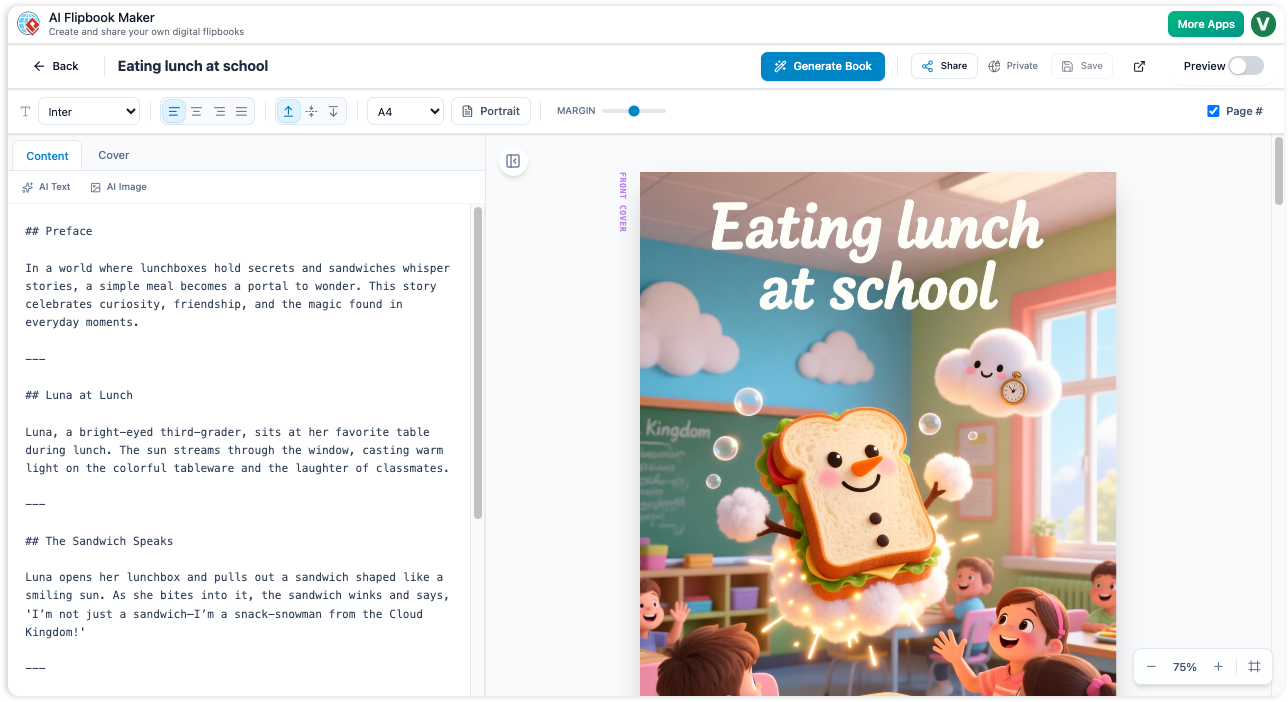
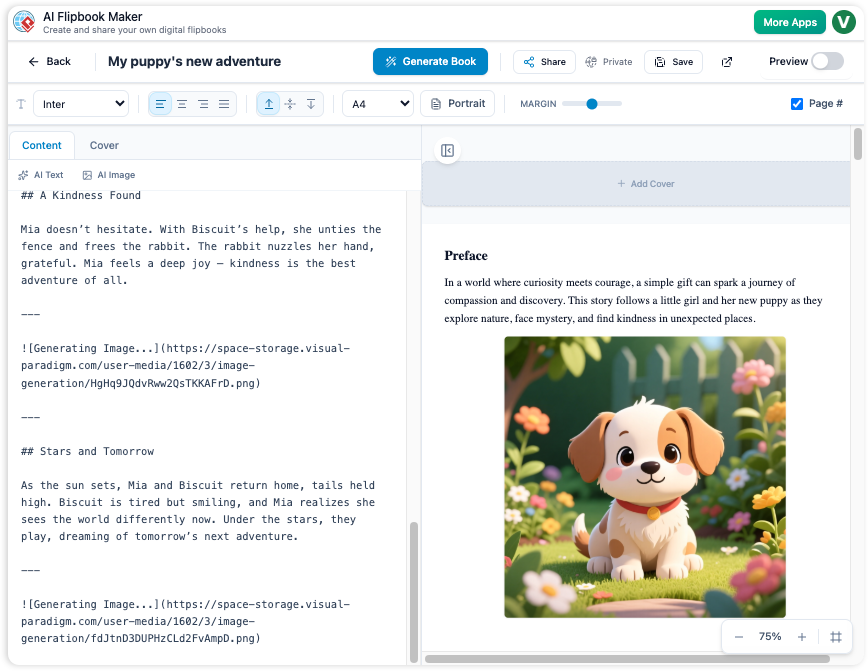
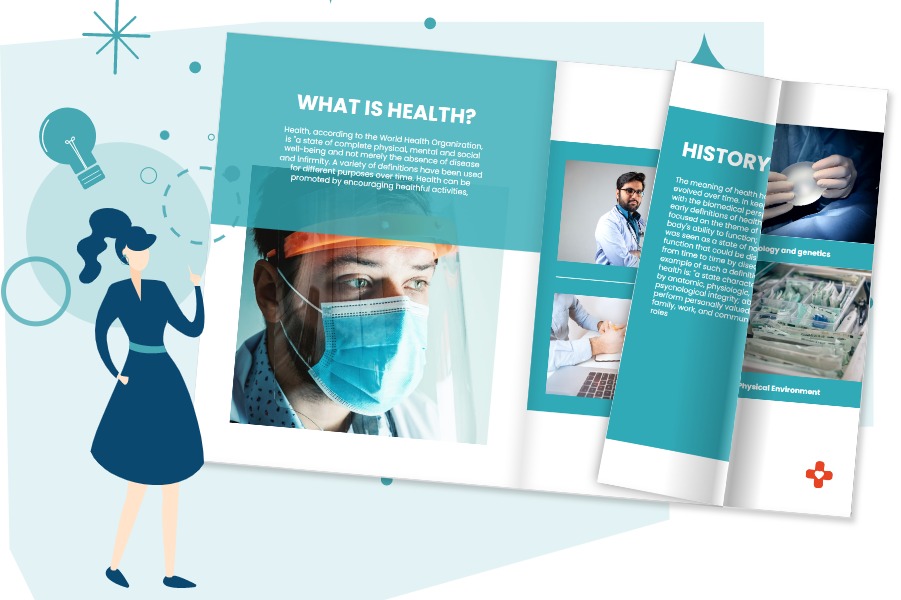
Fliplify, parte de Visual Paradigm Online, es una herramienta potente diseñada para ayudar a los usuarios a crear libros digitales cautivadores y presentaciones en diapositivas. Ya sea que comiences desde cero o cargues contenido existente, Fliplify ofrece una experiencia fluida y fácil de usar. Este tutorial te guiará a través del proceso de crear libros digitales impresionantes, destacando sus funciones clave, áreas de aplicación y razones por las que Fliplify se destaca.

¿Por qué elegir Fliplify?

  1. Interfaz fácil de usar:

    • Fliplify ofrece una interfaz intuitiva y fácil de usar que permite a los usuarios crear libros digitales con aspecto profesional sin necesidad de conocimientos técnicos extensos24.
  2. Creación de contenido versátil:

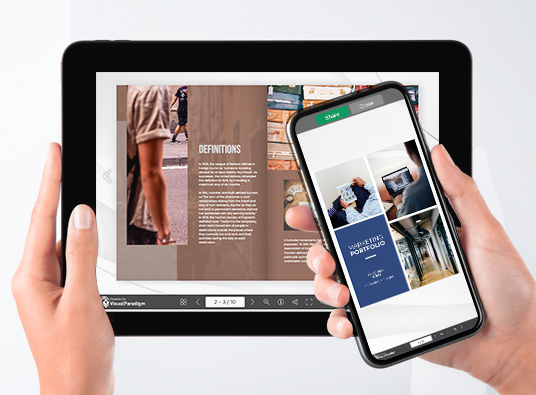
    • Los usuarios pueden crear libros digitales a partir de diversas fuentes, incluyendo PDFs, presentaciones de PowerPoint y más. Esta versatilidad permite transformar una amplia gama de contenidos en libros digitales atractivos24.
  3. Opciones de personalización:

    • Fliplify permite a los usuarios personalizar todos los aspectos de sus libros digitales, desde el diseño y la disposición hasta los elementos interactivos. Esto garantiza una presentación pulida y profesional adaptada a necesidades específicas24.
  4. Elementos interactivos:

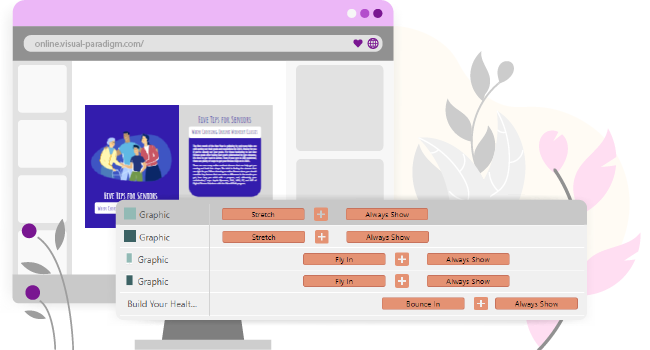
    • La herramienta permite añadir elementos interactivos, como anotaciones, resaltados y comentarios, mejorando la participación y comprensión del contenido25.
  5. Integración fluida:

    • Fliplify se integra sin problemas con otras funciones de Visual Paradigm Online, creando un conjunto completo para todas tus necesidades creativas. Esta integración garantiza una experiencia fluida y productiva26.

Áreas de aplicación

  1. Presentaciones empresariales:

    • Cree presentaciones empresariales atractivas e interactivas que cautiven a la audiencia y transmitan eficazmente mensajes clave.
  2. Contenido educativo:

    • Desarrolle materiales educativos atractivos visualmente e interactivos, que mejoren la experiencia de aprendizaje de los estudiantes.
  3. Materiales de marketing:

    • Diseñe folletos digitales, catálogos de productos y otros materiales de marketing que destaquen y atraigan a los clientes potenciales.
  4. Proyectos personales:

    • Use Fliplify para proyectos personales, como crear álbumes de fotos, diarios de viaje o cualquier otro contenido que se beneficie de un formato interactivo y visualmente atractivo.

Por qué Fliplify destaca

  1. Herramienta completa:

    • Fliplify ofrece un conjunto robusto de herramientas para crear, editar y publicar libros digitales. Desde elementos básicos de diseño hasta opciones avanzadas de personalización, Fliplify proporciona todo lo necesario para crear libros digitales impresionantes26.
  2. Fácil de usar:

    • La plataforma está diseñada para ser fácil de usar, con una interfaz sencilla que permite a los usuarios centrarse en sus proyectos creativos sin la molestia de instalaciones de software complejas24.
  3. Salida de alta calidad:

    • Fliplify garantiza que los libros digitales publicados sean de alta calidad, con diseños de aspecto profesional y elementos interactivos que mejoran la experiencia del usuario24.
  4. Soporte al cliente:

    • Visual Paradigm Online ofrece un excelente servicio al cliente, ayudando a los usuarios con cualquier problema o pregunta que puedan tener al utilizar la función de libro giratorio27.

Lista de características

  1. Plantillas personalizables:

    • Elige entre una variedad de plantillas personalizables para comenzar tu proyecto de libro giratorio. Estas plantillas proporcionan una base para tu diseño, permitiendo una personalización sencilla para adaptarse a tus necesidades específicas26.
  2. Anotaciones interactivas:

    • Agrega anotaciones, resaltados y comentarios a tus libros giratorios para aumentar la participación y la comprensión. Estos elementos interactivos hacen que el contenido sea más dinámico y personalizado25.
  3. Soporte para múltiples formatos de archivo:

    • Convierte varios tipos de archivos en libros giratorios, incluyendo PDF, presentaciones de PowerPoint, eBooks y hojas de cálculo. Esta versatilidad permite transformar una amplia gama de contenidos en libros giratorios atractivos27.
  4. Herramientas avanzadas de diseño:

    • Utiliza herramientas avanzadas de diseño para personalizar el diseño, la disposición y los elementos interactivos de tus libros giratorios. Estas herramientas garantizan una presentación pulida y profesional26.
  5. Integración sin problemas con Visual Paradigm Online:

    • Fliplify se integra sin problemas con otras funciones de Visual Paradigm Online, creando un conjunto completo para todas tus necesidades creativas. Esta integración garantiza una experiencia fluida y productiva26.

Conclusión

Fliplify de Visual Paradigm Online destaca como una herramienta potente y fácil de usar para crear impresionantes libros giratorios. Con su interfaz intuitiva, opciones versátiles para la creación de contenido y herramientas avanzadas de diseño, Fliplify ofrece todo lo necesario para crear libros giratorios atractivos e interactivos. Ya sea para presentaciones empresariales, contenido educativo, materiales de marketing o proyectos personales, Fliplify ofrece una experiencia fluida y productiva, convirtiéndolo en una elección ideal para todas sus necesidades de libros giratorios.

Tutorial completo para crear maravillosos libros de animación con AniFuzion y Fliplify de Visual Paradigm

Introducción

Crear un libro de animación combina la naturaleza atractiva de las animaciones con la experiencia interactiva de los libros de dibujos. Las herramientas AniFuzion y Fliplify de Visual Paradigm ofrecen una forma fluida de lograr esto, permitiendo a los usuarios crear contenido cautivador que destaque. Este tutorial te guiará a través del proceso de crear un libro de animación, destacando por qué estas herramientas son una excelente elección y cómo pueden hacer que tu contenido sea más atractivo y agradable.

¿Por qué elegir AniFuzion y Fliplify de Visual Paradigm?

Elevate Your Animations with Sound in AniFuzion - AniFuzion

  1. Interfaz fácil de usar:

    • Tanto AniFuzion como Fliplify ofrecen interfaces intuitivas que facilitan a los usuarios, independientemente de su experiencia técnica, crear animaciones y libros de dibujos de calidad profesional2024.
  2. Herramienta completa:

    • Estas herramientas ofrecen una amplia gama de funciones, incluyendo animación 2D y 3D, plantillas personalizables y elementos interactivos, asegurando que los usuarios tengan todo lo necesario para crear contenido atractivo2126.
  3. Integración fluida:

    • AniFuzion y Fliplify se integran sin problemas entre sí y con otras funciones de Visual Paradigm Online, creando un conjunto completo para todas tus necesidades creativas2126.
  4. Salida de alta calidad:

    • Las herramientas garantizan que la salida final sea de alta calidad, con animaciones y libros de dibujos pulidos y de aspecto profesional que cautivan a los espectadores2024.
  5. Soporte al cliente:

    • Visual Paradigm ofrece un excelente servicio al cliente, ayudando a los usuarios con cualquier problema o pregunta que puedan tener al utilizar las herramientas27.

Cómo los libros de dibujos animados hacen que el contenido sea atractivo y agradable

Flipping Book Animation Software - Visual Paradigm Blog

  1. Atractivo visual:

    • Los libros de dibujos animados combinan el atractivo visual de las animaciones con la experiencia interactiva de los libros de dibujos, haciendo que el contenido sea más atractivo y visualmente agradable20.
  2. Experiencia interactiva:

    • La naturaleza interactiva de los libros de dibujos permite a los usuarios relacionarse con el contenido de una manera más dinámica, mejorando la comprensión y la retención25.
  3. Narración:

    • Los libros de dibujos animados permiten a los usuarios contar historias de una manera más convincente, utilizando animaciones para dar vida a personajes y escenas21.
  4. Versatilidad:

    • Los libros de dibujos animados pueden utilizarse para una amplia variedad de propósitos, desde contenido educativo y presentaciones empresariales hasta materiales de marketing y proyectos personales2426.

Tutorial: Creación de un libro de dibujos animado con AniFuzion y Fliplify

Visual Paradigm Flipbook Maker: Elevate Your Digital Presence with Dynamic and Engaging Flipbooks - Visual Paradigm Blog

Paso 1: Crear animaciones con AniFuzion
  1. Regístrese y inicie sesión:

    • Regístrese para obtener una cuenta de Visual Paradigm Online e inicie sesión para acceder a AniFuzion.
  2. Elige una plantilla o empieza desde cero:

    • Explora las plantillas disponibles o elige comenzar desde cero. Las plantillas proporcionan una base para tu animación, mientras que comenzar desde cero permite una personalización mayor21.
  3. Diseña tu animación:

    • Utiliza la interfaz intuitiva para diseñar tu animación. Añade personajes, escenas y objetos, y personaliza su apariencia y acciones. Utiliza las funciones de animación 2D y 3D para dar vida a tu visión20.
  4. Añade elementos interactivos:

    • Incorpora elementos interactivos, como anotaciones, resaltados y comentarios, para aumentar el compromiso y la comprensión25.
  5. Previsualiza y exporta:

    • Previsualiza tu animación para asegurarte de que cumple con tus expectativas. Una vez satisfecho, exporta la animación en el formato deseado20.
Paso 2: Crea un libro de dibujos con Fliplify
  1. Sube tu animación:

    • Inicia sesión en Visual Paradigm Online y accede a Fliplify. Sube tu animación exportada para usarla como contenido para tu libro de dibujos24.
  2. Elige una plantilla o empieza desde cero:

    • Explora las plantillas de libros de dibujos disponibles o elige comenzar desde cero. Las plantillas proporcionan una base para tu libro de dibujos, mientras que comenzar desde cero permite una personalización mayor26.
  3. Diseña tu libro de volteretas:

    • Utiliza la interfaz intuitiva para diseñar tu libro de volteretas. Agrega páginas, personaliza el diseño y incorpora elementos interactivos, como anotaciones y resaltados24.
  4. Integra tu animación:

    • Integra tu animación en el libro de volteretas, asegurando que fluya sin problemas con el resto del contenido. Utiliza las funciones interactivas de Fliplify para aumentar la participación y comprensión de la animación25.
  5. Vista previa y publicación:

    • Vista previa de tu libro de volteretas para asegurarte de que cumple con tus expectativas. Una vez satisfecho, publica el libro de volteretas y compártelo con tu audiencia24.

Conclusión

Crear un libro de volteretas animado con AniFuzion de Visual Paradigm y Fliplify es una forma poderosa de hacer que tu contenido sea más atractivo y agradable. Con sus interfaces intuitivas, herramientas completas, integración sin problemas y resultados de alta calidad, estas herramientas ofrecen todo lo necesario para crear libros de volteretas animados cautivadores. Ya sea para contenido educativo, presentaciones empresariales, materiales de marketing o proyectos personales, AniFuzion y Fliplify ofrecen una experiencia fluida y productiva, convirtiéndolos en una elección ideal para todas tus necesidades creativas.

Guía completa para crear libros giratorios y organizarlos en una hermosa estantería virtual

Introducción

Crear libros giratorios con Visual Paradigm Online es una forma fluida y atractiva de presentar tu contenido. Ya sea que estés diseñando materiales educativos, presentaciones empresariales o proyectos personales, las herramientas de Visual Paradigm ofrecen un conjunto completo de funciones para dar vida a tus ideas. Esta guía te acompañará paso a paso en el proceso de crear libros giratorios, incorporar animaciones 2D y 3D, texto a voz (TTS) y voces humanas de inteligencia artificial, y organizarlos en una hermosa estantería virtual.

Fliplify:Visual Paradigm Online的翻页书设计大师| 學習EA, Agile & UML 和使用Visual Paradigm 技能- 點部落

Paso 1: Comenzar con Visual Paradigm Online

  1. Regístrate y inicia sesión:

    • Visita el sitio web de Visual Paradigm Online y regístrate para obtener una cuenta si aún no tienes una.
    • Inicia sesión para acceder al conjunto de herramientas, incluyendo Fliplify para crear libros giratorios y AniFuzion para añadir animaciones.
  2. Explora el panel de control:

    • Familiarízate con el panel de control, que proporciona acceso a diversas herramientas y funciones.
    • Navega hasta la sección de Fliplify para comenzar a crear tu libro giratorio.

Make Your Flipbook Stand Out with AniFuzion - Fliplify

Paso 2: Crear un libro giratorio con Fliplify

  1. Elige una plantilla o comienza desde cero:

    • Explora las plantillas de libros giratorios disponibles o elige comenzar desde cero. Las plantillas proporcionan una base para tu diseño, mientras que comenzar desde cero permite una personalización mayor26.
  2. Diseña tu libro giratorio:

    • Utiliza la interfaz intuitiva para diseñar tu libro giratorio. Añade páginas, personaliza el diseño y incorpora elementos interactivos como anotaciones, resaltados y comentarios24.
    • Utiliza las herramientas avanzadas de diseño para asegurar una presentación pulida y profesional.
  3. Integra animaciones 2D y 3D:

    • Utiliza AniFuzion para crear o importar animaciones 2D y 3D. Estas animaciones se pueden integrar sin problemas en tu libro giratorio para aumentar la interacción y el atractivo visual20.
    • Asegúrese de que las animaciones fluyan sin problemas con el resto del contenido, utilizando las funciones interactivas de Fliplify para mejorar la comprensión25.

Visual Paradigm Online: Revolutionizing Digital Content Creation - Cybermedian

  1. Agregue Texto a voz (TTS) y voces humanas de IA:

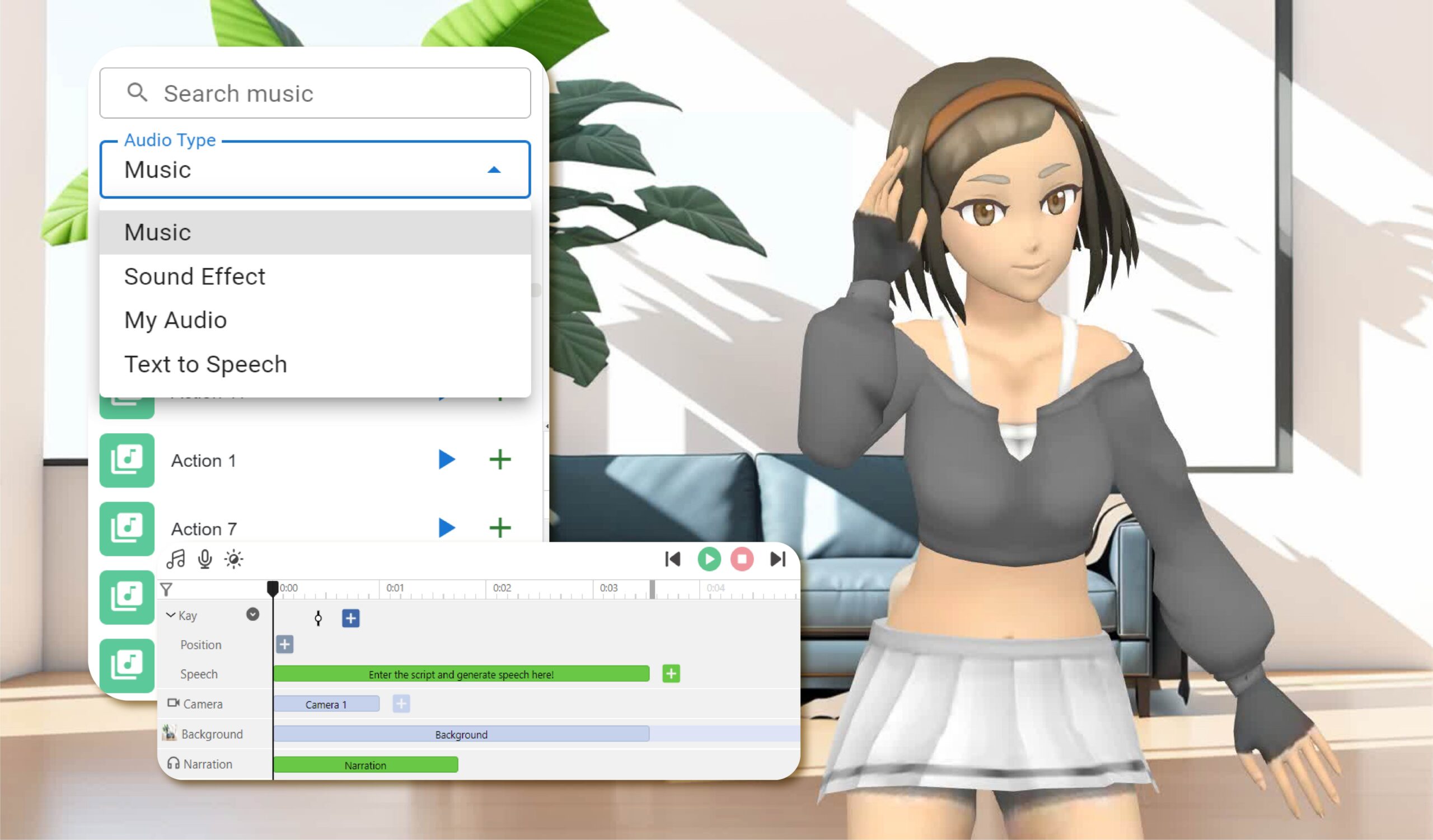
    • Incorpore TTS y voces humanas de IA para narrar su libro digital. Esta función mejora la experiencia interactiva, haciendo que el contenido sea más atractivo y accesible20.
    • Personalice la configuración de voz para que coincida con el tono y estilo de su libro digital

Bring Your Characters to Life with Enhanced TTS Support - Visual Paradigm  News

  1. Vista previa y publicación:

    • Vea una previsualización de su libro digital para asegurarse de que cumpla con sus expectativas. Realice los ajustes necesarios en el diseño y el contenido
    • Una vez satisfecho, publique el libro digital y compártalo con su audiencia24.

Paso 3: Organizar libros digitales en una estantería virtual

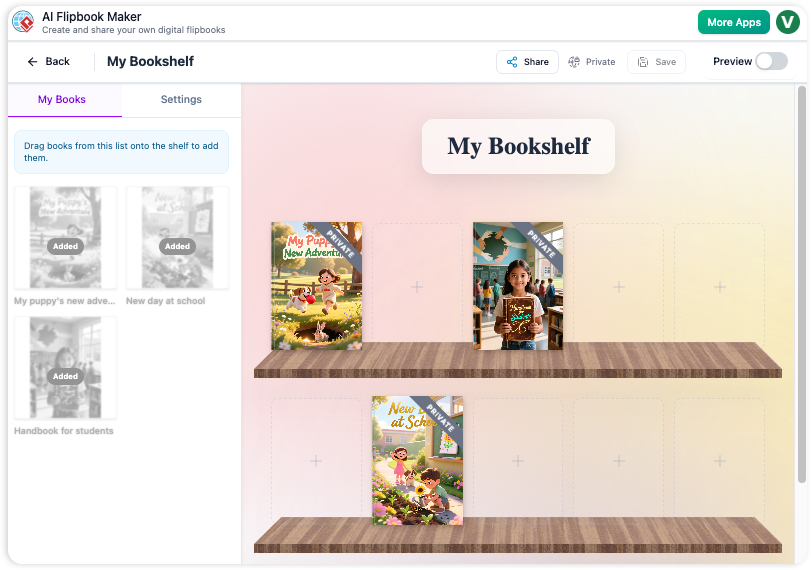
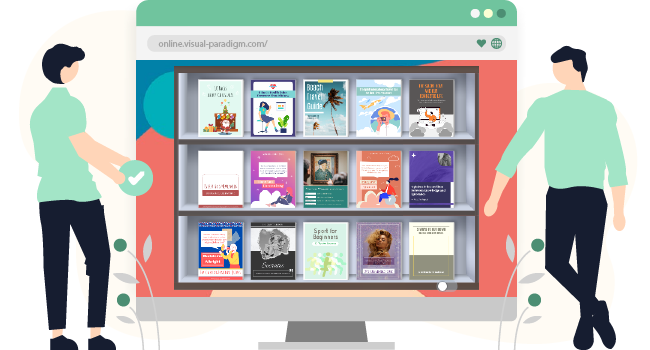
  1. Cree una estantería virtual:

    • Navegue hasta la función de estantería virtual en Visual Paradigm Online
    • Cree una nueva estantería y personalice su apariencia para que coincida con su marca o estilo personal
  2. Agregue libros digitales a la estantería:

    • Agregue sus libros digitales publicados a la estantería virtual. Organícelos por categoría, tema o cualquier otro criterio que tenga sentido para su contenido
    • Personalice las miniaturas y descripciones de cada libro digital para que sean visualmente atractivas e informativas
  3. Personalice el diseño de la estantería:

    • Organice los libros digitales en la estantería de manera visualmente atractiva. Utilice las herramientas de diseño para ajustar la posición y el espaciado de los libros digitales
    • Agregue elementos interactivos, como enlaces a contenido relacionado o recursos adicionales, para mejorar la experiencia del usuario
  4. Comparta su estantería virtual:

    • Comparte tu estantería virtual con tu audiencia proporcionando un enlace o incrustándola en tu sitio web.
    • Promociona tu estantería a través de redes sociales, boletines por correo electrónico y otros canales de marketing para llegar a una audiencia más amplia.

Paso 4: Mejorar la participación con funciones interactivas

  1. Anotaciones interactivas:

    • Agrega anotaciones, resaltados y comentarios a tus libros digitales para mejorar la participación y la comprensión. Estos elementos interactivos hacen que el contenido sea más dinámico y personalizado25.
  2. Cuestionarios y encuestas:

    • Incorpora cuestionarios y encuestas dentro de tus libros digitales para involucrar a tu audiencia y recopilar comentarios. Esta función es especialmente útil para contenidos educativos y presentaciones empresariales.
  3. Integración multimedia:

    • Integra elementos multimedia, como videos, imágenes y clips de audio, para mejorar el atractivo visual y la participación de tus libros digitales.
    • Asegúrate de que los elementos multimedia se integren sin problemas con el resto del contenido, utilizando las funciones interactivas de Fliplify para mejorar la comprensión25.

How to Add Voice to Characters by Text-to-Speech with Perfect Lip Sync-  AniFuzion


Conclusión

Crear libros digitales con Visual Paradigm Online y organizarlos en una hermosa estantería virtual es una forma poderosa de presentar tu contenido de manera atractiva e interactiva. Con funciones como animaciones 2D y 3D, TTS y voces humanas de IA, puedes mejorar el atractivo visual y la participación de tus libros digitales. Ya sea para contenidos educativos, presentaciones empresariales o proyectos personales, las herramientas de Visual Paradigm ofrecen un conjunto completo de funciones para dar vida a tus ideas y cautivar a tu audiencia.

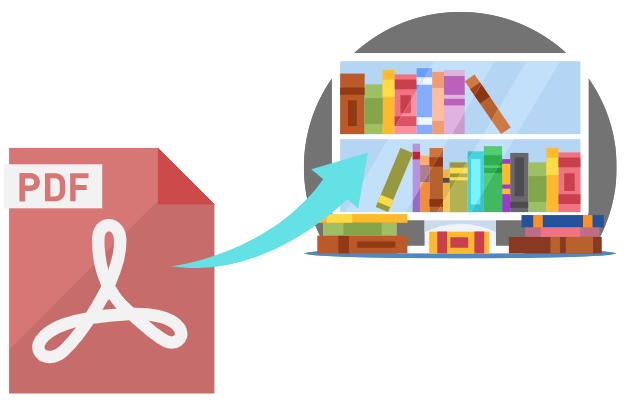
Tutorial completo: Convierta un PDF en un maravilloso libro de volteo en pocos clics usando Visual Paradigm Online

Introducción

En la actual era digital, presentar el contenido de una manera atractiva e interactiva es crucial para captar y mantener la atención del público. Una forma efectiva de lograr esto es convertir documentos PDF tradicionales en libros de volteo dinámicos. Visual Paradigm Online ofrece una solución potente y fácil de usar para esta transformación con su herramienta Fliplify. Este tutorial completo te guiará paso a paso en el proceso de convertir un PDF en un maravilloso libro de volteo en solo unos clics, destacando las características principales y beneficios de usar Visual Paradigm Online. Ya sea que estés creando materiales educativos, presentaciones empresariales o proyectos personales, esta guía te ayudará a aprovechar todo el potencial de los libros de volteo para que tu contenido destaque.

Can I turn my PDF into a Flipbook? - Visual Paradigm Blog

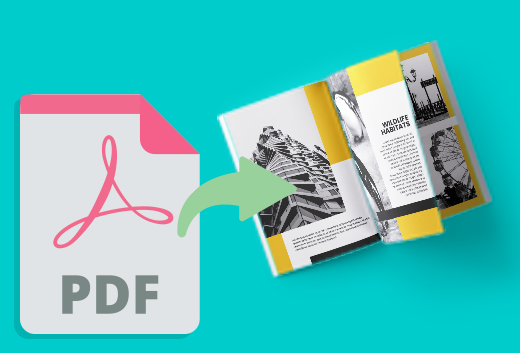
Convertir un PDF en un libro de volteo atractivo puede mejorar significativamente la presentación e interactividad de tu contenido. Visual Paradigm Online ofrece una forma fluida y fácil de usar para lograr esto con su potente herramienta Fliplify. Este tutorial te guiará a través del proceso de convertir un PDF en un libro de volteo en solo unos clics, destacando las características principales y beneficios de usar Visual Paradigm Online.

Transform Your PDFs into Engaging Flipbooks with Our Powerful Tools - Visual Paradigm Blog

Paso 1: Comenzar con Visual Paradigm Online

  1. Regístrese e inicie sesión:

    • Visite el sitio web de Visual Paradigm Online y regístrese para obtener una cuenta si aún no la tiene.
    • Inicie sesión para acceder al conjunto de herramientas, incluida Fliplify para crear libros de volteo.
  2. Navegue hasta Fliplify:

    • Una vez iniciada la sesión, navegue hasta la sección Fliplify desde el panel de control. Aquí convertirá su PDF en un libro de volteo.

Paso 2: Cargar su PDF

  1. Cargue el PDF:

    • Haga clic en el botón «Crear libro de volteo» y seleccione la opción para cargar un PDF.
    • Elija el archivo PDF desde su computadora o almacenamiento en la nube que desea convertir en un libro de volteo.
  2. Procesamiento del PDF:

    • Visual Paradigm Online procesará automáticamente el PDF cargado y lo convertirá en formato de libro de volteo. Este proceso generalmente tarda solo unos momentos, dependiendo del tamaño del PDF.

Paso 3: Personalizar su libro de volteo

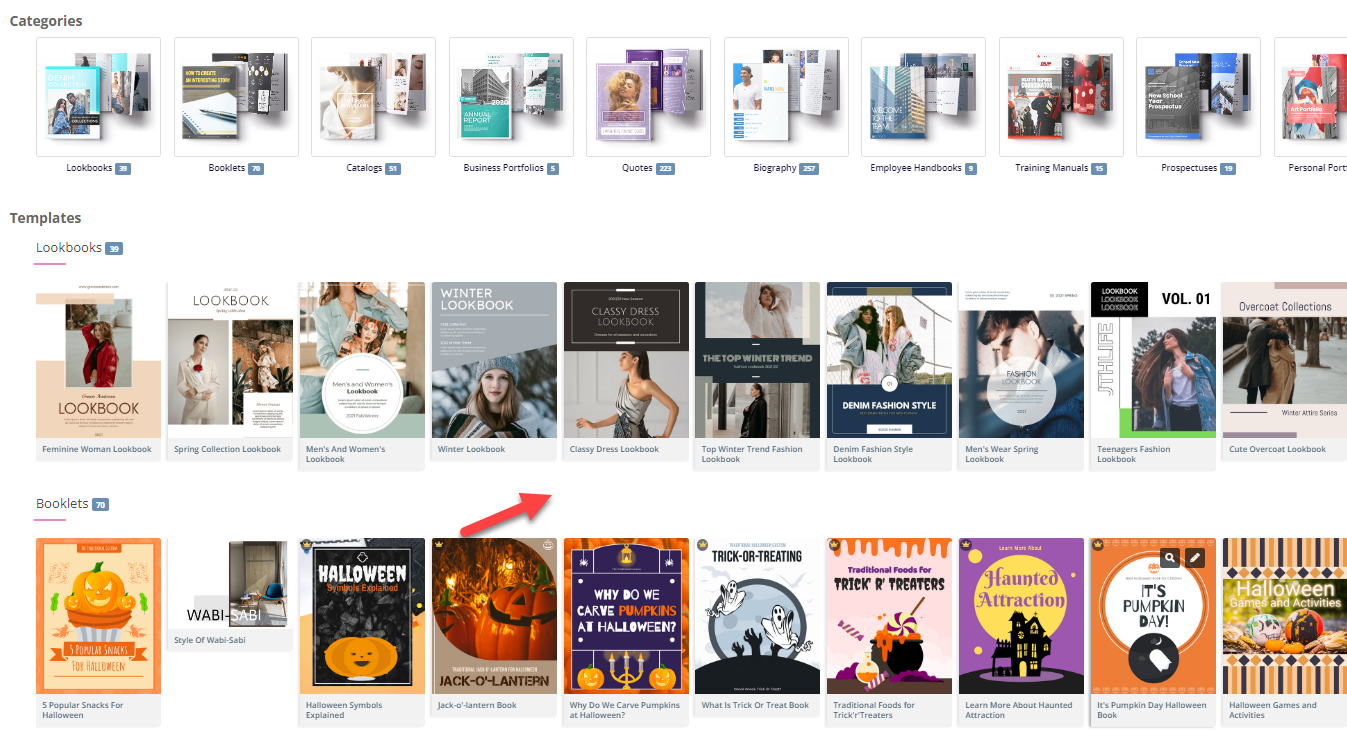
  1. Elija una plantilla:

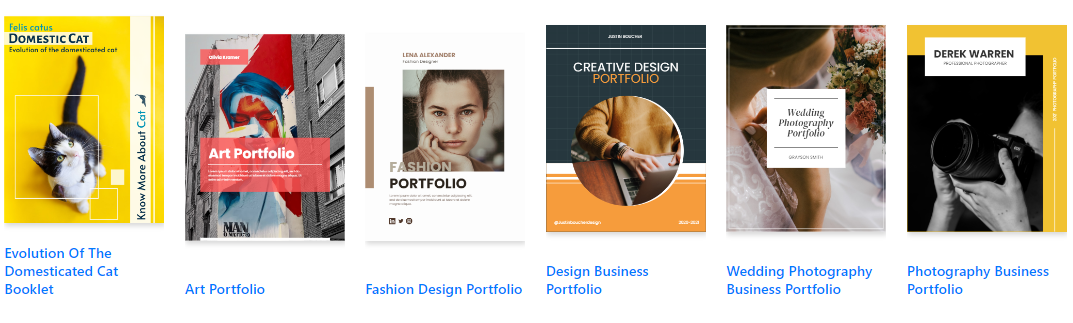
    • Navegue entre las plantillas de libros de volteo disponibles y elija una que mejor se adapte a su contenido. Las plantillas proporcionan una base para su diseño, permitiendo una personalización sencilla26.

Flipping into the Future: The Magic of Flipbooks with Animation Capability  - Visual Paradigm Blog

  1. Personalice la disposición:

    • Utilice la interfaz intuitiva para personalizar el diseño de su libro giratorio. Ajuste el diseño de las páginas, agregue elementos interactivos como anotaciones, resaltados y comentarios para aumentar la participación24.
  2. Agregue elementos interactivos:

    • Incorpore elementos interactivos como enlaces, videos y clips de audio para hacer que su libro giratorio sea más atractivo. Estos elementos se pueden agregar fácilmente utilizando la interfaz de arrastrar y soltar25.
  3. Integre animaciones (opcional):

    • Si desea mejorar su libro giratorio con animaciones, puede utilizar la herramienta AniFuzion de Visual Paradigm para crear o importar animaciones 2D y 3D. Estas animaciones se pueden integrar sin problemas en su libro giratorio para añadir atractivo visual20.

Paso 4: Agregar Texto a Voz (TTS) y voces humanas de IA

  1. Habilite TTS:

    • Incorpore la función de Texto a Voz (TTS) para narrar su libro giratorio. Esta característica mejora la experiencia interactiva, haciendo que el contenido sea más atractivo y accesible20.
  2. Personalice las voces humanas de IA:

    • Personalice las voces humanas de IA para que coincidan con el tono y estilo de su libro giratorio. Ajuste la configuración de la voz para asegurar una narración natural y profesional

Paso 5: Previsualización y publicación de su libro giratorio

  1. Previsualice el libro giratorio:

    • Previsualice su libro giratorio para asegurarse de que cumple con sus expectativas. Verifique el diseño, los elementos interactivos y las animaciones para asegurarse de que todo esté en su lugar
  2. Publique el libro giratorio:

    • Una vez satisfecho, haga clic en el botón “Publicar” para poner su libro giratorio en línea. Puede compartir el libro giratorio con su audiencia proporcionando un enlace o incrustándolo en su sitio web24.

Paso 6: Organiza tus libros digitales

  1. Crea una estantería virtual:

    • Navega hasta la función de estantería virtual en Visual Paradigm Online.
    • Crea una nueva estantería y personaliza su apariencia para que se ajuste a tu marca o estilo personal.
  2. Agrega libros digitales a la estantería:

    • Agrega tus libros digitales publicados a la estantería virtual. Organízalos por categoría, tema u otros criterios que tengan sentido para tu contenido.
    • Personaliza las miniaturas y descripciones de cada libro digital para que sean visualmente atractivos e informativos.
  3. Comparte tu estantería virtual:

    • Comparte tu estantería virtual con tu audiencia proporcionando un enlace o incrustándola en tu sitio web.
    • Promociona tu estantería a través de redes sociales, boletines por correo electrónico y otros canales de marketing para llegar a una audiencia más amplia.

Flipping Book Animation Software - Visual Paradigm Blog

Conclusión

Convertir un PDF en un maravilloso libro digital usando Visual Paradigm Online es una forma sencilla y atractiva de presentar tu contenido. Con funciones como plantillas personalizables, elementos interactivos, animaciones, texto a voz (TTS) y voces humanas de inteligencia artificial, puedes crear libros digitales cautivadores que destaquen. Ya sea para contenido educativo, presentaciones empresariales o proyectos personales, las herramientas de Visual Paradigm ofrecen un conjunto completo de funciones para dar vida a tus ideas y cautivar a tu audiencia. Siguiendo esta guía, puedes transformar tus PDF estáticos en libros digitales dinámicos e interactivos, mejorando la presentación y el compromiso de tu contenido con facilidad.

Domine su mercado con el analizador de las cinco fuerzas de Porter impulsado por IA de Visual Paradigm

Dominate your market with Visual Paradigm’s AI Porter’s Five Forces Analyzer. Generate fast, professional industry reports with actionable strategic insights.

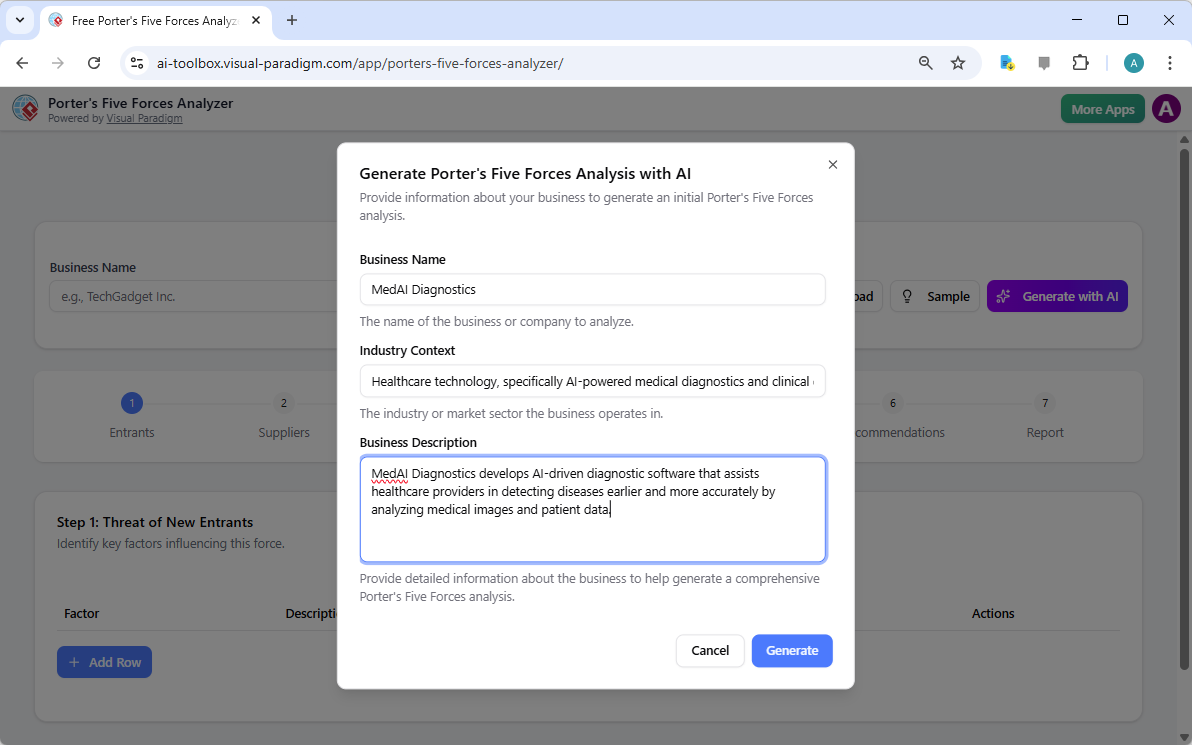
Descubra los secretos de su industria y sobrepase a la competencia con elanalizador de las cinco fuerzas de Porter impulsado por IA de Visual Paradigm. En el entorno empresarial actual, rápido y dinámico, comprender las fuerzas estructurales que influyen en su rentabilidad no es solo una ventaja, sino una necesidad para la supervivencia. Ya sea que sea un fundador de una startup o un estratega experimentado, estaherramienta profesional de análisis de industria proporciona la claridad que necesita para tomar decisiones ganadoras. La pantalla de inicio lo invita a una experiencia fluida donde simplemente describe su negocio para activar un motor estratégico de alto nivel que trabaja para usted.

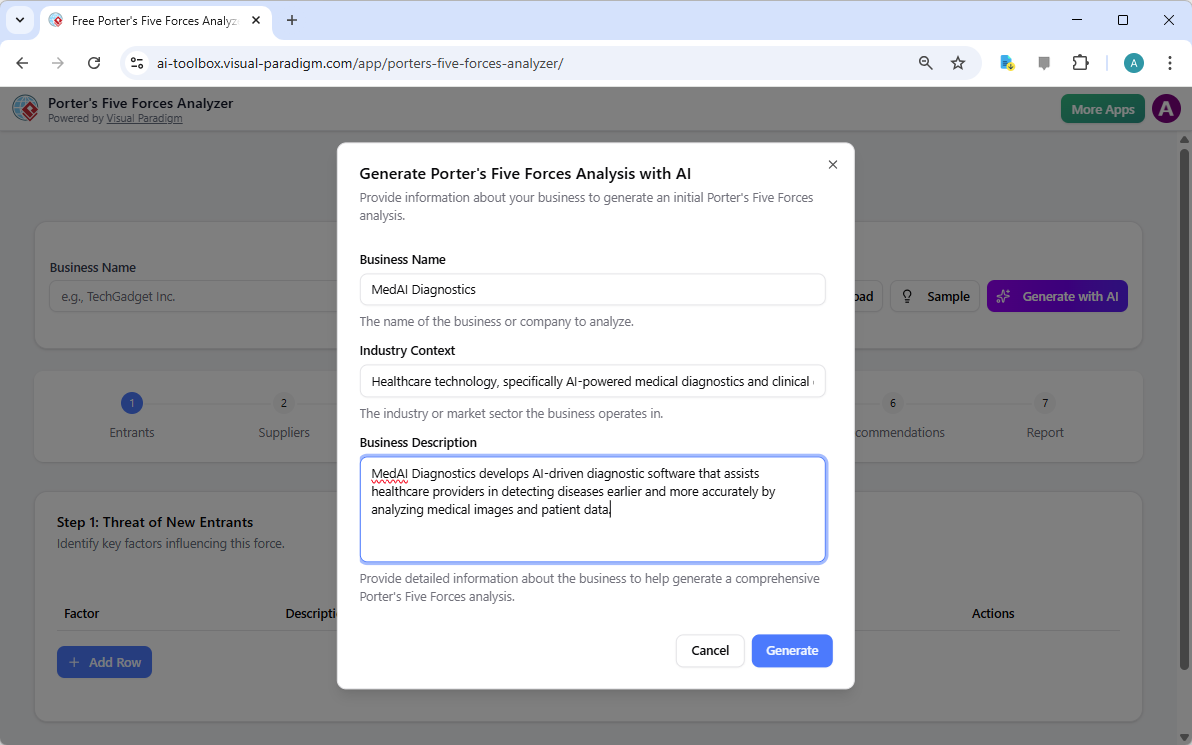
Como se ve en la configuración inicial, los usuarios pueden ingresar detalles específicos como el nombre de la empresa y el contexto industrial, por ejemplo, una empresa de diagnóstico médico de vanguardia, para recibir un análisis personalizado. Esta interfaz inteligente actúa como su consultor personal, cerrando la brecha entre los datos brutos y la inteligencia accionable.

Visual Paradigm’s AI-Powered Porter's Five Forces Analysis Tool landing screen, where users begin by entering a brief busines

Por qué toda empresa necesita una ventaja estratégica impulsada por IA

Realizar un estudio manual de la industria puede llevar días de investigaciones agotadoras. Sin embargo, con elsoftware de planificación estratégica fácil de usar, puede generar un borrador completo en cuestión de segundos. Esta herramienta no solo enumera hechos; interpreta la intensidad competitiva de su nicho de mercado específico, permitiéndole centrarse en la validación de alto nivel en lugar de la tediosa entrada de datos. Es la herramienta definitivamejor herramienta de análisis de industria para quienes valoran la velocidad y la precisión.

Resumen rápido de los beneficios clave

  • Análisis ultrarrápido: Genere un informe completo de las cinco fuerzas en minutos utilizando asistencia avanzada de IA.

  • Lógica estructurada en 7 pasos: Siga una metodología profesional y probada que no deja piedra sin mover.

  • Privacidad total: Guarde sus datos estratégicos sensibles localmente como archivos .json—¡no se requiere almacenamiento en la nube!

  • Inteligencia accionable: Vaya más allá de la teoría conrecomendaciones estratégicas específicas adaptadas a su negocio.

  • Salida profesional: Genere informes de alta calidad ideales para presentaciones a partes interesadas y reuniones del consejo.

Paso 1: Enfrentar la amenaza de nuevos competidores

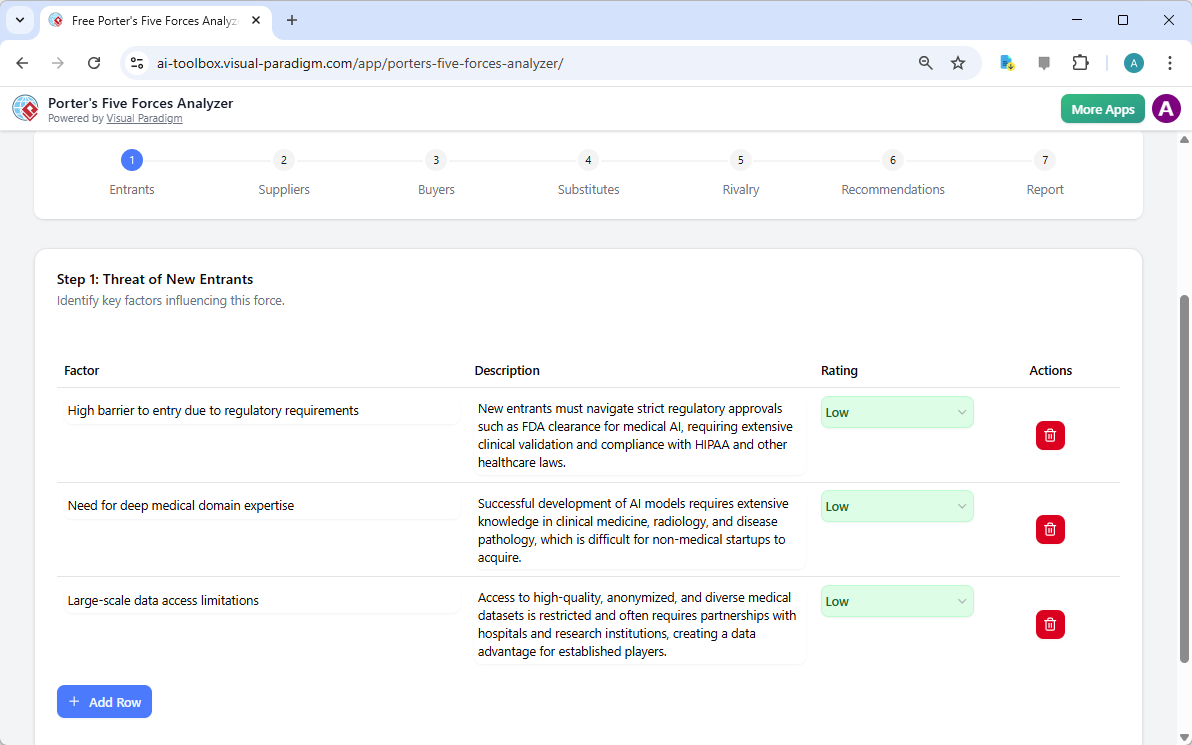
El primer paso en cualquier análisis sólido es evaluar qué tan fácil es para nuevos jugadores ingresar a su territorio. Usando elanalizador de las cinco fuerzas de Porter impulsado por IA, puede identificar barreras críticas para la entrada, como requisitos regulatorios, costos de capital y la necesidad de experiencia especializada en el dominio. En el ejemplo de una empresa médica de IA, la herramienta destaca cómo las aprobaciones de la FDA y el profundo conocimiento médico actúan como escudos poderosos para los jugadores establecidos.

Al calificar estos factores como Bajo, Medio o Alto, obtienes una representación visual inmediata de la defensibilidad de tu mercado. Esto herramienta estratégica en línea asegura que nunca quedes sorprendido por la aparición repentina de un nuevo competidor ¡!

The screenshot of Step 1 of Visual Paradigm AI-Powered Porter's Five Forces Analysis Tool. - Professional online diagram make

Paso 2: Evaluar el poder de negociación de los proveedores

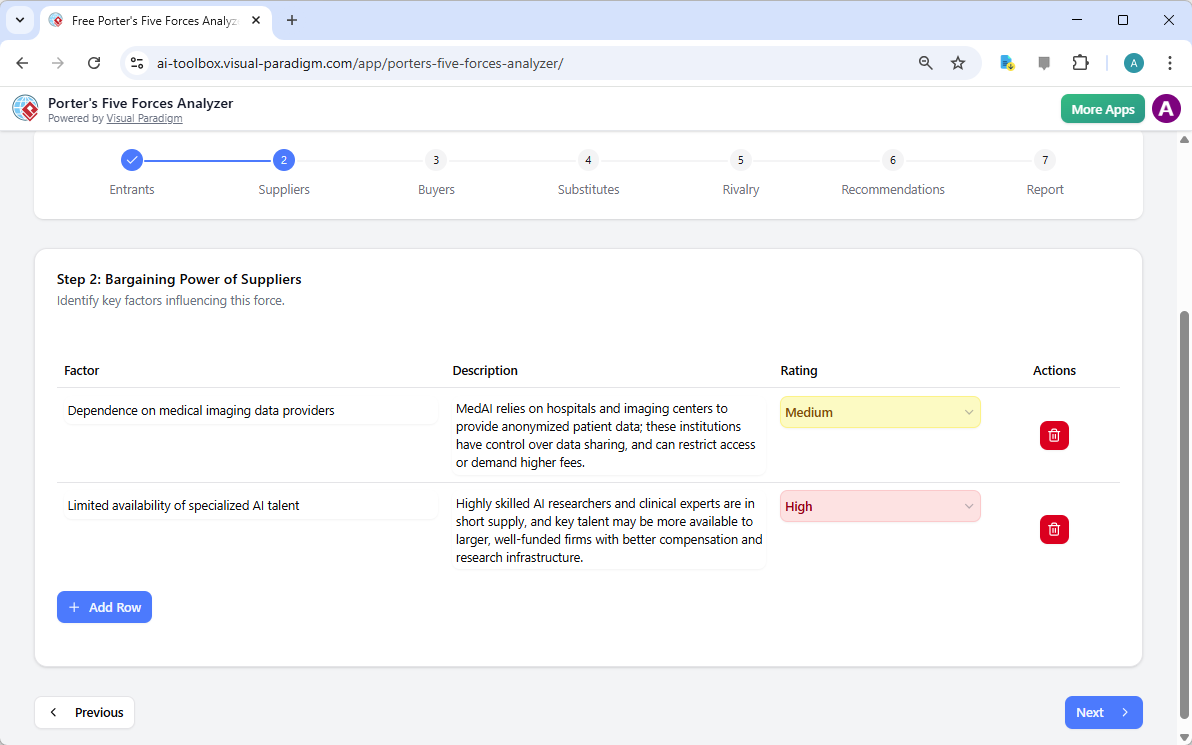
¿Están los proveedores comprimiendo tus márgenes? El paso 2 del flujo de trabajo se centra en el Poder de negociación de los proveedores. Esta sección te ayuda a identificar si tu negocio depende excesivamente de unos pocos proveedores clave, como talento especializado en IA o proveedores únicos de datos. Identificar estos cuellos de botella a tiempo te permite desarrollar estrategias de diversificación antes de que se conviertan en problemas críticos.

Las tablas dinámicas interactivas te permiten agregar filas personalizadas y perfeccionar las sugerencias generadas por IA, asegurando que el análisis refleje la realidad “de terreno” de tu cadena de suministro. ¡Es gestión estratégica hecha sencilla y efectiva!

The screenshot of Step 2 of the Visual Paradigm  AI-Powered Porter's Five Forces Analysis Tool. - Professional online diagram

Paso 3: Dominar el poder de negociación de los compradores

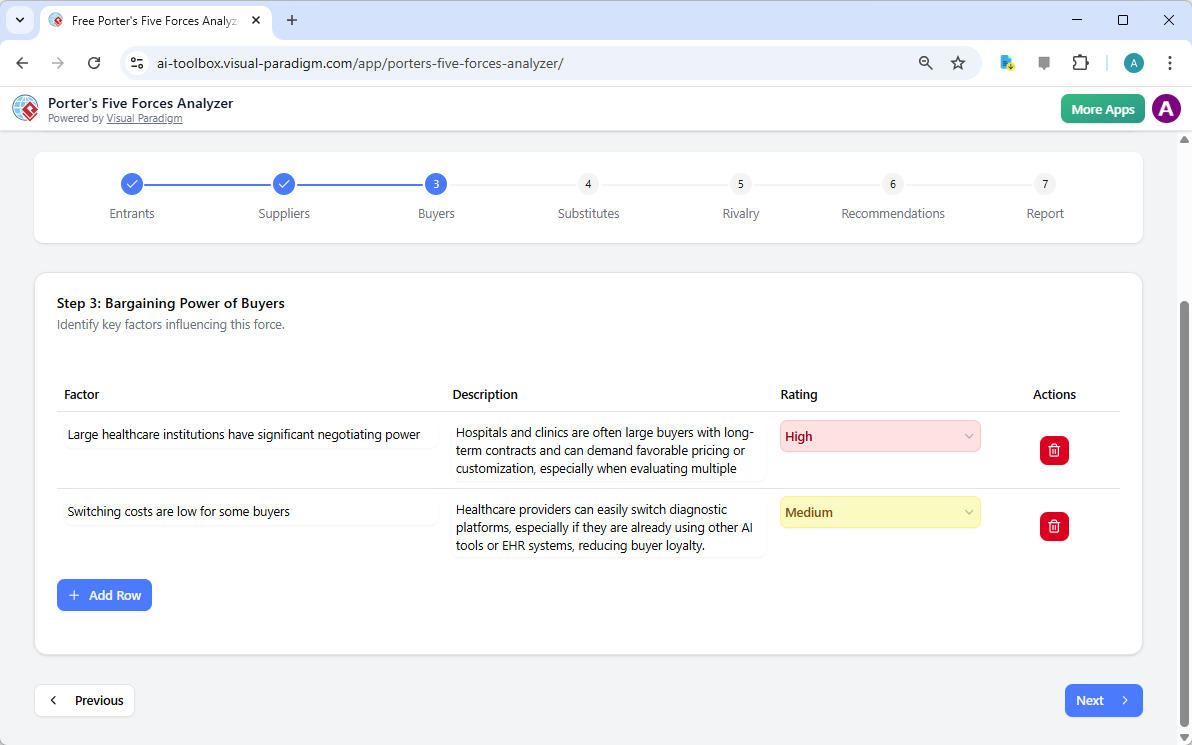
Tus clientes son tu sangre vital, pero su poder para reducir los precios puede ser una amenaza importante. En el paso 3, el mejor analizador de los Cinco Factores de Porter impulsado por IA examina el Poder de negociación de los compradores. Para una empresa de tecnología médica, esto podría implicar analizar el poder de negociación de grandes instituciones de salud o los bajos costos de cambio que podrían reducir la lealtad a la marca.

Comprender estas dinámicas es crucial para tu estrategia de precios. Al reconocer cuándo el poder del comprador es alto, puedes desviar tu enfoque hacia diferenciación y servicios con valor añadido que hacen que tu producto sea indispensable.

The screenshot of Step 3 of the Visual Paradigm  AI-Powered Porter's Five Forces Analysis Tool. - Professional online diagram

Paso 4: Identificar la amenaza de productos sustitutos

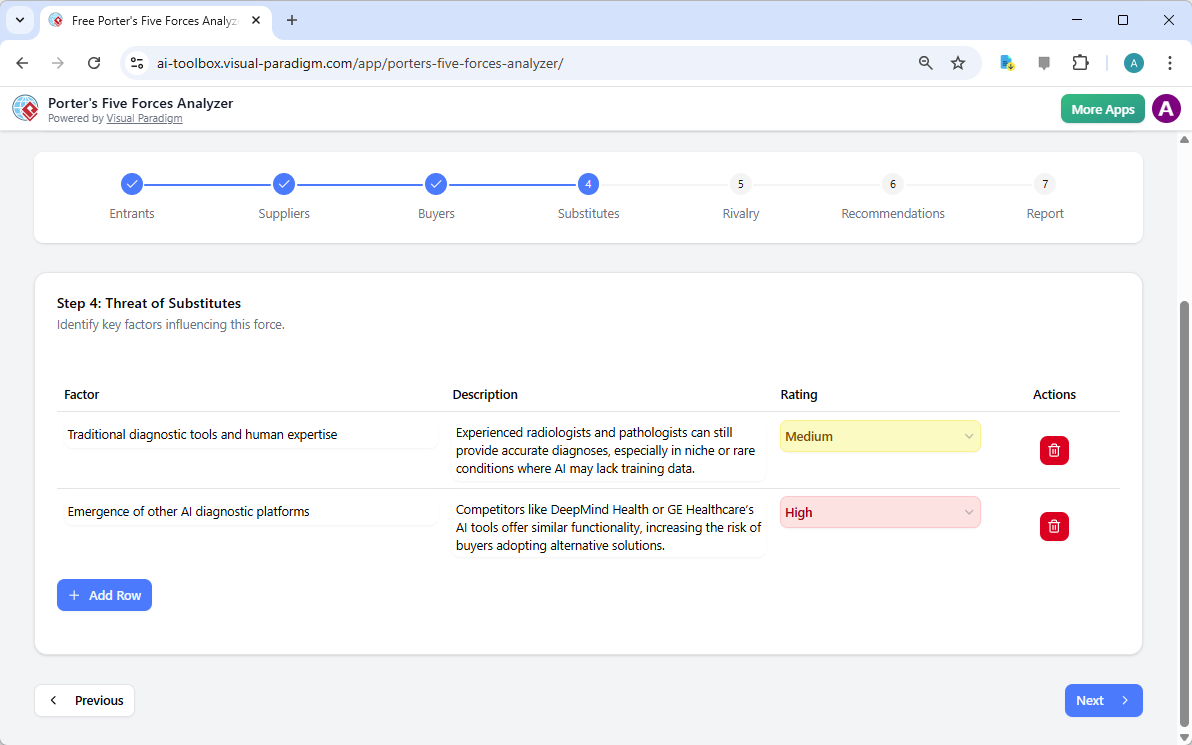
La competencia no siempre proviene de rivales directos; a veces proviene de formas completamente diferentes de resolver el mismo problema. El paso 4 te guía a través de la identificación del Amenaza de sustitutos. Ya sea la experiencia humana tradicional compitiendo contra la IA o una tecnología completamente nueva, esta herramienta asegura que estés mirando el panorama general.

Calificar la intensidad de estos sustitutos te ayuda a priorizar qué amenazas requieren la mayor atención en tus esfuerzos de marketing y I+D. Con esta software de análisis de nivel profesional, siempre estarás un paso adelante de los cambios del mercado!

The screenshot of Step 4 of the Visual Paradigm  AI-Powered Porter's Five Forces Analysis Tool. - Professional online diagram

Paso 5: Navegar la rivalidad entre competidores existentes

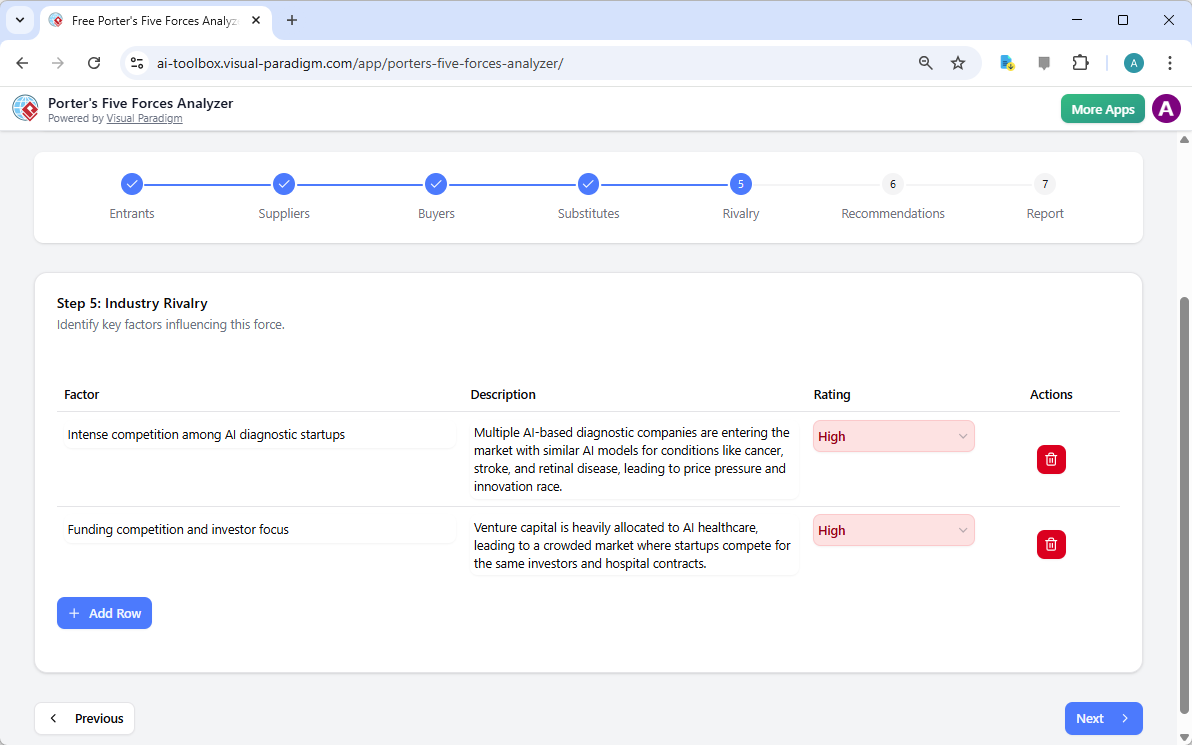
La fuerza final en el marco es el Rivalidad entre competidores existentes. A menudo es donde se siente la presión más intensa, caracterizada por guerras de precios, publicidad agresiva y innovación rápida. La herramienta te anima a evaluar el número de competidores y la tasa de crecimiento del sector para determinar el grado general de intensidad del mercado.

En un campo tan concurrido como la salud con IA, comprender la «carrera de innovación» es fundamental. Este paso te ayuda a visualizar el panorama competitivo para que puedas encontrar oportunidades de «océano azul» donde la rivalidad es menos intensa.

The screenshot of Step 5 of the Visual Paradigm  AI-Powered Porter's Five Forces Analysis Tool. - Professional online diagram

Paso 6: Elaboración de recomendaciones estratégicas ganadoras

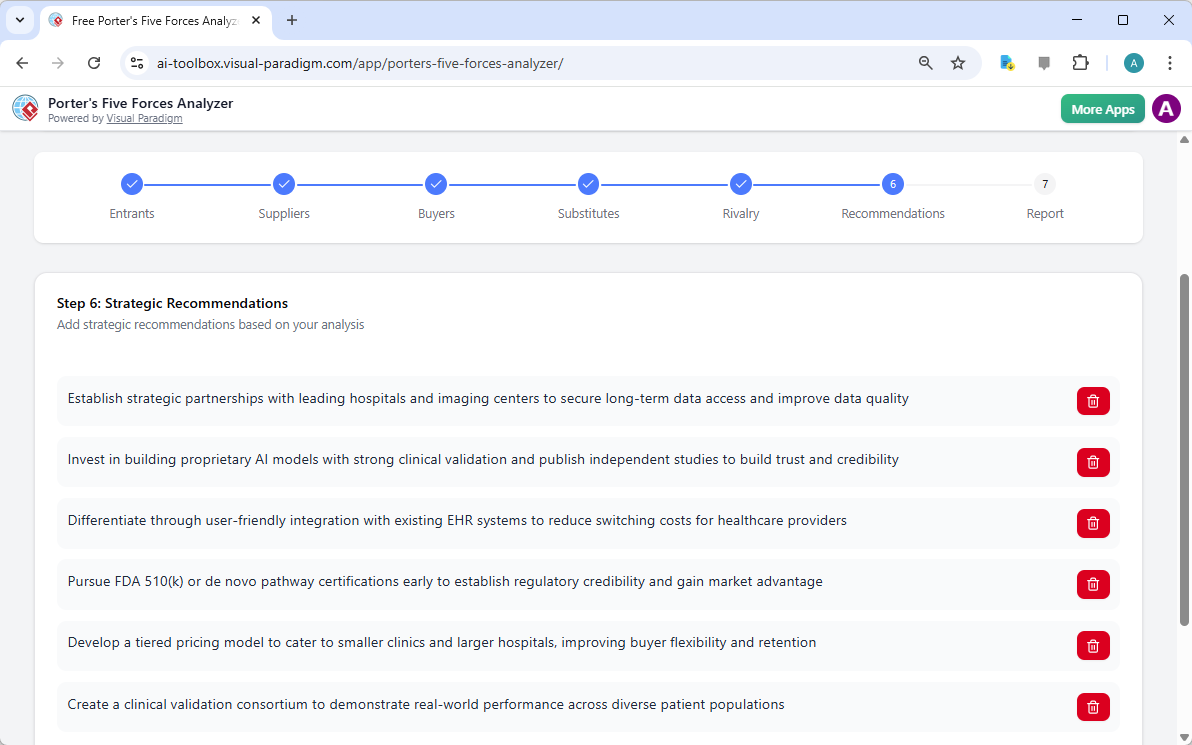
¡Un análisis solo es tan bueno como las acciones que inspira! El paso 6 del Analizador de los Cinco Factores de Porter impulsado por IAes donde ocurre la magia. Basado en los datos recopilados en los pasos anteriores, la IA sugiere poderosas recomendaciones estratégicas. Podrían incluir la obtención de certificaciones específicas, la formación de alianzas estratégicas o la creación de modelos de precios por niveles para captar más cuota de mercado.

Aquí es donde transformas las percepciones en una hoja de ruta para el éxito. Puedes editar estas recomendaciones para alinearlas perfectamente con la visión única y las capacidades de recursos de tu empresa.

The screenshot of Step 6 of the Visual Paradigm  AI-Powered Porter's Five Forces Analysis Tool - Professional online diagram

Paso 7: Generación de tu informe final profesional

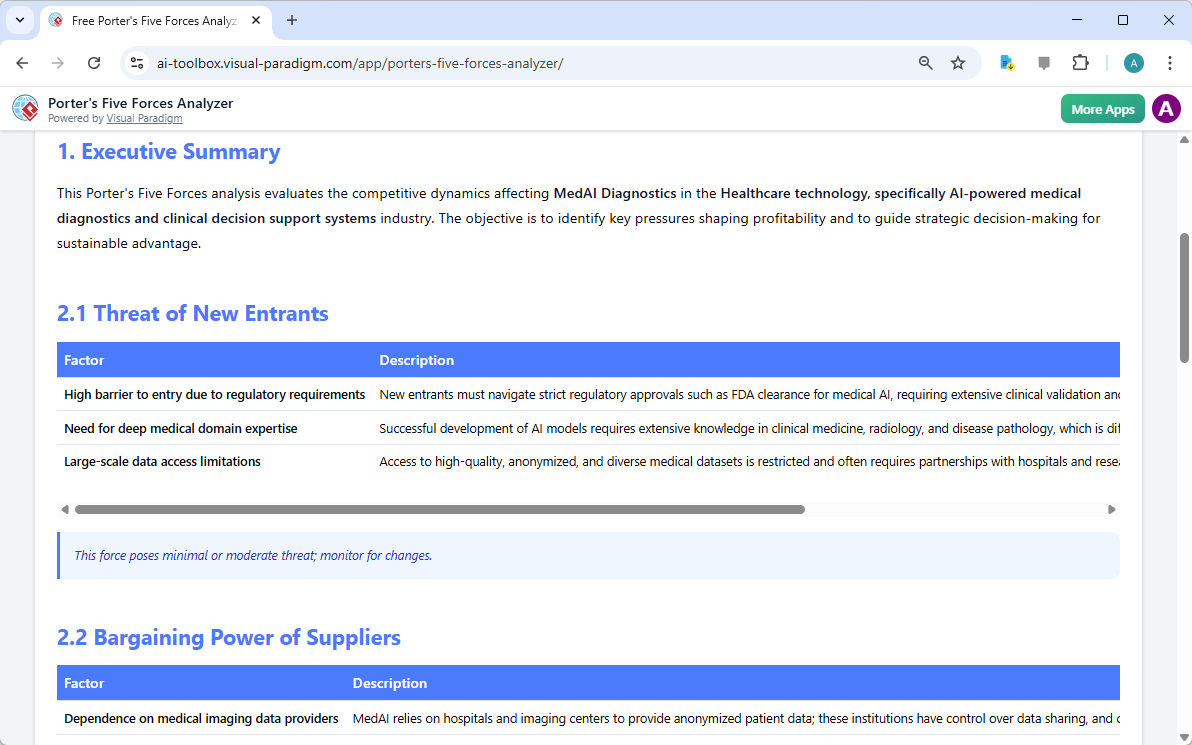
El culminar de tu esfuerzo es un informe final consolidado. El paso 7 reúne todos los factores, calificaciones de impacto y recomendaciones en un formato profesional y fácil de leer. Este es el documento que convence a los inversores y alinea a tu equipo. Incluye un resumen ejecutivo y un desglose detallado de cada fuerza, ofreciendo una visión completa de 360 grados sobre la atractividad de tu industria.

Puedes imprimir este informe directamente o guardarlo como un PDF, lo que lo hace increíblemente fácil de compartir con los interesados o incluir en tu plan de negocio formal. ¡Es la entrega definitiva para cualquier profesional de negocios serio!

The screenshot of Step 7 of the Visual Paradigm  AI-Powered Porter's Five Forces Analysis Tool, displaying the automatically

Domina tu estrategia hoy mismo!

Nunca ha habido un mejor momento para tomar el control de tu destino competitivo. El Analizador de los Cinco Factores de Porter impulsado por IAestá diseñado para dotarte de las percepciones necesarias para prosperar en cualquier industria. Desde identificar amenazas ocultas hasta aprovechar oportunidades sin explotar, esta herramienta es tu puerta de entrada a excelencia estratégica. No dejes tu éxito al azar: basa tus decisiones en el estándar de oro del análisis de la industria.

¿Listo para ver dónde se encuentra tu negocio en el panorama competitivo? Usa esta herramienta de planificación estratégica fácil de usarpara transformar tu conocimiento de la industria en una ventaja competitiva defendible ahora mismo!

Experimenta el poder de la estrategia impulsada por IA:

¡Prueba el Analizador de los Cinco Factores de Porter ahora!

Aprende más sobre nuestras herramientas estratégicas innovadoras.

Enlaces relacionados

Dominate Your Market with Visual Paradigm’s AI Porter’s Five Forces Analyzer

Dominate your market with Visual Paradigm’s AI Porter’s Five Forces Analyzer. Generate fast, professional industry reports with actionable strategic insights.

Unlock the secrets of your industry and outmaneuver the competition with the AI-powered Porter’s Five Forces Analyzer from Visual Paradigm! In today’s fast-paced business environment, understanding the structural forces that shape your profitability isn’t just an advantage—it’s a necessity for survival. Whether you are a startup founder or a seasoned strategist, this professional industry analysis tool provides the clarity you need to make winning decisions. The landing screen invites you into a seamless experience where you simply describe your business to ignite a high-level strategic engine that works for you!

As seen in the initial setup, users can input specific details like business name and industry context—such as a cutting-edge medical diagnostics firm—to receive a tailored analysis. This intelligent interface acts as your personal consultant, bridging the gap between raw data and actionable intelligence.

Visual Paradigm’s AI-Powered Porter's Five Forces Analysis Tool landing screen, where users begin by entering a brief busines

Why Every Business Needs an AI-Powered Strategic Edge

Conducting a manual industry study can take days of grueling research. However, with Visual Paradigm’s easy-to-use strategic planning software, you can generate a comprehensive draft in seconds! This tool doesn’t just list facts; it interprets the competitive intensity of your specific market niche, allowing you to focus on high-level validation rather than tedious data entry. It is the ultimate best industry analysis tool for those who value both speed and precision.

Quick Summary of Key Benefits

  • Lightning-Fast Analysis: Generate a full Five Forces report in minutes using advanced AI assistance.

  • Structured 7-Step Logic: Follow a proven, professional workflow that leaves no stone unturned.

  • Total Privacy: Save your sensitive strategic data locally as .json files—no cloud storage required!

  • Actionable Intelligence: Move beyond theory with specific strategic recommendations tailored to your business.

  • Professional Output: Produce high-quality reports perfect for stakeholder presentations and board meetings.

Step 1: Confronting the Threat of New Entrants

The first step in any robust analysis is evaluating how easy it is for new players to enter your territory. Using the AI-powered Porter’s Five Forces Analyzer, you can identify critical barriers to entry such as regulatory requirements, capital costs, and the need for specialized domain expertise. In the example of an AI medical firm, the tool highlights how FDA clearances and deep medical knowledge act as powerful shields for established players.

By rating these factors as Low, Medium, or High, you gain an immediate visual representation of your market’s defensibility. This online strategic tool ensures that you are never blindsided by a new competitor appearing overnight!

The screenshot of Step 1 of Visual Paradigm AI-Powered Porter's Five Forces Analysis Tool. - Professional online diagram make

Step 2: Evaluating the Bargaining Power of Suppliers

Are your suppliers squeezing your margins? Step 2 of the workflow focuses on the Bargaining Power of Suppliers. This section helps you identify if your business is overly dependent on a few key providers, such as specialized AI talent or unique data providers. Identifying these bottlenecks early allows you to develop diversification strategies before they become critical issues.

The interactive dynamic tables allow you to add custom rows and refine AI-generated suggestions, ensuring the analysis reflects the “on-the-ground” reality of your supply chain. It’s strategic management made simple and effective!

The screenshot of Step 2 of the Visual Paradigm  AI-Powered Porter's Five Forces Analysis Tool. - Professional online diagram

Step 3: Mastering the Bargaining Power of Buyers

Your customers are your lifeblood, but their power to drive down prices can be a major threat. In Step 3, the best AI-powered Porter’s Five Forces Analyzer examines the Bargaining Power of Buyers. For a medical tech company, this might involve analyzing the negotiating leverage of large healthcare institutions or the low switching costs that might reduce brand loyalty.

Understanding these dynamics is crucial for your pricing strategy. By recognizing when buyer power is high, you can shift your focus toward differentiation and value-added services that make your product indispensable.

The screenshot of Step 3 of the Visual Paradigm  AI-Powered Porter's Five Forces Analysis Tool. - Professional online diagram

Step 4: Identifying the Threat of Substitute Products

Competition doesn’t always come from direct rivals; sometimes, it comes from entirely different ways of solving the same problem. Step 4 guides you through identifying the Threat of Substitutes. Whether it’s traditional human expertise competing against AI or a completely new technology, this tool ensures you are looking at the big picture.

Rating the intensity of these substitutes helps you prioritize which threats need the most attention in your marketing and R&D efforts. With this professional-grade analysis software, you’ll always stay one step ahead of market shifts!

The screenshot of Step 4 of the Visual Paradigm  AI-Powered Porter's Five Forces Analysis Tool. - Professional online diagram

Step 5: Navigating Rivalry Among Existing Competitors

The final force in the framework is the Rivalry Among Existing Competitors. This is often where the most intense pressure is felt, characterized by price wars, aggressive advertising, and rapid innovation. The tool prompts you to assess the number of competitors and the rate of industry growth to determine the overall heat of the market.

In a crowded field like AI healthcare, understanding the “innovation race” is vital. This step helps you visualize the competitive landscape so you can find “Blue Ocean” opportunities where rivalry is less intense.

The screenshot of Step 5 of the Visual Paradigm  AI-Powered Porter's Five Forces Analysis Tool. - Professional online diagram

Step 6: Developing Winning Strategic Recommendations

An analysis is only as good as the actions it inspires! Step 6 of the AI-powered Porter’s Five Forces Analyzer is where the magic happens. Based on the data gathered in the previous steps, the AI suggests powerful strategic recommendations. These might include pursuing specific certifications, forming strategic partnerships, or creating tiered pricing models to capture more market share.

This is where you transform insights into a roadmap for success. You can edit these recommendations to align perfectly with your company’s unique vision and resource capabilities.

The screenshot of Step 6 of the Visual Paradigm  AI-Powered Porter's Five Forces Analysis Tool - Professional online diagram

Step 7: Generating Your Professional Final Report

The culmination of your hard work is a consolidated final report. Step 7 gathers every factor, impact rating, and recommendation into a professional, easy-to-read format. This is the document that wins over investors and aligns your team. It includes an executive summary and a detailed breakdown of each force, providing a complete 360-degree view of your industry’s attractiveness.

You can print this report directly or save it as a PDF, making it incredibly easy to share with stakeholders or include in your formal business plan. It’s the ultimate deliverable for any serious business professional!

The screenshot of Step 7 of the Visual Paradigm  AI-Powered Porter's Five Forces Analysis Tool, displaying the automatically

Master Your Strategy Today!

There has never been a better time to take control of your competitive destiny. Visual Paradigm’s AI-powered Porter’s Five Forces Analyzer is designed to empower you with the insights needed to thrive in any industry. From identifying hidden threats to capitalizing on untapped opportunities, this tool is your gateway to strategic excellence. Don’t leave your success to chance—base your decisions on the gold standard of industry analysis!

Ready to see where your business stands in the competitive landscape? Use this easy-to-use strategic planning tool to transform your industry knowledge into a defensible competitive advantage right now!

Experience the power of AI-driven strategy:

Try the Porter’s Five Forces Analyzer Now!

Learn more about our innovative strategic tools.

Related Links

Comprehensive Tutorial: Convert a PDF to a Wonderful Flipbook in a Few Clicks Using Visual Paradigm Online

Introduction

In today’s digital age, presenting content in an engaging and interactive manner is crucial for capturing and retaining audience attention. One effective way to achieve this is by converting traditional PDF documents into dynamic flipbooks. Visual Paradigm Online offers a powerful and user-friendly solution for this transformation with its Fliplify tool. This comprehensive tutorial will guide you through the process of converting a PDF to a wonderful flipbook in just a few clicks, highlighting the key features and benefits of using Visual Paradigm Online. Whether you are creating educational materials, business presentations, or personal projects, this guide will help you leverage the full potential of flipbooks to make your content stand out.

Can I turn my PDF into a Flipbook? - Visual Paradigm Blog

Converting a PDF to an engaging flipbook can significantly enhance the presentation and interactivity of your content. Visual Paradigm Online offers a seamless and user-friendly way to achieve this with its powerful Fliplify tool. This tutorial will guide you through the process of converting a PDF to a flipbook in just a few clicks, highlighting the key features and benefits of using Visual Paradigm Online.

Transform Your PDFs into Engaging Flipbooks with Our Powerful Tools - Visual Paradigm Blog

Step 1: Getting Started with Visual Paradigm Online

  1. Sign Up and Log In:

    • Visit the Visual Paradigm Online website and sign up for an account if you don’t already have one.
    • Log in to access the suite of tools, including Fliplify for creating flipbooks.
  2. Navigate to Fliplify:

    • Once logged in, navigate to the Fliplify section from the dashboard. This is where you will convert your PDF into a flipbook.

Step 2: Uploading Your PDF

  1. Upload the PDF:

    • Click on the “Create Flipbook” button and select the option to upload a PDF.
    • Choose the PDF file from your computer or cloud storage that you want to convert into a flipbook.
  2. Processing the PDF:

    • Visual Paradigm Online will automatically process the uploaded PDF and convert it into a flipbook format. This process typically takes just a few moments, depending on the size of the PDF.

Step 3: Customizing Your Flipbook

  1. Choose a Template:

    • Browse through the available flipbook templates and select one that best suits your content. Templates provide a foundation for your design, allowing for easy customization 26.

Flipping into the Future: The Magic of Flipbooks with Animation Capability  - Visual Paradigm Blog

  1. Customize the Layout:

    • Use the intuitive interface to customize the layout of your flipbook. Adjust the page layout, add interactive elements like annotations, highlights, and comments to enhance engagement 24.
  2. Add Interactive Elements:

    • Incorporate interactive elements such as links, videos, and audio clips to make your flipbook more engaging. These elements can be easily added using the drag-and-drop interface 25.
  3. Integrate Animations (Optional):

    • If you want to enhance your flipbook with animations, you can use Visual Paradigm’s AniFuzion tool to create or import 2D and 3D animations. These animations can be seamlessly integrated into your flipbook to add visual appeal 20.

Step 4: Adding Text-to-Speech (TTS) and AI Human Voices

  1. Enable TTS:

    • Incorporate Text-to-Speech (TTS) to narrate your flipbook. This feature enhances the interactive experience, making the content more engaging and accessible 20.
  2. Customize AI Human Voices:

    • Customize the AI human voices to match the tone and style of your flipbook. Adjust the voice settings to ensure a natural and professional narration.

Step 5: Previewing and Publishing Your Flipbook

  1. Preview the Flipbook:

    • Preview your flipbook to ensure it meets your expectations. Check the layout, interactive elements, and animations to make sure everything is in place.
  2. Publish the Flipbook:

    • Once satisfied, click on the “Publish” button to make your flipbook live. You can share the flipbook with your audience by providing a link or embedding it on your website 24.

Step 6: Organizing Your Flipbooks

  1. Create a Virtual Bookshelf:

    • Navigate to the virtual bookshelf feature in Visual Paradigm Online.
    • Create a new bookshelf and customize its appearance to match your branding or personal style.
  2. Add Flipbooks to the Bookshelf:

    • Add your published flipbooks to the virtual bookshelf. Organize them by category, topic, or any other criteria that make sense for your content.
    • Customize the thumbnails and descriptions of each flipbook to make them visually appealing and informative.
  3. Share Your Virtual Bookshelf:

    • Share your virtual bookshelf with your audience by providing a link or embedding it on your website.
    • Promote your bookshelf through social media, email newsletters, and other marketing channels to reach a wider audience.

Flipping Book Animation Software - Visual Paradigm Blog

Conclusion

Converting a PDF to a wonderful flipbook using Visual Paradigm Online is a straightforward and engaging way to present your content. With features like customizable templates, interactive elements, animations, text-to-speech (TTS), and AI human voices, you can create captivating flipbooks that stand out. Whether for educational content, business presentations, or personal projects, Visual Paradigm’s tools offer a comprehensive suite of features to bring your ideas to life and captivate your audience. By following this tutorial, you can transform your static PDFs into dynamic and interactive flipbooks, enhancing the presentation and engagement of your content with ease.

Comprehensive Guide to Creating Flipbooks and Organizing Them into a Beautiful Virtual Bookshelf

Introduction

Creating flipbooks with Visual Paradigm Online is a seamless and engaging way to present your content. Whether you’re designing educational materials, business presentations, or personal projects, Visual Paradigm’s tools offer a comprehensive suite of features to bring your ideas to life. This guide will walk you through the process of creating flipbooks, incorporating 2D and 3D animations, text-to-speech (TTS), and AI human voices, and organizing them into a beautiful virtual bookshelf.

Fliplify:Visual Paradigm Online的翻页书设计大师| 學習EA, Agile & UML 和使用Visual Paradigm 技能- 點部落

Step 1: Getting Started with Visual Paradigm Online

  1. Sign Up and Log In:

    • Visit the Visual Paradigm Online website and sign up for an account if you don’t already have one.
    • Log in to access the suite of tools, including Fliplify for creating flipbooks and AniFuzion for adding animations.
  2. Explore the Dashboard:

    • Familiarize yourself with the dashboard, which provides access to various tools and features.
    • Navigate to the Fliplify section to start creating your flipbook.

Make Your Flipbook Stand Out with AniFuzion - Fliplify

Step 2: Creating a Flipbook with Fliplify

  1. Choose a Template or Start from Scratch:

    • Browse through the available flipbook templates or choose to start from scratch. Templates provide a foundation for your design, while starting from scratch allows for more customization 26.
  2. Design Your Flipbook:

    • Use the intuitive interface to design your flipbook. Add pages, customize the layout, and incorporate interactive elements such as annotations, highlights, and comments 24.
    • Utilize the advanced design tools to ensure a polished and professional presentation.
  3. Integrate 2D and 3D Animations:

    • Use AniFuzion to create or import 2D and 3D animations. These animations can be seamlessly integrated into your flipbook to enhance engagement and visual appeal 20.
    • Ensure that the animations flow seamlessly with the rest of the content, using the interactive features of Fliplify to enhance comprehension 25.

Visual Paradigm Online: Revolutionizing Digital Content Creation - Cybermedian

  1. Add Text-to-Speech (TTS) and AI Human Voices:

    • Incorporate TTS and AI human voices to narrate your flipbook. This feature enhances the interactive experience, making the content more engaging and accessible 20.
    • Customize the voice settings to match the tone and style of your flipbook.

Bring Your Characters to Life with Enhanced TTS Support - Visual Paradigm  News

  1. Preview and Publish:

    • Preview your flipbook to ensure it meets your expectations. Make any necessary adjustments to the design and content.
    • Once satisfied, publish the flipbook and share it with your audience 24.

Step 3: Organizing Flipbooks into a Virtual Bookshelf

  1. Create a Virtual Bookshelf:

    • Navigate to the virtual bookshelf feature in Visual Paradigm Online.
    • Create a new bookshelf and customize its appearance to match your branding or personal style.
  2. Add Flipbooks to the Bookshelf:

    • Add your published flipbooks to the virtual bookshelf. Organize them by category, topic, or any other criteria that make sense for your content.
    • Customize the thumbnails and descriptions of each flipbook to make them visually appealing and informative.
  3. Customize the Bookshelf Layout:

    • Arrange the flipbooks on the bookshelf in a visually appealing manner. Use the layout tools to adjust the positioning and spacing of the flipbooks.
    • Add interactive elements, such as links to related content or additional resources, to enhance the user experience.
  4. Share Your Virtual Bookshelf:

    • Share your virtual bookshelf with your audience by providing a link or embedding it on your website.
    • Promote your bookshelf through social media, email newsletters, and other marketing channels to reach a wider audience.

Step 4: Enhancing Engagement with Interactive Features

  1. Interactive Annotations:

    • Add annotations, highlights, and comments to your flipbooks to enhance engagement and comprehension. These interactive elements make the content more dynamic and personalized 25.
  2. Quizzes and Polls:

    • Incorporate quizzes and polls within your flipbooks to engage your audience and gather feedback. This feature is particularly useful for educational content and business presentations.
  3. Multimedia Integration:

    • Integrate multimedia elements, such as videos, images, and audio clips, to enhance the visual appeal and engagement of your flipbooks.
    • Ensure that the multimedia elements are seamlessly integrated with the rest of the content, using the interactive features of Fliplify to enhance comprehension 25.

How to Add Voice to Characters by Text-to-Speech with Perfect Lip Sync-  AniFuzion


Conclusion

Creating flipbooks with Visual Paradigm Online and organizing them into a beautiful virtual bookshelf is a powerful way to present your content engagingly and interactively. With features like 2D and 3D animations, TTS, and AI human voices, you can enhance the visual appeal and engagement of your flipbooks. Whether for educational content, business presentations, or personal projects, Visual Paradigm’s tools offer a comprehensive suite of features to bring your ideas to life and captivate your audience.

Comprehensive Tutorial for Creating Wonderful Animation Flipbooks with Visual Paradigm’s AniFuzion and Fliplify

Introduction

Creating an animation flipbook combines the engaging nature of animations with the interactive experience of flipbooks. Visual Paradigm’s AniFuzion and Fliplify tools offer a seamless way to achieve this, allowing users to create captivating content that stands out. This tutorial will guide you through the process of creating an animation flipbook, highlighting why these tools are an excellent choice and how they can make your content more attractive and engaging.

Why Choose Visual Paradigm’s AniFuzion and Fliplify?

Elevate Your Animations with Sound in AniFuzion - AniFuzion

  1. User-Friendly Interface:

    • Both AniFuzion and Fliplify provide intuitive interfaces that make it easy for users, regardless of their technical expertise, to create professional-quality animations and flipbooks 2024.
  2. Comprehensive Toolkit:

    • These tools offer a wide range of features, including 2D and 3D animation, customizable templates, and interactive elements, ensuring that users have everything they need to create engaging content 2126.
  3. Seamless Integration:

    • AniFuzion and Fliplify integrate seamlessly with each other and with other features of Visual Paradigm Online, creating a comprehensive suite for all your creative needs 2126.
  4. High-Quality Output:

    • The tools ensure that the final output is of high quality, with polished and professional-looking animations and flipbooks that captivate audiences 2024.
  5. Customer Support:

    • Visual Paradigm provides excellent customer support, assisting users with any issues or questions they may have while using the tools 27.

How Animated Flipbooks Make Content Attractive and Engaging

Flipping Book Animation Software - Visual Paradigm Blog

  1. Visual Appeal:

    • Animated flipbooks combine the visual appeal of animations with the interactive experience of flipbooks, making the content more engaging and visually appealing 20.
  2. Interactive Experience:

    • The interactive nature of flipbooks allows users to engage with the content in a more dynamic way, enhancing comprehension and retention 25.
  3. Storytelling:

    • Animated flipbooks enable users to tell stories in a more compelling way, using animations to bring characters and scenes to life 21.
  4. Versatility:

    • Animated flipbooks can be used for a wide range of purposes, from educational content and business presentations to marketing materials and personal projects 2426.

Tutorial: Creating an Animation Flipbook with AniFuzion and Fliplify

Visual Paradigm Flipbook Maker: Elevate Your Digital Presence with Dynamic and Engaging Flipbooks - Visual Paradigm Blog

Step 1: Create Animations with AniFuzion
  1. Sign Up and Log In:

    • Sign up for a Visual Paradigm Online account and log in to access AniFuzion.
  2. Choose a Template or Start from Scratch:

    • Browse through the available templates or choose to start from scratch. Templates provide a foundation for your animation, while starting from scratch allows for more customization 21.
  3. Design Your Animation:

    • Use the intuitive interface to design your animation. Add characters, scenes, and props, and customize their appearance and actions. Utilize the 2D and 3D animation features to bring your vision to life 20.
  4. Add Interactive Elements:

    • Incorporate interactive elements, such as annotations, highlights, and comments, to enhance engagement and comprehension 25.
  5. Preview and Export:

    • Preview your animation to ensure it meets your expectations. Once satisfied, export the animation in the desired format 20.
Step 2: Create a Flipbook with Fliplify
  1. Upload Your Animation:

    • Log in to Visual Paradigm Online and access Fliplify. Upload your exported animation to use as content for your flipbook 24.
  2. Choose a Template or Start from Scratch:

    • Browse through the available flipbook templates or choose to start from scratch. Templates provide a foundation for your flipbook, while starting from scratch allows for more customization 26.
  3. Design Your Flipbook:

    • Use the intuitive interface to design your flipbook. Add pages, customize the layout, and incorporate interactive elements, such as annotations and highlights 24.
  4. Integrate Your Animation:

    • Integrate your animation into the flipbook, ensuring that it flows seamlessly with the rest of the content. Utilize the interactive features of Fliplify to enhance the engagement and comprehension of the animation 25.
  5. Preview and Publish:

    • Preview your flipbook to ensure it meets your expectations. Once satisfied, publish the flipbook and share it with your audience 24.

Conclusion

Creating an animation flipbook with Visual Paradigm’s AniFuzion and Fliplify is a powerful way to make your content more attractive and engaging. With their user-friendly interfaces, comprehensive toolkits, seamless integration, and high-quality output, these tools provide everything needed to create captivating animation flipbooks. Whether for educational content, business presentations, marketing materials, or personal projects, AniFuzion and Fliplify offer a seamless and productive experience, making them an ideal choice for all your creative needs.

Comprehensive Tutorial for Creating Stunning Flipbooks with Fliplify of Visual Paradigm Online

Introduction

Fliplify, part of Visual Paradigm Online, is a powerful tool designed to help users create captivating digital flipbooks and slideshows. Whether you are starting from scratch or uploading existing content, Fliplify offers a seamless and user-friendly experience. This tutorial will guide you through the process of creating stunning flipbooks, highlighting the key features, application areas, and reasons why Fliplify stands out.

Why Choose Fliplify?

  1. User-Friendly Interface:

    • Fliplify provides an intuitive and user-friendly interface that makes it easy for users to create professional-looking flipbooks without the need for extensive technical knowledge 24.
  2. Versatile Content Creation:

    • Users can craft flipbooks from various sources, including PDFs, PowerPoints, and more. This versatility allows for a wide range of content to be transformed into engaging flipbooks 24.
  3. Customization Options:

    • Fliplify empowers users to customize every aspect of their flipbooks, from layout and design to interactive elements. This ensures a polished and professional presentation tailored to specific needs 24.
  4. Interactive Elements:

    • The tool allows for the addition of interactive elements, such as annotations, highlights, and comments, enhancing the engagement and comprehension of the content 25.
  5. Seamless Integration:

    • Fliplify seamlessly integrates with other features of Visual Paradigm Online, creating a comprehensive suite for all your creative needs. This integration ensures a smooth and productive experience 26.

Application Areas

  1. Business Presentations:

    • Create engaging and interactive business presentations that captivate audiences and effectively communicate key messages.
  2. Educational Content:

    • Develop educational materials that are visually appealing and interactive, enhancing the learning experience for students.
  3. Marketing Materials:

    • Design digital brochures, product catalogs, and other marketing materials that stand out and engage potential customers.
  4. Personal Projects:

    • Use Fliplify for personal projects, such as creating photo albums, travel journals, or any other content that benefits from an interactive and visually appealing format.

Why Fliplify Stands Out

  1. Comprehensive Toolkit:

    • Fliplify offers a robust set of tools for creating, editing, and publishing flipbooks. From basic design elements to advanced customization options, Fliplify provides everything needed to create stunning flipbooks 26.
  2. Easy to Use:

    • The platform is designed to be easy to use, with a straightforward interface that allows users to focus on their creative projects without the hassle of complex software installations 24.
  3. High-Quality Output:

    • Fliplify ensures that the published flipbooks are of high quality, with professional-looking designs and interactive elements that enhance the user experience 24.
  4. Customer Support:

    • Visual Paradigm Online provides excellent customer support, assisting users with any issues or questions they may have while using the Flipbook feature 27.

Feature List

  1. Customizable Templates:

    • Choose from a variety of customizable templates to start your flipbook project. These templates provide a foundation for your design, allowing for easy customization to fit your specific needs 26.
  2. Interactive Annotations:

    • Add annotations, highlights, and comments to your flipbooks to enhance engagement and comprehension. These interactive elements make the content more dynamic and personalized 25.
  3. Multiple File Format Support:

    • Convert various file types into flipbooks, including PDFs, PowerPoints, eBooks, and spreadsheets. This versatility allows for a wide range of content to be transformed into engaging flipbooks 27.
  4. Advanced Design Tools:

    • Utilize advanced design tools to customize the layout, design, and interactive elements of your flipbooks. These tools ensure a polished and professional presentation 26.
  5. Seamless Integration with Visual Paradigm Online:

    • Fliplify integrates seamlessly with other features of Visual Paradigm Online, creating a comprehensive suite for all your creative needs. This integration ensures a smooth and productive experience 26.

Conclusion

Fliplify of Visual Paradigm Online stands out as a powerful and user-friendly tool for creating stunning flipbooks. With its intuitive interface, versatile content creation options, and advanced design tools, Fliplify provides everything needed to create engaging and interactive flipbooks. Whether for business presentations, educational content, marketing materials, or personal projects, Fliplify offers a seamless and productive experience, making it an ideal choice for all your flipbook needs.