Полное руководство по ArchiMate, поддерживающее TOGAF ADM

Введение в ArchiMate

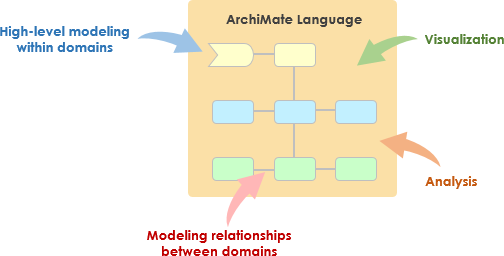
ArchiMate — это открытый и независимый язык моделирования корпоративной архитектуры, который поддерживает описание, анализ и визуализацию архитектуры внутри и между бизнес-областями. Он разработан для обеспечения четкого и однозначного способа передачи сложных архитектур заинтересованным сторонам. ArchiMate особенно полезен при использовании совместно с методом разработки архитектуры TOGAF (ADM), обеспечивая стандартизированный способ моделирования и передачи корпоративных архитектур.
What is ArchiMate?

Ключевые концепции ArchiMate

ArchiMate Core Framework

1. Уровни ArchiMate

ArchiMate делит корпоративную архитектуру на три основных уровня:

  • Уровень бизнеса: Ориентирован на бизнес-процессы, услуги и функции, поддерживающие цели организации.
  • Уровень приложений: Занимается сервисами приложений, компонентами и их взаимодействием, поддерживающими уровень бизнеса.
  • Уровень технологий: Охватывает технологическую инфраструктуру, включая аппаратное обеспечение, программное обеспечение и сетевые компоненты, поддерживающие уровень приложений.

2. Основные элементы

ArchiMate определяет несколько основных элементов, используемых для моделирования архитектуры:

  • Активные структурные элементы: Представляют сущности, выполняющие поведение, такие как бизнес-акторы, компоненты приложений и устройства.
  • Элементы поведения: Представляют процессы, функции, услуги и взаимодействия внутри архитектуры.
  • Пассивные структурные элементы: Представляют информацию или данные, используемые или создаваемые элементами поведения, такие как бизнес-объекты и объекты данных.

3. Связи

ArchiMate определяет несколько типов связей для соединения элементов:

  • Структурные связи: Например, композиция, агрегация и специализация.
  • Зависимые связи: Например, ассоциация, реализация и используется-с.
  • Динамические связи: Например, запуск и поток.

4. Точки зрения

ArchiMate предоставляет несколько точек зрения для визуализации архитектуры с разных точек зрения:

  • Точка зрения на бизнес-процессы: Показывает бизнес-процессы и их взаимодействия.
  • Точка зрения на взаимодействие приложений: Показывает, как приложения взаимодействуют для поддержки бизнес-процессов.
  • Точка зрения на реализацию технологий: Показывает, как компоненты технологии реализуют компоненты приложений.

ArchiMate и TOGAF ADM

Методология разработки архитектуры TOGAF (ADM)

ADM TOGAF — это всесторонняя методология разработки корпоративных архитектур. Она состоит из нескольких этапов, каждый из которых фокусируется на определённой аспекте процесса разработки архитектуры. ArchiMate поддерживает ADM TOGAF, обеспечивая стандартизированный способ моделирования и визуализации архитектуры на каждом этапе.
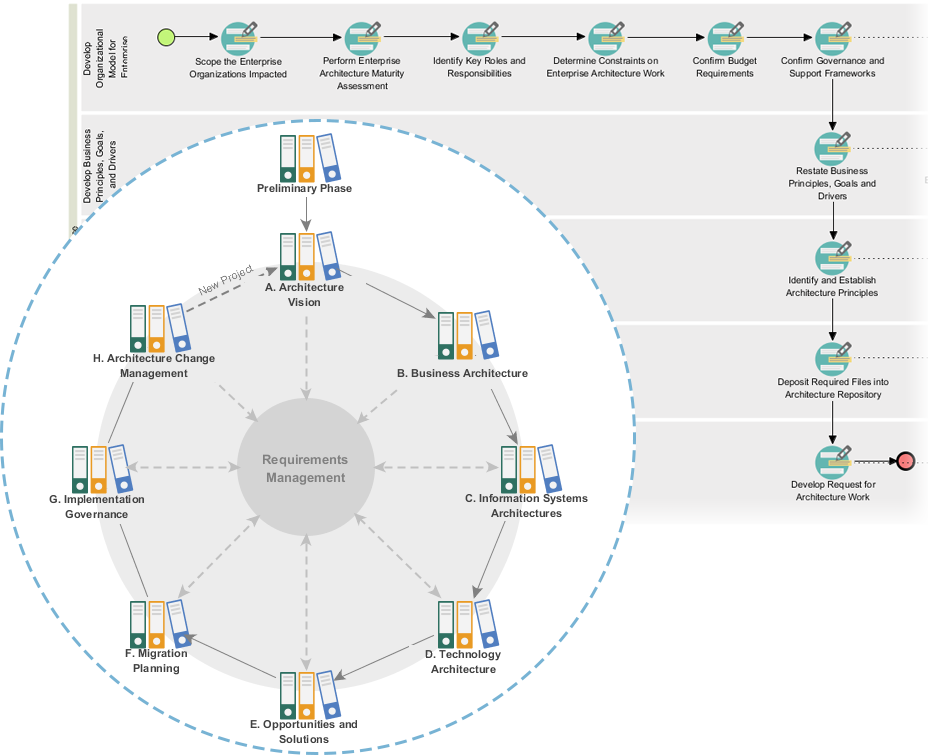
Powerful TOGAF ADM Toolset

Этапы ADM TOGAF

  1. Предварительный этап: Устанавливает принципы архитектуры, рамки и управление.
  2. Видение архитектуры: Определяет охват, заинтересованные стороны, вопросы и бизнес-цели.
  3. Бизнес-архитектура: Разрабатывает бизнес-архитектуру, включая бизнес-процессы и услуги.
  4. Архитектуры информационных систем: Разрабатывает архитектуры данных и приложений.
  5. Технологическая архитектура: Разрабатывает технологическую архитектуру.
  6. Возможности и решения: Определяет и приоритизирует проекты архитектуры.
  7. Планирование миграции: Разрабатывает план миграции и внедрения.
  8. Управление внедрением: Обеспечивает управление и поддержку внедрения архитектуры.

Примеры моделей ArchiMate

Этот диаграмма иллюстрирует многоуровневую архитектуру системы управления здравоохранением, разделенную на два основных уровня: Уровень приложений и Уровень технологий. Вот подробное объяснение каждого компонента и их взаимодействия:
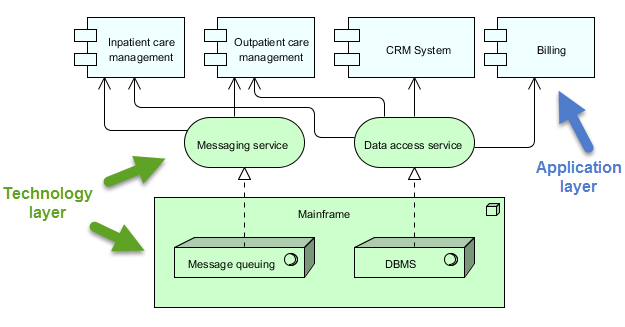
archimate diagram example

Уровень приложений (синий)

Этот уровень состоит из различных приложений и систем, которые напрямую взаимодействуют с пользователями или другими системами для управления услугами здравоохранения. Основные компоненты на этом уровне:

  1. Управление лечением пациентов, находящихся в стационаре:

    • Управляет услугами и процессами, связанными с пациентами, которые находятся в стационаре.
  2. Управление лечением пациентов, посещающих больницу, но не проходящих госпитализацию:

    • Управляет услугами и процессами для пациентов, которые посещают больницу для лечения, но не проходят госпитализацию.
  3. Система управления взаимоотношениями с клиентами (CRM):

    • Управляет взаимодействием с пациентами, включая коммуникацию, последующие визиты и управление отношениями с пациентами.
  4. Биллинг:

    • Обрабатывает финансовые аспекты, включая выставление счетов, обработку платежей и управление финансовыми записями.

Уровень технологий (зелёный)

Этот уровень предоставляет базовую инфраструктуру и службы, которые поддерживают приложения на уровне приложений. Основные компоненты на этом уровне:

  1. Сервис сообщений:

    • Обеспечивает коммуникацию между различными приложениями и системами в системе управления здравоохранением.
    • Обеспечивает надежную доставку сообщений в правильном порядке.
  2. Сервис доступа к данным:

    • Предоставляет централизованный способ доступа и управления данными по всей системе.
    • Обеспечивает эффективное и безопасное извлечение и хранение данных.
  3. Мейнфрейм:

    • Центральная вычислительная система, которая обеспечивает работу основных служб и данных.
    • Включает два основных компонента:
      • Очереди сообщений: Управляет очередями и обработкой сообщений для обеспечения надежной связи.
      • СУБД (система управления базами данных): Хранит и управляет данными, используемыми различными приложениями.

Взаимодействия

  • Управление лечением пациентов, находящихся в стационареУправление лечением амбулаторных пациентовСистема управления взаимоотношениями с клиентами, и Биллинг взаимодействуют с Сервис сообщений и Сервис доступа к данным для выполнения своих функций.
  • Сервис Сервис сообщений и Сервис доступа к данным полагаются на Мейнфрейм для основных служб, таких как очередь сообщений и управление базами данных.
  • Сервис Мейнфреймгарантирует правильную обработку сообщений и эффективное управление данными, обеспечивая работу всей системы.

Диаграмма демонстрирует структурированный подход к управлению медицинскими услугами за счёт разделения функций приложения от лежащей в основе технологической инфраструктуры. Это разделение позволяет создавать более модульную и поддерживаемую архитектуру системы, при которой изменения в одном слое оказывают минимальное влияние на другой. Сервис сообщений и Сервис доступа к даннымвыступают посредниками, обеспечивая обмен информацией и управление данными между компонентами приложения и основной вычислительной системой.

Рекомендуемый инструмент ArchiMate для EA

Visual Paradigm широко признан одним из лучших инструментов для моделирования ArchiMate в проектах архитектуры предприятия (EA). Вот некоторые причины, по которым он высоко рекомендуется:
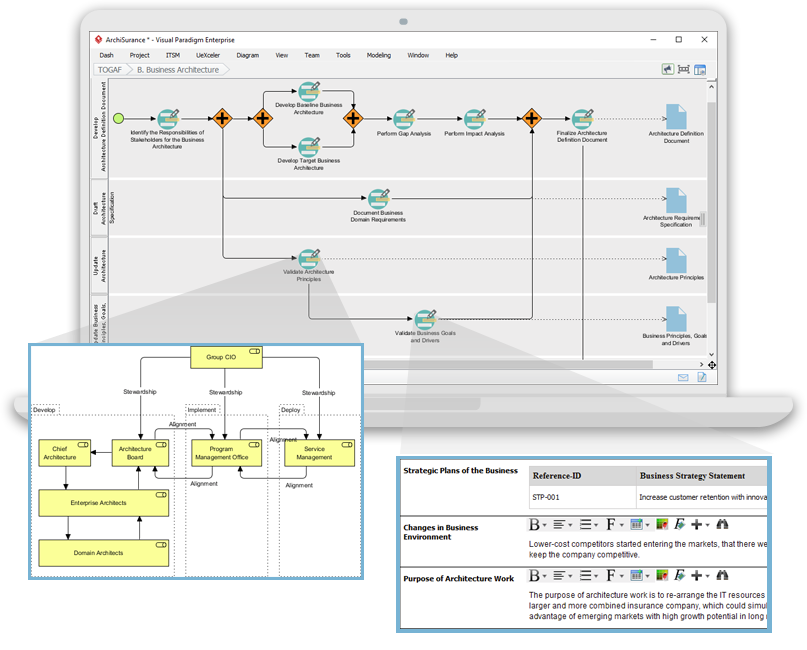
Navigating TOGAF: Your Guide to the ADM Process - Visual Paradigm Guides

1. Полная поддержка ArchiMate

  • Полный стандарт ArchiMate: Visual Paradigm поддерживает последние стандарты ArchiMate, включая ArchiMate 3.1, обеспечивая возможность использования всех официальных элементов и отношений ArchiMate.
  • Богатая библиотека элементов: Он предоставляет обширную библиотеку символов ArchiMate, что упрощает создание подробных и точных моделей.

2. Пользовательский интерфейс

  • Интуитивно понятный дизайн: Инструмент предлагает удобный интерфейс, который легко освоить, даже для пользователей, которые только начинают работать с моделированием ArchiMate.
  • Перетаскивание: Функция перетаскивания позволяет быстро и эффективно создавать модели.

3. Расширенные функции моделирования

  • Многоуровневые представления: Поддерживает создание многоуровневых представлений (например, бизнес, приложение, технология), обеспечивая всесторонний обзор архитектуры предприятия.
  • Межуровневые отношения: Легко определять и визуализировать отношения между различными уровнями архитектуры.

4. Совместная работа и обмен

  • Совместная работа команды: Visual Paradigm поддерживает совместную работу, позволяя нескольким пользователям одновременно работать над одним проектом.
  • Контроль версий: Интегрированный контроль версий помогает управлять изменениями и отслеживать эволюцию ваших моделей.

5. Возможности интеграции

  • Интеграция инструментов: Безупречно интегрируется с другими инструментами и платформами, такими как JIRA, Confluence и различные базы данных, улучшая общую практику архитектуры предприятия.
  • Импорт/экспорт: Поддерживает импорт и экспорт моделей в различных форматах, включая формат обмена ArchiMate, обеспечивая совместимость с другими инструментами.

6. Документирование и отчетность

  • Автоматическое документирование: Генерирует подробную документацию на основе ваших моделей ArchiMate, экономя время и обеспечивая согласованность.
  • Пользовательские отчеты: Позволяет создавать пользовательские отчеты, адаптированные под конкретные потребности заинтересованных сторон.

7. Обучение и поддержка

  • Обширные ресурсы: Предоставляет обширный набор обучающих материалов, руководств и примеров, чтобы помочь пользователям начать работу и освоить моделирование ArchiMate.
  • Поддержка клиентов: Предоставляет надежную поддержку клиентов для помощи в решении любых возникающих проблем или вопросов.

8. Масштабируемость

  • Масштабируемые решения: Подходит как для небольших, так и для крупных проектов архитектуры предприятия, делая его универсальным инструментом для организаций любого размера.

9. Соответствие стандартам

  • Отраслевые стандарты: Соответствует отраслевым стандартам и лучшим практикам, обеспечивая соответствие и актуальность ваших моделей архитектуры предприятия.

Заключение

ArchiMate предоставляет мощный и стандартизированный способ моделирования архитектур предприятий, поддерживая методологию TOGAF ADM. Освоив ключевые концепции, уровни, элементы и отношения в ArchiMate, вы сможете эффективно моделировать и передавать сложные архитектуры заинтересованным сторонам. Приведенные примеры демонстрируют, как ArchiMate может использоваться для моделирования бизнес-процессов, взаимодействия приложений и реализации технологий, поддерживая различные этапы методологии TOGAF ADM.

Ресурс инструмента ArchiMate

  1. Бесплатный онлайн-инструмент для создания диаграмм ArchiMate

  2. Главная страница – Ресурсы ArchiMate бесплатно

    • Описание: Предоставляет визуальный язык для моделирования и документирования архитектуры предприятия, обеспечивая возможность визуализации взаимосвязей внутри и между различными областями.
    • URLГлавная страница – Ресурсы ArchiMate бесплатно 2
  3. Visual Paradigm – UML, Agile, PMBOK, TOGAF, BPMN и многое другое!

    • Описание: Используйте уникальные для отрасли инструменты жизненного цикла TOGAF ADM, а также инструменты DoDAF, NAF и MODAF, доверенные ведущими предприятиями. Включает ArchiMate и другие инструменты моделирования.
    • URLVisual Paradigm – UML, Agile, PMBOK, TOGAF, BPMN и многое другое! 3
  4. Глава 7. ArchiMate – Сообщество пользователей Visual Paradigm

  5. Что такое ArchiMate?

    • Описание: Пошаговое руководство по изучению ArchiMate, включая использование его для моделирования архитектуры предприятия.
    • URLЧто такое ArchiMate? 5
  6. Инструменты ArchiMate

    • Описание: Узнайте, как использовать Visual Paradigm, инструмент проектирования и управления, предназначенный для команд разработки программного обеспечения по методологии Agile.
    • URLИнструменты ArchiMate 6
  7. Лучшее программное обеспечение ArchiMate

    • Описание: Сертифицированный инструмент ArchiMate для эффективного проектирования и моделирования архитектуры предприятия. Быстро создавайте диаграммы ArchiMate, соответствующие официальной спецификации The Open Group.
    • URLЛучшее программное обеспечение ArchiMate 7
  8. Как форматировать элементы ArchiMate?

  9. Руководство по точкам зрения ArchiMate — точка зрения карты ресурсов

  10. Обучающий материал по диаграммам ArchiMate

Эти ресурсы должны обеспечить всестороннюю отправную точку для использования инструмента ArchiMate Visual Paradigm для моделирования архитектуры предприятия.
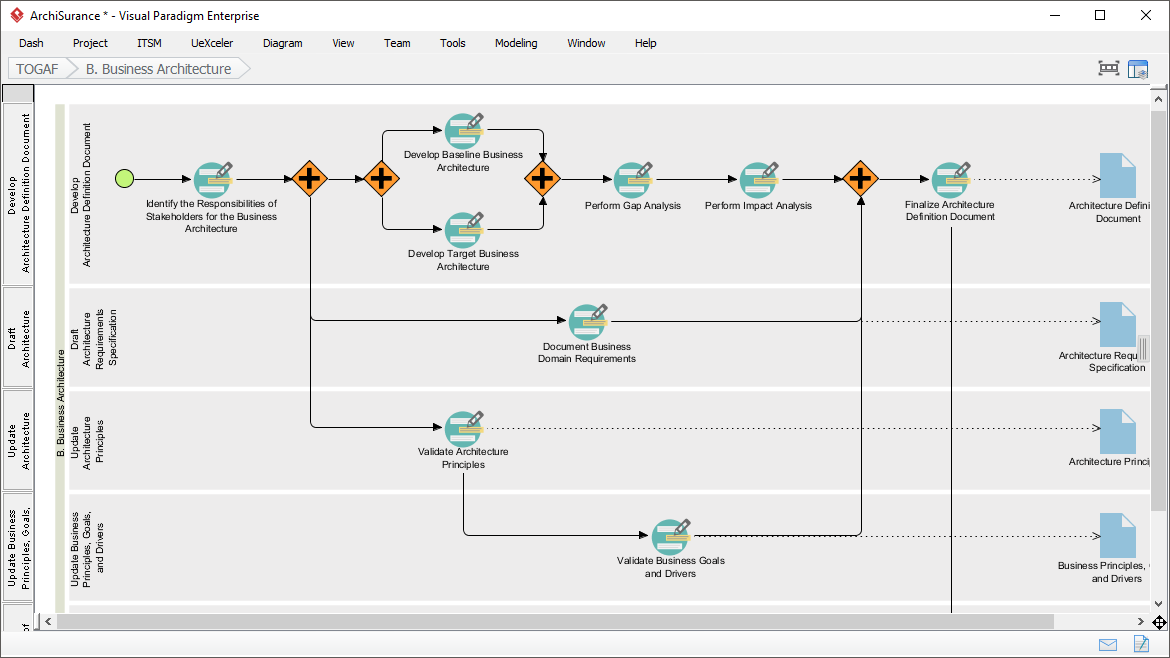
Полное руководство по процессу-путеводителю TOGAF от Visual Paradigm

Введение

Процесс-путеводитель TOGAF от Visual Paradigm — это мощный инструмент, разработанный для упрощения внедрения методологии разработки архитектуры TOGAF (ADM). Он предоставляет пошаговое руководство, инструкции и реальные примеры для поддержки разработки корпоративной архитектуры. Это всестороннее руководство рассмотрит ключевые особенности, преимущества и области применения процесса-путеводителя TOGAF от Visual Paradigm, подчеркнув, почему он выделяется в области корпоративной архитектуры.

Transform Your Business with Visual Paradigm and TOGAF - Visual Paradigm Guides

Ключевые особенности

  1. Пошаговое руководство:

    • Процесс-путеводитель предлагает подробные пошаговые инструкции для каждой фазы методологии разработки архитектуры TOGAF, обеспечивая пользователям возможность легко справляться со сложностями разработки корпоративной архитектуры1112.
  2. Интеграция с ArchiMate:

    • Visual Paradigm поддерживает интеграцию ArchiMate с методологией разработки архитектуры TOGAF, обеспечивая мощное сочетание для инициатив в области корпоративной архитектуры. ArchiMate 3 с его гибкой системой нотации позволяет архитекторам эффективно выражать сложные модели1314.
  3. Автоматическое управление задачами:

    • Инструмент улучшает весь процесс за счет автоматического управления задачами и уведомлений, позволяя пользователям разрабатывать архитектурные результаты поэтапно и совместно15.
  4. Визуальные схемы процессов:

    • Программное обеспечение включает визуальные схемы процессов, которые помогают пользователям легко ориентироваться в процессе корпоративной архитектуры. Оно предоставляет полный набор инструментов планирования, проектирования и разработки для выполнения задач ADM14.
  5. Полный набор инструментов:

    • Visual Paradigm предлагает широкий спектр инструментов, специально разработанных для задач ADM, включая диаграммы ArchiMate для моделирования бизнес-процессов, ИТ-компонентов и физических аспектов корпоративной архитектуры. Эти инструменты обеспечивают всесторонний обзор архитектуры, облегчая ее понимание и внедрение TOGAF14.

Выгоды

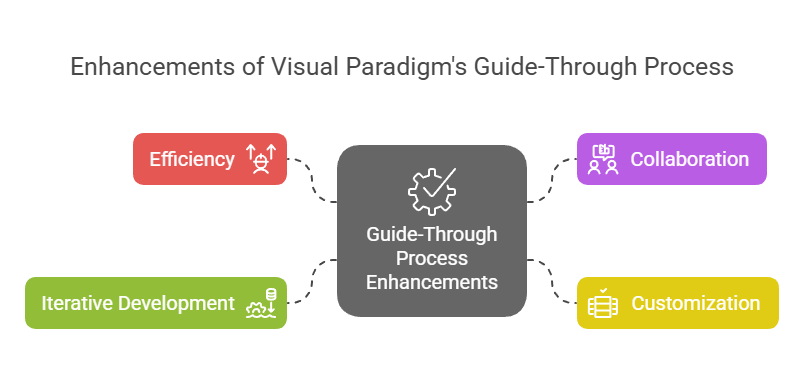
Enhancements of Visual Paradigm's Guide-Through Process: Visual Paradigm

  1. Эффективность:

    • Процесс-путеводитель значительно повышает эффективность за счет предоставления четких инструкций и автоматизации задач, позволяя пользователям сосредоточиться на стратегических решениях, а не на процедурных деталях11.
  2. Сотрудничество:

    • Инструмент способствует сотрудничеству между различными заинтересованными сторонами, включая владельцев проектов, бизнес-аналитиков, архитекторов предприятий и специалистов в области ИТ. Этот подход к сотрудничеству обеспечивает вовлеченность и информированность всех сторон на протяжении всего процесса разработки архитектуры15.
  3. Настройка:

    • Инструмент Visual Paradigm позволяет настраивать процесс, что позволяет организациям адаптировать процесс ADM под свои конкретные потребности и цели. Эта гибкость обеспечивает соответствие процесса разработки архитектуры уникальным требованиям организации11.
  4. Итеративная разработка:

    • Итеративный характер процесса TOGAF ADM полностью поддерживается процессом-путеводителем Visual Paradigm. Это позволяет специалистам адаптировать и улучшать свою работу на основе меняющихся потребностей в информации и обратной связи заинтересованных сторон, обеспечивая соответствие архитектуры изменяющимся потребностям организации16.

Области применения

  1. Разработка архитектуры предприятия:

    • Основная область применения — разработка архитектуры предприятия, где процесс-путеводитель помогает организациям проектировать, планировать, реализовывать и управлять своей архитектурой предприятия. Он обеспечивает структурированный подход для эффективной согласованности бизнес-целей с ИТ-стратегиями17.
  2. Цифровая трансформация:

    • Инструмент имеет решающее значение для инициатив цифровой трансформации, в рамках которых организации стремятся улучшить опыт клиентов и операционную эффективность за счет внедрения новых технологий и процессов18.
  3. Стратегическое планирование:

    • Процесс «Путеводитель» от Visual Paradigm поддерживает стратегическое планирование, предоставляя всестороннюю основу для разработки видений архитектуры, определения охвата, выявления заинтересованных сторон и создания планов коммуникаций. Это обеспечивает соответствие процесса разработки архитектуры бизнес-целям и стратегическим направлениям19.
  4. Гибкие методологии:

    • Инструмент интегрирует гибкие методологии и UML, обеспечивая всестороннее решение для разработки корпоративной архитектуры. Эта интеграция гарантирует гибкость и эффективность процесса разработки архитектуры, поддерживая гибкие практики внутри организации14.

Заключение

Процесс «Путеводитель» от Visual Paradigm выделяется как всесторонний и эффективный инструмент для поддержки TOGAF ADM. Пошаговое руководство, интеграция с ArchiMate, автоматическое управление задачами и совместные функции делают его бесценным ресурсом для разработки корпоративной архитектуры. Используя этот инструмент, организации могут повысить эффективность, сотрудничество, настройку и итеративную разработку, в конечном итоге достигая целей корпоративной архитектуры и стимулируя создание бизнес-ценности и трансформацию

Глава 3 ArchiMate 3.2

3 Структура языка

В данной главе описывается структура языка моделирования архитектуры предприятия ArchiMate. Подробное определение и примеры стандартного набора элементов и отношений приведены в главах 4–1

3.1 Рассмотрение вопросов проектирования языка

Ключевой вызов при разработке общей метамодели для архитектуры предприятия заключается в достижении баланса между специфичностью языков для отдельных областей архитектуры и очень общей совокупностью концепций архитектуры, отражающей взгляд на системы как на простой набор взаимосвязанных сущностей.

Проектирование языка ArchiMate началось с набора относительно общих концепций. Эти концепции были адаптированы для применения на различных архитектурных уровнях, как объясняется в последующих разделах. Наиболее важным ограничением проектирования языка является то, что он явно разработан для минимального размера, но при этом остаётся пригодным для большинства задач моделирования архитектуры предприятия. Многие другие языки стремятся удовлетворить потребности всех возможных пользователей. В интересах простоты обучения и использования язык ArchiMate ограничен концепциями, достаточными для моделирования знаменитых 80% практических случаев.
В настоящем стандарте не описывается подробное обоснование проектирования языка ArchiMate. Заинтересованным читателям рекомендуется обратиться к источникам [1], [2] и [3], в которых приведено подробное описание построения языка и вопросов проектирования.

3.2 Структура языка на высшем уровне

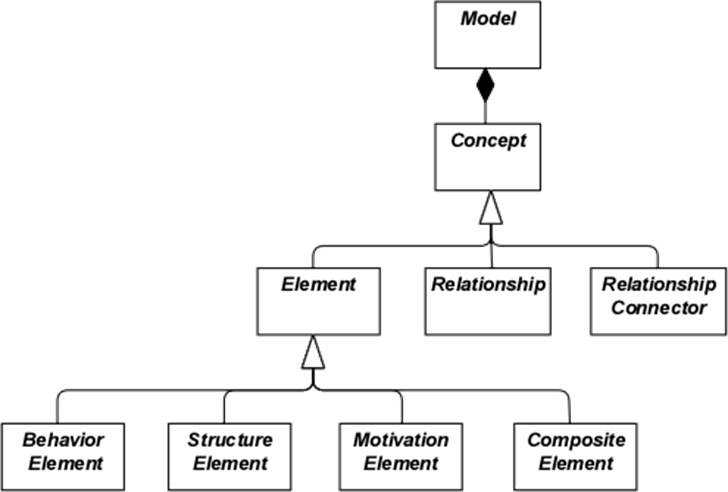
На рисунке 1 показана иерархическая структура языка на высшем уровне:

  • Модель — это совокупностьконцепций— концепция представляет собой либоэлементлибоотношение
  • Элемент — это либо элемент поведения, либо элемент структуры, либо элемент мотивации, либо составной элемент

Обратите внимание, что этиабстрактныеконцепции; они не предназначены для прямого использования в моделях. Для обозначения этого они изображены белым цветом с названиями курсивом. См. главу 4 для пояснения обозначений, используемых на рисунке 1.

Рисунок 1: Иерархия концепций ArchiMate на высшем уровне

3.3 Уровневая структура языка ArchiMate

Ядро языка ArchiMate определяет структуру общих элементов и их отношений, которые могут быть специализированы на различных уровнях. В ядре языка ArchiMate определены три уровня следующим образом:

  1. УровеньБизнесотображает бизнес-услуги, предоставляемые клиентам, которые реализуются в организации посредством бизнес-процессов, выполняемых бизнес-акторами.
  2. УровеньПриложенияотображает сервисы приложений, поддерживающие бизнес, и приложения, реализующие их.
  3. УровеньТехнологиивключает в себя как информационные, так и операционные технологии. Вы можете моделировать, например, обработку, хранение и коммуникационные технологии в поддержку прикладного мира и бизнес-слоев, а также моделировать операционные или физические технологии с использованием объектов, физического оборудования, материалов и сетей распределения.

Общая структура моделей в различных слоях схожа. Используются одни и те же типы элементов и отношений, хотя их точная природа и степень детализации различаются. В следующей главе представлена структура генерического метамодели. В главах 8, 9 и 10 эти элементы специализируются для получения элементов, специфичных для определенного слоя.

В соответствии с принципами ориентации на сервисы, наиболее важным отношением между слоями является отношение «обслуживания»[1]отношения, которые показывают, как элементы одного слоя обслуживаются сервисами других слоев. (Обратите внимание, однако, что сервисы могут обслуживать не только элементы в другом слое, но и элементы в том же слое.) Второй тип связи образуется с помощью отношений реализации: элементы нижних слоев могут реализовывать сопоставимые элементы верхних слоев; например, объект

«объект данных» (прикладной слой) может реализовывать «бизнес-объект» (бизнес-слой); или объект

«артефакт» (технологический слой) может реализовывать либо «объект данных», либо «компонент приложения» (прикладной слой).

3.4 Ядро архитектурной модели ArchiMate

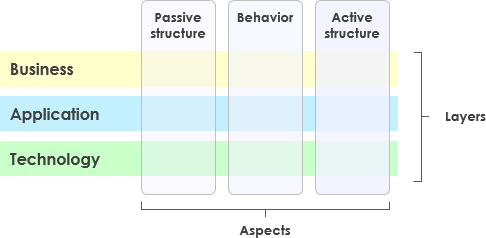
Ядро архитектурной модели ArchiMate — это система из девяти ячеек, используемых для классификации элементов языка ArchiMate. Оно состоит из трех аспектов и трех слоев, как показано на рисунке 2. Это известно как ядро архитектурной модели ArchiMate.

Важно понимать, что классификация элементов на основе аспектов и слоев является лишь общей. Элементы реальной архитектуры не обязательно строго ограничиваются одним аспектом или слоем, поскольку элементы, связывающие различные аспекты и слои, играют центральную роль в согласованном описании архитектуры. Например, опережая последующие концептуальные обсуждения, бизнес-роли выступают в качестве промежуточных элементов между «чисто поведенческими» элементами и «чисто структурными» элементами, и зависит от контекста, считается ли определенный программный продукт частью прикладного слоя или технологического слоя.

Рисунок 2: Ядро архитектурной модели ArchiMate

Структура модели позволяет моделировать предприятие с различных точек зрения, где положение внутри ячеек подчеркивает интересы заинтересованной стороны. Заинтересованная сторона, как правило, может иметь интересы, охватывающие несколько ячеек.

Размерности модели следующие:

  • Слои — три уровня, на которых предприятие может быть смоделировано в ArchiMate — бизнес, приложение и технология (как описано в разделе 3.3)
  • Аспекты:

Аспект активной структуры, который представляет структурные элементы (бизнес-актеры, компоненты приложения и устройства, демонстрирующие реальное поведение; то есть

«субъекты» деятельности)

Аспект поведения, который представляет поведение (процессы, функции, события и сервисы), выполняемые актерами; структурные элементы назначаются поведенческим элементам, чтобы показать, кто или что демонстрирует поведение

Аспект пассивной структуры, который представляет объекты, на которых выполняется поведение; это обычно информационные объекты в бизнес-слое и объекты данных в прикладном слое, но они также могут использоваться для представления физических объектов

Эти три аспекта вдохновлены естественным языком, в котором предложение имеет подлежащее (активная структура), сказуемое (поведение) и дополнение (пассивная структура). Используя те же конструкции, к которым люди привыкли в собственных языках, язык ArchiMate становится проще для изучения и понимания.

Поскольку нотация ArchiMate являетсяграфическойязыком, в котором элементы организованы пространственно, этот порядок не имеет значения при моделировании.

Составной элемент, как показано на рисунке 1, — это элемент, который не обязательно должен соответствовать одному аспекту (столбцу) модели, но может объединять два или более аспекта.

Обратите внимание, что язык ArchiMate не требует от моделиста использовать какую-либо конкретную компоновку, например, структуру данного фреймворка; он представляет собой просто классификацию элементов языка.

3.5 Полный фреймворк ArchiMate

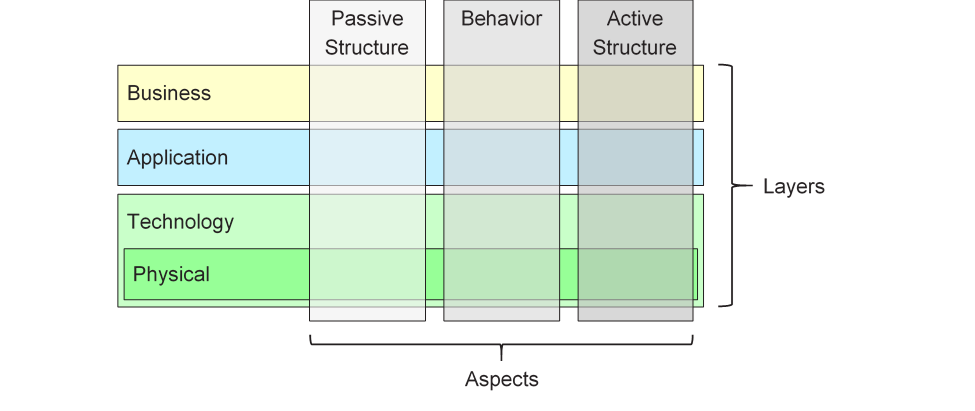
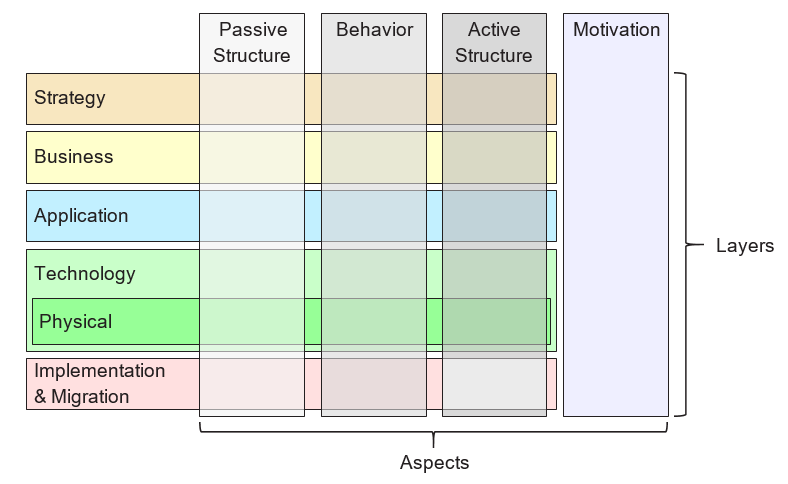
Полный фреймворк ArchiMate, как описано в данной версии стандарта, добавляет несколько уровней и аспект к базовому фреймворку. Физические элементы включены в технологический уровень для моделирования физических объектов, оборудования, распределительных сетей и материалов. Таким образом, они также являются основными элементами. Элементы стратегии вводятся для моделирования стратегического направления и выбора. Они описаны в главе 7. Аспект мотивации вводится на общем уровне в следующей главе и подробно описан в главе 6. Элементы реализации и миграции описаны в главе 12. Результатом является полный фреймворк ArchiMate, показанный на рисунке 3.

Рисунок 3: Полный фреймворк ArchiMate

Язык ArchiMate не определяет специальный уровень для информации; однако элементы аспекта пассивной структуры, такие как бизнес-объекты, данные и артефакты, используются для представления сущностей информации. Моделирование информации поддерживается на всех уровнях ArchiMate.

3.6 Абстракция в языке ArchiMate

Структура языка ArchiMate предусматривает несколько знакомых форм абстракции и уточнения. Прежде всего, различие между внешним (черный ящик, абстрагирование от содержимого ящика) и внутренним (белый ящик) взглядом широко используется в проектировании систем. Внешний взгляд показывает, что система должна делать для своей среды, а внутренний — как она это делает.

Во-вторых, различие между поведением и активной структурой часто используется для разделения того, что система должна делать, и того, как она это делает, от составных частей системы (людей, приложений и инфраструктуры), которые это выполняют. При моделировании новых систем часто полезно начинать с поведения, которое система должна выполнять, а при моделировании существующих систем — начинать с людей, приложений и инфраструктуры, составляющих систему, а затем подробно анализировать поведение, выполняемое этими активными структурами.

В-третьих, различие между концептуальным, логическим и физическим уровнями абстракции. Это имеет свои корни в моделировании данных: концептуальные элементы представляют информацию, которая имеет значение для бизнеса; логические элементы обеспечивают логическую структуру этой информации для ее обработки информационными системами; физические элементы описывают хранение этой информации, например, в виде файлов или таблиц базы данных. В языке ArchiMate это соответствует бизнес-объектам, объектам данных и артефактам, а также отношениям реализации между ними.

Различие между логическими и физическими элементами также перенесено на описание приложений. Метамодель предприятия TOGAF [4] включает набор сущностей, описывающих бизнес-компоненты, компоненты данных, приложения и технологии, а также услуги, для описания концепций архитектуры. Логические компоненты — это независимые от реализации или продукта оболочки данных или функциональности, тогда как физические компоненты — это осязаемые программные компоненты, устройства и т.д. Это различие зафиксировано в рамках TOGAF в виде архитектурных блоков (ABB) и блоков решений (SBB). Это различие снова полезно при переходе от высокого уровня абстрактных описаний к конкретным проектным решениям. Обратите внимание, что блоки могут содержать несколько элементов, которые обычно моделируются с использованием концепции группировки в языке ArchiMate.

Язык ArchiMate имеет три способа моделирования таких абстракций. Во-первых, как описано в [6], элементы поведения, такие как функции приложений и технологий, могут использоваться для моделирования логических компонентов, поскольку они представляют собой независимые от реализации оболочки функциональности. Соответствующие физические компоненты затем могут быть смоделированы с использованием элементов активной структуры, таких как компоненты приложений и узлы, привязанные к элементам поведения. Во-вторых, язык ArchiMate поддерживает концепцию реализации. Это лучше всего описать, работая с технологическим уровнем вверх. Технологический уровень определяет физические артефакты и программное обеспечение, реализующие компонент приложения. Он также предоставляет сопоставление с другими физическими понятиями, такими как устройства, сети и т.д., необходимыми для реализации информационной системы. Отношение реализации также используется для моделирования более абстрактных форм реализации, например, между (более конкретным) требованием и (более общим) принципом, при котором выполнение требования подразумевает соблюдение принципа. Реализация также разрешена между компонентами приложений и между узлами. Таким образом, можно смоделировать физический компонент приложения или технологии, реализующий логический компонент приложения или технологии соответственно. В-третьих, логические и физические компоненты приложений могут быть определены как специализации элемента компонента приложения на уровне метамодели, как описано в главе 14 (см. также примеры в разделе 14.2.2). То же самое относится к логическим и физическим компонентам технологии метамодели содержимого TOGAF, которые могут быть определены как специализации элемента узла (см. раздел 14.2.3).

Язык ArchiMate сознательно не поддерживает различие между типами и экземплярами. На уровне абстракции корпоративной архитектуры чаще моделируются типы и/или образцы, а не экземпляры. Аналогично, бизнес-процесс в языке ArchiMate не описывает отдельный экземпляр (то есть один запуск этого процесса). В большинстве случаев бизнес-объект используется для моделирования типа объекта (см. класс UML®), экземпляры которого могут существовать в организации. Например, каждый запуск процесса обработки страхового заявления может привести к конкретному экземпляру бизнес-объекта страхового полиса, но это не моделируется в корпоративной архитектуре.

3.7 Понятия и их нотация

Язык ArchiMate разделяет понятия языка (то есть составные части метамодели) от их нотации. Разные группы заинтересованных сторон могут требовать различных нотаций для понимания модели или представления архитектуры. В этом отношении язык ArchiMate отличается от языков, таких как UML или BPMN™, которые имеют только одну стандартизированную нотацию. Механизм точек зрения, описанный в главе 13, предоставляет средства для определения таких визуализаций, ориентированных на заинтересованные стороны.

Хотя нотация понятий ArchiMate может (и должна) быть специфичной для заинтересованных сторон, стандарт предоставляет одну общую графическую нотацию, которую могут использовать архитекторы и другие, разрабатывающие модели ArchiMate. Эта нотация ориентирована на аудиторию, знакомую с существующими техническими методами моделирования, такими как диаграммы отношений сущностей (ERD), UML или BPMN, и поэтому похожа на них. В остальной части данного документа, если не указано иное, символы, используемые для изображения понятий языка, представляют стандартную нотацию ArchiMate. Стандартная нотация для большинства элементов состоит из прямоугольника с иконкой в правом верхнем углу. В некоторых случаях эта иконка сама по себе может использоваться в качестве альтернативной нотации. Эту стандартную иконографию следует предпочитать whenever possible, чтобы любой, знающий язык ArchiMate, мог читать диаграммы, созданные на этом языке.

3.8 Использование вложенности

Вложенность элементов внутри других элементов может использоваться в качестве альтернативной графической нотации для выражения некоторых отношений. Это подробно объясняется в главе 5 и в определении каждого из этих отношений.

3.9 Использование цветов и нотационных подсказок

На рисунках метамодели в данном стандарте используются оттенки серого для различения элементов, относящихся к различным аспектам фреймворка ArchiMate, следующим образом:

  • Белый — для абстрактных (то есть неприменимых) понятий
  • Светло-серый — для пассивных структур
  • Серый — для поведения
  • Темно-серый — для активных структур

В моделях ArchiMate формальные семантики не присваиваются цветам, а использование цвета остается на усмотрение моделиста. Однако они могут свободно использоваться для акцентирования определенных аспектов в моделях. Например, во многих примерах моделей, представленных в данном стандарте, цвета используются для различения уровней базового фреймворка ArchiMate, следующим образом:

  • Желтый — для бизнес-уровня
  • Синий — для прикладного уровня
  • Зеленый — для технологического уровня

Они также могут использоваться для визуального акцентирования. Рекомендуемый текст с руководствами — глава 6 [1]. Помимо цветов, могут использоваться и другие нотационные подсказки для различения уровней фреймворка. Буква M, S, B, A, T, P или I в левом верхнем углу элемента может использоваться для обозначения элемента мотивации, стратегии, бизнеса, приложения, технологии, физического уровня или реализации и миграции соответственно. Пример такой нотации показан в примере 34.

Стандартная нотация также использует соглашение о форме углов символов для различных типов элементов, а именно:

  • Углы с квадратной формой используются для обозначения элементов структуры
  • Углы с круглой формой используются для обозначения элементов поведения
  • Углы с диагональной формой используются для обозначения элементов мотивации

[1]Обратите внимание, что в предыдущих версиях стандарта это называлось «используется»; для ясности это название было изменено на «обслуживает».

Опубликовано Рубрики ArchiMate

ArchiMate 3.2 Chapter 3

3 Language Structure

This chapter describes the structure of the ArchiMate Enterprise Architecture modeling language. The detailed definition and examples of its standard set of elements and relationships follow in Chapter 4 to Chapter 1

3.1 Language Design Considerations

A key challenge in the development of a general metamodel for Enterprise Architecture is to strike a balance between the specificity of languages for individual architecture domains and a very general set of architecture concepts, which reflects a view of systems as a mere set of inter-related entities.

The design of the ArchiMate language started from a set of relatively generic concepts. These have been specialized towards application at different architectural layers, as explained in the following sections. The most important design restriction on the language is that it has been explicitly designed to be as small as possible, but still usable for most Enterprise Architecture modeling tasks. Many other languages try to accommodate the needs of all possible users. In the interest of simplicity of learning and use, the ArchiMate language has been limited to the concepts that suffice for modeling the proverbial 80% of practical cases.

This standard does not describe the detailed rationale behind the design of the ArchiMate language. The interested reader is referred to [1], [2], and [3], which provide a detailed description of the language construction and design considerations.

3.2 Top-Level Language Structure

Figure 1 outlines the top-level hierarchical structure of the language:

  • A model is a collection of concepts – a concept is either an element or a relationship
  • An element is either a behavior element, a structure element, a motivation element, or a composite element

Note that these are abstract concepts; they are not intended to be used directly in models. To signify this, they are depicted in white with labels in italics. See Chapter 4 for an explanation of the notation used in Figure 1.

Figure 1: Top-Level Hierarchy of ArchiMate Concepts

3.3 Layering of the ArchiMate Language

The ArchiMate core language defines a structure of generic elements and their relationships, which can be specialized in different layers. Three layers are defined within the ArchiMate core language as follows:

  1. The Business Layer depicts business services offered to customers, which are realized in the organization by business processes performed by business actors.
  2. The Application Layer depicts application services that support the business, and the applications that realize them.
  3. The Technology Layer comprises both information and operational technology. You can model, for example, processing, storage, and communication technology in support of the application world and Business Layers, and model operational or physical technology with facilities, physical equipment, materials, and distribution networks.

The general structure of models within the different layers is similar. The same types of elements and relationships are used, although their exact nature and granularity differ. In the next chapter, the structure of the generic metamodel is presented. In Chapter 8, Chapter 9, and Chapter 10 these elements are specialized to obtain elements specific to a particular layer.

In alignment with service-orientation, the most important relationship between layers is formed by “serving”[1] relationships, which show how the elements in one layer are served by the services of other layers. (Note, however, that services need not only serve elements in another layer, but also can serve elements in the same layer.) A second type of link is formed by realization relationships: elements in lower layers may realize comparable elements in higher layers; e.g., a

“data object” (Application Layer) may realize a “business object” (Business Layer); or an

“artifact” (Technology Layer) may realize either a “data object” or an “application component” (Application Layer).

3.4 The ArchiMate Core Framework

The ArchiMate Core Framework is a framework of nine cells used to classify elements of the ArchiMate core language. It is made up of three aspects and three layers, as illustrated in Figure 2. This is known as the ArchiMate Core Framework.

It is important to understand that the classification of elements based on aspects and layers is only a global one. Real-life architecture elements need not strictly be confined to one aspect or layer because elements that link the different aspects and layers, play a central role in a coherent architectural description. For example, running somewhat ahead of the later conceptual discussions, business roles serve as intermediary elements between “purely behavioral” elements and “purely structural” elements, and it may depend on the context whether a certain piece of software is considered to be part of the Application Layer or the Technology Layer.

Figure 2: ArchiMate Core Framework

The structure of the framework allows for modeling of the enterprise from different viewpoints, where the position within the cells highlights the concerns of the stakeholder. A stakeholder typically can have concerns that cover multiple cells.

The dimensions of the framework are as follows:

  • Layers – the three levels at which an enterprise can be modeled in ArchiMate – Business, Application, and Technology (as described in Section 3.3)
  • Aspects:

— The Active Structure Aspect, which represents the structural elements (the business actors, application components, and devices that display actual behavior; i.e., the

“subjects” of activity)

— The Behavior Aspect, which represents the behavior (processes, functions, events, and services) performed by the actors; structural elements are assigned to behavioral elements, to show who or what displays the behavior

— The Passive Structure Aspect, which represents the objects on which behavior is performed; these are usually information objects in the Business Layer and data objects in the Application Layer, but they may also be used to represent physical objects

These three aspects were inspired by natural language where a sentence has a subject (active structure), a verb (behavior), and an object (passive structure). By using the same constructs that people are used to in their own languages, the ArchiMate language is easier to learn and read.

Since ArchiMate notation is a graphical language where elements are organized spatially, this order is of no consequence in modeling.

A composite element, as shown in Figure 1, is an element that does not necessarily fit in a single aspect (column) of the framework but may combine two or more aspects.

Note that the ArchiMate language does not require the modeler to use any particular layout such as the structure of this framework; it is merely a categorization of the language elements.

3.5 The ArchiMate Full Framework

The ArchiMate Full Framework, as described in this version of the standard, adds a number of layers and an aspect to the Core Framework_._ The physical elements are included in the Technology Layer for modeling physical facilities and equipment, distribution networks, and materials. As such, these are also core elements. The strategy elements are introduced to model strategic direction and choices. They are described in Chapter 7. The motivation aspect is introduced at a generic level in the next chapter and described in detail in Chapter 6. The implementation and migration elements are described in Chapter 12. The resulting ArchiMate Full Framework is shown in Figure 3.

Figure 3: ArchiMate Full Framework

The ArchiMate language does not define a specific layer for information; however, elements from the passive structure aspect such as business objects, data objects, and artifacts are used to represent information entities. Information modeling is supported across the different ArchiMate layers.

3.6 Abstraction in the ArchiMate Language

The structure of the ArchiMate language accommodates several familiar forms of abstraction and refinement. First of all, the distinction between an external (black-box, abstracting from the contents of the box) and internal (white-box) view is common in systems design. The external view depicts what the system has to do for its environment, while the internal view depicts how it does this.

Second, the distinction between behavior and active structure is commonly used to separate what the system must do and how the system does it from the system constituents (people, applications, and infrastructure) that do it. In modeling new systems, it is often useful to start with the behaviors that the system must perform, while in modeling existing systems, it is often useful to start with the people, applications, and infrastructure that comprise the system, and then analyze in detail the behaviors performed by these active structures.

A third distinction is between conceptual, logical, and physical abstraction levels. This has its roots in data modeling: conceptual elements represent the information the business finds relevant; logical elements provide logical structure to this information for manipulation by information systems; physical elements describe the storage of this information; for example, in the form of files or database tables. In the ArchiMate language, this corresponds with business objects, data objects, and artifacts, along with the realization relationships between them.

The distinction between logical and physical elements has also been carried over to the description of applications. The TOGAF Enterprise Metamodel [4] includes a set of entities that describe business, data, application, and technology components and services to describe architecture concepts. Logical components are implementation or product-independent encapsulations of data or functionality, whereas physical components are tangible software components, devices, etc. This distinction is captured in the TOGAF framework in the form of Architecture Building Blocks (ABBs) and Solution Building Blocks (SBBs). This distinction is again useful in progressing Enterprise Architectures from high-level, abstract descriptions to tangible, implementation-level designs. Note that building blocks may contain multiple elements, which are typically modeled using the grouping concept in the ArchiMate language.

The ArchiMate language has three ways of modeling such abstractions. First, as described in [6], behavior elements such as application and technology functions can be used to model logical components, since they represent implementation-independent encapsulations of functionality. The corresponding physical components can then be modeled using active structure elements such as application components and nodes, assigned to the behavior elements. Second, the ArchiMate language supports the concept of realization. This can best be described by working with the Technology Layer upwards. The Technology Layer defines the physical artifacts and software that realize an application component. It also provides a mapping to other physical concepts such as devices, networks, etc. needed for the realization of an information system. The realization relationship is also used to model more abstract kinds of realization, such as that between a (more specific) requirement and a (more generic) principle, where fulfillment of the requirement implies adherence to the principle. Realization is also allowed between application components and between nodes. This way you can model a physical application or technology component realizing a logical application or technology component, respectively. Third, logical and physical application components can be defined as metamodel-level specializations of the application component element, as described in Chapter 14 (see also the examples in Section 14.2.2). The same holds for the logical and physical technology components of the TOGAF Content Metamodel, which can be defined as specializations of the node element (see Section 14.2.3).

The ArchiMate language intentionally does not support a difference between types and instances. At the Enterprise Architecture abstraction level, it is more common to model types and/or exemplars rather than instances. Similarly, a business process in the ArchiMate language does not describe an individual instance (i.e., one execution of that process). In most cases, a business object is therefore used to model an object type (cf. a UML® class), of which several instances may exist within the organization. For instance, each execution of an insurance application process may result in a specific instance of the insurance policy business object, but that is not modeled in the Enterprise Architecture.

3.7 Concepts and their Notation

The ArchiMate language separates the language concepts (i.e., the constituents of the metamodel) from their notation. Different stakeholder groups may require different notations in order to understand an architecture model or view. In this respect, the ArchiMate language differs from languages such as UML or BPMN™, which have only one standardized notation. The viewpoint mechanism explained in Chapter 13 provides the means for defining such stakeholder-oriented visualizations.

Although the notation of the ArchiMate concepts can (and should) be stakeholder-specific, the standard provides one common graphical notation which can be used by architects and others who develop ArchiMate models. This notation is targeted towards an audience used to existing technical modeling techniques such as Entity Relationship Diagrams (ERDs), UML, or BPMN, and therefore resembles them. In the remainder of this document, unless otherwise noted, the symbols used to depict the language concepts represent the ArchiMate standard notation. This standard notation for most elements consists of a box with an icon in the upper-right corner. In several cases, this icon by itself may also be used as an alternative notation. This standard iconography should be preferred whenever possible so that anyone knowing the ArchiMate language can read the diagrams produced in the language.

3.8 Use of Nesting

Nesting elements inside other elements can be used as an alternative graphical notation to express some relationships. This is explained in more detail in Chapter 5 and in the definition of each of these relationships.

3.9 Use of Colors and Notational Cues

In the metamodel pictures within this standard, shades of grey are used to distinguish elements belonging to the different aspects of the ArchiMate framework, as follows:

  • White for abstract (i.e., non-instantiable) concepts
  • Light grey for passive structures
  • Medium grey for behavior
  • Dark grey for active structures

In ArchiMate models, there are no formal semantics assigned to colors and the use of color is left to the modeler. However, they can be used freely to stress certain aspects in models. For instance, in many of the example models presented in this standard, colors are used to distinguish between the layers of the ArchiMate Core Framework, as follows:

  • Yellow for the Business Layer
  • Blue for the Application Layer
  • Green for the Technology Layer

They can also be used for visual emphasis. A recommended text providing guidelines is Chapter 6 of [1]. In addition to the colors, other notational cues can be used to distinguish between the layers of the framework. A letter M, S, B, A, T, P, or I in the top-left corner of an element can be used to denote a Motivation, Strategy, Business, Application, Technology, Physical, or Implementation & Migration element, respectively. An example of this notation is depicted in Example 34.

The standard notation also uses a convention with the shape of the corners of its symbols for different element types, as follows:

  • Square corners are used to denote structure elements
  • Round corners are used to denote behavior elements
  • Diagonal corners are used to denote motivation elements

[1] Note that this was called “used by” in previous versions of the standard. For the sake of clarity, this name has been changed to “serving”.

Опубликовано Рубрики ArchiMate

Comprehensive Guide to Visual Paradigm’s TOGAF Guide-Through Process

Introduction

Visual Paradigm’s TOGAF Guide-Through Process is a powerful tool designed to streamline the adoption of the TOGAF Architecture Development Method (ADM). It provides step-by-step guidance, instructions, and real-life examples to support enterprise architecture development. This comprehensive guide will explore the key features, benefits, and application areas of Visual Paradigm’s TOGAF Guide-Through Process, highlighting why it stands out in the field of enterprise architecture.

Transform Your Business with Visual Paradigm and TOGAF - Visual Paradigm Guides

Key Features

  1. Step-by-Step Guidance:

    • The Guide-Through Process offers detailed, step-by-step instructions for each phase of the TOGAF ADM, ensuring that users can navigate the complexities of enterprise architecture development with ease 1112.
  2. Integration with ArchiMate:

    • Visual Paradigm supports the integration of ArchiMate with TOGAF ADM, providing a powerful combination for enterprise architecture initiatives. ArchiMate 3, with its versatile notation system, allows architects to express complex models effectively 1314.
  3. Automated Task Management:

    • The tool enhances the entire process with automated task management and notifications, enabling users to develop architecture deliverables incrementally and collaboratively 15.
  4. Visual Process Maps:

    • The software features visual process maps that help users navigate through the entire enterprise architecture process easily. It provides a full set of planning, design, and development tools to complete ADM activities 14.
  5. Comprehensive Toolkit:

    • Visual Paradigm offers a range of tools tailored for ADM activities, including ArchiMate diagrams for modeling business, IT, and physical aspects of enterprise architecture. These tools provide a comprehensive view of the architecture, making it easier to understand and implement TOGAF 14.

Benefits

Enhancements of Visual Paradigm's Guide-Through Process: Visual Paradigm

  1. Efficiency:

    • The Guide-Through Process significantly enhances efficiency by providing clear instructions and automating tasks, allowing users to focus on strategic decisions rather than procedural details 11.
  2. Collaboration:

    • The tool facilitates collaboration among different stakeholders, including project owners, business analysts, enterprise architects, and IT professionals. This collaborative approach ensures that all parties are engaged and informed throughout the architecture development process 15.
  3. Customization:

    • Visual Paradigm’s tool allows for customization, enabling organizations to tailor the ADM process to their specific needs and goals. This flexibility ensures that the architecture development process aligns with the organization’s unique requirements 11.
  4. Iterative Development:

    • The iterative nature of the TOGAF ADM is fully supported by Visual Paradigm’s Guide-Through Process. This allows practitioners to adapt and refine their work based on evolving information needs and stakeholder feedback, ensuring that the architecture meets the changing needs of the organization 16.

Application Areas

  1. Enterprise Architecture Development:

    • The primary application area is enterprise architecture development, where the Guide-Through Process helps organizations design, plan, implement, and govern their enterprise architecture. It provides a structured approach to align business goals with IT strategies effectively 17.
  2. Digital Transformation:

    • The tool is crucial for digital transformation initiatives, where organizations seek to enhance customer experience and operational efficiency through the implementation of new technologies and processes 18.
  3. Strategic Planning:

    • Visual Paradigm’s Guide-Through Process supports strategic planning by providing a comprehensive framework for developing architecture visions, defining scope, identifying stakeholders, and creating communications plans. This ensures that the architecture development process is aligned with business goals and strategic drivers 19.
  4. Agile Methodologies:

    • The tool integrates agile methodologies and UML, providing a comprehensive solution for enterprise architecture development. This integration ensures that the architecture development process is both flexible and efficient, supporting agile practices within the organization 14.

Conclusion

Visual Paradigm’s TOGAF Guide-Through Process stands out as a comprehensive and effective tool for supporting the TOGAF ADM. Its step-by-step guidance, integration with ArchiMate, automated task management, and collaborative features make it an invaluable resource for enterprise architecture development. By leveraging this tool, organizations can enhance efficiency, collaboration, customization, and iterative development, ultimately achieving their enterprise architecture goals and driving business value and transformation.

Comprehensive Tutorial for ArchiMate Supporting TOGAF ADM

Introduction to ArchiMate

ArchiMate is an open and independent enterprise architecture modeling language that supports the description, analysis, and visualization of architecture within and across business domains. It is designed to provide a clear and unambiguous way to communicate complex architectures to stakeholders. ArchiMate is particularly useful when used in conjunction with the TOGAF Architecture Development Method (ADM), providing a standardized way to model and communicate enterprise architectures.

What is ArchiMate?

Key Concepts of ArchiMate

ArchiMate Core Framework

1. Layers of ArchiMate

ArchiMate divides the enterprise architecture into three main layers:

  • Business Layer: Focuses on the business processes, services, and functions that support the organization’s goals.
  • Application Layer: Deals with the application services, components, and their interactions that support the business layer.
  • Technology Layer: Covers the technology infrastructure, including hardware, software, and network components that support the application layer.

2. Core Elements

ArchiMate defines several core elements that are used to model the architecture:

  • Active Structure Elements: Represent the entities that perform behavior, such as business actors, application components, and devices.
  • Behavior Elements: Represent the processes, functions, services, and interactions within the architecture.
  • Passive Structure Elements: Represent the information or data used or produced by behavior elements, such as business objects and data objects.

3. Relationships

ArchiMate defines several types of relationships to connect the elements:

  • Structural Relationships: Such as composition, aggregation, and specialization.
  • Dependency Relationships: Such as association, realization, and used-by.
  • Dynamic Relationships: Such as triggering and flow.

4. Viewpoints

ArchiMate provides several viewpoints to visualize the architecture from different perspectives:

  • Business Process Viewpoint: Shows the business processes and their interactions.
  • Application Cooperation Viewpoint: Shows how applications cooperate to support business processes.
  • Technology Realization Viewpoint: Shows how technology components realize application components.

ArchiMate and TOGAF ADM

TOGAF Architecture Development Method (ADM)

TOGAF ADM is a comprehensive methodology for developing enterprise architectures. It consists of several phases, each focusing on a specific aspect of the architecture development process. ArchiMate supports TOGAF ADM by providing a standardized way to model and visualize the architecture at each phase.

Powerful TOGAF ADM Toolset

Phases of TOGAF ADM

  1. Preliminary Phase: Establishes the architecture principles, framework, and governance.
  2. Architecture Vision: Defines the scope, stakeholders, concerns, and business objectives.
  3. Business Architecture: Develops the business architecture, including business processes and services.
  4. Information Systems Architectures: Develops the data and application architectures.
  5. Technology Architecture: Develops the technology architecture.
  6. Opportunities and Solutions: Identifies and prioritizes architecture projects.
  7. Migration Planning: Develops the migration and implementation plan.
  8. Implementation Governance: Provides governance and support for the implementation of the architecture.

Examples of ArchiMate Models

This diagram illustrates a layered architecture for a healthcare management system, divided into two main layers: the Application Layer and the Technology Layer. Here’s a detailed explanation of each component and their interactions:

archimate diagram example

Application Layer (Blue)

This layer consists of the various applications and systems that directly interact with users or other systems to manage healthcare services. The key components in this layer are:

  1. Inpatient Care Management:

    • Manages services and processes related to patients who are admitted to the hospital.
  2. Outpatient Care Management:

    • Manages services and processes for patients who visit the hospital for treatment but are not admitted.
  3. CRM System (Customer Relationship Management):

    • Manages interactions with patients, including communication, follow-ups, and patient relationship management.
  4. Billing:

    • Handles the financial aspects, including generating bills, processing payments, and managing financial records.

Technology Layer (Green)

This layer provides the underlying infrastructure and services that support the applications in the Application Layer. The key components in this layer are:

  1. Messaging Service:

    • Facilitates communication between different applications and systems within the healthcare management system.
    • Ensures that messages are delivered reliably and in the correct order.
  2. Data Access Service:

    • Provides a centralized way to access and manage data across the system.
    • Ensures that data is retrieved and stored efficiently and securely.
  3. Mainframe:

    • The central computing system that hosts core services and data.
    • Includes two main components:
      • Message Queuing: Manages the queuing and processing of messages to ensure reliable communication.
      • DBMS (Database Management System): Stores and manages the data used by the various applications.

Interactions

  • Inpatient Care ManagementOutpatient Care ManagementCRM System, and Billing interact with the Messaging Service and Data Access Service to perform their respective functions.
  • The Messaging Service and Data Access Service rely on the Mainframe for core services like message queuing and database management.
  • The Mainframe ensures that messages are processed correctly and data is managed efficiently, supporting the entire system’s operations.

The diagram depicts a structured approach to managing healthcare services by separating the application-level functions from the underlying technology infrastructure. This separation allows for more modular and maintainable system design, where changes in one layer have minimal impact on the other. The Messaging Service and Data Access Service act as intermediaries, facilitating communication and data management between the application components and the mainframe.

Recommended ArchiMate EA Tool

Visual Paradigm is widely recognized as one of the best tools for ArchiMate modeling in Enterprise Architecture (EA) projects. Here are some reasons why it is highly recommended:

Navigating TOGAF: Your Guide to the ADM Process - Visual Paradigm Guides

1. Comprehensive ArchiMate Support

  • Full ArchiMate Standard: Visual Paradigm supports the latest ArchiMate standards, including ArchiMate 3.1, ensuring that you can model using all the official ArchiMate elements and relationships.
  • Rich Library of Elements: It provides a extensive library of ArchiMate symbols, making it easy to create detailed and accurate models.

2. User-Friendly Interface

  • Intuitive Design: The tool offers a user-friendly interface that is easy to navigate, even for users who are new to ArchiMate modeling.
  • Drag-and-Drop: The drag-and-drop functionality allows for quick and efficient model creation.

3. Advanced Modeling Features

  • Layered Views: Supports the creation of layered views (e.g., Business, Application, Technology) to provide a holistic view of the enterprise architecture.
  • Cross-Layer Relationships: Easily define and visualize relationships across different layers of the architecture.

4. Collaboration and Sharing

  • Team Collaboration: Visual Paradigm supports collaborative work, allowing multiple users to work on the same project simultaneously.
  • Version Control: Integrated version control helps manage changes and track the evolution of your models.

5. Integration Capabilities

  • Tool Integration: Seamlessly integrates with other tools and platforms, such as JIRA, Confluence, and various databases, enhancing the overall EA practice.
  • Import/Export: Supports importing and exporting models in various formats, including ArchiMate Exchange File Format, ensuring compatibility with other tools.

6. Documentation and Reporting

  • Automated Documentation: Generates comprehensive documentation from your ArchiMate models, saving time and ensuring consistency.
  • Custom Reports: Allows for the creation of custom reports tailored to specific stakeholder needs.

7. Training and Support

  • Extensive Resources: Offers a wealth of tutorials, guides, and examples to help users get started and master ArchiMate modeling.
  • Customer Support: Provides robust customer support to assist with any issues or questions that may arise.

8. Scalability

  • Scalable Solutions: Suitable for both small and large-scale EA projects, making it a versatile tool for organizations of all sizes.

9. Compliance and Standards

  • Industry Standards: Aligns with industry standards and best practices, ensuring that your EA models are compliant and up-to-date.

Conclusion

ArchiMate provides a powerful and standardized way to model enterprise architectures, supporting the TOGAF ADM methodology. By understanding the key concepts, layers, elements, and relationships in ArchiMate, you can effectively model and communicate complex architectures to stakeholders. The examples provided illustrate how ArchiMate can be used to model business processes, application cooperation, and technology realization, supporting the various phases of the TOGAF ADM.

ArchiMate Tool Resource

  1. Free Online ArchiMate Diagram Tool

    • Description: Create ArchiMate diagrams online with a free tool that supports ArchiMate 3 visual modeling language. Includes examples and templates to help you get started.
    • URLFree Online ArchiMate Diagram Tool 1
  2. Main Page – ArchiMate Resources for FREE

    • Description: Offers a visual language to model and capture enterprise architecture, providing a means to visualize relationships within and between different domains.
    • URLMain Page – ArchiMate Resources for FREE 2
  3. Visual Paradigm – UML, Agile, PMBOK, TOGAF, BPMN and More!

  4. Chapter 7. ArchiMate – Visual Paradigm Community Circle

  5. What is ArchiMate?

    • Description: Step-by-step learning guide for ArchiMate, including how to use it for enterprise architecture modeling.
    • URLWhat is ArchiMate? 5
  6. ArchiMate tools

    • Description: Learn how to use Visual Paradigm, a design and management tool designed for agile software teams.
    • URLArchiMate tools 6
  7. Best ArchiMate Software

    • Description: Certified ArchiMate tool for effective EA design and modeling. Quickly draw ArchiMate diagrams that conform to The Open Group official specification.
    • URLBest ArchiMate Software 7
  8. How to Format ArchiMate Elements?

  9. ArchiMate Viewpoint Guide – Resource Map Viewpoint

  10. ArchiMate Diagram Tutorial

    • Description: Tutorial that helps you learn about ArchiMate diagrams, how to create them, and when to use them. Includes examples and tips.
    • URLArchiMate Diagram Tutorial 10

These resources should provide a comprehensive starting point for using Visual Paradigm’s ArchiMate tool for enterprise architecture modeling.